The best smart home hubs with touchscreen displays combine centralized device control with at-a-glance information, making it easier to manage lights, cameras, sensors, media, and routines from one convenient screen.
This roundup compares 10 options ranging from mainstream Alexa and Google displays to dedicated wall panels with Zigbee, PoE, relay, and energy-monitoring features. Use the guide below to match the right hub to your ecosystem, installation plan, and home-control goals.
Best 10 Smart Home Hubs with Touchscreen Displays Picks for 2026
Best Overall

- Customizable 8-inch smart home dashboard
- Supports Wi-Fi, Zigbee, Matter, Thread, and more
- Wall-mountable with family-friendly security controls
Best For: Alexa households wanting broad compatibility and flexible control
Best for Wall-Mounted Control
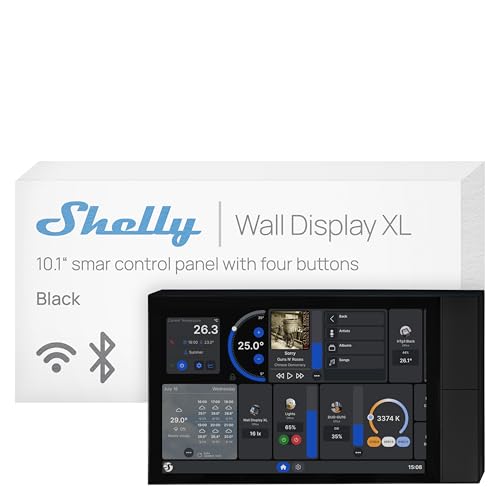
- Large 10.1-inch touchscreen and four buttons
- Built-in 5A relay for appliance control
- Works with Shelly, Home Assistant, Alexa, Google, and HomeKit
Best For: Hardwired Shelly-based home and commercial installations
Best for Security Monitoring
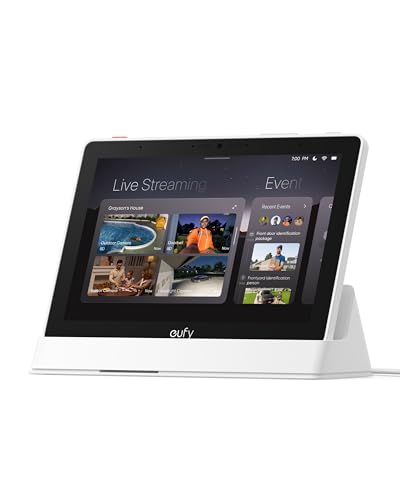
- Automatic live feeds and voice alerts
- View four camera feeds simultaneously
- Local event playback and security summaries
Best For: Families monitoring eufy cameras, doorbells, and property activity
Best Family Hub

- Large 15.6-inch Full HD shared display
- Widgets for calendars, lists, weather, and smart home control
- Built-in Fire TV, camera feeds, and video calling
Best For: Families wanting organization, entertainment, and Alexa control together
Best Integrated Control Panel

- 4.7-inch touchscreen for centralized controls
- Zigbee gateway with security features
- Displays energy data and supported camera feeds
Best For: Focused home automation and security control
Best for Family Communication

- 10-inch HD touchscreen with 6.5MP camera
- Hands-free Duo video calls and messages
- 30W-subwoofer stereo speaker system
Best For: Family communication and media-rich smart-home control
Best for Custom In-Wall Installs
JEESTON 15.6-Inch PoE Touch Panel

- Large Android 14 touchscreen controller
- PoE, Ethernet, Wi-Fi 6E, and serial interfaces
- Built-in camera, sensors, and LED light bars
Best For: Advanced wired and MQTT-based home installations
Best Global-Ready Display
Google Nest Hub Max 10" (Renewed)

- Large 10-inch touchscreen smart display
- App and voice control with Bluetooth
- Universal adapter and multilingual support
Best For: Large-screen tabletop home control and media
Best for Custom Installations

- 15.6-inch Full HD capacitive touchscreen
- PoE, gigabit Ethernet, Wi-Fi 6E, and Bluetooth 5.3
- RS232/RS485, sensors, IR, and LED light bars
Best For: In-wall automation and technically customized setups
Best Zigbee Control Center

- Alexa built in for hands-free control
- Integrated Zigbee gateway
- 5-inch touchscreen for devices and scenes
Best For: Smart Life and Tuya-based Zigbee homes
Best Overall – Amazon Echo Hub
The Amazon Echo Hub is a strong choice for shoppers comparing smart home hubs with touchscreen displays. Its customizable dashboard puts device controls, camera views, routines, and security functions in one wall-mountable 8-inch panel.
Best For: Alexa households that want a dedicated, highly customizable smart home control panel.
Pros:
- Customizable dashboard with rearrangeable sections and resizable controls.
- Built-in support for Wi-Fi, Bluetooth, Zigbee, Matter, Sidewalk, and Thread devices.
- Supports camera viewing, routines, security controls, and on-screen media control.
- Can be wall mounted and includes multiple privacy controls, including a microphone-off button.
Cons:
- Wall pass-through hardware, power-over-Ethernet adapter, and tabletop stand are sold separately.
- Some Ring features require Alexa+ and a compatible Ring subscription sold separately.
The Echo Hub stands out for broad device compatibility and flexible household customization. It is especially practical when several family members need quick access to lights, cameras, routines, and security controls from one location.
Best for Wall-Mounted Control – Shelly Wall Display XL
The Shelly Wall Display XL is a purpose-built option among smart home hubs with touchscreen displays. Its 10.1-inch screen, built-in 5A relay, and four customizable buttons provide direct control of appliances and Shelly devices from a standard electrical wall box.
Best For: Homeowners and commercial users who want hardwired, in-wall control for Shelly-based automations.
Pros:
- Large 10.1-inch touchscreen with four customizable physical buttons.
- Built-in relay can control lights, fans, heaters, coffee makers, and other appliances.
- Works with the Shelly Smart Control app, Home Assistant, Alexa, Google, and HomeKit.
- Can control Bluetooth or Sonos audio and supports schedules, scenes, and remote notifications.
Cons:
- Requires a neutral wire for installation.
- Its built-in relay is rated for 5A, which may limit some appliance applications.
- Installation in a standard electrical wall box is less flexible than a plug-in display.
This display is a good fit for a more permanent control setup rather than a portable smart screen. The relay, physical buttons, and Home Assistant compatibility make it particularly useful for structured lighting and automation installations.
Best for Security Monitoring – eufy Smart Display E10
The eufy Smart Display E10 focuses on security monitoring within the smart home hubs with touchscreen displays category. Its 8-inch control panel can automatically show live feeds and voice alerts, while supporting simultaneous camera views and locally stored event playback.
Best For: Families that want an easy-to-use security display for viewing eufy cameras and doorbell activity.
Pros:
- Automatically displays live video and voice alerts for doorbell, door, and camera events.
- Shows up to four simultaneous live feeds for broader property monitoring.
- Downloads historical events to local storage for quick replay without buffering.
- Supports daily security summaries using facial and package recognition powered by HomeBase 3.
Cons:
- The supplied features are centered primarily on eufy security devices and HomeBase 3.
- Its 8-inch screen is smaller than the Shelly Wall Display XL and Echo Show 15.
- Security-summary features depend on compatible eufy equipment.
The E10 is more of a dedicated security command center than a general-purpose smart home controller. Choose it when fast camera access, local event playback, and simple operation for children or seniors matter most.
Best Family Hub – Amazon Echo Show 15
The Amazon Echo Show 15 combines a large 15.6-inch Full HD display with family organization, entertainment, and smart home controls. For shoppers considering smart home hubs with touchscreen displays, it offers a kitchen-friendly dashboard plus built-in Fire TV and video calling.
Best For: Families seeking a large shared display for calendars, lists, entertainment, cameras, and Alexa controls.
Pros:
- Large 15.6-inch Full HD screen is well suited to shared household information.
- Customizable widgets can show calendars, to-do lists, weather, and smart home controls.
- Built-in Fire TV supports services including Prime Video, Netflix, YouTube, and Apple TV.
- Includes smart home controls, camera feeds, photo displays, and enhanced video calling.
Cons:
- Its large size is less suitable for compact rooms or discreet wall spaces.
- Some entertainment services may require subscriptions.
- It is more entertainment- and organization-focused than a dedicated security panel.
The Echo Show 15 is the most versatile shared-screen option in this group. Its combination of widgets, Fire TV, camera access, and video calling makes it a practical central hub for a busy kitchen or family area.
Best Integrated Control Panel – SONOFF NSPanel Pro 120
The SONOFF NSPanel Pro 120 is a practical choice among smart home hubs with touchscreen displays for users who want several controls in one compact wall-style panel. Its 4.7-inch touchscreen can display energy use, camera feeds, thermostat controls, lighting controls, and saved webpages.
Best For: Centralizing compatible home controls, basic security notifications, energy monitoring, and camera viewing.
Pros:
- Combines lighting, thermostat, camera, energy, and web controls in one interface.
- Supports Zigbee gateway functionality and customizable security modes.
- Can show live views from supported cameras in multiple areas of the home.
- Compact 4.7-inch touchscreen design.
Cons:
- The smaller display is less suitable for detailed camera viewing than a larger smart display.
- Camera compatibility is limited to the supported camera types.
This panel stands out when you want a focused home-control interface rather than a general-purpose entertainment display. Its combination of Zigbee integration, security alerts, energy statistics, and camera viewing makes it especially useful in a centralized setup.
Best for Family Communication – Google Nest Hub Max
The Google Nest Hub Max is a strong fit for shoppers comparing smart home hubs with touchscreen displays that also serve as communication and media devices. Its 10-inch HD touchscreen, built-in camera, Google Assistant, and stereo audio system support video calls, voice commands, and everyday smart-home control.
Best For: Families wanting a large smart display for video calls, voice assistance, media, and compatible smart-home devices.
Pros:
- Large 10-inch HD touchscreen provides a clear viewing area.
- Supports hands-free video calls and video messages with Duo.
- Built-in stereo speakers include a 30W subwoofer.
- Works with Google Assistant, Nest, Arlo, Hue, SmartThings, and Wink.
Cons:
- Duo is required for video calls and video messages.
- Some personalized features require additional enrollment and setup.
- YouTube TV and music services may require subscriptions.
Choose the Nest Hub Max if a smart display needs to do more than operate connected devices. The larger screen and camera make it better suited to family communication, while Google Assistant and broad device compatibility support daily home routines.
Best for Custom In-Wall Installs – JEESTON 15.6-Inch PoE Touch Panel
The JEESTON 15.6-inch panel is designed for shoppers seeking smart home hubs with touchscreen displays that can serve as a more customizable in-wall controller. Android 14, PoE support, MQTT control, serial interfaces, sensors, and a 5MP camera give it a broad hardware and integration profile.
Best For: Advanced installations that need a large in-wall interface, wired networking, PoE, and MQTT or serial control options.
Pros:
- Large 15.6-inch capacitive touchscreen with up to 1920×1080 resolution.
- Supports PoE, Wi-Fi 6E, Gigabit Ethernet, Bluetooth 5.3, and multiple interfaces.
- Includes 4GB RAM, 64GB storage, Android 14, and an eight-core RK3576S processor.
- Built-in 5MP camera, light sensor, temperature and humidity sensor, and LED light bars.
Cons:
- Its in-wall design and PoE connectivity may require more installation planning.
- Advanced MQTT, RS232, and RS485 features may be more than casual users need.
- Software update support is listed as unknown.
This is the most installation-oriented option in the group. It makes sense for a custom smart-home project where a large panel, wired power and networking, sensors, and industrial-style interfaces matter more than a simple plug-in setup.
Best Global-Ready Display – Google Nest Hub Max 10" (Renewed)
Google Nest Hub Max 10" Smart Display with Google Assistant - Charcoal (renewed)
Check Price On AmazonThe renewed Google Nest Hub Max is a practical choice for shoppers seeking smart home hubs with touchscreen displays, especially when they want a larger screen, voice and app control, and a bundled international power setup. Its 10-inch display fits naturally on a countertop, shelf, desk, or nightstand.
Best For: Households wanting a large tabletop smart display for home control, video calls, media, or digital photos.
Pros:
- Large 10-inch display with stereo audio and up to 30-watt output.
- Supports app and voice control, plus Bluetooth connectivity.
- Includes a universal power adapter and international quick-start materials.
- Language settings can be changed, with support for multiple languages and locations.
Cons:
- Renewed product with a listed 90-day warranty.
- Requires corded electric power and is intended for indoor use.
- Bluetooth is the listed connectivity technology, so buyers should verify compatibility with their setup.
The Nest Hub Max stands out for its roomy screen, strong tabletop audio, and globally oriented accessory bundle. It is a sensible pick when display size and flexible language support matter more than portability.
Best for Custom Installations – 15.6" PoE Android Touch Panel
This JEESTON panel is aimed at technically minded buyers comparing smart home hubs with touchscreen displays for a built-in or automation-focused installation. It combines a large Full HD touchscreen with Android 14, PoE, wired networking, and several control interfaces.
Best For: Custom smart-home control panels, in-wall installations, and users who need PoE, Ethernet, serial interfaces, or MQTT-based integration.
Pros:
- Large 15.6-inch capacitive display with 1920×1080 resolution.
- Android 14 with an RK3576 processor, 4GB RAM, and 64GB storage.
- Supports Wi-Fi 6E, gigabit Ethernet, Bluetooth 5.3, and PoE power.
- Includes RS232, RS485, I/O, IR, sensors, and built-in LED light bars.
Cons:
- Its extensive interfaces and in-wall design may be more complex than needed for casual users.
- The supplied information does not identify a built-in voice assistant or specific consumer smart-home ecosystem.
- Installation and integration may require compatible wiring and automation software.
With its oversized screen, wired connectivity, sensors, and installation-oriented interfaces, this panel is better suited to a planned automation project than a plug-and-play kitchen display. Confirm MQTT and hardware compatibility before buying.
Best Zigbee Control Center – MOES Alexa Smart Home Panel
The MOES Smart Home Control Panel is a compact option for shoppers seeking smart home hubs with touchscreen displays and built-in ecosystem support. Its 5-inch touch interface, Alexa integration, and Zigbee gateway can consolidate control of compatible Smart Life and Tuya devices.
Best For: Smart Life or Tuya households that want Alexa voice control and a local Zigbee gateway in one wall-mounted or tabletop-style panel.
Pros:
- Built-in Alexa enables hands-free voice control.
- Integrated Zigbee gateway eliminates the need for a separate gateway for compatible devices.
- 5-inch full touchscreen provides direct control of devices and scenes.
- Supports wired and wireless networking, with Type-C and circuit-connection power options.
Cons:
- Compatibility is centered on Smart Life, Tuya, and listed compatible device categories.
- The 5-inch screen is smaller than the displays on the other products in this roundup.
- Installation may require choosing between Type-C power and a circuit connection.
The MOES panel offers the most straightforward combination of touchscreen control, Alexa, and Zigbee in this group. It is a strong fit for users already building around Smart Life or Tuya devices, provided the intended products are compatible.
How We Picked the Best Smart Home Hubs with Touchscreen Displays
We compared these hubs by looking at ecosystem compatibility, display size, installation flexibility, smart-home protocol support, camera and security features, voice control, and everyday usability. We also considered whether each model is best suited to a kitchen counter, bedside table, entryway, or permanent wall installation.
Because smart-home platforms differ, compatibility matters as much as hardware. Alexa-focused households may prefer Echo models or panels with Alexa built in, while Google users may find Nest displays more seamless. Dedicated control panels can be a better fit for Zigbee systems, wired installations, energy monitoring, or custom Android-based interfaces.
Quick Comparison
- Best for Alexa homes: Amazon Echo Hub or Echo Show 15.
- Best for Google households: Google Nest Hub Max.
- Best for wall-mounted control: Shelly Wall Display XL or a 15.6-inch PoE touch panel.
- Best for Zigbee-focused setups: SONOFF NSPanel Pro or MOES Smart Home Control Panel.
- Best for security viewing: eufy Smart Display E10 or Echo Show 15, depending on your device ecosystem.
- Best for energy and electrical control: Shelly Wall Display XL or SONOFF NSPanel Pro.
Key Buying Factors for Smart Home Hubs with Touchscreen Displays
Platform and Device Compatibility
Check whether the hub supports your existing lights, locks, cameras, thermostats, and sensors. Alexa, Google Assistant, Zigbee, Wi-Fi, Matter, and proprietary platforms do not all provide the same level of control. If you already own several devices, choose the hub that minimizes app switching and compatibility gaps.
Screen Size and Placement
Smaller displays work well on counters and nightstands, while 10-inch and 15.6-inch panels are easier to read from across a room. Decide whether you want a portable smart display, a wall-mounted controller, or a permanently installed panel before buying. Confirm power, mounting, and cable requirements for the intended location.
Control, Security, and Automation Features
Look for the features you will actually use: camera feeds, video calling, routines, occupancy sensing, alarm controls, energy monitoring, physical relays, or Zigbee coordination. A larger screen is not automatically better if the software cannot control your devices reliably.
Privacy and Long-Term Support
Displays with cameras and microphones deserve careful placement and privacy review. Consider camera shutters, microphone controls, account security, update history, and whether the manufacturer continues supporting the platform. Also verify that replacement power adapters and mounting accessories are available.
Who Should Buy Which Smart Home Hubs with Touchscreen Displays?
Choose an Echo Hub if you want a focused Alexa control panel with a customizable interface. Choose the Echo Show 15 if household organization, media, and a large kitchen-friendly screen matter most. Choose Google Nest Hub Max if your home already relies on Google Assistant, Google services, and compatible cameras.
Choose Shelly, SONOFF, or MOES if you want more specialized electrical, Zigbee, or wall-control capabilities. Choose a 15.6-inch PoE Android panel for a larger permanent interface, especially in a custom installation where wired networking, cameras, sensors, or automation software are priorities. Choose the eufy display if centralized security monitoring is the main goal.