The best wireless smart home hubs bring compatible lights, sensors, locks, switches, and appliances under one control system. They can also reduce app switching and make automations more dependable.
This roundup compares 10 hub options, from streamlined bridges for one ecosystem to flexible platforms supporting Zigbee, Z-Wave, Matter, Bluetooth, and voice assistants.
Best 10 Wireless Smart Home Hubs Picks for 2026
Best for Lutron Lighting

- Supports up to 75 Caseta devices
- Works with major voice and smart-home platforms
- Clear Connect avoids Wi-Fi congestion
Best For: Caseta lighting systems and connected-home expansion
Best for Tapo Sensors

- Connects up to 64 Tapo devices
- Low-power protocol helps extend battery life
- Built-in chime and up to 90 dB siren
Best For: Tapo sensors, switches, buttons, and alerts
Best for Local Automation

- Runs automations locally without a subscription
- Supports Matter, Z-Wave, Zigbee, and Bluetooth
- Works with 1,000+ devices across 100+ brands
Best For: Advanced DIY, private, multi-brand automation
Best for Camera Storage

- Supports 64 devices plus four cameras or doorbells
- Stores compatible recordings on up to 512GB microSD
- Adds smart alarm and chime functions
Best For: Tapo cameras, doorbells, sensors, and local storage
Best Overall

- Supports Matter, Zigbee, Z-Wave Plus, Wi-Fi, and SmartThings
- Offers Wi-Fi or Ethernet setup
- Works with Alexa and Google Home
Best For: Broad compatibility and SmartThings automations
Best for Local Control
SONOFF Bridge Max Smart Home Hub
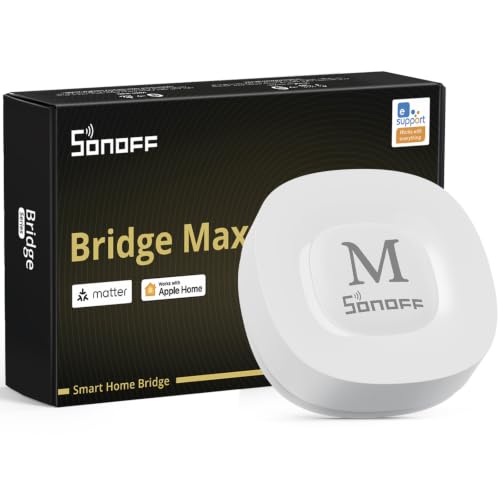
- Provides local Matter bridging without required cloud access
- Supports Zigbee devices and Home Assistant
- Includes a 90 dB alarm for local security setups
Best For: Local control and cross-platform device bridging
Best Multi-Protocol Value

- Combines Zigbee, BLE, and Bluetooth Mesh
- Supports up to 128 Zigbee or Bluetooth Mesh devices
- Offers Smart Life app and voice control
Best For: Tuya homes using several wireless device protocols
Best with Extra Features

- 8-inch customizable smart home control panel
- Supports Wi-Fi, Zigbee, Matter, Thread, and more
- Controls devices, cameras, routines, and security
Best For: Alexa households wanting a versatile touchscreen hub
Best Tuya Dual-Protocol Hub
ZigBee WiFi & Bluetooth Gateway

- Connects compatible Zigbee 3.0 and Bluetooth 5.0 devices
- Uses Smart Life and Tuya Smart apps
- Adds Alexa and Google Assistant voice control
Best For: Tuya users combining Zigbee and Bluetooth devices
Best for Bluetooth Mesh
Smart Bluetooth SIG Mesh Gateway

- Supports up to 128 Tuya Bluetooth mesh devices
- Offers scenes, group control, and remote access
- Works with Alexa, Google Assistant, and IFTTT
Best For: Tuya Bluetooth mesh networks needing scalable group control
Best for Lutron Lighting – Caseta Smart Hub
The Lutron Caseta Smart Hub is a focused choice among wireless smart home hubs for households building around Caseta lighting. It connects to your router, uses the Lutron app for setup, and supports Alexa, Apple HomeKit, Google Assistant, Ring, Serena shades, and Sonos integrations.
Best For: Homeowners who want reliable Caseta lighting control with broad smart-home compatibility.
Pros:
- Supports up to 75 Caseta devices.
- Works with Alexa, Apple HomeKit, Google Assistant, Ring, Serena shades, and Sonos.
- Clear Connect technology avoids competing with Wi-Fi-connected devices.
- Plugs into an outlet and connects to a Wi-Fi router.
Cons:
- Designed primarily for Lutron Caseta devices and coordinating accessories.
- Caseta dimmers and switches are sold separately.
This hub makes the most sense if lighting is the center of your smart-home setup. Its 75-device capacity and broad platform support leave room to expand, but buyers seeking a general-purpose multi-protocol hub may want a different option.
Best for Tapo Sensors – H100 Smart Hub
The Tapo H100 is a compact option among wireless smart home hubs for coordinating Tapo sensors, switches, and buttons. It requires a 2.4GHz Wi-Fi connection, uses a low-power wireless protocol, and includes a built-in chime and siren for selected smart-home alerts.
Best For: Tapo users who want longer sensor battery life and simple app- or voice-triggered routines.
Pros:
- Connects up to 64 Tapo devices.
- Offers a claimed range of up to 30 meters, depending on conditions.
- Low-power connectivity can extend compatible device battery life by up to 10 times versus Wi-Fi.
- Built-in chime and siren can support motion and security alerts.
Cons:
- Requires a 2.4GHz Wi-Fi network.
- Cannot directly connect to Tapo smart plugs or smart lighting.
- Compatibility is centered on Tapo sensors, switches, and buttons.
The H100 is a practical entry point for a sensor-focused Tapo setup. Its capacity and low-power protocol are useful for expanding battery-operated devices, although direct control of Tapo plugs and lights requires the appropriate network connection and setup.
Best for Local Automation – Hubitat Elevation C-8 Pro
The Hubitat Elevation C-8 Pro stands out among wireless smart home hubs for local processing and broad device support. It runs automations on the hub, supports Matter, Z-Wave, Zigbee, and Bluetooth, and works with Alexa, Google Home, and Apple HomeKit without requiring a recurring subscription.
Best For: DIY users who want advanced, private, multi-brand automation that can continue working during an internet outage.
Pros:
- Processes automations locally for fast response and continued operation when internet service is unavailable.
- Supports Matter 1.5, Z-Wave 800, Zigbee 3.0, and Bluetooth.
- Compatible with more than 1,000 devices across over 100 brands.
- Includes Rule Machine and an AI-assisted routine builder without a subscription.
Cons:
- Advanced automation features may have a steeper learning curve than simpler hubs.
- Its broad capabilities may be more than needed for a small, single-brand setup.
The C-8 Pro is the strongest fit here for a flexible, long-term smart-home platform. Local execution, multi-protocol radios, external antennas, and an active community make it appealing to enthusiasts, though casual users may prefer a simpler hub.
Best for Camera Storage – Tapo H200 Smart Hub
The Tapo H200 is a useful choice among wireless smart home hubs for Tapo camera, doorbell, and sensor systems. It requires 2.4GHz Wi-Fi, provides a built-in chime and smart alarm, and can store compatible camera or doorbell recordings on a separately purchased microSD card.
Best For: Tapo households that want one hub for sensors, alerts, compatible cameras, and local video storage.
Pros:
- Supports up to 64 switches, sensors, or buttons plus four compatible cameras or doorbells.
- Offers local microSD storage up to 512GB, with the card sold separately.
- Works as a smart alarm or chime for compatible cameras, doorbells, and sensors.
- Supports Alexa and Google Home voice control.
Cons:
- Requires a 2.4GHz Wi-Fi network.
- Local video storage requires a separately purchased microSD card.
- Compatibility is focused on Tapo devices and listed camera or doorbell models.
The H200 is the more capable Tapo option when cameras and doorbells are part of the plan. Its combination of device capacity, chime functions, and expandable local storage makes it a practical hub for a Tapo-centered security setup.
Best Overall – Aeotec Smart Home Hub
For shoppers comparing wireless smart home hubs, the Aeotec Smart Home Hub is a versatile SmartThings-based option with Wi-Fi or Ethernet setup and broad protocol support. It connects compatible Z-Wave, Zigbee, Matter, and Wi-Fi devices through the SmartThings app, with support for Alexa and Google Home voice control.
Best For: Households wanting broad device compatibility and customizable SmartThings automations.
Pros:
- Supports Matter, Zigbee, Z-Wave Plus, Wi-Fi, and SmartThings devices.
- Works with both Ethernet and Wi-Fi connectivity.
- SmartThings automations can coordinate lights, sensors, switches, and other devices, with many running locally.
- Compatible with Alexa and Google Home.
Cons:
- Designed for use in North America.
- Z-Wave Plus support is specified for the V3 model.
This is the strongest all-around choice when you want one hub to cover several major smart home standards. The SmartThings app also provides a central place to set up, manage, and automate connected devices.
Best for Local Control – SONOFF Bridge Max Smart Home Hub
The SONOFF Bridge Max stands out among wireless smart home hubs for local Matter bridging and a web console that can be accessed directly over your LAN. It links Zigbee, BTHome, and eWeLink devices with Matter platforms, while also supporting Home Assistant through MQTT or device bridging.
Best For: Users prioritizing local control, cross-platform bridging, and Zigbee-based home security.
Pros:
- Bridges Zigbee, BTHome, and eWeLink devices to Matter platforms such as Alexa, Google Home, and Apple Home.
- Local web console works without requiring an app or cloud service.
- Supports Home Assistant through MQTT and device bridging.
- Pairs with Zigbee sensors for a local security system with a built-in 90 dB alarm and mobile notifications.
Cons:
- It is a Matter Bridge, not a Matter Hub or Controller.
- It cannot add Matter devices directly.
Choose this hub if your setup centers on non-Matter Zigbee devices and you want to expose them to Matter-compatible platforms. Be especially mindful of its Matter Bridge limitation if you need to pair Matter devices directly.
Best Multi-Protocol Value – Tuya Multi-Mode Gateway
The Tuya Smart Multi-Mode Gateway is a flexible choice among wireless smart home hubs, combining Zigbee 3.0, BLE, and Bluetooth Mesh support in one compact unit. Its Smart Life app provides remote control, scenes, and voice control through Alexa, Google Home, and Siri, while dual-band Wi-Fi supports 2.4GHz and 5GHz connections.
Best For: Tuya users combining Zigbee, BLE, and Bluetooth Mesh devices in one app.
Pros:
- Combines Zigbee, BLE, and Bluetooth Mesh protocols.
- Supports up to 128 Zigbee or Bluetooth Mesh Tuya devices, plus two BLE devices concurrently.
- Works with Alexa, Google Home, and Siri voice control.
- Supports app-based remote control, scenes, and IFTTT.
Cons:
- Device compatibility is centered on the Tuya platform and its cloud service.
- The gateway requires a Wi-Fi connection during network configuration.
- It uses a USB power supply rather than Ethernet connectivity.
This gateway makes the most sense for a Tuya-based home with a mix of wireless protocols. Its device capacity and multi-mode design can reduce the need for separate hubs, though shoppers seeking local-first operation should consider that the product description emphasizes cloud-based control.
Best with Extra Features – Amazon Echo Hub
The Amazon Echo Hub is a versatile choice among wireless smart home hubs, combining an 8-inch customizable control panel with built-in support for Wi-Fi, Bluetooth, Zigbee, Matter, Sidewalk, and Thread devices. Its dashboard lets you organize controls, view compatible cameras, and start routines from one screen.
Best For: Alexa households that want a central, wall-mountable touchscreen for controlling a broad mix of compatible smart home devices.
Pros:
- Supports thousands of compatible devices across several wireless standards.
- Customizable dashboard with resizable sections for frequently used controls.
- Can manage routines, compatible security systems, cameras, and media.
- Offers wall-mounting and optional tabletop placement.
Cons:
- Some Ring camera features require Alexa+ and a compatible Ring subscription, sold separately.
- Wall cable pass-through, power-over-Ethernet, and tabletop stands are optional accessories.
The Echo Hub stands out when you want a visible, family-friendly command center rather than a small gateway hidden near your router. Its broad compatibility and customizable interface make it the most flexible option here, though some enhanced features and mounting choices add separate costs.
Best Tuya Dual-Protocol Hub – ZigBee WiFi & Bluetooth Gateway
This Tuya gateway is a compact option among wireless smart home hubs for connecting compatible Zigbee 3.0 and Bluetooth 5.0 devices. It uses 2.4GHz Wi-Fi and the Smart Life or Tuya Smart app for setup, remote control, automation, and voice commands through Alexa or Google Assistant.
Best For: Users building a Tuya-based system with compatible Zigbee and Bluetooth devices and wanting one small dual-mode gateway.
Pros:
- Combines Zigbee 3.0 and Bluetooth 5.0 connectivity.
- Supports remote control through the Smart Life and Tuya Smart apps.
- Works with Amazon Alexa and Google Assistant voice control.
- Setup requires power and app pairing without a network cable.
Cons:
- Only compatible with Tuya-protocol devices.
- Does not support certain blinds, Sengled bulbs, and door locks according to the supplied notes.
- Uses 2.4GHz Wi-Fi rather than 5GHz Wi-Fi.
This gateway makes sense for a Tuya or Smart Life installation where both Zigbee and Bluetooth devices need a shared bridge. Compatibility must be checked carefully before buying, since it is not designed as a universal smart home hub.
Best for Bluetooth Mesh – Smart Bluetooth SIG Mesh Gateway
This Bluetooth SIG Mesh gateway is a focused choice among wireless smart home hubs for Tuya Bluetooth mesh devices. It connects to 2.4GHz Wi-Fi through USB power and enables app-based remote control, group management, scenes, and Alexa or Google Assistant voice commands.
Best For: Homes using Tuya or Smart Life Bluetooth mesh devices that need group control and support for a larger mesh network.
Pros:
- Supports up to 128 Bluetooth mesh sub-devices, typically 50 or more.
- Enables group control, local scenes, and remote app access.
- Supports Alexa, Google Assistant, and IFTTT integrations.
- One-key networking can add multiple pending devices at once.
Cons:
- Only supports Tuya Bluetooth mesh devices.
- Requires 2.4GHz Wi-Fi and does not support 5GHz Wi-Fi.
- Powered by USB rather than a stated built-in power supply.
This gateway is best viewed as a specialized Bluetooth mesh bridge, not a multiprotocol hub. Its node capacity and group-control features make it appealing for compatible mesh lighting or automation devices, provided your existing products use the Tuya platform.
How We Picked These Wireless Smart Home Hubs
We focused on compatibility, connection options, setup requirements, automation features, and the type of household each hub suits best. The selection includes dedicated ecosystem bridges, multi-protocol controllers, display-based hubs, and affordable Tuya-compatible gateways.
We also considered whether a hub supports local processing, common wireless standards, voice-assistant integration, and expansion beyond a small starter setup. Because hub performance depends on device compatibility and network conditions, check the manufacturer’s supported-device list before buying.
Quick Comparison
| Best For | Look For |
|---|---|
| Simple lighting control | A dedicated bridge with reliable app and voice-assistant support |
| Mixed-brand homes | Zigbee, Z-Wave, Matter, or multi-mode compatibility |
| Advanced automations | Local processing, detailed rules, and broad device support |
| Touchscreen control | A display hub with customizable dashboards |
| Budget expansion | A Tuya or Smart Life-compatible gateway |
Key Buying Factors for Wireless Smart Home Hubs
Protocol and Device Compatibility
Confirm which standards your existing devices use. Zigbee and Z-Wave are common choices for sensors, switches, and locks, while Matter is designed to improve cross-platform compatibility. Bluetooth and Wi-Fi support can be useful, but they do not guarantee that every device will work with every hub.
Local Control and Reliability
Some hubs process automations locally, which can improve response times and preserve basic routines during an internet outage. Cloud-dependent systems may be easier to configure, but they can rely more heavily on remote services and account availability.
Voice Assistants and Ecosystems
Check compatibility with Alexa, Google Home, Apple Home, SmartThings, or other platforms you already use. A hub that connects to your preferred assistant can make everyday control easier, but advanced features may still require the hub’s own app.
Network and Setup Requirements
Many gateways require 2.4GHz Wi-Fi, Ethernet, or a specific mobile app. Place the hub centrally, away from heavy interference, and verify whether it needs a separate bridge, subscription, or compatible controller.
Who Should Buy Which Wireless Smart Home Hubs?
Choose a dedicated lighting hub if you mainly want dependable control of one brand’s bulbs, switches, or shades. Pick a multi-protocol model if you are combining devices from several ecosystems or expect to expand over time. Advanced users should prioritize local automation, detailed rules, and broad Zigbee, Z-Wave, or Matter support.
A touchscreen hub makes sense for households that want visible room-by-room controls instead of relying only on phones or voice commands. For basic sensors, buttons, and Smart Life or Tuya devices, an inexpensive gateway may provide the necessary bridge without adding advanced features you will not use.