The best smart home hubs without cloud access keep essential automations running locally, reduce latency, and give you more control over your devices and data. The right choice depends on the protocols you use, your comfort with setup, and whether you need advanced automation or simple device bridging.
We compared 10 leading hubs across local control, Matter and Zigbee support, ecosystem compatibility, automation flexibility, and long-term value to help you choose a dependable foundation for your smart home.
Best 10 Smart Home Hubs Without Cloud Access Picks for 2026
Best Overall Local Platform

- Preinstalled Home Assistant OS
- Keeps home data on the hub
- Expandable with protocol USB devices
Best For: Privacy-focused Home Assistant beginners
Best Multi-Protocol Bridge

- Local Zigbee and Matter automation
- Matter bridge and Thread router
- PoE, Wi-Fi, and IR support
Best For: Aqara-centered Matter households
Best for Lutron Lighting

- Supports up to 75 Caseta devices
- Uses non-Wi-Fi Clear Connect radio
- Works with major voice platforms
Best For: Lutron-focused lighting systems
Best for Advanced Local Automation

- Processes automations on the hub
- Supports Matter, Z-Wave, and Zigbee
- No recurring subscription required
Best For: DIY users building complex local routines
Best Local Matter Bridge
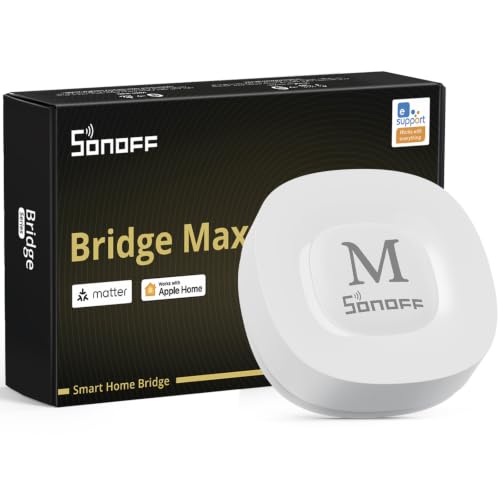
- Local web console without cloud dependence
- Bridges Zigbee, BTHome, and eWeLink devices
- Supports Home Assistant via MQTT or bridging
Best For: Local Matter integration and Zigbee-based smart homes
Best Advanced Local Automation Hub

- Edge Hub design prioritizes local automations
- Supports Zigbee, Thread, Matter, and Home Assistant
- Includes encrypted local storage and IR control
Best For: Advanced Aqara setups with local automation needs
Best Budget Local Zigbee Hub

- Local scenes can run when the network is disconnected
- Supports up to 128 Zigbee sub-devices
- Connects Zigbee and Wi-Fi devices
Best For: Compact SONOFF Zigbee installations with offline automation
Aqara Local-Ready Hub

- Zigbee 3.0 hub for Aqara devices
- Built-in RGB light, sensor, and alarm speaker
- Works with HomeKit, Alexa, Google Assistant, and IFTTT
Best For: Aqara-focused homes needing alarm and automation features
SmartThings Local Automation Hub
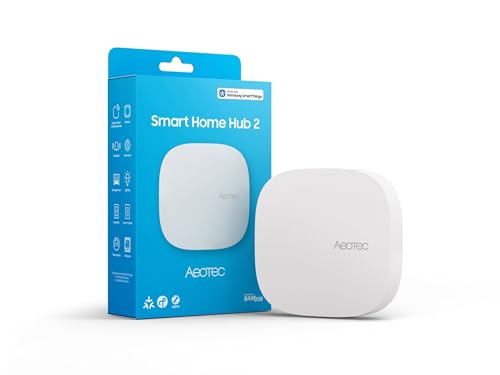
- Supports SmartThings, Matter, and Zigbee
- Runs many automations locally during outages
- Connects by Wi-Fi or Ethernet; no Z-Wave
Best For: SmartThings homes prioritizing local routines and Matter support
Tuya Dual-Protocol Gateway

- Supports Tuya Zigbee 3.0 and Bluetooth 5.0 devices
- Works with Smart Life and Tuya Smart apps
- Adds Alexa and Google Assistant voice control
Best For: Small Tuya-based Zigbee and Bluetooth installations
Best Overall Local Platform – Home Assistant Green
Home Assistant Green | Smart Home hub with Advanced Automation | Official Home Assistant Hardware
Check Price On AmazonHome Assistant Green is a straightforward starting point for anyone comparing smart home hubs without cloud access. Home Assistant OS comes preinstalled, and the fanless hub keeps household data on the device while supporting broad automation and future USB expansion.
Best For: Homeowners who want a flexible, privacy-focused Home Assistant setup with minimal initial configuration.
Pros:
- Home Assistant is already installed; setup mainly involves connecting power and Ethernet.
- Local data storage and export options support greater control over household information.
- Quad-core processing, 4GB of RAM, and 32GB of storage provide a capable foundation for automations.
- USB expansion supports optional Zigbee, Z-Wave, and Thread connectivity.
Cons:
- Ethernet connectivity is required for the included setup.
- Z-Wave, Zigbee, or Thread connectivity requires separate USB devices.
Green is an appealing choice when you want the broad automation potential of Home Assistant in official, ready-to-run hardware. Its main limitation is that some radio protocols require add-on adapters.
Best Multi-Protocol Bridge – Aqara Hub M200
The Aqara Hub M200 stands out among smart home hubs without cloud access by supporting local Zigbee and Matter automation. It also combines Matter bridging, Thread routing, IR control, Wi-Fi, and optional PoE in one compact hub.
Best For: Aqara users who want local automations plus Matter integration and flexible wired or wireless networking.
Pros:
- Runs Zigbee and Matter automations locally, including when Wi-Fi or cloud access is unavailable.
- Acts as a Matter Controller, Thread Border Router, and Matter Bridge.
- Supports up to 40 Aqara Zigbee devices and 40 Thread devices.
- Offers 360-degree IR control with feedback and optional PoE networking.
Cons:
- Some features, including cloud push notifications, still require a cloud connection.
- A 2A USB power adapter is not included.
- Its Matter exposure and integration behavior can vary by platform.
The M200 is a strong fit for mixed Aqara and Matter homes that value local responsiveness but do not require every feature to function offline. Its multi-protocol design is versatile, though cloud-dependent functions remain.
Best for Lutron Lighting – Lutron Caseta Smart Hub
The Lutron Caseta Smart Hub is a focused option for shoppers considering smart home hubs without cloud access primarily for lighting. Its Clear Connect technology keeps Lutron devices from competing with Wi-Fi, while the hub integrates with major voice and smart-home platforms.
Best For: Homes built around Lutron Caseta lighting that need reliable hub-based control and ecosystem compatibility.
Pros:
- Supports up to 75 Caseta devices.
- Clear Connect communication does not interfere with Wi-Fi-connected devices.
- Works with Alexa, Apple HomeKit, Google Assistant, Ring, Serena shades, and Sonos.
- Setup is simple: connect the hub to power and a Wi-Fi router, then follow the app instructions.
Cons:
- It is primarily a Lutron-focused hub rather than a broad universal automation platform.
- Caseta dimmers and switches are sold separately.
- The supplied notes do not specify fully offline operation for every connected service.
Choose the Caseta hub when lighting reliability and Lutron integration matter more than broad multi-brand local automation. It is less suitable as the central platform for a highly varied device collection.
Best for Advanced Local Automation – Hubitat Elevation C-8 Pro
Hubitat Elevation C-8 Pro is designed for shoppers seeking smart home hubs without cloud access and advanced local control. It processes automations on the hub, supports several major protocols, and provides Rule Machine for detailed multi-condition routines.
Best For: DIY smart-home builders who want fast local automations, broad device compatibility, and no required subscription.
Pros:
- Runs automations locally so routines can continue when the internet is down.
- Supports Matter, Z-Wave 800 Series Long Range, Zigbee 3.0, and Bluetooth.
- Works with Alexa, Google Home, and Apple HomeKit.
- Rule Machine and AI-assisted routine building support both advanced and approachable automation design.
Cons:
- Advanced configuration may be more involved than a simpler single-brand hub.
- Some integrations and voice-assistant features may depend on their respective services.
- Its extensive customization may be more than casual users need.
The C-8 Pro is one of the strongest fits here for serious local automation, especially in larger or device-dense homes. Its protocol range and community support provide flexibility, but the deeper feature set rewards users willing to configure and learn the platform.
Best Local Matter Bridge – SONOFF Bridge Max Bridge-M
The SONOFF Bridge Max is a practical choice for shoppers seeking smart home hubs without cloud access. Its local web console lets you configure the Matter Bridge over your LAN, while Zigbee, BTHome, and eWeLink support helps connect devices to Matter platforms.
Best For: Users who want local device bridging, Zigbee support, and Home Assistant flexibility.
Pros:
- Local web management without requiring cloud services.
- Bridges Zigbee, BTHome, and eWeLink devices to Matter platforms.
- Supports Home Assistant through MQTT or device bridging.
- Includes a 90 dB alarm and mobile intrusion notifications when paired with Zigbee sensors.
Cons:
- It is a Matter Bridge, not a Matter Controller, so it cannot add Matter devices directly.
- Some advanced functionality depends on compatible devices and platforms.
With Ethernet and Wi-Fi connectivity plus local control, the Bridge Max is well suited to privacy-conscious setups. Its main limitation is the distinction between bridging existing devices and controlling Matter devices directly.
Best Advanced Local Automation Hub – Aqara Smart Home Hub M3
The Aqara Smart Home Hub M3 stands out among smart home hubs without cloud access for its edge-based automation features and encrypted local storage. It combines Aqara Zigbee and Thread support with Matter bridging, wired or wireless networking, and a built-in IR blaster.
Best For: Aqara households wanting local automations, Matter integration, Thread support, and IR control.
Pros:
- Prioritizes local control and automation through its Edge Hub design.
- Supports Aqara Zigbee, Thread, Matter bridging, and Home Assistant integration.
- Provides 8GB of end-to-end encrypted local storage for configuration data.
- Offers PoE, dual-band Wi-Fi, USB-C power options, and a 360-degree IR blaster.
Cons:
- Some cloud-based notifications still require an internet connection.
- Zigbee capacity is intended for Aqara devices rather than third-party Zigbee devices.
- A USB-C power adapter is not included.
The M3 is a feature-rich option for an Aqara-centered installation that values local processing. Buyers should account for its ecosystem limitations and the remaining internet requirement for certain notifications.
Best Budget Local Zigbee Hub – SONOFF Zigbee Bridge Pro
The SONOFF Zigbee Bridge Pro is a straightforward pick for shoppers comparing smart home hubs without cloud access. Its local smart scenes can continue running when the network is disconnected, and it connects Zigbee devices with Wi-Fi equipment for simple home automation.
Best For: SONOFF users who need a compact Zigbee gateway with offline scenes and local alarm modes.
Pros:
- Local timing and scene linkages can operate during network outages.
- Supports up to 128 Zigbee sub-devices.
- Combines Wi-Fi and Zigbee protocols for cross-device communication.
- Supports home, away, and sleep security modes with local alarm functionality.
Cons:
- Compatibility is focused on SONOFF Zigbee devices.
- The supplied notes do not indicate Matter or Home Assistant support.
This compact bridge makes sense for a SONOFF-focused Zigbee installation where offline scenes matter more than broad ecosystem integration. It is less suitable for shoppers seeking a Matter controller or wide third-party compatibility.
Aqara Local-Ready Hub – M1S Gen 2
The Aqara Hub M1S Gen 2 is a practical option for shoppers comparing smart home hubs without cloud access, particularly within the Aqara ecosystem. It supports local-network integration with Aqara Zigbee devices, Apple HomeKit, Alexa, Google Assistant, and IFTTT, although the hub itself requires a 2.4 GHz Wi-Fi connection and Aqara’s app for setup and management.
Best For: Aqara device owners who want a Zigbee hub with alarm, lighting, and automation features.
Pros:
- Supports up to 128 Aqara devices when Zigbee repeaters are used.
- Uses Zigbee 3.0 and works with Aqara sensors and automation devices.
- Includes a customizable RGB light, illumination sensor, speaker, and alarm functionality.
- Integrates with Apple HomeKit, Alexa, Google Assistant, and IFTTT.
Cons:
- Requires 2.4 GHz Wi-Fi; 5 GHz-only and Wi-Fi 6 networks are not supported.
- Does not officially support third-party Zigbee devices or Zigbee2MQTT dongles.
- Full platform compatibility varies by Aqara child device.
This hub is best viewed as an Aqara-centered bridge rather than a broadly open smart home controller. Its local-network requirements and proprietary device support should be checked before purchase, but its built-in alarm and lighting features add useful functionality.
SmartThings Local Automation Hub – Hub2 V4
The Aeotec Smart Home Hub2 is a strong candidate for shoppers seeking smart home hubs without cloud access because it can run many automations locally when the internet is temporarily unavailable. It combines SmartThings support with Matter and Zigbee connectivity, plus Wi-Fi or Ethernet setup, but it does not include Z-Wave.
Best For: SmartThings users who want Matter and Zigbee support with local automation capability.
Pros:
- Supports Matter and Zigbee devices across lighting, security, climate, and energy applications.
- Many automations can continue running locally during temporary internet outages.
- Offers Wi-Fi and wired Ethernet connectivity for flexible installation.
- Works with compatible Aeotec and third-party devices through SmartThings.
Cons:
- Z-Wave devices are not supported.
- Device compatibility depends on SmartThings, Matter, or Zigbee support.
- Voice control compatibility requires compatible Alexa or Google Assistant equipment.
The Hub2 V4 is a sensible choice for a mixed-device SmartThings setup, especially when local processing matters. Confirm that your existing devices use supported protocols, since the lack of Z-Wave is the key limitation.
Tuya Dual-Protocol Gateway – Zigbee and Bluetooth Hub
This Tuya gateway is a budget-oriented option for shoppers comparing smart home hubs without cloud access, but its ecosystem limits are important. It connects compatible Tuya Zigbee 3.0 and Bluetooth 5.0 devices through a 2.4 GHz Wi-Fi network and supports Smart Life or Tuya Smart apps, with Alexa and Google Assistant voice control.
Best For: Tuya or Smart Life users building a small Zigbee-and-Bluetooth setup.
Pros:
- Combines Zigbee 3.0 and Bluetooth 5.0 connectivity in one gateway.
- Works with compatible Tuya Smart and Smart Life devices.
- Supports Alexa and Google Assistant voice control.
- Uses a simple powered setup without requiring an Ethernet cable.
Cons:
- Only compatible with devices using Tuya protocols.
- Not compatible with listed blind, Sengled bulb, and door-lock devices.
- Requires 2.4 GHz Wi-Fi and app-based setup.
This gateway makes sense when your devices already belong to the Tuya ecosystem. It is not a universal hub, and buyers should verify protocol compatibility before expecting it to replace a broader local smart home controller.
How We Picked the Best Smart Home Hubs Without Cloud Access
We focused on hubs that can perform at least some important functions locally rather than relying entirely on a remote server. That distinction matters: a product may still use cloud services for remote access, account setup, voice assistants, firmware updates, or selected integrations even when core automations work without the internet.
Our comparison considered protocol support, including Zigbee, Z-Wave, Matter, Wi-Fi, Bluetooth, infrared, and proprietary device ecosystems. We also weighed automation depth, app and platform compatibility, setup complexity, expansion potential, and whether the hub is best suited to beginners, enthusiasts, or a specific lighting and security ecosystem.
Quick Comparison
- Best for broad local control: Home Assistant Green or Hubitat Elevation C-8 Pro.
- Best for Matter and Aqara devices: Aqara Hub M3 or Aqara Smart Hub M200.
- Best for Lutron lighting: Lutron Caseta Smart Hub.
- Best for SmartThings users: Aeotec Smart Home Hub2.
- Best for SONOFF Zigbee devices: SONOFF Zigbee Bridge Pro or Bridge Max.
- Best for a simple Tuya gateway: the Zigbee, Wi-Fi, and Bluetooth dual-mode Tuya bridge.
Key Buying Factors for Smart Home Hubs Without Cloud Access
Local Automation and Internet Independence
Check exactly what remains available during an internet outage. Look for local schedules, sensor triggers, device-to-device routines, and local dashboards. “Cloud-free” is not always absolute, so review the manufacturer’s documentation before assuming remote access, voice control, or every integration will work offline.
Protocol and Device Compatibility
Choose a hub that matches both your current devices and likely future purchases. Matter can improve cross-platform compatibility, while Zigbee and Z-Wave provide large established device ecosystems. Some hubs support one protocol particularly well but offer limited support elsewhere.
Automation Depth and Ease of Use
Beginner-friendly apps are useful for basic scenes, but advanced users may prefer conditional logic, variables, dashboards, scripting, and extensive integrations. Consider whether you want a guided appliance-like experience or a platform you can customize extensively.
Privacy, Reliability, and Maintenance
Local processing can reduce data exposure and improve response times, but it may require more updates, backups, networking knowledge, or troubleshooting. Prefer products with clear firmware support, reliable recovery options, and a strong user community.
Who Should Buy Which Smart Home Hubs Without Cloud Access?
Choose Home Assistant Green if maximum customization and local-first control are your priorities. Choose Hubitat Elevation if you want powerful local automations in a more appliance-like hub. Lutron Caseta is the focused pick for dependable Lutron lighting. Aqara models suit shoppers building around Aqara sensors and Matter, while SONOFF bridges are most practical for SONOFF Zigbee equipment. The Aeotec Smart Home Hub2 makes sense for users invested in SmartThings. Finally, choose a Tuya gateway only when its supported device ecosystem and simpler control model meet your needs.