A USB Bluetooth adapter is a simple way to add or upgrade wireless connectivity on a desktop, laptop, or Windows PC. The right dongle can connect keyboards, mice, headphones, controllers, printers, and other Bluetooth devices without installing an internal card.
Our 2026 roundup compares 10 USB Bluetooth adapters across Bluetooth versions, operating-system support, range, size, and everyday usability. Use the guide below to narrow the list based on your setup and priorities.
Best 10 USB Bluetooth Adapters Picks for 2026
Best Overall
TP-Link Bluetooth 5.4 Nano Adapter

- Bluetooth 5.4 with EDR and BLE
- Tiny design for a permanent USB connection
- Supports multiple Windows Bluetooth devices
Best For: Windows desktops and laptops needing broad Bluetooth compatibility
Best for Multi-Device Pairing
Avantree DG45 USB Bluetooth Adapter

- Pairs with up to seven Bluetooth devices
- Supports audio, peripherals, printers, and controllers
- Works with Windows 8 through Windows 11
Best For: Windows setups using several Bluetooth accessories
Best Compact Bluetooth 5.3 Pick
UGREEN USB Bluetooth 5.3 Adapter

- Bluetooth 5.3 with EDR and BLE
- Supports up to five connected devices
- Compact plug-and-play Windows design
Best For: Windows PCs needing a small everyday Bluetooth receiver
Best for Newer Bluetooth Support
ASUS USB-BT600 Bluetooth 6.0 Adapter

- Bluetooth 6.0 with low-energy connectivity
- Supports up to seven devices
- Compatible with Windows 10/11 and Linux
Best For: Users wanting the newest listed Bluetooth version
Best Windows Plug-and-Play Pick
- Bluetooth 6.0 with EDR and BLE
- Connects up to five devices
- Plug and play on Windows 11/10/8.1
Best For: Everyday Windows peripherals and audio devices
Best Long-Range Option

- Class 1 radio and 5dBi antenna
- Up to 600 feet in open areas
- Connects up to seven devices
Best For: Longer-range Windows desktop connections
Best Nano Design
TP-Link UB600 Bluetooth 6.0 Adapter

- Ultra-compact nano form factor
- Supports up to seven devices
- Compatible with Windows 7 through 11
Best For: Portable laptops and space-conscious desktop setups
Best Compact Option
Amazon Basics Bluetooth 5.4 USB Adapter
- Bluetooth 5.4 with broad backward compatibility
- Connects up to six devices
- Lightweight nano form factor
Best For: Windows users wanting a simple adapter for multiple peripherals
Best Extended-Range Value
Techkey Bluetooth 5.4 Long-Range Dongle

- Class 1 radio with extra-long antenna
- Rated up to 500 feet in open areas
- Connects up to five devices
Best For: Windows desktop setups where connection distance matters
Best Overall – TP-Link Bluetooth 5.4 Nano Adapter
For Windows users comparing USB Bluetooth adapters, the TP-Link UB500 offers a current Bluetooth 5.4 connection in a tiny plug-in design. It supports modern and older Bluetooth versions, making it a practical choice for adding wireless connectivity to a desktop or laptop.
Best For: Windows users who want a compact adapter for headphones, keyboards, mice, phones, printers, and other Bluetooth devices.
Pros:
- Bluetooth 5.4 with EDR and BLE technology
- Backward compatible with Bluetooth versions 5.3 through 1.1
- Nano-sized design can remain in a USB port
- Plug-and-play support for Windows 8.1, 10, and 11
Cons:
- Does not support macOS, Linux, TVs, or Windows 8
- Windows 7 requires a separately downloaded driver
- Existing internal Bluetooth may need to be disabled to avoid conflicts
The UB500 is a well-rounded pick when you want recent Bluetooth support without a bulky dongle. Its main limitation is the Windows-only compatibility, so check your operating system before buying.
Best for Multi-Device Pairing – Avantree DG45 USB Bluetooth Adapter
The Avantree DG45 is one of the more flexible USB Bluetooth adapters for Windows PCs and laptops. It can pair with up to seven Bluetooth devices, making it useful for setups that combine audio gear with keyboards, mice, printers, or supported controllers.
Best For: Windows users who regularly switch among several Bluetooth peripherals and want support for stereo audio and voice calls.
Pros:
- Can pair with up to seven Bluetooth devices
- Supports headphones, speakers, keyboards, mice, printers, and compatible controllers
- Enables stereo audio streaming and headphone microphone calls
- Works with Windows 11, 10, 8.1, and 8
Cons:
- Not compatible with macOS, ChromeOS, Linux, Windows 7, TVs, or consoles
- Supports only one active Bluetooth audio device at a time
- Does not work with Wi-Fi or 2.4G wireless devices that use separate receivers
The DG45 makes sense for a Windows workstation with several Bluetooth accessories. Its clearly limited platform and device compatibility means it is not a universal wireless adapter, particularly for 2.4G peripherals.
Best Compact Bluetooth 5.3 Pick – UGREEN USB Bluetooth 5.3 Adapter
The UGREEN Bluetooth 5.3 dongle is a compact option among USB Bluetooth adapters for Windows computers. Its BR+EDR+BLE support is designed to improve connection stability while allowing up to five compatible Bluetooth devices to connect at once.
Best For: Windows 8.1, 10, and 11 users who want a small adapter for everyday Bluetooth peripherals and audio devices.
Pros:
- Bluetooth 5.3 with BR, EDR, and BLE support
- Connects up to five Bluetooth devices simultaneously
- Plug-and-play operation on Windows 8.1, 10, and 11
- Compact stick can remain connected without blocking much space
Cons:
- Does not support macOS, Linux, TVs, cars, or game consoles
- Not compatible with Windows 7
- Existing Bluetooth hardware may need to be disabled before use
UGREEN’s adapter is a straightforward choice for a Windows-only setup where size and basic multi-device support matter. Be aware that it is a receiver, not a transmitter, and it cannot be used directly with consoles.
Best for Newer Bluetooth Support – ASUS USB-BT600 Bluetooth 6.0 Adapter
The ASUS USB-BT600 brings Bluetooth 6.0 and Bluetooth Low Energy to compatible desktops and laptops. Among these USB Bluetooth adapters, it is the option to consider if you want the newest stated Bluetooth version, multi-device connectivity, and support for both Windows and Linux.
Best For: Windows 10/11 and Linux users seeking an ultra-compact Bluetooth 6.0 adapter for multiple wireless devices.
Pros:
- Uses Bluetooth 6.0 with Bluetooth Low Energy
- Supports connections with up to seven devices
- Ultra-compact design for portability
- Supports Windows 10, Windows 11, and Linux
Cons:
- Does not list support for older Windows versions
- Supplied notes provide fewer device-specific details than some competing models
The USB-BT600 stands out for its Bluetooth 6.0 support and broader operating-system coverage, including Linux. It is a strong fit for newer systems, though buyers on older Windows releases should verify compatibility first.
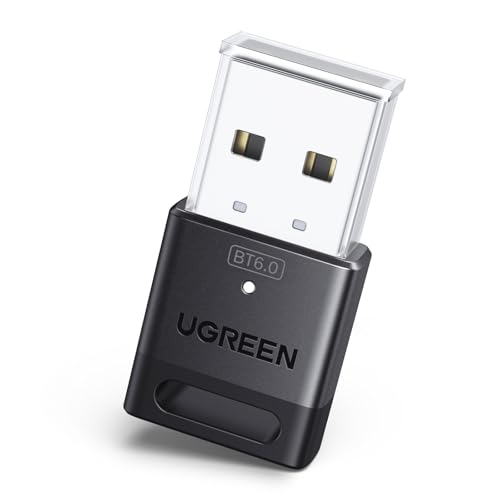
Best Windows Plug-and-Play Pick – UGREEN Bluetooth 6.0 Adapter
If you want a straightforward way to add Bluetooth to a compatible Windows computer, this UGREEN model is one of the more practical USB Bluetooth adapters. It supports Bluetooth 6.0, EDR, BLE, and connections with up to five devices at once, while its small design takes up little space.
Best For: Windows 11, 10, or 8.1 users pairing everyday peripherals such as headphones, speakers, keyboards, mice, phones, and printers.
Pros:
- Bluetooth 6.0 with EDR and BLE technology
- Supports up to five connected Bluetooth devices
- No driver installation required on Windows 11, 10, or 8.1
- Compact, lightweight design
Cons:
- Does not support macOS, Linux, or Windows 7
- Not designed for TVs, cars, game consoles, or other unsupported systems
- Only one audio device of the same type can play music at a time
The UGREEN adapter is a sensible choice when compatibility with supported Windows versions and simple setup matter more than maximum range. Check your computer’s existing Bluetooth hardware before installing, since the manufacturer recommends disabling other Bluetooth devices first.
Best Long-Range Option – Techkey Bluetooth 6.0 Adapter
Among these USB Bluetooth adapters, the Techkey model stands out for users who need extended wireless reach. Its Class 1 radio and 5dBi antenna are rated for up to 600 feet in open areas, and it supports Bluetooth 6.0, EDR, BLE, and up to seven connected devices.
Best For: Windows desktop users who need longer-range connections for headphones, speakers, keyboards, mice, printers, or small-workspace print sharing.
Pros:
- Class 1 radio with an extended 5dBi antenna
- Rated for up to 600 feet in open areas
- Supports data rates up to 3Mbps and Bluetooth 6.0 compatibility
- Can connect up to seven Bluetooth devices simultaneously
Cons:
- Actual range can decrease because of walls, obstructions, and wireless interference
- Supports Windows 11, 10, and 8.1 only
- Not compatible with macOS, Linux, TVs, cars, Xbox, or PlayStation systems
The Techkey is the strongest fit when distance and device capacity are priorities. Its print-server functionality may also help small offices, but it remains a Windows-focused adapter with compatibility limits that should be checked before buying.
Best Nano Design – TP-Link UB600 Bluetooth 6.0 Adapter
The TP-Link UB600 is a compact choice for adding modern Bluetooth connectivity without leaving a bulky device attached to your computer. This nano USB Bluetooth adapter supports Bluetooth 6.0, up to seven connected devices, and Windows 11, 10, 8.1, and 7.
Best For: Laptop and desktop users who want a low-profile adapter for mice, keyboards, phones, game controllers, printers, and other Bluetooth devices.
Pros:
- Ultra-compact nano design that can remain plugged in
- Bluetooth 6.0 support with low-latency positioning
- Supports up to seven connected devices
- Works with Windows 11, 10, 8.1, and 7
Cons:
- Windows 11 and Windows 7 require a driver download
- Windows-only compatibility
- Its compact design does not provide the extended antenna range of the Techkey model
The UB600 is a good fit for portable setups and crowded USB ports, especially when you prefer an adapter that can stay connected during travel. Windows 10 and 8.1 offer plug-and-play installation, while newer and older supported versions may need the official driver.
Best with Extra Features – TP-Link UB500 Plus Bluetooth 5.3 Adapter
If you need usb bluetooth adapters for a desktop or laptop and want more reception flexibility, the TP-Link UB500 Plus stands out with Bluetooth 5.3, an adjustable antenna, and support for Windows systems from Windows 7 through Windows 11. Its larger design favors range and positioning over pocket-sized portability.
Best For: Windows users who want an adjustable antenna and extended Bluetooth coverage for peripherals and other compatible devices.
Pros:
- Bluetooth 5.3 with backward compatibility through Bluetooth 1.1.
- Adjustable multi-direction antenna can be rotated for improved reception.
- Plug-and-play support for Windows 8.1, 10, and 11; Windows 7 driver available.
- Supports EDR and Bluetooth Low Energy for faster transfers and lower power use.
Cons:
- Windows 7 requires a driver download.
- The adjustable-antenna design is less compact than a nano dongle.
- Compatibility is listed for Windows operating systems rather than macOS or Linux.
The UB500 Plus is a practical choice when reception and placement matter more than minimal size. Its two-year manufacturer warranty and adjustable antenna add useful reassurance for a desktop setup.
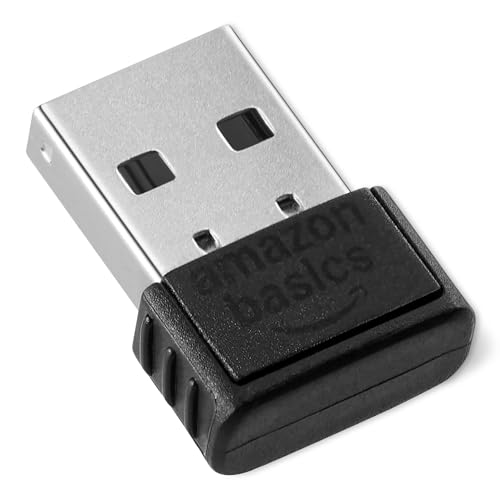
Best Compact Option – Amazon Basics Bluetooth 5.4 USB Adapter
For straightforward usb bluetooth adapters, this Amazon Basics dongle adds Bluetooth to a compatible Windows PC through a standard USB port. Its lightweight nano design is easy to leave connected to a laptop, while Bluetooth 5.4 and support for up to six simultaneous devices suit everyday peripherals.
Best For: Windows 8.1, 10, and 11 users seeking a small adapter for keyboards, mice, and other Bluetooth devices.
Pros:
- Bluetooth 5.4 with backward compatibility from Bluetooth 5.3 through 1.1.
- Can connect up to six devices simultaneously.
- Compact, lightweight 2-gram nano design.
- EDR and BLE support provide faster transfers and lower energy consumption.
Cons:
- Works only with Windows 8.1, 10, and 11.
- Not compatible with Mac, Linux, Chrome, Unix, PlayStation, or Windows 7 and earlier.
- Built-in Bluetooth should be disabled before use.
This is a sensible plug-in upgrade for a supported Windows computer, especially if you want to connect several accessories without adding a bulky receiver. Check the operating-system restrictions carefully before buying.
Best Extended-Range Value – Techkey Bluetooth 5.4 Long-Range Dongle
Among usb bluetooth adapters built for distance, this Techkey dongle combines Bluetooth 5.4, Class 1 radio technology, and an extra-long antenna. It is designed for Windows 8.1, 10, and 11 computers and can connect up to five Bluetooth devices at once.
Best For: Windows desktop users who need extended range for speakers, headphones, keyboards, mice, or printers.
Pros:
- Bluetooth 5.4 with EDR, BLE, and dual-mode support.
- Class 1 radio and extra-long antenna are rated for up to 500 feet in open areas.
- Supports data rates up to 3 Mbps and connections with up to five devices.
- Plug-and-play design requires no driver installation according to the supplied notes.
Cons:
- Actual range can be reduced by walls and wireless interference.
- Not compatible with Mac OS, Linux, car stereos, Xbox, PS4, or TVs.
- The long antenna makes it less discreet than a mini dongle.
The Techkey adapter is compelling when a desktop setup needs more reach than a basic nano receiver can provide. Its range rating applies to open conditions, so placement and surrounding interference will still affect performance.
How We Picked the Best USB Bluetooth Adapters
We focused on adapters that offer a practical combination of connection stability, current Bluetooth support, compatibility, and value. The selection includes compact nano dongles for everyday peripherals, models designed for Windows desktops and laptops, and long-range options with external antennas. We also considered whether each adapter supports common Bluetooth uses such as audio, keyboards, mice, controllers, and multi-device connections.
Bluetooth version numbers matter, but they are not the only measure of performance. Driver support, antenna design, USB placement, the connected device, and local wireless interference can affect real-world results just as much.
Quick Comparison
| What to Compare | Best Fit |
|---|---|
| Nano-size design | Laptops, compact desktops, and permanent installation |
| External antenna | Desktops, longer distances, and obstructed setups |
| Bluetooth 5.3 or 5.4 | Modern everyday peripherals and efficient connectivity |
| Bluetooth 6.0 | Newer hardware and shoppers seeking the latest standard |
| Broad Windows compatibility | Windows 10, Windows 11, and older supported PCs |
| Linux support | Users who need a less Windows-specific option |
Key Buying Factors for USB Bluetooth Adapters
Bluetooth Version
Newer versions can improve efficiency, connection management, and compatibility with newer accessories. However, the adapter cannot make an older keyboard or headset use features it does not support. For most users, Bluetooth 5.3 or 5.4 is already a strong choice; Bluetooth 6.0 is most useful when you are intentionally upgrading for newer devices.
Range and Antenna Design
Short-range nano adapters are convenient, but walls, metal cases, and the PC’s location can reduce performance. Choose an adapter with an external antenna when the computer is under a desk, far from your accessories, or used across rooms. Claimed distances are ideal maximums, not guaranteed indoor range.
Operating-System and Driver Support
Check the product’s supported operating systems before buying. Windows 10 and 11 are common, while Linux support varies by chipset and distribution. Some adapters may require a downloaded driver, and Bluetooth audio or advanced device features can depend on the computer’s software.
Size, Ports, and Device Capacity
A nano dongle is less likely to snag on a laptop, while a larger adapter may provide better antenna placement. Also check the number of simultaneous connections if you plan to use a mouse, keyboard, headset, controller, or other accessories together.
Who Should Buy Which USB Bluetooth Adapters?
Choose a compact Bluetooth 5.3 or 5.4 adapter for everyday keyboards, mice, headphones, and controllers. Select a Bluetooth 6.0 model if you want the newest available standard and use newer compatible devices. For a desktop positioned far from your accessories, a long-range adapter with an external antenna is the better fit. If you use Linux or an older Windows computer, prioritize explicit operating-system and driver support over the highest version number.