The best thermal printers for small businesses can reduce supply costs, speed up order fulfillment, and simplify receipt or label printing. The right model depends on whether you need shipping labels, point-of-sale receipts, barcodes, or a flexible combination of tasks.
We selected 10 options spanning USB, Bluetooth, Ethernet, and Wi-Fi connectivity, with choices for home-based sellers, retail counters, warehouses, and growing online shops.
Best 10 Thermal Printers for Small Businesses Picks for 2026
Best Bluetooth Shipping Label Printer
NULLTONEX 4x6 Thermal Label Printer

- 203 DPI printing at up to 150 mm/s
- Bluetooth and USB connectivity
- Compatible with major carriers and marketplaces
Best For: Small businesses needing flexible 4x6 shipping-label printing
Best Heavy-Duty Label Printer
TSC TE200 Shipping Label Printer

- 203 DPI output at up to 6 inches per second
- Supports labels, stickers, receipts, and tags
- Durable thermal-transfer design
Best For: Workplaces needing versatile, durable USB label printing
Best Networked Receipt Printer

- USB, Ethernet, Wi-Fi, and Bluetooth
- Prints at up to 250 mm/s
- Supports CloudPRNT Next
Best For: Businesses needing flexible, network-ready receipt printing
Best Commercial-Grade Pick
Rollo USB Shipping Label Printer

- Fast 150mm/s printing
- Works with major marketplaces
- Supports multiple label widths
Best For: Desktop-based ecommerce shipping stations
Best Connectivity
Phomemo 248 Pro Thermal Label Printer
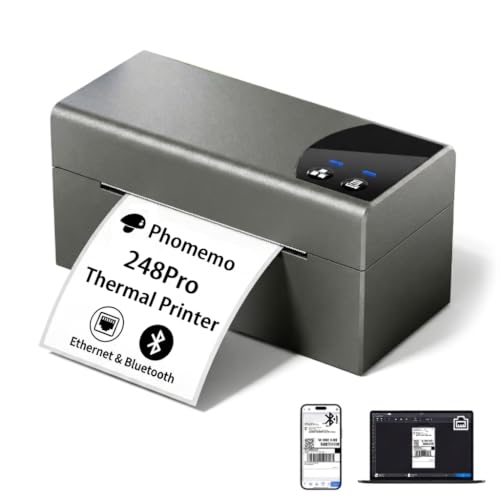
- Ethernet and Bluetooth connectivity
- 150mm/s inkless printing
- Supports 0.8- to 4.5-inch labels
Best For: Mixed-device business and inventory labeling
Best Budget-Friendly Wireless Pick
JADENS Bluetooth Shipping Label Printer

- Bluetooth and USB printing
- Works with roll and fanfold labels
- Compatible with major shipping platforms
Best For: Small online sellers using computers or mobile devices
Best Budget Bluetooth Pick

- Bluetooth and USB printing
- Supports 1- to 4.6-inch labels
- Up to 72 4x6 labels per minute
Best For: Small online sellers needing flexible wireless and wired label printing
Best Compact Shipping Printer
Rongta RP425 Thermal Label Printer

- Compact 1.25-pound design
- Prints up to 60 labels per minute
- Bluetooth and USB connectivity
Best For: Small offices needing a portable 4x6 shipping-label printer
Best Advanced Workflow Pick

- 300 dpi output and 180 mm/s speed
- 4-inch touchscreen with stylus
- Stores up to eight local templates
Best For: Growing businesses handling detailed or high-volume label workflows
Best Bluetooth Shipping Label Printer – NULLTONEX 4×6 Thermal Label Printer
For small businesses that need to ship orders regularly, this NULLTONEX model is a practical option among thermal printers for small businesses. Its direct-thermal design avoids ink and toner, while 203 DPI output and speeds up to 150 mm/s support clear, scannable labels during busy periods.
Best For: Small businesses shipping from phones, tablets, laptops, or PCs that want Bluetooth and USB connectivity.
Pros:
- Prints 4×6 shipping labels at up to 150 mm/s with 203 DPI resolution.
- Supports Bluetooth and USB connections, plus a mobile app with customizable templates.
- Works with Amazon, Shopify, Etsy, USPS, UPS, FedEx, and DHL, and supports labels from 1.57 to 4.3 inches wide.
- Compact design, overheat protection, and 25 included 4×6 labels help with setup.
Cons:
- Prints in black and white only.
- Bluetooth printing requires the FlashLabel Pro app.
This is a flexible shipping-focused printer for sellers who value wireless setup and low ongoing consumable requirements. USB provides a steadier connection when working from a desktop, while the app is useful for quick mobile label creation.
Best POS Receipt Printer – Epson TM-T20III Thermal POS Printer
The Epson TM-T20III is designed for retail and hospitality checkout environments rather than shipping labels. As thermal printers for small businesses go, it emphasizes dependable receipt printing, fast output, reduced paper usage, and a durable auto-cutter.
Best For: Retail or hospitality businesses using Square Stand or Square Register with a USB-connected receipt printer.
Pros:
- Prints at speeds up to 250 mm/s.
- Auto-cutter is rated for up to 1.5 million cuts.
- Enhanced print options can reduce paper usage by up to 30%.
- Includes a two-year full warranty and a printhead rated for 150 km or 150 million pulses.
Cons:
- USB connectivity only; it does not include Bluetooth or Wi-Fi.
- Square use requires a Square Stand or Square Register.
- It is intended for receipt and invoice printing rather than general-purpose shipping-label work.
Choose this model when checkout reliability matters more than wireless flexibility. Its USB-only configuration may limit placement options, but the fast print speed and high cutter rating suit steady point-of-sale workloads.
Best Heavy-Duty Label Printer – TSC TE200 Shipping Label Printer
The TSC TE200 is a sturdy desktop choice for businesses printing more than standard postage labels. It supports shipping labels, product stickers, receipts, tags, and barcodes, making it a versatile entry in the thermal printers for small businesses category.
Best For: Offices, stores, schools, and small businesses that need durable USB label printing across multiple media types.
Pros:
- Prints at up to 6 inches per second with 203 DPI resolution.
- Handles shipping labels, tracking labels, stickers, receipts, and file-folder tags.
- Accepts 72- or 110-meter ribbons on a half-inch core and 300-meter ribbons on a one-inch core.
- Modular thermal-transfer mechanism and ABS housing are designed for demanding environments.
Cons:
- USB connectivity only.
- Its 11.02 x 8.03 x 11.02-inch footprint is larger than compact shipping-label models.
- Thermal-transfer printing requires ribbon supplies.
The TE200 is a better fit for varied labeling tasks and workplaces that prioritize a durable enclosure over a small footprint. Its ribbon flexibility can also help businesses work with the supplies they already use.
Best Networked Receipt Printer – Star Micronics TSP143iV X4
The Star Micronics TSP143iV X4 is built for businesses that need receipt printing across multiple device types and network connections. It stands out among thermal printers for small businesses with USB, Ethernet, Wi-Fi, and Bluetooth, plus support for Star’s CloudPRNT Next technology.
Best For: Businesses that want a compact receipt printer with wired, wireless, and cloud-based connectivity.
Pros:
- Offers USB, LAN, WLAN, and Bluetooth connectivity for iOS, Android, and Windows devices.
- Prints at up to 250 mm/s and includes a guillotine auto-cutter.
- Supports Star CloudPRNT Next for cloud-based printing using MQTT.
- Compact design includes an internal power supply and supports USB-C Android Open Accessory connectivity.
Cons:
- Designed for monochrome receipt printing on paper up to 80 mm wide, not 4×6 shipping labels.
- Cloud printing depends on a compatible setup and network connection.
This is a strong choice for shops, offices, and other operations where connection flexibility matters. It costs less in workflow friction than a USB-only model when receipts need to be printed from different devices or locations.
Best Commercial-Grade Pick – Rollo USB Shipping Label Printer
For small businesses seeking thermal printers for small businesses, the Rollo USB is a practical wired option for fast, dependable 4×6 shipping labels. It connects to Windows or Mac computers by USB, prints without ink or toner, and also supports several other label types.
Best For: Online sellers and small warehouses that primarily print from a laptop or desktop.
Pros:
- Prints at up to 150mm/s, or about one 4×6 label per second.
- Supports major shipping platforms and marketplaces, including Amazon, Shopify, Etsy, and eBay.
- Handles label widths from 1.57 to 4.1 inches for shipping, barcode, product, and sticker labels.
- Includes access to Rollo Ship for streamlined shipping and shipping-rate options.
Cons:
- Connectivity is wired USB rather than wireless.
- Designed for monochrome printing only.
- Limited to a 203 DPI print resolution.
The Rollo stands out when speed, platform compatibility, and desktop workflow matter most. Its USB-only design is less convenient for mobile or shared-device printing, but it is a strong fit for a dedicated packing station.
Best Connectivity – Phomemo 248 Pro Thermal Label Printer
The Phomemo 248 Pro is a flexible choice among thermal printers for small businesses, combining Ethernet and Bluetooth connectivity with support for a broad range of label sizes. Its inkless printing and automatic paper rewinding are useful for businesses handling frequent labeling tasks.
Best For: Small businesses that need networked or mobile printing for shipping, inventory, retail, and office labels.
Pros:
- Offers both Ethernet and Bluetooth connections, plus compatibility with Windows, Mac, Linux, Chrome OS, iOS, and Android.
- Prints at up to 150mm/s without ink or toner.
- Supports label widths from 0.8 to 4.5 inches.
- Automatic paper rewinding helps minimize paper waste.
Cons:
- Drivers are required for PC connections.
- Print resolution is limited to 203 DPI.
- Its maximum listed media size is 4 x 6 inches.
With more connection choices than the other models here, the Phomemo is particularly adaptable for mixed-device workspaces. It is a compelling option if your business wants both Ethernet reliability and Bluetooth convenience in one compact printer.
Best Budget-Friendly Wireless Pick – JADENS Bluetooth Shipping Label Printer
The JADENS JD268BT offers wireless and USB printing in a compact package, making it a practical contender among thermal printers for small businesses. It uses 203 DPI direct thermal printing, works with roll or fanfold labels, and is designed for common shipping platforms.
Best For: Small online businesses that want Bluetooth printing from compatible computers or app-based printing from mobile devices.
Pros:
- Prints without ink or toner and supports both fanfold and roll labels.
- Works with Windows and Mac through USB, with Bluetooth support for Windows 8 or later and Mac.
- Supports label widths from 1.57 to 4.1 inches.
- Compatible with shipping services and marketplaces such as ShipStation, eBay, Amazon, and Shopify.
Cons:
- Android and iOS users must print through the Jadens app rather than Bluetooth directly.
- Label calibration is required when changing label sizes.
- Print resolution is limited to 203 DPI.
JADENS is a sensible choice for sellers who want wireless flexibility without giving up USB connectivity. Mobile printing requires the brand’s app, so businesses with a phone-first workflow should account for that setup step.
Best Budget Bluetooth Pick – Phomemo 241BT Label Printer
The Phomemo 241BT is a flexible option for small businesses looking for thermal printers for small businesses without ink or toner costs. It supports Bluetooth and USB printing, works with phones, computers, and several operating systems, and handles labels from 1 to 4.6 inches wide.
Best For: Small online sellers who need wireless or wired printing for shipping labels, barcodes, QR codes, and basic business documents.
Pros:
- Prints wirelessly through Bluetooth with iOS and Android devices using the Labelife app.
- Supports USB connections with Windows, Mac, Chrome OS, and Linux systems.
- Prints up to 150 mm/s and can produce up to 72 4×6 labels per minute.
- Works with major platforms including eBay, Shopify, Amazon, Etsy, UPS, USPS, and FedEx.
Cons:
- Prints in black and white only.
- Computer users need to download the appropriate driver.
- The manufacturer recommends using genuine Phomemo thermal labels for best results.
With broad platform compatibility and both Bluetooth and USB connectivity, the 241BT is a practical starter printer for home offices and growing shops. Its monochrome output is well suited to standard shipping and barcode labels, but it is less appropriate if you need color printing.
Best Compact Shipping Printer – Rongta RP425 Thermal Label Printer
The compact Rongta RP425 is designed for sellers comparing thermal printers for small businesses. It offers Bluetooth and USB connectivity, automatic label detection, and compatibility with phones, computers, and major shipping and e-commerce platforms.
Best For: Small businesses and home offices that want a lightweight 4×6 shipping-label printer with mobile and computer support.
Pros:
- Prints at up to 150 mm/s, or as many as 60 labels per minute.
- Supports iOS, Android, Windows, Mac, Chrome, and major shipping platforms.
- Automatically catches and feeds labels from 0.98 to 4.37 inches wide.
- Compact, lightweight design helps save desk space and makes it easy to move.
Cons:
- Apple laptops with Intel chips do not support Bluetooth connection.
- Although multiple devices can connect, printing content should not be triggered simultaneously from different devices.
- Its 203 dpi resolution is aimed at standard monochrome label printing rather than high-detail output.
The RP425 stands out for its small footprint and straightforward setup through the RONGTA app. Automatic feeding and broad operating-system support make it a convenient choice for routine shipping labels, especially where desk space is limited.
Best Advanced Workflow Pick – Phomemo PM643 300DPI Printer
The Phomemo PM643 is a feature-rich choice among thermal printers for small businesses, combining a 4-inch touchscreen with Wi-Fi, Bluetooth, USB, and AirPrint connectivity. Its 300 dpi output, local template storage, and one-click reprinting are geared toward businesses handling frequent or varied label jobs.
Best For: Growing sellers, studios, and warehouses that need sharper labels, offline templates, and efficient batch reprinting.
Pros:
- 300 dpi printing produces sharper labels and scannable barcodes.
- Prints at up to 180 mm/s for higher-volume workflows.
- Stores up to eight templates locally and can reprint the last label for up to 255 copies.
- Supports AirPrint, Bluetooth, USB, and a built-in signature pad across multiple operating systems.
Cons:
- The advanced features may be more than basic shipping-label users need.
- It is limited to monochrome printing.
- Its 4-inch touchscreen and additional workflow features may require more setup than a basic label printer.
The PM643 is the strongest fit for businesses that value workflow speed and label detail over simplicity. Offline template storage and flash reprinting can reduce repetitive computer work, while the wide media range supports shipping labels, inventory marks, price tags, and QR stickers.
How We Picked the Best Thermal Printers for Small Businesses
We focused on practical factors that affect daily business use: print purpose, connectivity, label or receipt compatibility, setup requirements, print resolution, operating cost, and ease of integration. The lineup includes dedicated 4-by-6 shipping-label printers, receipt printers for point-of-sale systems, and wireless models suited to flexible workspaces.
Because thermal printers do not use ink or toner, ongoing costs mainly come from media, replacement parts, and maintenance. We also considered whether each printer is best suited to occasional home use, regular order volume, or a busier commercial environment.
Quick Comparison
| Best For | Recommended Type | Connectivity to Consider |
|---|---|---|
| Online sellers and fulfillment | 4-by-6 shipping-label printer | USB, Bluetooth, or Wi-Fi |
| Retail checkout | Monochrome receipt printer | USB, Ethernet, or POS compatibility |
| Barcodes and tags | Commercial label printer | USB with broad media support |
| Mobile or shared workspaces | Wireless label printer | Bluetooth or Wi-Fi |
Key Buying Factors for Thermal Printers for Small Businesses
Choose the Right Print Format
Shipping businesses should prioritize reliable 4-by-6-inch label printing and compatibility with the platforms they use. Retailers generally need receipt printers that support their POS software and the appropriate paper width. A label printer is not automatically a substitute for a receipt printer.
Check Connectivity and Compatibility
USB is usually the simplest and most dependable connection for a single workstation. Bluetooth is useful for phones, tablets, and uncluttered counters, while Ethernet is often preferable for a shared retail network. Wi-Fi provides flexibility but may require more setup and troubleshooting.
Match Speed, Resolution, and Duty Cycle
For shipping labels, standard thermal resolution is typically sufficient for readable addresses and barcodes. Higher resolution can help with small text, graphics, or detailed labels. If your business prints continuously, check rated speed, supported media, and manufacturer guidance on monthly volume.
Budget for Supplies and Software
Direct thermal printers avoid ink costs, but they still require compatible labels or receipt rolls. Confirm roll or label dimensions, core size, fanfold support, driver availability, and compatibility with marketplaces, shipping services, and POS platforms before buying.
Who Should Buy Which Thermal Printers for Small Businesses?
Choose a dedicated 4-by-6 model if your main task is shipping ecommerce orders. Pick a receipt printer such as a POS-focused model if you run a storefront or service counter. Commercial label printers make more sense for businesses printing tags, barcodes, or batches throughout the day. Bluetooth models suit mobile sellers and compact counters, while Ethernet or Wi-Fi options are better for teams sharing printers across multiple devices.
For most small businesses, the best choice is the model that supports current software and media without unnecessary features. Verify operating-system support, return policies, warranty coverage, and the actual cost of labels before placing your order.