The right SSD enclosure can turn an internal drive into a fast, portable photo library for backups, editing, and transfers between computers. The best choice depends on your SSD format, connection speed, and workflow.
We selected 10 enclosures covering 2.5-inch SATA and M.2 NVMe drives, with options ranging from simple budget cases to USB4 models built for demanding file transfers.
Best 10 SSD Enclosures for Photo Storage Picks for 2026
Best Budget 2.5-Inch Pick

- Tool-free 2.5-inch SATA installation
- USB 3.0 speeds up to 5 Gbps
- Works with Windows and Mac
Best For: Simple photo backups on 2.5-inch SATA SSDs
Best Portable NVMe Value

- Supports NVMe M-Key drives up to 8TB
- USB 3.1 Gen 2 up to 10 Gbps
- Includes USB-C and USB-A cable support
Best For: Portable photo storage using compatible NVMe SSDs
Best Aluminum SATA Option

- Fits 2.5-inch SATA SSDs up to 6TB
- USB-C 3.1 Gen 2 with UASP
- Aluminum body aids passive cooling
Best For: USB-C photo backups from 2.5-inch SATA drives
Transparent USB-C Pick

- USB 3.1 Gen 2 and UASP support
- Tool-free with USB-C and USB-A cables
- Transparent housing with auto-sleep mode
Best For: 2.5-inch SATA SSD or HDD users wanting flexible connections
High-Speed M.2 Option

- USB 3.2 Gen 2 up to 10Gbps
- Supports NVMe and SATA M.2 drives
- Aluminum shell with thermal pads
Best For: Compatible M.2 SSD users needing compact photo storage
Simple Budget Choice
BENFEI 2.5-Inch SATA Enclosure

- Tool-free plug-and-play installation
- USB Type-C and Type-A connectivity
- UASP support with 5Gbps-rated transfers
Best For: Everyday 2.5-inch SATA SSD photo storage
Practical USB-C Pick
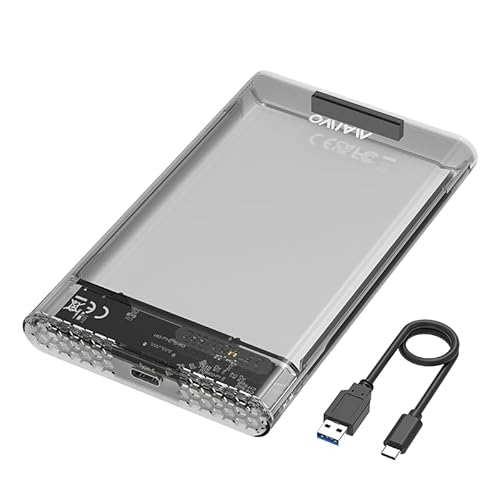
- Supports 7mm and 9.5mm 2.5-inch SATA drives
- 5Gbps USB-C with UASP support
- Tool-free setup and up to 6TB capacity
Best For: Simple USB-C photo-storage expansion
Speed-Focused Choice
BENFEI 2.5-Inch SATA Enclosure

- Up to 6Gbps transfer support with UASP
- Includes USB-C/USB-A 10Gbps cable
- Tool-free and supports drives up to 6TB
Best For: Flexible, fast access to a 2.5-inch SATA photo drive
Easy-View Favorite
ORICO Clear 2.5-Inch SATA Enclosure

- Transparent case makes drive identification easy
- 5Gbps USB 3.0 with UASP support
- Tool-free design supports up to 6TB
Best For: Photographers swapping and identifying multiple SATA drives
Best Budget 2.5-Inch Pick – Tool-Free SATA SSD Enclosure
For straightforward ssd enclosures for photo storage, the SABRENT EC-UASP is a practical choice for standard 2.5-inch SATA SSDs. Its tool-free design, plug-and-play setup, and USB 3.0 connectivity make it convenient for backups, photo libraries, and moving files between compatible computers.
Best For: Photographers using a 2.5-inch SATA SSD who want an affordable, simple external storage enclosure.
Pros:
- Tool-free installation with hot-swappable, plug-and-play operation.
- Supports 2.5-inch SATA and SATA II hard drives and SSDs.
- USB 3.0 supports transfer rates up to 5 Gbps and UASP SATA III.
- Works with Windows and Mac systems without requiring drivers.
Cons:
- Limited to 2.5-inch SATA drives rather than M.2 NVMe SSDs.
- USB 2.0 connections are limited to up to 480 Mbps.
- Plastic construction may offer less heat dissipation than aluminum alternatives.
This enclosure is best when compatibility and ease of installation matter more than maximum throughput. Confirm that your photo-storage SSD is a 2.5-inch SATA model before buying.
Best Portable NVMe Value – 10 Gbps M.2 NVMe Enclosure
The ORICO M2PV is a compact option among ssd enclosures for photo storage, especially if you have an M-Key PCIe NVMe drive. Its USB 3.1 Gen 2 interface can reach up to 10 Gbps, while the aluminum top and included thermal pad help support portable, high-speed file transfers.
Best For: Mobile photographers with a compatible 2230, 2242, 2260, or 2280 PCIe NVMe SSD.
Pros:
- Supports PCIe NVMe M-Key SSDs up to 8TB.
- USB 3.1 Gen 2 offers theoretical speeds up to 10 Gbps.
- Includes USB-C to USB-C and USB-C to USB-A connectivity options.
- Compact aluminum-and-plastic design supports portability and heat dissipation.
Cons:
- Does not support M.2 SATA, M.2 PCIe AHCI, or Mac SSDs.
- New SSDs must be formatted before use.
- Installation requires using the included screwdriver and fasteners.
The M2PV offers a useful balance of speed and portability for NVMe-based photo libraries. Check your SSD interface carefully, since an M.2 SATA drive will not work in this enclosure.
Best Aluminum SATA Option – USB-C 2.5-Inch SSD Enclosure
For photographers who prefer a USB-C workflow, the UGREEN 2.5-inch enclosure is a capable option for ssd enclosures for photo storage. It supports SATA SSDs up to 6TB, uses UASP acceleration, and pairs an aluminum body with a USB-C interface for portable backups and file transfers.
Best For: Users with a 2.5-inch SATA SSD who want USB-C connectivity and an aluminum enclosure.
Pros:
- Supports most 2.5-inch SATA I, II, and III SSDs and HDDs up to 6TB.
- USB-C 3.1 Gen 2 interface and UASP support enable fast transfers.
- Aluminum alloy construction helps with heat dissipation without a fan.
- Tool-free, plug-and-play installation requires no extra power supply.
Cons:
- Designed for 2.5-inch SATA drives, not M.2 NVMe SSDs.
- The included USB-C to USB-C cable may require an additional cable for USB-A-only devices.
- Actual performance depends on the host port and installed drive.
This is a sensible match for existing 2.5-inch SATA photo-storage drives and modern USB-C computers. Its 6TB support and fanless aluminum construction make it practical for everyday backups and portable archives.
Best High-Speed NVMe Pick – USB4 Tool-Free SSD Enclosure
The SABRENT EC-U4TN is built for demanding ssd enclosures for photo storage workloads, including large RAW catalogs and video-heavy projects. With USB4 support, transfer rates up to 3,900 MB/s, tool-free NVMe installation, and active cooling, it targets creators who need portable performance.
Best For: Professional photographers and editors using PCIe NVMe SSDs with USB4 or Thunderbolt-capable computers.
Pros:
- USB4 performance reaches up to 3,900 MB/s; Thunderbolt 3/4 supports up to 2,700 MB/s.
- Tool-free installation supports 2230, 2242, 2260, and 2280 PCIe NVMe drives.
- Active cooling fan helps maintain performance during large file transfers.
- Works with USB4, Thunderbolt 3/4, and USB-C systems on Windows and macOS.
Cons:
- Does not support SATA M.2 SSDs.
- Maximum speeds require a compatible USB4 host and suitable NVMe drive.
- Active cooling adds a fan where simpler enclosures may be quieter.
This enclosure makes the most sense for users who can take advantage of USB4 or Thunderbolt bandwidth. For ordinary USB-C systems, it remains backward compatible, but its headline performance may not be available.
Transparent USB-C Pick – ORICO 2.5-Inch SATA Enclosure
For photographers seeking practical ssd enclosures for photo storage, the ORICO 2139C3-G2 is a flexible choice for a 2.5-inch SATA SSD or HDD. Its USB 3.1 Gen 2 interface, UASP support, and included USB-C-to-C and USB-A-to-C cables make it convenient for moving photo libraries between compatible computers.
Best For: Users who want a transparent, tool-free enclosure for a 2.5-inch SATA SSD or HDD and need both USB-C and USB-A connection options.
Pros:
- Supports 2.5-inch SATA SSDs and HDDs, including drives up to 7 or 9.5mm thick.
- USB 3.1 Gen 2, SATA III, and UASP support provide a rated interface speed of up to 10Gbps.
- Tool-free installation, hot-swapping, and two detachable cables simplify everyday use.
- Transparent housing, blue activity LED, and 10-minute auto-sleep mode add useful visibility and power management.
Cons:
- Only supports one 2.5-inch drive at a time.
- Not suitable for M.2 or other non-2.5-inch SATA formats.
- Actual performance depends on the installed drive, host port, and cable.
The ORICO stands out when easy installation and drive visibility matter. It is a sensible match for photographers repurposing a 2.5-inch SATA SSD, though it is not the right enclosure for an M.2 drive.
High-Speed M.2 Option – SSK NVMe/SATA SSD Enclosure
The SSK M.2 enclosure is designed for photographers using compact NVMe or SATA M.2 drives as portable photo storage. Its USB 3.2 Gen 2 connection supports up to 10Gbps, while the aluminum shell, thermal pads, and included cables help make it practical for fast transfers across compatible devices.
Best For: Photographers with a compatible 2242, 2260, or 2280 M.2 NVMe or SATA SSD who want a compact, bus-powered enclosure.
Pros:
- Supports M.2 NVMe PCIe and SATA M-Key or B+M-Key SSDs in 2242, 2260, and 2280 sizes.
- USB 3.2 Gen 2 provides a rated transfer speed of up to 10Gbps and is backward compatible with slower USB standards.
- Includes USB-C and USB-A cables, thermal pads, and a screwdriver.
- Aluminum construction, UASP, TRIM, and the RTL9210B controller support portability and drive management.
Cons:
- Does not support M.2 PCIe AHCI drives, mSATA SSDs, Wi-Fi or capture cards, or non-M.2 drives.
- The SSD is not included and must be formatted for the host operating system.
- Maximum performance requires a compatible USB-C Gen 2 or Thunderbolt 3 connection.
For photographers already equipped with a compatible M.2 SSD, the SSK offers the highest rated interface speed among these options and a compact design. Confirm the drive type and keying before buying, since compatibility is more specific than with a 2.5-inch enclosure.
Simple Budget Choice – BENFEI 2.5-Inch SATA Enclosure
The BENFEI enclosure is a straightforward option for photographers who need portable ssd enclosures for photo storage without tools or drivers. It accepts 2.5-inch SATA I, II, or III SSDs and includes Type-C and Type-A connectivity, making it useful for transferring photo files between computers and compatible mobile devices.
Best For: Users repurposing a 2.5-inch SATA SSD for portable storage and wanting simple plug-and-play operation with broad host compatibility.
Pros:
- Supports 2.5-inch 7mm or 9.5mm SATA SSDs and HDDs up to 6TB.
- Tool-free, plug-and-play design requires no additional drivers.
- USB Type-C and Type-A connectivity supports computers and compatible phones or tablets.
- UASP support, hot-swapping, and an 18-month unconditional warranty add practical value.
Cons:
- Transfer speeds are rated up to 5Gbps, below the 10Gbps rating of the other listed options.
- Supports only one 2.5-inch SATA drive and not M.2 SSDs.
- Its integrated cable design may offer less flexibility than an enclosure with detachable cables.
The BENFEI is a sensible everyday enclosure for a spare 2.5-inch SATA SSD, especially when simplicity and compatibility matter more than maximum transfer speed. It is less suitable for users with M.2 drives or very large, frequent photo transfers.
Practical USB-C Pick – MAIWO 2.5-Inch SATA Enclosure
For photographers assembling SSD enclosures for photo storage, the MAIWO offers a straightforward way to connect one 2.5-inch SATA SSD or HDD to a computer. Its USB-C output, tool-free setup, and support for drives up to 6TB make it a practical option for expanding storage or organizing a photo library.
Best For: Users who want a simple USB-C enclosure for a 7mm or 9.5mm 2.5-inch SATA drive.
Pros:
- Supports 2.5-inch 7mm and 9.5mm SATA SSDs and HDDs.
- USB-C connection supports transfer speeds up to 5Gbps and UASP.
- Tool-free, plug-and-play installation with no drivers required.
- Includes anti-shock pads, an LED indicator, and a USB-C to USB-A cable.
Cons:
- Designed for one drive at a time.
- It uses a 5Gbps interface rather than the faster 10Gbps connection offered by some alternatives.
- A new drive may require initialization, partitioning, and formatting before use.
The MAIWO is a sensible choice when convenience and USB-C connectivity matter more than maximum interface speed. Its 6TB support also leaves room for a sizable photo archive.
Speed-Focused Choice – BENFEI 2.5-Inch SATA Enclosure
Among SSD enclosures for photo storage, the BENFEI stands out for its 6Gbps-rated transfer support and included USB Type-C/Type-A cable. It is built for 2.5-inch SATA drives and provides a tool-free way to move files between computers or use an internal drive as external storage.
Best For: Photographers who want a versatile enclosure with UASP, broad operating-system compatibility, and a detachable high-speed cable.
Pros:
- Supports 2.5-inch 7mm and 9.5mm SATA I/II/III SSDs and HDDs up to 6TB.
- JMS580 chipset supports data transfer rates up to 6Gbps and UASP.
- Tool-free, hot-swappable installation with plug-and-play operation.
- Includes a USB Type-C/Type-A 10Gbps cable and an 18-month warranty.
Cons:
- Holds one 2.5-inch drive at a time.
- Actual performance depends on the drive, computer, cable, and port used.
- It is intended for 2.5-inch SATA drives, not other drive form factors.
The BENFEI combines easy installation with a flexible cable setup and strong compatibility across Windows, Linux, and macOS. It is a well-rounded pick for transferring or accessing photo files from a SATA SSD.
Easy-View Favorite – ORICO Clear 2.5-Inch SATA Enclosure
The ORICO clear enclosure is a useful option for SSD enclosures for photo storage when you want to identify the installed drive at a glance. Its transparent case, 5Gbps USB 3.0 interface, UASP support, and tool-free design suit photographers who regularly swap or repurpose 2.5-inch SATA drives.
Best For: Users who value visible drive identification, portability, and simple plug-and-play access.
Pros:
- Transparent crystal PC case lets you see the installed drive without opening it.
- Supports 2.5-inch 7mm and 9.5mm SATA I/II/III drives up to 6TB.
- USB 3.0 provides up to 5Gbps transfer rates with UASP support.
- Includes a 50cm USB-A cable, blue activity LED, and tool-free installation.
Cons:
- The included cable uses USB-A, which may require an adapter for some USB-C-only devices.
- It supports one drive at a time.
- The supplied notes do not list a warranty.
Choose the ORICO when seeing which drive is installed is especially helpful. It delivers the core features needed for photo-file transfers while keeping the enclosure compact and easy to swap.
How We Picked the Best SSD Enclosures for Photo Storage
We focused on enclosure compatibility, interface speed, portability, installation convenience, and practical value for photographers. The selection includes cases for 2.5-inch SATA SSDs, M.2 NVMe drives, and combination enclosures that support more than one M.2 standard. Tool-free designs received attention because they make drive swaps and temporary storage setups easier.
Advertised speeds depend on the installed SSD, host computer, cable, and operating system. A fast enclosure cannot overcome a slower SATA drive or a USB port with limited bandwidth, so compatibility matters as much as headline performance.
Quick Comparison
| Best For | Drive Type | Typical Interface | What to Look For |
|---|---|---|---|
| Basic photo backups | 2.5-inch SATA | USB 3.0 or USB-C | Tool-free installation and UASP |
| Everyday editing | 2.5-inch SATA or M.2 NVMe | USB 3.1/3.2 Gen 2 | 10 Gbps support and aluminum cooling |
| Maximum transfer speed | M.2 NVMe | USB4 | Compatible USB4 host and cable |
| Mixed drive collections | M.2 NVMe and SATA | USB 3.2 Gen 2 | Confirmed protocol support |
Key Buying Factors for SSD Enclosures for Photo Storage
Drive Compatibility
First identify whether your SSD is a 2.5-inch SATA model or an M.2 drive. M.2 enclosures may support NVMe, SATA, or both, but these protocols are not interchangeable. For M.2 drives, also check the supported lengths, such as 2230, 2242, 2260, or 2280.
Speed and Connectors
USB 3.0 is adequate for routine backups, while 10 Gbps USB 3.1 or USB 3.2 Gen 2 is better for large RAW libraries and video projects. USB4 enclosures can deliver substantially higher throughput, but only when connected to a compatible USB4 port with a suitable cable.
Cooling and Durability
Aluminum housings can help dissipate heat during sustained transfers. This is especially important for NVMe drives, which may throttle when warm. Look for secure drive mounting, a protective shell, and a cable that fits your computer without adapters.
Convenience Features
UASP support can improve performance and responsiveness on compatible systems. Tool-free access is useful when rotating several drives, while USB-C and USB-A compatibility can make an enclosure easier to use across desktop and laptop computers.
Who Should Buy Which SSD Enclosures for Photo Storage?
Choose a 2.5-inch SATA enclosure if you are repurposing an older laptop SSD or need an affordable backup drive. Select a 10 Gbps NVMe enclosure for frequent transfers and photo editing from an external drive. A USB4 NVMe model makes the most sense for professionals moving very large catalogs who already own a USB4-equipped computer. If your drives vary by format, prioritize a clearly labeled dual-protocol enclosure and verify compatibility before purchasing.