The best receipt printers for inventory make stock movements, sales records, and order handoffs easier to document without slowing down daily operations. The right model should match your software, connection needs, paper size, and expected print volume.
We compared 10 thermal receipt printers across speed, connectivity, cutter design, compatibility, and suitability for retail, restaurants, warehouses, and small businesses.
Best 10 Receipt Printers for Inventory Picks for 2026
Best Integrated POS Pick

- USB and Ethernet connectivity
- Built-in autocutter
- Compact thermal design
Best For: Retail counters and fixed POS inventory stations
Best High-Volume Value

- 250mm/s printing speed
- USB, LAN, and serial ports
- Autocutter and cash-drawer support
Best For: Busy wired retail, restaurant, and kitchen setups
Best Renewed Epson Option

- USB thermal receipt printing
- Autocutter rated for 1.5 million cuts
- ePOS-Print support
Best For: Budget-conscious PC and compatible POS setups
Best Wi-Fi Placement Flexibility
MUNBYN P047 Wi-Fi Receipt Printer

- USB and Wi-Fi connectivity
- Wall-mountable 80mm design
- Energy Star certified thermal printing
Best For: Android-compatible stations needing flexible placement
Best High-Speed Option
Epson TM-T20IV Thermal Receipt Printer

- Prints at up to 310mm/s
- USB, serial, and Ethernet interfaces
- Supports Epson ePOS on Windows, Android, and iOS
Best For: High-volume retail and restaurant POS stations
Best for Busy Kitchens
P80E 80mm USB Ethernet POS Printer

- USB, Ethernet, and RJ11 connectivity
- RGB and audible order alerts
- Oil-resistant, wall-mountable housing
Best For: Restaurants, cafes, food trucks, and wired ESC/POS setups
Best Portable Pick
Mini 58mm Thermal Receipt Printer

- USB and Bluetooth connectivity
- Rechargeable, portable design
- Works with select inventory apps
Best For: Mobile retailers using compatible Android or Windows apps
Best Wall-Mountable Workhorse
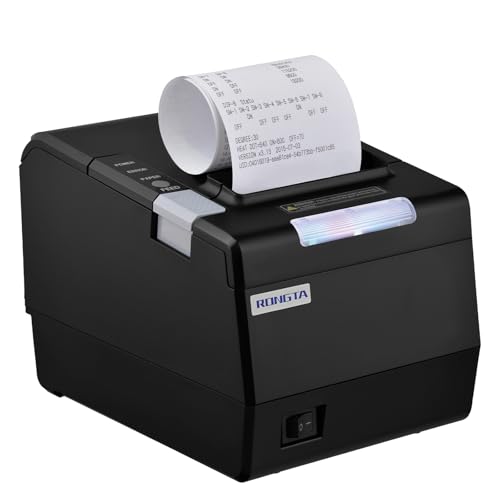
- USB, serial, and Ethernet connections
- Auto cutter and cash-drawer support
- Wall-mountable 80mm design
Best For: Fixed computer-based retail and restaurant stations
Best High-Speed Wired Option
Rongta RP332 80mm Thermal Printer

- Prints at up to 250mm/s
- Ethernet, USB, and serial interfaces
- Auto cutter with cash-drawer support
Best For: Busy wired retail and office counters
Best Integrated POS Pick – Epson TM-M30
The Epson TM-M30 is a compact thermal option for receipt printers for inventory setups that need dependable POS connectivity. It includes USB and Ethernet interfaces, ePOS Print technology, and an autocutter, making it well suited to a fixed checkout or stockroom workstation.
Best For: Retail counters and inventory stations using a PC or POS system over USB or Ethernet.
Pros:
- USB and Ethernet connectivity support flexible POS installation.
- Built-in autocutter helps streamline receipt handling.
- Compact 7-by-5-by-5-inch design conserves counter space.
- Energy Star certification and efficient power management support lower-energy operation.
Cons:
- Prints monochrome only.
- Designed for thermal paper, so it requires compatible media.
- Its print speed specification is limited compared with the faster models in this roundup.
The TM-M30 is a practical choice when connectivity and a compact footprint matter more than maximum throughput. Its Epson ePOS features also make it a strong fit for established POS environments.
Best High-Volume Value – Rongta 80mm Thermal Printer
For busy operations, this Rongta model is one of the more capable receipt printers for inventory, with a rated 250mm-per-second speed and support for USB, LAN, and serial connections. Its 80mm format, autocutter, and cash-drawer support suit retail, restaurant, and stockroom workflows.
Best For: High-volume retail or kitchen environments that need fast printing and broad wired compatibility.
Pros:
- Prints at up to 250mm per second, or approximately 43 receipts per minute.
- USB, LAN, and serial ports offer flexible setup options.
- 203 DPI output is designed for clear receipts and order tickets.
- Clamshell loading and wall-mount capability help simplify maintenance and placement.
Cons:
- Does not support Wi-Fi or Bluetooth.
- Not compatible with several platforms, including Square, Clover, Chromebook, and Lightspeed.
- Requires thermal paper and is limited to monochrome output.
The Rongta stands out for throughput and connection flexibility at a value-oriented price. Confirm software compatibility before buying, especially if your inventory or POS system relies on one of the listed unsupported platforms.
Best Renewed Epson Option – Epson TM-T20II USB Printer
The renewed Epson TM-T20II offers a straightforward thermal-printing solution for receipt printers for inventory, with USB connectivity and a stated USB-plus-serial configuration. Its ePOS-Print support can also help connect compatible mobile or web-based applications to a receipt workflow.
Best For: Budget-conscious businesses wanting a proven Epson receipt printer for a PC or compatible POS setup.
Pros:
- Thermal line printing avoids ink, toner, and ribbons.
- USB connectivity supports direct connection to a computer.
- Autocutter is rated for up to 1.5 million cuts.
- ePOS-Print technology supports direct printing from compatible mobile or web applications.
Cons:
- This is a renewed product with a 90-day limited warranty.
- The supplied listing specifies USB as the hardware interface, so verify the exact connection configuration.
- Monochrome printing requires thermal paper.
The TM-T20II is appealing when a lower-cost Epson model and established receipt-printing features are priorities. Because it is renewed, review the warranty and connection details carefully before placing it in a critical inventory station.
Best Wi-Fi Placement Flexibility – MUNBYN P047 Wi-Fi Receipt Printer
The MUNBYN P047 adds Wi-Fi alongside USB for receipt printers for inventory, giving businesses more placement flexibility than a USB-only unit. Its 80mm paper width, wall-mount design, and ink-free thermal printing work well for compact checkout or stockroom locations.
Best For: Android-compatible inventory or POS stations that need Wi-Fi or wall-mounted placement.
Pros:
- Supports USB and Wi-Fi connectivity.
- Wall-mount holes provide flexible placement in tight spaces.
- Energy Star certification supports energy-conscious operation.
- Ink-free thermal printing uses 80mm paper without ribbons or ink.
Cons:
- Wi-Fi does not support the 5G band.
- Not compatible with Square, Clover, iOS, iPad, Shopify POS, Lightspeed, and several delivery platforms.
- It is not Bluetooth-enabled.
The P047 is a useful choice when wireless placement and a compact, mountable design are more important than broad platform support. Check the supported operating system and POS software before relying on it for inventory printing.
Best Wall-Mount Value – Vretti 80mm Thermal Receipt Printer
For businesses comparing receipt printers for inventory and everyday checkout, the Vretti V330M offers a practical wired setup with USB, serial, and LAN connectivity. Its 260mm/s print speed, 80mm paper support, and direct thermal operation suit retail, warehouse, restaurant, and supermarket environments.
Best For: Retail counters, warehouses, kitchens, and businesses that need wall-mount flexibility.
Pros:
- Supports USB, serial, and LAN connections.
- Fast 260mm/s printing with a partial auto cutter.
- Wall-mount design helps save counter space.
- Includes a starter roll, cables, adapter, and user manual.
Cons:
- Does not support Wi-Fi or Bluetooth.
- Not compatible with several popular platforms, including Square, Clover, Shopify, and OpenTable.
The Vretti is a straightforward choice when your inventory or POS system supports ESC/POS over a wired connection. Confirm platform compatibility before buying, especially if you rely on a cloud-based or mobile POS.
Best High-Speed Option – Epson TM-T20IV Thermal Receipt Printer
The Epson TM-T20IV is a strong option for receipt printers for inventory when transaction speed, system flexibility, and dependable daily operation matter. It prints at up to 310mm/s and supports USB, serial, and Ethernet connections for wired POS installations.
Best For: Busy retail stores, restaurants, and businesses using Windows, Android, iOS, or Epson ePOS.
Pros:
- Fast printing speeds of up to 310mm/s.
- USB, serial, and Ethernet connectivity, plus an extra USB-A port.
- Supports Epson ePOS mobile printing on Windows, Android, and iOS.
- Offers paper-saving controls, wall mounting, and a 2 million-cut auto cutter.
Cons:
- It is a wired printer rather than a Wi-Fi or Bluetooth model.
- The listed model information includes inconsistent warranty details, so verify coverage before purchase.
With its higher print speed, broad platform support, and durable cutter rating, the TM-T20IV is well suited to busy inventory and checkout workflows. Its wired interfaces make it best for an established POS station rather than a cable-free setup.
Best for Busy Kitchens – P80E 80mm USB Ethernet POS Printer
The P80E is among the more specialized receipt printers for inventory, sales slips, and order tickets, particularly in fast-moving food-service environments. It combines USB and Ethernet connectivity with an RJ11 cash-drawer connection, a 200mm/s print speed, and visual and audible status alerts.
Best For: Restaurants, cafes, food trucks, and small retail businesses needing kitchen or checkout printing.
Pros:
- Supports USB, Ethernet, and RJ11 cash-drawer connections.
- RGB status lights and a buzzer provide order and error alerts.
- Oil-resistant housing and dual desktop or wall-mount installation suit kitchens.
- Auto cutter, overheat protection, and quick-open paper cover support continuous use.
Cons:
- No Wi-Fi or Bluetooth connectivity.
- Incompatible with cloud-based POS platforms such as Square, Clover, Lightspeed, Toast, and Shopify POS.
- Does not support Chromebooks or Linux.
The P80E makes the most sense when you need a compact, durable printer for wired ESC/POS workflows and visible kitchen alerts. Check your POS platform carefully, since its compatibility limitations may rule it out for cloud-first systems.
Best Portable Pick – Mini 58mm Thermal Receipt Printer
If you need receipt printers for inventory tasks across a retail counter or mobile setup, this compact Sunydog model offers USB and Bluetooth connectivity for compatible Android and Windows workflows. Its 58mm paper format, rechargeable battery, and ink-free thermal printing make it convenient for lightweight, on-the-go receipt or ticket printing.
Best For: Mobile retailers and small businesses using compatible apps such as iREAP, Loyverse, CasierStock, or Kyte.
Pros:
- Portable design with a built-in 1500mAh rechargeable battery
- Supports Bluetooth and USB connections
- 203dpi printing at speeds up to 70mm/s
- Uses ink-free thermal paper to reduce consumable costs
Cons:
- Not compatible with Square POS
- Does not support iOS, according to the supplied notice
- Requires checking app compatibility before purchase
This is a practical choice when portability and flexible app-based inventory workflows matter more than high-volume counter printing. Confirm your phone, operating system, and preferred inventory app are supported before ordering.
Best Wall-Mountable Workhorse – Rongta RP850 80mm POS Printer
For receipt printers for inventory operations at a fixed retail or restaurant station, the Rongta RP850 emphasizes wired connectivity, an auto cutter, and support for cash drawers. It works with Windows, Mac, and Linux computers and can connect through USB, serial, or Ethernet.
Best For: Computer-based retail counters, restaurants, and kitchen stations that need an 80mm receipt printer with wired networking.
Pros:
- USB, serial, and Ethernet interface options
- Auto cutter and cash-drawer support
- Supports 80mm and 58mm paper widths
- Wall-hanging design helps save counter space
Cons:
- No Wi-Fi or Bluetooth
- Does not work with phones or tablets
- Not compatible with Square, Clover, Shopify, and several listed delivery or POS platforms
The RP850 is better suited to a conventional computer-based POS or inventory station than a mobile setup. Review the software restrictions carefully, then choose the correct driver and paper-width configuration for your system.
Best High-Speed Wired Option – Rongta RP332 80mm Thermal Printer
The Rongta RP332 is a wired option for receipt printers for inventory and point-of-sale work where faster output and network connectivity are priorities. It supports USB, serial, and Ethernet connections, prints at up to 250mm/s, and includes an auto cutter and cash-drawer support.
Best For: Busy retail or office counters using Windows, Mac, or Linux computers and ESC/POS-compatible software.
Pros:
- Printing speed up to 250mm/s
- USB, serial, and Ethernet connectivity with TCP/IP installation
- Auto cutter and cash-drawer support
- Supports 80mm and 58mm paper widths
Cons:
- No Wi-Fi or Bluetooth
- Not designed for iPhone, iPad, Android devices, or tablets
- Incompatible with Square, PayPal, Clover, Shopify, and other listed platforms
Choose the RP332 when a wired computer setup needs quicker receipt throughput than a compact mobile printer can provide. Its broad interface selection is useful for established stations, but compatibility should be confirmed before purchase.
How We Picked the Best Receipt Printers for Inventory
We focused on practical features that affect inventory workflows: dependable thermal printing, common 80mm or 58mm paper formats, automatic cutters, connection options, operating-system support, and ease of integration with POS or stock-management software. We also considered whether each printer suits low-volume counter use, busy retail environments, or kitchen and warehouse tasks.
Because product listings and bundled accessories can vary, confirm the exact interface, drivers, paper width, and included power supply before ordering. Thermal printers do not use ink, but their labels and receipts can fade when exposed to heat, light, or moisture.
Quick Comparison
| Best For | What to Prioritize | Recommended Type |
|---|---|---|
| Retail counters | Fast printing, auto cutter, USB or Ethernet | 80mm desktop POS printer |
| Multiple terminals | Stable network connectivity and broad software support | Ethernet-equipped model |
| Restaurants and kitchens | Reliable output, ESC/POS support, network interfaces | Rugged 80mm printer |
| Small businesses | Simple setup and affordable replacement rolls | USB or Wi-Fi thermal printer |
| Mobile or occasional use | Compact size and low power requirements | Portable 58mm printer |
Key Buying Factors for Receipt Printers for Inventory
Paper Width and Print Speed
Most inventory and POS workflows use 80mm paper because it allows wider item descriptions, prices, and transaction details. A 58mm printer is more compact but may produce narrower, less readable records. For busy counters, look for a rated speed around 200mm/s or higher, while occasional-use buyers can usually accept slower output.
Connectivity and Compatibility
USB is straightforward for a single computer, while Ethernet is generally better for shared terminals or a fixed network. Wi-Fi can simplify placement but may require more setup and a stable wireless connection. Check support for Windows, macOS, Linux, Android, and ESC/POS commands if your inventory or POS software requires them.
Auto Cutter and Durability
An automatic cutter reduces manual tearing and keeps queues moving. For kitchens, retail stores, and stockrooms with frequent printing, choose a model with a sturdy cutter, accessible paper loading, and a proven duty cycle. Also verify whether the printer is designed only for indoor dry locations.
Software and Operating Costs
Confirm that your application can send receipts, order tickets, or inventory documents to the printer. Thermal printing avoids ink costs, but ongoing expenses include paper rolls, replacement cutters, cables, and possible service downtime. Standard paper sizes are usually easier and cheaper to source.
Who Should Buy Which Receipt Printers for Inventory?
Choose an Epson TM-series model if reliability, established POS compatibility, and business-focused construction matter most. These are strong choices for retail counters and higher-volume operations.
Choose an 80mm Rongta or similar network-ready printer if you need flexible USB, serial, or Ethernet connectivity for restaurants, warehouses, or multiple workstations.
Choose a Wi-Fi or compact model if placement flexibility is more important than maximum throughput. These can work well for small businesses, pop-up counters, and occasional inventory documentation.
Choose a 58mm portable printer only when space and portability outweigh receipt width. For detailed inventory records, 80mm output is usually easier to read and file.