A reliable Ethernet switch can turn a limited apartment router into a more capable wired network for TVs, computers, game consoles, access points, cameras, and smart-home hubs.
These 10 picks cover compact plug-and-play models, PoE switches, managed features, extra-port capacity, and multi-Gigabit performance for apartments of different sizes and layouts.
Best 10 Network Switches for Apartments Picks for 2026
Best Compact Pick
TP-Link TL-SG105 5-Port Gigabit Switch
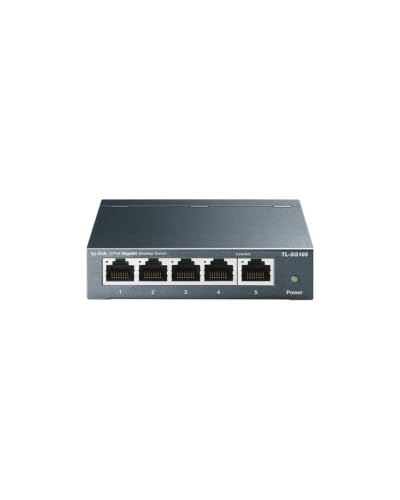
- Five Gigabit Ethernet ports
- Fanless, quiet metal design
- Plug-and-play with QoS and IGMP Snooping
Best For: Small apartment networks needing a few extra wired connections
Best for PoE Devices
TP-Link LS108GP 8-Port PoE Gigabit Switch

- Eight PoE+ Gigabit ports
- 65W total PoE power budget
- Silent, plug-and-play operation
Best For: Apartments using PoE cameras or access points
Best for Multi-Gigabit Networks

- Two 10Gb and four 2.5Gb ports
- 60Gbps switching capacity
- Fanless metal case with wall mounting
Best For: Apartments with NAS, Wi-Fi 7, or multi-gigabit devices
Best High-Capacity Option
TP-Link TL-SG116 16-Port Gigabit Switch
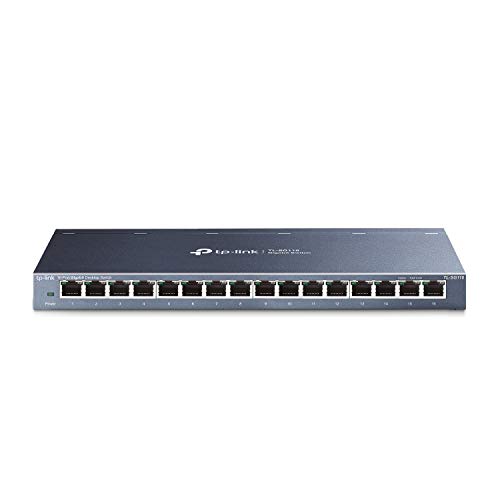
- Sixteen Gigabit Ethernet ports
- Quiet fanless metal enclosure
- QoS and IGMP Snooping included
Best For: Larger apartment networks with many wired devices
Best Managed Pick
TP-Link TL-SG108E 8-Port Smart Switch
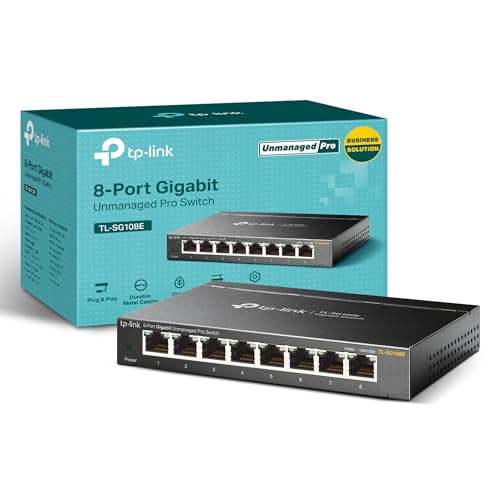
- Eight Gigabit ports for multiple wired devices
- VLAN, QoS, IGMP Snooping, and monitoring features
- Metal desktop or wall-mount design
Best For: Apartment networks needing extra ports and smart traffic management
Best Simple Setup
NETGEAR GS305 5-Port Gigabit Switch

- Five automatic 1Gbps Ethernet ports
- Plug-and-play with no configuration required
- Fanless metal design for quiet placement
Best For: Small apartment networks needing simple wired expansion
Best for Comfort
TP-Link TL-SG1005P 5-Port PoE+ Switch

- Four Gigabit PoE+ ports with a 65W total budget
- One additional non-PoE Gigabit port
- Fanless metal housing with plug-and-play setup
Best For: Apartments using compatible PoE cameras, access points, or other devices
Best for Maximum Wired Capacity
NETGEAR GS316v3 16-Port Gigabit Switch

- 16 auto-negotiating 1Gbps ports
- Plug-and-play, fanless operation
- Desktop or wall-mount installation
Best For: Larger apartment networks with many wired devices
Best for Multi-Gig Upgrades
TP-Link TL-SG108S-M2 2.5G Switch

- Eight 2.5Gbps Ethernet ports
- Supports 100Mbps, 1Gbps, and 2.5Gbps
- Silent, plug-and-play design
Best For: Apartments with multi-gig internet or fast local devices
Best Budget Gigabit Pick
TP-Link TL-SG108 8-Port Gigabit Switch

- Eight 10/100/1000Mbps ports
- Quiet fanless metal enclosure
- Plug-and-play with energy-efficient operation
Best For: Small apartments needing simple gigabit expansion
Best Compact Pick – TP-Link TL-SG105 5-Port Gigabit Switch
For apartments that need a few extra wired connections, the TP-Link TL-SG105 is a practical choice among network switches for apartments. Its five Gigabit ports, fanless operation, and plug-and-play setup make it easy to add devices without creating much noise or configuration work.
Best For: Small apartment networks connecting a router, desktop, streaming device, printer, or game console.
Pros:
- Five 10/100/1000Mbps ports with auto negotiation and Auto MDI/MDIX
- Fanless design provides quiet operation
- Compact metal case supports desktop or wall mounting
- Traffic-prioritization features include QoS and IGMP Snooping
Cons:
- Five ports may be limiting for larger households or growing setups
- Unmanaged design does not provide advanced network configuration
The TL-SG105 is a straightforward, quiet, and durable solution when you only need a handful of additional Gigabit ports in an apartment.
Best for PoE Devices – TP-Link LS108GP 8-Port PoE Gigabit Switch
The TP-Link LS108GP is a useful option for apartments with PoE-powered equipment. It combines eight Gigabit PoE+ ports with plug-and-play operation, a fanless build, and a 65W total PoE budget, making it one of the more specialized network switches for apartments.
Best For: Apartment users powering compatible surveillance cameras, access points, or other PoE devices over Ethernet.
Pros:
- Eight PoE+ Gigabit ports provide up to 30W per port
- 65W total PoE power budget and up to 16Gbps switching capacity
- Fanless design supports silent operation
- PoE Auto Recovery can reboot dropped or unresponsive PoE devices
Cons:
- PoE features may be unnecessary for a basic wired apartment network
- Extend Mode is intended for longer PoE runs and may not be needed in compact spaces
If your apartment setup includes PoE equipment, the LS108GP adds both network connectivity and device power without requiring a separate PoE injector for each connection.
Best for Multi-Gigabit Networks – NICGIGA 6-Port 10GbE Switch
The NICGIGA six-port switch is designed for apartments with newer multi-gigabit equipment. It provides four 2.5Gb ports and two 10Gb RJ45 ports, giving compatible NAS devices, Wi-Fi 7 routers, PCs, and adapters more bandwidth than standard Gigabit network switches for apartments.
Best For: Multi-gigabit home networks with a NAS, high-speed wireless access point, gaming PC, or 10GbE-capable devices.
Pros:
- Two 10Gb RJ45 ports and four 2.5Gb ports support several link speeds
- Up to 60Gbps switching capacity
- Fanless metal design provides quiet operation
- Supports desktop or wall mounting and requires no configuration
Cons:
- Only six ports are available
- Its higher-speed capabilities may offer limited benefit with Gigabit-only devices
- One-year warranty is shorter than some alternatives
This is the strongest fit for an apartment network built around multi-gigabit hardware, especially when fast local transfers to a NAS matter as much as internet access.
Best High-Capacity Option – TP-Link TL-SG116 16-Port Gigabit Switch
When an apartment has many wired devices or a more distributed setup, the TP-Link TL-SG116 supplies 16 Gigabit ports without requiring configuration. Its fanless metal design and desktop or wall-mounting options make it a practical choice among network switches for apartments that need room to expand.
Best For: Larger apartment networks connecting multiple computers, entertainment devices, printers, access points, or other wired equipment.
Pros:
- Sixteen 10/100/1000Mbps ports provide substantial expansion capacity
- Fanless design supports quiet operation
- Shielded metal case supports desktop or wall mounting
- Includes QoS and IGMP Snooping for traffic optimization
Cons:
- Its larger footprint may be excessive for a small apartment setup
- Unmanaged operation limits configuration options
- Uses more physical space than five- or eight-port models
The TL-SG116 is a sensible long-term choice if you expect your wired device count to grow and want plenty of Gigabit ports in one quiet enclosure.
Best Managed Pick – TP-Link TL-SG108E 8-Port Smart Switch
For apartments with several wired devices and a need for more network control, the TP-Link TL-SG108E is a versatile choice among network switches for apartments. Its eight Gigabit ports, VLAN support, QoS, and monitoring tools provide useful flexibility without requiring a large rack-mounted setup.
Best For: Apartment users who want extra wired ports plus smart management features for segmentation, traffic prioritization, and troubleshooting.
Pros:
- Eight 10/100/1000Mbps Gigabit Ethernet ports
- Supports VLANs, QoS, IGMP Snooping, port mirroring, and cable diagnostics
- Compact metal design supports desktop or wall mounting
- Shielded ports and a three-year warranty add practical durability and support
Cons:
- Smart management features require configuration through web interface or software
- Eight ports may be more capacity than a small apartment needs
- Specified for operation up to 40°C
The TL-SG108E is a strong fit when simple expansion is not enough and you want control over how apartment network traffic is organized. It offers useful Layer 2 features in a compact, sturdy enclosure.
Best Simple Setup – NETGEAR GS305 5-Port Gigabit Switch
The NETGEAR GS305 keeps apartment networking straightforward. With five Gigabit ports, automatic speed negotiation, and no configuration software, it is a practical plug-and-play option for connecting a router, television, computer, console, or other wired devices.
Best For: Apartment residents who want a quiet, compact switch for basic wired expansion with minimal setup.
Pros:
- Five 1Gbps Ethernet ports support high-speed wired connections
- Plug-and-play operation requires no software or configuration
- Fanless design provides silent operation
- Metal housing supports desktop or wall-mount placement
Cons:
- Unmanaged design does not provide VLAN or advanced traffic controls
- Five ports offer less capacity than larger models
- Made for use in the U.S. and Canada only
For basic apartment connectivity, the GS305 is easy to recommend because it combines Gigabit performance with silent, low-maintenance operation. Choose it when simplicity matters more than network customization.
Best for Comfort – TP-Link TL-SG1005P 5-Port PoE+ Switch
The TP-Link TL-SG1005P is one of the more specialized network switches for apartments because it can deliver both data and power to compatible devices. Four PoE+ ports provide up to 30W per port within a 65W total budget, while the fifth Gigabit port provides a non-PoE connection.
Best For: Apartment setups using compatible PoE devices such as cameras or access points and wanting a compact, quiet switch.
Pros:
- Four 802.3af/at PoE+ ports with up to 65W total power budget
- All five ports support 10/100/1000Mbps Gigabit connections
- Plug-and-play setup with no software installation
- Fanless metal enclosure supports desktop or wall mounting
Cons:
- Only four ports provide PoE; the fifth is non-PoE
- PoE functionality is useful only with compatible 802.3af/at devices
- Five total ports may limit expansion for larger wired networks
The TL-SG1005P makes sense when powering compatible network hardware is part of the apartment setup. If PoE is unnecessary, a standard unmanaged switch may be a simpler match; if it is needed, this model adds that capability without fans or complex installation.
Best for Maximum Wired Capacity – NETGEAR GS316v3 16-Port Gigabit Switch
For apartments with several wired devices, the NETGEAR GS316v3 is a practical choice among network switches for apartments. Its 16 gigabit Ethernet ports provide room for computers, printers, access points, and other Ethernet-connected equipment without requiring configuration.
Best For: Apartment networks that need many wired connections and quiet, flexible placement.
Pros:
- Provides 16 auto-negotiating 1Gbps Ethernet ports.
- Plug-and-play unmanaged setup requires no software or configuration.
- Fanless metal design supports silent desktop or wall-mounted operation.
- Supports IEEE 802.3az energy-efficient Ethernet, 802.1p QoS, and 9K jumbo frames.
Cons:
- Offers gigabit ports rather than multi-gigabit speeds.
- Its larger 11.3-inch length may require more shelf or mounting space.
- Specified for use in the U.S. and Canada only.
The GS316v3 makes the most sense when port count is more important than advanced management features. It is a straightforward, quiet expansion option for a wired apartment setup.
Best for Multi-Gig Upgrades – TP-Link TL-SG108S-M2 2.5G Switch
The TP-Link TL-SG108S-M2 is suited to apartments with multi-gig internet, fast local storage, or newer Wi-Fi hardware. All eight ports support up to 2.5Gbps and automatically adjust between 100Mbps, 1Gbps, and 2.5Gbps for broad device compatibility.
Best For: Apartment users building a faster wired network for Wi-Fi 6 access points, NAS devices, workstations, or gaming systems.
Pros:
- Eight 2.5Gbps ports provide up to 40Gbps of switching capacity.
- Auto-negotiation supports 100Mbps, 1Gbps, and 2.5Gbps connections.
- Plug-and-play design needs no configuration.
- Fanless construction enables silent desktop or wall-mounted use.
Cons:
- Eight ports provide less expansion room than a 16-port switch.
- It is an unmanaged switch without advanced network configuration features.
- Its plastic case may feel less substantial than a metal alternative.
For apartments where current devices or internet service can benefit from speeds above gigabit, this model offers a simple upgrade path. It can also work with existing Cat5e wiring, according to the supplied product notes.
Best Budget Gigabit Pick – TP-Link TL-SG108 8-Port Gigabit Switch
The TP-Link TL-SG108 is a compact, straightforward option for expanding a wired apartment network. Its eight gigabit ports, fanless design, and plug-and-play setup make it useful for connecting common devices such as computers, printers, consoles, and other Ethernet equipment.
Best For: Small apartment networks that need dependable gigabit connectivity in a quiet, compact enclosure.
Pros:
- Eight RJ45 ports support 10/100/1000Mbps connections.
- Plug-and-play setup requires no network configuration.
- Fanless design operates quietly in bedrooms or home offices.
- Metal housing and shielded ports support durability, heat dissipation, and interference protection.
Cons:
- It does not provide 2.5Gbps multi-gigabit ports.
- Eight ports may be limiting for larger wired installations.
- As an unmanaged switch, it lacks configurable management features.
The TL-SG108 is a sensible fit when you want simple gigabit expansion without paying for multi-gig capability. Its compact metal enclosure and quiet operation are particularly practical in space-conscious apartments.
How We Picked the Best Network Switches for Apartments
We focused on practical apartment networking needs: compact designs, quiet or fanless operation, straightforward setup, reliable Ethernet performance, and useful port counts. The selection includes unmanaged switches for simple expansion, smart-managed models for VLAN and QoS controls, PoE options for powering compatible devices, and multi-Gigabit models for faster local transfers.
We also considered placement flexibility. Desktop and wall-mount designs are easier to install in media cabinets, offices, entertainment centers, and utility closets where space may be limited.
Quick Comparison
| Best For | Recommended Type | What to Look For |
|---|---|---|
| Basic wired expansion | 5-port Gigabit unmanaged | Plug-and-play setup and fanless operation |
| Several wired devices | 8-port Gigabit switch | Extra capacity without a large footprint |
| Large apartment networks | 16-port Gigabit switch | Room for current and future devices |
| Access points or cameras | PoE switch | Compatible PoE standard and sufficient power budget |
| Fast NAS or desktop transfers | 2.5GbE or 10GbE switch | Multi-Gig ports and matching cabling |
Key Buying Factors for Network Switches for Apartments
Port Count and Layout
Count the devices you plan to connect, then leave at least one or two spare ports. A five-port switch suits a small office or entertainment center, while an eight-port model is a better general-purpose choice. Choose 16 ports when several rooms, access points, or wired smart-home devices may be added later.
Speed and Compatibility
Gigabit Ethernet is enough for most internet plans and everyday wired devices. Multi-Gigabit switches make more sense for a fast NAS, Wi-Fi 6E or Wi-Fi 7 access point, workstation, or local media transfers. Your router, client devices, and cabling must also support the higher speed.
PoE Requirements
PoE can send power and data over one Ethernet cable to compatible cameras, access points, and VoIP phones. Check the required PoE standard and total wattage before buying; the number of PoE ports alone does not determine capacity.
Management and Noise
Unmanaged switches require virtually no configuration and are ideal for most apartments. A smart-managed switch is worthwhile if you need VLANs, traffic prioritization, monitoring, or more control over connected devices. Fanless models are preferable in bedrooms, offices, and living areas.
Who Should Buy Which Network Switches for Apartments?
Choose a compact five-port Gigabit switch for a few wired devices near a router or TV. An eight-port Gigabit model is the best all-around fit for many apartments. Select a 16-port switch for a growing wired network or multiple rooms. Pick a PoE model when powering compatible network hardware matters, and choose a multi-Gigabit switch only when your devices and internet or local-network workload can use the extra speed.