Choosing among receipt printers for Mac can be surprisingly complicated. A printer may list USB, Ethernet, or macOS support yet still require the right driver, paper size, or ESC/POS-compatible checkout software.
We’ve gathered 10 thermal POS printers suited to cafés, retail counters, restaurants, and small businesses, emphasizing practical connectivity, 80mm paper support, auto-cutting, and compatibility considerations.
Best 10 Receipt Printers for Mac Picks for 2026
Best Plug-and-Print Option
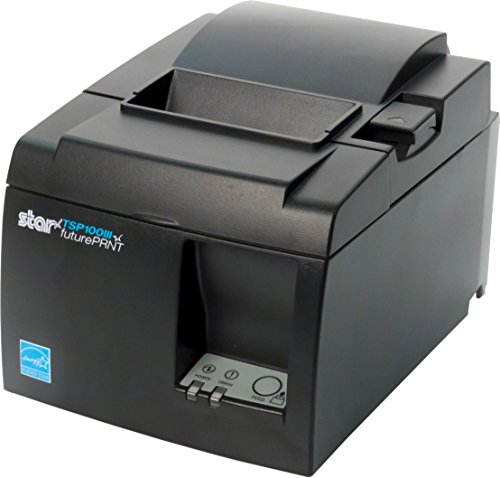
- USB setup with a compact footprint
- Prints up to 250mm/s
- Drop-in loading with De-Curl function
Best For: Wired point-of-sale setups needing simple installation
Best High-Speed Wired POS Printer
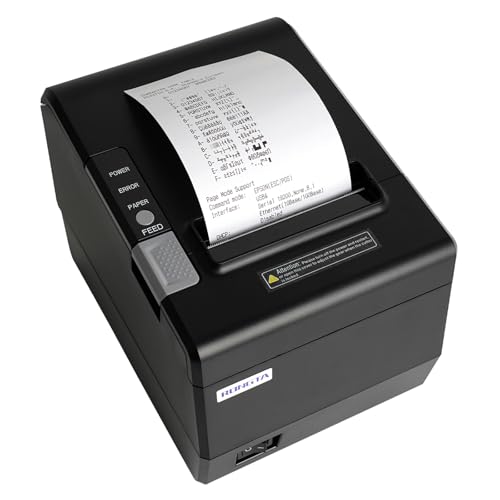
- Up to 300mm/s printing
- USB, serial, and Ethernet interfaces
- Supports Mac through driver guidance
Best For: Desktop POS stations needing speed and wired networking
Best Simple USB Budget Setup

- USB connection with cash-drawer interface
- 200mm/s printing and auto cutter
- Ink-free direct thermal operation
Best For: Windows USB POS stations with 80mm paper
Versatile Wired Pick

- Mac, Windows, and Linux support
- USB, serial, and Ethernet connectivity
- 250mm/s printing with auto cutter
Best For: Mac setups needing wired flexibility and cash-drawer support
Efficient Energy-Saving Choice
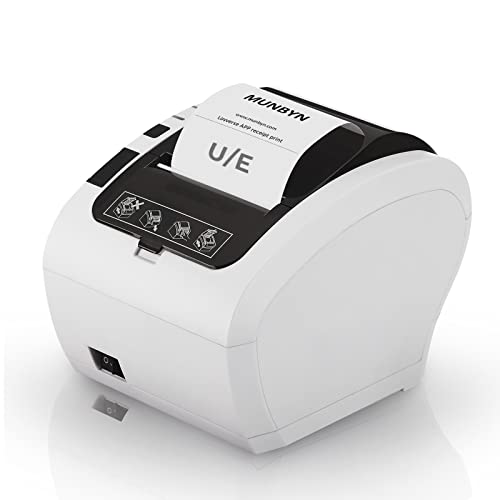
- USB and Ethernet connectivity
- Up to 230mm/s printing
- ENERGY STAR certified with wall-mount design
Best For: Compatible Mac or PC counters prioritizing speed and efficiency
Fast USB-Only Performer

- Mac, Windows, and Linux support
- Up to 300mm/s printing
- Automatic cutter with overheating protection
Best For: Dedicated Mac computers needing high-speed USB printing
Best Overall

- 310 mm/s printing for busy counters
- USB, Ethernet, and serial interfaces
- 80 mm rolls with paper-saving mode
Best For: Retail and restaurant POS setups needing speed and flexible wired connections
Best Mac Compatibility

- Supports Mac OS through USB or Ethernet
- 260 mm/s printing with auto cutter
- RJ11 cash-drawer and wall-mount support
Best For: Mac-based wired POS systems using compatible ESC/POS software
Best for Mac Desktops
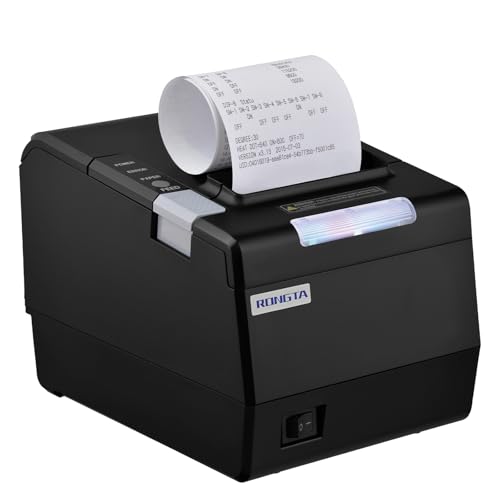
- Mac driver materials are included
- USB, Ethernet, and serial connectivity
- Supports 80 mm and 58 mm paper
Best For: Fixed Mac laptop or desktop POS stations needing configurable wired printing
Best Plug-and-Print Option – Star Micronics TSP143IIIU
The Star Micronics TSP143IIIU is a practical choice for shoppers comparing receipt printers for Mac and other computer-based point-of-sale setups. Its USB connection, compact footprint, and drop-in paper design make it straightforward to install and maintain.
Best For: Mac users who need a compact, wired thermal printer for a point-of-sale system.
Pros:
- Prints up to 250mm/s, with a stated capacity of up to 43 receipts per minute.
- USB connection supports direct communication with compatible computers and iOS devices.
- Drop-in paper loading and the De-Curl function simplify routine use.
- Small footprint and embedded power supply help conserve counter space.
Cons:
- Uses a wired USB connection rather than wireless networking.
- Its certified compatibility list includes specific platforms, so shoppers should confirm support for their POS software.
Choose this model when easy USB setup and a space-saving design matter more than network connectivity. Its thermal-only monochrome printing also avoids ink replacement.
Best Interface Flexibility – VRETTI V330M 80mm Printer
The VRETTI V330M is worth considering if you need receipt printers for Mac with more than one wired connection option. It supports USB, serial, and LAN interfaces, while its wall-mountable design can help organize a busy counter or kitchen workspace.
Best For: Mac-based retail, restaurant, or kitchen setups that need USB, serial, or Ethernet connectivity.
Pros:
- Supports Windows, Mac, and Linux through ESC/POS print commands.
- Offers USB, serial, and LAN connectivity for flexible wired installation.
- Prints up to 260mm/s and includes a partial auto cutter rated for up to 1.5 million cuts.
- Includes a roll, cables, adapter, manual, and USB drive in the kit.
Cons:
- Does not support Bluetooth or Wi-Fi.
- The notes list incompatibility with several platforms and services, including Square, Clover, and Shopify.
- Its 80mm paper format has a 72mm print width.
This is a flexible wired option for users who can work within its ESC/POS requirements. Confirm POS compatibility before buying, especially if your workflow depends on a named app or service.
Best High-Speed Wired POS Printer – Rongta RP850P
The Rongta RP850P is a high-speed choice among receipt printers for Mac, supporting wired connections to laptops and desktop computers. It combines USB, serial, and Ethernet interfaces with an auto cutter and wall-mounting holes for commercial environments.
Best For: Mac or Windows desktop POS systems that need fast 80mm receipt printing and wired networking.
Pros:
- Supports Mac, Windows, and Linux with ESC/POS and OPOS command compatibility.
- Provides USB, serial, and Ethernet connections, including TCP/IP installation.
- Prints at speeds up to 300mm/s and includes an auto cutter.
- Can handle 80mm or 58mm paper widths and supports wall mounting.
Cons:
- No Wi-Fi or Bluetooth, and it does not work with iPhone, iPad, or Android devices.
- Not compatible with services including Clover, Square, Chromebook, and UberEats.
- Mac installation requires following the included driver guidance.
The RP850P suits a desktop-based POS station where speed and multiple wired interfaces are priorities. Its extensive service exclusions make compatibility checking especially important before purchase.
Best Simple USB Budget Setup – MUNBYN P098 80mm Printer
The MUNBYN P098 is a straightforward USB model for shoppers seeking receipt printers for Mac but should be considered only after checking system compatibility. It uses direct thermal printing, includes an auto cutter, and is designed for 80mm receipt rolls.
Best For: Windows-based USB POS stations needing a simple, wall-mountable thermal printer.
Pros:
- USB plug-and-play design with a separate cash-drawer interface.
- Prints at up to 200mm/s and includes an auto cutter.
- Direct thermal printing requires no ribbon or ink.
- Wall-mounted design can help save workspace.
Cons:
- The supplied notes state that it is compatible with Windows, not iPad, iPhone, or other iOS devices.
- No LAN, Wi-Fi, or Bluetooth connectivity.
- Not compatible with Square, DoorDash, Uber, or Grubhub.
Although this is a compact, capable USB printer, it is not a broadly compatible Mac option according to the supplied specifications. Verify the operating system and POS application before choosing it for a Mac workflow.
Versatile Wired Pick – Rongta RP332
For shoppers comparing receipt printers for Mac, the Rongta RP332 is a flexible wired option with USB, serial, and Ethernet connectivity. It supports Mac, Windows, and Linux, prints on 80mm or 58mm paper, and includes an automatic cutter for regular counter or kitchen use.
Best For: Mac users who need wired connectivity, Ethernet installation, and cash-drawer support.
Pros:
- Supports Mac, Windows, and Linux computers.
- Offers USB, serial, and Ethernet interfaces, including TCP/IP installation.
- Prints at up to 250mm/s and includes an automatic cutter.
- Supports cash-drawer driving and wall mounting.
Cons:
- No Wi-Fi or Bluetooth connectivity.
- Not compatible with phones, tablets, Square, PayPal, Shopify, Clover, or several delivery and POS platforms.
- Requires selecting the correct 80mm or 58mm driver.
The RP332 is a practical choice when a Mac-based setup benefits from multiple wired connection options. Verify your POS software and paper-width requirements first, especially if you rely on a named third-party platform.
Efficient Energy-Saving Choice – MUNBYN ITPP047
The MUNBYN ITPP047 is a straightforward option among receipt printers for Mac, using USB or Ethernet connectivity with compatible computers. Its 230mm/s print speed, automatic cutter, wall-mount design, and ENERGY STAR certification suit busy retail and food-service counters.
Best For: Businesses using compatible Mac or PC systems that want fast wired receipt printing and lower energy use.
Pros:
- Compatible with laptops and PCs through USB or Ethernet.
- Prints more than 40 receipts per minute at up to 230mm/s.
- Automatic cutter helps separate receipts neatly.
- ENERGY STAR certified and designed for wall mounting.
Cons:
- Compatibility is limited with Shopify, iZettle, Grubhub, and DoorDash.
- Does not offer wireless connectivity in the supplied specifications.
- System compatibility should be confirmed before purchase.
Choose the ITPP047 if your Mac workflow uses a supported USB or Ethernet setup and you value speed and energy efficiency. Its platform limitations make a compatibility check especially important before ordering.
Fast USB-Only Performer – NetumScan 8360
For Mac users seeking receipt printers for Mac without networking requirements, the NetumScan 8360 keeps the setup simple with USB connectivity. It supports Windows, Mac, and Linux, prints at up to 300mm/s, and combines an automatic cutter with overheating protection.
Best For: Mac desktops or laptops that need fast, dependable USB receipt printing.
Pros:
- Supports Windows, Mac, and Linux computers.
- Prints at up to 300mm/s with no ink or ribbons required.
- Automatic cutter and one-touch cover opening simplify operation.
- Offers wall mounting and overheating protection.
Cons:
- USB-only; it does not support LAN, Wi-Fi, or Bluetooth.
- Not compatible with Square POS, iOS devices, Uber Eats, Clover, Postmates, Shopify, or Lightspeed.
- Cannot connect directly to iPhones, iPads, or Android devices.
The 8360 is appealing when maximum wired printing speed matters more than network flexibility. It is best suited to a dedicated Mac computer, provided your POS software is supported and USB-only operation fits the workspace.
Best Overall – Epson TM-T20IV
The Epson TM-T20IV is a strong option for shoppers comparing receipt printers for Mac and other business platforms. It combines 310 mm/s thermal printing with USB, Ethernet, and serial connectivity, making it suitable for busy counters and varied POS setups.
Best For: Retailers, restaurants, and service businesses that need fast, dependable countertop receipt printing with flexible wired connectivity.
Pros:
- Prints at up to 310 mm/s for faster transactions.
- Offers USB, Ethernet, and RS-232 serial interfaces, plus an extra USB-A port.
- Supports Epson ePOS mobile printing on Windows, iOS, and Android.
- Includes paper-saving features, wall-mount hardware, starter paper, and a three-year limited warranty.
Cons:
- Connectivity is wired rather than Bluetooth or Wi-Fi.
- Mac support is not specifically stated in the supplied compatibility notes.
Choose this model when speed, durability, and interface flexibility matter more than wireless convenience. Its 80 mm paper support and heavy-duty cutter rating make it a practical fit for continuous business use.
Best Mac Compatibility – Volcora 80mm Thermal Printer
The Volcora 80mm thermal printer is designed for Windows, Mac OS, and Linux systems, making it a straightforward contender among receipt printers for Mac. It adds Ethernet and USB connectivity, an auto cutter, and ESC/POS support for compatible POS applications.
Best For: Mac users and small businesses that want a compact wired receipt printer with Ethernet networking and cash-drawer support.
Pros:
- Ethernet and USB interfaces support Mac OS, Windows, and Linux.
- Prints at up to 260 mm/s with a 203 dpi resolution.
- Includes an auto cutter rated for up to 1.5 million cuts.
- Supports an RJ11 cash-drawer connection and optional wall mounting.
Cons:
- Does not support Bluetooth or Wi-Fi printing.
- USB compatibility is limited to Windows, Mac OS, Linux, VirtualCom, and Android.
- Does not support several named platforms, including Shopify, Clover, and delivery services such as Uber Eats.
This is a practical wired choice if your Mac POS software is compatible with ESC/POS and the listed interfaces. Confirm software support before buying, especially if you use a third-party delivery or cloud POS platform.
Best for Mac Desktops – Rongta RP850
The Rongta RP850 is a traditional desktop POS printer for shoppers seeking receipt printers for Mac, Windows, or Linux laptops and desktops. Its USB, serial, and Ethernet interfaces support 80 mm or 58 mm paper, while the included driver materials help with Mac installation.
Best For: Businesses running receipt printing from a Mac laptop or desktop that need serial connectivity, wall mounting, and configurable printer controls.
Pros:
- Supports Mac, Windows, and Linux computers through wired connections.
- Provides USB, Ethernet, and serial interfaces with TCP/IP installation support.
- Handles 80 mm and 58 mm thermal paper and includes an auto cutter.
- Offers wall mounting plus adjustable sound, print density, language, and cutter settings.
Cons:
- Does not work with iPhone, iPad, Android devices, Chromebooks, or several named POS and delivery platforms.
- No Wi-Fi or Bluetooth connectivity.
- Designed for laptops and desktops rather than mobile POS use.
The RP850 makes sense for a fixed Mac workstation where wired connectivity and configuration options are priorities. Verify your POS software first, since the supplied notes list broad platform restrictions.
How We Picked the Best Receipt Printers for Mac
We focused on thermal POS models with features that matter at a Mac-based checkout: USB or Ethernet connectivity, 80mm paper support, automatic cutters, and stated compatibility with macOS or common ESC/POS software. We also considered printing speed, cash-drawer support, kitchen-ready connectivity, and the reputation of established manufacturers.
Compatibility claims can vary by macOS version and point-of-sale application, so buyers should confirm current drivers and supported integrations before ordering. A printer that works with a Mac at the operating-system level may still need configuration inside the POS app.
Quick Comparison
| Best For | What to Prioritize | Recommended Type |
|---|---|---|
| Small retail counters | Simple setup and dependable USB | USB thermal printer |
| Restaurants and cafés | Ethernet, speed, and auto-cutter durability | Network-ready POS printer |
| Busy checkout lanes | High print speed and reliable paper handling | Commercial-grade thermal model |
| Multiple terminals | Shared network access | Ethernet-enabled printer |
Key Buying Factors for Receipt Printers for Mac
Mac and POS Compatibility
Look for explicit macOS support, current drivers, or compatibility with the ESC/POS commands used by your checkout software. Check whether the printer connects directly through macOS or requires a vendor utility. If your POS provider maintains a supported-hardware list, use it as the final authority.
USB Versus Ethernet
USB is usually the simplest option for one Mac at a counter. Ethernet is more useful when several devices need access to one printer or when the printer must be positioned away from the computer. Some models offer USB, serial, and Ethernet, giving you more flexibility as your setup changes.
Print Speed and Cutter
Speed matters most during busy periods, but the advertised figure is only part of the experience. A dependable auto-cutter reduces manual tearing and keeps queues moving. For restaurants, choose a model designed for frequent use and place it where heat, grease, and spills are minimized.
Paper Size and Operating Cost
Most products here use 80mm, or 3 1/8-inch, direct-thermal receipt paper. Confirm roll width, maximum roll diameter, and whether your existing paper stock fits. Direct thermal printers do not require ink or toner, but paper quality still affects readability and storage life.
Cash Drawers and Accessories
If you need a cash drawer, barcode scanner, customer display, or kitchen routing, verify the ports and POS integrations before buying. A printer may advertise cash-drawer support without including the drawer or cable.
Who Should Buy Which Receipt Printers for Mac?
Choose a straightforward USB model if you run one Mac checkout and want the least complicated installation. Choose USB and Ethernet if you expect multiple workstations, remote placement, or future expansion. Choose a faster, sturdier commercial model for high-volume retail or restaurant service. Choose a kitchen-oriented printer when receipts or order tickets must be routed reliably away from the front counter.
Before purchasing, confirm your POS software, macOS version, paper dimensions, connection type, and return policy. Those checks are more important than headline speed alone and will help ensure your new receipt printer fits your workflow from day one.