Choosing the right CFexpress Type A reader can make a noticeable difference when transferring large photo shoots, high-bitrate video, or backup files. The best models combine dependable performance with the ports, slots, and cables your workflow actually needs.
We compared 10 options ranging from compact single-card adapters to multi-format USB-C readers, focusing on transfer speed, compatibility, convenience, and overall value.
Best 10 Memory Card Reader with Cfexpress Type a Picks for 2026
Road-Ready Pro
ProGrade PG09 Dual-Slot Reader

- CFexpress Type A and SDXC dual-slot support
- USB 3.2 Gen 2 speeds up to 10 Gbps
- Magnetic mobile design with two-year warranty
Best For: Traveling creators who use CFexpress Type A and SDXC cards
Compact Speed Pick
Lexar RW515 CFexpress Type A Reader

- Up to 900 MB/s read and 800 MB/s write speeds
- Built-in USB-C cable plus USB-A adapter
- Compact metal housing for travel
Best For: Portable CFexpress Type A transfers across USB-C and USB-A devices
Multi-Format Hub

- Eight formats including CFexpress Type A and B
- Simultaneous multi-card reading at up to 10 Gbps
- USB-A and USB-C support across major operating systems
Best For: Multi-camera workflows using several card formats
Next-Gen Performance
Lexar Workflow CFexpress 4.0 Reader
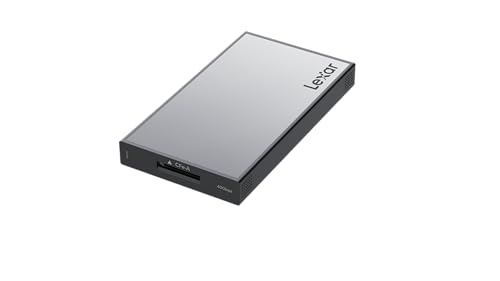
- Up to 1,800 MB/s read and 1,650 MB/s write speeds
- Supports CFexpress 4.0 and 2.0 Type A cards
- USB-C connection with three-year limited warranty
Best For: Users seeking high-speed CFexpress 4.0 Type A transfers
Best Flexible Connection
BENFEI CFexpress Type A Reader

- Up to 10Gbps over USB 3.2 Gen 2
- USB-C and USB-A connectivity
- 18-month warranty and durable housing
Best For: Users who need CFexpress Type A access across USB-C and USB-A computers
Best USB-C Simplicity
Acer CFexpress Type A Card Reader

- Up to 10Gbps USB-C transfers
- Plug-and-play setup
- Works with USB-C computers and mobile devices
Best For: USB-C users transferring CFexpress Type A files to computers, tablets, or smartphones
Best Multi-Format Option
Lexar CFexpress Type A/SD Reader

- Supports CFexpress Type A and SD UHS-II
- Includes USB-C-to-C and USB-C-to-A cables
- Up to 900MB/s CFexpress transfer speed
Best For: Creators who use both CFexpress Type A and UHS-II SD cards
Best Dual-Slot Value
Rocketek CFexpress Type A & SD Reader

- 10Gbps USB 3.2 Gen 2 transfer bandwidth
- Supports CFexpress Type A and SD cards
- Includes USB-C and USB-A connection cables
Best For: Mixed-card workflows and multi-port device compatibility
Best Compact Single-Slot Pick
Rytaki CFexpress Type A Reader

- Dedicated CFexpress Type A card slot
- Up to 10Gbps USB 3.2 Gen 2 bandwidth
- Built-in USB-C and USB-A connectors
Best For: Portable CFexpress Type A transfers
Best Simultaneous-Access Option
Rocketek 2-in-1 CFexpress Type A Reader

- Dual CFexpress Type A and SD card slots
- Up to 10Gbps USB 3.2 Gen 2 transfers
- Compact aluminum body with USB-C and USB-A
Best For: Photographers needing one reader for two card formats
Road-Ready Pro – ProGrade PG09 Dual-Slot Reader
The ProGrade PG09 is a practical memory card reader with cfexpress type a support for photographers and video creators who want fast transfers from both CFexpress Type A and SDXC cards. Its USB 3.2 Gen 2 connection supports transfer rates up to 10 Gbps, while the magnetic design helps create a compact mobile workstation.
Best For: Creators who regularly move CFexpress Type A and SDXC files on the road and value a durable, dual-slot workflow.
Pros:
- Supports CFexpress Type A and SDXC cards in two slots.
- USB 3.2 Gen 2 supports up to 10 Gbps transfer speeds.
- Magnetic attachment and included metal plate suit mobile editing setups.
- Includes a two-year warranty.
Cons:
- Its listed USB connectivity is USB Type A, which may require an adapter for some newer devices.
- The dual-slot design is larger and heavier than compact single-card readers.
The PG09 stands out when you need simultaneous access to two common professional card formats and a reader built for frequent travel. It is a strong choice for editing workflows that benefit from speed, durability, and flexible placement.
Compact Speed Pick – Lexar RW515 CFexpress Type A Reader
The Lexar RW515 is a compact memory card reader with cfexpress type a support, designed for straightforward plug-and-play transfers. It reaches read speeds up to 900 MB/s and write speeds up to 800 MB/s, with a built-in USB-C cable and USB-C-to-USB-A adapter for flexible connectivity.
Best For: Photographers and videographers who want a lightweight, portable CFexpress Type A reader for computers and travel.
Pros:
- Read speeds up to 900 MB/s and write speeds up to 800 MB/s.
- Includes a built-in USB-C cable and USB-C-to-USB-A adapter.
- Compact metal housing is designed for durability and heat dissipation.
- Supports plug-and-play use across multiple Windows and macOS versions.
Cons:
- It has a single CFexpress Type A slot and does not include additional card formats.
- Actual speeds depend on the card, computer, and connection used.
With its small footprint, included connection options, and strong rated speeds, the RW515 is an easy everyday choice. It favors portability and simple operation over multi-card versatility.
Multi-Format Hub – Rytaki Pro 8-Slot Card Reader
The Rytaki Pro is a versatile memory card reader with cfexpress type a support for creators handling several card formats. Its eight slots cover CFexpress Type A and B, XQD, SD, TF, MS, XD, and CF, while USB 3.2 Gen 2 supports transfer rates up to 10 Gbps and simultaneous multi-card reading.
Best For: Professional teams and multi-camera creators who need one reader for a broad mix of cards and devices.
Pros:
- Supports eight card formats, including CFexpress Type A and Type B.
- Allows simultaneous reading from multiple slots.
- Works with Windows, macOS, Linux, iOS, iPadOS, and Android.
- Includes USB Type-A and Type-C connection options and an aluminum chassis.
Cons:
- Its larger multi-slot design is less minimalist than a dedicated single-card reader.
- Only USB-protocol XQD cards are supported.
- Actual transfer speeds depend on the card and host hardware.
This reader is best viewed as a connectivity hub rather than a pocket-size specialist. Its broad format support and simultaneous reading can simplify demanding shoots, especially when different cameras and devices are involved.
Next-Gen Performance – Lexar Workflow CFexpress 4.0 Reader
The Lexar Workflow CFexpress 4.0 is a high-performance memory card reader with cfexpress type a support for newer CFexpress 4.0 cards. It offers rated read speeds up to 1,800 MB/s and write speeds up to 1,650 MB/s over USB-C, while remaining backward-compatible with CFexpress 2.0 Type A cards.
Best For: Creators using CFexpress 4.0 Type A cards who want maximum rated transfer performance through a USB-C workflow.
Pros:
- Supports CFexpress 4.0 Type A cards and is backward-compatible with CFexpress 2.0 Type A.
- Rated read speeds reach 1,800 MB/s, with write speeds up to 1,650 MB/s.
- Aluminum finish is designed for scratch resistance and on-location use.
- Includes a USB-C-to-USB-C cable and a limited three-year warranty.
Cons:
- It has one card slot and supports only CFexpress media.
- USB-C connectivity may require an adapter for devices without USB-C.
- Its highest performance requires compatible CFexpress 4.0 cards and host hardware.
The Workflow reader is the performance-focused option in this group. It makes the most sense for users already invested in CFexpress 4.0 Type A cards and a modern USB-C computer, tablet, or smartphone.
Best Flexible Connection – BENFEI CFexpress Type A Reader
The BENFEI is a practical memory card reader with CFexpress Type A support for users who need both USB-C and USB-A connectivity. Its USB 3.2 Gen 2 interface supports transfers up to 10Gbps when paired with compatible hardware, while the braided cable and aluminum housing add everyday durability.
Best For: Photographers and creators who use computers with either USB-C or USB-A ports.
Pros:
- Supports USB 3.2 Gen 2 transfer rates up to 10Gbps.
- Includes a 2-in-1 USB-C and USB-A cable design.
- Works with Windows, Mac, Linux, and Android devices.
- Backed by an 18-month warranty.
Cons:
- Compatible with CFexpress Type A cards only; it does not support Type B or SD cards.
- Actual speed depends on the card and the connected USB port.
Choose this BENFEI model if broad computer compatibility and a reinforced design matter more than multi-format card support. It is a straightforward single-slot option for CFexpress Type A workflows.
Best USB-C Simplicity – Acer CFexpress Type A Card Reader
The Acer is a compact memory card reader with CFexpress Type A compatibility and a USB-C connection. It supports transfers up to 10Gbps, requires no driver installation, and can connect to laptops, tablets, smartphones, and other USB-C devices that support OTG.
Best For: Mobile creators who want a plug-and-play CFexpress Type A reader for USB-C devices.
Pros:
- Supports USB-C transfer rates up to 10Gbps.
- Plug-and-play operation without additional software.
- Compatible with Windows, Mac, Linux, and Android USB-C devices.
- Aluminum casing helps with heat dissipation.
Cons:
- Supports CFexpress Type A cards only and excludes SD, XQD, and Type B cards.
- Connected devices must support OTG for compatible mobile use.
- It does not provide USB-A connectivity.
The Acer makes sense for a USB-C-focused setup, especially when direct transfers to a tablet or smartphone are part of the workflow. Confirm OTG support and card format before buying.
Best Multi-Format Option – Lexar CFexpress Type A/SD Reader
The Lexar is a versatile memory card reader with CFexpress Type A and SD UHS-II support. Its USB 3.2 Gen 2 connection is rated for up to 10Gbps, with stated transfer speeds of up to 900MB/s for CFexpress Type A cards and 312MB/s for UHS-II SD cards.
Best For: Photographers and videographers who work with both CFexpress Type A and SD UHS-II media.
Pros:
- Supports both CFexpress Type A and SD UHS-II cards.
- Includes USB-C-to-A and USB-C-to-C cables.
- Rated for up to 900MB/s with CFexpress Type A cards.
- Includes a two-year limited warranty.
Cons:
- Its listed 10Gbps interface speed is dependent on the host device and card.
- The supplied details describe one reader slot, so it may not suit users seeking simultaneous dual-card offloads.
Lexar is the strongest fit here when one reader needs to handle both modern CFexpress Type A media and UHS-II SD cards. The included cables also make it adaptable to USB-C and USB-A computers.
Best Dual-Slot Value – Rocketek CFexpress Type A & SD Reader
If you need a memory card reader with CFexpress Type A support plus SD flexibility, this Rocketek model is a practical choice. Its USB 3.2 Gen 2 connection is rated for transfers up to 10Gbps, and both USB-C and USB-A cables are included for connecting to newer and older devices.
Best For: Photographers and videographers who use both CFexpress Type A and SD cards across multiple computers or mobile devices.
Pros:
- Supports CFexpress Type A, SD, SDXC, SDHC, and UHS-I cards.
- USB 3.2 Gen 2 delivers up to 10Gbps transfer bandwidth.
- Includes USB-C-to-C and USB-C-to-A cables.
- Works with Windows, macOS, Linux, Chrome OS, and Android.
Cons:
- Both card slots cannot read simultaneously.
- SD support is listed through UHS-I compatibility.
This reader stands out when you want one compact adapter for CFexpress Type A and SD media, especially if your setup includes a mix of USB-C and USB-A ports. The no-driver plug-and-play design also keeps transfers straightforward.
Best Compact Single-Slot Pick – Rytaki CFexpress Type A Reader
For a focused CFexpress Type A workflow, this compact memory card reader with CFexpress Type A support offers USB 3.2 Gen 2 connectivity and up to 10Gbps bandwidth. Its integrated USB-C and USB-A connectors make it convenient for laptops, tablets, phones, and desktop PCs.
Best For: Creators who primarily use CFexpress Type A cards and want a portable reader for on-the-go transfers.
Pros:
- Designed specifically for CFexpress Type A memory cards.
- USB 3.2 Gen 2 supports up to 10Gbps transfer bandwidth.
- Integrated USB-C and USB-A connectors reduce the need for extra cables.
- Aluminum-alloy housing helps dissipate heat during extended transfers.
Cons:
- Has one card slot and does not support SD cards.
- The listed maximum bandwidth may depend on the host device and card.
Its single-slot design keeps the reader small and focused, while the built-in dual connector setup suits mixed-device workflows. A two-year warranty adds useful coverage for a portable accessory.
Best Simultaneous-Access Option – Rocketek 2-in-1 CFexpress Type A Reader
This memory card reader with CFexpress Type A support pairs a CFexpress Type A slot with an SD slot in a compact aluminum enclosure. It uses USB 3.2 Gen 2 for transfers up to 10Gbps and includes USB-C and USB-A connectivity for flexible use with computers and compatible devices.
Best For: Photographers and filmmakers who want a dual-slot reader with the option to access CFexpress Type A and SD media in one device.
Pros:
- Combines CFexpress Type A and SD card slots.
- Rated for up to 10Gbps USB 3.2 Gen 2 transfers.
- Supports USB-C and USB-A connections.
- Compact aluminum body provides passive heat dissipation.
Cons:
- The product details have inconsistent wording about simultaneous reading.
- Operating-system details specifically list Windows and Mac, despite broader compatibility claims in the bullets.
- Includes a one-year warranty.
This model is appealing if you want dual-slot convenience and a travel-friendly build. Before buying, confirm whether your intended device and workflow support the simultaneous-access behavior you need.
How We Picked the Best Memory Card Reader with Cfexpress Type a
We evaluated each Memory Card Reader with Cfexpress Type a based on advertised interface speed, slot configuration, device compatibility, portability, and practical workflow flexibility. Models supporting USB 3.2 Gen 2 can offer up to 10Gbps under ideal conditions, while newer USB 4-class readers may provide considerably more bandwidth when paired with compatible computers and cards.
We also considered whether a reader supports SD cards, USB-C and USB-A connections, simultaneous transfers, and common professional formats. Real-world performance depends on the card, computer, cable, file sizes, and operating system, so maximum claims should be treated as theoretical limits rather than guaranteed sustained speeds.
Quick Comparison
- Best for a simple CFexpress Type A and SD setup: Choose a compact dual-slot reader.
- Best for mixed media workflows: Consider a multi-format reader with slots for CFexpress, SD, microSD, XQD, or other cards.
- Best for maximum potential speed: Look for a USB-C reader rated above 10Gbps, but confirm your computer supports the required standard.
- Best for flexible connectivity: Select a model with both USB-C and USB-A cables or adapters.
Key Buying Factors for a Memory Card Reader with Cfexpress Type a
Interface and Transfer Speed
USB 3.2 Gen 2 is a practical baseline for fast transfers and is widely supported. A reader advertising 20Gbps or 40Gbps may be preferable for large video projects, but only if the host computer, cable, and card can use that bandwidth. Check whether the quoted speed refers to the USB interface or actual card-read performance.
Slot Layout and Compatibility
A CFexpress Type A slot is essential, but an SD slot can eliminate the need for a second accessory when working with cameras that use both formats. Multi-slot readers are useful for production kits, although they may be larger and more complex. Confirm that the reader supports the exact card types you own; CFexpress Type A and Type B are not interchangeable.
Portability and Build
Travel users should prioritize a compact enclosure, secure card fit, and a cable that stores easily. A sturdier reader may be worthwhile for frequent studio or field use. Built-in cables reduce loose accessories, while removable cables are easier to replace.
Computer and Cable Requirements
USB-C describes the connector, not the speed. Check your computer’s USB generation, Thunderbolt or USB4 support, and cable rating before expecting top performance. USB-A compatibility can be valuable when moving files between newer laptops and older desktop systems.
Who Should Buy Which Memory Card Reader with Cfexpress Type a?
Photographers with one primary camera should choose a compact CFexpress Type A reader, preferably with an SD slot if they use multiple cameras. Videographers handling large project files should prioritize the fastest compatible interface and a well-built USB-C connection. Traveling creators will benefit from a small dual-interface model that works with both modern laptops and older computers. Studios and production teams may prefer a multi-format reader with several slots and simultaneous-read support for consolidating different cards efficiently.