The best high-speed memory card readers make it easier to move photos, videos, and other large files without waiting on slow wireless transfers. The right model depends on your card format, host-device ports, and the transfer speeds your workflow can actually support.
We compared 10 options ranging from compact USB-C adapters to professional CFexpress readers, focusing on compatibility, interface speed, slot selection, and practical everyday convenience.
Best 10 High Speed Memory Card Readers Picks for 2026
Versatile Speed Pick

- Reads SD, microSD, and CompactFlash cards
- Up to 312MB/s for SD and microSD
- Includes USB-C/A cable and two-year warranty
Best For: Mixed-card photo and video workflows
Professional Performance Pick
ProGrade CFexpress Type B Reader
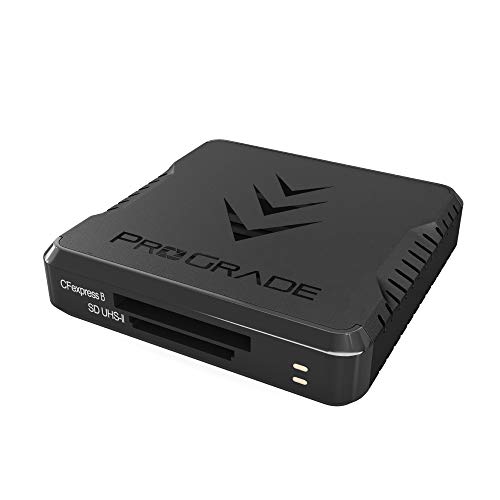
- Reads CFexpress Type B and SD cards
- Up to 1.25GB/s transfer speed
- Magnetic laptop mounting system included
Best For: Professional CFexpress and SD workflows
Compact USB-C Pick
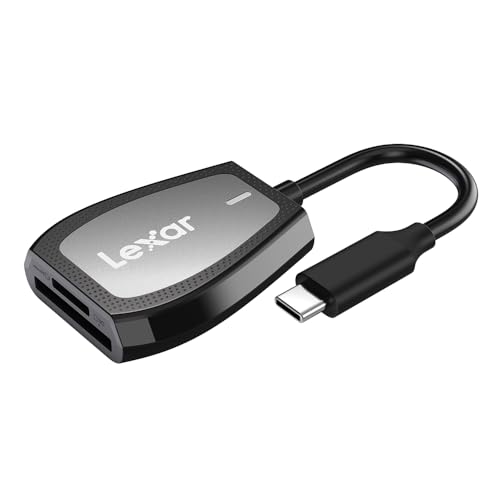
- Reads SD and microSD cards
- Up to 312MB/s read speed
- USB-C with LED activity indicator
Best For: Everyday SD transfers on USB-C computers
Maximum Compatibility Pick

- Supports CF, SD, microSD, and Memory Stick
- USB-C connector with detachable USB adapter
- Plug-and-play support across major platforms
Best For: Cross-device transfers with varied card formats
Best UHS-II Value
UGREEN USB-C SD 4.0 Card Reader

- Up to 312MB/s with UHS-II cards
- Simultaneous SD and microSD access
- Durable aluminum body with braided cable
Best For: Fast UHS-II transfers across USB-C devices
Best for Pro Video Workflows
Lexar CFexpress Type B/SD Card Reader

- Up to 10Gbps USB 3.2 Gen 2 transfers
- Dedicated CFexpress Type B and SD slots
- Includes USB-C cable and USB-A adapter
Best For: Large photo and 8K RAW video offloads
Best Everyday Dual-Interface Pick

- USB-C and USB 3.0 connectivity
- Simultaneous SD and microSD transfers
- Plug-and-play support for major operating systems
Best For: Everyday camera, phone, and laptop file transfers
Best All-in-One Option
SmartQ C368 USB 3.0 Card Reader

- Reads SD, microSD, MS, and CF cards
- Up to 5Gbps USB 3.0 transfers
- Plug-and-play across major operating systems
Best For: Travelers and users with mixed card formats
Best USB-C Hub Design

- Dual SD and microSD slots
- Includes an extra USB 3.0 port
- Aluminum, compact, and plug-and-play
Best For: USB-C laptops, tablets, and compatible smartphones
Best Dual-Connector Pick
Acer USB-C and USB-A Card Reader

- USB-C and USB-A connectivity
- Simultaneous SD and microSD access
- Up to 5Gbps with a compact aluminum build
Best For: Creators switching between USB-C and USB-A devices
Versatile Speed Pick – Lexar 3-in-1 Card Reader
For shoppers comparing high speed memory card readers, the Lexar 3-in-1 stands out with support for SD, microSD, and CompactFlash cards. It reaches up to 312MB/s with SD and microSD media and includes both USB-C and USB-A connectivity options.
Best For: Photographers and content creators who need one compact reader for multiple card formats.
Pros:
- Supports SD, microSD, and CompactFlash cards.
- Offers speeds up to 312MB/s for SD and microSD, and up to 160MB/s for CompactFlash.
- Includes USB-C/A cable and works with USB 3.1 and USB 2.0 ports.
- Backwards compatible with SD and microSD UHS-I cards.
Cons:
- It has no CFexpress slot support.
- Its maximum speeds depend on the card and host port being used.
The Lexar is a practical all-rounder when format flexibility matters. Its three-slot design and included cable make it a strong choice for mixed-card workflows, while the two-year limited warranty adds reassurance.
Professional Performance Pick – ProGrade CFexpress Type B Reader
Among high speed memory card readers, the ProGrade Digital dual-slot model is built for demanding CFexpress Type B and SD workflows. USB 3.2 Gen 2 connectivity supports transfers up to 1.25GB/s, or 10Gb/s, from both cards simultaneously.
Best For: Professional photographers, videographers, and editors using CFexpress Type B and SD cards.
Pros:
- Supports CFexpress Type B and SD cards in a dual-slot design.
- Delivers transfer speeds up to 1.25GB/s through USB 3.2 Gen 2.
- Includes an adhesive metal plate for magnetic laptop mounting.
- Backed by a two-year warranty and Refresh Pro support.
Cons:
- It supports only two card formats.
- Its high-speed performance requires compatible cards and a USB 3.2 Gen 2 connection.
This is the strongest performance-focused option in the group. The simultaneous dual-slot transfers and magnetic mounting system suit fast-moving production environments, especially when CFexpress Type B cards are part of the workflow.
Compact USB-C Pick – Lexar Dual-Slot Card Reader
The Lexar dual-slot reader is a straightforward choice for shoppers seeking high speed memory card readers with USB-C connectivity. It reads SD and microSD cards at speeds up to 312MB/s and includes an LED activity indicator for quick status checks.
Best For: USB-C laptop and desktop users who regularly transfer files from SD or microSD cards.
Pros:
- Supports both SD and microSD cards.
- Provides read speeds up to 312MB/s.
- Uses USB-C connectivity and supports USB 3.2 Gen 1.
- Includes an LED activity light and two-year limited warranty.
Cons:
- It does not support CompactFlash or CFexpress cards.
- The supplied details do not indicate simultaneous transfer speeds for both slots.
Choose this Lexar when you want fast SD and microSD access without extra card-format support. Its USB-C interface and activity light keep the design simple for modern computers.
Maximum Compatibility Pick – 4-in-1 USB-C Card Reader
For broad device and media support, this 4-in-1 model is a flexible alternative among high speed memory card readers. It accepts CF, SD, microSD, and Memory Stick cards, while its USB-C connector and detachable USB adapter support newer and older computers.
Best For: Users moving photos and videos between phones, tablets, Macs, PCs, and multiple card formats.
Pros:
- Provides CF, SD, TF/microSD, and Memory Stick slots.
- Works with USB-C devices and includes a USB adapter.
- Supports plug-and-play OTG transfers across iOS, Android, Windows, and macOS.
- Compatible with common photo and video formats, including JPEG, RAW, H.264, and MPEG-4.
Cons:
- Its listed data transfer rate is 480Mb/s, lower than the fastest readers here.
- It does not support Wi-Fi SD cards.
- It has a one-year warranty.
This reader prioritizes compatibility over peak throughput. Its four slots and dual-connector design make it useful for varied devices and legacy media, but users focused on maximum transfer speed may prefer a USB 3.2 Gen 2 option.
Best UHS-II Value – UGREEN USB-C SD 4.0 Card Reader
For photographers, vloggers, and mobile creators looking for high speed memory card readers, the UGREEN USB-C SD 4.0 reader stands out with support for UHS-II SD and microSD cards and advertised transfer speeds up to 312MB/s. Its two slots also allow simultaneous card access.
Best For: UHS-II card users who need fast transfers and USB-C compatibility across computers, tablets, and supported smartphones.
Pros:
- Supports SD 4.0 UHS-II speeds up to 312MB/s.
- Reads and writes SD and microSD cards simultaneously.
- Works with Windows, macOS, Linux, ChromeOS, iPadOS, and Android.
- Aluminum housing and braided cable are designed for durability.
Cons:
- USB-C connectivity may require an adapter for USB-A-only devices.
- Android phones must support OTG.
Choose this model if your workflow uses UHS-II cards and you want more speed than a typical UHS-I reader. It is also a practical option for moving files between two cards without repeated unplugging.
Best for Pro Video Workflows – Lexar CFexpress Type B/SD Card Reader
The Lexar RW520 is one of the more specialized high speed memory card readers in this lineup, pairing a CFexpress Type B slot with an SD slot. With USB 3.2 Gen 2 support and advertised speeds up to 10Gbps, it is built for moving large photo and video files.
Best For: Camera users working with CFexpress Type B cards, SD cards, high-resolution images, and 8K RAW video.
Pros:
- Supports transfer speeds up to 10Gbps.
- Provides dedicated CFexpress Type B and SD card slots.
- Allows simultaneous offloads from both slots.
- Includes USB-C-to-C cable and USB-C-to-A adapter.
Cons:
- Supports CFexpress Type B rather than other CFexpress formats.
- Its larger 127-gram design is less lightweight than compact readers.
For professional or enthusiast camera workflows, the dual-slot layout and 10Gbps interface can reduce offload time and simplify organization. The included adapter also makes it easier to connect with both newer USB-C and older USB-A computers.
Best Everyday Dual-Interface Pick – uni USB-C/USB 3.0 Card Reader
The uni card reader is a flexible choice among high speed memory card readers for people using both USB-C and USB-A devices. It supports SD and microSD formats, offers transfer speeds up to 5Gbps, and can read two cards simultaneously for everyday photo, video, and file transfers.
Best For: Camera, GoPro, dash cam, surveillance, smartphone, and laptop users who need broad SD and microSD compatibility.
Pros:
- USB-C and USB 3.0 interfaces support speeds up to 5Gbps.
- Reads and writes SD and microSD cards at the same time.
- Plug-and-play operation requires no additional driver or power supply.
- Protective covers help keep dust and liquid away from the slots.
Cons:
- Not compatible with Lightning devices.
- Does not support CFexpress, XQD, SIM, or Memory Stick cards.
- Transfers are limited to the advertised 5Gbps USB interface.
This is a sensible general-purpose reader when you want one accessory for USB-C and USB-A equipment. Its dual-slot design is especially useful for quickly reviewing or copying footage from standard SD and microSD cards.
Best All-in-One Option – SmartQ C368 USB 3.0 Card Reader
The SmartQ C368 is a practical choice among high speed memory card readers if you need broad format support in one compact, plug-and-play device. Its USB 3.0 connection supports transfer speeds up to 5Gbps and it reads SD, microSD, MS, and CF cards independently.
Best For: Travelers, photographers, and users who need one reader for several memory card formats across Windows, macOS, and Linux systems.
Pros:
- Four-in-one support for Micro SD, SD, MS, and CF cards.
- USB 3.0 transfer speeds up to 5Gbps, with USB 2.0 compatibility.
- Driver-free setup with a blue LED status indicator.
Cons:
- Uses a USB Type-A connection rather than USB-C.
- Memory cards are not included.
Choose the C368 when format flexibility matters more than having a built-in USB-C connector. Its independent card reading and small travel-friendly design make it a versatile desktop or mobile-use accessory.
Best USB-C Hub Design – Acer 3-in-1 USB-C Card Reader
The Acer 3-in-1 reader combines dual card slots with an extra USB 3.0 port, making it a useful pick among high speed memory card readers for USB-C laptops, tablets, and compatible phones. It supports transfers up to 5Gbps and can read SD and microSD cards simultaneously.
Best For: USB-C device owners who want card access plus a spare USB-A port for peripherals such as a mouse or keyboard receiver.
Pros:
- Dual slots support SD and microSD cards at the same time.
- Additional USB 3.0 port supports USB-A devices.
- Aluminum shell, compact design, and 15cm cable help with portability and heat management.
Cons:
- Not compatible with Lightning or USB-A host devices.
- Does not support CF, MS, SDUC, UFS, XQD, or UHS-II cards.
- Thick device cases may prevent full connector insertion.
This Acer model is a strong fit for modern USB-C setups, particularly when you want to transfer from two card types without swapping devices. Confirm your card format and device port before buying.
Best Dual-Connector Pick – Acer USB-C and USB-A Card Reader
The Acer ODK4E0 is one of the more flexible high speed memory card readers for users moving between USB-C and USB-A devices. It offers up to 5Gbps USB 3.0 transfers, dual SD and microSD slots, and simultaneous reading and writing for efficient file management.
Best For: Photographers, video editors, and mobile users who need one compact reader for both USB-C and USB-A computers, tablets, and phones.
Pros:
- USB-C and USB-A dual-header design works with a broad range of devices.
- Supports simultaneous reading and writing from SD and microSD cards.
- Compact aluminum construction includes protective port covers and an attached cord.
Cons:
- Does not support CF Express, CF, SIM, XQD, MS, or Memory Stick cards.
- Not compatible with Lightning-port devices.
- Thick cases may interfere with full connector insertion.
Pick this model when connector flexibility and dual-card workflows are priorities. Its broad host-device compatibility is convenient, but users with professional CF or XQD media will need a different reader.
How We Picked the Best High Speed Memory Card Readers
We selected these high-speed memory card readers to cover the most common camera and mobile workflows. The lineup includes single-format and multi-card models, USB-A and USB-C connectivity, UHS-II support, and readers designed for SD, microSD, CompactFlash, and CFexpress Type B cards.
Our comparisons prioritize advertised interface and card-read speeds, but real-world performance can vary. Your memory card, computer or phone port, file size, operating system, and cable all affect transfer results. We also considered portability, simultaneous-slot support, plug-and-play operation, and compatibility with newer devices.
Quick Comparison
- Best for professional CFexpress workflows: Choose a dedicated CFexpress Type B reader with USB 3.2 or 10Gbps connectivity.
- Best for mixed card collections: A multi-card reader with SD, microSD, and CF support reduces the need for separate adapters.
- Best for UHS-II SD cards: Look for a UHS-II-compatible reader and a USB 3.0 or faster connection.
- Best for phones and tablets: A compact USB-C reader is convenient, but confirm that the host device supports external storage and the required file system.
- Best for occasional transfers: A basic USB 3.0 SD or microSD adapter can provide good value without professional features.
Key Buying Factors for High-Speed Memory Card Readers
Card Format and Slot Layout
Check the cards used by your camera or device before choosing a reader. SD and microSD are common, while CF, CFexpress Type B, and other professional formats require dedicated slots. If you use multiple formats, a multi-card reader may be more practical than carrying several adapters.
Connection Speed
USB 3.0, USB 3.1, USB 3.2, and USB 3.2 Gen 2 can support faster transfers than USB 2.0, but the slowest component sets the limit. A high-speed card reader cannot reach its advertised performance when connected to an older port or paired with a slower memory card.
UHS-II and CFexpress Support
UHS-II SD cards use an additional row of contacts and need a compatible reader to reach their full potential. CFexpress Type B cards also require a purpose-built reader and are best matched with a fast USB-C cable and host port.
Device Compatibility and Portability
USB-C is increasingly common on laptops, tablets, and phones, while USB-A remains useful for older computers. Consider whether you need an included adapter, a short built-in cable, dual-slot access, or a compact design for travel.
Who Should Buy Which High Speed Memory Card Readers?
Photographers and videographers: Select a reader that matches your primary card type and supports the fastest interface available on your computer. CFexpress users should choose a dedicated Type B model rather than a generic SD adapter.
Mobile creators: Choose a USB-C reader with SD and microSD support for moving footage directly to a phone or tablet. Verify compatibility with your device and editing app before buying.
Everyday users: A simple USB 3.0 reader is usually sufficient for documents, photos, and occasional backups. Multi-format models are worthwhile if your household uses several card types.