Choosing among telescope guide cameras for beginners can feel complicated when sensor size, compatibility, software, and mounting hardware all affect the result. The right option depends on whether you want hands-on guiding, a simple planetary camera, or an all-in-one smart telescope workflow.
This roundup covers practical camera and guide-scope options alongside beginner-focused manuals for popular astrophotography systems. Use the buying guide below to match your experience level, telescope, and imaging goals before you buy.
Best 10 Telescope Guide Cameras for Beginners Picks for 2026
High-Speed Planetary Pick

- IMX662 sensor with low readout noise
- 1920×1080 capture at up to 107 FPS
- ST4 interface plus USB 3.0 connectivity
Best For: Computer-based planetary imaging and guiding
Compact Guiding Companion
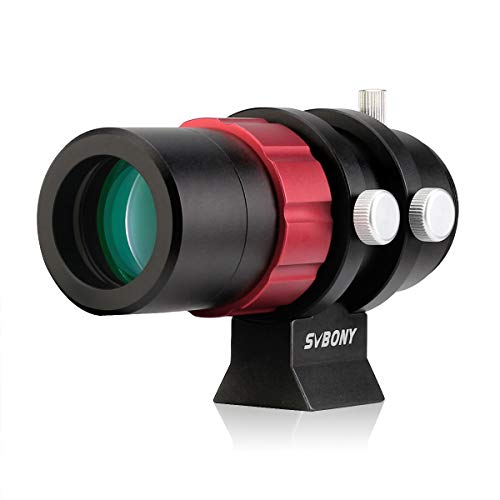
- 30mm aperture with F4 wide-field optics
- 45mm back focus for focus adjustment
- Supports 1.25-inch and M42 camera interfaces
Best For: Lightweight beginner autoguiding setups
Beginner-Friendly Starter
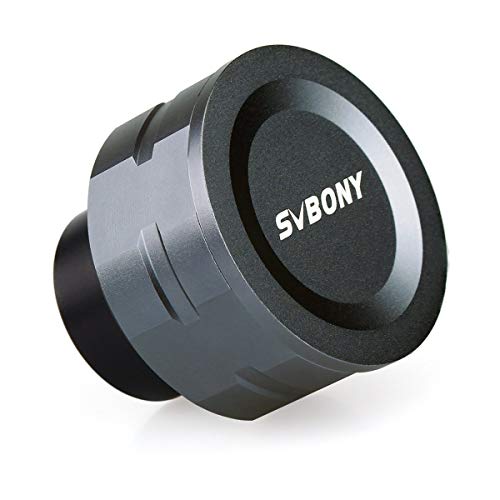
- Plug-and-play USB 2.0 operation
- 1920×1080 video at up to 30 FPS
- 1.25-inch color camera for lunar and planetary use
Best For: First-time Moon and bright-planet imaging
Learning Resource
The Beginner’s Guide to Astrophotography

- Explains gear, setup, exposure, and focus
- Covers lunar, planetary, and deep-sky subjects
- Includes planning and post-processing guidance
Best For: Learning astrophotography fundamentals before buying gear
DWARF Mini Learning Companion

- Illustrated setup and app instructions
- Deep-sky and solar imaging guidance
- Includes target, settings, and troubleshooting aids
Best For: DWARF Mini owners learning guided observing and astrophotography
Field Stargazing Foundation
The Ultimate Beginner Telescope Guide

- Covers telescope selection and setup
- Helps locate planets and deep-sky objects
- Includes astrophotography and smart-telescope basics
Best For: New Northern Hemisphere stargazers wanting a broad field guide
All-Camera Imaging Handbook
Astrophotography Guide for Beginners

- Works with cameras, phones, and smart telescopes
- Covers capture through image processing
- Organizes sessions with the STELLAR Method
Best For: Beginners building practical night-sky photography skills
Dwarf 3 Learning Companion
Dwarf 3 Smart Telescope User Guide
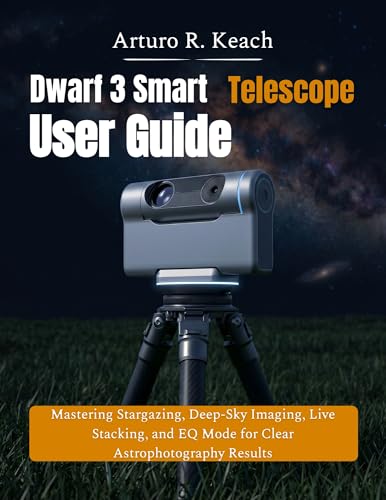
- Covers setup, app use, and first-night operation
- Explains EQ Mode, stacking, filters, and FITS export
- Includes checklists and troubleshooting guidance
Best For: Dwarf 3 users progressing from first setup to advanced imaging
Seestar Beginner Roadmap
ZWO Seestar S50 Guide for Beginners

- Simplifies setup and app navigation
- Explains alignment, AI tracking, and live stacking
- Includes targets, seasonal guides, and image tips
Best For: New Seestar S50 owners starting astrophotography
Seestar S50 Pro Deep-Dive

- Covers setup, GoTo, autofocus, and plate solving
- Includes EQ, Milky Way, mosaic, and stacking workflows
- Adds projects, checklists, processing, and troubleshooting
Best For: S50 Pro users wanting a detailed long-term reference
High-Speed Planetary Pick – SV305C Pro Telescope Camera
For beginners comparing telescope guide cameras for beginners, the SVBONY SV305C Pro is a feature-rich option focused on planetary imaging and guiding. Its IMX662 sensor, 1920×1080 capture at up to 107 frames per second, USB 3.0 transfer, and ST4 interface support a streamlined computer-based setup.
Best For: Beginners who want high-speed planetary video and a camera that can also connect with guiding software.
Pros:
- IMX662 sensor offers high sensitivity and low readout noise.
- Captures 1920×1080 video at up to 107 FPS for fast-moving planets.
- Includes USB 3.0, an ST4 guiding interface, and PHD2/ASCOM compatibility.
- 128MB DDR buffer and heat dissipation support extended capture sessions.
Cons:
- Requires a computer; it does not support iPads.
- Manual exposure and focus controls may require a learning period.
The SV305C Pro is a strong choice when speed and guiding compatibility matter more than a simple tablet-based workflow. It is especially appealing for users ready to explore planetary capture and computer-assisted tracking.
Compact Guiding Companion – SV165 30mm Guide Scope
The SVBONY SV165 is a compact guide scope for beginners building a telescope guiding setup. Its 30mm aperture, F4 optics, 45mm back focus, and 1.25-inch/M42 interfaces are designed to work with compatible autoguiding cameras from SVBONY, ZWO, QHY, Orion, and other brands.
Best For: Beginners who need a lightweight guide scope to pair with a compatible autoguiding camera for deep-sky tracking.
Pros:
- Compatible with mainstream autoguiding cameras and 1.25-inch/M42 connections.
- F4 optics provide a wide field of view for locating targets.
- 45mm back focus allows straightforward focus adjustment.
- Nylon-tipped thumbscrews help avoid scratching the scope tube.
Cons:
- Some cameras may need additional accessories to reach focus.
- It cannot be used with a dielectric mirror star diagonal.
- An eyepiece produces an inverted image, which may surprise first-time users.
This is a practical supporting component rather than a standalone camera. Check your camera’s mounting and focus requirements before buying, but the compact design and wide field of view make it approachable for a beginner guiding rig.
Beginner-Friendly Starter – SV105 Telescope Camera
The SVBONY SV105 is a straightforward entry point for beginners exploring telescope guide cameras for beginners and basic planetary imaging. This 1.25-inch USB 2.0 color camera uses an IMX307 sensor, records 1920×1080 video at up to 30 FPS, and connects to a laptop or PC for live viewing and recording.
Best For: First-time astrophotographers who want a simple camera for the Moon, bright planets, and terrestrial targets.
Pros:
- Plug-and-play design requires no driver installation.
- 1.25-inch format and M28.5×0.6 thread support telescope filters.
- 1920×1080 capture at up to 30 FPS is suitable for lunar and planetary video.
- Works with Windows, Linux, and macOS computer systems through compatible software.
Cons:
- USB 2.0 and 30 FPS are less suited to high-speed planetary capture.
- It is not compatible with Apple phones or tablets.
- Its intended use is mainly the Moon, planets, and other bright targets.
The SV105 keeps the initial learning curve manageable and is a sensible choice for casual lunar or planetary recording. Choose it when ease of use matters more than advanced guiding features or faster transfer speeds.
Learning Resource – The Beginner’s Guide to Astrophotography
The Beginner's Guide to Astrophotography: How to Capture the Cosmos with Any Camera
Check Price On AmazonAlthough it is not a telescope camera, this book is a useful companion for anyone researching telescope guide cameras for beginners. It explains equipment, setup, exposure, focusing, planning, and post-processing in accessible language, helping new users understand how a camera fits into a broader astrophotography workflow.
Best For: Beginners who want practical instruction before choosing or operating astrophotography equipment.
Pros:
- Covers gear, camera settings, focusing, composition, and post-processing.
- Applies to smartphones, DSLRs, and mirrorless cameras.
- Includes guidance for the Moon, planets, Milky Way, nebulae, galaxies, and more.
Cons:
- It does not include a telescope camera or guiding hardware.
- Readers seeking camera-specific software instructions may need additional resources.
This is best viewed as a foundation-building guide rather than a replacement for equipment research. Its broad coverage can help beginners make more informed choices about cameras, accessories, and their first observing sessions.
DWARF Mini Learning Companion – DWARF Mini User Guide
For beginners seeking telescope guide cameras for beginners, this illustrated manual is a focused companion for turning the DWARF Mini into a more capable observing and imaging tool. It covers setup, app controls, target selection, tracking, solar safety, and practical astrophotography workflows.
Best For: DWARF Mini owners who want structured help with setup, deep-sky imaging, solar observation, and troubleshooting.
Pros:
- Provides step-by-step setup and DWARFLAB app guidance.
- Covers deep-sky, solar, lunar, wildlife, landscape, and daytime photography.
- Includes practical bonuses such as target lists, settings references, and troubleshooting aids.
Cons:
- Its advice is specifically centered on the DWARF Mini.
- It is a user guide rather than a broad introduction to all telescope types.
This is the most specialized option in the roundup. Choose it if you already have a DWARF Mini and want a single reference for operating it more confidently.
Field Stargazing Foundation – The Ultimate Beginner Telescope Guide
Among telescope guide cameras for beginners, this field-edition guide takes a broader route: it explains telescope selection, setup, finding celestial objects, introductory astrophotography, and smart telescopes. Its spiral-bound format is suited to keeping a practical reference nearby while observing.
Best For: New stargazers who need a general telescope and night-sky field guide, particularly in the Northern Hemisphere.
Pros:
- Covers choosing, setting up, and using a telescope.
- Explains how to find planets, galaxies, nebulae, and star clusters.
- Includes introductory astrophotography and smart-telescope guidance.
Cons:
- The supplied description says it is primarily for Northern Hemisphere observers.
- Its broad coverage may be less detailed for owners seeking device-specific instructions.
This is a strong all-around starting point for beginners who want help both operating a telescope and deciding what to observe. The field format adds practical appeal for observing sessions.
All-Camera Imaging Handbook – Astrophotography Guide for Beginners
For beginners comparing telescope guide cameras for beginners with broader imaging instruction, this guide focuses on photographing the night sky with smartphones, cameras, traditional telescopes, and smart telescopes. It combines capture advice with stacking, processing, and workflow guidance.
Best For: Beginners who want to photograph stars, the Milky Way, planets, nebulae, or galaxies using equipment they already own.
Pros:
- Supports smartphones, DSLRs, mirrorless cameras, traditional telescopes, and smart telescopes.
- Explains exposure, focusing, stacking, light-pollution removal, and beginner processing workflows.
- Uses a seven-step STELLAR Method to organize imaging sessions.
Cons:
- Its wide equipment coverage may feel less specialized than a single-device manual.
- Some processing sections involve software such as DeepSkyStacker, Siril, GraXpert, or PixInsight.
This is the most versatile choice for beginners whose equipment may change or who want to progress beyond basic telescope operation. It is especially useful when image processing is part of the goal.
Dwarf 3 Learning Companion – Dwarf 3 Smart Telescope User Guide
For beginners comparing telescope guide cameras for beginners, this Dwarf 3 guide is a practical choice if you want structured help with setup, smart-telescope controls, and astrophotography workflows. It focuses on the DWARFLAB app, AZ and EQ modes, live stacking, filters, and troubleshooting.
Best For: Dwarf 3 owners who want step-by-step guidance from first setup through more advanced imaging.
Pros:
- Covers setup, Wi-Fi and NFC pairing, app navigation, and first-session procedures.
- Explains EQ Mode, polar alignment, 60-second exposures, dark frames, and live stacking.
- Includes target-based settings, checklists, a glossary, and troubleshooting advice.
Cons:
- Written specifically for the Dwarf 3, so it may not suit owners of other smart telescopes.
- It is an independent guide and does not replace the manufacturer’s official manual.
Its broad coverage makes it useful for beginners who want one reference for both basic operation and deeper imaging features, including FITS export and in-app enhancement tools.
Seestar Beginner Roadmap – ZWO Seestar S50 Guide for Beginners
Among telescope guide cameras for beginners, this Seestar S50 guide stands out for its beginner-first approach to setup, app navigation, automated alignment, tracking, and image stacking. It is designed to reduce guesswork for new owners building an astrophotography routine.
Best For: First-time Seestar S50 users seeking simple instructions and beginner-friendly target guidance.
Pros:
- Explains setup, app controls, target selection, and core smart features in accessible language.
- Covers the Moon, planets, and deep-sky imaging, including galaxies and nebulae.
- Adds seasonal sky guides, common-mistake prevention, and practical image-improvement tips.
Cons:
- Its focus is the Seestar S50 rather than general telescope operation.
- The supplied details do not indicate extensive standalone image-processing instruction.
This is a straightforward option for beginners who want to understand the S50’s automated workflow and start capturing shareable images without being overwhelmed by technical terminology.
Seestar S50 Pro Deep-Dive – Seestar S50 Pro User Guide
For shoppers comparing telescope guide cameras for beginners, this Seestar S50 Pro guide is the most expansive option in the group. It combines beginner setup instructions with detailed workflows for GoTo, autofocus, plate solving, EQ Mode, live stacking, Milky Way imaging, processing, and maintenance.
Best For: S50 Pro owners who want a comprehensive reference that can support both basic use and more advanced projects.
Pros:
- Provides step-by-step coverage of leveling, connection, controls, focusing, and smart tracking.
- Includes deep-sky, Milky Way, wide-field, mosaic, lunar, and solar-imaging workflows.
- Offers practical exercises, recommended settings, checklists, projects, and troubleshooting.
Cons:
- Its 353-page length may be more detail than beginners need for a quick start.
- It is tailored to the S50 Pro, limiting its usefulness with unrelated telescope models.
Choose this guide if you prefer a substantial long-term reference rather than a short introduction. Its combination of operating instructions, imaging projects, processing guidance, and maintenance advice gives it room to remain useful as your skills develop.
How We Picked the Best Telescope Guide Cameras for Beginners
We evaluated the selected products for beginner usefulness, setup difficulty, compatibility, imaging purpose, and the clarity of their instructions. Camera models were considered for sensor performance, connection speed, form factor, and suitability for guiding or basic planetary and lunar imaging. Guidebooks were assessed for step-by-step coverage, practical troubleshooting, and relevance to current smart-telescope workflows.
Not every item here is a standalone guide camera. Some are guide scopes, while others are instructional resources for smart telescopes and general astrophotography. That distinction matters: a camera may require a separate guide scope and computer, whereas a smart telescope can handle much of the capture process internally.
Quick Comparison
| Best For | Look For | Typical Setup |
|---|---|---|
| Basic guiding | Small, compatible guide camera and scope | Camera, guide scope, mount, computer |
| Planetary imaging | Fast USB connection and suitable CMOS sensor | Camera, telescope, capture software |
| Simple deep-sky imaging | Integrated smart-telescope controls | Smart telescope and mobile app |
| Learning before buying | Clear setup and imaging instruction | Guidebook matched to your equipment |
Key Buying Factors for Telescope Guide Cameras for Beginners
Compatibility Comes First
Check the camera’s connection type, barrel size, mounting threads, operating-system support, and compatibility with your mount and guiding software. A 1.25-inch camera may fit many focusers, but adapters or additional accessories can still be necessary. Confirm that your mount supports the guiding method you plan to use.
Sensor and Imaging Purpose
For guiding, sensitivity and reliable software support are usually more important than high resolution. For lunar and planetary work, a fast USB connection and a sensor suited to your telescope’s field of view can be more valuable. Color cameras simplify first experiments, while monochrome systems may offer more flexibility with filters and advanced imaging.
Mounting and Setup Requirements
A guide camera alone does not create a guiding system. You may also need a guide scope, mounting rings, cables, a powered hub, and a computer. Keep the optical arrangement rigid to prevent flexure, and make sure the guide scope is securely aligned with the main telescope.
Software and Learning Curve
Beginners should favor products with straightforward drivers, broad software support, and clear documentation. Manuals are especially useful when learning polar alignment, focusing, calibration, live stacking, or EQ mode. Choose instructions written for your exact smart-telescope model whenever possible.
Who Should Buy Which Telescope Guide Cameras for Beginners?
Choose a dedicated camera and guide scope if you want to learn traditional autoguiding, use a computer-controlled mount, or build a flexible astrophotography system over time.
Choose a compact color camera if your priority is affordable lunar and planetary imaging with a familiar 1.25-inch telescope connection and minimal equipment.
Choose a smart-telescope guide if you already own, or plan to buy, a Dwarf or Seestar system and want model-specific setup, live-stacking, or deep-sky instructions.
Choose a general astrophotography guidebook if you are still comparing equipment or want broader help with stars, the Milky Way, planets, nebulae, and galaxies. In every case, verify current software requirements and included accessories before ordering.