The best robotics sets for middle school students turn screen time into hands-on problem solving. The right kit can teach coding, electronics, mechanical design, and engineering concepts while keeping students engaged through projects they can build and control.
This roundup compares 10 options across beginner-friendly robots, Arduino-compatible vehicles, programmable arms, modular construction systems, and classroom-ready platforms. Use the guide below to match each kit’s programming tools, complexity, age range, and expansion potential to the student.
Best 10 Robotics Sets for Middle School Students Picks for 2026
Best Beginner Coding Pick

- Quick 15-minute assembly
- Scratch and Arduino support
- Expandable with modules and LEGO parts
Best For: Beginners who want guided coding and multiple robot play modes
Best Sensor-Rich Robot Car

- Arduino-compatible controller
- FPV camera and Wi-Fi module
- Line tracking and obstacle avoidance
Best For: Students ready for guided Arduino and sensor-based vehicle projects
Best Multi-Model Introduction
Thames & Kosmos Smart Machines

- Build eight motorized machines
- Ultrasonic sensor programming
- 64-page illustrated manual
Best For: Students who enjoy varied builds and app-guided robotics
Best Advanced Teen Engineering Kit

- 52 electronic components
- Scratch and Python support
- Story-led modular learning
Best For: Students 12+ ready for deeper robotics and programming
Best Advanced 3-in-1 Pick

- Builds three different robot designs
- Supports Scratch and Arduino programming
- Includes sensors and durable metal parts
Best For: Students ready for varied builds and progressive coding
Best Classroom-Ready System
TETRIX Prime Remote Control Kit

- Includes 290+ construction components
- Teaches design, electronics, and wireless control
- Comes with rechargeable power and guided activities
Best For: Ages 13+ and collaborative middle school projects
Best Mechanical Coding Starter
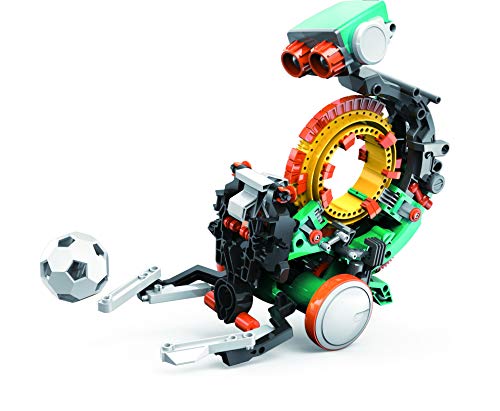
- Programs actions with a mechanical coding wheel
- Build requires multiple hours of hands-on work
- Introduces engineering and coding basics
Best For: Beginning engineers who prefer physical, screen-free coding
Best Value 3-in-1

- Three buildable robot designs
- 560 pieces with guided assembly
- Remote and app programming
Best For: Beginner builders ages 8–14
Best for Coding Progression
ACEBOTT Programmable Robot Car

- Scratch, Arduino, and Python support
- 16 guided story-based tutorials
- Code using computers or mobile devices
Best For: Learners progressing from beginner to advanced coding
Best Advanced Build

- 5DOF arm with modular tank platform
- Four possible robot configurations
- Scratch and Arduino compatibility
Best For: Students ages 12+ ready for advanced robotics
Best Beginner Coding Pick – Makeblock mBot
For families looking at robotics sets for middle school students, the Makeblock mBot offers an approachable introduction to electronics, construction, and programming. It can be assembled in about 15 minutes and supports both Scratch and Arduino learning.
Best For: Beginners who want a quick-build robot with guided coding lessons and several play modes.
Pros:
- Supports step-by-step learning with Scratch and Arduino.
- Includes building instructions, coding cards, lessons, and access to Makeblock apps and mBlock software.
- Can operate as a remote-control car with line-following and obstacle-avoidance functions.
- Open-source design works with more than 100 electronic modules and 500 parts from the Makeblock platform, plus LEGO parts.
Cons:
- CR2025 and four AA batteries are not included.
- The listed recommended age begins at 8, so advanced students may eventually want add-on packs or more challenging projects.
The mBot is a practical entry point for students who are new to robotics. Its short assembly time and guided software make it easy to start, while the expandable platform leaves room for continued experimentation.
Best Sensor-Rich Robot Car – ELEGOO UNO R3 Smart Robot Car
The ELEGOO UNO R3 Smart Robot Car is a strong option among robotics sets for middle school students who want to build, code, and drive a working vehicle. Its guided wiring, Arduino programming, camera, and sensors create several hands-on engineering projects.
Best For: Students interested in Arduino coding, live FPV video, sensor experiments, and programmable vehicle projects.
Pros:
- Includes line tracking, obstacle avoidance, auto-follow functions, app control, and IR remote control.
- Onboard camera and Wi-Fi module support live FPV video.
- Keyed connectors and an illustrated tutorial help reduce wiring mistakes for beginners.
- Includes a rechargeable 2000 mAh lithium-ion battery and multiple sensors and motors.
Cons:
- Arduino IDE programming and the electronics assembly may require adult guidance for first-time builders.
- The listed manufacturer recommendation is 12 years and up, making it less suitable for younger beginners.
This kit goes beyond simple assembly by giving students a platform for modifying movement, sensor responses, and routes. It is especially appealing for robotics clubs, STEM classes, or learners ready for more involved Arduino projects.
Best Multi-Model Introduction – Thames & Kosmos Smart Machines
Thames & Kosmos Smart Machines gives students a structured way to explore robotics through eight motorized builds. For families comparing robotics sets for middle school students, its illustrated manual and app-based programming make the kit approachable while introducing ultrasonic sensing.
Best For: Learners who prefer model variety, visual instructions, and app-based coding challenges.
Pros:
- Builds eight different motorized machines.
- Uses an ultrasonic sensor based on sonar principles to let robots respond to feedback.
- Includes a full-color, 64-page step-by-step manual.
- Provides building blocks, motors, gears, a Bluetooth battery box, and a part separator tool.
Cons:
- A compatible iOS or Android tablet or smartphone is required and not included.
- Programming depends on the app interface, which may offer less flexibility than a kit centered on Arduino or Python.
Smart Machines is a good fit when repeated building and clear instruction matter more than advanced programming. Its eight models help maintain interest while the ultrasonic sensor demonstrates a useful real-world robotics concept.
Best Advanced Teen Engineering Kit – WhalesBot E9 Pro
The WhalesBot E9 Pro is designed for older students seeking a deeper robotics experience. Among robotics sets for middle school students, it stands out with 52 electronic components, 12 servo motor joints, multiple sensors, and support for both Scratch-style and more advanced programming workflows.
Best For: Students ages 12 and up who want story-led missions, modular construction, and a path from block coding toward Python programming.
Pros:
- Includes a smart controller, three sensors, 16 motors, and two dot-matrix displays.
- Supports mobile app coding and PC programming, including Scratch and Python learning.
- Comes with a parts list, two illustrated storybooks, and a comprehensive user manual.
- Modular design and WhalesBot 3D software encourage custom digital and physical builds.
Cons:
- At 9.2 pounds, it is substantially larger and heavier than the other kits in this roundup.
- The higher component count and broader programming options may be more demanding for beginners.
The E9 Pro is best viewed as a long-term learning platform rather than a quick weekend toy. Its mission-based lessons can make complex building and coding more approachable while leaving room for advanced experimentation.
Best Advanced 3-in-1 Pick – Makeblock mBot Ranger
For shoppers comparing robotics sets for middle school students, the Makeblock mBot Ranger offers a hands-on step up from beginner kits. Students can build three different robots, explore sensors, and program their creations with Scratch or Arduino through the mBlock5 app.
Best For: Young builders who want multiple robot configurations, app control, and a progression from beginner coding toward more advanced programming.
Pros:
- Three configurations include a tracked Land Raider, self-balancing Nervous Bird, and three-wheeled Dashing Raptor.
- Supports Scratch and Arduino programming with guidance through the mBlock5 app.
- Includes multiple sensors and sturdy metal parts for indoor or outdoor play.
- Combines robotics, coding, engineering, and problem-solving practice.
Cons:
- Requires six AA or lithium batteries, which are not included.
- Its many modules and configurations may require more build time and guidance than a basic kit.
The Ranger is a versatile choice for students who may outgrow a single-purpose robot quickly. Its three builds and broad sensor selection provide plenty of room for experimentation, while the Scratch-to-Arduino path supports continued learning.
Best Classroom-Ready System – TETRIX Prime Remote Control Kit
The TETRIX Prime Remote Control Robotics Educational Kit is designed specifically for middle school learning. With more than 290 construction pieces, a wireless controller, rechargeable power, and structured activities, it suits students working through engineering and robotics projects individually or in teams.
Best For: Ages 13 and up, classroom or group projects, and students interested in mechanical design, electronics integration, and remote-control systems.
Pros:
- Curriculum-aligned activities support grades 6-8 engineering learning.
- Includes aluminum and plastic building components, gears, wheels, hubs, brackets, and a gripper kit.
- Provides a four-channel wireless controller, rechargeable battery pack, charger, and servos.
- Comes with a storage bin, builder’s guide, and materials for robot-course activities.
Cons:
- At 11.2 pounds, it is substantially heavier than simpler robotics sets.
- The large component count and systematic design may be demanding for younger or first-time builders.
Among robotics sets for middle school students, TETRIX Prime stands out as a structured learning system rather than a quick-build toy. It is especially practical where collaborative design, testing, and engineering documentation are part of the experience.
Best Mechanical Coding Starter – TEACH TECH Mech-5
The TEACH TECH Mech-5 is a focused entry point for robotics sets for middle school students who enjoy building with their hands. Instead of app-based programming, students snap coding buttons onto a mechanical coding wheel to make the robot throw, lift, kick, draw, and perform other actions.
Best For: Ages 10 and up, beginning engineers, and learners who prefer a tangible introduction to mechanical engineering and coding concepts.
Pros:
- Mechanical coding wheel lets students program several physical actions.
- Provides an in-depth, hands-on build rather than a pre-assembled toy.
- Mission-based activities introduce coding, problem-solving, and mechanical engineering principles.
- Includes step-by-step assembly instructions and a one-year manufacturer defect warranty.
Cons:
- Assembly can take multiple hours and requires careful attention to the instructions.
- Uses two AAA batteries, which are not listed as included.
- Offers mechanical button-based coding rather than app or text-based programming.
Mech-5 is a strong choice when the goal is to make coding concepts visible and physical. Its narrower programming system is less expandable than app-connected kits, but the build-and-test format can make mechanical cause and effect approachable for younger students.
Best Value 3-in-1 – Kyanio STEM Robotics Kit
For shoppers comparing robotics sets for middle school students, the Kyanio kit combines 560 building pieces with three robot designs, remote control, and app programming. Its color-coded parts and step-by-step instructions make it a practical introduction to mechanical construction and coding.
Best For: Beginners ages 8–14 who want a build-focused robotics set with multiple models and both manual and app-based control.
Pros:
- Builds three designs: a robot, tracked vehicle, and mechanical cannon tank.
- Includes 560 blocks, color-coded parts, and guided instructions.
- Supports remote control and app programming, with Type-C charging.
Cons:
- The educational programming depth may be more introductory than advanced Arduino- or Python-based kits.
- It is designed for indoor use.
The Kyanio is a strong choice when hands-on building and play value matter most. It offers broad age coverage and multiple construction options, though older students seeking advanced coding languages may want a more electronics-focused kit.
Best for Coding Progression – ACEBOTT Programmable Robot Car
Among robotics sets for middle school students, the ACEBOTT robot car stands out for its progression from Scratch block coding to Arduino and Python. The ESP32-based kit also supports coding on computers, tablets, and smartphones, making it flexible for classroom or home learning.
Best For: Students ages 8–16 who want a robotics platform that can develop from beginner block coding into text-based programming.
Pros:
- Supports Scratch, Arduino, and Python for multiple skill levels.
- Includes 16 story-based tutorials, HD videos, and illustrated instructions.
- Works with mobile devices as well as computers and includes app and IR remote control.
Cons:
- Batteries are not included.
- The product is primarily a single smart car kit rather than a multi-model construction set.
This ACEBOTT model is a particularly sensible pick for students who may continue beyond beginner coding. Its mobile-friendly design and guided lessons reduce the setup barrier, while Arduino and Python compatibility provide room for more advanced projects.
Best Advanced Build – ACEBOTT 4-in-1 Robot Arm Tank
For older middle school students comparing robotics sets for middle school students, this ACEBOTT kit adds a 5DOF robotic arm to a modular tank-car platform. Students can build several configurations, program movement with Scratch or Arduino, and explore gripping, lifting, navigation, and traction.
Best For: Students ages 12 and up who want a more challenging robotics project involving a programmable arm, tracked driving, and modular builds.
Pros:
- Offers four configurations using the robot car, tank tracks, and 5DOF arm components.
- Includes 16 tutorials and HD assembly videos for guided learning.
- Supports Arduino and Scratch, plus app and IR remote control.
- Rubber tracks are designed for grass, gravel, slopes, and carpet.
Cons:
- Its 12+ recommendation and multi-part design may be demanding for younger beginners.
- The supplied details do not list Python support for this model.
This is the most capable option in the group for students ready to move beyond a basic robot car. The arm-and-tank combination creates more ambitious mechanical and coding challenges, while the tutorials help make the advanced build approachable.
How We Picked the Best Robotics Sets for Middle School Students
We evaluated these kits by looking at the skills they support, the age and experience they target, the programming languages or platforms available, and the kind of hardware students build. We also considered whether a set encourages repeated projects rather than offering only one finished model.
Important differences include block-based coding versus text-based programming, Arduino compatibility, motor and sensor variety, construction flexibility, and whether the kit is better suited to independent play, guided learning, or classroom use. Because middle school students have widely different experience levels, the list includes both accessible starter systems and more demanding engineering platforms.
Quick Comparison
| Best For | Look For |
|---|---|
| First robotics project | Visual coding, simple assembly, and clear instructions |
| Arduino learning | Microcontroller compatibility, sensors, and programmable motors |
| Mechanical engineering | Durable structural parts, gears, joints, and multiple configurations |
| Advanced students | Python support, more sensors, servo control, and open-ended builds |
| Classroom programs | Reusable components, curriculum support, and scalable project options |
Key Buying Factors for Robotics Sets for Middle School Students
Age and Difficulty
Choose a kit that is challenging without requiring constant adult intervention. Beginners generally benefit from guided builds and Scratch-style programming, while experienced students may prefer Arduino or Python access and fewer restrictions on design.
Programming Options
Block coding is useful for learning logic, loops, conditions, and sequencing. Arduino compatibility adds electronics and text-based programming, while Python support may provide a stronger path toward advanced robotics and automation.
Build Flexibility
Check whether the set supports multiple robots or configurations. Modular kits offer more long-term value because students can redesign mechanisms, test different drive systems, and learn from failed prototypes.
Hardware and Durability
Review the number and type of motors, servos, sensors, wheels, structural pieces, and electronic modules. A larger component set is not automatically better; reliable parts and clear documentation matter just as much.
Support and Project Guidance
Instructions, example code, app support, tutorials, and an active user community can make the difference between a rewarding project and a frustrating one. Also confirm whether batteries, a compatible computer, or tools are required separately.
Who Should Buy Which Robotics Sets for Middle School Students?
Choose a beginner-oriented Makeblock, Thames & Kosmos, Kyanio, or TEACH TECH set for a student who is new to robotics and needs approachable projects. Arduino-compatible car kits from ELEGOO or ACEBOTT are a stronger fit for learners interested in electronics, sensors, and app-controlled programming.
Students who enjoy constructing complex mechanisms should consider the Makeblock Ranger or TETRIX Prime. The WhalesBot E9 Pro is better suited to structured educational use and students ready to explore servo-driven designs, Scratch, and Python. For older or more advanced learners, the ACEBOTT robotic arm and tank-car kit offers a broader challenge with multiple build types and degrees of freedom.
Before buying, match the kit to the student’s current ability, available setup time, and interest—coding, vehicles, mechanical design, or open-ended engineering. That alignment is usually more important than choosing the kit with the most parts.