The best compact laptops balance easy portability with the performance, keyboard comfort, battery life, and screen quality you need every day. This roundup covers Windows laptops, Chromebooks, and flexible 2-in-1 designs for work, school, travel, and home use.
Before choosing, consider which operating system fits your software needs, how much storage and memory you require, and whether a smaller display or specialized mini-laptop design will improve your setup.
Best 10 Compact Laptops Picks for 2026
Everyday Productivity Pick

- 512GB SSD and Windows 11 Home
- Full HD matte display with 120Hz refresh rate
- Numeric keypad, Wi-Fi 6, and onsite service
Best For: Students, business users, and home productivity
Travel-Friendly Value Choice

- 3.3-pound slim design with 10,000mAh battery
- 8GB RAM and expandable SSD storage
- Webcam privacy switch and dedicated numeric keypad
Best For: Travelers, commuters, and everyday business users
Best Convertible Chromebook
Lenovo IdeaPad Flex 3i Chromebook

- 12.2-inch WUXGA touchscreen with 360-degree hinge
- 2.8 pounds with up to 12 hours of battery life
- ChromeOS updates listed through June 2031
Best For: Students, online learning, and cloud-based work
Simple Windows Study Laptop

- Quad-core Intel N150 processor up to 3.6GHz
- Compact 14-inch Windows 11 design
- Includes Office for the Web and Wi-Fi 6 compatibility
Best For: Web browsing, schoolwork, and basic home productivity
Best Budget Chromebook

- 14-inch anti-glare HD display
- Up to 14 hours of claimed battery life
- Chrome OS with Android app support
Best For: Students, browsing, streaming, and everyday cloud-based tasks
Best Tiny Windows 2-in-1
KOOFORWAY 10.1-Inch Mini Laptop
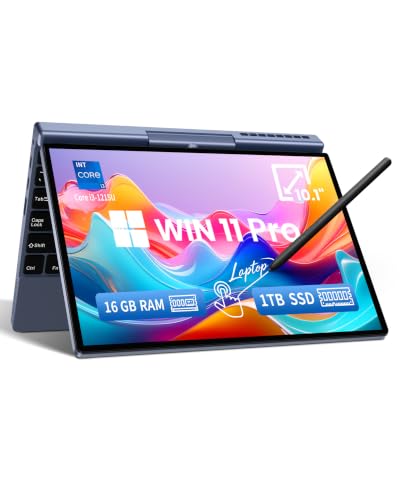
- 12th Gen Intel Core i3 performance
- Full HD touchscreen with optional stylus support
- Wi-Fi 6 and expandable SSD storage
Best For: Travel, note-taking, Windows productivity, and mobile work
Most Portable 2-in-1

- 0.78 kg handheld design with an 8-inch touchscreen
- 12GB RAM and up to 1TB SSD storage
- 180-degree rotation with stylus support
Best For: Travelers and mobile note-takers
Best ChromeOS Value
Lenovo 14-inch Touch Chromebook

- 14-inch Full HD IPS touchscreen
- Octa-core Kompanio 520 processor with ChromeOS
- Wi-Fi 6, privacy-shutter webcam, and backlit keyboard
Best For: Students and browser-based productivity
Best Windows Bundle

- Windows 11 Pro with Office 2024 and Copilot
- Intel N150 processor with 4GB DDR5 RAM
- Includes 500GB external drive and USB-C hub
Best For: Students and small-business users wanting a ready-made bundle
Everyday Productivity Pick – Dell 15.6 Laptop
For shoppers comparing compact laptops for work, school, and general home use, the Dell 15.6 offers a practical combination of a Full HD display, 512GB SSD, Windows 11 Home, and a roomy keyboard with a numeric keypad.
Best For: Students, home users, and business tasks that benefit from ample storage and a full-size keyboard.
Pros:
- 512GB SSD provides generous storage for documents, apps, and media.
- 1920 x 1080 matte display includes a 120Hz refresh rate and ComfortView software.
- Includes Wi-Fi 6, Bluetooth 5.3, HDMI, three USB ports, and an SD card slot.
- Lifted hinges support a more ergonomic typing angle, while one-year onsite service adds support.
Cons:
- At 4.2 pounds, it is less travel-friendly than smaller compact laptops.
- The display is not touchscreen-enabled.
- Graphics are integrated, so it is aimed at everyday computing rather than demanding graphics work.
This Dell is a sensible choice when screen space, storage, and keyboard comfort matter more than minimum size. Its feature set suits everyday productivity without adding specialized hardware.
Travel-Friendly Value Choice – 15.6-inch AMD Laptop
This 15.6-inch model stands out among compact laptops for its 3.3-pound design, built-in 10,000mAh battery, Full HD screen, and expandable storage. It is configured for everyday business and general portable use.
Best For: Travelers, commuters, and students who want a lightweight laptop with a numeric keypad and flexible storage.
Pros:
- Light 3.3-pound chassis and slim 0.75-inch profile support portability.
- 8GB RAM and a 256GB SSD are suitable for everyday multitasking and storage.
- Storage can be expanded up to 1TB, according to the supplied specifications.
- Includes a physical webcam privacy switch, USB 3.0, USB-C, and a TF card slot.
Cons:
- Wi-Fi 5 and Bluetooth 4.2 are older than the wireless standards on some newer laptops.
- Integrated Radeon R5 graphics are intended for general use, not demanding graphics workloads.
- The supplied details do not identify the exact AMD processor model.
With its low weight, long-battery-life focus, and useful ports, this laptop is geared toward mobile everyday computing. The expandable SSD capacity is particularly helpful if the initial 256GB fills quickly.
Best Convertible Chromebook – Lenovo IdeaPad Flex 3i Chromebook
For buyers seeking compact laptops that can adapt to different settings, the Lenovo IdeaPad Flex 3i Chromebook combines a 12.2-inch touchscreen with a 360-degree hinge, ChromeOS, and a lightweight 2.8-pound design.
Best For: Students, online classes, video calls, and users who want laptop, tablet, tent, and presentation modes.
Pros:
- Four convertible modes make it useful for typing, streaming, sharing, and touch interaction.
- 12.2-inch 1920 x 1200 IPS touchscreen has 300-nit brightness and low-blue-light certification.
- Intel N100 processor, Wi-Fi 6, Bluetooth 5.3, HDMI, USB ports, and microSD connectivity support everyday tasks.
- Advertised battery life reaches up to 12 hours, and ChromeOS updates are listed through June 2031.
Cons:
- 4GB of RAM is modest for heavier multitasking.
- ChromeOS may not support every Windows desktop application.
- Its listed storage combines 64GB eMMC with a 64GB SD card rather than a larger internal SSD.
The Flex 3i is a strong fit when portability and flexibility are priorities. Its touchscreen, long stated battery life, and extended ChromeOS support make it especially appealing for school and cloud-based workflows.
Simple Windows Study Laptop – HP 14 Ultrabook
The HP 14 Ultrabook is a straightforward option among compact laptops, pairing a 14-inch Windows 11 Home system with a quad-core Intel N150 processor, 4GB of RAM, and 128GB of UFS SSD storage.
Best For: Web-based schoolwork, home office basics, document editing, and everyday browsing.
Pros:
- Quad-core Intel N150 processor reaches up to 3.6GHz for routine computing tasks.
- Compact 14-inch chassis measures 0.71 inches thick and includes three USB ports plus HDMI.
- Windows 11 Home and lifetime Microsoft Office for the Web support common productivity needs.
- Wi-Fi 6 compatibility supports modern wireless connectivity.
Cons:
- 4GB RAM and 128GB storage limit heavier multitasking and large local libraries.
- The 1366 x 768 display is less sharp than a Full HD panel.
- The supplied specifications do not list a touchscreen or dedicated graphics.
This HP keeps the configuration simple and portable for essential Windows tasks. It makes the most sense for buyers who primarily use web apps, documents, and light productivity rather than demanding software.
Best Budget Chromebook – HP Chromebook 14
If you want one of the more straightforward compact laptops for schoolwork, browsing, streaming, and everyday tasks, this HP Chromebook keeps the setup simple with Chrome OS, a 14-inch anti-glare display, and a lightweight 3.2-pound design.
Best For: Students, home users, and shoppers who prefer Chrome OS and long battery life.
Pros:
- Up to 14 hours of claimed battery life with HP Fast Charge.
- Quad-core Intel Celeron N4120 processor and integrated Intel UHD Graphics 600.
- Chrome OS includes access to Android apps through the Google Play Store.
- Micro-edge, anti-glare HD display and multi-touch touchpad.
Cons:
- 4GB of RAM and 64GB of eMMC storage are modest for heavier multitasking.
- The 14-inch display has a 1366 x 768 resolution.
- Chrome OS may not support every Windows desktop application.
This is a practical compact laptop for cloud-based work, web browsing, and media use. Its modest memory and storage make it better suited to everyday Chrome OS tasks than demanding local software.
Best Tiny Windows 2-in-1 – KOOFORWAY 10.1-Inch Mini Laptop
Among compact laptops, this KOOFORWAY stands out for combining a 10.1-inch Full HD touchscreen with Windows 11 Pro, a 12th Gen Intel Core i3 processor, and a 2-in-1 design in a 2.4-pound chassis.
Best For: Travelers, students, and mobile professionals who want a small Windows device for notes, documents, and web work.
Pros:
- Intel Core i3-1215U processor reaches speeds up to 4.40GHz.
- 1920 x 1200 10-point touchscreen supports optional MPP stylus input.
- Dual full-function USB-C ports support charging, data, and DisplayPort output.
- Wi-Fi 6, Bluetooth 5.2, Windows Hello face unlock, and expandable SSD support.
Cons:
- The 10.1-inch screen may feel cramped for extended desktop work.
- An active stylus is optional rather than included in the listed features.
- The compact keyboard may require an adjustment period for frequent typing.
This is the most flexible option here for buyers who need full Windows software in a highly portable format. Its touchscreen, stylus compatibility, and upgradeable storage add versatility beyond a basic travel laptop.
Best Renewed Chromebook Storage – HP Lightweight Chromebook
This renewed HP is a sensible choice among compact laptops for buyers who want a familiar 14-inch format, Chrome OS simplicity, and more listed storage than the other Chromebook in this roundup.
Best For: Students, home users, and light business or entertainment tasks that benefit from 128GB of storage.
Pros:
- 128GB SSD storage provides more listed capacity than the 64GB Chromebook option.
- 14-inch BrightView IPS display with micro-edge design.
- Quad-core Intel processor is listed with speeds up to 3.70GHz.
- Includes USB-C, USB-A, headphone/microphone connectivity, Wi-Fi, and Bluetooth 5.
Cons:
- 4GB of RAM limits its suitability for demanding multitasking.
- The display resolution is 1366 x 768.
- As a renewed product, it includes a listed 30-day warranty.
The additional storage makes this HP appealing for everyday Chrome OS use, while its 14-inch display remains portable without being ultra-small. Consider it for routine browsing, schoolwork, and entertainment rather than intensive applications.
Most Portable 2-in-1 – KOOFORWAY 8-inch Mini Laptop
For shoppers comparing compact laptops, the KOOFORWAY stands out for its exceptionally small 8-inch touchscreen, 0.78 kg weight, and convertible design. Its Intel N95 processor, 12GB of LPDDR5 RAM, and 1TB SSD provide a capable setup for portable work, note-taking, browsing, and casual entertainment.
Best For: Travelers, students, and mobile users who want a highly portable Windows 11 Pro device with touch and stylus support.
Pros:
- Very light 0.78 kg CNC-machined metal design.
- 180-degree rotating touchscreen supports tablet-style use and handwriting.
- 12GB RAM, 1TB SSD, Wi-Fi 6, Bluetooth 5.2, HDMI, USB-C, and USB 3.0.
- Includes a rechargeable stylus and a one-year warranty.
Cons:
- The 8-inch, 1280×800 display is small for extended desktop work.
- Battery life is listed at about four hours.
- The touchscreen-only keyboard description may not suit users seeking a conventional laptop keyboard.
This is a specialty choice among compact laptops: unusually portable and flexible, but better suited to short mobile sessions than as a primary everyday computer.
Best ChromeOS Value – Lenovo 14-inch Touch Chromebook
The Lenovo Chromebook is a practical pick among compact laptops for users who primarily work in a browser. Its 14-inch Full HD touchscreen, octa-core MediaTek Kompanio 520 processor, Wi-Fi 6, and ChromeOS make it suitable for schoolwork, video calls, cloud apps, and everyday browsing.
Best For: Students, remote learners, and home users who prefer ChromeOS and cloud-based productivity.
Pros:
- Sharp 14-inch 1920×1080 IPS touchscreen with wide viewing angles.
- ChromeOS offers built-in protection, cloud backups, and access to thousands of apps.
- Wi-Fi 6, a privacy-shutter webcam, dual-array microphones, and a backlit keyboard.
- Includes USB-A, USB-C, microSD, and headphone/microphone connectivity.
Cons:
- 4GB RAM and 64GB eMMC storage are limited for demanding multitasking or large local files.
- ChromeOS may not support users who need traditional Windows desktop software.
- At about 2.86 pounds, it is portable but not among the lightest compact laptops.
With its comfortable Full HD touchscreen and simple ChromeOS workflow, this Lenovo is a sensible everyday option when browser-based apps and cloud storage meet your needs.
Best Windows Bundle – HP 14-inch Ultra-Light Laptop
This HP is a practical Windows option among compact laptops, combining a thin 14-inch chassis with Windows 11 Pro, Microsoft Office 2024, Copilot, and a bundled accessory kit. The Intel N150 processor and 4GB DDR5 RAM are aimed at everyday productivity, while the included 500GB external drive expands its built-in 128GB storage.
Best For: Students, home users, and small-business buyers who want a ready-to-use Windows bundle with office software and accessories.
Pros:
- Thin 0.71-inch profile and 3.2-pound weight for easier portability.
- Windows 11 Pro, Microsoft Office 2024, and Copilot are included.
- Bundle includes a 500GB external drive, USB-C hub, mouse, mouse pad, cables, and card readers.
- Listed battery life is up to nine hours, with fast-charge support.
Cons:
- 4GB RAM may limit heavier multitasking.
- The 14-inch display is 1366×768 rather than Full HD.
- The 500GB of additional storage is external, so it must be carried separately.
The HP offers strong out-of-box value for basic Windows work, especially if the included Office software and accessories matter more than display resolution or upgrade headroom.
How We Picked the Best Compact Laptops
We compared these Compact Laptops by looking at portability, processor capability, memory, storage, display size, operating system, battery expectations, keyboard usability, and overall value. The selection includes traditional 14- and 15.6-inch models as well as smaller 2-in-1 laptops for shoppers who prioritize minimum size.
Because specifications vary significantly across Windows and ChromeOS devices, we considered each laptop according to its intended use rather than treating every configuration as interchangeable. A Chromebook may be ideal for browser-based work, while a Windows model is generally more flexible for desktop software.
Quick Comparison
- Best for Windows productivity: Choose a model with at least 8GB of RAM and an SSD for smoother multitasking.
- Best for web-based work and school: Chromebooks offer simple setup, strong portability, and efficient battery use.
- Best for flexibility: A 2-in-1 touchscreen can function as a conventional laptop or tablet.
- Best for maximum portability: Mini laptops are easier to carry but may have smaller keyboards and displays.
- Best for storage value: Look for an SSD or expandable storage if you keep large files locally.
Key Buying Factors for Compact Laptops
Size, Weight, and Screen Comfort
A smaller chassis is easier to carry, but an 8- or 10-inch screen can feel cramped for spreadsheets and long documents. For a practical balance, 14 inches is often the most comfortable compact size. Check the listed weight and dimensions if you commute frequently.
Performance and Memory
For email, streaming, documents, and light web multitasking, entry-level Intel, AMD, and MediaTek processors can be sufficient. Windows users should favor 8GB of RAM when possible; 4GB configurations are better suited to lighter workloads, especially on ChromeOS. More demanding editing, programming, or multitasking requires a faster processor and additional memory.
Storage and Operating System
ChromeOS works best when your files and applications are cloud-based, while Windows supports a broader range of traditional software. A 64GB or 128GB Chromebook may be adequate for online use, but Windows users should prioritize an SSD and enough capacity for updates, applications, and personal files. Expandable storage can improve long-term value.
Battery, Ports, and Keyboard
Battery life depends on screen brightness, applications, wireless use, and processor efficiency, so treat advertised figures as estimates. Also check for USB-A, USB-C, HDMI, headphone, and memory-card connectivity. A numeric keypad can help with data entry, while a compact keyboard may require an adjustment period.
Who Should Buy Which Compact Laptops?
Students and casual users should consider a Chromebook for straightforward browsing, school platforms, streaming, and document work. Office and business users will usually benefit from a Windows laptop with 8GB of RAM, an SSD, and a comfortable 14- or 15.6-inch keyboard.
Travelers should prioritize low weight, dependable battery performance, a durable-feeling hinge, and USB-C charging where available. Creative users and power multitaskers should avoid the smallest entry-level models and choose more memory, faster storage, and a stronger processor. Shoppers who want tablet flexibility should select a touchscreen 2-in-1, while buyers seeking the smallest possible device should accept compromises in keyboard space and display comfort.