Choosing the right scanner for preservation work can save hours and protect fragile materials. For book scanners for archival projects, the best models balance image quality, gentle handling, OCR accuracy, and workflow speed.
Below, we focus on practical options for libraries, historians, researchers, and serious home archivists who need reliable digitization without damaging bindings or wasting time on cleanup.
Best 10 Book Scanners for Archival Projects Picks for 2026
Fast Desktop Scanning
CZUR Aura Pro Book & Document Scanner

- Scans in about 2 seconds per page
- Outputs JPG, Word, PDF, and searchable PDF
- Laser flattening helps curved book pages
Best For: Fast archival scanning of books and documents on a desktop
Flatbed Book Organization

- Bundled BookMaker software improves file organization
- OCR supports editable and searchable text
- Flatbed design suits careful book handling
Best For: Organizing and archiving books, notes, and reference documents
High-Resolution Overhead Capture

- 24MP camera with high-resolution output
- Supports A3 books and documents
- ABBYY OCR converts scans to editable files
Best For: Large-format archival scanning with detailed OCR-ready output
Oversized Archival Scanning
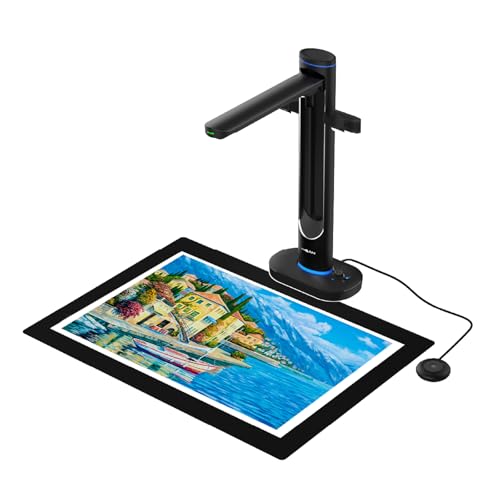
- Scans up to A2 without pressing bindings
- Dual 48MP cameras deliver detailed scans
- OCR and text-to-speech support accessibility
Best For: Oversized books, maps, and fragile archival materials
Premium Archival Book Scanner
CZUR ET MAX Professional Book & Document Scanner

- 38MP sensor with 7168 × 5376 resolution
- Curve-flattening tech for bound books
- OCR creates editable and searchable files
Best For: High-detail archival scanning of books and large documents
Overhead Archive Scanner
ScanSnap SV600 Overhead Book and Document Scanner

- Non-destructive overhead scanning for bound materials
- Auto Book Correction reduces page curve distortion
- Page Turning Detection and Time Mode add convenience
Best For: Non-destructive scanning of books, newspapers, and mixed archives
Portable Archive Book Scanner
CZUR Shine Ultra Smart Portable Document Scanner

- About 1 second per page for fast capture
- Flattening tech works best on thinner books
- Foldable, height-adjustable, and portable
Best For: Portable digitizing of thinner books and flat documents
Compact All-in-One Picker
JOYUSING V320pro 16MP Book & Document Scanner

- Captures A3/A4 material with auto-flatten and deskew
- 16MP camera plus LED lighting for clearer scans
- OCR and exports available on Windows
Best For: Fast overhead scanning for mixed books and documents
Large-Format Archival Choice
VIISAN S21 Large Format Book & Document Scanner

- A2 overhead scanning for oversized books and archives
- 26MP capture with up to 600 DPI software enhancement
- OCR and cleanup tools for flattening, finger removal, and split pages
Best For: Oversized archival materials like newspapers, maps, and journals
Balanced A3 Scanner Pick

- A3 overhead design for books and large pages
- 16MP camera with 300 DPI scanning and OCR
- Anti-glare lighting and auto page flattening
Best For: Everyday archival digitizing of books, artwork, and large pages
Fast Desktop Scanning – CZUR Aura Pro Book & Document Scanner
If you want book scanners for archival projects that balance speed with dependable text capture, the CZUR Aura Pro is built for quick desktop digitizing. It scans in about 2 seconds per page, supports A3 and A4 materials, and uses laser-based page flattening to improve curved book pages before export.
Best For: Archiving books, documents, and mixed paper collections on a fast USB-connected desktop scanner.
Pros:
- Very fast 2-second-per-page scanning for higher-volume archival work
- Supports JPG, Word, PDF, and searchable PDF output
- OCR supports 180+ languages for broad text recognition needs
- Laser-assisted flattening and 32 LED lights help improve page clarity
Cons:
- Thai, Hebrew, and Arabic are not currently supported in OCR
- Requires specific Mac and Windows versions for compatibility
- USB desktop setup is less portable than a handheld option
Overall, the Aura Pro is a practical choice when archival speed matters and your project includes lots of bound pages that need efficient capture and OCR-ready files.
Flatbed Book Organization – Plustek OpticBook 4900
For book scanners for archival projects that need careful handling and file organization, the Plustek OpticBook 4900 takes a flatbed approach with document management software bundled in. It is designed for books, magazines, handwritten notes, and reference documents, with OCR features that support searchable text and note-based organization.
Best For: Users who want a flatbed scanner with software tools for organizing and searching archived books and reference files.
Pros:
- Bundled BookMaker software helps organize books, PDFs, notes, and magazines
- OCR supports searchable text and editable formats
- Full text search can work by file name, chapter, page content, or note content
- Includes one year of free cloud storage service with eDoc registration
Cons:
- Single-sheet flatbed design is slower than overhead scanners for large projects
- Uses a 1-page capacity, so scanning is more manual
- Requires Windows 7/8/10/11 or Mac OS X 10.13 to 14.x support
This model makes sense if your archival workflow values cataloging, searching, and editing as much as scanning itself, especially for smaller or more curated collections.
High-Resolution Overhead Capture – CZUR ET24 Pro
If your archival project needs book scanners for archival projects with strong image detail and broad compatibility, the CZUR ET24 Pro is a capable overhead option. Its 24MP camera, A3 support, and upgraded flattening and OCR tools are aimed at digitizing books, documents, and other materials with less manual correction.
Best For: Archival digitizing of books, documents, and oversized pages where image quality and OCR matter.
Pros:
- 24MP camera with up to 5696 x 4272 resolution for detailed captures
- Supports A3-size materials for larger books and documents
- ABBYY OCR can convert JPG into editable PDF, Excel, or Word files
- Works with macOS, Windows, and Ubuntu Linux on supported versions
Cons:
- Very glare-prone papers are not recommended
- Some OCR language support limitations remain for Thai, Hebrew, and Arabic
- Bulkier than a basic flatbed or compact scanner setup
The ET24 Pro is a strong fit when you need high-resolution scans and better automation for curved pages, especially for archive work that includes larger bound materials.
Oversized Archival Scanning – VIISAN S48 Duo
For book scanners for archival projects that need to handle oversized materials gently, the VIISAN S48 Duo uses a dual-camera overhead design that avoids pressing on fragile bindings. It captures A2-sized books, maps, and documents with built-in AI tools that help flatten pages and clean the image before OCR processing.
Best For: Libraries, schools, and archives scanning oversized bound materials without damaging the original pages.
Pros:
- Overhead design scans up to A2 size without flattening or pressing pages
- Dual 48MP cameras capture sharp, detailed images up to 600 DPI
- AI helps flatten curved pages, remove finger marks, and correct edge distortion
- Includes OCR and text-to-speech for searchable and accessible files
Cons:
- Requires a USB connection and a supported computer setup
- Minimum specs include 4GB RAM, with 16GB recommended
- More focused on overhead capture than compact everyday scanning
Overall, the S48 Duo stands out for fragile or oversized archival material where preserving the original item is just as important as producing searchable digital copies.
Premium Archival Book Scanner – CZUR ET MAX Professional Book & Document Scanner
If you need book scanners for archival projects, the CZUR ET MAX is built for fast, high-detail capture of bound volumes without unbinding them. Its 38MP sensor, curve-flattening technology, and OCR support make it a strong fit for creating clean digital copies of books, documents, and A3-size materials.
Best For: Archival teams and researchers who need high-resolution, searchable scans from bound books and larger documents.
Pros:
- 38MP CMOS sensor delivers 7168 × 5376 resolution for detailed scans.
- Patented curve-flattening helps reduce distortion on bound pages.
- OCR can export to editable files and searchable PDFs, with 180+ language support.
- Very fast scanning at about 1.5 seconds per page for bulk work.
Cons:
- Not recommended for glossy or highly reflective materials.
- Arabic OCR is limited to ET Series scanners on Windows.
- Linux support is limited to Ubuntu 20.04 through 24.04.
For archival scanning where speed, image detail, and text search matter, the ET MAX is a capable over-document solution. It is especially appealing if you want to digitize books intact and keep the workflow efficient.
Overhead Archive Scanner – ScanSnap SV600 Overhead Book and Document Scanner
For book scanners for archival projects, the ScanSnap SV600 takes a simple overhead approach that lets you scan books, newspapers, and magazines without cutting them apart. Its auto book correction, point retouch, and page-turning detection are useful when you want a practical way to capture loose or bound material with less manual cleanup.
Best For: Users who want a non-destructive overhead scanner for books, newspapers, and mixed archival materials.
Pros:
- Scans books and newspapers directly without cutting or damaging them.
- Auto Book Correction helps flatten curve distortion.
- Page Turning Detection and Time Mode support hands-free scanning workflows.
- Multi Document Detection can capture several small items in one pass.
Cons:
- 1200 resolution is lower than some high-end archival scanners.
- Standard sheet capacity is only 1, so it is not built for feeder-style batching.
- Heavier and larger than portable options at 6.6 pounds.
The SV600 is a good fit when non-destructive capture matters more than raw resolution. It is especially useful for mixed archival collections that include books, clippings, photos, and newspapers.
Portable Archive Book Scanner – CZUR Shine Ultra Smart Portable Document Scanner
If you’re comparing book scanners for archival projects and need something lighter and faster, the CZUR Shine Ultra is a portable overhead option for flat documents and thinner books. It combines a 13MP camera, auto cropping, and curved-page flattening with a foldable design that makes it easier to move between workspaces.
Best For: Portable digitizing of thinner books and flat archival documents in shared or mobile setups.
Pros:
- About 1 second per page scanning speed supports efficient digitizing.
- Patented flattening helps reduce curve distortion on thinner books.
- 13MP CMOS camera with smart paging, auto cropping, and multiple color modes.
- Foldable, height-adjustable design makes it easier to store and transport.
Cons:
- Only suitable for thinner books; ET series is recommended for thicker volumes.
- Not compatible with Android or iOS.
- OCR does not currently support Thai, Hebrew, or Arabic.
The Shine Ultra is best viewed as a flexible entry point for small-to-medium archival tasks rather than a heavy-duty book digitization station. It is a practical choice if portability and speed matter most.
Compact All-in-One Picker – JOYUSING V320pro 16MP Book & Document Scanner
If you need book scanners for archival projects that can move quickly through mixed documents, the JOYUSING V320pro is built around speed and convenience. It captures A3 and A4 material, adds auto-flatten and deskew tools, and includes OCR for converting scans into editable formats on Windows.
Best For: Archives, offices, and home users who want a fast overhead scanner for books and documents with simple all-in-one capture.
Pros:
- 16MP fixed-focus lens with LED auxiliary lighting for clearer captures in dim spaces
- Auto-flatten, deskew, finger removal, and smart paging help clean up book scans
- Supports A3/A4 switching and scanning up to 40 pages per minute
- Works with Windows XP/7/8/10/11 and macOS 10 through 14
Cons:
- OCR and export features are Windows-based; Mac support is limited to PDF
- Book thickness is limited to 3 cm
- Lower stated resolution than the higher-end large-format model here
For basic archival digitizing, the V320pro offers a practical mix of speed and software assistance. It is a strong fit when you want overhead scanning without a steep setup burden.
Large-Format Archival Choice – VIISAN S21 Large Format Book & Document Scanner
Among book scanners for archival projects, the VIISAN S21 stands out when your materials are unusually large. It supports A2 capture, uses a 26MP camera, and includes software tools for flattening curved pages, removing fingers, splitting spreads, and running OCR into editable formats.
Best For: Libraries, archives, and researchers digitizing large books, journals, newspapers, maps, and other oversized items.
Pros:
- A2 scanning area is suited to oversized archival materials
- 26MP capture with software-enhanced up to 600 DPI for detailed output
- Auto-flatten, finger removal, edge repair, and double-page splitting in software
- Supports PDF, Word, Excel, EPUB, TXT, and more, plus video recording and remote collaboration
Cons:
- Bundled OfficeCam software does not support ARM-based Windows devices
- Bright light and very glossy paper are not recommended
- The larger footprint and overhead hinge make it less portable than simpler scanners
If your archive work regularly includes oversize pages, this model is the most specialized option in the group. Its strength is breadth of format support paired with strong software cleanup tools.
Balanced A3 Scanner Pick – VIISAN DL16 Book Scanner
If you want book scanners for archival projects that focus on practical A3 capture, the VIISAN DL16 is a straightforward overhead option. It combines a 16MP camera with 300 DPI scanning, OCR, auto page flattening, and anti-glare LED lighting for cleaner digitization of books and large documents.
Best For: Libraries, offices, students, and home archivists digitizing bound books, artwork, and large-format pages.
Pros:
- A3 overhead design handles bound books and oversized documents
- 16MP camera with 300 DPI output for clear text and document detail
- Anti-glare LED lighting helps reduce shadows and reflections
- Works with Windows and Mac for flexible desktop use
Cons:
- No large-format A2 capture like the S21
- Lower resolution on paper than the 26MP competitor in this roundup
- Best suited to desktop archiving rather than highly portable use
The DL16 is a sensible middle-ground scanner for users who want archival-ready features without moving up to an A2 system. It should fit well in small library, office, or personal preservation workflows.
How We Picked the Best Book Scanners for Archival Projects
We focused on scanners that are well suited to archive-minded digitizing: overhead or book-friendly designs, strong optical capture, usable OCR, flattening and de-skew tools, and formats that cover common preservation sizes from A4 to A2. We also weighed speed, lighting quality, and how much post-processing each device can reduce.
Quick Comparison
In broad terms, flatbed book scanners tend to be best for flatter, more careful capture and page-edge detail, while overhead models are better for bound volumes, faster workflows, and delicate materials. Higher-resolution cameras help with fine print and illustrations, but software features matter just as much for readable, searchable output.
Key Buying Factors for Book Scanners for Archival Projects
Image Quality and Resolution
Look for enough resolution to preserve small text, marginal notes, stamps, and illustrations. For Book Scanners for Archival Projects, sharp optics and clean lighting often matter more than headline megapixels alone.
Flattening, Deskew, and Finger Removal
Good auto-flattening and deskew tools reduce the warping common in bound books. Finger-removal and anti-glare correction can also cut down editing time, especially on older volumes with reflective pages or tight gutters.
OCR and Searchability
If you need searchable PDFs or editable text, OCR quality is essential. Check language support, accuracy on small fonts, and whether the software handles mixed layouts, footnotes, and tables well.
Book Size and Handling
Match the scanner to the largest materials you plan to digitize. A3 is enough for many books and documents, but A2 or large-format support is valuable for oversized archives, newspapers, and spread-heavy reference works.
Workflow and Output
Think about file naming, batch capture, auto-cropping, and export options. A smoother workflow matters in real archive projects, where hundreds of pages can make software friction the biggest bottleneck.
Who Should Buy Which Book Scanners for Archival Projects?
Choose a flatbed-style option if your priority is careful capture of flatter books, page detail, and more controlled scanning. Choose an overhead scanner if you need speed, safer handling for fragile bindings, or easier work with thick or oversized volumes.
If your archive work centers on searchable records, prioritize OCR and software automation. If you handle rare or delicate materials, prioritize non-contact capture, even lighting, and strong distortion correction. For most buyers, the best choice is the scanner that fits the largest format you regularly use while keeping cleanup time low.