Finding the right scanner can make digitizing books, notes, and bound documents far faster and less frustrating. The best models for Windows balance image quality, speed, and practical features like auto-flatten and OCR.
Below, we focus on 10 options that suit different budgets and workflows, from compact portable units to higher-resolution scanners for larger books and archives.
Best 10 Book Scanners for Windows Picks for 2026
Fast portable book scanner

- About 1 second per page
- Windows XP through 11 support
- Works as a document camera too
Best For: Windows users scanning thin books and flat documents quickly
Easy flatbed Windows scanner
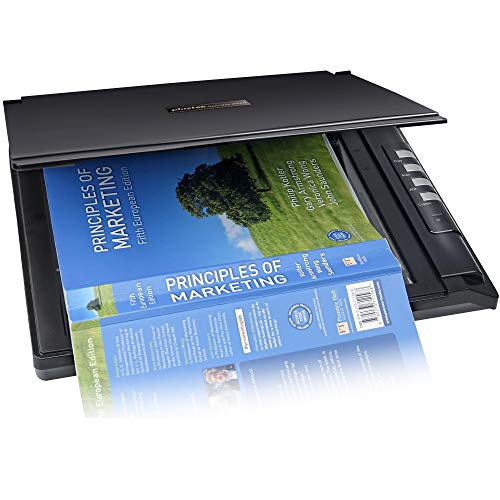
- Scans in up to 3 seconds
- Creates searchable PDFs
- Windows 7 to 11 support
Best For: Simple Windows scanning for books, PDFs, and documents
Premium book capture scanner

- About 2 seconds per page
- Laser-assisted page flattening
- Word, PDF, and searchable PDF output
Best For: Windows users who want fast, high-accuracy book scanning
Compact detail-focused scanner

- 4800 dpi optical resolution
- High-rise lid for books and albums
- USB-powered and portable
Best For: Windows users needing a compact scanner for books and photos
Windows book scanner with flat-page capture
CZUR Aura Pro Portable Book Scanner

- Three laser lines help flatten curved book pages.
- Scans in about 2 seconds per page.
- Compatible with Windows XP through Windows 11.
Best For: Windows users who want fast book scanning plus desk-lamp functionality
Oversized document scanner for Windows
VIISAN USB 23MP Document Camera

- Captures A2 and A3 documents, including thick books.
- Scans in under 1.5 seconds per page.
- Supports Windows 7 through Windows 11.
Best For: People scanning large books, newspapers, and maps on Windows
Portable handheld scanner for Windows
IRIScan Book 7 White Portable Wireless Handheld Scanner

- Rechargeable handheld scanner with SD card support.
- Works with Windows and Mac via USB.
- Includes OCR and Readiris PDF software.
Best For: Travelers and mobile users who need a compact Windows-compatible scanner
Premium Windows Book Scanner
CZUR ET24 Pro 24MP Book Scanner

- Works with Windows XP through Windows 11.
- 24MP camera and curve-flattening tech for books.
- ABBYY OCR exports editable PDF, Word, and Excel.
Best For: Windows users needing a versatile A3 book scanner with OCR
Large-Format Scanning Pick

- A2 capture area handles oversized books and documents.
- 26MP scanning with software-enhanced detail up to 600 DPI.
- OCR and cleanup tools help flatten pages and remove fingers.
Best For: Large-format book scanning on Windows or macOS
High-Resolution Upgrade

- 38MP sensor delivers detailed 7168 x 5376 scans.
- Curve-flattening tech helps with bound book pages.
- Supports Windows, macOS, and Ubuntu-based Linux.
Best For: Users who want high-resolution book scans with fast capture
Fast portable book scanner – CZUR Shine Ultra for Windows
If you want book scanners for windows that can also double as a document camera, the CZUR Shine Ultra is built for speed and flexibility. It supports Windows XP through Windows 11 and is designed for A3 and A4-size materials, with about 1 second per page scanning for flat papers and thinner books.
Best For: Windows users who need a portable book scanner for flat papers, thin books, and remote teaching or meetings.
Pros:
- Works with Windows XP/7/8/10/11 and macOS, so it fits many setups.
- Fast scanning speed of about 1 second per page for A3/A4 materials.
- Patented page-flattening technology helps with thinner books.
- Can also function as a document camera for Zoom and Google Meet.
Cons:
- Only suitable for thinner books; thicker books call for the ET series.
- Not compatible with Android or iOS.
- OCR does not support Thai, Hebrew, or Arabic.
Overall, this is a strong pick if speed matters and your scanning needs center on thin books and flat documents. The adjustable design and smart features make it especially practical for everyday Windows workflows.
Easy flatbed Windows scanner – Plustek OpticSlim 2700
For buyers comparing book scanners for windows, the Plustek OpticSlim 2700 is a straightforward flatbed option that emphasizes speed and easy operation. It scans in as fast as 3 seconds in 300 dpi color mode and supports Windows 7 through 11 with TWAIN compatibility.
Best For: Users who want a simple Windows flatbed scanner for books, PDFs, and everyday document tasks.
Pros:
- Fast scanning speed of up to 3 seconds in 300 dpi color.
- Built-in PDF button makes editable, searchable PDFs easier to create.
- Image tools can auto-rotate, deskew, and crop scans.
- Four one-touch buttons help streamline common tasks.
Cons:
- Minimum system requirement is Windows 7, so older systems are not covered by the listed requirement.
- Flatbed format is less specialized for book-page flattening than dedicated book scanners.
- Driver must be downloaded from Plustek’s website.
This is a practical no-frills scanner for people who want dependable scanning and searchable PDFs without a complicated setup. It is best suited to straightforward Windows use rather than specialized book digitizing.
Premium book capture scanner – CZUR Aura Pro for Windows
If you need book scanners for windows with stronger book-page handling, the CZUR Aura Pro is designed for fast capture and cleaner page reproduction. It works with Windows XP through Windows 11, scans in about 2 seconds per page, and outputs JPG, Word, PDF, and searchable PDF files.
Best For: Windows users who want a premium scanner for books and documents with fast OCR output.
Pros:
- Fast 2-second-per-page scanning keeps workflows moving.
- Three precise laser lines help with scanning accuracy and image clarity.
- Outputs multiple formats including Word, PDF, and searchable PDF.
- Works with Windows XP/7/8/10/11 and recent macOS versions.
Cons:
- OCR does not support Thai, Hebrew, or Arabic.
- Standard sheet capacity is only 3, so it is not meant for high-stack batch feeding.
- Requires USB connection rather than wireless use.
The Aura Pro is a strong choice when accuracy and book-friendly capture matter more than bulk document throughput. Its built-in lighting and AI-assisted software make it well suited to careful digitizing on a Windows PC.
Compact detail-focused scanner – Epson Perfection V19 II
The Epson Perfection V19 II is a compact flatbed option for people looking at book scanners for windows and wanting a simple USB-powered setup. It supports Windows 7 and uses Epson ScanSmart software to scan books, documents, photos, and albums with searchable PDF and Office document output.
Best For: Windows users who want a compact scanner for books, photos, and occasional document digitizing.
Pros:
- 4800 dpi optical resolution delivers very detailed scans.
- High-rise removable lid makes it easier to scan books and photo albums.
- Includes ScanSmart software for searchable PDFs and editable Office files.
- USB powered and lightweight for easy portability.
Cons:
- Letter-sized scans can take up to 10 seconds, which is slower than some alternatives.
- Standard sheet capacity is 1, so it is not designed for batch scanning.
- Minimum system requirement listed is Windows 7.
This model makes sense if you want a small, versatile flatbed rather than a dedicated high-speed book scanner. It is especially appealing when detail, portability, and simple operation matter more than raw scanning speed.
Windows book scanner with flat-page capture – CZUR Aura Pro Portable Book Scanner
If you want book scanners for Windows that can also handle office work, the CZUR Aura Pro is built around fast, curved-page capture and simple USB use. Its laser-based flattening tech helps reproduce open book pages more cleanly, while the included side lights and AI-driven software make scanning feel more automatic.
Best For: Windows users who want a fast book scanner that also doubles as a multifunction desk lamp.
Pros:
- Works with Windows XP/7/8/10/11, so it fits a wide range of PCs.
- Uses three laser lines to help flatten curved pages for better book scans.
- Fast 2-second-per-page scanning for single sheets and double-page books.
- OCR supports 180+ languages for text recognition.
Cons:
- OCR does not currently support Thai, Hebrew, or Arabic.
- Sound-control features can be affected by ambient noise and distance.
Overall, the Aura Pro is a strong pick if you want a desktop-style scanner that is quick, Windows-compatible, and designed to make books easier to capture without constant manual adjustment.
Oversized document scanner for Windows – VIISAN USB 23MP Document Camera
For shoppers comparing book scanners for Windows, this VIISAN model stands out for large-format coverage and very quick capture. Its adjustable-height design and USB connection make it a practical choice when you need to scan thick books, newspapers, maps, or other oversized documents from a Windows PC.
Best For: Windows users who need to scan A2 and A3 materials quickly.
Pros:
- Covers A2 and A3 sizes, including thick books and other large items.
- Under 1.5 seconds per page for ultra-fast scanning.
- Works with Windows 7, 8, 10, and 11.
- USB connection keeps setup straightforward.
Cons:
- Listed optical resolution is 300 dpi, which may be limiting for detail-focused archiving.
- Does not include the book-flattening or OCR language details found on some rivals.
This is a good fit if your priority is size coverage and speed rather than extra software features. It is especially useful when standard book scanners feel too small for the material you need to digitize.
Portable handheld scanner for Windows – IRIScan Book 7 White Portable Wireless Handheld Scanner
If you need book scanners for Windows that travel well, the IRIScan Book 7 focuses on portability, battery power, and flexible storage. It can scan directly to SD card or connect by USB, and the included Readiris software adds OCR and PDF editing for a more complete workflow on Windows or Mac.
Best For: Mobile users who want a lightweight handheld scanner for books, receipts, and documents.
Pros:
- Portable handheld design with rechargeable battery support.
- Compatible with Windows and Mac, with USB and SD card scanning options.
- OCR and Readiris PDF software are included.
- Offers 300, 600, and 1050 dpi scan modes.
Cons:
- Handheld scanning is less automated than flatbed or overhead book scanners.
- AC adapter is not provided.
- Wireless connectivity is not supported.
The IRIScan Book 7 makes sense when portability matters more than desktop convenience. It is a flexible choice for users who want a compact Windows-compatible scanner they can carry and use almost anywhere.
Premium Windows Book Scanner – CZUR ET24 Pro 24MP Book Scanner
If you want a book scanner for Windows that balances speed, page flattening, and broad compatibility, the CZUR ET24 Pro is a strong all-around option. It uses upgraded curve-flattening technology, a 24MP camera, and ABBYY OCR to turn bound pages into editable files with minimal setup.
Best For: Windows users who need a versatile book and document scanner for A3 materials, OCR, and quick desktop workflows.
Pros:
- Supports Windows XP through Windows 11, plus macOS and Ubuntu-based Linux systems.
- 24MP camera with 5696 x 4272 resolution and built-in flattening for curved book pages.
- ABBYY OCR supports 180+ languages and can export to editable PDF, Word, and Excel.
- Side lights and a head light help reduce glare on many pages.
Cons:
- Very glare-prone papers are not recommended.
- Arabic OCR is only supported on ET Series scanners under Windows systems.
- Thai and Hebrew are not currently supported.
The ET24 Pro is a practical choice if your priority is dependable book scanning on Windows with strong OCR and large-format support. It is especially useful for mixed scanning tasks where you need one device for books, documents, and A3-size originals.
Large-Format Scanning Pick – VIISAN S21 A2/A3 Book Scanner
For shoppers comparing book scanners for Windows, the VIISAN S21 stands out when page size is the priority. Its A2 capture area, 26MP sensor, and scanning software are built for oversized books, journals, newspapers, and other large documents, while still handling everyday book scanning tasks.
Best For: Windows and macOS users who need an overhead scanner for A2/A3 books, manuscripts, and other large-format originals.
Pros:
- A2-size capture area makes it suitable for large journals, newspapers, maps, and manuscripts.
- 26MP resolution with software-enhanced up to 600 DPI for detailed captures.
- Auto-flattening, finger removal, edge repair, and split-page features help clean up book scans.
- Built-in OCR can convert scans to PDF, Word, Excel, EPUB, and text formats.
Cons:
- Bundled OfficeCam software only supports x64 and x86 Windows and macOS systems.
- Not compatible with ARM-based devices such as Surface Pro X.
- Very glossy papers are not recommended.
The S21 is a good fit if you need extra capture space rather than just a standard book scanner. It brings flexible software tools and broad output formats, making it especially useful for larger archives and mixed document workflows.
High-Resolution Upgrade – CZUR ET MAX 38MP Book Scanner
The CZUR ET MAX is aimed at buyers who want a higher-resolution book scanner for Windows without giving up flexible compatibility. With a 38MP sensor, fast scan speed, and patented curve-flattening technology, it is designed for users who need cleaner results on bound books and A3 documents.
Best For: Windows users who want high-resolution book scanning with fast capture and strong OCR support.
Pros:
- 38MP CMOS sensor and 7168 x 5376 resolution for detailed scans.
- Patented curve-flattening technology helps reduce distortion on bound pages.
- Scans a page in about 1.5 seconds with practiced operation.
- Supports Windows, macOS, and Ubuntu-based Linux systems.
Cons:
- Glossy or highly reflective materials are not recommended.
- Arabic OCR is only supported on ET Series scanners under Windows systems.
- Thai and Hebrew are not currently supported.
ET MAX is a strong upgrade pick if scan quality is your top concern and you want a device that can keep up with larger jobs. Its combination of higher resolution, A3 support, and OCR makes it well suited to serious scanning workflows.
How We Picked the Best Book Scanners for Windows
We focused on Book Scanners for Windows that deliver dependable software support, clear text capture, and a workflow that suits real-world use. Priority went to models with strong optical resolution, OCR compatibility, useful page-flattening tools, and scan sizes that match common book and document formats.
We also considered setup simplicity, portability, and whether a scanner works better for occasional home use or heavier office and archival tasks.
Quick Comparison
If you want the simplest path, choose a portable book scanner or document camera that can handle mixed materials and larger pages. If your priority is flat, consistent output for smaller stacks, a flatbed-style option may be the better fit. For oversized books, look for A3/A2 capture and software features that reduce page curvature and shadowing.
Key Buying Factors for Book Scanners for Windows
Scan Size and Page Coverage
Check whether the scanner supports A4, A3, or A2 pages. Larger formats matter if you scan textbooks, manuals, art books, or archival materials. A scanner that is too small will force awkward repositioning and increase the chance of missed edges.
Image Quality and OCR
Higher resolution helps preserve small text, diagrams, and fine print. OCR is especially important if you want searchable PDFs or editable text after scanning. For many buyers, reliable OCR is more valuable than chasing the highest megapixel number.
Flattening and Cleanup Features
Book pages often curve near the spine, so auto-flatten, de-warping, and finger-removal tools can save time in editing. These features are especially helpful for thicker books and bound materials that do not lie completely flat.
Speed, Portability, and Workflow
Think about how often you will scan and where you will use the device. Fast flatbed models are useful for consistent page-by-page work, while portable scanners and document cameras are better when you need flexibility or limited desk space. Windows compatibility and easy driver support should be non-negotiable.
Who Should Buy Which Book Scanners for Windows?
Students and home users usually do best with compact, portable models that are quick to set up and simple to store. Office teams and heavy users should look for faster scanners with stronger software and better batch handling. If you work with oversized books, rare materials, or mixed media, a higher-resolution document camera style scanner is often the most practical choice.
In short, the best option depends on your page size, scanning volume, and how much cleanup you want to do after each scan. Matching those needs to the right Windows-compatible scanner will save time and deliver better results.