A thoughtful home office gift can make daily work more comfortable, organized, or flexible. Consider how the recipient works, what devices they use, and how much room their setup has.
18 Home Office Gifts to Consider
1. DREO HEPA Air Purifier
A Breathable Workspace Upgrade

- HEPA-style three-in-one filter targets fine particles such as dust, pollen, and smoke.
- PM2.5 sensor displays air quality, with Auto, Turbo, Sleep, and Normal modes.
- Sleep Mode turns off display lights; includes three aroma pads.
Best For: Someone who spends long stretches in a dedicated office room
2. GOLDENMATE Lithium UPS Battery Backup
A Backup for Workday Disruptions
GOLDENMATE Lithium UPS Battery Backup

- Provides battery backup and surge protection through eight outlets.
- LCD panel displays battery and power conditions.
- Buzzer can be muted with the switch button; designed for standard 110V household power.
Best For: A home worker who wants time to save work during brief power interruptions
3. Ergonomic Office Chair with Adjustable Lumbar
A More Adjustable Place to Work
Ergonomic Office Chair with Adjustable Lumbar

- Features adjustable lumbar support, a headrest, and three-way adjustable armrests.
- Mesh back and contoured seat pair with a 4.3-inch foam cushion.
- Reclines from 90° to 120° and offers three tilt-lock positions.
Best For: Someone who spends much of the workday seated at home
4. ErGear 48 x 24-Inch Electric Standing Desk
A Sit-Stand Workspace Refresh
ErGear 48 x 24-Inch Electric Standing Desk

- Electric height adjustment ranges from 28.35 to 46.46 inches.
- Four memory presets let users save preferred desk heights.
- Steel frame and engineered-wood top create a freestanding work surface.
Best For: A remote worker looking to vary their workstation setup
5. HUANUO Dual Monitor Desk Mount
A Lift for a Two-Screen Setup
HUANUO Dual Monitor Desk Mount

- Supports two 13–32-inch monitors weighing 4.4–19.8 pounds each, with VESA 75x75 or 100x100 holes.
- Arms tilt, swivel, rotate, and raise for screen positioning.
- C-clamp or grommet installation; wooden desk and clearance requirements apply.
Best For: Someone with two compatible monitors who wants more desk space
6. THERUN Under-Desk Walking Pad
A Walking Break Within Reach

- Two modes support under-desk use or walking on its own.
- Speed adjusts from 0.6 to 3.8 mph.
- Built-in transport wheels and a compact design aid moving and storage.
Best For: A home office worker who likes to stay lightly active while working
7. EMEET M0 Plus Conference Speakerphone
A Clearer Option for Calls
EMEET M0 Plus Conference Speakerphone

- Four microphones provide 360° voice pickup, with noise filtering and echo reduction.
- Connects by USB-C or Bluetooth 5.0; no drivers or extra software required according to the supplied product notes.
- Supports over 10 hours of talk time on a charge.
Best For: Someone who takes frequent calls and prefers speaker audio over headphones
8. SteeLoong Two-Drawer Locking File Cabinet
A Neater Home for Paperwork
SteeLoong Two-Drawer Locking File Cabinet

- Two drawers store files, letters, books, and everyday items.
- Both drawers can be locked or opened together; two keys are included.
- Metal cabinet can also serve as a printer stand; assembly is required.
Best For: Someone who keeps paper records or work documents at home
9. Univivi 36-Inch Under-Desk Cable Tray
A Tidy Spot for Desk Cords
Univivi 36-Inch Under-Desk Cable Tray

- A 36-inch fabric tray holds adapters, sockets, and cables under a desk.
- Installs with clamps or screws and includes built-in ties to secure items.
- Check desk dimensions and edge clearance before choosing a spot.
Best For: A home office owner tired of loose cables around the desk
10. Magnetic Glass Dry-Erase Board
A Wall-Mounted Planning Surface
Magnetic Glass Dry-Erase Board

- 36-by-24-inch tempered-glass board mounts vertically or horizontally.
- Smooth writing surface is designed to wipe clean; marker, tray, eraser, and strong magnets are included.
- Requires strong magnets; ordinary refrigerator magnets will not work.
Best For: A visual planner who likes to keep tasks and notes in view
11. Acer 9-in-1 USB-C Docking Station
A Single Hub for Desk Connections
Acer 9-in-1 USB-C Docking Station

- Includes two HDMI ports, three USB-A ports, one USB-C port, and SD and MicroSD slots.
- Supports dual HDMI displays; laptop USB-C must support video output through DisplayPort Alt Mode.
- Power Delivery requires a compatible USB-C port and a 100W or higher adapter, sold separately.
Best For: A laptop-based worker connecting several desk peripherals
12. ComfiLife Adjustable Memory Foam Footrest
A Softer Place to Rest Your Feet
ComfiLife Adjustable Memory Foam Footrest

- Memory-foam cushion offers adjustable height for under-desk foot support.
- Removable cover is machine washable, according to the supplied notes.
- Can also be used under the knees or flipped as a rocker beneath a chair.
Best For: A desk worker who wants to adjust how they sit at their workstation
13. Pzloz Adjustable LED Desk Lamp
Flexible Light for Focused Tasks
Pzloz Adjustable LED Desk Lamp

- Offers five color temperatures and five brightness levels, plus reading and night modes.
- Adjustable swing arms and rotatable lamp head direct light around the workspace.
- Wireless remote controls the lamp's settings.
Best For: Someone who reads, writes, or works at a desk in changing light
14. LYMAX Dimmable Monitor Light Bar
A Light That Leaves Desk Space Free
LYMAX Dimmable Monitor Light Bar

- Designed to illuminate the keyboard and desktop without reflecting glare onto the screen.
- Color temperature adjusts from 2900K to 6000K; includes touch and wireless remote controls.
- USB-C powered and fits monitors from 0.2 to 1.8 inches thick.
Best For: Someone who works at a monitor in a dim or variable-light room
15. Yodoit 15.6-Inch Portable Monitor
A Second Screen for Flexible Work
Yodoit 15.6-Inch Portable Monitor

- 15.6-inch FHD IPS display with 1920 × 1080 resolution and matte finish.
- Connects by USB-C or Mini HDMI, with USB-C power for the HDMI option.
- Includes built-in speakers and a smart cover; check device port support before gifting.
Best For: A remote worker who travels between rooms or wants a second laptop screen
16. Redragon K671KS Wireless Mechanical Keyboard
A More Tactile Typing Setup
Redragon K671KS Wireless Mechanical Keyboard
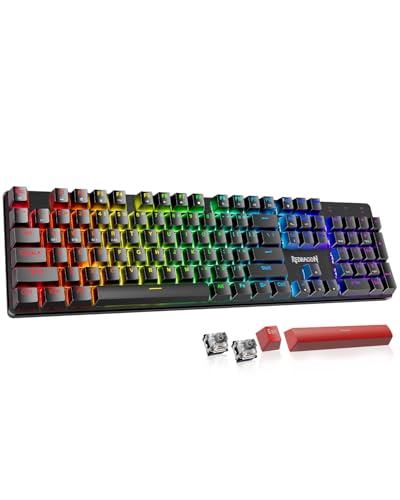
- Connects by USB-C, Bluetooth, or 2.4 GHz wireless and can pair with up to five devices.
- Hot-swappable switches, eight spare switches, and two extra keycaps are included.
- Features programmable macros and adjustable RGB backlighting.
Best For: Someone who types throughout the workday and enjoys a tactile keyboard
17. Nulea M501 Wireless Trackball Mouse
A Pointer with Thumb Control
Nulea M501 Wireless Trackball Mouse

- Thumb-operated trackball moves the cursor without moving the mouse across the desk.
- Connects to up to three devices through Bluetooth or the USB receiver.
- Rechargeable battery and four DPI levels support adjustable cursor control.
Best For: A desk worker interested in a different pointer style or compact setup
18. AFIING 47 x 17-Inch Desk Mat
A Broad Surface for Desk Work

- Large surface supports mouse movement, writing, and typing across the desk.
- Made with a cork base and vegan PU leather surface, according to the supplied notes.
- Non-slip backing helps keep the mat in place; clean with a cloth.
Best For: Someone who wants to organize and protect a broad desk surface
How to Choose a Home Office Christmas Gift
Start with the recipient’s workday rather than a generic idea of what an office should look like. Someone who sits through long stretches may appreciate a chair, footrest, or standing desk. A person who spends much of the day on calls could use a speakerphone, while a visual planner may make better use of a wall board. If they already have a comfortable setup, smaller accessories like a desk mat, lamp, or cable tray can still address a daily annoyance.
Look for clues in how they work: Do they switch between a laptop and a desktop? Keep paper documents nearby? Need two monitors? Prefer a quiet room for calls? Practical gifts feel personal when they solve something the recipient has mentioned. If you are unsure, choose an accessory with a clear role and fewer setup dependencies, such as a footrest or desk mat, rather than a large item that may not fit.
Match the Gift to the Budget and Workspace
For a modest, useful gesture, consider a mouse, footrest, desk mat, or monitor light bar. These accessories can improve an existing setup without requiring a room rearrangement. A lamp, speakerphone, cable tray, or glass whiteboard makes a more noticeable gift while still focusing on one part of the workday.
Larger purchases such as a chair, electric standing desk, air purifier, or UPS deserve more planning. Check available floor and desk space, and consider whether the recipient would welcome a major change to their room. A walking pad needs space for use and storage; a file cabinet needs a suitable location; and a desk’s size and height range should work with the person and their room. For power equipment, check the recipient’s outlet setup and the device requirements.
Check Compatibility and Personalization
Desk accessories are not always universal. Before choosing the dual monitor mount, verify each display’s size, weight, and VESA hole pattern, as well as the desk material, thickness, and underside clearance. For the Acer docking station, the laptop’s USB-C port must support video output; charging also depends on Power Delivery support and a compatible adapter. The portable monitor offers USB-C and Mini HDMI options, so confirm which connection the laptop or other device can use.
A personalized choice can reflect the recipient’s habits without adding custom engraving. Pick lighting with adjustable brightness for someone whose work hours shift, a glass board for someone who plans visually, or a trackball for someone curious about a pointer controlled by the thumb. If their exact setup is unknown, favor items whose use is straightforward and whose placement can be changed easily.
Timing and Last-Minute Decisions
For a larger workstation gift, give yourself time to confirm dimensions and compatibility before Christmas. Furniture and mounted equipment may need assembly, and a new desk or chair can require help to set up. A note explaining why you chose the item can make a practical gift feel considered, especially if the recipient can decide where to install or place it.
When choosing close to the holiday, lean toward products that do not depend on a precise desk fit or device port. A footrest, desk mat, lamp, or speakerphone may be simpler to integrate than a monitor mount or docking station, though the recipient’s preferences still matter. Check current seller information for delivery timing and included components rather than assuming a particular arrival date. If a larger item is the right fit, a printed note describing the planned gift can preserve the surprise while leaving final measurements and setup decisions to the recipient.
The best home office Christmas gift ideas are useful in the recipient’s real routine. Focus on a specific comfort, organization, lighting, or connection need, then make sure the gift fits the space and equipment they already use.