A useful desk gift can make everyday work, study, or creative time feel more comfortable and organized. These picks range from small organizers to major workspace upgrades, so consider the recipient’s desk, devices, and habits.
Desk accessory Christmas gifts to consider
1. ELABEST X100 Ergonomic Mesh Office Chair
A Seat for Long Desk Days
ELABEST X100 Ergonomic Mesh Office Chair

- Features adjustable lumbar support, a headrest, and 5D flip-up arms.
- Includes a two-position footrest and a reclining mechanism.
- Breathable mesh construction and adjustable seat height.
Best For: Remote workers or students looking for an adjustable chair for their main desk
2. Fenge Dual Monitor Stand with Drawer and Trays
A Customizable Desk Shelf
Fenge Dual Monitor Stand with Drawer and Trays

- Modular design can be assembled in six layouts.
- Includes two drawers, two slide-out trays, and compartments.
- The listed surface fits two 27-inch screens side by side.
Best For: Someone who wants to raise monitors and organize desk essentials
3. HUANUO FlowLift Dual Monitor Stand
Flexible Screen Positioning
HUANUO FlowLift Dual Monitor Stand

- Fits two 13–32-inch monitors that meet the stated weight and VESA requirements.
- Arms provide tilt, swivel, rotation, and height adjustment.
- C-clamp or grommet mounting; check desk material and dimensions first.
Best For: A desk worker with compatible monitors who wants adjustable screen placement
4. Univivi 36-Inch Under-Desk Cable Tray
A Tidy Cable Hideaway
Univivi 36-Inch Under-Desk Cable Tray

- The 36-inch fabric tray is designed to hold adapters and sockets under a desk.
- Installs with clamps or screws, with ties to secure items inside.
- Measure first and allow 5.3 inches of edge clearance if drawers or a back rod are present.
Best For: Someone who wants to gather chargers and computer cables beneath a desk
5. ComfiLife Adjustable Memory Foam Footrest
Comfort Under the Desk
ComfiLife Adjustable Memory Foam Footrest

- Memory foam cushion has adjustable height for foot support.
- Removable cover is machine washable.
- Can also be used as a knee support or flipped into a rocking footrest.
Best For: Someone who spends much of the day sitting at a desk
6. Two-Tier Wood Desktop Shelf Organizer
Vertical Space for Desk Essentials
Two-Tier Wood Desktop Shelf Organizer

- Two-tier design stores books, stationery, and other small items.
- Wood boards and a metal frame assemble into a tabletop shelf.
- Can be used upside down to suit the workspace.
Best For: A student or reader who wants books and supplies close at hand
7. ProtoArc EM11 NL Wireless Vertical Mouse
A Different Kind of Mouse Grip
ProtoArc EM11 NL Wireless Vertical Mouse

- Vertical shape is designed for small to medium hands under 7.5 inches long.
- Connects by Bluetooth or USB-A receiver and can pair with up to three devices.
- Rechargeable design includes a Type-C charging cable; allow time to adjust to the grip.
Best For: A right-handed computer user with a small to medium hand who wants a vertical mouse
8. Acer 7-in-1 USB-C Hub
More Connections for a Laptop

- Adds HDMI, USB-A, USB-C, SD, and MicroSD connections to a USB-C device.
- HDMI supports up to 4K at 30Hz when the device supports video over USB-C.
- PD port supports up to 100W charging when the laptop and charger are compatible.
Best For: A laptop user who needs extra connections for a desk setup
9. LED Desk Lamp with Wireless Phone Charger
Light and Charging in One
LED Desk Lamp with Wireless Phone Charger

- Offers three color temperatures and dimming from 5% to 100%.
- The base has a 10W wireless charger for compatible phones.
- Flexible tube directs light and folds for compact storage.
Best For: Someone who reads or studies at a desk and has a compatible wireless-charging phone
10. Brown Faux Leather Valet Tray
A Catch-All for Small Essentials
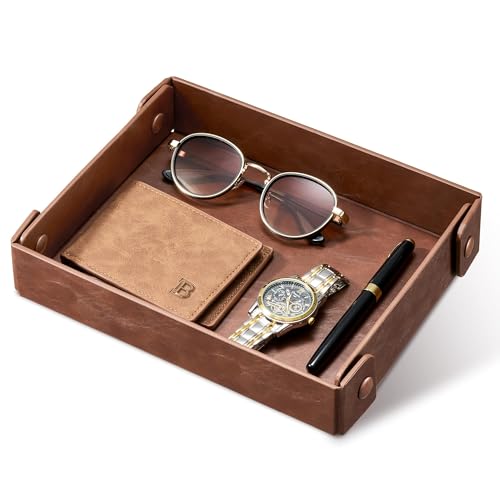
- Holds items such as keys, a wallet, phone, coins, or a watch.
- Snap buttons assemble the tray; it folds flat for storage or travel.
- Soft faux leather interior is described as a non-abrasive surface.
Best For: Someone who likes keeping keys and everyday carry items in one place
11. Globe Electric Novogratz Brass Desk Lamp
A Classic Adjustable Task Lamp
Globe Electric Novogratz Brass Desk Lamp

- Matte brass finish and cone shade suit a mid-century modern look.
- Adjustable balance arm lets the lamp head be repositioned.
- Requires one E26 medium-base bulb, sold separately.
Best For: A reader or writer who appreciates classic desk design
12. Replogle 12-Inch World Classic Globe
A Worldly Desktop Accent
Replogle 12-Inch World Classic Globe

- Features a 12-inch globe with raised relief and 3,500 named places.
- Includes a square walnut-finished base and die-cast semi-meridian.
- The antique-style map shows shipping routes and explorer ships.
Best For: A geography fan or traveler who enjoys a traditional office accent
13. Anker 8-in-1 USB-C Docking Station
A Hub for Multi-Display Desks
Anker 8-in-1 USB-C Docking Station

- Includes two HDMI ports, Ethernet, USB-A ports, and SD and microSD readers.
- Supports one display at up to 4K at 60Hz or two at up to 4K at 30Hz.
- Pass-through charging supports up to 85W; charger and USB-C cable are required.
Best For: A compatible laptop user who connects displays and several desk peripherals
14. AULA F75 Pro Wireless Mechanical Keyboard
A Tactile Typing Upgrade
AULA F75 Pro Wireless Mechanical Keyboard

- Compact 75% layout has 81 keys, arrow keys, and a multifunction knob.
- Connects by Bluetooth, 2.4GHz wireless, or USB; supports up to five devices.
- Hot-swappable base supports 3-pin or 5-pin switches.
Best For: A writer or programmer who enjoys mechanical keys and a compact layout
15. BenQ ScreenBar Pro Monitor Light
Lighting Above the Screen
BenQ ScreenBar Pro Monitor Light

- Clamps to compatible monitors 0.17–2.56 inches thick and with 1000–1800R curvature.
- Asymmetrical optics are designed to illuminate the desk while limiting screen reflections.
- Motion sensor switches the light on nearby and off after five minutes of absence.
Best For: Someone who studies or works at a compatible monitor in the evening
16. RGB Digital Desk Clock with Temperature Display
Time and Room Details at a Glance
RGB Digital Desk Clock with Temperature Display

- Displays time, date, weekday, and temperature on a single screen.
- Includes dual alarms with daily, weekday, and weekend modes.
- Offers 15 display colors and five brightness levels; it must remain plugged in.
Best For: Someone who likes having time and temperature visible at the desk
Choosing a gift for the recipient
Start with the recipient’s daily routine. Someone who spends hours at a computer may appreciate a footrest, adjustable chair, vertical mouse, or monitor light. A reader or student might get more use from a task lamp, desktop shelf, or globe. For someone who already has a comfortable setup, a valet tray or cable organizer can improve the little habits around it without requiring a large change.
Look at the desk before choosing a large accessory. Measure the available surface and note where the monitor, keyboard, drawers, and cables sit. A shelf needs room for its footprint and height; a monitor arm needs a suitable mounting edge and clear space beneath it. Compact additions such as a tray, lamp, or clock are easier to place, though they still need a sensible spot and access to power when required.
Match the gift to a budget
For a modest, practical present, consider a catch-all tray, under-desk footrest, or desktop clock. A desk shelf, lamp, mouse, or USB-C hub offers a more substantial upgrade while remaining focused on one everyday need. Larger purchases, such as a chair, dual-monitor mount, or docking station, can reshape a workspace, so they are most suitable when you know the recipient wants that specific improvement.
Price alone does not determine usefulness. A cable tray can be valuable to someone whose cords constantly crowd the floor, while a globe may be a better fit for a person who values decor and geography. If you are uncertain, choose the item that solves a visible inconvenience or complements something the recipient already uses.
Check compatibility and personalization
Desk accessories often depend on details that are easy to overlook. Before choosing a monitor arm, confirm the screen size, weight, VESA pattern, desk material, thickness, and mounting clearance. For a USB-C hub or dock, check that the laptop supports the needed video and charging features; ports that look alike do not guarantee the same functions. A wireless charging lamp also requires a phone that supports wireless charging.
Personalization can come from matching the recipient’s style or setup rather than adding a monogram. Brass lighting and an antique globe suit a more traditional desk, while a compact keyboard or monitor bar may fit a streamlined workstation. Think about hand size for the vertical mouse, available surface area for organizers, and whether the person prefers adjustable lighting or a simple on/off lamp. These small checks make a desk accessory Christmas gift feel considered and help avoid a mismatch.
Plan timing and last-minute decisions
For gifts that need measurements or device checks, decide early enough to confirm the details with the recipient or someone familiar with the workspace. This is especially helpful for a chair, monitor mount, or docking accessory. If you are choosing closer to Christmas, lean toward an item with fewer fit requirements, such as a valet tray, globe, or desktop shelf, after checking that it suits the available space.
Keep setup in mind, too. Some accessories require assembly, mounting, a separate bulb, or an appropriate charger. A lamp that needs an E26 bulb or a hub that depends on a compatible USB-C port may still be a thoughtful present, but those requirements should be clear when selecting it. Consider whether the recipient enjoys configuring a workspace or would prefer something ready to place on the desk.
The strongest desk accessory Christmas gift ideas connect to how a person actually works, studies, or relaxes. A useful upgrade need not be festive in appearance: ordinary, well-chosen tools can make the desk more comfortable, organized, or personal long after the holiday season.