Remote work can make a well-chosen desk upgrade part of someone’s everyday routine. These Christmas gift ideas for remote workers cover comfort, organization, focus, and the small conveniences that make a home workspace more personal.
Practical Gifts for a Remote Workday
1. Anker Prime 14-in-1 Docking Station
The Connected Desk Upgrade
Anker Prime 14-in-1 Docking Station

- Brings USB-C, USB4, or Thunderbolt laptops together with desk peripherals through a 14-in-1 dock.
- Offers dual HDMI outputs; display behavior and supported resolutions depend on the laptop and operating system.
- Provides up to 160W total output and includes a USB-C upstream cable.
Best For: Laptop users with multiple desk peripherals and displays
2. TRALT Ergonomic Mesh Office Chair
A More Supportive Seat
TRALT Ergonomic Mesh Office Chair
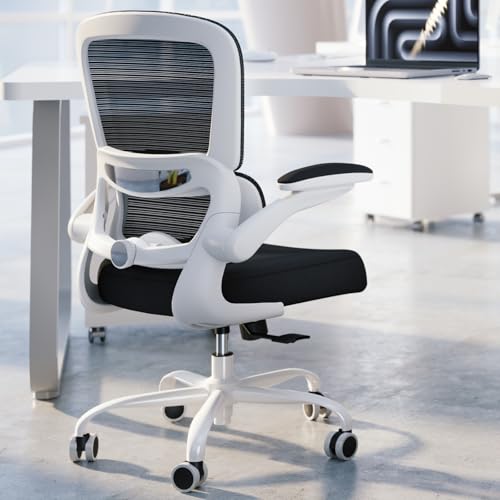
- Features an adjustable-depth lumbar support and breathable mesh backrest.
- The seat height adjusts from 17.7 to 21.7 inches, according to the product notes.
- Assembly is required; the listing describes a 15-minute setup.
Best For: Remote workers who spend long stretches seated
3. SHARDOR Dual Brew Coffee Maker
The Workday Coffee Station
SHARDOR Dual Brew Coffee Maker

- Brews single servings with K-Cup pods or ground coffee, or makes a carafe of up to six cups.
- Includes a programmable timer, strong and iced coffee options, and a removable 95-ounce reservoir.
- The thermal carafe is stainless steel; the drip tray accommodates travel mugs up to 6.88 inches tall.
Best For: Coffee drinkers who like flexible brewing at home
4. ErGear Electric Standing Desk, 48 × 24 Inches
A Sit-Stand Workspace
ErGear Electric Standing Desk, 48 × 24 Inches

- Electric height adjustment ranges from 28.35 to 46.46 inches.
- Stores up to four preferred height settings for quick adjustments.
- The black desk has a steel frame and requires assembly.
Best For: Remote workers who want to alternate between sitting and standing
5. Acer Dual Monitor Arm
Clearer Desk Space

- Supports two compatible VESA monitors; check each screen’s size, weight, and mounting pattern first.
- Offers height, tilt, swivel, and rotation adjustments for different screen layouts.
- Mounts with a clamp or grommet; confirm desk thickness, depth, and surface suitability.
Best For: Two-monitor users with a compatible desk
6. Redragon K745 PRO Wireless Keyboard
A Customizable Typing Gift
Redragon K745 PRO Wireless Keyboard

- Full-size 108-key layout includes four shortcut keys for mute, calculator, screen lock, and desktop by default.
- Connects by USB-C, Bluetooth, or 2.4GHz wireless and can switch between devices.
- Gasket-mounted construction has five-layer noise dampening; the four hotkeys can be reassigned with software.
Best For: Frequent typists who enjoy shortcut and lighting customization
7. TESSAN 100W USB Charging Station
A Tidy Charging Corner
TESSAN 100W USB Charging Station

- Combines three AC outlets, three USB-C ports, and three USB-A ports in a vertical tower.
- The listing describes charging up to nine devices at the same time.
- Uses a North American Type A plug; check local outlet compatibility.
Best For: Remote workers charging several devices at one desk
8. Univivi 36-Inch Under-Desk Cable Tray
A Place for Desk Cords
Univivi 36-Inch Under-Desk Cable Tray

- A 36-inch fabric tray holds and conceals adapters, sockets, and cables under a desk.
- Can be installed with clamps or screws and unfolds to make adding or removing items easier.
- Measure desk space first, including the clearance needed for clamps and any drawers or rails.
Best For: People looking to organize visible power strips and cords
9. Magnetic Glass Whiteboard, 36 × 24 Inches
A Wall-Mounted Planning Board
Magnetic Glass Whiteboard, 36 × 24 Inches

- Tempered glass writing surface mounts vertically or horizontally.
- Includes a marker, tray, eraser, and strong magnets; ordinary refrigerator magnets will not work.
- The frameless board is intended for wall mounting and requires installation.
Best For: Visual planners who keep notes and reminders in view
10. ComfiLife Adjustable Memory Foam Footrest
A Softer Place to Rest Feet
ComfiLife Adjustable Memory Foam Footrest

- Memory foam cushion has adjustable height for seated desk use.
- The removable cover is machine washable, and the foam can also be used as a rocker or knee support.
- Lightweight design includes a carry handle for moving between workspaces.
Best For: Desk workers who want a cushioned footrest
11. Yodoit 15.6-Inch Portable Monitor
A Second Screen on the Go
Yodoit 15.6-Inch Portable Monitor

- Portable 15.6-inch FHD screen offers USB-C and mini HDMI connectivity options.
- Includes built-in speakers and a smart cover for use at different work locations.
- Check whether the laptop or device supports video output through USB-C, or use the mini HDMI option.
Best For: Remote workers who move between home, coworking, and travel
12. AFIING Large PU Leather Desk Mat
A Roomier Desk Surface
AFIING Large PU Leather Desk Mat

- The 55 × 24-inch mat provides space for a keyboard, mouse, laptop, and accessories.
- Waterproof PU leather surface wipes clean with a damp cloth, according to the listing.
- Suede backing helps keep the mat in place during everyday desk use.
Best For: People who want to protect and organize a broad desktop
13. RIWUCT Foldable Aluminum Laptop Stand
An Adjustable Laptop Riser
RIWUCT Foldable Aluminum Laptop Stand
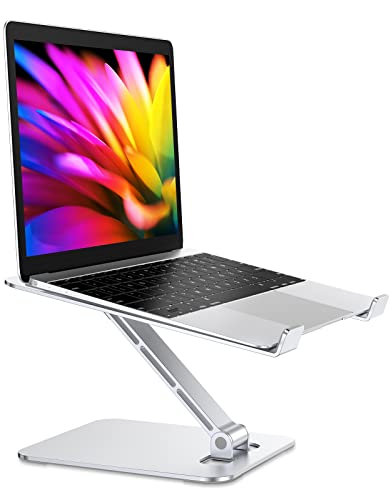
- Adjusts to raise a laptop up to 7.48 inches and folds for storage or carrying.
- Designed for laptops from 10 to 16 inches, with a listed support limit of 8.8 pounds.
- The open stand design leaves space for ventilation; the notes recommend an external keyboard for intensive typing.
Best For: Laptop users who want a portable, adjustable riser
14. ProtoArc EM11 NL Vertical Wireless Mouse
A Different Mouse Shape
ProtoArc EM11 NL Vertical Wireless Mouse

- Vertical shape is designed for small to medium hands; the listing recommends measuring hand length before ordering.
- Connects with Bluetooth or a USB-A receiver and can pair with up to three devices.
- Rechargeable design includes a USB-C charging cable; the notes describe a learning period for new users.
Best For: Right-handed workers interested in a vertical mouse
15. Purivortex PX500 Room Air Purifier
A Home-Office Air Upgrade
Purivortex PX500 Room Air Purifier

- Three-layer filtration includes a pre-filter, HEPA filter, and activated carbon layer.
- Offers four fan modes, three timer settings, and four night-light modes.
- The listing describes coverage up to 880 square feet in one hour; room conditions affect performance.
Best For: Remote workers who want an air purifier for their workspace
16. Hotmoon Cocoon 2 Sound Machine
Ambient Sound for Focus
Hotmoon Cocoon 2 Sound Machine

- Offers 40 sounds, including fan, nature, lullaby, ambient, and color-noise options.
- Has four timer settings, 32 volume levels, and eight night-light colors.
- Plug-in use only; the notes say an adapter is not included.
Best For: People who prefer background sound while working or winding down
17. LED Desk Lamp with Wireless Charging
Task Lighting with a Charging Base
LED Desk Lamp with Wireless Charging

- Touch controls select 3000K, 4000K, or 5000K light and adjust brightness.
- The lamp has a 360-degree adjustable tube and a built-in wireless charging base.
- The LED beads are built in and cannot be removed; check phone compatibility for wireless charging.
Best For: Remote workers who want adjustable desk lighting
18. KVIDIO Wireless Noise-Cancelling Headphones
A Quieter Work Corner
KVIDIO Wireless Noise-Cancelling Headphones

- Over-ear headphones offer active noise cancelling and a transparency mode.
- The listing gives up to 40 hours in wireless noise-cancelling mode or 70 hours in standard music mode.
- Includes a USB-C charging cable and a 3.5 mm audio cable for wired listening.
Best For: People working near household or neighborhood noise
How to Choose a Gift for a Remote Worker
Start with the friction they mention most often. A laptop user who plugs in several accessories may appreciate a dock; someone who moves between rooms or travels could get more use from a portable monitor or foldable stand. If they already have a settled workstation, look at smaller daily comforts such as a desk lamp, footrest, keyboard, or headphones. The best Christmas gift ideas for remote workers reflect their actual routine rather than a generic picture of a home office.
Think about the space, too. A standing desk or office chair is a substantial change to a room, while a desk mat, charging tower, or sound machine is easier to fit into an existing setup. Before choosing furniture, consider the recipient’s available floor space, desk size, and whether they have room for assembly. Wall-mounted gifts such as a glass whiteboard also require a suitable place and permission to install it.
Match the Gift to a Comfortable Workday
Ergonomic accessories can help tailor a workspace, but personal fit matters. Check whether a chair’s height range is suitable and whether the recipient wants a footrest. The vertical mouse here is designed for small to medium hands and may take time to get used to, so it suits someone who is curious about that shape. A laptop stand can raise a screen, but pairing it with a separate keyboard may be more comfortable for longer typing sessions.
For focus, consider the conditions around the worker. Noise-cancelling headphones can help in a shared home, while a sound machine may be a better fit for someone who prefers steady ambient sound. Lighting gifts suit dim work corners, and an air purifier may make sense for a room where the recipient spends many hours. These items serve different preferences, so a small clue from conversation can make the choice more thoughtful.
Set a Budget That Fits the Gift
Useful presents come at different scales. A desk mat, laptop stand, charging station, or sound machine can be a compact upgrade. A monitor, chair, or electric standing desk is a larger purchase and may be worth coordinating with family if the recipient has expressed a specific need. Avoid treating the biggest item as automatically the best choice: a modest accessory that solves an everyday annoyance can feel more personal than furniture they would not have selected themselves.
You can also build a gift around one work routine without adding products beyond this list. For example, pair the idea of a more organized desk with the cable tray or charging station, or choose a lighting upgrade for someone who often works after dark. Keep the focus on the item they are likely to use, rather than making the gift feel like a full office makeover.
Check Compatibility and Personal Preferences
For electronics, confirm the recipient’s devices and setup before buying. A docking station depends on laptop ports, operating system, and display support; the notes specify that macOS mirrors the external displays and Linux is unsupported. A portable monitor needs a compatible video connection. The monitor arm requires suitable VESA mounting, screen weight, and desk dimensions. For charging products, check plug type and whether the phone supports wireless charging. These details help avoid gifting a useful-looking item that cannot connect to their equipment.
Personalization can be practical: choose a keyboard color that fits their style, a mat that suits the desk dimensions, or a whiteboard placement that matches how they plan. For the coffee maker, consider whether they use pods, grounds, or both. For a mouse, verify hand fit and preferred connection. A quick, casual question about their setup can preserve the surprise while narrowing down the right choice.
Timing and Last-Minute Decisions
Order furniture and wall-mounted pieces early enough to account for delivery and assembly, and check the current listing for availability before making plans. For a late decision, prioritize gifts that are easier to integrate into a workspace, such as a desk accessory or portable item, while still checking compatibility and measurements. If you are unsure about a large change, choose an item that fits an existing routine and include a simple note explaining why you thought of them. A useful Christmas present should make the workday feel a little more comfortable after the decorations come down.