The best wireless gaming mice combine low-latency performance with the freedom to play without a cable. The right model depends on more than sensor resolution: shape, weight, button layout, battery approach, and software support can matter just as much.
We’ve compared 10 wireless options ranging from lightweight competitive designs to feature-rich mice for MMO players and productivity-focused setups. Use the guide below to narrow the list by grip style, budget, and the features you’ll actually use.
Best 10 Wireless Gaming Mice Picks for 2026
Best Lightweight Pick

- 1 ms LIGHTSPEED wireless response
- Up to 250 hours on one AA battery
- Lightweight 3.4-ounce design
Best For: Competitive players and portable gaming setups
Best Rechargeable Feature Set

- 2.4G wireless and USB-C wired modes
- Up to 75 hours with RGB off
- Seven programmable buttons and 1000Hz polling
Best For: Windows users wanting customization and rechargeable convenience
Best Customizable Pro-Style Pick

- 11 programmable buttons
- Up to 25,600 DPI HERO sensor
- Six removable weights for balance tuning
Best For: Right-handed gamers who want extensive controls and adjustability
Best Budget Macro Control

- Eight programmable buttons and macro support
- Up to 10,000 DPI with adjustable levels
- Rechargeable battery with up to 45 hours in eco mode
Best For: Gamers wanting customizable controls and RGB on a rechargeable mouse
Best All-Around Ergonomics
Razer Basilisk V3 X HyperSpeed

- Ergonomic shape with 9 customizable controls
- HyperSpeed and Bluetooth connectivity
- Up to 285 hours of HyperSpeed battery life
Best For: Players wanting comfort, customization, and long battery life
Best for MMO Customization
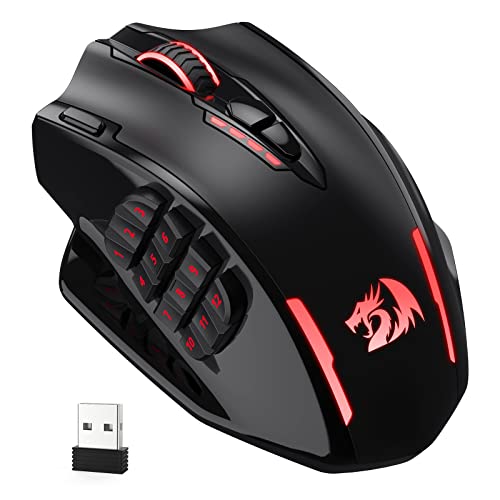
- 16 programmable buttons with 12 side controls
- 2.4GHz wireless and USB-C wired modes
- Up to 16,000 DPI with customizable settings
Best For: MMO players who need many accessible shortcuts
Best for Wireless Charging
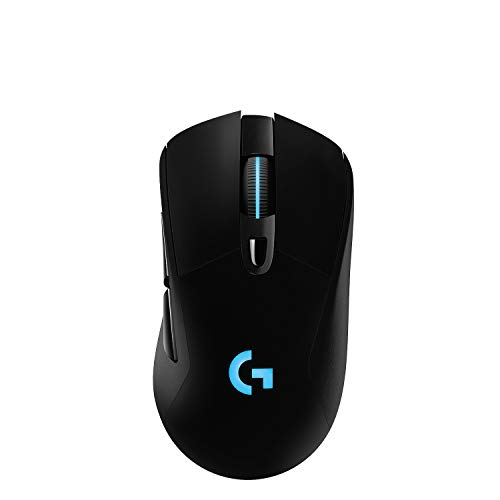
- Responsive LIGHTSPEED wireless connection
- HERO sensor with up to 25,600 DPI
- Compatible with optional POWERPLAY charging
Best For: PC gamers seeking responsive play and charging-mat support
Budget Wireless Freedom
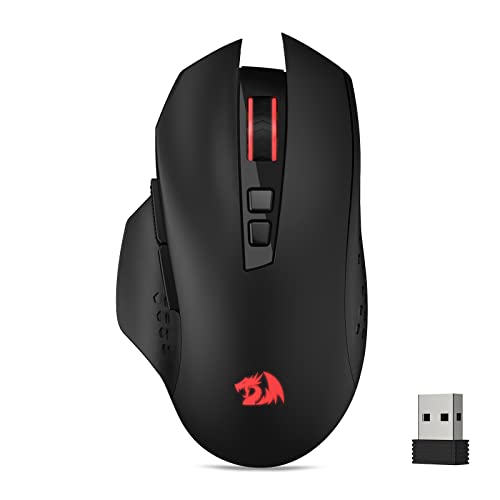
- 2.4GHz wireless with up to 10-meter range
- Five adjustable DPI levels up to 4,000
- Seven programmable buttons with macro support
Best For: Budget-conscious right-handed PC gamers
Feature-Rich RGB Control
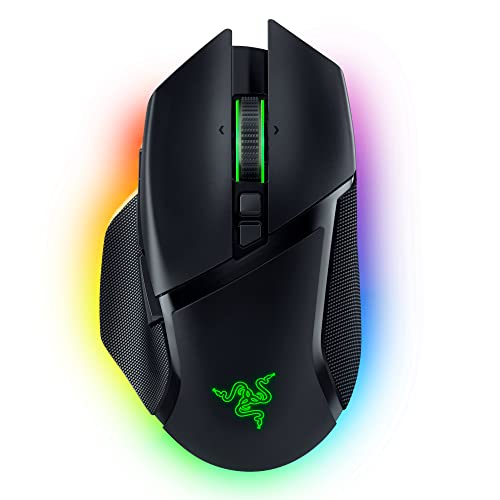
- 30,000 DPI sensor with wide-surface tracking
- 11 programmable buttons and HyperScroll wheel
- 2.4GHz, Bluetooth, and USB connectivity
Best For: Users seeking premium customization and RGB lighting
Long-Life Competitive Play

- 82-gram mass-centered design
- 30,000 DPI Focus Pro optical sensor
- Up to 280 hours from one AA battery
Best For: Competitive players prioritizing light handling and battery life
Best Lightweight Pick – Logitech G305 LIGHTSPEED
The Logitech G305 is a practical choice among wireless gaming mice if you want low weight, dependable performance, and long battery life without adding unnecessary features. Its LIGHTSPEED connection uses a 1 ms report rate, while the HERO sensor supports up to 12,000 DPI.
Best For: Competitive players and laptop users who prioritize portability, responsiveness, and battery longevity.
Pros:
- LIGHTSPEED wireless connection with a 1 ms report rate
- Up to 250 hours of gameplay from one included AA battery
- Lightweight 3.4-ounce design with built-in nano receiver storage
- HERO optical sensor supports up to 12,000 DPI and 400 IPS
Cons:
- Uses a replaceable AA battery rather than a rechargeable battery
- Has six buttons, offering fewer controls than several feature-heavy alternatives
The G305 focuses on the essentials: fast wireless performance, accurate tracking, and easy portability. It is especially appealing for gamers who prefer a simple, lightweight mouse with minimal charging or setup concerns.
Best Rechargeable Feature Set – TECKNET Wireless Gaming Mouse
The TECKNET is one of the more versatile wireless gaming mice for users who want both wireless and wired operation. It combines a 700mAh rechargeable battery, adjustable polling rates up to 1000Hz, programmable buttons, RGB lighting, and support for up to 12,800 DPI through Windows software.
Best For: Windows gamers who want customizable controls, dual-mode connectivity, and a rechargeable battery.
Pros:
- Supports 2.4G wireless and USB-C wired modes
- 700mAh battery provides up to 75 hours with RGB turned off
- Seven programmable buttons with macro support in Windows software
- Offers adjustable polling rates up to 1000Hz and 13 RGB effects
Cons:
- Driver software and side-button customization are not supported on Mac OS
- Battery life is specified with RGB disabled, so lighting use may reduce runtime
With its wired fallback and broad customization options, the TECKNET suits mixed gaming and everyday use. It is a strong fit for Windows users, though Mac owners should expect limited software functionality.
Best Customizable Pro-Style Pick – Logitech G502 LIGHTSPEED
The Logitech G502 LIGHTSPEED is a feature-rich option among wireless gaming mice, built for right-handed players who want extensive controls and adjustable balance. It includes 11 programmable buttons, a HERO sensor, a dual-mode scroll wheel, and six removable weights.
Best For: Right-handed gamers who want abundant commands, adjustable weight, and a familiar ergonomic layout.
Pros:
- LIGHTSPEED wireless technology is designed for fast, reliable performance
- Eleven programmable buttons provide extensive control options
- HERO sensor supports tracking across up to 25,600 DPI
- Six included weights allow balance customization
Cons:
- At 12.96 ounces, it is substantially heavier than lightweight alternatives
- Its right-handed shape is less suitable for left-handed users
- Battery life is listed at up to 60 hours
The G502 LIGHTSPEED prioritizes control and adjustability over minimal weight. Its programmable layout and removable weights make it particularly useful for players who want to tune both button access and handling characteristics.
Best Budget Macro Control – Redragon M810 PRO
The Redragon M810 PRO is a flexible choice among wireless gaming mice for players who want programmable controls, RGB lighting, and a rechargeable design. Its 2.4GHz wireless connection works alongside USB-C, while eight buttons and adjustable DPI settings support gaming and general use.
Best For: Gamers seeking customizable keybinds, rapid-fire functionality, and RGB lighting in a rechargeable wireless mouse.
Pros:
- Eight programmable buttons support custom keybinds and macros
- Adjustable DPI includes five onboard levels up to 10,000 DPI
- Rechargeable battery provides up to 45 hours in eco mode
- Supports 2.4GHz wireless and USB-C connectivity with RGB lighting
Cons:
- Listed battery life is shorter than several competing models
- Designed for right-handed use
- Its feature set relies on Windows software for customization
The M810 PRO emphasizes configurable controls and visual customization rather than premium sensor specifications. It is a sensible option for players who value macros, rapid-fire access, and rechargeable wireless operation.
Best All-Around Ergonomics – Razer Basilisk V3 X HyperSpeed
The Razer Basilisk V3 X HyperSpeed is a versatile choice among wireless gaming mice, combining a comfortable right-handed shape with dual wireless modes and extensive customization. Its HyperSpeed connection targets low-latency play, while Bluetooth and long battery life make it practical for work, travel, and extended gaming sessions.
Best For: Players who want an ergonomic mouse with programmable controls, long battery life, and flexible wireless connectivity.
Pros:
- Comfortable Basilisk design with 9 customizable controls and Razer Hypershift support.
- HyperSpeed wireless and Bluetooth connectivity, with up to 285 hours or 535 hours of battery life respectively.
- 18,000 DPI optical sensor, Gen-2 mechanical switches, 1000 Hz polling, and onboard profile storage.
- Chroma RGB lighting and smooth 100% PTFE mouse feet add customization and glide.
Cons:
- Uses a replaceable AA battery rather than a rechargeable built-in battery.
- Its right-handed 110 g design may not suit left-handed users or those seeking an ultralight mouse.
The Basilisk V3 X HyperSpeed stands out for balancing gaming performance, productivity controls, and exceptionally long battery claims. It is especially appealing if you switch between devices or want a single wireless mouse for several uses.
Best for MMO Customization – Redragon M913 Impact Elite
The Redragon M913 Impact Elite is built for MMO players who need many commands close at hand. With 12 side buttons, 16 programmable controls, dual wired and 2.4GHz wireless modes, and customizable RGB lighting, it offers a highly configurable approach to wireless gaming mice.
Best For: MMO and strategy gamers who rely on numerous remappable shortcuts and adjustable DPI settings.
Pros:
- Provides 16 customizable buttons, including 12 accessible side buttons.
- Supports both 2.4GHz wireless and USB-C wired operation.
- Pixart 3335 sensor offers up to 16,000 DPI with five onboard DPI levels.
- Battery life is rated for up to 45 hours with backlighting or 80 hours in eco mode.
Cons:
- At 132 g, it is heavier than some gaming mice.
- The extensive button layout may take time to learn and configure.
- Its listed 45-hour battery figure with lighting is shorter than some competing options.
The M913 makes the most sense when button density matters more than minimal weight. Its wired fallback, adjustable DPI, and software customization give MMO-focused setups plenty of flexibility.
Best for Wireless Charging – Logitech G703 LIGHTSPEED
The Logitech G703 LIGHTSPEED is a performance-focused option among wireless gaming mice, pairing a 95 g design with Logitech’s LIGHTSPEED connection and HERO sensor technology. Its rechargeable battery lasts up to 35 hours with default RGB lighting, while optional POWERPLAY support can keep it charged when paired with the separately sold charging system.
Best For: PC gamers who prioritize responsive wireless performance, a comfortable grip, and optional charging-mat compatibility.
Pros:
- LIGHTSPEED wireless is designed for responsive, high-performance gameplay.
- HERO sensor provides 1:1 tracking, 400+ IPS, and sensitivity up to 25,600 DPI.
- Comfortable design includes rubber side grips, six programmable buttons, and an optional 10 g weight.
- POWERPLAY compatibility can reduce battery-management interruptions with the separately sold system.
Cons:
- Battery life is rated at up to 35 hours with default LIGHTSYNC RGB.
- The POWERPLAY wireless charging system is sold separately.
- It is listed for Microsoft Windows, limiting the stated operating-system compatibility.
The G703 is a strong fit for players who want a comfortable, responsive wireless mouse and may later add a charging system. Its programmable controls and adjustable weight also make it adaptable without becoming overly complex.
Budget Wireless Freedom – Redragon M656
The Redragon M656 is a practical choice among wireless gaming mice for players who want cable-free movement, adjustable sensitivity, and programmable controls without a complicated feature set. Its 2.4GHz connection, five DPI levels, and right-handed ergonomic design suit everyday PC gaming.
Best For: Budget-conscious right-handed PC gamers who want customizable buttons and straightforward wireless performance.
Pros:
- 2.4GHz wireless connection with a stated range of up to 10 meters.
- Five onboard DPI levels from 1,000 to 4,000, with software customization.
- All seven buttons are programmable for keybinds and macros.
- Smart ECO sleep mode helps conserve battery during intermittent use.
Cons:
- Uses a replaceable AA battery, which is not included.
- Limited to a 500Hz polling rate.
- Red lighting is relatively basic, and the scroll-wheel light is not always on.
The M656 focuses on useful gaming essentials rather than premium extras. It is a sensible wireless gaming mouse for casual and competitive players who value programmable controls and adjustable DPI at an accessible level.
Feature-Rich RGB Control – Razer Basilisk V3 Pro
The Razer Basilisk V3 Pro is a premium option among wireless gaming mice, combining a right-handed ergonomic shape with extensive customization. It offers a 30,000 DPI sensor, 11 programmable buttons, multi-mode connectivity, and detailed Chroma RGB lighting.
Best For: Right-handed PC or Mac users who want extensive controls, premium tracking, and customizable RGB lighting.
Pros:
- Focus Pro 30K optical sensor supports tracking across a wide range of surfaces, including glass.
- Eleven programmable buttons provide substantial control customization.
- Supports 2.4GHz wireless, Bluetooth, and USB connectivity.
- Up to 110 hours of HyperSpeed wireless battery life or up to 150 hours over Bluetooth.
Cons:
- 8KHz polling requires the separately sold Mouse Dock Pro or HyperPolling Wireless Dongle.
- The extensive feature set may be more than casual players need.
- Its right-handed design is not suited to left-handed users.
The Basilisk V3 Pro is built for players who want a highly configurable wireless gaming mouse with premium tracking and lighting. Its extra hardware requirements for 8KHz polling are worth considering before purchase.
Long-Life Competitive Play – Razer Viper V3 HyperSpeed
The Razer Viper V3 HyperSpeed is a lightweight wireless gaming mouse designed around consistent competitive control and long battery life. Its 82-gram body, 30,000 DPI sensor, low-latency HyperSpeed connection, and top-mounted DPI button make it well suited to focused PC play.
Best For: Competitive players who prioritize lightweight handling, reliable wireless performance, and extended battery life.
Pros:
- 82-gram design with a mass-centered shape for consistent swipes.
- Focus Pro 30K sensor supports tracking on varied surfaces, including glass.
- Up to 280 hours of battery life from one included AA battery.
- Top-mounted control switches among five DPI stages or can be remapped.
Cons:
- Uses a replaceable AA battery rather than a built-in rechargeable battery.
- Provides six buttons, fewer than many productivity-focused gaming mice.
- Its listed wireless range is 5 meters, shorter than some alternatives.
The Viper V3 HyperSpeed emphasizes competitive consistency over lighting and extra controls. It is a strong fit for players who want a relatively light wireless gaming mouse and do not want frequent battery changes.
How We Picked These Wireless Gaming Mice
We focused on the factors that most affect real-world play: wireless responsiveness, sensor capability, weight, ergonomics, button placement, battery convenience, customization, and overall value. The selection includes lightweight FPS-oriented models, comfortable all-purpose mice, and higher-button options for MMOs, strategy games, and productivity. Listed specifications such as DPI, polling rate, connectivity, and programmable controls are useful comparison points, but they do not determine comfort or performance on their own.
Because hand size and grip preference vary, no single mouse is ideal for every player. Consider each product’s shape and controls alongside its feature list.
Quick Comparison
- Best for competitive FPS: Look for a lightweight shell, a reliable 2.4GHz connection, a consistent sensor, and a shape that supports quick lift-offs.
- Best for extra controls: MMO-style models offer more programmable buttons, while thumb-rest designs can improve access and comfort.
- Best for value: Budget models can provide wireless convenience, RGB lighting, and remapping, but may involve compromises in software, materials, or battery management.
- Best for long sessions: Prioritize ergonomic support, a suitable size, low weight, and a battery system that fits your routine.
Key Buying Factors for Wireless Gaming Mice
Connection and Latency
A dedicated 2.4GHz USB receiver is generally the safest choice for gaming because it is designed for low-latency play. Bluetooth is useful for laptops and secondary devices, but it may not deliver the same responsiveness or feature support. Check whether the receiver can be stored in the mouse and whether charging or wired operation is supported as a backup.
Shape, Grip, and Weight
Shape often matters more than headline DPI. Palm, claw, and fingertip grips each favor different contours and sizes. Lightweight mice can feel faster for competitive shooters, while heavier ergonomic designs may feel steadier and more comfortable for general use. If possible, compare dimensions with a mouse you already find comfortable.
Buttons and Software
Extra buttons are valuable only when they are easy to reach without accidental presses. Check whether the mouse supports onboard profiles, button remapping, sensitivity adjustment, macros, and RGB control. Software quality and compatibility can be especially important if you switch between computers.
Battery and Sensor Performance
Higher DPI numbers do not automatically mean better tracking; consistent control at your preferred sensitivity matters more. Also consider battery life, charging time, battery indicators, and whether the mouse remains usable while connected by cable.
Who Should Buy Which Wireless Gaming Mice?
Competitive FPS players should favor lightweight, streamlined mice with dependable 2.4GHz wireless and minimal button clutter. Players who want an ergonomic all-rounder may prefer a thumb-rest shape with several programmable controls. MMO and productivity users should consider a model with a larger button array and profile support. Budget-conscious buyers can choose an affordable wireless mouse with the needed controls, but should verify comfort, software support, and battery expectations before prioritizing RGB or maximum DPI.
Finally, match the mouse to your desk and play style. A premium sensor cannot compensate for an uncomfortable shape, while a budget model may be perfectly suitable if its connection, fit, and controls meet your needs.