The best label printers for Mac make shipping, organization, and office workflows faster without relying on ink cartridges. This roundup compares USB, Bluetooth, and Wi-Fi models suited to everything from occasional home labeling to daily business fulfillment.
We selected options across multiple budgets and use cases, focusing on Mac compatibility, connection methods, print speed, label formats, operating costs, and setup convenience.
Best 10 Label Printers for Mac Picks for 2026
Flexible Wireless Shipping
KNAON Bluetooth 4x6 Label Printer

- USB and app-based macOS support
- 3,000+ templates and broad label sizes
- Up to 180 mm/s thermal printing
Best For: Mac users printing shipping and custom labels
Fast Network Labeling
Brother QL-810W Professional Label Printer

- USB and Wi-Fi connectivity
- Up to 110 labels per minute
- Black-and-red 300 dpi printing
Best For: High-volume office and address labeling
Simple 4x6 Shipping
JADENS Bluetooth Thermal Label Printer

- USB and Bluetooth Mac support
- No ink or toner required
- Supports roll and fanfold labels
Best For: Online sellers printing marketplace shipping labels
Professional Tape Labeling
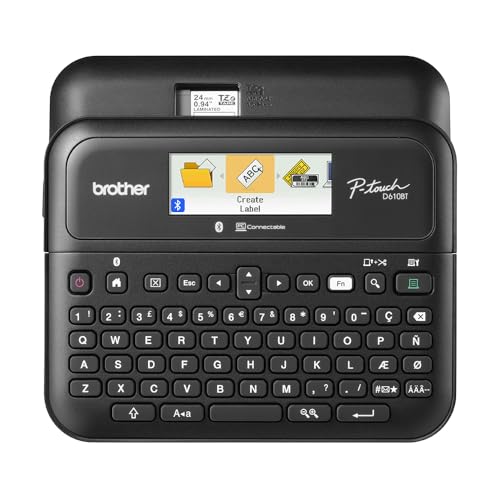
- Bluetooth and USB connectivity
- 175 templates and 900 symbols
- LCD preview and 90-label memory
Best For: Business organization and durable tape labels
Best Wired Pick
Rollo USB Shipping Label Printer

- Mac 10.9+ USB compatibility
- 150 mm/s inkless thermal printing
- Supports shipping and custom labels
Best For: Mac users who prefer a fast, dependable wired printer
Best Bluetooth Value
Phomemo 241BT Thermal Label Printer

- USB support for Mac OS
- Bluetooth printing via Labelife
- 1–4.6-inch label-width range
Best For: Home businesses needing flexible label sizes and connectivity
Best Wireless Mac Pick
Rollo Wireless Shipping Label Printer

- AirPrint for Mac, iPhone, and iPad
- Wi-Fi and USB connectivity
- Fast 203 DPI thermal printing
Best For: Apple users who want convenient wireless shipping-label printing
Dual-Roll Office Organizer
DYMO LabelWriter 450 Twin Turbo
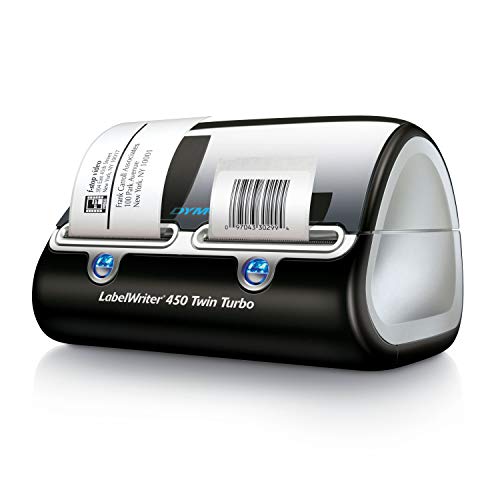
- Switch between two label rolls without swapping media
- Direct thermal printing needs no ink or toner
- USB printing with 300 dpi monochrome output
Best For: Home and office users who print multiple label types
Wireless Shipping Workhorse
MUNBYN 130B Bluetooth Label Printer

- Use Bluetooth, USB, or a browser-based Mac editor
- Supports common 4x6 shipping labels and varied widths
- Includes templates, fonts, OCR, and file-import tools
Best For: Small businesses and sellers printing shipping labels
Mac-Compatible Compact Shipper
Rongta RP425 Bluetooth Label Printer

- Works with Mac OS 10.11 and newer via downloadable drivers
- Supports Bluetooth and USB connections
- Automatically feeds labels from 0.98 to 4.37 inches wide
Best For: Mac users printing varied shipping, barcode, and QR labels
Flexible Wireless Shipping – KNAON Bluetooth 4×6 Label Printer
For shoppers comparing label printers for Mac, the KNAON stands out as a flexible thermal option for shipping and smaller DIY labels. It supports macOS through USB or the FlashLabel Pro app, prints up to 4.2-inch-wide media, and avoids ink and toner.
Best For: Small businesses and home sellers needing Mac-compatible shipping, barcode, mailing, or custom labels.
Pros:
- Supports macOS through USB and the FlashLabel Pro app.
- Offers Bluetooth connectivity for compatible devices and includes a built-in USB drive with drivers and setup videos.
- Provides more than 3,000 templates, 5,000 icons, and 100 fonts in the app.
- Prints at up to 180 mm/s and supports media from 1.5 to 4.2 inches wide.
Cons:
- Bluetooth use requires the FlashLabel Pro app rather than a direct connection for every device.
- Shipping-platform labels must be saved as PDFs and imported into the app.
The KNAON is a versatile pick if you want one compact printer for Mac shipping workflows and general label projects. Its app-based process adds a step, but the broad template library and media flexibility improve its everyday usefulness.
Fast Network Labeling – Brother QL-810W Professional Label Printer
The Brother QL-810W is a strong choice among label printers for Mac when speed and network access matter. It connects by USB or Wi-Fi, supports Mac OS X versions listed by the manufacturer, and can produce up to 110 standard address labels per minute.
Best For: Offices and small businesses printing address, package, folder, badge, and postage labels in volume.
Pros:
- Supports Mac OS X 10.10.5 through 10.13.x, along with Windows systems listed in the specifications.
- Offers USB and Wi-Fi connectivity, including mobile printing over a wireless network.
- Prints standard address labels at up to 110 per minute at 300 dpi.
- Can print black-and-red labels with DK 2251 media and includes an automatic cutter.
Cons:
- Uses Brother DK label rolls, with a maximum media width of 2.4 inches.
- The supplied Mac operating-system compatibility list names older Mac OS X versions.
Choose the QL-810W if rapid output and shared wireless access are more important than wide 4×6 shipping labels. Its 300 dpi output, cutter, and black-and-red capability make it particularly practical for organized office labeling.
Simple 4×6 Shipping – JADENS Bluetooth Thermal Label Printer
The JADENS JD268BT is a straightforward option for label printers for Mac, especially for online sellers printing 4×6 shipping labels. It works with Mac through Bluetooth or USB, uses thermal printing without ink or toner, and supports both roll and fanfold labels.
Best For: Online sellers who need an economical Mac-compatible printer for marketplace and shipping labels.
Pros:
- Supports Mac OS 10.9 and newer through USB, with Bluetooth printing available for Mac.
- Uses a 203 dpi thermal print head, so it requires no ink or toner.
- Works with label widths from 1.57 to 4.1 inches and accepts roll or fanfold media.
- Supports shipping platforms including Amazon, eBay, Shopify, ShipStation, Shippo, and others.
Cons:
- Android and iOS phones require the Jadens Printer app rather than Bluetooth printing.
- Label calibration is required when changing label sizes.
The JADENS keeps the setup focused on shipping and marketplace workflows. Its USB connection is useful for Mac users, while the app requirement and manual recalibration are worth considering if you frequently switch devices or label sizes.
Professional Tape Labeling – Brother P-Touch PT-D610BT
Brother P-Touch PT-D610BT Business Professional Connected Label Maker with Bluetooth®
Check Price On AmazonThe Brother P-Touch PT-D610BT takes a different approach from shipping-focused label printers for Mac. It connects through Bluetooth or USB, includes a keyboard and color LCD preview, and creates durable Brother Genuine TZe tape labels up to 1 inch wide.
Best For: Businesses organizing inventory, assets, merchandise, security seals, and other tape-based labeling projects.
Pros:
- Supports Bluetooth and USB connections for computers and mobile devices.
- Includes 175 business-focused templates, 17 fonts, 17 styles, 160 frames, and 900 symbols.
- Stores up to 90 frequently used labels for quick reprinting.
- Provides a 20-character, two-line full-color LCD preview and an automatic cutter.
Cons:
- Its maximum label width is 1 inch, making it less suited to standard 4×6 shipping labels.
- It uses Brother Genuine TZe label tapes rather than general shipping-label media.
The PT-D610BT is best viewed as a professional organization label maker rather than a parcel printer. For Mac users who need neatly designed tape labels, its onboard controls, templates, memory, and preview screen offer a productive workflow.
Best Wired Pick – Rollo USB Shipping Label Printer
For shoppers comparing label printers for Mac, the Rollo USB is a practical wired option for Mac computers running macOS 10.9 or newer. It prints 4×6 shipping labels at up to one label per second without ink or toner, while also supporting custom labels, barcodes, QR codes, and stickers.
Best For: Mac users who want a straightforward USB shipping-label printer for ecommerce, warehouse, or custom labeling.
Pros:
- Compatible with Mac 10.9 and newer through USB.
- Prints at 150 mm/s with a 203 DPI print head.
- Supports label widths from 1.57 to 4.1 inches.
- Works with major carriers, marketplaces, and shipping platforms.
Cons:
- Requires a wired USB connection.
- Prints monochrome labels only.
- Limited to labels up to 4.1 inches wide.
The Rollo USB stands out when reliable Mac compatibility and fast shipping-label output matter more than wireless convenience. Its broad platform support and flexible label sizing also make it useful beyond standard postage labels.
Best Bluetooth Value – Phomemo 241BT Thermal Label Printer
The Phomemo 241BT is a flexible choice among label printers for Mac, offering USB printing for Mac OS as well as Bluetooth printing through supported devices and software. It handles labels from 1 to 4.6 inches wide and includes 20 labels to help get started.
Best For: Home businesses and sellers who want wireless device support, broad label-size flexibility, and an included starter supply.
Pros:
- Supports Mac OS through a USB connection and driver.
- Offers Bluetooth printing through the Labelife app and compatible devices.
- Handles label widths from 1 to 4.6 inches.
- Prints text, barcodes, QR codes, and forms without ink or toner.
Cons:
- Mac computer printing requires downloading the correct driver and using USB.
- Bluetooth setup uses the Labelife app and is geared toward supported mobile devices.
- Prints black-and-white labels only.
The Phomemo 241BT is appealing for users who want more connection options than a basic wired printer provides. Its wide media range and template support make it suitable for shipping, organization, and small-business labeling.
Best Wireless Mac Pick – Rollo Wireless Shipping Label Printer
For Mac users seeking wireless convenience, the Rollo Wireless uses AirPrint to print directly from a Mac, iPhone, or iPad. This 4×6 thermal printer also supports Wi-Fi connections across other platforms, while retaining USB connectivity and fast, ink-free output.
Best For: Mac and Apple-device users who want to print shipping labels over Wi-Fi or AirPrint without relying on Bluetooth or computer drivers.
Pros:
- Supports AirPrint from Mac, iPhone, and iPad.
- Prints through Wi-Fi or USB without requiring Bluetooth.
- Produces one 4×6 label per second at 203 DPI.
- Supports shipping platforms plus custom labels from 1.57 to 4.1 inches wide.
Cons:
- Prints monochrome labels only.
- Designed primarily for label printing rather than general documents.
- Wireless setup depends on a Wi-Fi network.
The Rollo Wireless is the strongest fit here for an Apple-centered workspace because AirPrint simplifies printing from Macs and iOS devices. Its USB fallback, marketplace compatibility, and durable print-head specification add flexibility for regular shipping use.
Dual-Roll Office Organizer – DYMO LabelWriter 450 Twin Turbo
If you need label printers for Mac that can handle everyday organization and mailing tasks, the DYMO LabelWriter 450 Twin Turbo stands out for its two-roll design. It uses direct thermal printing, connects by USB, and can create labels from Microsoft Word, Excel, Outlook, and Google Contacts.
Best For: Home offices and workplaces that regularly switch between two types of labels.
Pros:
- Two label rolls make it easy to switch formats without changing media.
- Direct thermal printing eliminates ink and toner purchases.
- Prints precise quantities to help reduce sheet-label waste.
- Supports label creation from several familiar Microsoft and Google applications.
Cons:
- Uses USB connectivity rather than the wireless options offered by some newer models.
- Best performance is tied to authentic DYMO LabelWriter labels.
The Twin Turbo is a practical choice when convenience means keeping two label sizes ready at once. Its compact office-focused design and 300 dpi monochrome output suit filing, shipping, barcodes, and general organization.
Wireless Shipping Workhorse – MUNBYN 130B Bluetooth Label Printer
For shoppers comparing label printers for Mac, the MUNBYN 130B offers a flexible way to print shipping and organization labels. Mac and desktop users can design through the browser-based Munbyn Editor, while Bluetooth and USB connectivity provide convenient setup options.
Best For: Small businesses and home sellers printing 4×6 shipping labels from computers or mobile devices.
Pros:
- Bluetooth printing works with phones and tablets through the MUNBYN Print app.
- Mac and desktop users can use the browser-based Munbyn Editor without installation.
- Supports labels from 1.57 to 4.3 inches wide, including common 4×6 shipping labels.
- Offers templates, fonts, design elements, PDF/TXT importing, and OCR tools.
Cons:
- Optimal performance is recommended with genuine MUNBYN thermal labels.
- The supplied notes caution that it may not be compatible with UPS thermal paper.
With 203 dpi output, a two-year warranty, and support for major shipping platforms, this model is geared toward flexible small-business labeling. Its browser-based Mac workflow is particularly useful if you want to avoid installing desktop software.
Mac-Compatible Compact Shipper – Rongta RP425 Bluetooth Label Printer
The Rongta RP425 is one of the more versatile label printers for Mac when you need both computer and mobile support. It works with Mac OS 10.11 and newer through downloadable drivers, while Bluetooth printing is available from iOS and Android devices.
Best For: Small offices, warehouses, and mobile sellers that need flexible label sizes and automatic feeding.
Pros:
- Supports Mac OS 10.11 and newer, Windows 7 and newer, and Chrome OS.
- Bluetooth and USB connectivity support computers, phones, and tablets.
- Automatically identifies, grabs, and feeds compatible labels.
- Handles direct thermal labels from 0.98 to 4.37 inches wide.
Cons:
- Setup on Mac requires downloading the driver from Rongta’s official website.
- Its 203 dpi resolution is designed for standard monochrome labels rather than high-detail printing.
The RP425 is a strong fit if your labeling needs extend beyond standard 4×6 shipping labels. Automatic label detection, a compact build, and speeds up to 150 mm/s make it practical for varied office or small-business workflows.
How We Picked the Best Label Printers for Mac
We focused on printers that can fit naturally into a Mac-based workflow, whether they connect through USB, Wi-Fi, or Bluetooth. The selection includes dedicated 4×6 thermal shipping printers, compact Bluetooth models, and versatile office label makers. We also considered advertised print speed, supported label sizes, software requirements, portability, and whether the printer uses direct thermal printing to avoid ink and toner costs.
Because compatibility can vary by macOS version and app, check the manufacturer’s current driver, software, and system-support information before buying. Wireless models may offer more flexible placement, while USB printers are often simpler and more dependable for a single Mac workstation.
Quick Comparison
| Best For | Recommended Type | Connection to Consider | Typical Label Format |
|---|---|---|---|
| Online sellers | Dedicated thermal shipping printer | USB or Wi-Fi | 4 x 6 inches |
| Shared home or office use | Wireless shipping printer | Wi-Fi or Bluetooth | 4 x 6 inches and smaller |
| Folders, cables, and storage | Desktop label maker | USB or Bluetooth | Die-cut and continuous tape |
| High-volume fulfillment | Commercial-grade thermal printer | USB | 4 x 6 inches |
Key Buying Factors for Label Printers for Mac
Mac Compatibility and Setup
Look for macOS drivers or software, not just generic computer compatibility. A printer may support Mac printing through a standard driver, while design features such as templates, barcode tools, and custom layouts may require a separate app. Confirm compatibility with your Mac’s operating system and available ports.
Connection Type
USB is usually the easiest choice for reliable, repeatable printing from one computer. Wi-Fi is better when several devices need access or the printer must sit away from your desk. Bluetooth is convenient for phones and tablets, but app support and device switching can be more limited.
Label Size and Printer Purpose
Choose a 4×6 thermal model for most carrier shipping labels. For address labels, file folders, cables, and retail organization, a tape-based label maker may be more flexible. Verify the printer’s supported width and whether it accepts proprietary media or standard-compatible rolls.
Speed, Resolution, and Running Cost
Higher speed matters for frequent shipping, while resolution matters for small text, barcodes, and graphics. Direct thermal printers eliminate ink replacement, but you still need to budget for labels. Compare roll prices, availability, adhesive quality, and the time required to reload media.
Who Should Buy Which Label Printers for Mac?
Choose a USB thermal printer if you mainly print shipping labels from one Mac and want straightforward setup. Choose Wi-Fi if multiple users or devices need access. Choose Bluetooth for compact, flexible printing from mobile devices or a small workspace. Choose a Brother or DYMO-style label maker for office organization, narrow labels, and varied label designs rather than primarily 4×6 shipping labels. For daily fulfillment, prioritize dependable media handling, fast output, and easy-to-replace rolls over portability.