Printing labels should be one of the quickest steps in fulfilling an order—not a source of cable clutter, compatibility problems, or wasted labels. The best Wi-Fi shipping label printers make it easier to print 4 x 6 shipping labels from computers, phones, and tablets.
We compared these 10 models for connectivity, platform support, print performance, label compatibility, and everyday usability so you can choose the right printer for your workflow and budget.
Best 10 Wifi Shipping Label Printers Picks for 2026
Flexible Wi-Fi Workhorse

- USB and wireless printing across several platforms
- Supports roll and fanfold labels
- Handles widths from 0.75 to 4.25 inches
Best For: Versatile e-commerce and inventory labeling
Team-Friendly Network Pick

- Dual-band Wi-Fi and wired LAN sharing
- Smart queueing for concurrent print jobs
- Fast 150 mm/s 4x6 output
Best For: Small teams sharing one shipping printer
Professional Wide-Format Choice

- Wireless, Bluetooth, Ethernet, and USB connectivity
- Prints labels up to 4 inches wide
- Includes barcode crop and network tools
Best For: Professional postage and barcode workflows
Proven USB Shipping Staple
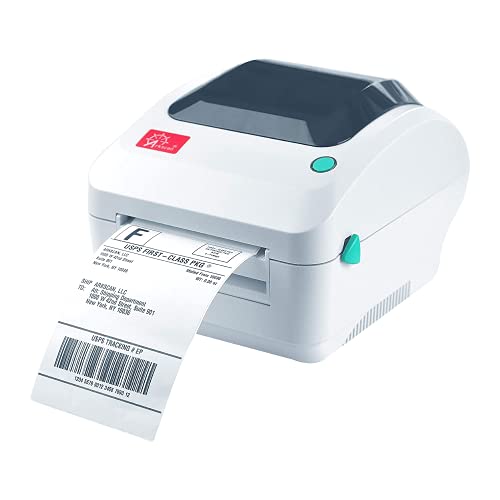
- Supports major marketplaces and carriers
- Accepts roll and fanfold labels
- Prints up to 5 inches per second
Best For: Computer-based sellers prioritizing broad platform support
Best Wi-Fi Pick
Rollo Wireless Shipping Label Printer

- Wi-Fi, AirPrint, and USB connectivity
- 203 DPI printing at up to 150mm/s
- Supports major platforms and custom label sizes
Best For: Small businesses needing flexible wireless label printing
Best App-Based Option
NULLTONEX Bluetooth Shipping Label Printer

- Bluetooth and USB connectivity
- 203 DPI printing up to 150mm/s
- App includes 1,800+ templates and 300+ fonts
Best For: Mobile-first sellers using Bluetooth or USB
Best Wired Alternative
Rollo USB Shipping Label Printer

- USB connection for Windows and Mac
- Prints one 4x6 label per second
- Supports shipping and custom labels
Best For: Dedicated desktop shipping stations
Best Bluetooth Speed
Nelko PL70E 4x6 Thermal Printer

- Up to 72 4x6 labels per minute
- Bluetooth app and USB connectivity
- Supports roll and fanfold labels
Best For: Fast shipping-label printing from phones or computers
Best Value Bluetooth
JADENS JD268BT Shipping Label Printer

- Ink- and toner-free thermal printing
- Bluetooth and USB connectivity
- Supports many shipping platforms and label sizes
Best For: Budget-conscious online sellers using Bluetooth devices
Flexible Wi-Fi Workhorse – Arkscan 2054K-WF
The Arkscan 2054K-WF is a versatile choice among wifi shipping label printers, supporting USB and network printing across Windows, macOS, ChromeOS, compatible Android devices, and compatible iOS devices. It handles common 4×6 shipping labels as well as smaller and longer label formats.
Best For: Small businesses and sellers that need flexible media sizes, roll or fanfold loading, and broad platform support.
Pros:
- Supports label widths from 0.75 to 4.25 inches and lengths from 0.4 to 90 inches.
- Accepts both internal label rolls and fanfold labels fed from the rear.
- Includes BarTender UltraLite software for Windows label design.
- Uses direct thermal printing, so ink, toner, and ribbons are unnecessary.
Cons:
- Print resolution is 203 DPI.
- Wireless printing depends on compatible devices and network setup.
With its wide media range and included design software, the 2054K-WF is a practical option when shipping is only one part of your labeling workflow. Its one-year limited warranty and U.S.-based technical support add useful setup assistance.
Team-Friendly Network Pick – JADENS JD-410WF
The JADENS JD-410WF stands out among wifi shipping label printers with dual-band 2.4G/5G Wi-Fi, wired LAN, and smart queueing for concurrent print jobs. It is designed for home offices and small businesses that print standard thermal labels from multiple devices.
Best For: Small teams that need shared wireless or wired printing and fast 4×6 label output.
Pros:
- Supports 2.4G/5G Wi-Fi and wired LAN connections.
- Smart queueing manages print jobs from multiple devices.
- Prints 4×6 labels at up to 150 mm per second with 203 DPI resolution.
- Built-in compartment and reversible core adapters support different roll sizes.
Cons:
- Windows, Intel-based macOS, and Chromebook users need the specified drivers or extensions.
- Its maximum media size is 4×6 inches, limiting oversized label use.
The JD-410WF is a strong fit for shared workspaces where several people need to send labels without repeatedly reconnecting. Its standard-label compatibility and cartridge-free direct thermal design can also help control ongoing media costs.
Professional Wide-Format Choice – Brother QL-1110NWB
The Brother QL-1110NWB is a professional-oriented option among wifi shipping label printers, combining wireless, Bluetooth, Ethernet, and USB connectivity. It prints labels up to 4 inches wide and includes features aimed at postage, barcodes, and network-based workflows.
Best For: Businesses needing wide mailing labels, barcode tools, and multiple connectivity options.
Pros:
- Supports wireless, Bluetooth, Ethernet, and USB connections.
- Prints mailing, address, postage, visitor, and name-badge labels up to 4 inches wide.
- Barcode crop function can select barcodes and UPCs from templates on Windows.
- Includes starter rolls, P-touch Editor software, and a two-year limited warranty.
Cons:
- The barcode crop function is specified for Windows only.
- Listed print resolution is 300 x 300 DPI, while the maximum print speed is lower than some dedicated shipping models.
- Its software and operating-system compatibility details are centered on specified Windows and older macOS versions.
Choose the QL-1110NWB when connectivity and professional label functionality matter more than the simplest setup. Ethernet and network-management tools make it especially suitable for established office workflows.
Proven USB Shipping Staple – Arkscan 2054A
The Arkscan 2054A is a straightforward choice for shoppers comparing wifi shipping label printers but primarily printing from a computer over USB. It supports major shipping and marketplace platforms, standard 4×6 labels, and both roll and fanfold media.
Best For: Sellers who want broad shipping-platform compatibility and dependable USB printing without ink or toner.
Pros:
- Works with platforms and services including Amazon, eBay, Etsy, Shopify, ShipStation, UPS, USPS, FedEx, and DHL.
- Supports label widths from 0.75 to 4.25 inches and lengths from 0.4 to 90 inches.
- Accepts roll and fanfold labels and prints at up to 5 inches per second.
- Includes BarTender UltraLite software and U.S.-based technical support.
Cons:
- The supplied connectivity information specifies USB rather than Wi-Fi.
- BarTender UltraLite is for Windows only.
- A one-year limited warranty is shorter than the two-year warranty listed for the Brother model.
The 2054A makes sense for a dedicated workstation where USB reliability and platform support are the priorities. Its broad label-size range also lets sellers handle product, barcode, and warehouse labels beyond standard shipping formats.
Best Wi-Fi Pick – Rollo Wireless Shipping Label Printer
For shoppers comparing wifi shipping label printers, the Rollo Wireless stands out for flexible connectivity and broad device support. It prints standard 4×6 labels at up to one per second without ink or toner, and it can also handle custom labels for other business needs.
Best For: Small businesses and online sellers who want Wi-Fi printing from phones, computers, or tablets.
Pros:
- Supports Wi-Fi, AirPrint, and USB connections across Android, Windows, Mac, Chromebook, Linux, iPhone, and iPad.
- Prints sharp 203 DPI labels at up to 150mm/s.
- Works with major carriers, marketplaces, and shipping platforms.
- Handles label widths from 1.57 to 4.1 inches for shipping and custom labels.
Cons:
- It is a monochrome printer and does not print in color.
- The included warranty is limited to one year.
The Rollo Wireless is the strongest match here for a true Wi-Fi workflow, especially if multiple device types need access to one printer. Its Rollo Ship Manager app and long-rated printhead life add practical value for frequent shippers.
Best App-Based Option – NULLTONEX Bluetooth Shipping Label Printer
Although it is not a Wi-Fi printer, this compact model is worth considering alongside wifi shipping label printers if Bluetooth phone printing suits your setup. It uses direct thermal printing, includes USB connectivity, and offers an app with templates and editing tools for shipping and organization labels.
Best For: Small businesses that prefer Bluetooth mobile printing or a direct USB connection.
Pros:
- Prints 203 DPI labels at speeds up to 150mm/s without ink or toner.
- Offers Bluetooth and USB connectivity for phones, laptops, and PCs.
- The FlashLabel Pro app includes more than 1,800 templates and 300 fonts.
- Supports 4×6 labels and other widths from 1.57 to 4.3 inches.
Cons:
- It does not provide Wi-Fi connectivity.
- Printing is black and white only.
- Bluetooth printing requires the FlashLabel Pro app.
This is a practical alternative for users who primarily print from a smartphone or keep the printer next to a computer. Choose it over a Wi-Fi model only if Bluetooth and USB meet your workflow needs.
Best Wired Alternative – Rollo USB Shipping Label Printer
If you do not need wireless access, the Rollo USB is a straightforward alternative to wifi shipping label printers. It connects directly to Windows or Mac computers, prints 4×6 labels quickly without ink, and works with common shipping services, marketplaces, and label types.
Best For: Sellers who print from a dedicated Windows PC or Mac and prefer a simple wired setup.
Pros:
- Prints one 4×6 label per second at up to 150mm/s.
- Uses direct thermal technology and a 203 DPI printhead, so no ink or toner is required.
- Compatible with Windows XP and newer and Mac 10.9 and newer.
- Supports shipping, warehouse, barcode, sticker, and custom labels from 1.57 to 4.1 inches wide.
Cons:
- Connectivity is wired USB only, with no Wi-Fi or Bluetooth.
- Computer-based setup requires downloading Rollo drivers.
- It is limited to monochrome printing.
The Rollo USB keeps the workflow simple and dependable when the printer can stay beside one computer. It is less flexible than the wireless Rollo, but it remains a capable choice for routine desktop shipping.
Best with Extra Features – KNAON Y486AP Wireless Label Printer
For shoppers comparing wifi shipping label printers, the KNAON Y486AP stands out with direct Wi-Fi printing and AirPrint support. It works with iPhone, iPad, Mac, Android, and Windows devices, prints at up to 150 mm/s, and supports labels from 1.54 to 4 inches wide.
Best For: Small businesses and home offices that want AirPrint-enabled wireless label printing across multiple device types.
Pros:
- Supports AirPrint and Wi-Fi printing from compatible devices.
- Works with major platforms including Amazon, eBay, Shopify, USPS, UPS, Etsy, and DHL.
- Prints monochrome labels at 203 dpi and up to 150 mm/s.
- Includes a label holder, 20 test papers, and power and USB-C accessories.
Cons:
- It is a print-only thermal printer with simplex output.
- AirPrint and Wi-Fi setup requires devices to connect to the same network.
The KNAON is a practical choice when Wi-Fi convenience matters more than advanced multifunction features. Its broad compatibility and included label holder make it especially appealing for small-scale shipping workflows.
Best Bluetooth Speed – Nelko PL70E 4×6 Thermal Printer
The Nelko PL70E is a compact option among wifi shipping label printers alternatives, using Bluetooth for wireless printing and USB for desktop connections. Its 150 mm/s speed, 203 dpi resolution, and support for both roll and fanfold labels suit regular shipping tasks.
Best For: Sellers who want fast 4×6 label printing from a phone or computer and do not require built-in Wi-Fi.
Pros:
- Prints up to 72 4×6 labels per minute at up to 150 mm/s.
- Supports Bluetooth through the NELKO app on iOS and Android.
- USB connectivity works with Windows, Mac, and Chrome OS.
- Accepts label widths from 1.54 to 4.1 inches and includes 50 4×6 labels.
Cons:
- It uses Bluetooth rather than Wi-Fi for wireless printing.
- Mac users are limited to USB or the specified Bluetooth app setup.
- Labels generally need to be saved as PDFs and uploaded to the app for printing.
The PL70E is a strong fit for users who prioritize speed and compact size. Its app-based workflow is convenient, though shoppers specifically seeking network-based Wi-Fi printing should consider a Wi-Fi model instead.
Best Value Bluetooth – JADENS JD268BT Shipping Label Printer
The JADENS JD268BT is a straightforward wireless thermal printer for shoppers comparing wifi shipping label printers and Bluetooth models. It prints 4×6 and other label sizes at 203 dpi, connects wirelessly through Bluetooth, and also supports USB connections for Windows and Mac computers.
Best For: Online sellers who need an economical printer for shipping, warehouse, marketplace, and small-business labels.
Pros:
- Uses thermal printing, so no ink or toner is required.
- Supports Bluetooth printing and USB connections for Windows and Mac.
- Works with platforms and tools including Amazon, eBay, Shopify, ShipStation, Shippo, and Ordoro.
- Supports label widths from 1.57 to 4.1 inches and includes 50 test labels.
Cons:
- It does not provide Wi-Fi connectivity; wireless printing uses Bluetooth.
- Android and iOS phones require the Jadens printer app.
- Users need to recalibrate the printer when changing label types.
The JD268BT keeps operating costs simple and offers broad shipping-platform compatibility. It is a sensible budget choice for Bluetooth users, provided the required app workflow and label calibration are acceptable.
How We Picked the Best Wifi Shipping Label Printers
We focused on printers that support common 4 x 6 shipping labels and are practical for online sellers, home offices, and small businesses. Our comparison considered wireless setup, compatibility with Windows, macOS, ChromeOS, Android, and iOS where applicable, as well as support for marketplaces and shipping platforms such as Amazon, eBay, Etsy, Shopify, PayPal, ShipStation, UPS, and USPS.
We also looked at print format, thermal-printing convenience, connection options, likely workspace fit, and whether a model is better suited to occasional home use or higher-volume fulfillment. Because feature availability can vary by operating system and app, verify compatibility with your exact device before ordering.
Quick Comparison
| Best For | What to Look For |
|---|---|
| Phone and tablet printing | Wi-Fi, AirPrint, or Bluetooth support with a mobile app |
| Multi-device households | Broad Windows, Mac, Chromebook, Android, and iOS compatibility |
| High-volume shipping | Reliable thermal printing, fast output, and sturdy construction |
| Wide labels or postage formats | A wide-format printer such as the Brother QL-1110NWB |
| Simple desktop setups | USB connectivity and straightforward driver support |
Key Buying Factors for Wi-Fi Shipping Label Printers
Wireless Compatibility
Wi-Fi is convenient, but not every printer connects the same way. Check whether the printer joins your home or office network, creates a direct connection, or relies on a specific app. Dual-band support can make setup easier on modern networks, while Bluetooth may be useful for direct mobile printing.
Device and Platform Support
Confirm support for the devices you actually use. A printer may work well with Windows and Mac but offer limited mobile functionality, or require an app for Android and iPhone printing. Marketplace compatibility is also important if your labels come from Shopify, Amazon, Etsy, eBay, or a carrier portal.
Label Size and Operating Cost
Most shipping workflows use standard 4 x 6 direct-thermal labels. Thermal printers do not require ink or toner, but label quality and roll or fanfold compatibility still matter. Check supported media, maximum print width, and whether replacement labels are easy to find.
Setup and Print Reliability
Look for clear drivers, automatic label detection, consistent alignment, and a design that fits your available workspace. A printer that is easy to reconnect and reload can save more time than one with a lower purchase price.
Who Should Buy Which Wifi Shipping Label Printers?
Choose a Wi-Fi model with broad device support if several people print from different computers or mobile devices. Rollo and Arkscan options are appealing for sellers who want familiar 4 x 6 workflows with wireless flexibility. JADENS and KNAON models may suit home businesses seeking compact wireless or mobile printing features.
For professional users who need wide-format flexibility, barcode printing, or a more established office-oriented design, the Brother QL-1110NWB deserves closer attention. If wireless printing is not essential, USB models can provide a simpler and potentially more dependable desktop setup. Bluetooth-focused options from Nelko or JADENS are worth considering when direct phone printing matters more than network sharing.