The best smart home hubs bring compatible devices, wireless protocols, and automation routines into one easier-to-manage system. They can reduce app switching while improving how lights, locks, sensors, thermostats, and appliances work together.
This roundup compares 10 smart home hubs for different priorities, including broad device support, advanced local automation, dedicated lighting control, simple Alexa management, and flexible multi-protocol setups.
Best 10 Smart Home Hubs Picks for 2026
Best Overall

- Supports Matter, Z-Wave, Zigbee, and SmartThings
- Works with Alexa and Google Home
- Uses Wi-Fi or Ethernet connectivity
Best For: Mixed-brand SmartThings households
Best for Hue Lighting

- Supports 150+ Hue lights and accessories
- Stores up to 500 personalized scenes
- Adds Hue MotionAware automation
Best For: Large Philips Hue lighting systems
Best for Home Assistant

- Home Assistant OS comes preinstalled
- Keeps home data stored locally
- Expands via Z-Wave, Zigbee, or Thread USB devices
Best For: DIY local automation enthusiasts
Best for Local Automation

- Processes automations locally
- Supports Matter, Z-Wave, Zigbee, and Bluetooth
- Works without a recurring subscription
Best For: Privacy-focused advanced automators
Best for Lutron Lighting

- Supports up to 75 Caseta devices
- Works with Alexa, HomeKit, Google Assistant, Ring, and Sonos
- Easy router-and-app setup
Best For: Lutron Caseta lighting systems
Best Local Matter Bridge
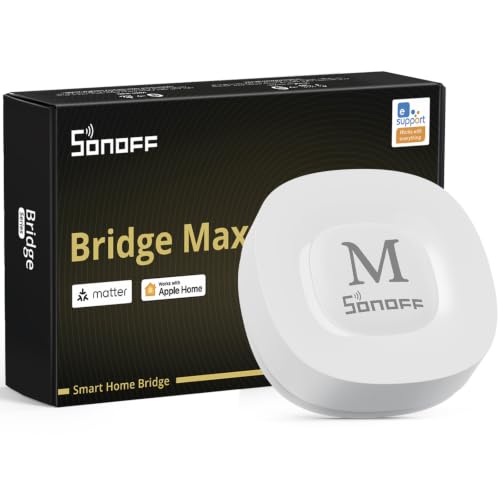
- Bridges Zigbee and other devices to Matter platforms
- Local web console with no cloud required
- Supports Home Assistant, Wi-Fi, and Ethernet
Best For: Local cross-platform device integration
Best All-in-One Hub

- Combines seven smart home technologies
- Supports over 50,000 devices from 1,000-plus brands
- Offers local processing and advanced automations
Best For: Large, mixed-brand smart homes
Best Screen-and-Dial Hub

- IPS screen shows home status and climate data
- Physical dial supports precise everyday adjustments
- IR, SwitchBot, and Matter device compatibility
Best For: Families and users who prefer tactile controls
Best Touchscreen Control Panel

- 8-inch dashboard organizes smart home controls
- Supports Wi-Fi, Zigbee, Matter, Thread, and more
- Works with Alexa routines, cameras, and security devices
Best For: Alexa households wanting a wall-mounted control screen
Best Local Automation Hub
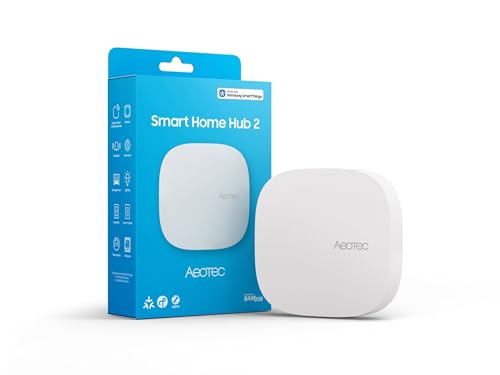
- Powered by the SmartThings ecosystem
- Matter and Zigbee support with local routines
- Wi-Fi or Ethernet connectivity
Best For: SmartThings users who do not need Z-Wave
Best Overall – Aeotec Smart Home Hub
The Aeotec Smart Home Hub is a versatile choice for smart home hubs if you want one controller for devices using SmartThings, Z-Wave, Zigbee, Matter, and Wi-Fi. It supports both Wi-Fi and Ethernet, and many automations can run locally through the SmartThings app.
Best For: Households building a mixed-brand smart home around SmartThings, Alexa, or Google Home.
Pros:
- Supports Matter, SmartThings, Z-Wave Plus, Zigbee, and Wi-Fi devices.
- Works with Amazon Alexa and Google Home voice control.
- Offers wired Ethernet or Wi-Fi setup and local automation support.
- Can coordinate lighting, comfort, energy, sensors, and switches.
Cons:
- Z-Wave Plus support is specified for the V3 model.
- Designed for use in North America.
Choose this hub when broad protocol support and SmartThings-based automation matter more than a single-brand lighting focus. Its combination of wired and wireless networking makes it a flexible foundation for many connected-home setups.
Best for Hue Lighting – Philips Hue Bridge Pro
The Philips Hue Bridge Pro is a specialized option among smart home hubs, built to manage a larger Philips Hue lighting system. Its faster processor, expanded memory, and support for more than 150 lights and accessories make it suited to extensive Hue installations.
Best For: Philips Hue users who want higher capacity, faster processing, and advanced lighting automations.
Pros:
- Supports more than 150 lights and accessories.
- Stores up to 500 personalized scenes and more automations.
- Hue MotionAware can trigger lights using three Hue devices without separate motion sensors.
- Includes enhanced security controls through the Zigbee Trust Center.
Cons:
- Its listed features focus on Philips Hue lighting rather than broad multi-protocol device control.
- MotionAware requires three Hue devices.
This is a strong fit if your home already relies on Hue products and you need more room for lights, accessories, scenes, and automations. It is less compelling as a general-purpose hub for a wide mix of non-Hue devices.
Best for Home Assistant – Home Assistant Green
Home Assistant Green | Smart Home hub with Advanced Automation | Official Home Assistant Hardware
Check Price On AmazonHome Assistant Green is an approachable choice among smart home hubs for users who want the Home Assistant platform without installing it separately. It arrives with Home Assistant OS ready to use and keeps home data on the device while supporting expansion through USB accessories.
Best For: DIY-minded homeowners who want centralized control, powerful automation, and local data storage.
Pros:
- Comes with Home Assistant already installed for straightforward setup.
- Provides a quad-core processor, 4GB of RAM, and 32GB of storage.
- Runs quietly and uses only a couple of watts of power.
- Can expand with Z-Wave, Zigbee, and Thread USB devices.
Cons:
- Initial setup requires Ethernet and the included power supply.
- Z-Wave, Zigbee, and Thread connectivity requires separate USB devices.
Home Assistant Green is a practical central controller for consolidating devices and building detailed routines while keeping data at home. Its expandable design is useful, but buyers should budget for USB radio adapters if they need those protocols.
Best for Local Automation – Hubitat Elevation C-8 Pro
The Hubitat Elevation C-8 Pro stands out among smart home hubs for local-first automation. It runs routines directly on the hub, supports Matter, Z-Wave 800 Series, Zigbee 3.0, and Bluetooth, and offers advanced rule-building without a subscription.
Best For: Experienced smart home users who prioritize fast local responses, privacy, and complex automations.
Pros:
- Runs automations locally, including when the internet is unavailable.
- Supports Matter 1.5, Z-Wave 800 Series, Zigbee 3.0, and Bluetooth.
- Works with Alexa, Google Home, Apple HomeKit, and Ring camera integration.
- Includes dual external antennas and advanced Rule Machine automation.
Cons:
- Advanced configuration may be better suited to tech-savvy users.
- Voice assistants and some integrations may still depend on their respective ecosystems.
Choose the C-8 Pro when dependable local processing and deep automation control are priorities. Its broad protocol support and active community add flexibility, while the no-subscription model keeps the full platform available after setup.
Best for Lutron Lighting – Caseta Smart Hub
The Lutron Caseta Smart Hub is a focused choice among smart home hubs for households built around Caseta lighting. It connects to your router, works with the Lutron app, and supports Alexa, Apple HomeKit, Google Assistant, Ring, Serena shades, and Sonos.
Best For: Lutron Caseta users who want reliable lighting control and compatibility with several major smart home platforms.
Pros:
- Supports up to 75 Caseta devices.
- Works with Alexa, Apple HomeKit, Google Assistant, Ring, Serena shades, and Sonos.
- Uses Clear Connect Technology to avoid competing with Wi-Fi-connected devices.
- Simple setup: plug it in, connect it to your router, and follow the app instructions.
Cons:
- Designed specifically for Lutron Caseta devices, which are sold separately.
- Requires a wired connection to your router during setup and operation.
- Offers less protocol breadth than more general-purpose hubs.
This hub makes the most sense when Caseta switches and dimmers are central to your setup. It is straightforward and expandable, but shoppers seeking broad Zigbee, Z-Wave, or Matter support should consider a more multi-protocol option.
Best Local Matter Bridge – SONOFF Bridge Max
The SONOFF Bridge Max is one of the more flexible smart home hubs for linking Zigbee, BTHome, and eWeLink devices with Matter platforms. It supports Wi-Fi and Ethernet, offers a local web console, and can connect with Alexa, Google Home, Apple Home, and Home Assistant.
Best For: Users who want local device bridging, Zigbee support, and a way to connect compatible devices across Matter ecosystems.
Pros:
- Bridges Zigbee, BTHome, and eWeLink devices to Matter platforms.
- Supports local configuration without requiring an app or cloud service.
- Works with Home Assistant through MQTT or device bridging.
- Includes a built-in 90 dB alarm and mobile notifications when paired with suitable Zigbee sensors.
Cons:
- It is a Matter Bridge, not a Matter Controller, so it cannot add Matter devices directly.
- Compatibility depends on the specific Zigbee, BTHome, and eWeLink devices used.
- Its security features require compatible Zigbee sensors.
Bridge Max is a practical fit for shoppers prioritizing local control and cross-platform integration. Be careful not to confuse its Matter Bridge role with a full Matter Hub or Controller, especially if you plan to add native Matter devices directly.
Best All-in-One Hub – Homey Pro (2026)
Homey Pro (2026) is a broad-compatibility option among smart home hubs, combining Wi-Fi, Zigbee, Z-Wave Plus, Bluetooth Low Energy, infrared, Matter, and Thread in one local-first device. It works with more than 50,000 devices from over 1,000 brands and supports app-based and voice control.
Best For: Larger or mixed-brand smart homes that need multiple wireless protocols, advanced automations, and local processing.
Pros:
- Combines seven technologies, including Zigbee, Z-Wave Plus, Matter, and Thread.
- Supports more than 50,000 devices from over 1,000 brands.
- Homey Flow and Advanced Flow enable detailed automations.
- Processes automations locally and includes energy monitoring and historical usage insights.
Cons:
- Its extensive feature set may be more than a small, single-brand setup needs.
- Specific device compatibility should be checked through Homey’s supported-brand listings.
- Some advanced automations require the Homey Web App.
Homey Pro is the strongest choice here for shoppers building a diverse, expandable system. Its protocol coverage and local-first design reduce the need for separate bridges, while its broad compatibility makes it suitable for complex automation plans.
Best Screen-and-Dial Hub – SwitchBot Hub 3
For shoppers seeking smart home hubs with a visible status display and hands-on controls, the SwitchBot Hub 3 combines an IPS screen, physical dial, infrared appliance control, and Matter bridging. It is a strong fit for homes built around SwitchBot devices, compatible IR appliances, and everyday scene automation.
Best For: Families, seniors, or guests who want tactile controls alongside app and voice access.
Pros:
- Controls 100,000+ infrared appliances plus SwitchBot and compatible Matter devices.
- Displays temperature, humidity, weather alerts, and other home-status information at a glance.
- Physical dial and customizable buttons make scene and climate adjustments straightforward.
- Supports automation triggers based on temperature, humidity, and light levels.
Cons:
- Requires a 2.4GHz Wi-Fi setup.
- Some integrations, including certain Apple Home scenarios, require specific same-network setup conditions.
- SwitchBot Lock and Meter Pro CO₂ features require separately sold devices.
The Hub 3 stands out when a smart home hub should be both an information display and a physical control center. Its broad IR support and SwitchBot ecosystem integration add flexibility, while the 2.4GHz requirement is worth checking before purchase.
Best Touchscreen Control Panel – Amazon Echo Hub
The Amazon Echo Hub is one of the most display-focused smart home hubs, offering an 8-inch customizable dashboard for devices, cameras, routines, security, and media. Its built-in support for Wi-Fi, Bluetooth, Zigbee, Matter, Sidewalk, and Thread devices makes it a versatile choice for Alexa-centered homes.
Best For: Alexa households that want a wall-mounted touchscreen for centralized device and security control.
Pros:
- Customizable dashboard lets you arrange device sections and resize controls.
- Built-in hub supports thousands of compatible devices across several protocols.
- Provides on-screen access to cameras, routines, security systems, and media controls.
- Can be wall mounted and supports optional cable pass-through, Ethernet power, or tabletop mounting accessories.
Cons:
- Wall-mounting cable pass-through, power-over-Ethernet, and tabletop stand accessories are sold separately.
- Some Ring camera features require Alexa+ and a compatible Ring subscription sold separately.
- Its feature set is most closely tied to the Alexa ecosystem.
Choose the Echo Hub when an always-available visual control panel matters more than a compact, display-free hub. The customizable interface and broad protocol support are compelling, especially for households already using Alexa-compatible cameras, locks, sensors, and routines.
Best Local Automation Hub – Aeotec Smart Home Hub2
For buyers prioritizing dependable routines, the Aeotec Smart Home Hub2 uses the SmartThings ecosystem with Matter and Zigbee support. Wi-Fi or Ethernet connectivity and local automation processing make it a practical foundation for lighting, security, climate, and energy-management setups.
Best For: SmartThings users who want Zigbee support and automations that can continue during temporary internet outages.
Pros:
- Supports Matter and Zigbee devices from Aeotec and other compatible brands.
- Local automation execution can improve responsiveness and maintain some routines offline.
- Works with SmartThings, Alexa, and Google Assistant.
- Offers both Wi-Fi and wired Ethernet setup options.
Cons:
- Z-Wave is not supported.
- Compatibility depends on supported SmartThings, Matter, and Zigbee devices.
- Users seeking Z-Wave connectivity will need a different hub.
The Aeotec Hub2 is a focused choice for SmartThings-based homes that value local processing and flexible network installation. Its main limitation is explicit: it does not support Z-Wave, so confirm the protocols used by your existing devices before buying.
How We Picked the Best Smart Home Hubs
We evaluated these Smart Home Hubs by looking at protocol support, ecosystem compatibility, automation capabilities, setup requirements, and the types of households each model suits best. Key considerations included support for Matter, Thread, Zigbee, Z-Wave, Wi-Fi, Bluetooth, infrared, and proprietary platforms such as Philips Hue or Lutron Caséta.
We also considered whether a hub emphasizes local processing, a polished touchscreen interface, lighting reliability, voice control, or advanced customization. Because no single hub is ideal for every home, the selections cover both beginner-friendly controllers and more technical platforms.
Quick Comparison
| Best For | Recommended Hub Type | What to Prioritize |
|---|---|---|
| General multi-brand control | Multi-protocol hub | Matter, Zigbee, Z-Wave, and strong app support |
| Advanced automation | Local-first platform | Reliable rules, customization, and local operation |
| Smart lighting | Dedicated lighting bridge | Fast response, scene support, and dimmer compatibility |
| Alexa-centered homes | Echo-based controller | Voice control, display access, and device compatibility |
| IR appliances | IR-capable hub | TV, air-conditioner, and remote-control integration |
Key Buying Factors for Smart Home Hubs
Protocol and Device Compatibility
Check the wireless standards your current and planned devices use. Matter improves cross-platform compatibility, while Zigbee and Z-Wave remain important for sensors, switches, locks, and other low-power products. Thread support can also help prepare a newer network for compatible Matter devices.
Local Processing and Reliability
Some hubs depend heavily on cloud services, while others can run many automations locally. Local control generally offers faster responses and continued operation during an internet outage, although remote access and certain integrations may still require cloud connectivity.
Automation Depth
Simple schedules and voice commands are enough for many households, but advanced users may want conditions, variables, presence detection, scenes, and multi-step routines. Review the platform’s app and automation tools before buying if complex rules matter.
Setup, Interface, and Expansion
A touchscreen controller can make everyday use easier, while a compact hub may be better hidden away near a router. Consider mobile apps, dashboards, voice assistants, firmware support, subscription requirements, and whether the hub can grow with your setup.
Who Should Buy Which Smart Home Hubs?
Choose a broad multi-protocol hub if you want one central system for devices from several brands. Pick a local-first option such as Home Assistant or Hubitat when dependable automation and customization matter more than the simplest setup. A Philips Hue or Lutron hub is usually the better choice when lighting is your main priority.
Alexa-focused households may prefer an Echo Hub for visible controls and voice access. Homes with televisions or air conditioners should consider a controller with infrared support, while users building around Matter should confirm whether the hub also supports the specific Thread, Zigbee, or Z-Wave devices they plan to add. Before purchasing, verify regional compatibility, required bridges, and whether every important device appears in the hub’s supported-product list.