The best signal generators for students make it easier to explore frequency, amplitude, waveforms, modulation, and circuit response without requiring a professional laboratory budget.
This roundup includes compact DDS modules, industrial 4–20 mA simulators, dual-channel generators, and more capable bench instruments, so you can match features and complexity to your coursework.
Best 10 Signal Generators for Students Picks for 2026
Versatile Lab Pick
Koolertron 15MHz DDS Signal Generator

- Dual independent DDS channels
- 15MHz sine output and 200MSa/s sampling
- Built-in measurement, sweep, and storage functions
Best For: Electronics labs and advanced waveform experiments
PLC Practice Pick

- Outputs 0/4–20mA current
- Outputs 0–10V voltage
- Compact dual-signal design
Best For: PLC and analog control-signal practice
USB-Ready Upgrade
YERTAI ET3320C Function Generator

- 20MHz dual-channel DDS output
- 32 arbitrary waveforms and 50 storage sets
- USB, modulation, and counter functions
Best For: Connected electronics and communications coursework
Portable Controls Pick
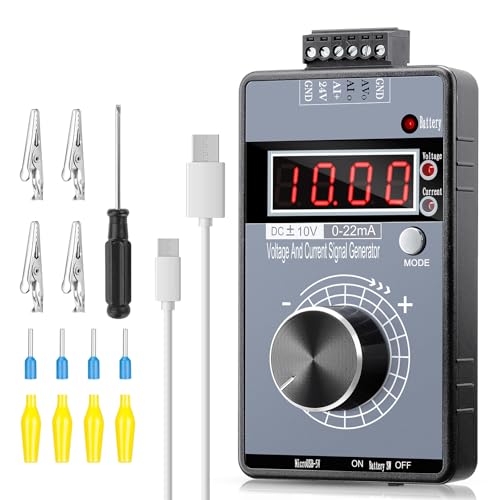
- Adjustable -10V to +10V and 0–22mA output
- Four-digit display with multiple modes
- Rechargeable and protected for portable testing
Best For: Mobile PLC and industrial-control signal testing
Best Overall Bench Generator
Rigol DG1022Z 25MHz Waveform Generator

- Dual-channel output up to 25 MHz
- 200 MSa/s sampling and 14-bit resolution
- 160 waveforms, arbitrary output, and modulation
Best For: Students building circuits and performing advanced electronics lab work
Best for Everyday Use
Riiai SG003A Multi-Signal Simulator

- Generates 0–24 mA and 0–24 V signals
- Supports pulse, PWM, and programmable ramps
- Rechargeable battery lasts up to 26 hours
Best For: Students learning PLC testing and industrial automation
Best Compact Learning Module

- Compact 8.1-ounce DDS module
- Sine output spans 0.01 Hz to 500 kHz
- Includes square, sawtooth, filters, and DC bias
Best For: Students learning waveform testing with an oscilloscope
Best with Extra Features
SEESII 500kHz DDS Signal Generator

- 1Hz–500kHz frequency range
- Four waveform outputs with switchable filter
- AC/DC or external battery-pack operation
Best For: Classroom labs, oscilloscope practice, and portable testing
Hands-On Build Choice
Weewooday XR2206 Function Generator Kit

- 1Hz–1MHz adjustable frequency range
- Sine, square, and triangle outputs
- Requires soldering tools and 9–12V DC input
Best For: Soldering practice and electronics construction projects
Portable DDS Study Tool
1Hz–500kHz Mini DDS Signal Generator

- Five waveform categories, including arbitrary output
- Advanced modulation capabilities
- Portable design with adapter or battery power
Best For: Waveform experiments, signal testing, and modulation study
Versatile Lab Pick – Koolertron 15MHz DDS Signal Generator
For students looking for signal generators for students coursework, lab experiments, and waveform exploration, the Koolertron offers dual-channel DDS output with a broad selection of functions. Its 15MHz sine-wave ceiling, measurement tools, and storage features make it a capable option for electronics practice.
Best For: Students who need a feature-rich bench instrument for electronics labs, waveform experiments, and teaching projects.
Pros:
- Dual channels can be configured independently.
- Supports sine, square, triangle, sawtooth, pulse, white noise, and user-defined waveforms.
- Includes frequency, period, pulse-width, and counting measurements.
- Stores up to 99 instrument-state setups and 60 user-defined waveforms.
Cons:
- Its range of controls and functions may be more than beginners need.
- The listed package dimensions make it less portable than compact handheld models.
This is a strong all-around choice when a student wants one instrument for generation, measurement, sweeping, and custom waveform work rather than a basic single-purpose source.
PLC Practice Pick – DROK 4-20mA Generator
Students studying industrial controls can use this DROK model as a straightforward tool among signal generators for students. It produces either current or voltage signals from one module, with adjustment handled by a multi-cycle precision potentiometer.
Best For: Students practicing PLC, panel, LED, and analog input testing.
Pros:
- Generates 0/4–20mA current signals and 0–10V voltage signals.
- Combines ampere and voltage output in one compact unit.
- Simple rotary adjustment is practical for bench testing.
Cons:
- It is designed for current and voltage simulation rather than waveform generation.
- The supplied notes do not list display, measurement, or waveform-storage features.
Choose this compact generator when the coursework centers on analog control signals instead of frequency or arbitrary-waveform experiments.
USB-Ready Upgrade – YERTAI ET3320C Function Generator
The YERTAI ET3320C is a practical choice for students seeking signal generators for students projects that combine standard waveforms, custom waveform editing, and computer connectivity. It pairs dual channels with a 20MHz range, frequency counters, modulation functions, and USB communication.
Best For: Students who want dual-channel waveform generation with USB communication and arbitrary-waveform capabilities.
Pros:
- Provides dual channels, five basic waveforms, and 32 arbitrary waveforms.
- Stores up to 50 customized editing waveforms internally.
- Includes a 100MHz frequency counter and 32-bit counter.
- Supports ASK, FSK, and PSK modulation.
Cons:
- The arbitrary-waveform editing software must be obtained from the manufacturer.
- The 2.4-inch display is compact for viewing detailed settings.
With its USB connection, counter functions, and modulation support, this model suits students moving beyond basic waveform demonstrations into communications and measurement exercises.
Portable Controls Pick – Riiai 0-10V/4-20mA Generator
For students working with PLCs and industrial automation, the Riiai offers a portable way to produce adjustable voltage and current signals. Its four-digit display, rechargeable battery, programmable output points, and protection features make it convenient for classroom demonstrations and field-style troubleshooting.
Best For: Students testing PLC inputs, panels, frequency converters, valves, and other industrial-control equipment.
Pros:
- Generates -10V to +10V and 0–22mA outputs with stated 0.01-unit precision.
- Four display modes show voltage, current, percentage, or frequency-related values.
- Rechargeable 1000mAh battery supports portable use.
- Includes short-circuit and reverse-connection protection plus nine quick output points.
Cons:
- It is intended for analog control-signal testing, not general waveform generation.
- Charging uses a micro USB port, which may be less convenient than newer connectors.
This is a useful student instrument when portability and adjustable industrial signals matter more than dual-channel waveform generation or high-frequency output.
Best Overall Bench Generator – Rigol DG1022Z 25MHz Waveform Generator
For students looking beyond basic experiments, the Rigol DG1022Z is a versatile choice among signal generators for students. Its dual-channel design, 25 MHz range, built-in waveforms, and arbitrary waveform support suit coursework, circuit testing, and more advanced lab work.
Best For: Students who need a full-featured bench instrument for electronics education, embedded design, and circuit validation.
Pros:
- Dual-channel output with a frequency range up to 25 MHz.
- 200 MSa/s sampling and 14-bit vertical resolution support accurate waveform reproduction.
- Includes 160 built-in waveforms plus arbitrary waveform capability.
- Supports modulation, sweep, burst, harmonic generation, USB, and LAN connectivity.
Cons:
- Its bench-oriented feature set may be more than beginners need for simple signal generation.
- At 3.5 kg, it is less portable than compact handheld options.
The DG1022Z is the strongest all-around option here for structured lab learning and repeatable bench testing. Choose it when waveform flexibility and PC integration matter more than portability.
Best for Everyday Use – Riiai SG003A Multi-Signal Simulator
The Riiai SG003A takes a different approach to signal generators for students by focusing on industrial control signals. It can generate adjustable current, voltage, pulse, and PWM outputs, making it useful for learning PLC testing and analog instrumentation.
Best For: Students studying PLCs, process control, industrial automation, or analog signal conversion.
Pros:
- Supports 0–24 mA current, 0–24 V voltage, and pulse output up to 9999 Hz.
- Offers programmable rising, falling, and cycling output modes.
- Includes a 2.4-inch color TFT display with graph views and adjustable backlight.
- Rechargeable 3000 mAh battery provides up to 26 hours of working time.
Cons:
- Its specialized signal ranges are better suited to PLC work than general waveform experimentation.
- The notes do not specify a traditional function-generator waveform library.
For students working with industrial sensors and controllers, the SG003A offers practical signal simulation in a portable format. It is a focused teaching tool rather than a general-purpose bench waveform generator.
Best Compact Learning Module – FG-200 DDS Function Generator
The compact FG-200 DDS is an accessible option among signal generators for students who want core waveform functions without a full-size bench instrument. It produces sine, square, and sawtooth signals from 0.01 Hz, with sine output reaching 500 kHz.
Best For: Students practicing circuit debugging, oscilloscope work, amplifier testing, and waveform fundamentals.
Pros:
- Compact 2.76 x 1.97 x 2.36-inch module weighs 8.1 ounces.
- Provides sine, square, and sawtooth waveform modes.
- Offers sine-wave adjustment from 0.01 Hz to 500 kHz.
- Includes frequency-counter functionality, filters, DC bias, amplitude adjustment, and saved settings.
Cons:
- Requires an external DC power source or suitable 3.7 V lithium battery.
- Output amplitude decreases as sine frequency increases, according to the supplied notes.
- Other waveform modes are specified up to 100 kHz for normal distortion and jitter requirements.
The FG-200 is a practical low-cost-style module for hands-on electronics exercises, especially when paired with an oscilloscope. Its small size is convenient, but students should plan for power and measurement equipment separately.
Best with Extra Features – SEESII 500kHz DDS Signal Generator
For students comparing signal generators for students, the SEESII FG-200 offers a practical combination of standard test signals, portable operation, and a 1Hz–500kHz frequency range. Its multiple waveforms make it useful for introductory electronics labs, oscilloscope exercises, and audio testing.
Best For: Students who want a ready-to-use signal generator for classroom demonstrations, circuit testing, and field work.
Pros:
- Generates sine, square, triangle, and sawtooth waveforms.
- Includes a switchable filter for optimizing sine and pulse outputs.
- Supports AC/DC adapter or external battery-pack operation; the battery is not included.
- Compact 12.3-ounce design is convenient for lab or on-site testing.
Cons:
- Its frequency range tops out at 500kHz.
- The external battery pack must be purchased separately.
- The Schumann resonator may be unnecessary for students seeking only conventional test functions.
The FG-200 is a well-rounded option when portability and basic waveform variety matter. It is especially appealing for students who need a complete, ready-to-operate unit rather than a soldering project.
Hands-On Build Choice – Weewooday XR2206 Function Generator Kit
Students looking for signal generators for students that also teach assembly may prefer this XR2206 module kit. It produces sine, square, and triangle waves across a 1Hz–1MHz range, but it requires soldering tools and installation work before use.
Best For: Electronics students who want to practice soldering while building an adjustable function generator.
Pros:
- Offers sine, square, and triangle outputs from 1Hz to 1MHz.
- Provides stated sine-wave distortion below 1% at 1kHz.
- Includes a transparent case box shell for assembly visibility.
- Compact 2.88-ounce kit is easy to handle and store.
Cons:
- Requires soldering tools and installation.
- Needs a 9–12V DC power supply.
- It has fewer waveform options than the DDS models in this roundup.
This is less of a plug-and-play instrument and more of an instructional project. Choose it when the learning value of assembly is important and you are comfortable following installation guidance.
Portable DDS Study Tool – 1Hz–500kHz Mini DDS Signal Generator
This mini DDS unit is a flexible choice among signal generators for students, combining compact controls with sine, square, triangle, pulse, and arbitrary waveform support. Its modulation capabilities and stable frequency control make it useful for exploring electronics and communication-system concepts.
Best For: Students who need a portable DDS generator for waveform experiments, signal testing, and introductory modulation work.
Pros:
- Supports sine, square, triangle, pulse, and arbitrary waveforms.
- Includes advanced modulation capabilities for studying communication techniques.
- Designed for intuitive operation and quick signal configuration.
- Can run from an AC/DC adapter or battery.
Cons:
- Its frequency range is limited to 500kHz.
- The notes do not specify the included battery or adapter configuration.
- Its broad feature set may be more than needed for simple first experiments.
The mini DDS is a strong fit for learners who expect to move beyond basic sine-wave exercises. It provides more waveform and modulation flexibility than a simple function-generator module while remaining compact and portable.
How We Picked the Best Signal Generators for Students
We focused on instruments and kits that support common educational experiments while covering a broad range of budgets and skill levels. The selection includes basic sine, square, and sawtooth waveform sources; DDS generators with frequency counters; dual-channel models for comparative testing; and process-signal simulators for PLC, automation, and instrumentation coursework.
We also considered frequency range, output flexibility, display readability, control simplicity, portability, and whether a product is better suited to breadboard work, a classroom bench, or more advanced lab exercises. A compact module can be excellent for embedded projects, while a full bench generator is generally easier to adjust and more useful for repeated testing.
Quick Comparison
| Type | Best For | What to Look For |
|---|---|---|
| Compact DDS module | Budget projects and breadboards | Stable output, usable controls, power requirements |
| Dual-channel function generator | Comparing or synchronizing signals | Independent settings, frequency range, waveform options |
| Bench function generator | Structured lab work | Clear display, output accuracy, connectivity, protections |
| Industrial signal simulator | PLC and automation practice | 0–10 V and 4–20 mA ranges, display resolution, loop operation |
Key Buying Factors for Signal Generators for Students
Frequency and Waveform Range
Choose a frequency range that covers your assignments rather than paying solely for the highest advertised number. Sine, square, and sawtooth outputs handle most introductory experiments; arbitrary-waveform support is useful for more advanced work.
Output and Channel Requirements
A single output is sufficient for basic filter and amplifier tests. Dual-channel models are more practical when you need a reference signal, phase comparison, or two related frequencies. Check output amplitude limits and whether the generator can drive your intended load.
Controls, Display, and Accuracy
Students benefit from direct controls and a readable frequency or amplitude display. A built-in counter can help verify the actual output, but advertised resolution is not the same as accuracy. For graded laboratory measurements, review specifications for stability, distortion, and calibration.
Electrical Compatibility and Safety
Industrial simulators use different connections and signal conventions than ordinary waveform generators. Confirm whether you need voltage output, current-loop output, or both. Also check power requirements, grounding, output protection, and safe voltage levels before connecting equipment.
Who Should Buy Which Signal Generators for Students?
Choose a compact 500 kHz-class DDS kit for inexpensive breadboard experiments, maker projects, and students learning the basics of waveform generation. A dual-channel DDS model is a better fit for electronics students who need more flexibility without moving to a full laboratory instrument.
Pick a bench generator such as a higher-frequency arbitrary-waveform model when coursework includes filters, amplifiers, communications concepts, or repeatable measurements. For automation, controls, or process instrumentation classes, select a dedicated 0–10 V and 4–20 mA simulator instead of a conventional function generator. Finally, prioritize USB connectivity or richer waveform controls when you expect to automate tests or progress into more advanced lab work.