Printing labels directly from a Windows PC can make online order fulfillment faster, cleaner, and less expensive than using sheets of adhesive paper. The right thermal printer should produce sharp 4×6 labels, connect reliably, and work smoothly with the marketplaces and carrier tools you already use.
We compared 10 shipping label printers for Windows across connectivity, format support, ease of setup, print performance, and suitability for different shipping volumes. This guide will help you narrow the list based on your workflow, workspace, and budget.
Best 10 Shipping Label Printers for Windows Picks for 2026
Best Overall
Rollo USB Shipping Label Printer

- Windows and Mac compatible
- Prints one 4x6 label per second
- Supports major shipping platforms
Best For: Fast, versatile USB label printing
Best Wireless Option
Brother QL-1110NWB Wide-Format Printer

- Bluetooth, Wi-Fi, Ethernet, and USB
- 300 DPI monochrome output
- Windows barcode and database tools
Best For: Networked or wireless shipping workflows
Best for Label Variety
Arkscan 2054A Shipping Label Printer
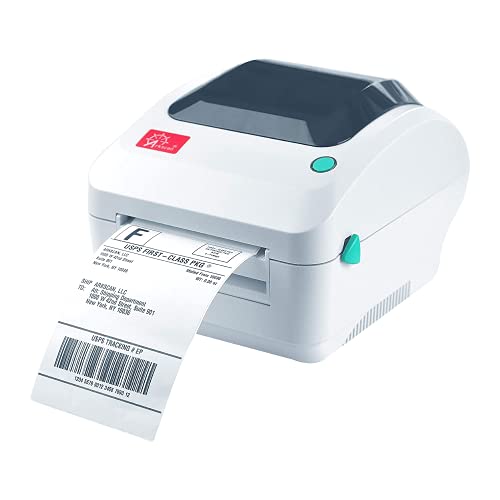
- Supports roll and fanfold media
- Prints up to 5 inches per second
- Works across Windows, Mac, Chromebook, and Android
Best For: Mixed label sizes and paper formats
Best Renewed Value
Brother QL-1100 Wide-Format Printer

- Wide labels up to 4 inches
- 300 DPI monochrome output
- Windows plug-and-label feature
Best For: Simple USB shipping stations on a budget
Best Networked Option
Arkscan 2054A-LAN Ethernet Shipping Label Printer
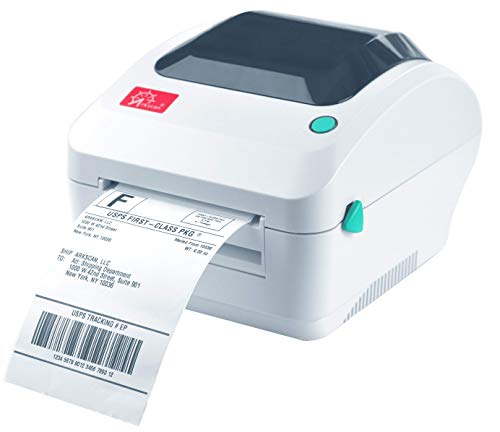
- USB and Ethernet connectivity
- Up to 5 inches per second
- Supports roll and fanfold labels
Best For: Online sellers sharing a printer across computers or devices
Best Wireless Value
JADENS JD268BT Bluetooth Shipping Label Printer

- Bluetooth and USB connectivity
- No ink or toner required
- Works with roll and fanfold labels
Best For: Small businesses wanting flexible wireless 4x6 printing
Best for Growing Operations
Zebra ZD421 4x6 Thermal Label Printer

- Prints up to 6 inches per second
- USB, Ethernet, and Bluetooth
- Supports EPL and ZPL languages
Best For: Retail, warehouse, and shipping operations planning to scale
Best with Extra Features

- Bluetooth and USB support for Windows 7 and later
- Prints up to 72 4x6 labels per minute
- Supports multiple label widths without ink or toner
Best For: Windows users wanting wireless and wired printing flexibility
Best Portable Option

- Works with Windows XP through Windows 11
- Bluetooth and USB connectivity with mobile app support
- Compact design with automatic label detection
Best For: Small businesses and home offices needing portable, multi-device printing
Best Simple Setup

- Windows 7+ driver support with USB and Bluetooth
- Automatic label identification and feeding
- Supports labels from 0.98 to 4.37 inches wide
Best For: Users wanting easy setup and versatile label-format support
Best Overall – Rollo USB Shipping Label Printer
For shoppers comparing shipping label printers for Windows, the Rollo USB is a practical commercial-grade option with straightforward USB setup, broad platform compatibility, and fast direct-thermal printing. It produces one 4-by-6-inch label per second without ink or toner.
Best For: Windows sellers who want a fast, dependable USB printer for shipping and general-purpose labels.
Pros:
- Works with Windows XP and newer, as well as Mac systems.
- Prints at up to 150 mm/s with a 203 DPI print head.
- Supports major carriers, marketplaces, and shipping platforms.
- Handles labels from 1.57 to 4.1 inches wide for added versatility.
Cons:
- USB connectivity is wired rather than wireless.
- Maximum media width is 4.1 inches.
The Rollo is a strong all-around choice for home businesses and packing stations. Its included USB connection and wide software compatibility keep setup simple, while the inkless design helps control ongoing supply costs.
Best Wireless Option – Brother QL-1110NWB Wide-Format Printer
The Brother QL-1110NWB stands out among shipping label printers for Windows when wireless flexibility and wider connectivity matter. It supports Bluetooth, Wi-Fi, Ethernet, and USB, and prints labels up to 4 inches wide at 300 DPI.
Best For: Businesses that need wireless or networked label printing alongside Windows database and barcode features.
Pros:
- Offers Bluetooth, wireless, Ethernet, and USB connectivity.
- Prints mailing, postage, address, barcode, and name labels up to 4 inches wide.
- Windows barcode-crop functionality can simplify UPC and barcode printing.
- Supports Windows database file formats including CSV, TXT, MDB, and XLS.
Cons:
- The feature-rich design may be more than basic shipping tasks require.
- Some barcode-crop functions are limited to Windows.
Choose this Brother when a packing operation needs more than a simple USB printer. Its network options and Windows-oriented tools suit shared workspaces, while 300 DPI output supports clear postage and barcode labels.
Best for Label Variety – Arkscan 2054A Shipping Label Printer
The Arkscan 2054A is a flexible choice among shipping label printers for Windows, supporting Windows, Mac, Chromebook, and Android devices through USB. It handles both roll and fanfold media, prints at 5 inches per second, and supports labels from 0.75 to 4.25 inches wide.
Best For: Sellers using different label formats, platforms, and paper-loading styles.
Pros:
- Supports roll and fanfold labels.
- Prints at up to 5 inches per second.
- Works with Windows, Mac, Chromebook, and Android via USB.
- Includes BarTender UltraLite software for Windows label design.
Cons:
- Connectivity is USB rather than wireless.
- Some included design software features are Windows-only.
- The printer is larger than some compact desktop options.
This model makes sense for sellers who print more than standard 4-by-6 shipping labels. Its broad size range, fanfold support, and compatibility with many carrier and marketplace platforms give it useful operational flexibility.
Best Renewed Value – Brother QL-1100 Wide-Format Printer
The renewed Brother QL-1100 is worth considering for Windows users seeking wide-format shipping label printers with a simpler USB setup. It prints labels up to 4 inches wide at 300 DPI and includes Windows features such as barcode cropping and plug-and-label printing.
Best For: Budget-conscious packing stations that prefer a straightforward USB Brother printer.
Pros:
- Prints mailing, postage, address, and barcode labels up to 4 inches wide.
- Offers 300 DPI monochrome printing.
- USB host support allows use with compatible peripherals such as scanners.
- Plug-and-label printing can work without installing software on Windows PCs.
Cons:
- This renewed model does not provide the QL-1110NWB’s wireless connectivity.
- Its feature set is primarily suited to USB-connected workstations.
- Renewed condition may make product condition worth verifying before purchase.
The QL-1100 is a sensible fit when wide labels and Windows convenience matter more than wireless networking. Its 300 DPI output and barcode tools support routine shipping work, while the renewed format may appeal to shoppers watching upfront cost.
Best Networked Option – Arkscan 2054A-LAN Ethernet Shipping Label Printer
For shoppers comparing shipping label printers for windows, the Arkscan 2054A-LAN stands out when shared network access and broad platform compatibility matter. It connects by USB or Ethernet, prints common 4×6 shipping labels without ink or toner, and supports both roll and fanfold media.
Best For: Online sellers who need a fast, network-ready printer for Windows and multiple shipping platforms.
Pros:
- Ethernet and USB connectivity, with support for Windows, Mac, Chromebook, Android, and iOS network printing.
- Prints at up to 5 inches per second and supports common 4×6, 4×8.25, and 4×6.75-inch labels.
- Handles label widths from 0.75 to 4.25 inches and lengths from 0.4 to 90 inches.
- Includes BarTender UltraLite software and U.S.-based phone, chat, and remote technical support.
Cons:
- The included BarTender UltraLite software is Windows-only.
- Ethernet networking may be more capability than a single-user setup requires.
- At 203 DPI, it is designed for standard monochrome labels rather than high-resolution graphics.
The 2054A-LAN is a flexible choice for growing shipping operations, especially if several computers or devices need access to one printer. Its wide media support and extensive platform compatibility add value beyond basic 4×6 label printing.
Best Wireless Value – JADENS JD268BT Bluetooth Shipping Label Printer
The JADENS JD268BT is a practical pick among shipping label printers for windows if you want wireless printing without ink or toner. Windows 8 and later systems can print over Bluetooth, while USB supports Windows 7 and newer, and the printer works with both roll and fanfold labels.
Best For: Small online businesses seeking an affordable, compact printer with Bluetooth and USB flexibility.
Pros:
- Supports Bluetooth printing on Windows 8 or later and USB printing on Windows 7 and newer.
- Uses a 203 DPI Japanese thermal print head, so no ink or toner is required.
- Works with roll and fanfold labels from 1.57 to 4.1 inches wide.
- Compatible with popular services including ShipStation, Shopify, eBay, Amazon, Shippo, and ShippingEasy.
Cons:
- Bluetooth printing is limited to Windows 8 or later and Mac; mobile devices require the JADENS app.
- You need to press and hold the feed button to identify and calibrate the label size when changing labels.
- Its listed maximum media size is 4×6 inches, offering less flexibility than wider-format models.
With both Bluetooth and USB options, the JD268BT is easy to fit into a small shipping station. It is particularly appealing when straightforward 4×6 printing and broad marketplace compatibility are more important than advanced networking.
Best for Growing Operations – Zebra ZD421 4×6 Thermal Label Printer
For buyers evaluating shipping label printers for windows in a busier retail, warehouse, or shipping environment, the Zebra ZD421 offers a business-focused feature set. It provides direct thermal printing at up to 6 inches per second, supports USB, Ethernet, and Bluetooth, and requires no ink or toner.
Best For: Retail, warehouse, laboratory, and shipping users who want a durable printer with multiple connectivity options and room to grow.
Pros:
- Prints at up to 6 inches per second with 203 DPI resolution and no ink or toner.
- Supports USB, Ethernet, and Bluetooth connections for Windows, Android, and iOS devices.
- Uses Zebra Link-OS and supports EPL and ZPL printer languages.
- Includes a two-year manufacturer warranty and field-upgradeable media handling and wireless options.
Cons:
- Its business-oriented features may be more than occasional home shippers need.
- The supplied specifications list a maximum media width of 4.25 inches, so it is aimed at standard label formats.
- Connectivity and upgrade options may require more setup than a basic USB printer.
The ZD421 is a strong long-term option for users who value speed, connectivity, and compatibility with established Zebra workflows. Its upgradeable design makes it better suited to expanding operations than to the simplest home shipping setup.
Best with Extra Features – Nelko PL70e-BT
If you want shipping label printers for windows with flexible connection options, the Nelko PL70E supports both Bluetooth and USB on Windows 7 and later. Its 203 DPI thermal printing, broad label-width support, and compatibility with major shipping platforms make it practical for home offices and small businesses.
Best For: Windows users who want wireless printing plus a dependable USB fallback.
Pros:
- Supports Bluetooth and USB printing on Windows 7 and later.
- Prints up to 72 4×6 labels per minute at 150 mm/s.
- Works with roll and fanfold labels from 1.54 to 4.1 inches wide.
- Uses direct thermal printing, so it needs no ink or toner.
Cons:
- Bluetooth printing requires the NELKO app and PDF upload workflow.
- Mac users can print only through USB, according to the supplied notes.
- 203 DPI is suited to standard labels but not higher-resolution graphics.
The Nelko stands out for Windows shoppers who value connection flexibility and speed. Its compact design and included sample labels also make setup approachable for occasional or regular shipping tasks.
Best Portable Option – Rongta RP425 Wireless
The Rongta RP425 is a compact choice among shipping label printers for windows, with Bluetooth and USB connectivity and support for Windows XP through Windows 11. It also works with phones and tablets through the RONGTA app, giving small businesses several ways to print.
Best For: Small businesses and home offices that need a lightweight, multi-device label printer.
Pros:
- Supports Windows XP, 7, 8, 10, and 11, plus Mac and Chrome OS.
- Prints up to 60 labels per minute at 150 mm/s.
- Automatic label detection supports widths from 0.98 to 4.37 inches.
- Can connect with a computer and mobile devices, with printing managed one device at a time.
Cons:
- Bluetooth is not supported on Intel-chip Apple laptops.
- Simultaneous print jobs from a computer and phone can cause conflicts.
- The stated one-year warranty is shorter than the lifetime warranty listed for the Nelko.
Choose this Rongta if portability and broad operating-system support matter more than maximum listed throughput. Its automatic feeding and compact build help reduce desk clutter while keeping common shipping-label sizes covered.
Best Simple Setup – Rongta RP425 Thermal
For shoppers comparing shipping label printers for windows, this Rongta RP425 offers a straightforward Windows and Mac driver setup through the manufacturer’s website. It combines Bluetooth and USB connectivity with automatic label identification and support for common shipping, barcode, QR, and circular label sizes.
Best For: Home, office, and small-business users who want automatic feeding and broad label-format support.
Pros:
- Supports Windows 7 and newer, Mac OS 10.11 and newer, and Chrome OS.
- Prints at up to 150 mm/s with 203 DPI resolution.
- Automatically detects, grabs, and feeds labels.
- Handles label widths from 0.98 to 4.37 inches, including 4×6 and barcode labels.
Cons:
- Bluetooth phone and tablet printing requires the RONGTA app.
- The supplied notes do not specify a print-per-minute figure in the main product bullets.
- It has a limited warranty with a one-year warranty description.
This model is a sensible fit when easy label handling and format versatility are priorities. Its direct thermal design avoids ink and toner, while the compact body suits desks, drawers, or occasional travel.
How We Picked the Best Shipping Label Printers for Windows
We focused on printers that can handle standard 4×6 shipping labels and are designed for Windows-based shipping workflows. Our comparison considers connection options such as USB, Bluetooth, Wi-Fi, and Ethernet; compatibility with major marketplaces and postage platforms; setup requirements; print clarity; and the practical needs of home sellers, small businesses, and higher-volume operations.
Thermal printing is also a key consideration. These printers do not require ink or toner, but they still vary in software quality, driver support, label calibration, print speed, and long-term durability. A printer that works well for occasional orders may not be the best choice for a busy packing station.
Quick Comparison
| Best For | Recommended Connection | What to Prioritize |
|---|---|---|
| Occasional home sellers | USB or Bluetooth | Simple setup and low upfront cost |
| Multi-device workspaces | Bluetooth or wireless | Flexible printing from computers and phones |
| Shared office shipping | Ethernet or network connectivity | Stable access for multiple users |
| Frequent order fulfillment | USB, Ethernet, or commercial-grade connectivity | Speed, durability, and consistent label alignment |
Key Buying Factors for Shipping Label Printers for Windows
Windows Compatibility and Software
Check that the model includes current Windows drivers or a supported setup utility. A printer may advertise broad platform compatibility, but the Windows installation experience, label-design software, and browser integration can differ substantially. Confirm support for the version of Windows on your computer before buying.
Connection Type
USB is usually the simplest and most dependable option for one Windows computer. Bluetooth is useful when you want to print from a laptop, tablet, or phone, but pairing and app support deserve extra attention. Ethernet is a strong choice for shared workstations because it provides a stable network connection without relying on wireless signal strength.
Label Size and Print Quality
Most shipping services use 4×6 labels, so verify both the printer’s supported media and your shipping platform’s page settings. Sharp barcodes, dark text, and accurate alignment help prevent scanning problems. Automatic calibration can save time when switching rolls or correcting skipped labels.
Volume and Durability
Estimate your typical daily and weekly order count rather than choosing solely by price. A compact consumer model may be sufficient for occasional shipments, while a commercial-grade printer is more suitable for repeated batches and shared packing stations.
Who Should Buy Which Shipping Label Printers for Windows?
Choose a USB model if you primarily ship from one Windows desktop or laptop and want the least complicated setup. Choose Bluetooth if multiple personal devices are part of your workflow. Choose Ethernet or another network-ready option for offices, inventory rooms, or teams that need dependable access from more than one workstation. Choose a commercial-grade Zebra, Rollo, or comparable model when speed, durability, and consistent performance matter more than having the smallest footprint.
Before ordering, confirm the included cables, supported label materials, warranty terms, and compatibility with your preferred marketplace or postage service. Those details often matter as much as the headline print speed.