Choosing among RAID enclosures for data security means balancing redundancy, capacity, speed, cooling, and ease of use. The right enclosure can protect availability when a drive fails while keeping your files accessible through a desktop or workstation.
This roundup compares 10 diskless enclosures, from compact dual-bay SATA and NVMe models to high-capacity four- and five-bay DAS systems. Use the guide below to narrow the choices by workload, drive type, and protection needs.
Best 10 Raid Enclosures for Data Security Picks for 2026
Flexible RAID Expansion

- Eight RAID and storage modes
- Up to 88TB with four 3.5-inch drives
- 150W power supply with active cooling
Best For: Flexible 3.5-inch RAID storage and backup
Hybrid High-Speed Storage
TERRAMASTER D5 Hybrid Enclosure

- Holds two SATA and three NVMe drives
- Up to 68TB total capacity
- 10Gbps USB-C connectivity
Best For: Mixed HDD, SSD, and NVMe storage setups
Mass-Capacity Hardware RAID

- Up to 110TB across five drives
- Eight hardware RAID and storage modes
- Supports 2.5-inch and 3.5-inch SATA drives
Best For: Large workstation backups and media libraries
Smart-Cooling USB-C DAS

- Up to 160TB across five SATA drives
- Eight RAID and storage modes
- Automatic fan control with drive sleep
Best For: High-capacity USB-C backup and DAS expansion
Best for NVMe Flexibility

- RAID 1 mirroring plus RAID 0, JBOD, and Clone modes
- 20Gbps USB 3.2 transfer speeds
- Tool-free M.2 2280 NVMe installation
Best For: Portable NVMe backups, cloning, and mirrored storage
Best for Large Desktop Arrays
MAIWO 4-Bay SATA RAID Enclosure

- Eight RAID modes, including RAID 5 and RAID 1/10
- Up to 96TB across four 3.5-inch SATA drives
- Dual switch-controlled cooling fans
Best For: High-capacity desktop backups and media storage
Best for Versatile SATA Drives
VANGREE Dual-Bay SATA RAID Enclosure

- Supports 2.5-inch and 3.5-inch SATA drives
- RAID 0, RAID 1, Normal, and JBOD modes
- 5Gbps USB 3.0 with active cooling
Best For: Flexible local SATA storage and mirrored backups
Best High-Capacity Pick

- Four bays support up to 80TB
- Eight storage and RAID modes
- USB-A/C 3.0 and eSATA connectivity
Best For: Large external storage setups needing flexible RAID options
Best Compact Speed Pick
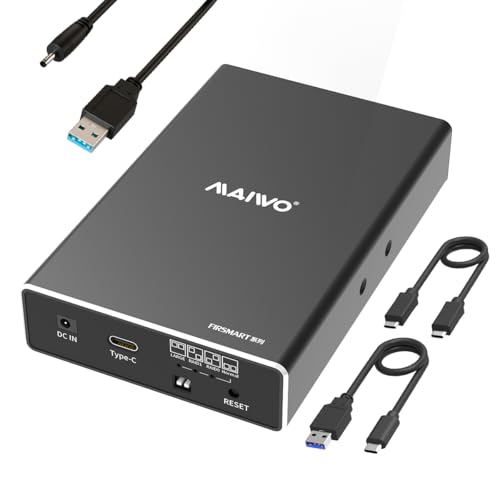
- USB 3.1 Gen 2 reaches up to 10Gbps
- Supports RAID 1, RAID 0, NORMAL, and JBOD
- Compact enclosure for two 2.5-inch drives
Best For: Portable, fast dual-drive storage and mirrored backups
Best Simple Dual-Bay Pick

- Supports 2.5-inch and 3.5-inch drives
- Includes RAID 1, RAID 0, Normal, and JBOD
- Up to 40TB total capacity with USB 3.0
Best For: Straightforward two-drive desktop storage and mirroring
Flexible RAID Expansion – ORICO 4-Bay RAID Enclosure
For shoppers comparing raid enclosures for data security, the ORICO 9848RU3 offers eight hardware RAID and storage modes in a compact four-bay design. It supports 3.5-inch SATA drives, up to 88TB total, and provides a practical balance of redundancy, capacity, and direct-attached backup.
Best For: Users who need flexible RAID configurations, large-capacity 3.5-inch storage, and straightforward Windows, Mac, or Linux compatibility.
Pros:
- Supports RAID 0, 1, 3, 5, 10, JBOD, Clone, and Clear modes.
- Accepts four 3.5-inch SATA disks with up to 22TB per drive.
- Includes a 150W power supply, aluminum housing, and an 80mm cooling fan.
Cons:
- Uses USB 3.0 rather than a newer 10Gbps USB interface.
- Designed for 3.5-inch SATA disks, limiting drive-format flexibility.
The independent safety lock and trayless design add convenient physical protection, while the cooling layout supports sustained multi-drive operation. Its broad RAID selection makes it a versatile choice for backup and data-management workflows.
Hybrid High-Speed Storage – TERRAMASTER D5 Hybrid Enclosure
The TERRAMASTER D5 Hybrid stands out among raid enclosures for data security by combining two SATA drive bays with three M.2 2280 NVMe slots. Its separate 2+3 configuration supports RAID options for the SATA drives while allowing the NVMe drives to operate individually.
Best For: Users who want one enclosure for high-capacity HDD storage, fast NVMe media, scheduled backups, and modern USB-C connectivity.
Pros:
- Combines two SATA drives and three NVMe SSDs for up to 68TB.
- Supports RAID 0, RAID 1, Single, and JBOD for the SATA pair.
- Offers USB 3.2 Gen 2 bandwidth up to 10Gbps with Windows, Mac, and Linux support.
Cons:
- NVMe drives operate as individual disks rather than joining the SATA RAID array.
- Storage media must be purchased separately.
Tool-free trays, push-lock retention, and temperature-controlled cooling make the D5 Hybrid convenient for mixed storage setups. Its included TPC Backupper software also supports scheduled backups, adding a useful layer to a data-security routine.
Mass-Capacity Hardware RAID – ORICO 5-Bay RAID Enclosure
For large backup projects and media libraries, this ORICO five-bay unit is a strong option among raid enclosures for data security. Its hardware RAID controller supports eight modes, while the enclosure accepts both 2.5-inch and 3.5-inch SATA HDDs or SSDs.
Best For: Workstations, creative studios, and offices that need up to 110TB of flexible multi-drive DAS storage.
Pros:
- Supports RAID 0, 1, 3, 5, 10, JBOD, Clone, and Clear modes.
- Holds five 2.5-inch or 3.5-inch SATA drives, up to 22TB each.
- Built-in 150W power supply and 80mm fan support multi-drive operation.
Cons:
- USB 3.0 transfer speeds are lower than newer USB 3.2 Gen 2 enclosures.
- The supplied warranty is one year.
The hardware controls make RAID selection accessible, and the aluminum alloy body with front and rear vents is suited to sustained workloads. It is especially practical when capacity and drive-format flexibility matter more than the fastest interface available.
Smart-Cooling USB-C DAS – UGREEN 5-Bay RAID Enclosure
The UGREEN 5-Bay DAS is designed for shoppers seeking raid enclosures for data security with broad storage flexibility and simple status monitoring. It supports eight modes, five SATA HDDs or SSDs, and up to 160TB total capacity through a USB-C connection.
Best For: Users who need high-capacity direct-attached storage, automatic cooling control, and compatibility with Windows, macOS, Linux, or compatible NAS devices.
Pros:
- Provides PM, RAID 0, 1, 3, 5, 10, Large, and Clone modes.
- Supports five 2.5-inch or 3.5-inch SATA drives and up to 160TB.
- Uses S.M.A.R.T. temperature monitoring to adjust fan speed and support drive sleep.
Cons:
- Uses 5Gbps USB-C rather than 10Gbps connectivity.
- Changing RAID modes requires reformatting, so data must be backed up first.
- Drives connected to a NAS cannot be added to or managed as part of its storage pool.
Independent drive LEDs provide useful status information for presence, errors, and rebuilding. The combination of automatic cooling, a large capacity ceiling, and multiple RAID modes makes this a practical home-office or small-workstation storage expansion.
Best for NVMe Flexibility – Dual-Bay SSD RAID Enclosure
For shoppers comparing raid enclosures for data security, this dual-bay NVMe model stands out with RAID 1 mirroring, along with RAID 0, JBOD, and offline Clone modes. Its 20Gbps USB 3.2 connection and tool-free drive access make it suited to fast backups and drive management.
Best For: NVMe users who need mirrored storage, drive cloning, and portable high-speed transfers.
Pros:
- RAID 1 provides automatic redundancy across two SSDs.
- Supports RAID 0, JBOD, and direct offline Clone mode.
- 20Gbps transfer speeds support large files and data-intensive work.
- Tool-free installation and an aluminum housing improve convenience and cooling.
Cons:
- Compatible with M.2 2280 NVMe SSDs rather than SATA or 3.5-inch drives.
- Requires an auxiliary USB-C input for stable operation with two high-capacity SSDs.
This is a strong compact option when data redundancy and fast NVMe performance matter. Choose RAID 1 for protection against a single drive failure, while remembering that RAID is not a substitute for a separate backup.
Best for Large Desktop Arrays – MAIWO 4-Bay SATA RAID Enclosure
This four-bay MAIWO enclosure is a practical choice among raid enclosures for data security when you need substantial 3.5-inch SATA capacity. It offers eight RAID configurations, supports up to 96TB, and includes cooling fans for sustained desktop storage use.
Best For: Professionals, businesses, and power users building large-capacity backups, media libraries, or surveillance storage.
Pros:
- Eight modes include RAID 0, 1/10, 3, 5, Clone, Normal, and Large/JBOD.
- Four bays support up to four 24TB 3.5-inch SATA drives, totaling up to 96TB.
- Two switch-controlled cooling fans help manage drive temperatures.
- USB-A/C 3.1 connectivity provides transfer speeds up to 5Gbps.
Cons:
- Designed for 3.5-inch SATA drives, not M.2/NVMe storage.
- Its larger four-bay desktop design is less portable than a compact dual-drive enclosure.
With broad RAID support and generous capacity, this model offers the most expansion room of the three. It is especially compelling for users who want RAID 5 or RAID 10 options, provided they are comfortable with a powered desktop DAS setup.
Best for Versatile SATA Drives – VANGREE Dual-Bay SATA RAID Enclosure
For straightforward raid enclosures for data security, the VANGREE dual-bay model supports both 2.5- and 3.5-inch SATA HDDs and SSDs. RAID 1 offers mirrored storage, while USB 3.0, active cooling, and a 48W adapter support everyday backups and large file transfers.
Best For: Home and office users who need flexible SATA drive support and simple RAID 0, RAID 1, Normal, or JBOD operation.
Pros:
- Accepts both 2.5-inch and 3.5-inch SATA HDDs or SSDs.
- Offers RAID 0, RAID 1, Normal, and JBOD modes.
- Supports up to 30TB per bay, with USB 3.0 speeds up to 5Gbps.
- Aluminum construction and a built-in fan aid cooling during extended use.
Cons:
- Changing RAID modes requires powering off and erases existing data.
- It is a direct-attached USB enclosure, not a NAS, so it lacks network sharing.
- Fan noise is listed at approximately 40–50dB.
This enclosure balances drive-format flexibility with useful RAID basics. It is a good fit for local storage and mirrored backups, but carefully back up data before changing modes and confirm that SATA—not SAS, IDE/PATA, or NVMe—is required.
Best High-Capacity Pick – CENMATE 4-Bay RAID Enclosure
For shoppers comparing raid enclosures for data security, the CENMATE 4-bay model offers flexible storage expansion, multiple RAID options, and support for both 2.5-inch and 3.5-inch SATA drives. Its aluminum construction and built-in fans are designed for sustained external storage use, while USB 3.0 and eSATA provide connection flexibility.
Best For: Users who need up to 80TB of multi-drive external storage and want several RAID configurations.
Pros:
- Supports four 2.5-inch or 3.5-inch SATA HDDs and SSDs, up to 80TB total.
- Offers RAID 0, 1, 3, 5, and 10, plus CLONE, LARGE, and NORMAL modes.
- Includes USB-A/C 3.0 and eSATA connectivity with an aluminum enclosure and cooling fans.
Cons:
- Hot-swapping is not supported.
- The eSATA connection may access only one bay unless the computer’s eSATA port supports RAID.
- Fan noise is approximately 40–50 decibels, and changing RAID modes can result in data loss.
This is the most expandable option in the group, especially for users who want RAID 5 or RAID 10 support. Be sure to plan the array carefully and verify your computer’s eSATA capabilities before buying.
Best Compact Speed Pick – MAIWO Dual-Bay RAID Enclosure
The MAIWO dual-bay enclosure is a compact choice among raid enclosures for data security, pairing RAID 1 mirroring with USB 3.1 Gen 2 connectivity. It accepts two 2.5-inch SATA drives, includes tool-free installation, and can reach 10Gbps transfer speeds in RAID 0 mode.
Best For: Portable setups using two 2.5-inch SATA SSDs or hard drives where compact size and fast USB connectivity matter.
Pros:
- Supports RAID 1 mirroring, RAID 0, NORMAL, and LARGE/JBOD modes.
- USB 3.1 Gen 2 supports transfer speeds up to 10Gbps in RAID 0 mode.
- Compact aluminum design includes tool-free installation, hot swapping, and USB-A and USB-C cables.
Cons:
- Supports only 2.5-inch drives and up to 16TB total capacity.
- An additional power connection is required.
- Drives are not included.
Choose this model when portability and speed are more important than high capacity or support for larger 3.5-inch drives. RAID 1 provides a straightforward mirrored-storage option, while RAID 0 prioritizes performance rather than redundancy.
Best Simple Dual-Bay Pick – CENMATE 2-Bay RAID Enclosure
For a straightforward desktop storage upgrade, this CENMATE model is one of the more accessible raid enclosures for data security. It supports both 2.5-inch and 3.5-inch SATA drives, includes RAID 0 and RAID 1, and uses an ASM1156R chip intended to improve stability and compatibility over USB 3.0.
Best For: Home and small-business users who want a two-drive enclosure with RAID 1 mirroring and broad drive-size compatibility.
Pros:
- Accepts two 2.5-inch or 3.5-inch SATA HDDs or SSDs, up to 20TB per drive.
- Provides RAID 0, RAID 1, Normal, and JBOD modes.
- Includes an aluminum enclosure, cooling fan, USB-A/C 3.0 cable, and plug-and-play support for Windows, Mac, and Linux.
Cons:
- USB 3.0 transfer speed is rated up to 5Gbps.
- Fan noise is approximately 40–50 decibels.
- Changing or designing a RAID array may result in data loss, and the reset button must be held for five seconds after resetting the array.
This enclosure balances capacity, drive compatibility, and a simple four-mode control scheme. It is a practical fit for users who want mirrored storage without stepping up to a larger four-bay system, provided they follow the array-reset instructions carefully.
How We Picked These Raid Enclosures for Data Security
We selected enclosures across the main categories buyers consider: bay count, supported drive formats, RAID options, connection standards, cooling, and maximum capacity. The list includes SATA-focused models for affordable bulk storage, NVMe-compatible designs for faster transfers, and hybrid systems that combine hard drives with solid-state storage.
We also looked for practical features such as RAID 1 mirroring, RAID 5 or other multi-drive options where supported, JBOD and spanning modes, tool-free installation, USB-C or USB 3 connectivity, UASP support, cooling fans, and drive-failure indicators. RAID improves availability, but it is not a substitute for an independent backup.
Quick Comparison
| Type | Best For | What to Check |
|---|---|---|
| Dual-bay SATA | Simple mirroring and smaller workspaces | RAID 1 support, drive-size limits, cooling |
| Dual-bay NVMe | Fast SSD workflows and drive cloning | PCIe generation, thermal management, USB speed |
| Four-bay SATA | Expandable home-office storage | RAID modes, fan noise, maximum capacity |
| Five-bay SATA | Large media libraries and archives | Power delivery, sustained cooling, host compatibility |
| Hybrid HDD/NVMe | Mixed storage and flexible performance | Supported combinations and software requirements |
Key Buying Factors for Raid Enclosures for Data Security
RAID Level and Redundancy
RAID 1 mirrors two drives and is the simplest choice for protecting against a single drive failure. RAID 5 can provide more usable capacity with redundancy when supported by the enclosure and its controller. RAID 0 increases speed and capacity but offers no fault tolerance, while JBOD exposes drives individually. Confirm the actual modes available rather than assuming every advertised enclosure supports every RAID level.
Drive Compatibility and Usable Capacity
Check whether the enclosure accepts 2.5-inch drives, 3.5-inch drives, SATA SSDs, M.2 NVMe modules, or a combination. Advertised maximum capacity is usually a per-system limit and may depend on drive size, firmware, and the host operating system. For a redundant array, usable capacity will be lower than the total installed capacity.
Cooling, Speed, and Connectivity
Fans matter when several mechanical drives run for hours, although fan design and noise levels vary. USB 3, USB-C, USB 3.1 Gen 2, and eSATA can produce different real-world speeds, so match the enclosure to the computer’s ports. NVMe models need adequate heat dissipation to avoid throttling during large transfers.
Data Protection Beyond RAID
RAID protects uptime, not against accidental deletion, malware, theft, fire, or controller failure. Keep a separate backup, ideally with one copy disconnected or stored off-site. Before trusting important data, test rebuild behavior, monitor drive health, and confirm that your operating system recognizes the chosen array correctly.
Who Should Buy Which Raid Enclosures for Data Security?
Choose a dual-bay SATA enclosure if you need straightforward RAID 1 protection for documents, photos, or a small media collection. Pick a dual-bay NVMe model when fast SSD transfers, cloning, or a compact footprint matter more than maximum capacity.
A four-bay enclosure suits users building a scalable home-office archive or workstation backup system. A five-bay model is better for larger media libraries, project files, and future expansion. Select a hybrid HDD/NVMe enclosure if you want flexible mixed storage, but verify its supported drive combinations before buying.
For the strongest practical setup, use matched drives from a reliable series, connect the enclosure to a compatible high-speed port, enable the RAID mode that fits your failure tolerance, and maintain a separate backup from the array.