Choosing the right logic analyzer can make UART, I2C, SPI, CAN, and GPIO troubleshooting far faster. The models in this roundup range from compact 24MHz USB analyzers for Arduino projects to advanced instruments with high sampling rates, deeper memory, and more channels.
Use the comparison and buying advice below to match channel count, timing performance, software support, and portability to your microcontroller debugging workflow.
Best 10 Logic Analyzers for Microcontrollers Picks for 2026
Best Budget Pick
HiLetgo 8-Channel USB Logic Analyzer

- Eight channels and up to 24 MHz sampling
- Adjustable sampling rates for flexible captures
- Useful input range for common embedded projects
Best For: Affordable UART, IIC, SPI, and general microcontroller debugging
Best Open-Source Option
NanoDLA 8-Channel Logic Analyzer

- Eight channels with 24 MHz sampling
- Supports Sigrok and PulseView
- Compatible with Arduino, STM32, ARM, and FPGA work
Best For: Open-source microcontroller development and education
Best Protocol Coverage
LA2016 16-Channel 200 MHz Analyzer

- Sixteen channels with 200 MHz sampling
- 1 Gbit memory for complex captures
- Decodes more than 20 protocols
Best For: Advanced multi-bus microcontroller and embedded-system debugging
Best High-Speed Choice
DSLogic Plus 16-Channel Analyzer

- Up to 400 MHz sampling in buffer mode
- Dual buffer and long-duration stream modes
- 16 channels with adjustable thresholds
Best For: High-speed and long-duration embedded signal analysis
Best Overall

- Eight digital/analog inputs
- Decodes SPI, I2C, and 23+ analyzers
- Up to 500 MS/s digital sampling
Best For: Versatile cross-platform microcontroller debugging
Best for Everyday Use

- 32 digital channels
- Up to 1 GHz sampling rate
- Stream and buffer capture modes
Best For: High-channel-count and fast embedded signal analysis
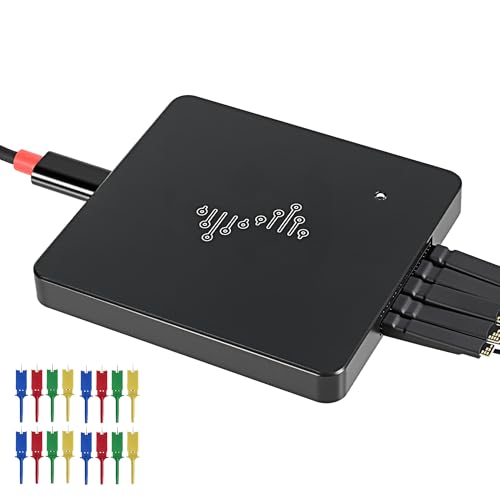
Best Budget Kit

- Eight channels at 24 MHz
- Includes 12 test-hook clips
- Supports UART, SPI, IIC, and sigrok
Best For: Entry-level Arduino and MCU debugging
Best with Extra Features
LA1010 16-Channel Logic Analyzer

- 16 channels at 100MHz per channel
- Decodes 30+ protocols
- Supports Windows, macOS, and Linux
Best For: Embedded developers needing broad signal coverage and protocol decoding
Best Starter Kit
LONELY BINARY 8-Channel Analyzer

- 24MHz capture across 8 channels
- Includes breadboard and breakout adapters
- USB-A and USB-C cables included
Best For: Students and makers working on breadboard-based Arduino or ESP32 projects
Best for Deep Captures
DSLogic Plus 16-Channel Analyzer
- 400MHz sampling with 16 channels
- Up to 16G sample depth in stream mode
- Nearly 100 protocol decoders
Best For: Advanced users analyzing fast or long-running digital signals
Best Budget Pick – HiLetgo 8-Channel USB Logic Analyzer
For straightforward digital signal analysis, this compact HiLetgo model is a practical entry point among logic analyzers for microcontrollers. It provides eight channels, sampling rates up to 24 MHz, and an input range suitable for many common 5 V and lower-voltage embedded projects.
Best For: Arduino-style projects, UART/IIC/SPI troubleshooting, and general-purpose embedded debugging on a budget.
Pros:
- Eight channels with sampling rates up to 24 MHz.
- Supports adjustable rates from 25 kHz through 24 MHz.
- Includes a USB cable with an EMI ferrite ring and offers 1 MΩ input impedance.
Cons:
- Its 24 MHz maximum sampling rate is less suited to faster digital buses.
- The supplied notes do not specify included protocol-decoding software or probes.
This is a sensible low-cost choice when you need basic waveform capture and digital debugging rather than advanced memory depth or high-speed analysis.
Best Open-Source Option – NanoDLA 8-Channel Logic Analyzer
The NanoDLA is designed for makers and developers who want an approachable tool for microcontroller, ARM, and FPGA work. With eight independent channels, 24 MHz sampling, and compatibility with Sigrok and PulseView, it fits common digital debugging workflows.
Best For: Arduino and STM32 development, open-source electronics projects, education, and portable bench work.
Pros:
- Captures up to eight digital signals simultaneously.
- Offers a 24 MHz sampling rate for timing and signal analysis.
- Works with Arduino, STM32, ARM, FPGA, Sigrok, and PulseView.
Cons:
- Eight channels may be limiting for larger systems.
- The supplied notes do not list advanced memory capacity or included accessories.
Its open-source orientation and broad software compatibility make the NanoDLA appealing when flexibility and community-supported tools matter more than maximum channel count.
Best Protocol Coverage – LA2016 16-Channel 200 MHz Analyzer
The LA2016 is a more capable option for complex digital systems, combining 16 channels, a 200 MHz sampling rate, and 1 Gbit of memory. Its software adds automated decoding for more than 20 protocols, making it one of the more feature-rich logic analyzers for microcontrollers in this group.
Best For: Multi-signal debugging involving I2C, SPI, UART, CAN, JTAG, Modbus, and other supported protocols.
Pros:
- Sixteen channels and 200 MHz sampling support detailed captures.
- 1 Gbit memory helps retain complex signal activity.
- Software decodes more than 20 protocols and includes waveform export and a PWM generator.
- Supports Windows, macOS, and Linux.
Cons:
- Its software compatibility details list Windows through version 10, so newer systems should be verified.
- The feature-rich setup may be more than a beginner needs for simple captures.
Choose the LA2016 when channel count, deeper capture memory, and built-in protocol interpretation are more important than having the smallest possible analyzer.
Best High-Speed Choice – DSLogic Plus 16-Channel Analyzer
For demanding timing work, the DSLogic Plus stands out with up to 400 MHz sampling, 16 channels, and dual capture modes. Its buffer mode prioritizes high-speed captures, while stream mode can send data to a computer for much longer recordings.
Best For: High-speed embedded debugging, long-duration captures, and projects requiring many channels or adjustable logic thresholds.
Pros:
- Reaches 400 MHz in buffer mode and supports 16-channel capture at up to 100 MHz.
- Offers 256 Mbit onboard memory plus stream-mode depths up to 16G samples.
- Supports adjustable thresholds in 0.1 steps.
- DSView works with Windows, macOS, and Linux and includes nearly 100 protocol decoders.
Cons:
- Maximum sampling rate depends on the number of active channels and capture mode.
- Its advanced feature set may be unnecessary for basic UART or I2C checks.
The DSLogic Plus is the strongest fit here when signal speed, capture duration, and flexible operating modes justify choosing a more advanced analyzer.
Best Overall – Saleae Logic Pro 8
For many users comparing logic analyzers for microcontrollers, the Saleae Logic Pro 8 offers a practical balance of channel count, protocol support, sampling performance, and cross-platform compatibility. Its eight inputs can handle digital or analog signals, while the PC-connected design supports extended captures.
Best For: Microcontroller developers who want an easy-to-use, versatile analyzer for SPI, I2C, UART, and other protocol debugging across Windows, Mac, or Linux.
Pros:
- Eight multi-use digital/analog inputs.
- Decodes SPI, I2C, and more than 23 additional analyzers.
- Up to 500 MS/s digital and 50 MS/s analog sampling.
- Supports Windows, Mac, and Linux.
Cons:
- Extended capture capacity uses connected PC memory.
- USB 3.0 is required for the listed capture performance.
The Logic Pro 8 is a strong all-around choice when usability and broad protocol coverage matter as much as raw channel count.
Best for Everyday Use – DSLogic U3Pro32
The DSLogic U3Pro32 stands out among logic analyzers for microcontrollers when high channel density and fast capture are priorities. It provides 32 digital channels, dual stream and buffer modes, and a USB-C connection for working with either long recordings or high-rate samples.
Best For: Advanced embedded developers analyzing many digital lines or high-speed interfaces with Windows, macOS, or Linux.
Pros:
- Offers 32 digital channels and up to 1 GHz sampling.
- Supports up to 16G samples in stream mode and includes 2Gbits of onboard DDR3 memory.
- Dual capture modes balance long duration and high sample-rate work.
- DSView supports nearly 100 protocol decoders and is open source.
Cons:
- Maximum sampling rates vary with the number of active channels.
- Its advanced feature set may be more than simple UART or I2C troubleshooting requires.
Choose this model when channel count, capture depth, and sampling speed are more important than a minimal setup.
Best Budget Kit – 8-Channel USB Logic Analyzer
For straightforward microcontroller work, this 8-channel USB analyzer is a compact entry point among logic analyzers for microcontrollers. Its 24 MHz rate is suited to common UART, SPI, and IIC debugging, and the included test-hook clips make connecting to development boards more convenient.
Best For: Arduino, ARM, FPGA, and other MCU projects that need basic serial-bus troubleshooting with included connection accessories.
Pros:
- Includes 12 SMD IC test-hook clips in six colors.
- Eight channels support UART, SPI, IIC, and other communication debugging.
- Works with compatible logic-analysis software and open-source programs such as sigrok.
- Supplier provides tutorials, demo code, tools, and class libraries.
Cons:
- Its 24 MHz sampling rate is aimed at basic debugging rather than high-speed analysis.
- Requires compatible software for protocol analysis.
- Maximum voltage is listed as 5 volts.
This kit is a sensible starting option for hobbyists and developers debugging everyday digital buses on low-voltage microcontroller systems.
Best with Extra Features – LA1010 16-Channel Logic Analyzer
For users who need broad coverage when comparing logic analyzers for microcontrollers, the LA1010 combines 16 input channels with a 100MHz sampling rate per channel. Its portable USB design and KingstVIS software support real-time waveform viewing and protocol decoding across common embedded-system buses.
Best For: Embedded developers debugging MCU, ARM, FPGA, and multi-protocol digital systems.
Pros:
- 16 channels capture multiple digital signals simultaneously.
- 100MHz sampling rate per channel supports detailed timing analysis.
- Decodes more than 30 protocols, including I2C, SPI, UART, and CAN.
- Works with Windows, macOS, and Linux.
Cons:
- Uses a USB 2.0 connection rather than a newer USB standard.
- The supplied specifications contain unusually broad computer-hardware fields that may not describe the analyzer itself.
The LA1010 is a strong all-purpose choice when channel count, cross-platform support, and built-in protocol decoding matter more than a minimal setup.
Best Starter Kit – LONELY BINARY 8-Channel Analyzer
The LONELY BINARY kit is a practical entry point for logic analyzers for microcontrollers, pairing eight channels and 24MHz capture with adapters and test leads. Its breadboard-focused accessories make it convenient for Arduino, ESP32, Raspberry Pi, and other hands-on embedded projects.
Best For: Students, hobbyists, and makers prototyping microcontroller communications on breadboards.
Pros:
- Eight channels support simultaneous analysis of I2C, SPI, and UART signals.
- Includes a breakout board and breadboard adapter with 2.54mm connections.
- Comes with USB-A and USB-C cables for different computers.
- Includes test clips, alligator clips, jumper wires, and a storage case.
Cons:
- Its 24MHz capture rate is lower than the other analyzers in this roundup.
- Eight channels provide less coverage than 16-channel alternatives.
This kit prioritizes convenience and quick connections, making it especially appealing for learning, breadboard experiments, and portable project work.
Best for Deep Captures – DSLogic Plus 16-Channel Analyzer
The DSLogic Plus stands out among logic analyzers for microcontrollers with 16 channels, a stated 400MHz sampling rate, and up to 16G sample depth in stream mode. Its dual capture modes and onboard memory are suited to analyzing either long-running activity or fast digital events.
Best For: Advanced users who need high-speed captures, extended recording, and extensive protocol-decoding support.
Pros:
- 16 channels and a 400MHz sampling rate support demanding digital analysis.
- Stream mode enables real-time transfer for long sample durations.
- Buffer mode and 256Mbits of onboard SDRAM support high-rate captures.
- Supports nearly 100 protocol decoders and adjustable signal thresholds.
Cons:
- Its advanced capture modes may be more than beginners need.
- Uses a USB 2.0 interface despite its high sampling and memory specifications.
- The supplied notes do not list included probes or clips.
Choose the DSLogic Plus when capture depth and speed are priorities, particularly for troubleshooting intermittent or fast microcontroller signals.
How We Picked the Best Logic Analyzers for Microcontrollers
We selected tools across several experience levels and budgets, focusing on the specifications that matter most in embedded debugging: channel count, maximum sampling rate, memory depth, supported protocols, host compatibility, probe accessories, and physical portability. The list includes simple 8-channel USB devices for basic serial-bus inspection as well as higher-performance analyzers suited to dense FPGA, ARM, and mixed-signal development.
Software usability also matters. A high-speed analyzer is less useful if its capture software is difficult to install or poorly matched to your operating system, so buyers should verify current Windows, macOS, and Linux support before ordering.
Quick Comparison
| Analyzer type | Typical strengths | Best suited to |
|---|---|---|
| 8-channel, 24MHz USB | Low cost, compact size, basic protocol debugging | Arduino, hobby, and entry-level projects |
| 16-channel, 100–200MHz | More signals and faster timing analysis | General embedded development |
| 16-channel, 400MHz | Higher-speed buses and deeper captures | Advanced microcontroller and FPGA work |
| 16-channel, 1GHz or 32-channel | Very fast transitions, many simultaneous signals | Professional and demanding digital debugging |
Key Buying Factors for Logic Analyzers for Microcontrollers
Channel Count
Eight channels are usually enough for one UART, I2C, or SPI connection with a few control lines. Choose 16 or 32 channels when monitoring multiple peripherals, parallel buses, chip selects, interrupts, or FPGA signals at the same time.
Sampling Rate and Memory
The analyzer should sample substantially faster than the signal being measured. Higher rates improve visibility of short pulses and timing relationships, while deeper memory allows longer captures without sacrificing detail. Do not compare sampling-rate numbers alone: confirm whether the stated rate applies to every channel and whether memory is shared.
Protocol Decoding
Check for decoders covering the protocols you actually use, such as UART, I2C, SPI, CAN, and common GPIO timing analysis. Decoder availability can save significant time, but raw waveform viewing remains essential when investigating glitches, contention, setup-time violations, or framing errors.
Software and Operating System Support
Confirm compatibility with your computer and preferred analysis application. Open-source tools can be flexible and inexpensive, while polished proprietary software may offer easier triggering, annotation, export, and protocol workflows.
Probes, Voltage Levels, and Portability
Included test clips and breakout boards add value, especially for beginners. Verify the analyzer’s supported input voltage range and ground arrangement before connecting it to a board. A compact USB model is convenient for field work, whereas a larger instrument may provide better connectors and controls.
Who Should Buy Which Logic Analyzers for Microcontrollers?
Beginners and hobbyists: Choose an affordable 8-channel analyzer with 24MHz sampling for Arduino, basic UART, I2C, and SPI troubleshooting.
General embedded developers: A 16-channel model in the 100–400MHz range offers a useful balance of coverage, speed, and cost for most microcontroller projects.
Engineers handling complex systems: Select a deeper-memory analyzer with 16 or 32 channels when you need to capture several buses, inspect fast edges, or debug ARM, FPGA, and tightly timed digital designs.