The best power strips do more than add outlets. They help organize crowded desks, protect connected electronics from surges, and keep phones, tablets, and other devices charged without extra adapters.
We selected 10 power strips with different combinations of outlet capacity, USB charging, cord length, surge protection, and mounting-friendly designs so you can match the right model to your space and devices.
Best 10 Power Strips Picks for 2026
Best High-Capacity Pick
Anker 351 12-Outlet Power Strip

- 12 AC outlets plus USB-C and USB-A ports
- 20W USB-C charging and 2100J surge protection
- Extra outlet spacing and mountable design
Best For: Home offices, dorms, and bedside or sofa-side tables
Best Heavy-Duty Option
ALESTOR 12-Outlet Surge Protector

- 12 AC outlets and four USB charging ports
- 2700J surge protection with protected indicator
- 6-foot cord and two widely spaced outlets
Best For: TV cabinets, offices, and larger multi-device setups
Best Compact USB-C Pick

- Eight AC outlets and four USB ports
- Two USB-C ports with up to 5V/3A output
- Flat plug, braided cord, and wall-mounting holes
Best For: Dorm rooms, compact desks, and USB-C charging stations
Best Wall-Mounted Extender
QINLIANF 5-Outlet Surge Protector
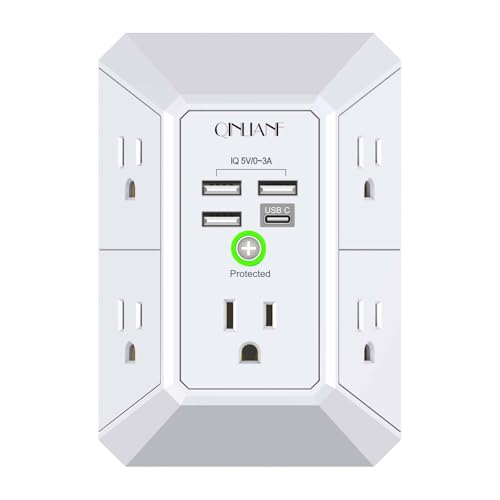
- Five AC outlets plus four USB ports
- 1680J surge protection and wide outlet spacing
- Secures to compatible duplex wall outlets
Best For: Compact indoor charging areas and compatible duplex outlets
Best for Easy Setup

- Six AC outlets plus USB-A and USB-C charging
- Space-saving layout for bulky adapters
- Flat plug, mounting holes, and 900J protection
Best For: Compact desks, dorms, and travel
Best Long-Cord Option

- Six AC outlets and three USB ports
- Six-foot flat-plug cord with cable ties
- 1,680J surge protection and mounting hole
Best For: Home offices and extended-reach setups
Best Heavy-Duty Two-Pack
Flexoria 6-Outlet Surge Protector

- 15A and 1,875W capacity for indoor equipment
- Four mounting slots with included screws
- ETL listed with overload protection
Best For: Mounted home and office AC power
Best Compact Cube
6-Foot 8-Outlet USB Power Strip

- Eight AC outlets plus four USB ports
- Three-sided layout with wide spacing
- 900-joule surge protection and flat plug
Best For: Compact home offices, dorm rooms, and multi-device setups
Best for Hidden Placement
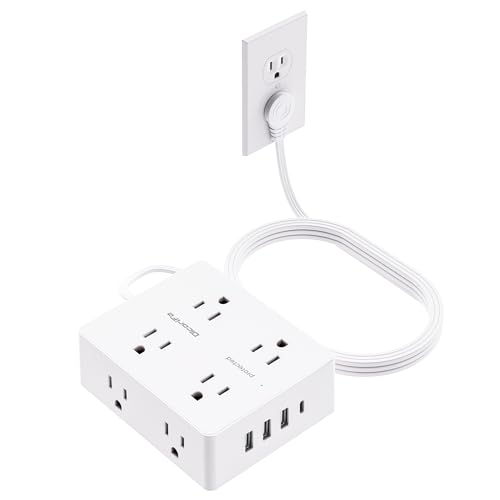
- Ultra-thin plug fits behind furniture
- Eight outlets and four USB ports
- Long 10-foot cord with wall-mount holes
Best For: Behind-furniture setups, dorms, travel, and home offices
Best Simple Pick
12-Outlet 2700-Joule Power Strip

- Twelve AC outlets and four USB ports
- 2700-joule surge protection
- Two wide-spaced outlets and 15-amp capacity
Best For: Large workstations, entertainment centers, offices, and dorms
Best High-Capacity Pick – Anker 351 12-Outlet Power Strip
If you need power strips for a home office, dorm, or media area, the Anker 351 combines 12 AC outlets with USB charging in a layout designed for multiple devices. Its 2100-joule surge rating, 5-foot cord, and extra outlet spacing make it a practical choice for everyday setups.
Best For: Desks, bedside tables, sofa-side tables, and users who need many AC outlets plus USB-C charging.
Pros:
- Provides 12 AC outlets, one USB-C port, and two USB-A ports.
- The 20W USB-C port can charge an iPhone 15 from 0% to 50% in about 26 minutes.
- Includes 2100-joule surge protection and an eight-point safety system.
- Extra spacing accommodates bulky plugs, while the strip can be mounted.
Cons:
- The USB ports share a maximum total output of 15W.
- The 5-foot cord may be limiting for setups far from the wall outlet.
Choose this Anker model when outlet count and a dedicated fast-charging USB-C port matter most. The shared USB output is worth noting if you expect to charge several USB devices at their maximum speeds simultaneously.
Best Heavy-Duty Option – ALESTOR 12-Outlet Surge Protector
Among power strips for busy workspaces and entertainment areas, the ALESTOR stands out with 12 AC outlets, four USB ports, and a 6-foot heavy-duty cord. Its 2700-joule surge rating and widely spaced outlets suit equipment with larger adapters.
Best For: TV cabinets, apartments, offices, and setups that need a longer cord and high surge-protection rating.
Pros:
- Offers 12 AC outlets and four USB charging ports, including one USB-C port.
- Provides a 2700-joule surge-protection rating with an illuminated protected indicator.
- Two outlets have 2-inch spacing for bulky power adapters.
- Includes a 6-foot heavy-duty extension cord and ETL certification.
Cons:
- The USB output is limited to 2.4A per USB-A port and 3A for USB-C.
- Its larger 11-by-3.9-inch design may take more desk or cabinet space.
This is a strong fit when you want maximum AC capacity, a longer reach, and a higher stated surge rating. Its larger footprint is the trade-off for the generous outlet layout and heavy-duty cord.
Best Compact USB-C Pick – HANYCONY 8-Outlet Power Strip
For compact power strips that still support modern devices, the HANYCONY pairs eight AC outlets with four USB ports, including two USB-C ports. Its three-sided layout, flat plug, braided 5-foot cord, and wall-mounting holes help keep smaller desks and dorm rooms organized.
Best For: College dorms, compact home offices, and charging stations that need multiple USB-C connections.
Pros:
- Supports up to 12 devices with eight AC outlets and four USB ports.
- Includes two USB-C ports rated up to 5V/3A and two USB-A ports.
- Wide 2.2-inch outlet spacing helps prevent bulky adapters from blocking neighbors.
- Features a flat plug, braided 5-foot cord, wall-mounting holes, and overload protection.
Cons:
- Its 1080-joule surge rating is lower than the other full-size options here.
- The total USB output is limited to 5V/3.1A.
- USB power negotiation can briefly interrupt other ports when devices are connected or removed.
The HANYCONY makes sense when USB-C access and space efficiency are higher priorities than the highest surge rating. Its compact, mountable design is especially convenient for dorm and desk charging setups.
Best Wall-Mounted Extender – QINLIANF 5-Outlet Surge Protector
Unlike corded power strips, the QINLIANF is a compact wall outlet extender that adds five AC outlets and four USB ports directly at a duplex receptacle. Its three-sided layout and 2.1-inch spacing make it useful where a loose strip would be inconvenient.
Best For: Indoor wall outlets, travel-friendly charging areas, and users who want a secured, space-saving outlet extender.
Pros:
- Adds five AC outlets and four USB ports, including USB-A and USB-C charging.
- Provides 1680-joule surge protection with a protected indicator light.
- The included screw can secure it to a compatible duplex outlet.
- Wide spacing and a rear groove help accommodate adapters and sit flush against the wall.
Cons:
- It works with duplex outlets only and cannot be secured to GFCI outlets.
- It has no extension cord, so placement depends on the existing wall outlet.
- The USB-C port is not Quick Charge 3.0 and does not support 9–22V devices.
This QINLIANF is best viewed as a fixed outlet upgrade rather than a conventional extension power strip. Confirm that your receptacle is compatible before buying, particularly if you use GFCI outlets or need corded reach.
Best for Easy Setup – One Beat Desktop Power Strip
If you need power strips for a crowded desk, dorm, or travel setup, the One Beat combines six AC outlets with USB charging in a compact, space-saving design. Its three-sided layout helps accommodate larger adapters without blocking neighboring outlets.
Best For: Desks, dorm rooms, travel, and compact charging setups that need USB-C connectivity.
Pros:
- Six AC outlets, two USB-A ports, and two USB-C ports can power up to nine devices.
- Widely spaced outlets and a three-sided layout help fit bulky adapters.
- Five-foot cord, flat plug, mounting holes, and 900-joule surge protection add placement flexibility.
Cons:
- Its 900-joule surge rating is lower than some larger power strips.
- The compact design provides fewer AC outlets than longer, full-size models.
The One Beat is a practical choice when desk space matters and you want built-in USB-C charging. Its mountable housing and flat plug make it especially adaptable for tight indoor spaces.
Best Long-Cord Option – Yintar 6-Outlet Power Strip
For power strips that need to reach across a room or workspace, this Yintar model pairs a six-foot flat-plug cord with six AC outlets and three USB ports. Its 1,680-joule surge rating and mounting hole make it suited to organized home or office installations.
Best For: Home offices, dorms, and workspaces needing extra cord reach and multiple USB charging ports.
Pros:
- Six AC outlets and three USB ports support several plugged-in and USB devices.
- The six-foot cord offers more placement flexibility than shorter extension cords.
- Provides 1,680-joule surge protection, an overload switch, and a surge indicator.
- A widely spaced outlet accommodates larger plugs, while the mounting hole supports installation.
Cons:
- The listed maximum current is 10 amps.
- Only one outlet is identified as widely spaced for bulky adapters.
This is a strong everyday option if cord length and surge capacity are higher priorities than a large outlet count. Cable ties and a mounting hole also help keep the setup neater.
Best Heavy-Duty Two-Pack – Flexoria 6-Outlet Surge Protector
When you need straightforward power strips for multiple rooms or work areas, the Flexoria six-outlet model emphasizes a 15-amp/1,875-watt capacity and secure mounting. The two-pack makes it convenient to equip separate home or office locations.
Best For: Home and office users who want wall-mountable outlet expansion for higher-power indoor devices.
Pros:
- Supports up to 1,875 watts at 125 volts and 15 amps.
- Six AC outlets provide additional connection capacity for indoor equipment.
- Four keyhole mounting slots and included screws help reduce cord clutter.
- ETL-listed construction includes overload protection and a flame-retardant housing.
Cons:
- It does not include USB charging ports.
- Its 600-joule surge rating is modest compared with some alternatives.
- The supplied details identify a two-pack title, while the specifications list one unit.
The Flexoria focuses on durable, mounted AC power rather than USB convenience. Choose it when the 15-amp rating, 1,875-watt capacity, and included mounting hardware fit your indoor setup.
Best Compact Cube – 6-Foot 8-Outlet USB Power Strip
This compact power strip is a practical choice when you need to power several devices without wasting outlet space. Its three-sided layout provides eight widely spaced AC outlets plus four USB ports, while the flat plug and 6-foot cord make it easier to position in a home office, dorm, or tight workspace.
Best For: Home offices, college dorms, and compact setups needing multiple outlets and USB charging.
Pros:
- Eight AC outlets and four USB ports can power up to 12 devices simultaneously.
- Three-sided design and 1.8-inch outlet spacing accommodate larger plugs.
- Includes 900-joule surge protection, overload protection, and a flat 45-degree plug.
- Mounting holes and a 6-foot cord support flexible placement.
Cons:
- USB charging is limited to USB-A 5V/2.4A ports and one USB-C 5V/3A port.
- Its 10-amp maximum current is lower than some larger power strips.
Choose this model if space efficiency and flexible outlet placement matter more than maximum surge capacity. The cube-style design is especially useful where bulky adapters would otherwise block neighboring sockets.
Best for Hidden Placement – 10-Foot Flat-Plug Power Strip
This power strip is designed for locations where a standard plug would be difficult to hide. The ultra-thin 0.27-inch flat plug can sit behind furniture, while the 10-foot cord extends reach and the three-sided layout provides eight outlets and four USB ports for everyday home-office or travel use.
Best For: Behind-furniture installations, travel, dorm rooms, and workstations that need extra cord length.
Pros:
- Eight widely spaced outlets and four USB ports support charging up to 12 devices.
- Ultra-thin flat plug helps save space behind furniture.
- 10-foot extension cord offers more placement flexibility.
- Mounting holes allow installation on a wall or other suitable surface.
Cons:
- The supplied notes specify overload protection but do not list a surge-protection rating.
- USB output includes three USB-A ports and one USB-C port, rather than multiple USB-C ports.
This is a strong fit when reach and discreet placement are the main priorities. Its lightweight, compact construction also makes it more convenient to pack or move than a larger conventional power strip.
Best Simple Pick – 12-Outlet 2700-Joule Power Strip
For larger electronics setups, this Teiobar power strip combines 12 AC outlets with four USB ports and a 6-foot heavy-duty cord. Its 2700-joule surge rating, widely spaced outlets, and 15-amp capacity make it suited to home offices, dorms, and entertainment areas with many connected devices.
Best For: High-device-count workstations, entertainment centers, offices, and dorm rooms.
Pros:
- Twelve AC outlets and four USB ports provide substantial connection capacity.
- Two widely spaced outlets accommodate larger adapters, while 10 standard outlets handle regular plugs.
- 2700 joules of surge protection and a protected indicator support easier status checking.
- Includes two USB-A and two USB-C ports, a 15-amp rating, and mounting capability.
Cons:
- The 11-inch rectangular body takes more space than compact cube-style power strips.
- The 6-foot cord may be shorter than the 10-foot option in this roundup.
If you need the most outlets and highest listed surge capacity among these options, this model is the most capable choice. Its larger footprint is a reasonable tradeoff for powering a broad mix of electronics from one location.
How We Picked These Power Strips
We focused on practical features that affect everyday use: the number and spacing of AC outlets, surge-protection rating, cord length, plug design, USB availability, and placement flexibility. Models with USB-C, braided cords, flat plugs, wall-mounting options, or widely spaced outlets can offer extra convenience, but the best choice depends on how and where you plan to use the strip.
We also considered whether each power strip fits common scenarios such as a home office, entertainment center, bedside table, dorm room, or travel setup. Always confirm the product’s electrical specifications before connecting high-wattage appliances.
Quick Comparison
| Feature | What to look for | Best suited to |
|---|---|---|
| Outlet count | 6 to 12 AC outlets | Multiple electronics and shared workspaces |
| Surge protection | Higher joule ratings generally indicate more energy absorption capacity | Computers, monitors, TVs, and networking gear |
| USB charging | USB-A for common cables; USB-C for newer devices | Phones, tablets, earbuds, and accessories |
| Cord length | Short cords for compact setups; 6 to 10 feet for flexible placement | Desks, dorms, rooms with distant outlets |
| Plug and housing design | Flat plugs, spaced outlets, or wall-mounting holes | Behind furniture, travel, and organized work areas |
Key Buying Factors for Power Strips
Surge Protection and Electrical Capacity
Check the joule rating, overload protection, clamping information, and maximum load. A power strip should not be used as a substitute for a circuit breaker, and high-draw appliances such as heaters, air conditioners, and some kitchen appliances may require a dedicated wall outlet.
Outlets, Spacing, and USB Ports
Count both the number of devices and the size of their plugs. Widely spaced outlets are useful for bulky adapters, while USB ports reduce the need for charging bricks. If you regularly charge newer devices, a USB-C port may be more useful than additional USB-A ports.
Cord Length and Placement
Choose a cord long enough to reach the wall outlet without tension or unsafe routing. Flat plugs work well behind furniture, while a compact or wall-mountable design can keep a bedside table or desk less cluttered.
Who Should Buy Which Power Strips?
- For a busy home office: Choose a model with ample outlets, meaningful surge protection, and enough spacing for monitors, computers, chargers, and networking equipment.
- For a dorm or bedroom: Prioritize a compact body, a flat plug, USB charging, and a cord length suited to the room’s outlet location.
- For entertainment systems: Look for higher surge capacity, multiple outlets, and a long cord that can reach behind a media console.
- For phones and tablets: A strip with several USB ports, especially USB-C, can simplify charging while leaving AC outlets available.
- For flexible room layouts: Select a 6- or 10-foot cord, clearly spaced outlets, and mounting features if you want the strip secured to a wall or desk.
Before buying, compare the strip’s total load rating with the devices you will connect, and replace any unit showing heat damage, frayed wiring, or signs of electrical wear.