The best portable label printers make it easier to organize cables, containers, files, packages, and everyday supplies without relying on bulky office equipment. This roundup covers compact handheld label makers, Bluetooth models, and 4×6 thermal shipping printers.
These products suit different jobs, from quick household labeling to frequent online-order fulfillment. Use the buying guide below to compare connectivity, label formats, portability, and ongoing supply costs before choosing one.
Best 10 Portable Label Printers Picks for 2026
Best Bundle for Everyday Organization

- Four tapes included
- QWERTY keyboard and preview display
- Laminated, water-resistant labels
Best For: Home, office, storage, and cable organization
Best for Small-Business Shipping

- Inkless 203 DPI thermal printing
- Wireless and USB connectivity
- Supports major shipping platforms
Best For: Online sellers and package shipping
Best Handheld Format Options

- Three D1 cassettes included
- QWERTY keyboard and large display
- 20+ formats and 200+ symbols
Best For: Home, office, art, and drawing projects
Best Wireless Shipping Flexibility

- Bluetooth and USB connectivity
- Supports labels up to 4.37 inches wide
- Automatic label identification
Best For: Multi-format shipping and barcode labeling
Colorful Personal Labeling

- Built-in QWERTY keyboard and LCD preview
- 250 symbols plus fonts, styles, and frames
- Uses 12mm Brother Btag tapes
Best For: Personal organization and creative home labeling
Best for Everyday Use
KNAON Bluetooth 4x6 Label Printer

- Supports 4x6 and other 1.5–4.2-inch labels
- Bluetooth and USB connectivity
- Works with major selling and shipping platforms
Best For: Online sellers and small-business shipping
Compact Everyday Organization

- Keyboard and Bluetooth app printing
- Rechargeable battery lasts up to one month
- Supports continuous and die-cut labels
Best For: Portable home, office, and school organization
Best All-Around Design Flexibility

- Supports continuous and fixed-length labels
- 203 DPI ink-free printing with a rechargeable battery
- Feature-rich app with templates, QR codes, and batch tools
Best For: Custom home, classroom, office, and small-business labeling
Best for Wider Labels

- Handles labels from 3/4 to 2 inches wide
- Free app supports images, codes, fonts, and icons
- Automatic label-size recognition and 203 DPI printing
Best For: Wider storage, address, product, and small-business labels
Best for Fixed-Length Labels
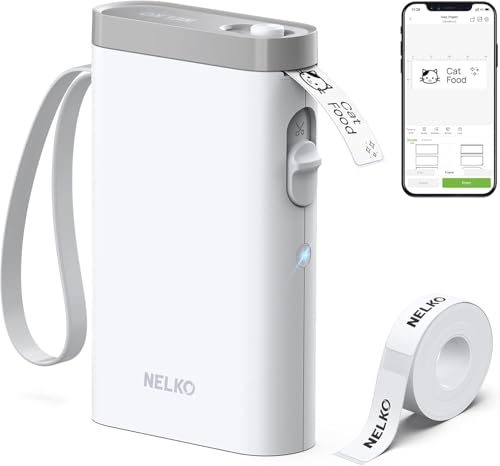
- Pocket-sized Bluetooth printer with rechargeable battery
- 203 DPI ink-free monochrome thermal printing
- App offers templates, languages, QR codes, and barcodes
Best For: Quick classroom, home, and office organization labels
Best Bundle for Everyday Organization – Brother P-Touch PTH110BP
Brother P-Touch, PTH110BP, Easy Portable Label Maker Bundle (4 Label Tapes Included), White, Small
Check Price On AmazonFor shoppers comparing portable label printers, the Brother P-Touch PTH110BP is a practical handheld choice for home, office, storage, and cable-labeling tasks. Its built-in QWERTY keyboard, preview display, and included tape supply make it ready for immediate use.
Best For: Home and office organization, file folders, storage bins, and cable management.
Pros:
- Includes four black-on-white laminated TZe tapes.
- Offers three fonts, 14 decorative frames, and more than 250 symbols.
- Stores up to 15 labels for quick reprinting.
- Water-resistant laminated labels are suitable for indoor and outdoor use.
Cons:
- AC adapter is sold separately.
- Limited to monochrome label printing and 12 mm media.
This bundle stands out for buyers who want a simple, self-contained label maker rather than a phone-dependent printer. The included tapes add value, while the handheld controls make occasional labeling straightforward.
Best for Small-Business Shipping – JADENS Bluetooth 4×6 Printer
Among portable label printers, the JADENS JD268BT is designed for shipping workflows that require 4×6 labels without ink or toner. It supports wireless printing, USB connections, roll and fanfold labels, and common shipping platforms.
Best For: Online sellers and small businesses printing shipping, warehouse, and marketplace labels.
Pros:
- Prints wirelessly and supports USB connections on compatible computers.
- Uses inkless 203 DPI thermal printing.
- Works with label widths from 1.57 to 4.1 inches.
- Compatible with platforms including ShipStation, Shopify, eBay, and Amazon.
Cons:
- Phones require the JADENS app rather than direct Bluetooth printing.
- Label size calibration is required when changing labels.
- It is less suited to decorative or general-purpose household labeling.
The JD268BT is a focused shipping tool rather than a traditional handheld label maker. Its broad platform compatibility and thermal operation make it a sensible option for sellers who regularly prepare packages.
Best Handheld Format Options – DYMO LabelManager 160
The DYMO LabelManager 160 is one of the more straightforward portable label printers for users who prefer typing directly on the device. Its QWERTY keyboard, large display, one-touch keys, and bundled D1 cassettes support quick organization around the home or office.
Best For: Users who want a compact handheld label maker for office, art, drawing, and household organization.
Pros:
- Includes three 12 mm by 7 m D1 label cassettes.
- Provides more than 20 text formats and over 200 symbols.
- Features a QWERTY keyboard, large display, and one-touch smart keys.
- Automatic power-off helps conserve battery life.
Cons:
- Requires authentic DYMO D1 tapes for recommended performance.
- The supplied notes list no product warranty.
- It is a monochrome, print-only device rather than a wireless shipping printer.
This model is a good fit when ease of on-device text entry matters more than mobile connectivity. The included cassettes and broad formatting options give it useful flexibility for recurring organization projects.
Best Wireless Shipping Flexibility – Rongta RP425
The Rongta RP425 gives portable label printers a more flexible shipping orientation, combining Bluetooth and USB connectivity with support for multiple direct-thermal label sizes. Automatic label identification and fast printing are useful for offices, warehouses, and small businesses.
Best For: Users printing shipping, barcode, QR code, and other thermal labels from phones, tablets, Windows, Mac, or Chrome OS devices.
Pros:
- Supports Bluetooth through the Rongta app on iOS and Android.
- Works with Windows, Mac, and Chrome OS through available drivers.
- Automatically detects and feeds supported label sizes.
- Prints at speeds up to 150 mm/s with 203 DPI resolution.
Cons:
- Mobile Bluetooth printing requires the Rongta app.
- It uses monochrome direct thermal printing, not color ink printing.
- Its compact desktop design may be less convenient for handheld use than a keyboard label maker.
The RP425 is especially appealing for buyers who need one thermal printer for several label formats. Its app-based wireless workflow and broad device compatibility provide more flexibility than a basic USB-only shipping printer.
Colorful Personal Labeling – Brother P-Touch PT-N20
The Brother P-Touch PT-N20 is a compact choice among portable label printers for organizing home, dorm, office, school, or workshop items. Its built-in QWERTY keyboard, preview screen, decorative options, and cutter make creating short personalized labels straightforward without relying on a phone.
Best For: Personal organization, creative labels, reminders, and small projects using 12mm Btag tapes.
Pros:
- Full QWERTY keyboard and 16-character LCD preview help simplify label creation.
- Includes 3 fonts, 7 font styles, 15 frames, and 250 symbols.
- Prints up to two lines and includes a built-in cutter for clean edges.
- Stores up to 10 labels for convenient reprinting.
Cons:
- Works exclusively with Brother P-touch Btag tapes measuring 12mm wide.
- Its small tape format is intended for personal labels rather than shipping labels.
- USB is listed as the hardware interface, so it is not a fully wireless label maker.
The PT-N20 stands out for simple, expressive labeling rather than high-volume or business shipping work. Its dedicated keyboard and built-in design features make it practical for users who want quick labels with a colorful, personalized look.
Best for Everyday Use – KNAON Bluetooth 4×6 Label Printer
The KNAON Y813BT is one of the more business-oriented portable label printers, designed for shipping, mailing, barcode, price, and name labels. Bluetooth and USB connectivity support phones, tablets, Windows, macOS, ChromeOS, and Linux, while the FlashLabel Pro app provides templates and editing tools.
Best For: Small businesses and online sellers printing shipping labels for platforms such as Etsy, Shopify, Amazon, eBay, and USPS.
Pros:
- Supports label widths from 1.5 to 4.2 inches, including common 4×6 shipping labels.
- Offers Bluetooth and USB connectivity across major computer and mobile platforms.
- FlashLabel Pro includes more than 3,000 templates, 5,000 icons, and 100 fonts.
- Prints at speeds up to 180 mm/s and includes 10 test papers.
Cons:
- Mobile Bluetooth printing requires the FlashLabel Pro app rather than a direct device connection.
- Shipping-platform labels must be saved as PDFs and imported into the app.
- At 2.8 pounds, it is less lightweight than compact handheld label makers.
The KNAON is a practical pick when portable label printers need to handle recurring shipping tasks and multiple label formats. Its app-based workflow adds a step, but the broad platform compatibility and template library can make it useful for growing online operations.
Compact Everyday Organization – SUPVAN E11 Label Maker
The SUPVAN E11 combines a physical keyboard with Bluetooth app printing, making it a flexible option among portable label printers for home, office, school, pantry, and garage organization. Its rechargeable battery and compact 0.5-pound design are suited to labeling in different rooms or while traveling.
Best For: Users who want both quick keyboard labeling and app-based designs with continuous or die-cut tape options.
Pros:
- 1200 mAh rechargeable battery provides up to one month of use per charge.
- App offers more than 30 fonts, 50 frames, 660 icons, and 17 languages.
- Supports both continuous labels and die-cut labels for varied projects.
- 0.2-inch margins help reduce wasted label material.
Cons:
- Bluetooth app printing is designed for smartphones, so broader device compatibility is not specified.
- Monochrome output limits colorful label designs to black thermal printing.
- Its maximum media size is 15mm by 6m, making it unsuitable for standard shipping labels.
The E11 is a strong everyday option for users who value portability and flexible label design. The included continuous and die-cut tapes let it handle both longer text and quick identification labels, while the keyboard provides an alternative to app-only operation.
Best All-Around Design Flexibility – Phomemo D30
The Phomemo D30 is a versatile choice among portable label printers, supporting both continuous tape and fixed-length labels. Its Bluetooth connection, rechargeable battery, and compact size make it practical for home organization, classrooms, offices, and small-business labeling.
Best For: Users who want extensive design tools and flexible label formats in a pocket-sized printer.
Pros:
- Supports continuous and fixed-length labels.
- Prints sharp, ink-free monochrome labels at 203 DPI.
- The Print Master app includes extensive icons, borders, fonts, templates, QR codes, barcodes, OCR, and batch-import tools.
- Rechargeable, lightweight, and designed for wireless mobile printing.
Cons:
- Print output is black text only; color comes from patterned label tape.
- Some premium app templates require a membership.
The D30 stands out when customization and media flexibility matter more than a basic label-only workflow. It is especially well suited to detailed organizing projects and small-business tags.
Best for Wider Labels – SUPVAN T50M Pro
The SUPVAN T50M Pro is a practical option among portable label printers for projects that need labels from 3/4 to 2 inches wide. Its free app works with phones, tablets, and PCs, while automatic label-size recognition helps simplify setup.
Best For: Home organizers and small businesses that need wider labels for products, storage, addresses, or codes.
Pros:
- Supports label widths from 3/4 to 2 inches.
- Free app requires no registration and offers 30+ fonts, 50+ frames, and 660+ icons.
- Supports images, QR codes, barcodes, and brand logos.
- Inkless 203 DPI printing with included sample label tape and USB-C charging.
Cons:
- At 433 g, it is heavier than the smaller pocket-style models in this roundup.
- Uses SUPVAN label tape.
Choose the T50M Pro if label width and straightforward app editing are priorities. Its broader media range makes it more adaptable for product information, addresses, and larger storage labels.
Best for Fixed-Length Labels – Nelko P21
The Nelko P21 is a compact Bluetooth option among portable label printers, designed for quick fixed-length labels at home, school, or work. It uses an Android and iOS app with ready-made templates, but it does not support continuous label tape or computer connectivity.
Best For: Teachers, students, and home users who want a small printer for straightforward fixed-size labels.
Pros:
- Lightweight, pocket-sized design with a rechargeable battery.
- 203 DPI BPA-free thermal printing requires no ink or toner.
- App includes more than 750 templates, 29 languages, QR and barcode tools, and thousands of design assets.
- Supports waterproof labeling for items such as lunch boxes and pencil cases when using suitable label media.
Cons:
- Supports fixed-length labels only; continuous tape is not supported.
- Does not work with computers.
- Not compatible with Google Pixel phones running Android 14, and the charging adapter is not included.
The P21 is a good fit for quick, repeatable labels rather than highly flexible media formats. Check phone compatibility and keep the app updated, particularly for iOS use.
How We Picked These Portable Label Printers
We selected models across the main portable label-printer categories: handheld tape-based label makers, compact Bluetooth label printers, and dedicated 4×6 thermal shipping printers. We considered portability, setup, connection options, keyboard or app usability, supported label sizes, print purpose, and the practicality of replacement supplies.
Because a printer designed for shipping labels serves a different purpose from one designed for pantry or cable labels, the recommendations are grouped by use case rather than treated as interchangeable. Product specifications and included accessories can vary, so confirm tape or label compatibility before ordering.
Quick Comparison
| Best For | Recommended Type | What to Look For |
|---|---|---|
| Home organization | Handheld tape label maker | Simple controls, compact size, affordable tapes |
| Phone-based custom labels | Bluetooth mini printer | Reliable app, templates, rechargeable battery |
| Shipping packages | 4×6 thermal printer | Windows or mobile support, calibration, automatic label sizing |
| Occasional office use | Keyboard or Bluetooth model | Easy setup, multiple fonts, accessible replacement media |
Key Buying Factors for Portable Label Printers
Label Format and Intended Job
Start with the labels you actually need. Tape-based models are best for bins, folders, shelves, cables, and small containers. Bluetooth mini printers often provide more design flexibility for decorative or customized labels. Shipping models typically print wider 4×6 labels and are better suited to carrier documents and package workflows.
Connectivity and Controls
A built-in QWERTY keyboard allows quick standalone labeling, while Bluetooth models generally offer more fonts, symbols, templates, and image options through a phone app. Check whether the printer supports your operating system and whether the app is required for basic use.
Portability and Power
For a truly mobile setup, check weight, battery type, charging method, and whether the printer can operate without a wall adapter. A small body is useful, but frequent users should also consider how quickly labels print and how often the device needs charging.
Supply Costs and Compatibility
Compare the price and availability of replacement tape or thermal labels, not just the printer’s purchase price. Some models accept several widths or colors, while others depend on proprietary cartridges. Thermal printers do not require ink, but they still need compatible label rolls and may require occasional cleaning.
Who Should Buy Which Portable Label Printers?
Choose a handheld keyboard model if you want fast, uncomplicated labels around the home, classroom, workshop, or office. Choose a Bluetooth mini printer if design flexibility and phone control matter most. For online sellers, warehouse tasks, or frequent package fulfillment, choose a 4×6 thermal shipping printer with software support that matches your computer or phone. If you label only occasionally, prioritize low supply costs and straightforward setup over advanced templates or maximum print speed.