A mechanical keyboard with an LCD screen can put system stats, media controls, custom graphics, and shortcuts directly within reach. The best models combine that extra display with dependable switches, useful layouts, wireless flexibility, and comfortable everyday typing.
We compared 10 standout options across screen functionality, programmability, connectivity, layout, battery capacity, and customization so you can choose a keyboard that fits your desk and workflow—not just one with the flashiest display.
Best 10 Mechanical Keyboard with Lcd Screen Picks for 2026
Personalized Wireless Pick

- TFT screen supports status information and custom GIFs
- Tri-mode USB-C, Bluetooth, and 2.4GHz connectivity
- Gasket mount with five-layer noise dampening
Best For: Wireless gaming and multitasking with a full 95-key layout
Streaming Control Center

- Six programmable LCD stream-deck keys
- Three assignable control knobs
- Wired TKL design with hot-swap gasket mount
Best For: Streaming, creative apps, and shortcut-heavy workflows
Compact Wireless Screen Pick

- 81-key layout with built-in TFT display
- Tri-mode wireless and USB-C connectivity
- PBT keycaps, hot-swap support, and gasket mounting
Best For: Compact wireless gaming and everyday desk setups
Macro Workflow Specialist

- Six LCD keys and three knobs across switchable pages
- Full-key macro and shortcut programming
- Hot-swap support with gasket mount and dampening
Best For: Advanced streaming, gaming, and productivity macros
Best Wireless Display Pick

- Smart display shows GIFs, status details, and connection information
- Bluetooth, 2.4GHz, and USB-C connectivity
- Hot-swappable 98-key layout with sound dampening
Best For: Wireless gaming and customizable compact layouts
Best Touchscreen Design
Womier DUO87 Touchscreen Keyboard

- Detachable touchscreen works as a control panel or photo frame
- QMK/VIA supports remapping, macros, layers, and profiles
- Gasket-mounted 75% layout with hot-swappable switches
Best For: Gaming, streaming, and creator-focused desk setups
Best Full-Size Wireless Option
AULA F108 Pro with TFT Display
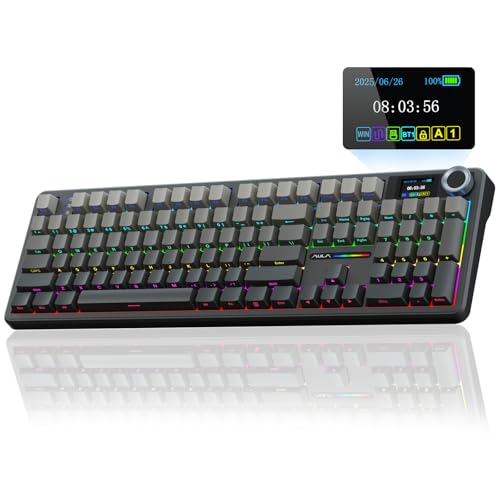
- Full-size 104-key layout includes a numeric keypad
- 8000mAh battery with Bluetooth, 2.4GHz, and USB-C modes
- TFT display and knob control status, lighting, and media features
Best For: Work and gaming setups that require a number pad
Best Smart-Display Pick
AULA L99 Wireless Touchscreen Keyboard

- Large 3.98-inch smart touchscreen with status tools and custom interfaces
- Tri-mode connectivity and an 8000mAh rechargeable battery
- 96% layout, hot-swappable switches, gasket mount, and RGB lighting
Best For: Users wanting the largest and most versatile built-in screen
Best Compact Screened Option
RedThunder K95 Wireless Mechanical Keyboard

- 1.14-inch TFT screen paired with a multifunction CNC knob
- 90% layout preserves number keys while saving desk space
- 8000mAh battery with tri-mode connectivity and hot-swappable switches
Best For: Compact gaming and work setups needing screen controls
Best Knob-Controlled Pick

- LCD status display with a multifunction metal knob
- Tri-mode connectivity saves up to five devices
- Hot-swappable switches, gasket structure, and customizable RGB
Best For: Multi-device users who prefer physical controls and LCD status feedback
Personalized Wireless Pick – Redragon K719 PRO
If you want a mechanical keyboard with lcd screen that balances customization, wireless flexibility, and a comfortable typing feel, the Redragon K719 PRO is a strong option. Its TFT display shows useful status information and supports custom GIFs, while the single knob simplifies media and lighting control.
Best For: Gamers and multitaskers who want a wireless 95-key layout with an information screen, tri-mode connectivity, and a cushioned gasket-mounted feel.
Pros:
- TFT screen displays battery, connection mode, typing status, and custom GIFs.
- USB-C, Bluetooth, and 2.4GHz connectivity support multiple devices.
- Gasket mounting, pre-lubed linear switches, and five-layer dampening provide a softer, quieter feel.
- Hot-swap-ready sockets and software-based macros add customization.
Cons:
- The 95-key layout is less compact than a TKL or 80% keyboard.
- Wireless and software features may be more than a basic typing setup requires.
The K719 PRO stands out for combining an LCD-style information display with genuinely practical wireless controls. Choose it if you want a fuller layout and a softer, quieter typing experience without giving up gaming-focused customization.
Streaming Control Center – darkFlash K87PRO
The darkFlash K87PRO takes the mechanical keyboard with lcd screen concept in a more control-oriented direction. Six customizable LCD stream-deck keys work alongside three knobs, giving streamers, gamers, and creators quick access to apps, macros, media, and system functions.
Best For: Streamers and productivity users who prefer a wired TKL keyboard with dedicated programmable display keys and multiple rotary controls.
Pros:
- Six LCD keys can show icons, GIFs, or system information and trigger shortcuts.
- Three independent knobs can control volume, playback, brightness, zoom, or custom functions.
- Hot-swappable switches and gasket mounting support customization and a softer feel.
- Compact TKL layout includes customizable RGB lighting and Windows/macOS compatibility.
Cons:
- It is wired only, using a USB-A to USB-C cable.
- The display controls depend on software configuration for their advanced functions.
With six programmable LCD controls and three knobs, the K87PRO is particularly suited to workflows that benefit from dedicated shortcuts. Its TKL footprint saves space, but users seeking wireless operation should consider another model.
Compact Wireless Screen Pick – Redragon K724 PRO
For shoppers seeking a compact mechanical keyboard with lcd screen, the Redragon K724 PRO combines an 81-key layout with a built-in TFT display and one multifunction knob. It also offers tri-mode connectivity, making it easy to switch between a computer, laptop, and tablet.
Best For: Users who want an 80%-style gaming keyboard with wireless flexibility, a customizable screen, and a softer linear typing experience.
Pros:
- TFT display shows battery, connection mode, and typing status and supports custom GIFs.
- USB-C, Bluetooth, and 2.4GHz connectivity provide flexible device switching.
- Gasket construction and five-layer dampening support a soft, quieter typing feel.
- Hot-swappable design, PBT keycaps, and south-facing RGB add durability and customization.
Cons:
- The 81-key format omits the expanded navigation and number-pad space of larger layouts.
- It has one control knob rather than the multiple knobs found on dedicated stream-control models.
The K724 PRO is a practical middle ground: more compact than a 95-key board while retaining wireless connectivity and a useful TFT screen. It is a good fit for desks where space matters but gaming controls and customization still rank highly.
Macro Workflow Specialist – VSD K1 Pro
The VSD K1 Pro is a mechanical keyboard with lcd screen designed around macros and dedicated controls. Its six LCD keys and three knobs can be assigned across switchable pages, while the TFT display handles visual customization and real-time information through the companion software.
Best For: Streamers, gamers, and productivity users who need extensive macro assignment, multiple control layers, and customizable on-screen shortcuts.
Pros:
- Six LCD keys and three knobs support switchable pages with numerous actions.
- Full-key programming enables shortcuts, macros, and multi-step operations.
- Hot-swappable 3-pin and 5-pin PCB supports switch and keycap customization.
- Gasket mounting, five-layer dampening, adjustable stands, and RGB lighting support comfortable long sessions.
Cons:
- Advanced screen, GIF, and date/time functions require software and a wired connection.
- It is wired only, and the standard package does not include a USB-C-to-USB-C cable.
- The extensive programming options may be unnecessary for simple typing needs.
The K1 Pro is the most workflow-focused option in this group. Its combination of page-based LCD controls, full-key programming, and three knobs makes it compelling for users willing to spend time configuring a highly personalized setup.
Best Wireless Display Pick – RK Royal Kludge S98
The RK ROYAL KLUDGE S98 is a practical mechanical keyboard with LCD screen features for shoppers who want wireless flexibility without giving up customization. Its smart display can show information such as GIFs, connection mode, layout, and battery status, while the knob provides quick control over volume, lighting, and connection settings.
Best For: Wireless gaming, compact full-function setups, and users who want a customizable display and hot-swappable switches.
Pros:
- Smart display supports custom GIFs, date, connection mode, layout, and battery information.
- Tri-mode connectivity includes Bluetooth 5.0, 2.4GHz wireless, and USB-C wired operation.
- Hot-swappable PCB supports both 3-pin and 5-pin switches.
- Five-layer sound-dampening design and double-shot PBT keycaps support a quieter, durable typing experience.
Cons:
- It is not water resistant.
- The 98-key layout is more compact than a full-size keyboard, so the arrangement may take adjustment.
The S98 balances a useful mini display, wireless connectivity, and enthusiast-friendly customization in a 98-key layout. It is a strong choice if you want a mechanical keyboard with LCD screen-style status features without moving to a wired-only design.
Best Touchscreen Design – Womier DUO87 Touchscreen Keyboard
The Womier DUO87 takes the mechanical keyboard with LCD screen concept further with a detachable oversized smart touchscreen. It can serve as a control interface or photo and GIF display, then be removed when you want a more traditional 75% or TKL-style keyboard.
Best For: Gamers, streamers, and creators who want touch controls, visual customization, and deep software remapping.
Pros:
- Detachable smart screen supports touch controls, plugins, icons, photos, and GIFs.
- QMK/VIA firmware enables remapping, macros, profiles, layers, and RGB customization.
- Gasket mount, five-layer filling, and pre-lubricated linear switches target a smooth, quieter typing feel.
- Hot-swappable PCB accepts 3-pin and 5-pin switches.
Cons:
- USB-C wired connectivity is the only listed connection option.
- The large screen increases power demands, so the keyboard is designed for wired use.
- It is not water resistant.
Choose the DUO87 if the touchscreen is central to your setup rather than simply a status panel. Its wired connection, VIA support, and modular screen make it especially appealing for users who prioritize control and customization over wireless convenience.
Best Full-Size Wireless Option – AULA F108 Pro with TFT Display
The AULA F108 Pro is a full-size mechanical keyboard with LCD screen functionality, a multifunction knob, and an 8000mAh battery. Its TFT display provides an interactive way to view or adjust GIFs, date and time, battery status, backlighting, and connection modes, although screen customization requires Windows software and wired mode.
Best For: Office and gaming users who need a numeric keypad, wireless connectivity, and extensive onboard customization.
Pros:
- High-definition TFT display and knob provide controls for GIFs, volume, time, battery, lighting, and connection modes.
- Bluetooth 5.0, 2.4GHz wireless, and USB-C wired modes support multiple devices and operating systems.
- Full-size 104-key layout includes function keys, arrow keys, and a numeric keypad.
- Hot-swappable design, pre-lubricated switches and stabilizers, and five-layer dampening support customization and smoother acoustics.
Cons:
- Configuring screen images or GIFs requires Windows software and wired mode.
- The keyboard is not water resistant.
- Linux users may encounter abnormal F-zone functionality due to incompatible driver versions.
The F108 Pro is the most practical pick here for anyone who relies on a number pad. Its large battery and tri-mode connection add flexibility, while the display and knob give a full-size office or gaming keyboard more interactive controls.
Best Smart-Display Pick – AULA L99 Wireless Touchscreen Keyboard
If you want a mechanical keyboard with LCD screen functionality that goes beyond basic status readouts, the AULA L99 combines a large 3.98-inch smart touchscreen with a 96% layout and number pad. Its display can show time, battery, and connection information, while also supporting custom interfaces, a calculator, touchpad, and mini numpad.
Best For: Users who want a feature-rich wireless keyboard with a large interactive screen, number pad, and extensive customization.
Pros:
- Large 3.98-inch touchscreen supports status information, custom interfaces, GIFs, and useful tools.
- Tri-mode connectivity works through USB-C, 2.4GHz wireless, or Bluetooth 5.1, with Bluetooth supporting up to three devices.
- 8000mAh battery, hot-swappable 3/5-pin switches, PBT keycaps, gasket mounting, and six-layer sound dampening offer strong everyday flexibility.
- Programmable keys and RGB lighting can be customized through software, the screen, or shortcuts.
Cons:
- Driver features are limited to Windows and require wired mode.
- The display’s custom interfaces and driver-based features require setup and software.
- The manufacturer advises using the original cable and avoiding fast charging.
The L99 is the most screen-focused option here, making its touchscreen useful for more than decoration. Choose it if you value a large visual control surface and a near-full-size layout; consider the software and charging restrictions before buying.
Best Compact Screened Option – RedThunder K95 Wireless Mechanical Keyboard
The RedThunder K95 is a practical mechanical keyboard with LCD screen features in a space-saving 90% layout. Its 1.14-inch TFT display shows useful information, while the CNC knob provides quick control over time, volume, RGB lighting, language, and screen images.
Best For: Gamers and typists who want a compact keyboard with a screen, knob controls, wireless flexibility, and a long-lasting battery.
Pros:
- Compact 90% layout retains number keys, arrow keys, and selected function keys while saving desk space.
- Tri-mode BT5.0, 2.4GHz wireless, and USB-C connectivity supports multiple devices and operating systems.
- 8000mAh battery is rated for about 48 hours with backlighting or about 266 hours without it.
- Gasket construction, five-layer shock absorption, hot-swappable 3/5-pin switches, and RGB lighting add customization.
Cons:
- Custom screen images are supported only on Windows.
- Software customization requires Windows 10 and wired or 2.4GHz mode.
- Some macOS functions, including switching F-keys, are not supported.
The K95 balances screen functionality and desk efficiency better than a full-size model. Its knob and strong battery make it convenient for daily use, while Windows users get the broadest access to customization tools.
Best Knob-Controlled Pick – SOLAKAKA A99 Pro LCD Keyboard
For shoppers seeking a mechanical keyboard with LCD screen readouts and physical controls, the SOLAKAKA A99 Pro combines a display with a multifunction metal knob. The screen shows date, time, battery, system, and connection mode, while the knob handles lighting, brightness, volume, and system controls.
Best For: Multi-device users who want a customizable wireless keyboard with an LCD display, metal control knob, and flexible RGB lighting.
Pros:
- LCD display provides at-a-glance date, time, battery, system, and connection information.
- Tri-mode Bluetooth 5.0, 2.4GHz wireless, and USB-C connectivity supports up to five saved devices.
- Full 3/5-pin hot-swapping, pre-lubricated stabilizers, and included keycap puller simplify customization.
- Gasket construction, five cushioning layers, RGB lighting, and side lighting support a comfortable, personalized setup.
Cons:
- The supplied notes do not specify battery capacity or estimated runtime.
- Advanced customization requires the web driver.
- Its compact layout may not suit users who need a dedicated number pad.
The A99 Pro is a well-rounded choice when a screen and a tactile control knob matter as much as typing feel. Its five-device support is especially useful for people moving between computers, tablets, and phones.
How We Picked the Best Mechanical Keyboard with Lcd Screen
We evaluated these keyboards by looking beyond screen size and appearance. Our comparison considers display usefulness, key layout, switch and stabilizer features, hot-swappability, wireless modes, software customization, battery capacity, and build quality. We also considered whether each model makes sense for gaming, streaming, office work, or macro-heavy tasks.
A good Mechanical Keyboard with Lcd Screen should make information or controls easier to access rather than serve as decoration. Models with knobs, programmable keys, or integrated streaming controls received extra consideration when those features offered a practical advantage.
Quick Comparison
| Best For | Look For | Recommended Type |
|---|---|---|
| Gaming and desk customization | Low-latency wireless, TFT display, hot-swappable switches | 75% or 95% gasket keyboard |
| Streaming and macros | Dedicated LCD keys, knobs, layered controls | Macro keyboard or streaming-deck hybrid |
| Full-size productivity | Number pad, large battery, comfortable key spacing | Full-size wireless model |
| Compact setups | 75% or TKL layout, detachable or integrated display | Compact mechanical keyboard |
Key Buying Factors for a Mechanical Keyboard with Lcd Screen
Display Functionality
Check what the screen actually shows and how easily it can be customized. Useful features may include system monitoring, media information, animated images, profiles, or programmable touch controls. Confirm software compatibility if you want custom graphics or live data.
Layout and Desk Space
Full-size boards retain a number pad but occupy more room. TKL and 75% layouts remove some keys while preserving the most important navigation controls. Compact macro boards can complement an existing keyboard rather than replace it.
Switches, Mounting, and Keycaps
Hot-swappable sockets let you change switches without soldering. Pre-lubed switches, gasket mounting, and PBT keycaps can improve sound and feel, but typing preference still matters more than specifications. Verify the included switch type and whether replacement parts use standard sizes.
Connectivity and Battery
Tri-mode connectivity—Bluetooth, 2.4GHz wireless, and USB-C—offers the most flexibility. For gaming, 2.4GHz is generally preferable to Bluetooth. A higher-capacity battery helps wireless endurance, especially when the display and lighting remain active.
Controls and Software
A rotary knob is useful for volume, brightness, or scrolling, while programmable keys can speed up streaming and creative workflows. Review the companion software, onboard memory, operating-system support, and remapping options before buying.
Who Should Buy Which Mechanical Keyboard with Lcd Screen?
For Gamers
Choose a gasket-mounted 75%, 81%, or 95% keyboard with 2.4GHz wireless, a responsive display, hot-swappable switches, and a dedicated knob. These models balance gaming access with useful customization.
For Streamers and Creators
A keyboard with dedicated LCD keys or an integrated streaming deck is the better fit when you need one-touch scenes, apps, commands, or macros. More programmable controls can be more valuable than a larger decorative screen.
For Office and Everyday Use
Pick the layout that matches your work. Full-size models suit spreadsheet users, while TKL and 75% boards save space. Prioritize comfortable switches, reliable Bluetooth, clear legends, and controls that will not distract from normal typing.
For Enthusiasts
Look for hot-swappable hardware, gasket construction, programmable firmware or software, replaceable keycaps, and a screen that supports custom content. These features leave more room to tune the keyboard over time.