The best network switches with SFP ports make it easier to connect multigigabit devices, extend networks over fiber, and add flexible uplink options without replacing every cable or router.
We selected 10 options spanning compact unmanaged desktop switches, 2.5GbE models, managed networking gear, 10Gb SFP+ uplinks, and PoE-capable installations. Use the guide below to match port speed, management features, and expansion needs to your network.
Best 10 Network Switches with Sfp Ports Picks for 2026
Best Flexible High-Speed Pick

- Five 2.5Gb RJ45 ports and one 10Gb SFP+ port
- Link aggregation and VLAN modes
- Metal, fanless-style desktop or wall-mount design
Best For: NAS, gaming, and flexible small-network upgrades
Best Managed Option
TP-Link Omada ES210X-M2 8-Port Switch

- Eight 2.5Gb RJ45 ports
- Two 10Gb SFP+ uplinks
- VLAN, IGMP snooping, and Omada management
Best For: Managed home-office and small-business networks
Best Simple Fiber Expansion

- Eight 1Gbps Ethernet ports
- One 10G SFP+ port
- Silent plug-and-play design
Best For: Gigabit networks needing one fiber expansion link
Best PoE Option
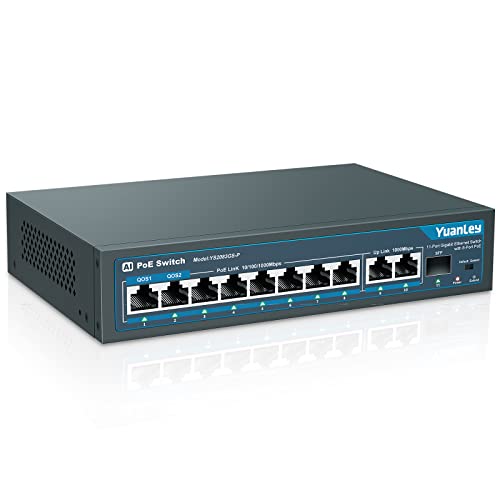
- Eight 802.3af/at PoE+ ports
- 120W total PoE budget
- One 1G SFP port
Best For: PoE cameras and access points needing fiber connectivity
Best for Web Management
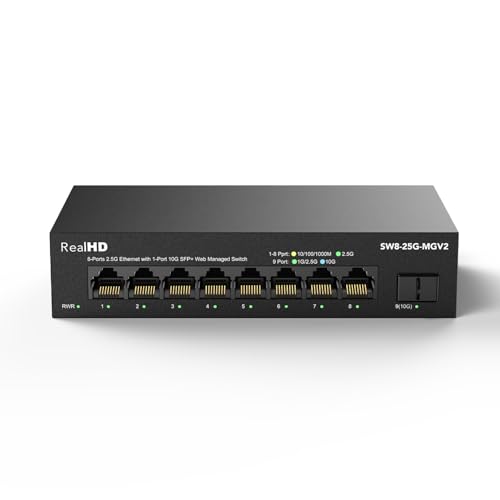
- Web controls for VLAN, QoS, and security
- 8 x 2.5G RJ45 plus 1 x 10G SFP+
- Fanless housing with 60Gbps bandwidth
Best For: Small networks needing browser-based configuration
Best Compact Option

- 4 x 2.5G RJ45 and 2 x 10G SFP ports
- One-key VLAN isolation mode
- Fanless desktop or wall-mount design
Best For: Small NAS, Wi-Fi 6, and gaming setups
Best Flexible High-Speed Pick – UGREEN 2.5Gb 6-Port Switch
For buyers comparing network switches with sfp ports, the UGREEN 2.5Gb Switch combines five 2.5Gb RJ45 ports with a flexible 10Gb SFP+ port. Its three selectable modes add useful options for NAS setups, small teams, and home networks.
Best For: NAS users, high-speed file transfers, gaming, and small networks that need VLAN or link aggregation options.
Pros:
- Five 2.5Gb ports plus a 10Gb SFP+ port supporting 1G, 2.5G, and 10G modules.
- Standard, link aggregation, and VLAN modes provide practical flexibility.
- Supports up to 12K jumbo frames and includes desktop or wall-mount installation options.
- Metal housing, 4KV lightning protection, and a 24-month warranty.
Cons:
- It is an unmanaged Layer 2 switch, so configuration options are limited beyond its built-in modes.
- SFP+ modules are not included.
This is a strong choice when you want multi-gigabit copper connectivity and a versatile SFP+ uplink without moving to a fully managed switch.
Best Managed Option – TP-Link Omada ES210X-M2 8-Port Switch
The TP-Link Omada ES210X-M2 is one of the more capable network switches with sfp ports in this group. It provides eight 2.5Gb RJ45 ports and two 10Gb SFP+ uplinks, along with VLAN, IGMP snooping, loop prevention, and Omada cloud management.
Best For: Home offices, small businesses, Wi-Fi 6/7 access points, NAS devices, and users who want centralized management.
Pros:
- Eight 2.5Gb Ethernet ports support multi-gigabit client connections.
- Two 10Gb SFP+ slots offer fast uplinks to servers or core switches.
- Managed features include VLAN, IGMP snooping, and automatic loop prevention.
- Fanless operation, shielded ports, and a durable metal enclosure.
Cons:
- Its 8.2-inch footprint is larger than the smaller five- or six-port alternatives.
- Managed features may be unnecessary for a simple plug-and-play network.
Choose this model if you need more ports, dual SFP+ uplinks, and room to manage traffic as your network grows. Its silent design also suits quiet workspaces.
Best Simple Value Pick – Real HD 2.5Gb 5-Port Switch
For a straightforward upgrade, this Real HD model is among the simpler network switches with sfp ports. It pairs five 2.5Gb RJ45 ports with one 10Gb SFP+ port in a compact, unmanaged design that requires no software or configuration.
Best For: Plug-and-play multi-gigabit connections for gaming PCs, Wi-Fi 6 equipment, NAS devices, and 4K video setups.
Pros:
- Five 2.5Gb ports provide faster connections for compatible devices.
- A 10Gb SFP+ port supports high-speed uplink expansion.
- Fanless metal housing is compact and designed for heat dissipation.
- Supports operation from -20 to 50°C and includes 6KV lightning protection.
Cons:
- It has no VLAN, link aggregation, or other managed networking features.
- Connected devices, cables, and SFP equipment must support the desired speed and be compatible.
This model makes sense when ease of installation matters more than advanced controls. Use CAT6 or better pure-copper cabling and compatible 2.5Gb hardware to reach its intended performance.
Best Compact Managed Pick – TP-Link Omada ES206X-M2
The TP-Link Omada ES206X-M2 is a compact option for buyers seeking network switches with sfp ports and basic management tools. It offers five 2.5Gb RJ45 ports, one 10Gb SFP+ slot, and features such as VLAN, IGMP snooping, and automatic loop prevention.
Best For: Small desktop networks that need managed features, silent operation, and a single high-speed SFP+ uplink.
Pros:
- Five 2.5Gb RJ45 ports support fast wired client connections.
- One 10Gb SFP+ slot provides a high-speed uplink option.
- Omada management, VLAN, IGMP snooping, and loop prevention add control.
- Fanless metal design supports quiet desktop or wall-mounted installations.
Cons:
- Only one SFP+ slot is available.
- Five total ports may be limiting for a growing network.
Consider this switch when you want the footprint and simplicity of a small desktop unit but still need practical segmentation and traffic-management features.
Best 2.5G Upgrade – NICGIGA 6-Port 2.5G Switch
For buyers comparing network switches with SFP ports, this NICGIGA model combines four multigigabit RJ45 connections with two 10G SFP+ ports. Its unmanaged design keeps setup simple while providing a useful upgrade for NAS devices, Wi-Fi 6 access points, gaming PCs, and other 2.5G equipment.
Best For: Home and small-office networks that need multiple 2.5G copper ports plus SFP+ expansion.
Pros:
- Four RJ45 ports support 10/100/1000/2500Mbps auto-negotiation.
- Two 10G SFP+ ports support compatible 1G/2.5G modules.
- Fanless metal design supports quiet desktop or wall-mounted installation.
- 60Gbps switching capacity suits high-throughput local traffic.
Cons:
- SFP modules are not included.
- Unmanaged operation does not provide configuration features.
This is a strong fit when you want to move beyond standard gigabit Ethernet without giving up straightforward installation. Confirm that your planned SFP modules and connected devices match the supported speeds.
Best Simple Fiber Expansion – NETGEAR GS108X 8-Port Switch
This NETGEAR GS108X is a straightforward option among network switches with SFP ports, pairing eight 1Gbps copper ports with one 10G SFP+ connection. It is designed for plug-and-play use, making it suitable for extending a wired network or adding a fiber uplink without software configuration.
Best For: Users who need dependable gigabit switching with one 10G SFP+ port for network expansion.
Pros:
- Eight auto-negotiating 1Gbps Ethernet ports work with Cat5e or Cat6 cabling.
- 10G SFP+ port supports fiber-based connectivity and expansion.
- Fanless metal enclosure provides silent operation.
- Supports desktop or wall-mount placement and includes a limited lifetime hardware warranty.
Cons:
- The copper ports are limited to 1Gbps.
- Only one SFP+ port is provided.
- Unmanaged operation offers no advanced network controls.
Choose this model when your connected devices are primarily gigabit and you want a single high-speed fiber expansion point. Its simple fixed-switch design is less appropriate for networks requiring VLANs or other managed features.
Best PoE Option – YuanLey 11-Port PoE+ Switch
For installations combining powered devices and fiber connectivity, this YuanLey model is one of the more versatile network switches with SFP ports. It provides eight 802.3af/at PoE+ ports, two gigabit uplinks, and one 1G SFP port, along with a 120W PoE budget for cameras, wireless access points, and similar equipment.
Best For: Camera, access-point, and small commercial networks needing PoE+ power and a 1G SFP uplink.
Pros:
- Eight PoE+ ports provide up to 30W per port within a 120W total budget.
- Includes two gigabit uplinks and one 1G SFP port for longer-distance links.
- AI WatchDog can restart failed or offline PoE devices automatically.
- VLAN isolation and QoS support help separate and prioritize traffic.
Cons:
- It is limited to 1Gbps network speeds.
- Not compatible with 24V passive PoE.
- Unmanaged operation limits configuration flexibility.
This switch makes the most sense when PoE power delivery is as important as the SFP connection. Check device compatibility carefully, particularly if any attached equipment uses passive rather than 802.3af/at PoE.
Best Overall 2.5G Upgrade – NICGIGA 10-Port 2.5G Switch
For buyers comparing network switches with SFP ports, this NICGIGA model offers eight 2.5G RJ45 ports plus two 10G SFP+ uplinks. Its unmanaged design keeps setup simple while providing 80Gbps switching capacity for NAS devices, Wi-Fi 6 access points, gaming PCs, and other multigigabit equipment.
Best For: Homes and small offices that need several 2.5G copper connections and fast SFP+ uplinks without configuration software.
Pros:
- Eight 100/1000/2500Mbps RJ45 ports and two 10G SFP+ ports.
- Plug-and-play operation with auto-negotiation and automatic MDI/MDIX.
- Fanless metal design with 6KV lightning protection and 80Gbps switching capacity.
- Includes a one-year warranty and lifetime technical support.
Cons:
- Unmanaged design does not provide VLAN, QoS, or other web-based controls.
- SFP+ ports require compatible transceivers or fiber equipment.
This is a practical choice when port count and straightforward 2.5G expansion matter most. The two 10G SFP+ ports also leave room for faster uplinks as the network grows.
Best for Web Management – Real HD 8-Port 2.5G Switch
This Real HD switch is a strong option among network switches with SFP ports when you want configuration control as well as multigigabit connectivity. It combines eight 2.5G RJ45 ports with one 10G SFP+ port and a web interface for VLAN, QoS, security, multicast, and MAC table settings.
Best For: Users who want to manage traffic and segment a small network through a browser-based interface.
Pros:
- Web management supports VLAN, QoS, security, multicast, and MAC table configuration.
- Eight 2.5G Ethernet ports plus one 10G SFP+ port.
- Fanless metal housing with 4KV lightning protection and operating temperatures from -20 to 50°C.
- Provides 60Gbps bandwidth for multigigabit traffic.
Cons:
- Only one SFP+ port is included.
- Does not include VPN functionality.
- Achieving 2.5G speeds requires suitable cabling and compatible network devices.
Choose this model if management features are more important than an entirely hands-off setup. It offers useful browser-based controls while retaining a quiet, compact form for office or home deployment.
Best Compact Option – YuanLey 6-Port 2.5G Switch
For a compact entry in the network switches with SFP ports category, the YuanLey provides four adaptive 2.5G RJ45 ports and two 10G SFP ports. It is primarily plug-and-play, while a one-key VLAN mode can isolate communication between the RJ45 ports for a simpler, more organized network.
Best For: Smaller setups with a few multigigabit devices, such as a NAS, Wi-Fi 6 access point, and gaming PC.
Pros:
- Four 2.5G Base-T ports and two 10G SFP ports.
- 60Gbps switching capacity supports heavy local traffic.
- One-key VLAN mode helps isolate RJ45-port communication.
- Fanless metal enclosure supports desktop or wall-mounted placement.
Cons:
- Only six total ports are available.
- SFP modules are not included.
- Unmanaged design offers less control than a fully web-managed switch.
This model makes sense when you need SFP connectivity but do not want a large switch. Its two SFP ports and optional one-key VLAN feature add flexibility, while the compact fanless enclosure suits desktop or wall installation.
How We Picked the Best Network Switches with Sfp Ports
We compared the selected switches by port count, copper Ethernet speed, SFP or SFP+ uplink capability, management features, installation flexibility, and likely use case. The lineup includes simple plug-and-play models for home networks, multigigabit switches for NAS and workstation connections, and managed or PoE options for more structured installations.
Because specifications can vary by hardware revision, verify the manufacturer’s current documentation for supported transceivers, VLAN features, power budgets, and link speeds before buying.
Quick Comparison
- Best for compact multigigabit upgrades: Six-port switches with 2.5GbE copper ports and one or two 10Gb SFP+ connections.
- Best for managed networks: Omada Easy Managed models and web-managed 2.5GbE switches with VLAN and monitoring controls.
- Best for simple plug-and-play use: Unmanaged switches that automatically negotiate compatible Ethernet speeds.
- Best for cameras and access points: The PoE switch with multiple 802.3af/at ports and an SFP uplink.
- Best for legacy gigabit networks: The NETGEAR GS108X, particularly where 1GbE remains sufficient and an optical or high-speed uplink is useful.
Key Buying Factors for Network Switches with Sfp Ports
Choose the Right Port Speeds
2.5GbE ports are a practical upgrade for newer Wi-Fi access points, desktops, and NAS devices. A 10Gb SFP+ port is usually intended for an uplink or high-speed backbone rather than ordinary copper endpoint connections. Confirm whether the port is SFP or SFP+; they are not interchangeable in every configuration.
Decide Between Managed and Unmanaged
Unmanaged switches are easiest to install and require no configuration. Managed models are better when you need VLANs, traffic monitoring, link controls, or network segmentation. “Easy managed” products can provide a middle ground for home labs and small offices.
Check Transceiver and Cable Compatibility
SFP ports may require separately purchased modules, DAC cables, or fiber transceivers. Check supported fiber types, distances, speeds, and vendor compatibility. For short rack or same-room links, a compatible DAC can be simpler than fiber.
Consider PoE, Cooling, and Placement
If the switch will power cameras, phones, or access points, confirm the PoE standard and total wattage budget. Fanless metal designs are attractive for desks and quiet rooms, while rack or equipment-closet installations may prioritize mounting options and airflow.
Who Should Buy Which Network Switches with Sfp Ports?
Choose a compact unmanaged 2.5GbE switch if you want a straightforward upgrade for a home office, gaming setup, or NAS. Pick a model with two SFP+ ports when you need redundant or separate high-speed uplinks. A managed Omada or web-managed switch is the better choice for VLANs, guest networks, and growing small businesses. For PoE endpoints, select the YuanLey model and confirm its power budget meets your devices’ requirements. If your network is mostly gigabit, the NETGEAR option can deliver dependable expansion without paying for unused multigigabit capacity.