A reliable wired connection can make a gaming setup easier to manage, especially when several consoles, PCs, access points, and streaming devices share one router. The best network switches for gaming add ports without introducing complicated setup or unnecessary network overhead.
This roundup compares compact gigabit switches, managed options, and faster 2.5GbE and 10GbE models so you can match port count, speed, and features to your home network.
Best 10 Network Switches for Gaming Picks for 2026
Best 10G Upgrade
NICGIGA 6-Port 10Gb Ethernet Switch

- Two 10Gb RJ45 ports plus four 2.5Gb ports
- 60Gbps switching capacity
- Fanless metal housing with plug-and-play setup
Best For: Mixed 10Gb and 2.5Gb gaming networks
Best for LAN Parties
TP-Link TL-SG108S-M2 8-Port 2.5G Switch

- Eight 2.5Gb ports
- 40Gbps switching capacity
- Fanless, plug-and-play operation
Best For: Multi-device 2.5Gb gaming and LAN setups
Best Thermal Design
UGREEN 8-Port 2.5Gb Ethernet Switch

- Eight 2.5Gb RJ45 ports
- Metal case with passive thermal design
- Fanless and plug-and-play
Best For: Quiet, sustained 2.5Gb gaming and NAS networks
Best Compact Value
BrosTrend 8-Port 2.5Gb Gaming Switch

- Eight 2.5Gb RJ45 ports
- Compact fanless design
- 40Gbps switching capacity
Best For: Compact plug-and-play gaming networks
Best Managed Pick
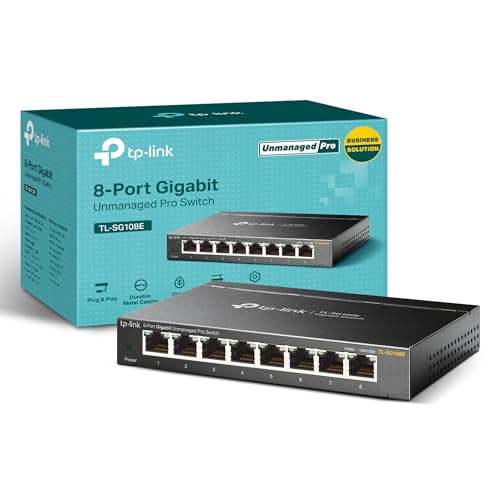
- 8 Gigabit Ethernet ports
- QoS, VLAN, and monitoring tools
- Metal desktop or wall-mount design
Best For: Gamers who want network-management features
Best Simple Setup

- Five 1Gbps Ethernet ports
- No configuration or software required
- Fanless metal design
Best For: Straightforward home gaming networks
Best Multi-Gig Upgrade

- Five 2.5Gbps ports
- Up to 25Gbps switching capacity
- Silent fanless operation
Best For: 2.5Gbps gaming and home networks
High-Capacity Expansion Pick
NETGEAR 16-Port Gigabit Switch

- Sixteen 1Gbps Ethernet ports
- Silent fanless metal design
- Desktop or wall-mount placement
Best For: Larger gigabit gaming and home networks
Compact Home Gaming Pick

- Eight gigabit Ethernet ports
- Quiet fanless metal housing
- Simple plug-and-play installation
Best For: Small home gaming setups needing extra wired ports
Best 10G Upgrade – NICGIGA 6-Port 10Gb Ethernet Switch
For gamers building a high-speed wired network, this NICGIGA model is one of the more capable network switches for gaming. It combines two 10Gb RJ45 ports with four 2.5Gb ports, making it suitable for a gaming PC, Wi-Fi 7 router, NAS, or other multi-gigabit devices.
Best For: Gamers and home users connecting 10Gb equipment alongside 2.5Gb devices.
Pros:
- Two 10Gb RJ45 ports and four 2.5Gb ports support mixed-speed networks.
- Up to 60Gbps switching capacity helps handle heavy local traffic.
- Fanless metal design supports quiet desktop or wall-mounted use.
- Plug-and-play setup requires no software or configuration.
Cons:
- Only two ports support 10Gb speeds.
- It is an unmanaged switch, so advanced network controls are not included.
This is a strong choice if your gaming setup includes a 10Gb NAS, adapter, or router. For an all-2.5Gb network, a simpler eight-port model may provide more equivalent-speed connections.
Best for LAN Parties – TP-Link TL-SG108S-M2 8-Port 2.5G Switch
The TP-Link TL-SG108S-M2 is a straightforward pick among network switches for gaming, offering eight 2.5Gb ports for wired gaming PCs, consoles, access points, and other devices. Its auto-negotiation supports 100Mb, 1Gb, and 2.5Gb connections without manual setup.
Best For: LAN parties, home entertainment setups, and small networks with several 2.5Gb devices.
Pros:
- All eight ports support speeds up to 2.5Gbps.
- Up to 40Gbps switching capacity supports simultaneous local traffic.
- Fanless operation keeps the switch quiet in living or gaming spaces.
- Desktop or wall-mount placement adds installation flexibility.
Cons:
- It does not provide 10Gb ports for faster devices.
- The plastic case may feel less rugged than metal alternatives.
Choose this model when you want a recognizable, uncomplicated 2.5Gb upgrade with plenty of ports. It is especially practical when multiple wired devices need the same multi-gigabit speed.
Best Thermal Design – UGREEN 8-Port 2.5Gb Ethernet Switch
UGREEN’s eight-port model focuses on quiet, sustained 2.5Gb connectivity, making it a practical option among network switches for gaming. Every RJ45 port supports 2.5Gbps and automatically adapts to 100Mb or 1Gb links, so older equipment can remain connected.
Best For: Gaming PCs, NAS devices, consoles, and Wi-Fi 6 or 6E routers in a quiet home setup.
Pros:
- Eight full 2.5Gb ports support a consistent multi-gigabit network.
- Automatic speed detection simplifies mixed-device connections.
- Metal housing, heatsinks, thermal pads, and ventilation support heat management.
- Fanless operation, LED indicators, and desktop or wall placement improve usability.
Cons:
- There are no 10Gb ports for top-end NAS or workstation links.
- As an unmanaged switch, it lacks configurable traffic features.
This UGREEN switch is a good fit for users who want eight matching 2.5Gb ports and extra attention to passive cooling. It makes the most sense for a growing home network that values quiet operation and simple installation.
Best Compact Value – BrosTrend 8-Port 2.5Gb Gaming Switch
The compact BrosTrend switch provides eight 2.5Gb RJ45 connections in a simple fanless design. For shoppers comparing network switches for gaming, it offers an easy way to connect gaming computers, consoles, NAS devices, access points, and other Ethernet equipment without SFP modules or complex configuration.
Best For: Space-conscious gaming setups and users connecting several 2.5Gb wired devices.
Pros:
- Eight ports deliver 2.5Gbps connectivity throughout the network.
- Up to 40Gbps switching capacity supports multiple high-speed connections.
- Small, lightweight design supports desktop or wall-mounted placement.
- Fanless operation keeps the switch quiet during demanding use.
Cons:
- It has a plastic case rather than a metal enclosure.
- No 10Gb ports or advanced management features are provided.
This is a sensible choice when you need many 2.5Gb ports in a compact, uncomplicated unit. Its unmanaged design suits plug-and-play home networks, while users needing 10Gb uplinks should consider a higher-speed hybrid switch.
Best Managed Pick – TP-Link TL-SG108E
For gamers who need more than basic connectivity, the TP-Link TL-SG108E is a practical choice among network switches for gaming. Its eight Gigabit ports provide room for a gaming PC, consoles, access points, and other wired devices, while smart-management features help organize and monitor traffic.
Best For: Gamers building a flexible wired network with VLAN, QoS, monitoring, or link-aggregation needs.
Pros:
- Eight 10/100/1000Mbps Gigabit Ethernet ports support multiple wired devices.
- Smart management includes QoS, VLAN support, port mirroring, loop prevention, and cable diagnostics.
- Sturdy metal construction, shielded ports, and desktop or wall-mount installation suit home setups.
- Backed by a listed three-year warranty and free technical support.
Cons:
- Management features require configuration through a web interface or free software.
- Gigabit ports do not provide multi-gigabit speeds.
- Its feature set may be more than needed for a simple plug-and-play setup.
The TL-SG108E is a strong fit when network control matters as much as adding ports. It offers useful traffic and monitoring tools without moving to a larger switch.
Best Simple Setup – NETGEAR GS305
The NETGEAR GS305 keeps wired networking straightforward. With five Gigabit ports and plug-and-play operation, it is one of the easiest network switches for gaming to add when you simply need more Ethernet connections without software or manual configuration.
Best For: Gamers who want a compact, quiet switch for a basic home Ethernet setup.
Pros:
- Five auto-negotiating 1Gbps ports work with existing Cat5e or Cat6 cables.
- Plug-and-play design requires no software installation or configuration.
- Fanless operation is silent, and IEEE 802.3az support helps reduce power use.
- Compact metal housing supports desktop or wall-mount placement.
Cons:
- Five ports provide less expansion room than larger switches.
- Unmanaged design does not include VLAN, QoS, or traffic-monitoring controls.
- Supplied notes specify compatibility for use in the U.S. and Canada.
Choose the GS305 when simplicity is the priority. It is a quiet, compact way to connect a gaming system and other wired devices at Gigabit speeds.
Best Multi-Gig Upgrade – TP-Link TL-SG105S-M2
The TP-Link TL-SG105S-M2 is designed for faster wired networks, making it a compelling option among network switches for gaming when your devices support 2.5Gbps Ethernet. Its five multi-gigabit ports can connect gaming PCs, Wi-Fi 6 access points, NAS hardware, and other high-throughput devices without manual setup.
Best For: Gamers with 2.5Gbps-capable equipment who want a silent multi-gigabit switch.
Pros:
- Five 2.5Gbps ports provide up to 25Gbps of switching capacity.
- Auto-negotiation supports 100Mbps, 1Gbps, and 2.5Gbps connections.
- Fanless operation keeps the switch silent for gaming and home use.
- Metal casing and desktop or wall-mount design support flexible placement.
Cons:
- It is unmanaged, so it does not provide configurable VLAN or QoS controls.
- Five ports may be limiting for larger wired setups.
- Its extra speed may not be useful with only Gigabit-capable devices.
The TL-SG105S-M2 makes the most sense as a multi-gig upgrade rather than a basic Ethernet splitter. It can deliver faster links while retaining plug-and-play convenience and silent operation.
Multigig Performance Pick – 5-Port 2.5Gb Switch with 10Gb SFP+
If you want faster wired connections than standard gigabit, this unmanaged switch is a strong option among network switches for gaming. It provides five 2.5Gb RJ45 ports plus a 10Gb SFP+ port, making it suitable for a 2.5Gb gaming PC, Wi-Fi 6 equipment, NAS devices, and other compatible hardware. Setup is plug and play, with no configuration required.
Best For: Gamers upgrading to 2.5Gb networking with compatible devices and Cat6-or-better copper Ethernet cables.
Pros:
- Five 2.5Gb Ethernet ports and one 10Gb SFP+ port
- Fanless metal housing supports quiet operation and heat dissipation
- Plug-and-play setup with 6KV lightning protection design
Cons:
- Connected devices and network cards must support 2.5Gb speeds to realize the upgrade
- Cat6 or higher-level pure copper Ethernet cable is recommended for 2.5Gb operation
- SFP/DAC compatibility should be verified before purchase
This is the most performance-focused choice in the group, but its benefits depend on having compatible 2.5Gb networking hardware throughout the connection. It is a practical fit for a modern gaming setup that is ready to move beyond gigabit speeds.
High-Capacity Expansion Pick – NETGEAR 16-Port Gigabit Switch
For a gaming room, home office, or small network with many wired devices, the NETGEAR GS316v3 offers 16 gigabit Ethernet ports in a compact unmanaged design. Its auto-negotiating ports work with existing Cat5e or Cat6 cables, while plug-and-play installation keeps network expansion straightforward.
Best For: Larger gaming and home networks that need many standard gigabit connections.
Pros:
- Sixteen 1Gbps Ethernet ports for connecting numerous devices
- Fanless, silent design with energy-efficient operation
- Metal housing supports desktop or wall-mount placement
- Supports 802.1p QoS and 9K jumbo frames
Cons:
- Limited to gigabit speeds rather than 2.5Gb or faster Ethernet
- Designed for use in the U.S. and Canada
- Its larger port count may be unnecessary for a small setup
The GS316v3 is a sensible choice when port capacity matters more than multigigabit speed. It can centralize wired connections for gaming PCs, consoles, laptops, and other Ethernet devices without adding configuration work or fan noise.
Compact Home Gaming Pick – TP-Link 8-Port Gigabit Switch
The TP-Link TL-SG108 is a straightforward choice for adding wired connections to a gaming setup without software or network configuration. It has eight gigabit RJ45 ports, a quiet fanless design, and a sturdy metal enclosure, making it well suited to bedrooms, home offices, and other noise-sensitive spaces.
Best For: Home gamers who need a compact, quiet way to connect consoles, PCs, and other gigabit Ethernet devices.
Pros:
- Eight 10/100/1000Mbps RJ45 ports
- Plug-and-play installation with no configuration required
- Fanless metal construction with shielded ports
- Adjusts power use based on link status and cable length
Cons:
- Does not provide multigigabit ports
- Rated operating temperature is up to 40°C
- Eight ports may offer less expansion than a 16-port model
This switch balances essential gaming connectivity with a small, quiet design. It is a good fit when gigabit performance is sufficient and you want an uncomplicated addition to a home network.
How We Picked the Best Network Switches for Gaming
We selected these models based on the features that matter most in a gaming network: port speed, total port count, ease of installation, build quality, noise, and useful management options. The list includes unmanaged plug-and-play switches for simple expansions, easy-smart models for VLAN and QoS control, and multi-gig switches for users with faster internet, NAS storage, or high-speed local transfers.
Because a switch cannot make an internet connection faster than the router, modem, or service feeding it, we also considered whether each model is a sensible match for common home-network hardware.
Quick Comparison
| Best For | Recommended Type | Why It Makes Sense |
|---|---|---|
| Basic console or PC expansion | 5-port gigabit | Compact, affordable, and simple to install |
| Several wired devices | 8-port gigabit | Provides useful room for consoles, PCs, TVs, and access points |
| Large home setup | 16-port gigabit | Adds capacity without needing multiple switches |
| Fast broadband or local file transfers | 2.5GbE | Supports speeds beyond standard gigabit connections |
| High-speed backbone or NAS | 10GbE or SFP+ | Offers faster uplinks for compatible equipment |
Key Buying Factors for Network Switches for Gaming
Port Speed and Compatibility
Gigabit Ethernet remains sufficient for most online gaming because latency and server distance typically matter more than raw bandwidth. Choose 2.5GbE if your router, internet plan, gaming PC, or NAS supports it. A 10GbE port is most useful as an uplink or for fast local transfers; every connected device must support the higher speed to benefit fully.
Port Count and Layout
Count current wired devices, then leave spare ports for future additions. A five-port switch suits a small desk setup, while eight or 16 ports are better for a gaming room or home office. Check whether the power connector and port layout work comfortably with your cables and mounting position.
Managed Features, Cooling, and Build
Unmanaged switches are usually the easiest choice: connect the cables and start playing. Easy-smart models add features such as VLANs, traffic controls, and QoS, but require more configuration. Fanless metal designs are attractive for bedrooms, offices, and streaming areas because they avoid fan noise. Shielded ports and a sturdy enclosure can also help in busy or cable-heavy setups.
Who Should Buy Which Network Switches for Gaming?
- Choose a five-port gigabit switch for a few devices and the lowest-cost expansion.
- Choose an eight-port gigabit switch for a typical gaming room with a console, PC, TV, access point, and spare connections.
- Choose a 16-port model when several rooms or many wired devices need centralized connectivity.
- Choose a 2.5GbE switch when your network hardware supports multi-gig speeds or you regularly move large files locally.
- Choose a managed or 10GbE/SFP+ model if you need VLAN segmentation, traffic controls, or a high-speed connection to compatible networking equipment.