The best microcontroller kits with display make it easier to move from basic code to working electronics projects. A bundled board, screen, breadboard, sensors, and guided tutorials can save time while you learn.
This roundup compares 10 kits built around popular Arduino, Raspberry Pi Pico, and ESP32 platforms, with options for beginners, wireless projects, camera experiments, and more advanced builds.
Best 10 Microcontroller Kits with Display Picks for 2026
Best Raspberry Pi Pico Display Kit

- RP2040 board with LCD1602 display
- Supports MicroPython, C/C++, and Piper Make
- Includes sensors, servo, RGB LEDs, and tutorials
Best For: Pico beginners and STEM learning
Best Connected Display Kit
ELEGOO UNO R4 WiFi Super Starter Kit

- UNO R4 WiFi with built-in 12 × 8 LED matrix
- Includes OLED display and 200+ components
- Supports Wi-Fi, Bluetooth, and Arduino shields
Best For: Arduino-compatible IoT learning
Best Python Display Kit
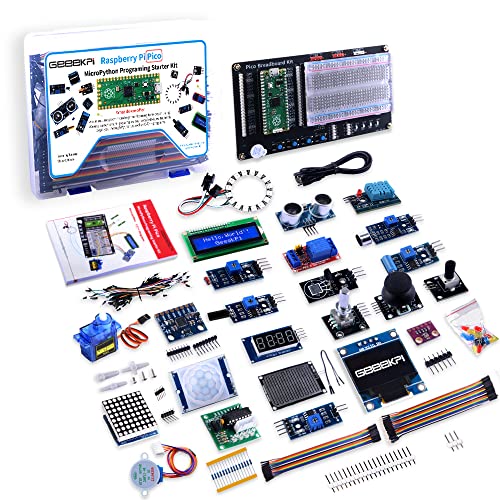
- Raspberry Pi Pico with MicroPython focus
- Includes I2C 1602 LCD and breadboard
- Comes with sensors, demo code, and tutorials
Best For: Python-based Pico beginners
Best Complete Arduino Display Kit

- LCD1602 and multiple display-related modules
- 200+ components and 35+ guided projects
- Mega 2560 offers extensive I/O and memory
Best For: Broad Arduino STEM and maker projects
Best Beginner Pick
Raspberry Pi Pico LCD Starter Kit

- LCD1602 display and SG90 servo included
- Supports MicroPython and C/C++
- Dual-core RP2040 for foundational projects
Best For: Beginners and students learning electronics and coding
Best Connected Learning Kit
ELEGOO ESP-32 Display Starter Kit

- OLED display plus 35+ modules
- Wi-Fi and Bluetooth for IoT projects
- 30+ Arduino IDE tutorial projects
Best For: Makers building connected electronics and IoT projects
Best Advanced Value

- 243 components and 121 guided projects
- Camera, Wi-Fi, Bluetooth 5, and USB-OTG
- MicroPython, C, and Processing examples
Best For: Advanced learners exploring camera and wireless projects
Best Hands-On Learning Value
UNO R3 Project Super Starter Kit

- LCD1602 with pre-soldered header
- 22+ guided Arduino projects
- Broad sensor, motor, and input selection
Best For: Beginners, families, homeschool, and STEM classrooms
Best Advanced Connectivity
ESP32 Camera Board Ultimate Starter Kit

- Wi-Fi, Bluetooth, camera, and memory-card support
- 122 guided projects with complete code
- MicroPython, C, and Processing examples
Best For: Connected electronics, camera projects, and advanced learners
Best Multi-Board Compatibility
R3 Mega2560 Mega328 Nano Starter Kit
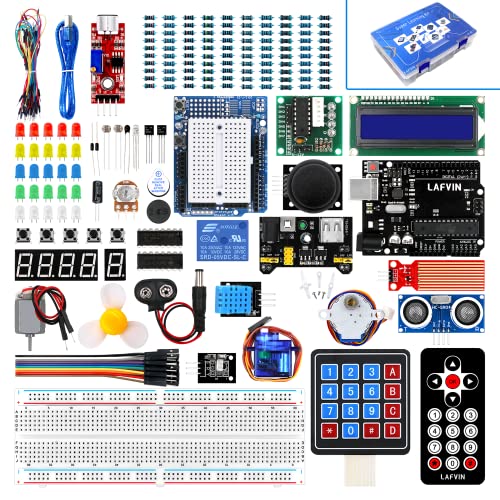
- Supports R3, Mega2560, and Nano formats
- LCD1602 and seven-segment displays
- 20+ lessons with code and datasheets
Best For: Arduino beginners exploring multiple compatible boards
Best Raspberry Pi Pico Display Kit – LAFVIN Pico LCD Starter Kit
For shoppers comparing microcontroller kits with display support, the LAFVIN Basic Starter Kit offers a focused Raspberry Pi Pico setup with an LCD1602 module, sensors, LEDs, and motors. It supports MicroPython, C/C++, and Piper Make, making it suitable for guided learning and hands-on experimentation.
Best For: Beginners, STEM classrooms, and Raspberry Pi Pico learners who want display, sensing, and control projects in one kit.
Pros:
- Uses the Raspberry Pi Pico and RP2040 microcontroller.
- Supports MicroPython, C/C++, and graphical Piper Make programming.
- Includes an LCD1602, servo, RGB LED strip, buzzer, buttons, and sensing modules.
- Provides tutorials and sample code for guided projects.
Cons:
- Designed specifically around the Raspberry Pi Pico rather than Arduino boards.
- The included LCD1602 is a character display, not a graphical screen.
This is a practical entry point for learners who want to see program output on a display while also exploring inputs, sensors, and actuators. Its tutorial-led format makes it especially approachable for classroom or first-project use.
Best Connected Display Kit – ELEGOO UNO R4 WiFi Super Starter Kit
The ELEGOO UNO R4 WiFi Super Starter Kit is one of the more expandable microcontroller kits with display options, combining an UNO R4 WiFi board, built-in 12 × 8 LED matrix, OLED display, and more than 200 components. Its Wi-Fi and Bluetooth connectivity also supports a progression from basic circuits to connected projects.
Best For: Beginners and makers who want Arduino compatibility, multiple display choices, and a path toward wireless IoT projects.
Pros:
- Includes a 12 × 8 LED matrix and a separate OLED display module.
- Built-in Wi-Fi, Bluetooth, USB-C, and Qwiic connectivity.
- Comes with more than 200 components, including sensors, motors, RFID, keypad, and joystick modules.
- Offers step-by-step tutorials with wiring diagrams and sample code.
Cons:
- The large component set may feel overwhelming for first-time users.
- It is compatible with Arduino UNO shields, but it is not an original Arduino-branded board.
This kit stands out when display experimentation and wireless connectivity matter as much as basic electronics. The structured lessons and broad module selection give learners room to move from simple screen and sensor exercises to more capable prototypes.
Best Python Display Kit – GeeekPi Pico MicroPython Kit
The GeeekPi Micro Python Programming Kit is a straightforward choice among microcontroller kits with display components, pairing a Raspberry Pi Pico with an I2C 1602 LCD, breadboard, sensors, and other modules. Its emphasis on MicroPython makes it a natural fit for learners who want to connect code with visible display output.
Best For: Raspberry Pi beginners and software-oriented learners building introductory MicroPython and embedded projects.
Pros:
- Centers on Raspberry Pi Pico and MicroPython programming.
- Includes an I2C 1602 LCD display and breadboard for prototyping.
- Provides various sensors and modules for expanding experiments.
- Includes a detailed manual, downloadable tutorials, and demo code.
Cons:
- Its primary operating-system support is MicroPython, so it is less flexible for learners seeking multiple languages.
- The LCD1602 is a basic character display rather than a full-color or graphical display.
Choose this kit if your priority is learning Python-driven hardware interactions without an overly broad feature list. The I2C display and included documentation provide a clear foundation for experimenting with output, sensors, and Pico programming.
Best Complete Arduino Display Kit – ELEGOO Mega 2560 Project Kit
The ELEGOO Mega 2560 Project Kit is a comprehensive option for shoppers seeking microcontroller kits with display modules and room for larger builds. Along with an LCD1602, it includes more than 200 components, 35+ guided projects, multiple sensors, motors, RFID hardware, and a Mega 2560 board with extensive I/O.
Best For: Teens, coding clubs, educators, and makers who want a broad Arduino-compatible kit for progressively larger electronics projects.
Pros:
- Includes an LCD1602 plus MAX7219 and other interactive display-related components.
- Offers 54 digital I/O pins, 16 analog inputs, 15 PWM outputs, and four hardware serial ports.
- Contains more than 200 components, including sensors, RFID, RTC, motors, keypad, and joystick.
- Provides 35+ guided projects with example code and modification ideas.
Cons:
- The large number of parts can be more than a beginner needs for a first project.
- The kit is physically larger and heavier than compact Pico-based alternatives.
This is the strongest choice for breadth and expansion potential in this group. Its Mega board and extensive component inventory support display projects that also combine several sensors, motors, controls, and communication modules.
Best Beginner Pick – Raspberry Pi Pico LCD Starter Kit
This Raspberry Pi Pico kit is a practical entry point for anyone comparing microcontroller kits with display support. It combines the RP2040 board with an LCD1602 display, SG90 servo, and other essential components for introductory electronics and programming projects.
Best For: Beginners, students, classroom activities, and self-guided STEM learning with MicroPython or C/C++.
Pros:
- Includes an LCD1602 display and SG90 servo for hands-on projects.
- Supports both MicroPython and C/C++ development.
- Dual-core RP2040 platform with 2 MB memory.
- Works with a broad range of free online projects and examples.
Cons:
- The standard kit relies on users finding project instructions online.
- Its component selection is more basic than larger ultimate kits.
Choose this kit if you want a straightforward way to learn display output, motor control, and foundational coding without committing to a large collection of advanced parts.
Best Connected Learning Kit – ELEGOO ESP-32 Display Starter Kit
For shoppers seeking microcontroller kits with display capability and built-in connectivity, this ELEGOO ESP-32 kit offers a broad project platform. It includes more than 35 modules and components, including an OLED screen, sensors, motors, and input devices, plus Wi-Fi and Bluetooth.
Best For: Students, makers, and hobbyists progressing from basic circuits to connected IoT projects.
Pros:
- ESP-32 board includes dual-core processing, Wi-Fi, and Bluetooth 4.2.
- Includes an OLED screen along with sensors, motors, and input modules.
- Compatible with the Arduino IDE.
- Online tutorial provides 30+ guided projects with code and circuit diagrams.
Cons:
- The larger component selection may feel less focused for absolute beginners.
- Project scope and connectivity features can require more setup than basic Pico experiments.
This is a strong middle-ground option: approachable enough for guided learning, yet equipped for practical Wi-Fi, Bluetooth, display, and smart-device experiments.
Best Advanced Value – Freenove ESP32-S3 Camera Kit
This Freenove kit is built for shoppers who want microcontroller kits with display compatibility and a much wider project range. Its ESP32-S3 camera board supports Wi-Fi and Bluetooth 5, while the 243-piece collection covers sensors, modules, wires, and other components for projects from simple to advanced.
Best For: Experienced learners, makers, and students who want extensive tutorials, camera projects, and multiple programming options.
Pros:
- ESP32-S3 board includes a camera, USB-OTG, Wi-Fi, and Bluetooth 5 LE.
- Includes 243 items, a 1GB memory card, and card reader.
- Offers MicroPython, C, and Processing code examples.
- Provides 121 projects and an 828-page downloadable or online tutorial.
Cons:
- The tutorial is online or downloadable rather than provided as a paper guide.
- The extensive component count may be more than beginners need.
- Processing projects require a computer for graphical interfaces.
Pick this kit when depth and variety matter most. It offers a substantial learning path, particularly for camera, wireless, and multi-language projects, rather than only basic display exercises.
Best Hands-On Learning Value – UNO R3 Project Super Starter Kit
The ELEGOO UNO R3 is a practical entry point for shoppers comparing microcontroller kits with display support. Its LCD1602, solderless breadboard, sensors, motors, and 22+ guided lessons let beginners move from simple LED and input experiments to display, motion, and environmental projects without soldering.
Best For: Families, homeschoolers, coding clubs, and STEM classrooms introducing Arduino-compatible electronics.
Pros:
- Includes an LCD1602 with a pre-soldered header for easier setup.
- Offers 22+ guided projects covering sensors, displays, motors, and input devices.
- Provides a broad assortment of components, including an UNO R3 board, ultrasonic sensor, DHT11, joystick, servo, and stepper motor.
- Includes example code and tutorial guidance for Arduino IDE users.
Cons:
- The included tutorial and code must be downloaded rather than relying solely on printed materials.
- The breadboard power module should not be supplied with more than 9V.
- Some younger learners may need experienced adult supervision.
This is the most approachable choice for structured, hands-on learning. It has less processing power than an ESP32 kit, but its organized lessons and display-focused Arduino projects make it especially accessible to first-time builders.
Best Advanced Connectivity – ESP32 Camera Board Ultimate Starter Kit
The Freenove ESP32 kit is a strong option for shoppers seeking microcontroller kits with display and connected-project potential. Its dual-core ESP32 camera board combines Wi-Fi, Bluetooth, a camera, memory-card support, and 122 guided projects, with examples in MicroPython, C, and Processing.
Best For: Learners who want to progress from basic electronics into camera, wireless, programming, and graphical-interface projects.
Pros:
- Uses a dual-core 32-bit processor running up to 240 MHz with 8 MB PSRAM and 4 MB flash.
- Includes onboard 2.4 GHz Wi-Fi, Bluetooth 4.2 LE, a camera, and a memory-card slot.
- Provides 122 projects with schematics, wiring diagrams, complete code, and explanations.
- Supports MicroPython, C, and Processing examples and includes 240 total items.
Cons:
- The 795-page tutorial is downloadable or online and is not provided as a paper manual.
- Processing projects require a computer to provide graphical interfaces.
- The broader feature set may be more complex than needed for a first electronics kit.
Choose this kit when wireless connectivity and camera-based experimentation matter as much as display work. Its extensive tutorial and multiple programming languages offer substantial room to grow, though beginners should expect a steeper learning curve.
Best Multi-Board Compatibility – R3 Mega2560 Mega328 Nano Starter Kit
The LAFVIN Project Super Starter Kit suits shoppers comparing microcontroller kits with display modules across several Arduino-compatible board formats. It includes LCD1602 and seven-segment displays, multiple motor types, sensors, and a tutorial with more than 20 lessons for learning electronics and programming through Arduino IDE.
Best For: Beginners who want broad Arduino-compatible component support and a choice of R3, Mega2560, or Nano-style boards.
Pros:
- Supports R3, Mega2560, and Mega328 Nano board formats.
- Includes an LCD1602 with a pre-attached pin header, plus a four-digit seven-segment display.
- Offers servo, stepper, and DC motors along with compatible sensors, LEDs, switches, and input components.
- Provides more than 20 lessons with code, libraries, and datasheets.
Cons:
- The supplied notes do not specify the full component count or detailed board specifications.
- It uses USB connectivity and does not list onboard Wi-Fi or Bluetooth.
- Its multiple board formats may require extra attention when matching projects to hardware.
This kit stands out for compatibility and display variety rather than wireless features. It is a sensible learning platform for users who want to explore several Arduino board types while building LCD, seven-segment, motor, and sensor projects.
How We Picked the Best Microcontroller Kits with Display
We focused on the parts that have the greatest effect on a beginner’s experience: the controller board, display hardware, included components, documentation, programming support, and project range. The selection covers Arduino-compatible boards, Raspberry Pi Pico and RP2040 kits, ESP32 boards, and ESP32-S3 camera hardware.
We also considered whether a kit provides useful foundations for learning rather than simply offering a large parts count. A clear tutorial, compatible software, and reusable components can be more valuable than dozens of unfamiliar modules.
Quick Comparison
| Platform | Best For | Typical Strength |
|---|---|---|
| Raspberry Pi Pico | Python learners and compact builds | MicroPython support and approachable projects |
| Arduino UNO | First electronics projects | Simple programming and broad community support |
| Arduino Mega | Larger wired projects | More pins for multiple sensors and modules |
| ESP32 | Connected projects | Wi-Fi and Bluetooth capabilities |
| ESP32-S3 camera boards | Vision and streaming experiments | Camera-focused development features |
Key Buying Factors for Microcontroller Kits with Display
Board and Programming Environment
Choose the platform that matches the way you want to learn. Arduino boards are supported by extensive examples and beginner resources. Raspberry Pi Pico kits are a strong fit if you want to use MicroPython or explore C/C++. ESP32 kits are better suited to connected devices, while camera kits require more specialized setup.
Display Type and Project Usefulness
Many starter bundles use an LCD1602 display, which is practical for showing sensor readings, menus, counters, and status messages. Check whether the display uses an I2C interface, since that can reduce wiring and conserve pins. A screen is most useful when the kit also includes sensors, buttons, LEDs, or motors to create interactive projects.
Included Components and Documentation
Look for a breadboard, jumper wires, resistors, LEDs, input sensors, and at least one output device such as a servo. Tutorials should identify wiring, libraries, example code, and troubleshooting steps. Verify whether instructions are supplied as a printed guide, PDF, or online resource.
Expansion and Compatibility
Consider how easily you can add modules later. UNO-compatible parts are widely available, while Mega boards offer more pins for complex builds. ESP32 boards add wireless functionality, but may require more care with voltage levels, libraries, and power requirements.
Who Should Buy Which Microcontroller Kits with Display?
Complete beginners: Start with an UNO starter kit and a clear tutorial if your priority is learning basic circuits and Arduino programming.
Python learners: Choose a Raspberry Pi Pico kit with an LCD1602 display for a gentle introduction to MicroPython and physical computing.
Builders with larger projects: An Arduino Mega kit is a better choice when you expect to connect many inputs and outputs at once.
Wireless project makers: Pick an ESP32 kit for Wi-Fi or Bluetooth experiments, home automation, and connected sensors.
Camera and vision experimenters: An ESP32-S3 camera kit offers the most relevant hardware, but it is better for learners comfortable with a more involved setup.