The best microcontroller kits for costume projects make it easier to add programmable lights, sound effects, sensors, and moving parts without sourcing every component separately. The 10 kits in this roundup cover approachable Arduino starter sets, wireless ESP32 boards, and mixed-platform bundles.
Whether you are building a glowing helmet, animated prop, interactive accessory, or classroom costume project, focus on the board’s connectivity, included components, documentation, and room to expand as your design becomes more ambitious.
Best 10 Microcontroller Kits for Costume Projects Picks for 2026
Best All-Around Starter

- 22+ guided Arduino projects
- Includes LEDs, sensors, motors, and display
- Solderless beginner-friendly setup
Best For: Learning and prototyping interactive costume effects
Best for Soldering Practice
DIY Microcontroller Game Console

- Simple five-button beginner layout
- Four built-in retro-style games
- USB or battery power options
Best For: Learning soldering through a focused interactive prop
Best for Connected Effects

- Built-in Wi-Fi and Bluetooth 4.2
- 35+ modules and components
- 30+ Arduino IDE tutorial projects
Best For: Wireless and IoT-style costume prototypes
Best Musical Build
DIY Microcontroller Piano Board

- Eight keys with three octave settings
- 14 built-in songs and auto-play
- LED running-light effects
Best For: Musical, illuminated costume accessories
Most Complete Arduino Learning Kit

- 200+ components across 63 types
- 30+ guided electronics projects
- Solderless prototyping with power accessories
Best For: Beginners creating sensor, light, display, and motor costume effects
Connected Costume Prototyping Kit
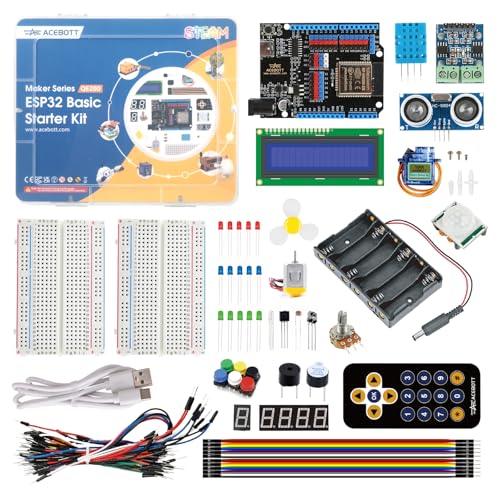
- Built-in Wi-Fi and Bluetooth
- 96 components for 40+ projects
- Supports graphical coding, Arduino IDE, and Python
Best For: Wireless and IoT-style costume effects
Classic Arduino Essentials
Uno R3 Costume Electronics Kit

- 190+ components for varied circuits
- Includes motor, servo, relay, and sensors
- Full-color 72-page instruction manual
Best For: Basic Arduino lights, sound, sensing, and motion projects
Best Dual-Platform Bundle
ELEGOO ESP-32 and UNO Super Kit

- Includes ESP-32 and UNO kits
- 35+ modules and 30+ tutorials
- Wi-Fi and Bluetooth support
Best For: Connected costume effects and expanding DIY projects
Best Guided Learning Value

- Pico and UNO R3 bundle
- 34 HD video project guides
- 75+ pre-soldered components
Best For: Beginners building guided sensor and lighting projects
Best Traditional UNO Starter
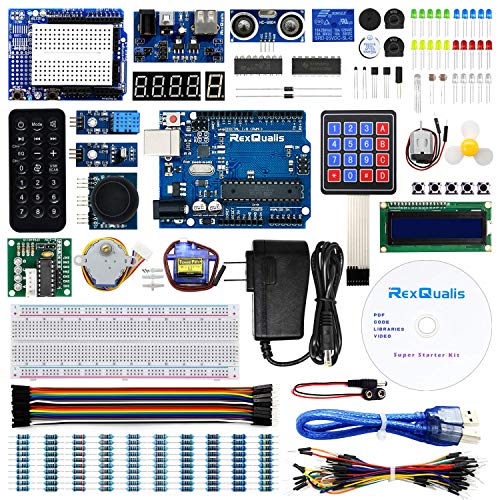
- 120 labeled components
- UNO R3-compatible controller
- Includes 9V power adapter
Best For: Budget-friendly sensor, display, and motion projects
Best All-Around Starter – UNO R3 Costume Control Kit
For beginners building microcontroller kits for costume projects, this UNO R3 package offers a broad selection of plug-in parts for experimenting with lights, sensors, sound, displays, and movement. Its solderless setup and guided lessons make it a practical choice for learning before adapting circuits to a costume.
Best For: Beginners who want to prototype LED effects, sensor triggers, motorized details, or interactive costume props.
Pros:
- Includes 22+ guided projects and example code.
- Wide component selection includes LEDs, buzzer, sensors, servo, stepper motor, LCD, and joystick.
- Solderless breadboard and pre-soldered LCD simplify assembly.
- Works with the Arduino IDE and supports changing timing, thresholds, and sequences.
Cons:
- The UNO R3 has limited memory compared with more advanced boards.
- It does not list built-in Wi-Fi or Bluetooth.
- Beginners must observe the power-module limit of 9V or below and check polarity.
This is the most versatile learning-focused option in the group. It is especially useful when a costume project needs simple interactive effects and you want plenty of spare components for testing.
Best for Soldering Practice – DIY Microcontroller Game Console
This compact DIY console is a focused option among microcontroller kits for costume projects if you want hands-on soldering practice rather than a large parts assortment. Assembly produces a button-controlled game device with a digital tube display and adjustable settings.
Best For: Makers learning soldering who want to adapt button input, display output, or game-style interaction concepts for a costume prop.
Pros:
- Designed around a simple five-button layout for beginners.
- Includes four embedded retro-style games.
- Supports USB or battery power.
- Brightness and background music settings add interactive elements.
Cons:
- It is a focused console kit rather than a broad component starter set.
- Assembly requires soldering.
- The supplied notes do not specify wireless connectivity or general-purpose sensors.
Choose this kit for a contained electronics build and soldering experience. It is less suitable when you need many different sensors or motors for a complex costume.
Best for Connected Effects – ESP32 Costume Project Kit
For microcontroller kits for costume projects that may communicate with a phone or network, this ESP32 starter kit adds dual-core processing, Wi-Fi, and Bluetooth 4.2. Its 35-plus modules and 30-plus tutorial projects provide room to develop connected lights, remote controls, and interactive costume features.
Best For: Makers who want wireless control, IoT-style interactions, or more advanced costume prototypes.
Pros:
- ESP32 board includes integrated Wi-Fi and Bluetooth 4.2.
- Offers more than 35 modules and components, including an OLED, servo, keypad, sensors, and motors.
- Includes 30+ projects with code, diagrams, and step-by-step instructions.
- Compatible with the Arduino IDE.
Cons:
- Its broader feature set may be more than a first-time builder needs.
- The supplied notes do not indicate a solderless-only assembly process.
- Wireless projects can require more setup than basic wired effects.
This is the strongest choice when a costume needs wireless communication or richer control logic. The included tutorials can help beginners progress, while the ESP32 platform leaves room for more ambitious builds.
Best Musical Build – DIY Microcontroller Piano Board
This electronic keyboard is a specialized pick among microcontroller kits for costume projects, combining an eight-key piano circuit with LED effects. It is a soldering project rather than a finished device, making it useful for builders who want a compact musical or illuminated costume prop.
Best For: Beginners aged 14 and up who want to build a sound-and-light accessory or practice soldering with a clearly marked board.
Pros:
- Eight keys correspond to musical notes across three adjustable octaves.
- Includes 14 built-in songs and an auto-play function.
- Dynamic LED running-light effects add visual interest.
- PCB markings and a step-by-step paper manual support assembly.
Cons:
- It is a dedicated keyboard rather than a general-purpose development kit.
- Requires soldering and is recommended for ages 14 and up.
- The supplied notes do not list wireless control or a broad range of sensors.
Pick this kit when music and LEDs are central to the project. Its compact, focused design is easier to match to a musical costume accessory than to a large multi-function wearable system.
Most Complete Arduino Learning Kit – UNO R3 Costume Build Starter
For makers seeking microcontroller kits for costume projects, this UNO R3 set provides a broad collection of beginner-friendly parts for interactive lights, motion effects, sound, displays, and motorized details. Its solderless breadboard, pre-soldered modules, guided projects, and organized storage make it practical for prototyping wearable electronics before integrating them into a costume.
Best For: Beginners building Arduino-based costume effects with sensors, LEDs, displays, or small motors.
Pros:
- Includes more than 200 components across 63 types, including LEDs, a PIR sensor, ultrasonic sensor, buzzer, servo, stepper motor, and LCD.
- Supports 30+ guided projects with an included PDF tutorial and example code.
- Solderless breadboard setup and organized storage help simplify early prototyping.
- Includes power accessories such as a USB cable, 9 V power supply, battery, and breadboard power module.
Cons:
- The large component selection may feel overwhelming to complete beginners.
- The notes specify a warning not to use voltage higher than 9 V.
This is the most broadly equipped option of the three for experimenting with costume-triggered lighting, motion sensing, displays, and simple mechanical movement. It is especially useful when you want to learn through structured projects and then adapt the examples into a custom prop or wearable effect.
Connected Costume Prototyping Kit – ESP32 IoT Effects Builder
If your microcontroller kits for costume projects need wireless control or connected features, this ESP32 kit adds built-in Wi-Fi and Bluetooth alongside a wide selection of sensors, lights, motors, and buttons. Its 40+ tutorials and support for graphical coding, Arduino IDE, and Python provide a path from simple wearable experiments to more advanced interactive effects.
Best For: Makers who want wireless, app-connected, or progressively more advanced costume projects.
Pros:
- ESP32 board includes built-in Wi-Fi and Bluetooth for wireless-control and IoT-style projects.
- Offers 96 components, including an ultrasonic sensor, PIR sensor, motors, RGB lights, buttons, and breadboard.
- Includes more than 40 structured tutorials with a progression from basics to IoT applications.
- Supports graphical coding, Arduino IDE programming, and Python.
Cons:
- Its broader programming and IoT focus may be more than needed for simple offline LED projects.
- The supplied notes do not list costume-specific mounting, battery, or wearable hardware.
This is the strongest choice when a costume effect benefits from wireless communication, remote control, or connected sensors. Plan separately for portable power and physical integration, since the kit is primarily an electronics learning and prototyping platform.
Classic Arduino Essentials – Uno R3 Costume Electronics Kit
This classic Uno R3 set is a practical entry point for microcontroller kits for costume projects that rely on straightforward LEDs, buttons, buzzers, sensors, and small moving parts. With more than 190 components and a full-color 72-page manual, it gives beginners a structured way to learn circuit fundamentals and prototype simple costume props or effects.
Best For: Beginners who want a traditional Arduino kit for basic lights, sound, sensing, and motion.
Pros:
- Includes more than 190 components, including LEDs, resistors, a photocell, temperature sensor, buzzer, motor, servo, and relay.
- The full-color 72-page manual provides step-by-step guidance for Arduino programming and circuits.
- Arduino Uno R3 compatibility supports a familiar beginner ecosystem and other compatible devices.
- Includes a breadboard, holder, USB cable, and 65 jumper wires for initial prototyping.
Cons:
- The supplied component list is less focused on wireless connectivity than the ESP32 kit.
- The notes do not mention a dedicated storage case or pre-soldered modules.
Choose this kit for conventional Arduino learning and dependable breadboard experimentation. It covers the core parts needed to test costume concepts such as LED sequences, button-triggered sounds, temperature responses, and small servo movements before building them into a final design.
Best Dual-Platform Bundle – ELEGOO ESP-32 and UNO Super Kit
For shoppers comparing microcontroller kits for costume projects, this ELEGOO bundle offers two platforms and a broad selection of reusable hardware. The ESP-32 kit adds Wi-Fi and Bluetooth connectivity, while the UNO kit provides a familiar foundation for sensors, displays, and other interactive builds.
Best For: Makers who want guided tutorials plus flexibility for connected costume effects, sensor experiments, and larger DIY projects.
Pros:
- Combines ESP-32 and UNO project kits in one package.
- Includes 35+ ESP-32 modules and components, plus 30+ project tutorials.
- Supports Wi-Fi and Bluetooth projects through the ESP-32 platform.
- Useful for lessons, demonstrations, repair practice, and open-ended builds.
Cons:
- Drivers, libraries, and IDE configuration may be needed depending on the project and computer.
- The larger two-platform bundle may be more hardware than a simple starter build requires.
This is a strong choice when a costume project may grow from basic lights or sensors into a connected prop. Its two learning paths also make it easier to compare platforms and keep experimenting after the initial tutorials.
Best Guided Learning Value – Raspberry Pico and UNO R3 Kit
For beginners exploring microcontroller kits for costume projects, this Pico and UNO R3 bundle combines two development boards with 75+ components and 34 HD video tutorials. Its pre-soldered, breadboard-ready modules are designed to help users start building without extra tools.
Best For: Beginners, students, and gift buyers who want step-by-step instruction for learning circuits, sensors, and programmable effects.
Pros:
- Includes both Raspberry Pico and UNO R3-compatible boards.
- Offers 34 guided video projects with diagrams and code.
- Components arrive pre-soldered and breadboard-ready.
- Comes in a compartmentalized storage box and supports Arduino IDE use.
Cons:
- Wireless connectivity is not listed among the supplied specifications.
- The stated warranty is 30 days.
This kit is especially approachable for a first costume electronics project because the video curriculum and ready-to-use modules reduce setup friction. It also leaves room to compare Pico and UNO-based approaches as skills develop.
Best Traditional UNO Starter – REXQualis UNO R3 Super Kit
For straightforward microcontroller kits for costume projects, the REXQualis Super Starter Kit centers on an Arduino UNO R3-compatible board and a wide selection of components. It includes sensors, a servo, motor parts, an LCD module, and a 9V power adapter for practical starter experiments.
Best For: Budget-conscious beginners who want a conventional UNO-based kit for simple displays, motion, sensors, and robotics-style builds.
Pros:
- Includes 120 individually packaged and labeled items.
- Provides an Arduino UNO R3-compatible controller board.
- Includes sensors, servo, motor, LCD1602 module, and ULN2003 driver board.
- Ships with a 9V 1A power adapter and plastic storage box.
Cons:
- It is centered on the UNO platform rather than offering multiple boards.
- Wireless connectivity is not listed in the supplied details.
- Tutorial and datasheet materials are provided as downloadable resources rather than described as built-in lessons.
This is a practical pick for costume makers who want to learn with familiar UNO-compatible hardware and experiment with movement, screens, or sensors. The labeled storage and included adapter add convenience for repeated projects.
How We Picked the Best Microcontroller Kits for Costume Projects
We compared these kits by looking at the features that matter most for wearable and prop-based builds: board compatibility, included sensors and output components, beginner documentation, programming support, expansion potential, and overall project versatility. We also considered whether a kit is better suited to simple LED effects, interactive electronics, wireless control, or more advanced motion and sound projects.
A strong starter kit should provide more than a development board. Breadboards, jumper wires, resistors, LEDs, buttons, displays, motors, and sensors help you test ideas before committing electronics to a costume. Clear tutorials and compatibility with familiar tools such as the Arduino IDE can shorten the learning curve.
Quick Comparison
| Kit type | Best for | Notable advantage |
|---|---|---|
| Arduino Uno starter kit | First-time builders and simple props | Large beginner community and straightforward wiring |
| ESP32 kit | Wireless or sensor-rich costumes | Wi-Fi and Bluetooth support on compatible boards |
| Arduino and ESP32 bundle | Experimenters building multiple projects | Broad platform flexibility |
| Raspberry Pi Pico and Uno kit | Value-focused learners | Two popular microcontroller platforms |
| Specialty soldering or game kit | Hands-on practice and compact builds | Focused project experience |
Key Buying Factors for Microcontroller Kits for Costume Projects
Board and Programming Support
Arduino Uno boards are easy to learn and well documented, making them a dependable choice for LEDs, buttons, servos, and basic sensors. ESP32 boards are preferable when a costume needs wireless control, phone interaction, or more processing capability. Check the exact board and whether its USB connection, drivers, and programming software work with your computer.
Included Components and Power Planning
Count the parts you will actually use. LEDs and resistors suit lighting effects, while servos, motors, displays, buzzers, and sensors support movement and interactivity. Most starter kits are intended for bench testing rather than direct wear, so plan for a suitable battery pack, voltage regulation, insulation, strain relief, and secure mounting.
Documentation and Expandability
Choose a kit with tutorials that match your experience. A well-organized guide can be more valuable than a larger component count. Also consider spare pins, available libraries, breadboard compatibility, and whether the board can be reused for future props.
Who Should Buy Which Microcontroller Kits for Costume Projects?
Choose an Arduino Uno starter kit if you are new to electronics or want reliable lighting and simple motion effects. Pick an ESP32 kit for wireless triggers, phone-controlled features, or projects using multiple sensors. A bundle makes sense for makers who want to compare platforms or build several costumes. The Raspberry Pi Pico and Uno option suits value-conscious learners seeking variety, while a specialty keyboard or game kit is best for focused soldering and programming practice.