Using two laptops with one keyboard, mouse, and monitor setup can quickly become a cable-management problem. The right KVM switch simplifies switching between computers while preserving the display and USB accessories you use every day.
This roundup focuses on KVM switches for laptops with USB-C docking, dual- and triple-monitor support, high refresh rates, and resolutions up to 8K. The buying guide below explains which features matter most before you choose.
Best 10 Kvm Switches for Laptops Picks for 2026
Top Dual-Monitor USB-C Pick
8K USB-C KVM for Desktop and Laptop

- Dual DP and HDMI monitor support
- 100W laptop PD charging
- Four shared USB expansion ports
Best For: Desktop-and-laptop dual-monitor workstations
Best Triple-Display Option
8K DisplayPort KVM for Two Computers

- Supports three shared monitors
- Up to 8K@60Hz or 4K@120Hz
- Four USB 3.0 peripheral ports
Best For: Three-monitor DisplayPort setups
Best Two-Laptop Value

- Dual HDMI displays at 4K@60Hz
- Four 5Gbps USB ports
- Dual 100W PD inputs
Best For: Two-laptop dual-monitor desks
High-Refresh DisplayPort Pick
8K DisplayPort KVM for Two Computers

- Up to 8K at 60Hz and 4K at 120Hz
- Four USB 3.0 peripheral ports
- Physical and desktop-controller switching
Best For: Sharing one DisplayPort monitor and USB accessories between two computers
Dual-Laptop Workspace Hub

- Controls two laptops across two HDMI monitors
- 12-in-1 dock with Ethernet, SD, USB, and audio
- Up to 60W charging per laptop
Best For: Dual-monitor home-office setups using compatible USB-C laptops
Triple-Display Power User
8K KVM Dock for Laptop and Desktop

- Shares up to three monitors and peripherals
- Up to 100W USB-C laptop charging
- 10Gbps USB, Ethernet, SD, and audio connectivity
Best For: Advanced triple-monitor workstations using a laptop and desktop PC
Triple-Screen USB-C Workstation

- Shares up to three displays between two laptops
- Four USB 10Gbps ports and 100W PD input
- Requires compatible USB-C video and MST support
Best For: Windows users building a shared three-monitor laptop workspace
Premium Dual-Display Hub

- Combines KVM switching with an 11-in-1 dock
- Supports dual 4K@60Hz from compatible Windows laptops
- Adds 10Gbps USB, Ethernet, audio, and SD connectivity
Best For: Hybrid workers sharing a dual-monitor laptop-and-desktop setup
Flexible Laptop-Desktop Switcher
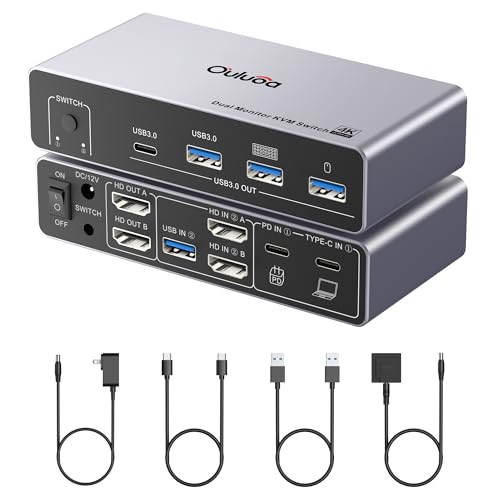
- Shares two HDMI displays between a desktop and laptop
- Desktop input supports up to 8K@60Hz
- Includes USB expansion, 100W PD, cables, and remote
Best For: Two-monitor desktop-and-laptop workstations
Top Dual-Monitor USB-C Pick – 8K USB-C KVM for Desktop and Laptop
For shoppers comparing kvm switches for laptops, this model is a strong fit when one desktop and one laptop need to share two monitors and several USB peripherals. It supports DP and HDMI output, includes 100W PD charging, and offers a wired remote for convenient switching.
Best For: Dual-monitor desktop-and-laptop workstations that need shared USB accessories and laptop charging.
Pros:
- Supports two monitors, with up to 8K@60Hz from the desktop input and 4K@60Hz from the laptop input.
- Includes three USB 3.0 ports and one USB-C port for shared peripherals.
- Built-in 100W PD charging and an external power adapter support stable operation.
- Wired remote allows switching without reaching behind the setup.
Cons:
- Windows is required for MST extended display; macOS supports SST mode only.
- The laptop input is limited to 4K@60Hz.
- Recommended HDMI cable length is 6.56 feet or less for stable transmission.
This is a capable choice for a mixed desktop-and-laptop desk, especially if charging and peripheral sharing matter as much as video output. Check your laptop’s USB-C display support and operating-system requirements before buying.
Best Docking-Station Choice – 4K Dual-Monitor KVM for Two Laptops
This AV Access model stands out among kvm switches for laptops when two USB-C laptops need to share two HDMI monitors and a broad set of desk accessories. Its 11-in-1 design adds Ethernet, card reading, audio, and multiple USB ports in one workstation hub.
Best For: Users switching between two compatible USB-C laptops while sharing dual HDMI displays, networking, and peripherals.
Pros:
- Supports two USB-C laptops and two HDMI monitors at up to 4K@60Hz.
- Provides three USB 3.0 ports, two USB 2.0 ports, USB-C, Gigabit Ethernet, audio, and SD card access.
- Offers 100W charging for each laptop when connected to the original power adapters.
- EDID emulation, automatic wake-up, a front button, and a wired remote support quick switching.
Cons:
- macOS supports mirror mode only and does not support USB-C MST.
- It is designed for compatible USB-C laptops and is not compatible with desktop towers.
- Some integrated-graphics laptops may not support dual 4K output.
If you want a laptop-focused KVM that also replaces much of a docking station, this is one of the most versatile options in the group. Confirm full-function USB-C video support and your laptop’s dual-display capability first.
Best Triple-Display Option – 8K DisplayPort KVM for Two Computers
For demanding multi-screen setups, this DisplayPort model gives two computers access to three monitors and four USB 3.0 peripherals. It is worth considering among kvm switches for laptops if your computer has three DisplayPort outputs and supports multiple monitors.
Best For: Triple-monitor DisplayPort workstations requiring high refresh rates and shared USB devices.
Pros:
- Supports triple-monitor expansion or mirror mode for two computers.
- DisplayPort 1.4 supports up to 8K@60Hz and 4K@120Hz, with lower-resolution compatibility.
- Four USB 3.0 ports provide up to 5Gbps transfer rates and support common peripherals.
- Offers front-panel and wired-controller switching, plus a 12V power adapter for stability.
Cons:
- Each computer needs three DisplayPort outputs and multiple-monitor support.
- 8K output requires compatible source hardware, displays, and DisplayPort cables.
- Its DisplayPort-focused design may be less convenient for laptops without three suitable outputs.
This is the most display-heavy option here, but its requirements are stricter than those of USB-C docking-style KVMs. Verify the laptop’s DisplayPort output arrangement before choosing it for a portable computer.
Best Two-Laptop Value – Dual-4K USB-C KVM Dock
This USB-C docking KVM is designed for people who regularly move between two laptops. It combines dual HDMI monitor support, four 5Gbps USB ports, dual 100W PD inputs, and physical or wired-remote switching, making it a practical entry in the kvm switches for laptops category.
Best For: Windows, macOS, Linux, or Chrome OS users sharing two monitors and peripherals between two USB-C laptops.
Pros:
- Supports two external HDMI monitors at up to 4K@60Hz.
- Includes three USB-A and one USB-C USB 3.0 ports at up to 5Gbps.
- Dual 100W PD inputs can charge both laptops when separate 100W adapters are connected.
- Supports physical-button and wired-remote switching with LED status indicators.
Cons:
- Laptop USB-C ports must support DP Alt Mode for video, data, and power functions.
- Extended mode is not supported on macOS because of MST limitations.
- 100W input delivers approximately 73–80W to the laptop after power consumption.
This model makes sense for a two-laptop desk where dual displays and fast peripheral access are priorities. Its compatibility conditions are important, so check USB-C capabilities and operating-system display behavior before purchase.
High-Refresh DisplayPort Pick – 8K DisplayPort KVM for Two Computers
For shoppers comparing kvm switches for laptops, this DisplayPort model is a focused choice for sharing one monitor and USB peripherals between two computers. It supports high-resolution, high-refresh video and uses a physical button or desktop controller for switching.
Best For: Users who need one DisplayPort monitor and shared keyboard, mouse, or other USB accessories across two computers.
Pros:
- Supports up to 8K at 60Hz and 4K at 120Hz with suitable cabling.
- Four USB 3.0 ports support peripherals and transfers up to 5Gbps.
- Includes a 12V power adapter and desktop controller for stable operation and convenient switching.
Cons:
- The required DP 1.4 cable for 8K video is not included.
- Keyboard shortcut switching is not supported.
- It shares one monitor rather than providing a multi-monitor laptop dock.
This is a sensible option when DisplayPort performance and straightforward two-computer switching matter more than docking features. Confirm your computers, monitor, and cables support the desired resolution before buying.
Dual-Laptop Workspace Hub – 4K KVM Dock for Two Laptops
Among kvm switches for laptops, this model stands out as a combined KVM switch and docking station for a two-laptop, dual-monitor workspace. It connects through full-featured USB-C and adds charging, networking, USB ports, storage access, and audio in one enclosure.
Best For: Home-office and hybrid-work users who want to control two compatible USB-C laptops from one dual-monitor setup.
Pros:
- Supports two laptops and two HDMI monitors with one-button switching.
- Provides 12-in-1 connectivity, including USB ports, Ethernet, SD, audio, and dual HDMI.
- Can charge both laptops at up to 60W each and switches in about 2–3 seconds.
Cons:
- Laptops must support USB-C DP Alt Mode and DP MST for extended dual displays.
- Mac models support mirrored displays only due to macOS limitations.
- It is not compatible with 5K monitors, FreeSync/G-Sync, or Dell Display Manager.
This is the most desk-oriented option here for people replacing separate docks and a basic KVM with one device. Compatibility is important, particularly for Mac users and anyone planning to run high-resolution or ultrawide displays.
Triple-Display Power User – 8K KVM Dock for Laptop and Desktop
For demanding kvm switches for laptops setups, this AV Access model combines laptop-and-desktop switching with triple-monitor support and extensive docking features. A single full-featured USB-C connection can carry video, data, and up to 100W of laptop charging.
Best For: Power users, creators, developers, traders, and gamers who need a shared three-display workstation for a USB-C laptop and desktop PC.
Pros:
- Shares up to three displays, USB peripherals, Ethernet, audio, and other accessories.
- Supports desktop output up to 8K at 60Hz, with high-refresh options including 4K at 165Hz.
- Offers up to 100W USB-C Power Delivery and includes 10Gbps USB ports plus an SDXC reader.
Cons:
- Windows laptops need compatible USB-C video output and MST for extended multi-monitor mode.
- MacBooks support mirrored displays only, not independent extended content across multiple monitors.
- The laptop’s stated maximum is lower than the desktop’s, including up to 4K at 60Hz.
This is the most capable and feature-rich choice for a complex laptop-and-desktop desk, especially where high refresh rates and multiple displays are priorities. Check USB-C video support and operating-system limitations before committing to a triple-monitor layout.
Triple-Screen USB-C Workstation – 3-Monitor Laptop KVM Dock
If you need kvm switches for laptops that can handle a demanding multi-screen desk, this USB-C model combines switching, docking, and display expansion in one unit. It supports two laptops, up to three displays, four USB 10Gbps peripherals, and laptop charging through a 100W PD input.
Best For: Windows users who want to share three monitors and USB accessories between two compatible laptops.
Pros:
- Supports up to two 4K@60Hz displays plus one 1080p@60Hz display.
- Four USB 3.1 Gen2 ports offer up to 10Gbps transfer speeds.
- 100W PD input can provide approximately 73–80W to the laptop.
- Switch using the front button or included wired remote.
Cons:
- Mac systems do not support the same MST triple-display behavior as compatible Windows systems.
- Laptops need a compatible USB-C port with DP Alt Mode, data, PD, and multi-display support.
- Recommended cable lengths and laptop CPU requirements may limit setup flexibility.
This is a feature-rich choice for a Windows-centered home office, but compatibility should be checked carefully before purchase—especially for Mac users and laptops without full-featured USB-C video output.
Premium Dual-Display Hub – AV Access 8K Laptop KVM Dock
For shoppers comparing kvm switches for laptops with a desktop-class setup, the AV Access B10 combines KVM switching with an 11-in-1 docking station. One USB-C connection from a compatible laptop can carry dual-display video, data, and charging while both computers share peripherals, networking, and audio.
Best For: Hybrid workers, creators, and power users sharing two monitors and high-speed accessories between a laptop and desktop.
Pros:
- Supports dual 4K@60Hz from compatible Windows USB-C laptops.
- Offers up to dual 8K@60Hz or dual 4K@165Hz on the desktop side.
- Includes multiple 10Gbps USB ports, Gigabit Ethernet, audio, and SD connectivity.
- Both computers can remain connected to Gigabit Ethernet while switching.
Cons:
- macOS mirrors two external monitors rather than extending them through MST.
- Mac mini setups may require additional cables that are not included.
- Advanced video performance depends on the computer’s graphics and USB-C capabilities.
This is the most expansive option here for a dual-computer desk, particularly when networking and fast USB connectivity matter as much as display switching. Confirm Mac display requirements before buying.
Flexible Laptop-Desktop Switcher – Dual-HDMI USB-C KVM
This dual-monitor model is a practical pick among kvm switches for laptops when you want to share two HDMI displays, USB accessories, and a keyboard and mouse between one desktop and one laptop. It also includes 100W PD charging, a wired remote, and the cables needed to get started.
Best For: Users who need a straightforward two-monitor KVM for a desktop-and-laptop workstation.
Pros:
- Supports two HDMI monitors in extended or mirrored mode on compatible Windows systems.
- Desktop input supports up to 8K@60Hz or 4K@144Hz through dual HDMI.
- Includes three USB 3.0 ports and one USB-C port for shared peripherals.
- Includes a 12V adapter, USB cables, wired remote, and 12-month warranty.
Cons:
- macOS operates in SST mode rather than Windows-style MST extended mode.
- USB bandwidth is shared across the four ports and tops out at 5Gbps per port.
- Laptop video output is specified at up to 4K@60Hz through USB-C.
With a focused feature set and included accessories, this model suits a conventional two-screen desk. It is especially appealing if you want high desktop refresh rates, but laptop and Mac display behavior should be verified first.
How We Picked These Kvm Switches for Laptops
We selected models based on the needs of laptop-based home offices, creative workstations, gaming setups, and multi-computer desks. Key considerations included laptop compatibility, USB-C or DisplayPort connectivity, supported monitor count, maximum resolution and refresh rate, USB peripheral support, switching convenience, and docking functionality.
We also separated products by practical use case rather than treating every high-resolution specification as equally important. A switch that supports 8K may be unnecessary for a 1080p office monitor, while a dual-laptop desk may benefit more from USB-C power and reliable peripheral switching.
Quick Comparison
| Setup | Best-suited option | What to prioritize |
|---|---|---|
| One monitor, two computers | Single-display KVM | Simple switching, USB compatibility, compact design |
| Two laptops, two monitors | Dual-monitor USB-C KVM | Video output, charging, and matching laptop ports |
| Two computers, three monitors | Triple-monitor KVM | GPU bandwidth, MST support, and cable requirements |
| High-refresh gaming or creative work | 8K or 4K high-refresh model | Refresh-rate support at your chosen resolution |
Key Buying Factors for Kvm Switches for Laptops
Ports and Laptop Compatibility
Check whether your laptops use USB-C, Thunderbolt, HDMI, DisplayPort, or a combination of these connections. USB-C is convenient, but not every USB-C port supports video output. Confirm that the laptop supports DisplayPort Alt Mode or Thunderbolt before relying on a USB-C KVM.
Monitor Count and Bandwidth
Choose a switch that supports the number of displays you actually use. Dual- and triple-monitor models require more bandwidth and may depend on DisplayPort Multi-Stream Transport (MST). Maximum resolution often changes with refresh rate, the number of active displays, and the connection type.
Resolution and Refresh Rate
Look beyond an advertised 8K maximum. If you need 4K at 120Hz or 144Hz, verify that the specific input and output combination supports it. A high-resolution switch is useful only when your laptops, graphics hardware, cables, and monitors can deliver the same performance.
USB, Charging, and Switching
Count the USB ports needed for your keyboard, mouse, webcam, storage, and other accessories. Some docking-style KVMs can charge a laptop, but power delivery limits vary. Also check whether switching uses a physical button, wired remote, keyboard hotkey, or software control.
Who Should Buy Which Kvm Switches for Laptops?
Choose a compact single-monitor model if you mainly share one display and basic USB peripherals between two computers. For a work-from-home setup with two laptops, a dual-monitor USB-C docking KVM is usually the most convenient choice. Users with a three-screen workstation should choose a model specifically rated for triple-monitor output and confirm MST support. Gamers and creators should prioritize the required resolution and refresh rate first, then verify that the KVM does not reduce performance. If your laptops use different video standards, favor a model with clearly documented input and output compatibility rather than relying on adapters alone.