Photographers need more than generous drive capacity: they need dependable ways to copy, archive, and protect large image libraries. The best hard drive duplicators for photo storage can simplify drive upgrades, create offline backups, and reduce the time spent moving files between disks.
This roundup compares 10 options ranging from compact dual-bay SATA docks to multi-drive duplicators and NVMe-compatible stations. Use the buying guide below to match features such as cloning speed, interface support, capacity, and automation with your workflow.
Best 10 Hard Drive Duplicators for Photo Storage Picks for 2026
Most Versatile NVMe/SATA Pick
ICY BOX Triple-Bay Drive Cloner

- Supports NVMe and 2.5/3.5-inch SATA drives
- Three tool-free bays for simultaneous access
- One-touch offline cloning with 10Gbps USB
Best For: Mixed NVMe and SATA photo-storage workflows
Best Dual-Bay SATA Option
StarTech Standalone SATA Duplicator Dock

- Clones 2.5/3.5-inch SATA HDDs and SSDs
- Sector-by-sector copying without a computer
- 10Gbps USB and dual-bay tool-free design
Best For: SATA-based photo archive duplication
Best High-Capacity Storage Drive

- 6TB capacity for large photo libraries
- Includes backup software and password protection
- 256-bit AES hardware encryption with USB 3.0
Best For: High-capacity desktop photo-backup storage
Best for Sanitization Tasks
Systor 1:1 SATA Duplicator/Eraser

- Standalone copying requires no computer
- Supports 2.5/3.5-inch SATA HDDs and SSDs
- Includes DoD 5220.22-M-compliant erasure
Best For: SATA duplication and secure drive retirement
Best Budget-Friendly Dock

- Accepts 2.5-inch and 3.5-inch SATA HDDs and SSDs
- Offline cloning needs no computer or drivers
- Supports drives up to 10TB and USB 3.0
Best For: Home photo-storage backups and basic SATA drive cloning
Best High-Volume Duplicator
Systor 1:11 HDD/SSD Duplicator
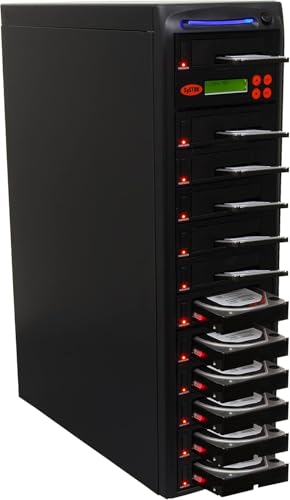
- Duplicates multiple SATA drives simultaneously
- Runs standalone without a computer or software
- Includes data, full-drive, and sanitization modes
Best For: High-volume photo-drive duplication and secure drive erasure
Best USB-C Option

- Offline SATA cloning without a computer
- Mounts two drives for simultaneous file access
- Tool-free 2.5-inch and 3.5-inch SATA support
Best For: USB-C users managing two SATA photo-storage drives
Flexible Offline Cloning
UGREEN Dual-Bay Hard Drive Dock

- Offline cloning without a computer
- Supports 2.5-inch and 3.5-inch SATA drives
- Up to 32TB per bay; USB 3.0 connectivity
Best For: Photographers needing broad SATA compatibility and high-capacity drive duplication
Stable Drive Handling

- Offline cloning without a computer
- Fixed bezels help hold drives securely
- Supports up to two 20TB SATA drives
Best For: Photo backup users who want simple operation and stable drive placement
Connected Backup Hub

- Offline cloning with progress indicators
- Up to 24TB per bay for SATA drives
- Three USB 3.0 hub ports included
Best For: Photographers who need drive cloning and extra USB connectivity in one station
Most Versatile NVMe/SATA Pick – ICY BOX Triple-Bay Drive Cloner
For photographers managing a mix of newer NVMe SSDs and traditional SATA drives, this ICY BOX is one of the more flexible hard drive duplicators for photo storage. Its three tool-free bays support offline cloning between several drive types, while USB 3.2 Gen 2 connectivity enables fast access when connected to a computer.
Best For: Photographers and professionals who need to clone or access NVMe and SATA drives in a mixed storage setup.
Pros:
- Supports M.2 PCIe NVMe, 2.5-inch SATA, and 3.5-inch SATA SSDs and HDDs.
- Three independent bays allow multiple drives to be connected at once.
- One-touch offline cloning requires no computer or cloning software.
- Includes USB-C and USB-A connectivity, Windows and macOS support, and a 24-month warranty.
Cons:
- Its plastic enclosure may be less rugged than a metal professional duplicator.
- Offline cloning still requires the target drive to be appropriate for the source data.
The triple-bay layout and broad drive compatibility make this a strong choice for photo workflows that span multiple generations of storage hardware. It is especially useful when you want both standalone cloning and computer-connected drive access.
Best Dual-Bay SATA Option – StarTech Standalone SATA Duplicator Dock
If your photo archive is stored on standard SATA hard drives or SSDs, the StarTech dual-bay dock offers straightforward duplication without requiring a computer. It performs sector-by-sector copying and also works as a USB-connected SATA dock for accessing individual drives.
Best For: Photographers and IT users duplicating 2.5-inch or 3.5-inch SATA drives with a target drive of equal or greater capacity.
Pros:
- Standalone cloning works without a computer and supports 2.5-inch and 3.5-inch SATA HDDs and SSDs.
- Sector-by-sector copying handles the entire drive, including empty sectors.
- Dual bays, tool-free loading, eject buttons, TRIM, and 4Kn support add practical flexibility.
- USB 3.2 Gen 2 provides up to 10Gbps host connectivity, with USB-C and USB-A cables included.
Cons:
- It does not support M.2 NVMe drives.
- The target disk must be equal to or larger than the source disk.
- Sector-by-sector duplication may copy empty space and take longer than file-level transfers.
This is a dependable choice among hard drive duplicators for photo storage when your archive uses SATA media. Its dual-bay design is less adaptable than a multi-format dock, but the standalone workflow and broad SATA compatibility are useful for routine drive migrations.
Best High-Capacity Storage Drive – WD My Book 6TB Desktop HDD
The WD My Book is a desktop external hard drive rather than a standalone duplicator, but it can serve as a large destination drive for photo backups and duplicated archives. Its 6TB capacity, included backup software, and hardware encryption make it a practical companion to hard drive duplicators for photo storage.
Best For: Photographers who need a high-capacity USB destination drive for personal or business photo backups.
Pros:
- Provides 6TB of desktop storage for large photo libraries.
- Includes device-management and auto-backup software, with installation required.
- 256-bit AES hardware encryption and password protection add security features.
- USB 3.0 connectivity is compatible with USB 2.0 systems.
Cons:
- It is an external storage drive, not a standalone drive duplicator.
- USB 3.0 tops out at a stated 5Gbps rather than the 10Gbps offered by newer docks.
- The desktop form factor requires an AC adapter and is less portable than a compact drive.
Choose the My Book when capacity is the priority and you need a straightforward destination for cloned or backed-up photo files. Pair it with a compatible duplicator dock for a complete storage workflow.
Best for Sanitization Tasks – Systor 1:1 SATA Duplicator/Eraser
The Systor 1:1 is a dedicated standalone duplicator and eraser for SATA storage. It supports both 2.5-inch and 3.5-inch drives without an adapter, making it useful for photographers who need to copy photo drives or securely sanitize old media before reuse or disposal.
Best For: Users who need basic SATA drive duplication plus DoD 5220.22-M-compliant sanitization.
Pros:
- Operates independently without a computer or software.
- Handles 2.5-inch and 3.5-inch SATA HDDs and SSDs without an adapter.
- Can copy data-only files or duplicate an entire hard drive.
- Supports drive erasure compliant with DoD 5220.22-M data-sanitization procedures.
Cons:
- Its stated transfer rate is up to 90MB per second, slower than newer 10Gbps docks.
- It supports SATA drives but not M.2 NVMe media.
- The product is a 1:1 duplicator, so it is less suitable for copying to multiple targets at once.
For photographers who regularly retire, repurpose, or redistribute SATA drives, the Systor adds an important erasure function that many basic duplicators lack. Its slower speed makes it better suited to controlled backup and sanitization tasks than high-volume transfers.
Best Budget-Friendly Dock – Sabrent Dual-Bay SATA Cloner
For photographers building backups, the SABRENT EC-HD2B is a practical entry point among hard drive duplicators for photo storage. Its two bays accept bare 2.5-inch or 3.5-inch SATA hard drives and SSDs, while offline cloning lets you copy one drive to another without installing software.
Best For: Home users who need a simple dual-bay dock for SATA drives, drive-to-drive cloning, and USB file transfers.
Pros:
- Supports both 2.5-inch and 3.5-inch SATA HDDs and SSDs.
- Offline cloning works without a computer or drivers.
- Supports drives up to 10TB and USB 3.0 transfer speeds up to 5Gbps.
- Includes a power supply and USB 3.0 cable.
Cons:
- Limited to SATA drives; the notes do not indicate support for M.2 or NVMe storage.
- Offline cloning is rated at up to 60Mbps, slower than its USB 3.0 interface.
Choose this model if you want an uncomplicated way to duplicate or access standard SATA photo-storage drives. Its capacity support and plug-and-play design are useful for routine backups, though the cloning speed is modest.
Best High-Volume Duplicator – Systor 1:11 HDD/SSD Duplicator
The Systor 1:11 is designed for users who need to create many copies at once. As a standalone unit, it can duplicate multiple SATA hard drives or SSDs without a computer, with a stated transfer rate of up to 150MB per second and options for data-only copying, full-drive copying, and sanitization.
Best For: Studios, IT workflows, and photographers who regularly prepare multiple SATA drive copies or need drive-erasure functionality.
Pros:
- Standalone operation requires no computer or software.
- Copies multiple hard drives or SSDs simultaneously.
- Supports data-only or whole-drive duplication.
- Includes DoD 5220.22-M-compliant drive sanitization.
Cons:
- Its 3.5-inch SATA form factor is less convenient for workflows centered on 2.5-inch drives.
- The supplied details describe SATA compatibility but do not specify support for NVMe or M.2 drives.
- It is a larger, specialized solution than a simple two-bay dock.
This is the strongest fit when photo-storage duplication is a repeatable, high-volume task rather than an occasional home backup. Its simultaneous-copying and sanitization features add flexibility, but the specialized design may be more than casual users need.
Best USB-C Option – Sabrent Dual-Bay USB-C Cloner
The SABRENT EC-CH2B combines a two-bay SATA dock with USB-C connectivity, making it a convenient choice among hard drive duplicators for photo storage. It can clone one SATA drive to another offline, or expose both drives as separate storage when connected to a computer.
Best For: Laptop and desktop users with USB-C who want tool-free access to two 2.5-inch or 3.5-inch SATA drives.
Pros:
- Copies one SATA drive to another without a computer.
- Reads and writes two drives at once when connected over USB.
- Supports hot-swapping and tool-free installation for 2.5-inch and 3.5-inch SATA drives.
- Includes a USB Type-C cable and supports USB 3.0 speeds up to 5Gbps.
Cons:
- Offline cloning requires the target drive to be the same size as or larger than the source.
- Does not support IDE/PATA, M.2, NVMe, or 4-pin Molex-connected drives.
- The included cable connects to USB-C on the dock, so a computer without USB-C may need an additional cable.
Pick this dock for a flexible USB-C workflow involving standard SATA photo drives. It is useful for both cloning and file access, but confirm your computer’s port and drive types before ordering.
Flexible Offline Cloning – UGREEN Dual-Bay Hard Drive Dock
For photographers comparing hard drive duplicators for photo storage, the UGREEN CM198 is a flexible dual-bay dock for copying drives without a computer. It accepts 2.5-inch and 3.5-inch SATA HDDs or SSDs, supports offline cloning when the target drive is at least as large as the source, and connects over USB 3.0 for file transfers.
Best For: Photographers who need broad SATA drive compatibility, offline cloning, and support for high-capacity storage.
Pros:
- Offline cloning between two drives without a computer.
- Supports two 2.5-inch or 3.5-inch SATA drives, with capacity listed up to 32TB per bay.
- USB 3.0 provides transfer speeds up to 5Gbps and includes a USB-C data cable.
- Surround cooling, a dust cover, and anti-slip pads add practical protection.
Cons:
- Offline cloning requires the target drive to be at least as large as the source.
- It is a dock rather than a permanently enclosed storage solution.
With its dual-bay design and support for both modern and older SATA standards, this UGREEN dock is a versatile choice for photo backup workflows. Its offline cloning mode is especially useful when duplicating a full image archive without tying up a computer.
Stable Drive Handling – WAVLINK Dual-Bay SATA Dock
The WAVLINK ST341UA is a practical option among hard drive duplicators for photo storage, combining two SATA bays with a fixed-bezel design. It supports offline drive-to-drive cloning without a computer, while USB 3.0 with UASP provides a convenient connection for backups and file transfers.
Best For: Photo users who value stable drive positioning, simple operation, and compatibility across common desktop operating systems.
Pros:
- Offline cloning starts from the dock without requiring a computer.
- Accepts 2.5-inch and 3.5-inch SATA I, II, and III HDDs or SSDs.
- Supports up to two 20TB drives and USB 3.0 transfer speeds up to 5Gbps.
- Tool-free, plug-and-play operation with UASP support.
Cons:
- The target drive must have capacity equal to or greater than the source for cloning.
- Compatibility is limited to SATA-interface drives.
- The fixed bezel may be less flexible for unusual drive setups.
The fixed-bezel design gives this WAVLINK dock a more secure, orderly feel when working with loose photo-storage drives. It is a straightforward choice for routine backup and cloning, particularly if your drives stay within the stated 20TB-per-bay capacity.
Connected Backup Hub – MAIWO Dual-Bay Drive Cloner
The MAIWO dual-bay cloner adds extra connectivity to a standard drive duplicator, making it useful for photographers building hard drive duplicators for photo storage into a broader backup station. It supports offline cloning of 2.5-inch and 3.5-inch SATA drives and includes three USB 3.0 hub ports for flash drives and other accessories.
Best For: Photographers who want offline drive cloning plus extra USB ports for consolidating storage tasks.
Pros:
- Offline cloning works without drivers or a connected computer.
- Supports 2.5-inch and 3.5-inch SATA HDDs and SSDs, with up to 24TB per bay.
- Three USB 3.0 Type-A hub ports expand connectivity; one supports 2.4A phone charging.
- LED indicators show clone progress at 25%, 50%, 75%, and 100%.
Cons:
- Cloning still requires the target drive to be suitable for the source data.
- The extra hub features make it larger and more specialized than a basic dock.
- USB transfers are rated up to 5Gbps rather than faster USB standards.
MAIWO’s strongest differentiator is its built-in USB hub, which can simplify a workstation handling drives, flash media, and mobile devices. For photo workflows that need both drive duplication and peripheral access, it offers more flexibility than a clone-only dock.
How We Picked the Best Hard Drive Duplicators for Photo Storage
We focused on the features that matter when protecting and expanding a photo archive: drive compatibility, offline cloning, sustained transfer performance, capacity support, connection speed, and ease of use. The selection includes dedicated 1:1 and multi-drive duplicators, dual-bay docking stations, and a conventional external hard drive for photographers who need a ready-to-use backup destination.
Because a duplicator is not the same as a complete backup system, we also considered whether each option suits drive-to-drive cloning, file-based transfers, or both. Compatibility with 2.5-inch and 3.5-inch SATA drives is especially useful for mixed archives, while NVMe support is important for newer editing workstations.
Quick Comparison
- Best for NVMe and SATA flexibility: ICY BOX triple-bay USB-C dock.
- Best for fast SATA cloning: StarTech SDOCK2U313R.
- Best for simple desktop backup: Western Digital My Book 6TB.
- Best for one-to-one duplication: Systor SYS101HS-DP.
- Best for multiple target drives: Systor 1:11 duplicator.
- Best for affordable dual-bay docking: SABRENT, UGREEN, WAVLINK, or MAIWO models.
Key Buying Factors for Hard Drive Duplicators for Photo Storage
Drive Type and Physical Size
Check whether the dock supports SATA HDDs, SATA SSDs, M.2 NVMe drives, or a combination. A 2.5-inch and 3.5-inch SATA dock covers most legacy photo libraries, but it will not accept NVMe storage without dedicated support or an adapter.
Cloning Method
Offline cloning copies one drive directly to another without a computer, which is useful for drive upgrades and full-disk replicas. A standard dock connected to a computer is better for selective folder transfers, catalog management, and incremental backups.
Speed and Connection
USB 3.0 is adequate for many hard drives, while USB-C and USB 3.2-class connections can reduce bottlenecks with SSDs. Advertised cloning speeds are maximum figures; actual performance depends on the source drive, target drive, file mix, and thermal limits.
Capacity and Protection
Verify the maximum supported disk capacity before buying large modern drives. For valuable images, prioritize a workflow that keeps at least two copies, ideally with one copy disconnected or stored off-site. Password protection or backup software can help, but neither replaces a tested backup routine.
Who Should Buy Which Hard Drive Duplicators for Photo Storage?
Choose a dedicated duplicator if you regularly migrate photo libraries, replace aging disks, or create complete offline replicas. A one-to-one unit is suited to occasional cloning, while a multi-target Systor model makes sense for studios, IT departments, and photographers producing several copies at once.
Choose a dual-bay dock if you want a flexible tool for both cloning and computer-based file transfers. Models with USB-C are preferable for newer laptops and SSD workflows. If you simply need an easy desktop destination for automated backups, the 6TB Western Digital My Book is the more straightforward option—provided its capacity fits your archive.