A gaming mouse with programmable buttons can put abilities, macros, shortcuts, and system commands within easy reach. The right model can reduce keyboard travel and make complex games or creative workflows more comfortable.
Our selection covers wired and wireless options, ergonomic shapes, MMO-focused side-button layouts, adjustable weights, and customizable software so you can match the mouse to your games and grip style.
Best 10 Gaming Mouse with Programmable Buttons Picks for 2026
Balanced Control Pick

- 11 programmable buttons
- Adjustable five-weight system
- 25,600 DPI HERO sensor
Best For: Right-handed PC gamers seeking wired customization
MMO Macro Champion

- 19 remappable buttons
- 12 side buttons and five profiles
- Adjustable weights and DPI
Best For: Macro-heavy MMO and MOBA gaming
Wireless Versatility Pick
Razer Basilisk V3 X HyperSpeed

- Nine customizable controls
- HyperSpeed and Bluetooth wireless
- Up to 285 or 535 hours of battery life
Best For: Wireless gaming, productivity, and travel
Value MMO Button Layout

- 18 programmable buttons
- 12 side buttons and five profiles
- Adjustable weights with 12,400 DPI
Best For: Wired MMO gaming with extensive remapping
Most Adaptable MMO Pick

- Swappable 12-, 6-, and 2-button side plates
- Up to 23 programmable buttons with macro support
- Wireless, Bluetooth, and USB-C connectivity
Best For: Players who switch between MMO, MOBA, FPS, and battle royale games
Best Wired All-Rounder

- 11 programmable buttons for macros and secondary functions
- Ergonomic right-handed design with thumb rest
- Free-spin or tactile Hyperscroll tilt wheel
Best For: Right-handed PC gamers who prefer a comfortable wired mouse
Best for Switch Modding

- 12 programmable buttons with six side buttons
- Hot-swappable switches and replacements included
- 2.4GHz wireless, USB-C, and magnetic charging dock
Best For: MMO and MOBA players who want switch customization
Reliable Essentials

- Five programmable buttons with macro support
- 6,400 DPI optical sensor
- Ergonomic right-handed wired design
Best For: Everyday PC gaming and basic button customization
Flexible Macro Value

- Nine programmable buttons and five profiles
- 16,000 DPI sensor with adjustable presets
- Weight tuning, RGB lighting, and rapid-fire button
Best For: Gamers who want extensive customization on a wired mouse
MMO Command Center
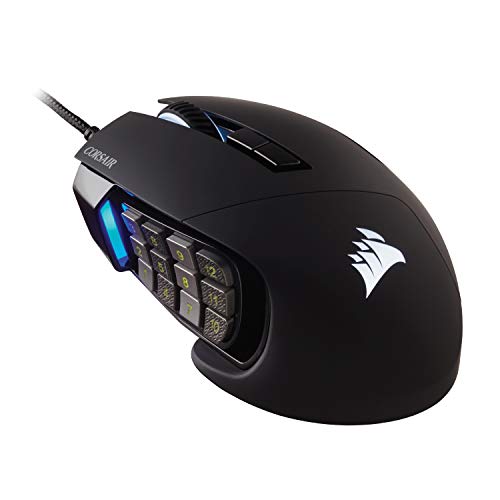
- Seventeen programmable buttons
- Repositionable 12-button side panel
- 18,000 DPI optical sensor
Best For: MMO and MOBA players managing many commands
Balanced Control Pick – Logitech G502 HERO
The Logitech G502 HERO is a practical gaming mouse with programmable buttons for players who want extensive controls without moving to an MMO-style layout. Its 11 programmable buttons, adjustable weights, and high-resolution sensor support a wide range of PC gaming setups.
Best For: Right-handed PC gamers who want customizable controls, adjustable balance, and wired reliability.
Pros:
- 11 programmable buttons provide flexible game controls.
- Five removable 3.6-gram weights allow personalized balance.
- HERO sensor offers tracking up to 25,600 DPI.
- Dual-mode scroll wheel and customizable LIGHTSYNC RGB add versatility.
Cons:
- Wired connection limits placement flexibility.
- The right-handed design is not suitable for left-handed users.
The G502 HERO is a strong all-around choice when you want programmable controls and physical customization in a familiar wired design. It is especially well suited to players who prefer a substantial, adjustable mouse rather than a lightweight minimalist model.
MMO Macro Champion – Redragon M901K
The Redragon M901K is a gaming mouse with programmable buttons built around MMO and macro-heavy play. With 19 remappable buttons, 12 side buttons, onboard memory profiles, and adjustable weights, it is designed for players who want many commands close at hand.
Best For: MMO, MOBA, and strategy players who need extensive macros and multiple saved configurations.
Pros:
- 19 programmable buttons include 12 remappable side buttons.
- Five memory profiles help save different control setups.
- Eight removable 2.4-gram weights allow balance tuning.
- Adjustable DPI and polling rate support gaming and everyday work.
Cons:
- The large button count may require an adjustment period.
- It uses a corded USB connection.
- The right-handed design limits hand compatibility.
The M901K stands out when button quantity matters more than simplicity. Its profile storage and weight tuning make it flexible, but its dense control layout is best suited to users who are comfortable learning a highly configurable MMO mouse.
Wireless Versatility Pick – Razer Basilisk V3 X HyperSpeed
The Razer Basilisk V3 X HyperSpeed is a wireless gaming mouse with programmable buttons for players who want customization without a cable. Its nine customizable controls, dual wireless modes, ergonomic right-handed shape, and long stated battery life make it suitable for both gaming and productivity.
Best For: Right-handed gamers who want wireless flexibility, programmable controls, and extended battery life.
Pros:
- Nine programmable controls support macros, shortcuts, and custom commands.
- HyperSpeed Wireless and Bluetooth provide two connection options.
- Battery life is rated up to 285 hours on HyperSpeed or 535 hours on Bluetooth.
- 18,000 DPI optical sensor and onboard profile storage add flexibility.
Cons:
- It requires a replaceable AA battery.
- The mouse is designed for right-handed use.
- It has fewer buttons than the MMO-focused options in this roundup.
The Basilisk V3 X HyperSpeed is the practical choice for users who value a clean wireless setup and dependable customization. Choose it over a larger MMO mouse when nine controls are sufficient and battery endurance is a priority.
Value MMO Button Layout – Redragon M908
The Redragon M908 is a gaming mouse with programmable buttons aimed at users who want MMO-style controls at a wired price point. Its 18 programmable buttons, 12 side buttons, five memory profiles, and adjustable weights provide extensive customization for compatible PC software.
Best For: Right-handed MMO players who want numerous remappable controls and wired performance.
Pros:
- 18 programmable buttons include 12 side buttons.
- Five memory profiles use dedicated light colors for identification.
- Eight 2.4-gram weights allow weight adjustment.
- Offers a 1000 Hz polling rate and up to 12,400 DPI.
Cons:
- Programmable functionality is intended primarily for Windows; Mac is listed for normal use.
- The 175-gram weight may feel substantial to some users.
- The wired design and right-handed shape reduce flexibility.
The M908 is a sensible fit for players who need a lot of side-button access and prefer a wired mouse. Its physical size, weight, and dense layout make it more specialized than a standard gaming mouse, but those traits can benefit MMO-focused control schemes.
Most Adaptable MMO Pick – Razer Naga V3 Pro Wireless
The Razer Naga V3 Pro is a highly adaptable gaming mouse with programmable buttons, letting you switch between 12-, 6-, and 2-button side plates for different genres. It also combines wireless, Bluetooth, and USB-C connectivity with extensive Synapse customization.
Best For: Players who switch between MMO, MOBA, FPS, and battle royale games.
Pros:
- Three swappable side plates provide 12, 6, or 2-button layouts.
- Up to 23 buttons, with remapping and macro support through Razer Synapse.
- Offers HyperSpeed wireless, Bluetooth, and wired USB-C modes.
- Long battery life, rated up to 155 hours on HyperSpeed or 280 hours on Bluetooth.
Cons:
- Full customization is available on Windows, while macOS is limited to core functions and onboard settings.
- Wireless charging accessories are sold separately.
The Naga V3 Pro is the most flexible choice here if you want one programmable-button mouse that can adapt to several game types. Its interchangeable layouts and broad connectivity make it especially practical for a mixed gaming and productivity setup.
Best Wired All-Rounder – Razer Basilisk V3
The Razer Basilisk V3 is a practical wired gaming mouse with programmable buttons for players who want extra controls without moving to a large MMO-style design. Its ergonomic right-handed shape, thumb rest, 11 programmable buttons, and configurable scroll wheel suit a wide range of PC games.
Best For: Right-handed PC gamers who prefer a comfortable wired mouse with versatile controls.
Pros:
- Eleven programmable buttons support macros and secondary functions.
- Ergonomic design includes a thumb rest and accessible button placement.
- Hyperscroll tilt wheel switches between free-spin and tactile modes.
- Focus+ 26K optical sensor and second-generation optical switches support precise, responsive input.
Cons:
- USB connectivity requires a wired setup.
- It is designed for right-handed use.
The Basilisk V3 is a strong fit when you want programmable controls in a familiar ergonomic shape rather than a dedicated MMO layout. It offers useful flexibility for gaming and everyday PC tasks while keeping the setup straightforward.
Best for Switch Modding – ASUS ROG Spatha X
The ASUS ROG Spatha X is a wireless MMO gaming mouse with programmable buttons, including six side buttons and 12 total controls. It supports low-latency 2.4GHz wireless and USB-C wired modes, while its hot-swappable switches let you replace or change the included ROG Micro Switches.
Best For: MMO and MOBA players who want many controls, switch customization, and a charging dock.
Pros:
- Twelve programmable buttons include six strategically placed side buttons.
- Supports 2.4GHz wireless and USB-C wired play.
- Hot-swappable switch sockets and replacement switches are included.
- Magnetic charging dock and fast charging add convenience.
Cons:
- Its large shape is aimed at MMO use and may not suit every hand or grip.
- Battery life is rated up to 67 hours with RGB off.
- The warranty is listed as one year.
The Spatha X stands out for its combination of MMO-focused controls and replaceable switches. It is a compelling option if you value hardware customization and prefer the convenience of a magnetic charging dock.
Reliable Essentials – Razer DeathAdder Essential
The Razer DeathAdder Essential is a straightforward gaming mouse with programmable buttons for players who want familiar controls, dependable tracking, and an ergonomic right-handed shape. Its 6,400 DPI optical sensor supports on-the-fly sensitivity changes, while five buttons can be remapped or assigned macro functions through Razer Synapse.
Best For: Right-handed PC gamers seeking a comfortable, uncomplicated wired mouse with useful customization.
Pros:
- Five programmable buttons support remapping and macro assignments.
- 6,400 DPI optical sensor offers adjustable sensitivity for gaming and creative work.
- Ergonomic design, rubberized textured scroll wheel, and durable mechanical switches.
Cons:
- Five buttons provide less customization than MMO-focused alternatives.
- Wired connectivity may be less convenient for users who prefer wireless mice.
This is a practical pick when comfort and essential button customization matter more than extensive macro controls or very high DPI settings.
Flexible Macro Value – Redragon M801
The Redragon M801 is a gaming mouse with programmable buttons aimed at players who want extensive customization without moving to an MMO-specific layout. It provides nine programmable buttons, five memory profiles, adjustable DPI settings up to 16,000, RGB lighting, and a rapid-fire button for compatible gaming uses.
Best For: Right-handed gamers who want multiple profiles, macro controls, adjustable weight, and abundant onboard customization.
Pros:
- Nine programmable buttons and five memory profiles support different games and tasks.
- Adjustable sensitivity reaches 16,000 DPI with multiple preset levels.
- Includes RGB effects, a rapid-fire button, and an eight-piece weight tuning set.
- Braided cable, Omron switches, and smooth Teflon feet support extended use.
Cons:
- Its feature-rich design may be more mouse than casual users need.
- The supplied compatibility information primarily specifies Windows, despite listing Mac and Linux hardware platforms.
The M801 stands out for customization per dollar, especially if you value profile switching and physical tuning alongside programmable controls.
MMO Command Center – Corsair Scimitar RGB Elite
The Corsair Scimitar RGB Elite is a gaming mouse with programmable buttons built for MMOs and MOBAs, where frequent actions and complex macros benefit from quick access. Its 17 programmable buttons include a repositionable 12-button side panel, while the 18,000 DPI optical sensor allows fine-grained sensitivity adjustment.
Best For: Right-handed MMO and MOBA players who need a large number of accessible commands and a configurable thumb layout.
Pros:
- Seventeen programmable buttons accommodate frequent actions and complex macros.
- Key Slider Control System lets you reposition the 12 side buttons for a better fit.
- 18,000 DPI PixArt optical sensor supports adjustment in one-DPI increments.
- Contoured shape, finger rest, 50-million-click switches, and braided cable support comfort and durability.
Cons:
- The large button count can be excessive for players who prefer a minimalist layout.
- It is a right-handed wired mouse, limiting fit and connection preferences.
For games that demand many mapped abilities, the Scimitar RGB Elite offers the most purpose-built control here, particularly when side-button positioning is important.
How We Picked the Best Gaming Mouse with Programmable Buttons
We focused on the features that matter most when assigning commands: button count and placement, remapping and macro support, sensor performance, comfort, connection type, and software flexibility. The list includes straightforward wired mice, versatile wireless models, and MMO mice with dense side-button grids or interchangeable panels.
We also considered how each design fits different users. A mouse with 19 programmable buttons may suit an MMO enthusiast, while a lighter, simpler model can be better for FPS gaming or general desktop use. DPI claims alone were not treated as a quality guarantee; shape, control, and reliable tracking are equally important.
Quick Comparison
- Best for extensive MMO commands: Razer Naga V3 Pro, Corsair Scimitar RGB Elite, or ASUS ROG Spatha X.
- Best for flexible everyday gaming: Razer Basilisk V3, Basilisk V3 X HyperSpeed, or Logitech G502 HERO.
- Best for budget-friendly button count: Redragon M908, M801, or the 19-button Redragon MMO model.
- Best for a simpler ergonomic design: Razer DeathAdder Essential.
Key Buying Factors for a Gaming Mouse with Programmable Buttons
Button Layout and Programming
Count the controls you can actually reach without shifting your hand. Side grids are powerful for MMOs but may feel crowded in fast shooters. Check whether the companion software supports remapping, macros, profiles, onboard memory, and application-specific settings.
Wired Versus Wireless
Wired mice usually offer simple setup and uninterrupted use. Wireless models provide a cleaner desk and more freedom, but battery life, charging options, wireless range, and the availability of wired fallback mode deserve attention.
Shape, Weight, and Grip
Ergonomic right-handed shapes can support palm and claw grips, while adjustable weights let you tune the feel. A large button-heavy mouse may be excellent for long MMO sessions but less comfortable for small hands or low-sensitivity aiming.
Sensor and Settings
Look for consistent tracking, adjustable sensitivity, dependable lift-off behavior, and a polling rate suited to your system. Extremely high DPI is not essential; controlled, stable movement matters more than the maximum number printed on the box.
Who Should Buy Which Gaming Mouse with Programmable Buttons?
Choose an MMO mouse with a full side-button array if you regularly manage many abilities, items, or shortcuts. Pick a Basilisk, G502, or similar multi-purpose shape if you want several programmable controls without committing to a full MMO layout. Competitive FPS players may prefer the simpler DeathAdder-style approach, where fewer buttons leave more room for a secure grip. If portability and cable-free play matter most, prioritize a wireless model and verify its charging and profile features. Finally, compare software compatibility with your operating system before buying, especially if you use a Mac or switch between multiple PCs.