The best document cameras for artists make it easier to demonstrate drawing, painting, crafting, and other hands-on techniques from a clear overhead view. The right model can also serve as a webcam for lessons, livestreams, portfolio videos, and remote critiques.
These 10 options range from compact USB cameras to 4K models with autofocus, built-in lighting, microphones, and A3-size coverage. Use the guide below to match image quality and features to your studio, classroom, or content setup.
Best 10 Document Cameras for Artists Picks for 2026
Best for Large Artwork

- 4K video with a 13MP Sony sensor
- Captures documents and artwork up to A3
- Includes lighting, autofocus, and annotation tools
Best For: Large artwork demonstrations and professional instruction
Best for Smooth Live Demos

- 8MP Sony CMOS image sensor
- Up to 30 fps in Full HD
- Fast autofocus and adjustable multi-jointed stand
Best For: Responsive live art and craft demonstrations
Best Compact All-Rounder
INSWAN INS-1 USB Document Camera

- 8MP imaging with 30 fps streaming
- Built-in LED and anti-glare sheet
- Compact multi-joint design with Documate software
Best For: Everyday desktop art demonstrations
Best for Scanning and OCR
VIISAN DB8401 16MP Document Camera
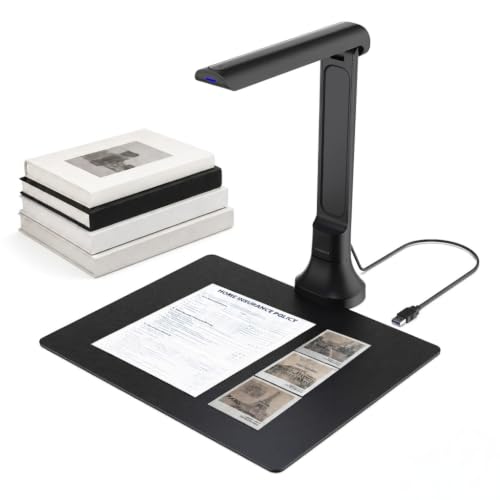
- 16MP autofocus camera for artwork and objects
- OCR supports editable and searchable files
- Foldable design with text-to-speech features
Best For: Digitizing artwork, books, and studio documents
Wide-View Detail Specialist

- 120° lens captures tabloid-size work and larger objects
- 4K, 8MP Sony sensor, LED light, and autofocus
- AI noise reduction and broad device compatibility
Best For: Large artwork demonstrations and detailed online streams
Flexible A3 Workspace Pick
PAKOTOO KB700 A3 Document Camera

- Covers A3 artwork with a foldable multi-joint arm
- 2448P capture with autofocus and adjustable LED lighting
- Image reversal controls work without software
Best For: A3 demonstrations and portable computer-based setups
Audio-Ready Demonstration Camera

- 8MP/2448P capture at up to 30 fps
- A3 coverage with foldable, multi-angle arm
- Dual microphones plus adjustable lighting and image inversion
Best For: Live art instruction with integrated audio
Flexible 5MP Pick

- 5MP still images and 1080p video at 30 fps
- 360-degree gooseneck with A3 coverage
- Macro focus, LED lighting, and manual ISO control
Best For: Artwork demos, online teaching, and live streaming
High-Resolution Choice
THUSTAR 8MP 4K Document Camera

- 8MP sensor with listed 4K video capture
- A3 coverage and macro focus to 3.94 inches
- Foldable body, LED lights, and dual microphones
Best For: Detailed art demonstrations and portable setups
Compact Value Option
PAKOTOO 5MP A3 Document Camera

- 5MP Full HD video at up to 30 fps
- Flexible A3 overhead coverage with autofocus
- Lightweight body with LED and ISO controls
Best For: Home studios, remote instruction, and occasional demos
Best for Large Artwork – INS-2 UHD 4K Document Camera
For artists comparing document cameras for artists, the INSWAN INS-2 stands out when detailed artwork, oversized sheets, or two-page spreads need to appear clearly on a large screen. Its 13MP Sony sensor records 4K video, while the adjustable arm supports documents up to A3 size.
Best For: Art instructors, professional educators, and artists presenting large artwork or detailed demonstrations.
Pros:
- 4K Ultra HD capture with a 13MP Sony sensor.
- A3 capture area suits large artwork and two-page spreads.
- Built-in LED, anti-glare sheet, autofocus, macro focus, and brightness control support varied studio lighting.
- Documate software includes annotation, recording, whiteboard tools, and OCR.
Cons:
- Its larger format and professional feature set may be more than needed for simple desk demonstrations.
- Compatibility requires a USB-C port when used with an iPad.
The INS-2 is a strong choice when image detail and working area matter more than minimal size. It is especially well suited to classroom or exhibition-style presentations where viewers need to see fine artistic details.
Best for Smooth Live Demos – IPEVO V4K 8MP Document Camera
The IPEVO V4K is a practical pick for artists who prioritize responsive live demonstrations. Its 8MP Sony CMOS sensor provides high-definition images, while the high frame rate and fast focusing help keep switching between materials smooth during online or in-person instruction.
Best For: Artists and instructors who need fluid live streaming for drawing, crafting, or material demonstrations.
Pros:
- 8MP resolution captures images up to 3264 x 2448 pixels.
- Streams at up to 30 fps in Full HD and up to 15 fps at maximum resolution.
- Fast focusing helps reduce interruptions during demonstrations.
- Multi-jointed stand offers flexible positioning and can be tightened if joints loosen with use.
Cons:
- No zoom is specified.
- Its maximum shooting area is about 13.46 by 10.04 inches, which is smaller than A3 support.
- System requirements may be demanding for lag-free streaming.
The V4K favors smooth operation and quick focus over extras such as built-in lighting or bundled annotation features. It is a sensible option for artists who already have suitable software and want dependable live presentation performance.
Best Compact All-Rounder – INSWAN INS-1 USB Document Camera
The INSWAN INS-1 is a versatile choice for artists seeking document cameras for artists that fit comfortably into a desktop setup. It combines 8MP imaging, 30 fps streaming, autofocus, and a multi-joint design with useful lighting and software controls.
Best For: Artists, teachers, and makers who want a compact camera for artwork, sketching, and online demonstrations.
Pros:
- 8MP Sony camera captures up to 3264 x 2448-pixel images.
- Supports lag-free video streaming at 30 fps across listed resolutions.
- LED light, anti-glare sheet, brightness adjustment, and autofocus help handle changing conditions.
- Documate software supports annotation, digital zoom, snapshots, recording, and image rotation.
Cons:
- It does not offer the 4K resolution of the INS-2.
- The listed 14.72-by-11-inch viewing area may not suit oversized artwork.
- It uses a USB-A cable, while some newer devices may require an adapter.
The INS-1 balances useful presentation controls with a space-saving desktop design. It is a good middle ground for everyday artwork sharing when A3 coverage and 4K detail are not essential.
Best for Scanning and OCR – VIISAN DB8401 16MP Document Camera
The VIISAN DB8401 is aimed at artists who need more than live viewing from their document cameras for artists. Its 16MP autofocus camera can show artwork and physical objects in real time, while scanning, OCR, text-to-speech, and a foldable design support digitizing and organizing creative work.
Best For: Artists and creative educators who scan artwork, books, notes, receipts, or other studio documents.
Pros:
- 16MP autofocus camera delivers detailed images of documents, artwork, and 3D objects.
- Supports multi-page scanning with automatic edge correction.
- OCR can create editable or searchable Word, Excel, and PDF files.
- Foldable 350-gram design is convenient for portable setups.
Cons:
- Its listed software compatibility is limited to Windows and macOS.
- Gemini AI features require the VisualCam Lite web interface and Chrome.
- The supplied notes do not specify video resolution or a built-in light.
The DB8401 is the most workflow-oriented option in this group. Choose it if scanning, OCR, accessibility tools, and portability are as important as showing artwork live.
Wide-View Detail Specialist – IPEVO V4K PRO 120
For artists who need to show large drawings, reference materials, or three-dimensional objects, the IPEVO V4K PRO 120 is one of the more capable document cameras for artists. Its 120-degree lens, 4K capture, autofocus, and adjustable arm are designed for expansive, detailed views.
Best For: Artists demonstrating tabloid-size artwork, larger objects, or detailed work during online classes and streams.
Pros:
- 120-degree field of view can cover tabloid-size documents and larger objects.
- 4K capture, an 8MP Sony CMOS sensor, LED light, and swift autofocus support clear detail.
- USB plug-and-play compatibility works with Windows, Mac, Chromebooks, and major conferencing platforms.
- AI noise reduction can help reduce ambient background noise during calls and presentations.
Cons:
- It does not include image stabilization.
- Its 860 g weight may be less convenient for artists seeking an ultra-light setup.
The wide lens is the standout feature here, especially when your artwork or demonstrations extend beyond standard paper size. Choose it if broad framing and high-resolution capture matter more than having a minimal travel camera.
Flexible A3 Workspace Pick – PAKOTOO KB700 A3 Document Camera
The PAKOTOO KB700 is a practical choice among document cameras for artists who work across A3 and A4 paper sizes. Its foldable, multi-joint design supports different angles, while adjustable lighting and autofocus help when switching between sketches, paintings, and small objects.
Best For: Artists who want a compact, adjustable camera for A3 artwork, mixed-media demonstrations, and distance teaching.
Pros:
- Maximum coverage of 16.5 by 11.6 inches accommodates A3 paper.
- Foldable multi-joint construction supports multiple shooting angles and easier carrying.
- 2448P capture, one-touch autofocus, three LED brightness levels, and ten exposure levels support varied lighting.
- Image reversal buttons allow left-right and up-down adjustments without relying on software.
Cons:
- It is not plug-and-play; you must select “USB Camera” in the computer system.
- USB 2.0 connectivity does not support zoom or HDMI, and it is not compatible with iPad.
- The stated macro capture distance starts at 3.94 inches.
This model offers useful physical controls for artists who want to adjust brightness, exposure, and image orientation quickly. It is a better fit for a computer-based studio or classroom than an iPad-centered mobile workflow.
Audio-Ready Demonstration Camera – Kitchbai KB-700 4K Visualiser
For artists teaching live or explaining techniques while working, the Kitchbai KB-700 combines A3 coverage with built-in dual microphones. This option among document cameras for artists also provides adjustable brightness, image inversion, autofocus, and a foldable arm for showing both flat artwork and 3D subjects.
Best For: Artists hosting live demonstrations who want integrated microphones and flexible framing for A3-size work.
Pros:
- 8MP/2448P capture at up to 30 frames per second supports live demonstrations.
- A3 coverage and a multi-joint arm help frame large artwork and three-dimensional objects.
- Dual microphones are designed to reduce noise and improve sound quality.
- Three brightness levels, ten exposure adjustments, autofocus, and image inversion add hands-on control.
Cons:
- The product uses USB connectivity rather than HDMI.
- Its listed dimensions indicate a relatively tall setup when unfolded.
- Macro capture begins at approximately 3.94 inches.
The dual microphones make this a particularly useful choice for live art instruction where both the work surface and spoken guidance matter. Consider it when you need A3 framing and built-in audio without adding a separate microphone.
Flexible 5MP Pick – THUSTAND A3 Document Camera
For artists seeking document cameras for artists, this 5MP THUSTAND model offers a flexible way to show artwork, craft details, and demonstrations. Its gooseneck design, A3 coverage, autofocus, and macro mode support both full-page compositions and close-up work.
Best For: Artists who need a versatile overhead camera for artwork demonstrations, online teaching, and live streaming.
Pros:
- 5MP sensor with up to 2592×1944 still resolution and Full HD video at 30 fps
- Flexible 360-degree gooseneck and A3-size coverage
- Autofocus and macro capture down to 3.94 inches
- Three-level LED fill light and five-level manual ISO exposure control
Cons:
- Video output is specified as 1080p despite the higher still-image resolution
- Requires selecting “USB Camera” during initial setup
This is a practical choice when you want one camera for overhead artwork, close-up demonstrations, and webcam use. Its lighting controls are especially useful for artists working in uneven home or studio lighting.
High-Resolution Choice – THUSTAR 8MP 4K Document Camera
The THUSTAR 8MP document camera is a strong option among document cameras for artists who prioritize detailed overhead footage. It combines high-resolution capture, adjustable lighting, macro focus, and a foldable multi-joint body for showing artwork or three-dimensional pieces.
Best For: Artists who want detailed live demonstrations and a foldable camera with built-in microphones.
Pros:
- 8MP sensor with listed 4K video capture and up to 30 fps
- A3 coverage for larger drawings, prints, and paper projects
- Macro focus down to 3.94 inches with one-touch autofocus
- Foldable multi-joint design, three-level LED lighting, and dual microphones
Cons:
- Uses a USB connection rather than HDMI
- Some listed specifications describe output as 2448P, so actual application resolution may vary
Its higher-resolution sensor makes this the most detail-focused option in the group on paper. The foldable construction also helps artists who need to pack away their setup between demonstrations or classes.
Compact Value Option – PAKOTOO 5MP A3 Document Camera
For artists comparing document cameras for artists on a straightforward USB setup, the PAKOTOO PA-800 covers the essentials. It supports A3 artwork, flexible positioning, autofocus, macro capture, and adjustable lighting for demonstrations from a home studio or classroom.
Best For: Artists who need an affordable-feeling, lightweight camera for overhead artwork and remote instruction.
Pros:
- 5MP CMOS sensor with Full HD streaming at up to 30 fps
- Flexible hose structure captures work from different angles and covers A3 paper
- Three-level LED light and five-level ISO exposure adjustment
- Autofocus and macro capture as close as 3.94 inches
Cons:
- Not fully plug and play; the computer must be set to “USB Camera”
- No HDMI output is listed
- Video resolution is specified as 1080p rather than 4K
This model is best suited to artists who want core overhead-camera features without needing advanced connectivity. Its 420-gram weight and foldable design make it convenient for occasional demonstrations and compact workspaces.
How We Picked the Best Document Cameras for Artists
We focused on features that matter during real-world demonstrations: image resolution, autofocus performance, capture-area coverage, lighting, microphone quality, mounting flexibility, and USB compatibility. The selection includes 4K and high-resolution models for fine detail, as well as simpler plug-and-play cameras for teaching and casual recording.
We also considered practical workflow details. Artists often need to reposition paper, switch between a work surface and their face, or record for extended periods. Foldable designs, image rotation, built-in LEDs, and broad operating-system support can make a greater difference than headline resolution alone.
Quick Comparison
| Best For | Look For | Recommended Features |
|---|---|---|
| Detailed art demonstrations | 4K or high-resolution capture | Autofocus, strong sensor, adjustable lighting |
| Large drawings and paper | A3 coverage | Wide capture area, flexible arm, image rotation |
| Online classes | Reliable USB connectivity | Built-in microphone, plug-and-play setup |
| Livestreaming and recording | Webcam versatility | Good low-light performance, broad software compatibility |
| Mobile or shared workspaces | Portable construction | Foldable body, integrated light, compact footprint |
Key Buying Factors for Document Cameras for Artists
Resolution and Image Detail
Choose 4K when viewers need to see tiny linework, brush texture, pencil shading, or lettering. An 8MP or 13MP camera can still produce detailed results, particularly for online lessons and standard video platforms. Resolution is most useful when the camera and software preserve that detail without excessive compression.
Autofocus and Framing
Autofocus helps when you move between a sketchbook and tools held closer to the lens. Swift or continuous autofocus is convenient for live demonstrations, while a stable manual focus can be preferable for a fixed recording setup. Check whether the camera supports image flipping, rotation, or inverted views before buying.
Coverage, Lighting, and Sound
A3 support gives more room for large paper, canvases, and craft projects than A4 coverage. Built-in LED lighting helps with shadows, but adjustable brightness and a flexible camera arm are more important if your studio already has lights. Dual microphones may improve voice pickup, although a dedicated microphone remains better for polished courses and videos.
Compatibility and Setup
Most USB models work through common video software, but confirm support for your Mac, Windows PC, Chromebook, or classroom platform. Plug-and-play cameras are easiest for teaching; OCR and scanning features are useful if you also digitize notes or artwork, but they are not essential for live visual demonstrations.
Who Should Buy Which Document Cameras for Artists?
Choose a 4K model if you publish tutorials, teach detailed techniques, or want the clearest close-up footage. High-resolution 8MP and 13MP cameras are strong all-purpose choices for classrooms, video calls, and demonstrations. A camera with A3 coverage is best for full-size artwork, while a foldable model suits artists who work in multiple locations.
If you mainly need an affordable overhead webcam, prioritize plug-and-play USB operation, adjustable LED lighting, and a stable arm over advanced scanning features. Artists recording professional courses should consider the camera’s microphone quality separately and plan to add dedicated lighting or audio when needed.