The best beginner robotics sets make it easier to move from following instructions to building, coding, and solving real problems. This lineup includes approachable kits for younger learners, Arduino-based projects, programmable cars, solar builds, and mechanical robot arms.
Use the comparison and buying advice below to match each learner with the right balance of construction, electronics, programming, guidance, and room to experiment.
Best 10 Beginner Robotics Sets Picks for 2026
Best All-in-One Build

- Three buildable robot and vehicle designs
- 560 pieces with color-coded instructions
- Remote, app control, and programming features
Best For: Construction-focused STEM play for ages 8 to 14
Best Electronics Starter
ELEGOO UNO R3 Super Starter Kit

- 22-plus guided Arduino projects
- Includes sensors, motors, displays, and controls
- Solderless breadboard supports beginner wiring
Best For: Learning Arduino electronics and foundational robotics concepts
Best Quick-Build Robot

- Builds in about 15 minutes
- Learns Scratch and Arduino coding
- Supports line following and obstacle avoidance
Best For: Ages 8 and up seeking an accessible first robot
Best Smart Robot Car

- FPV camera with app and IR control
- Line tracking and obstacle avoidance
- Guided Arduino assembly and coding
Best For: Ages 12 and up exploring advanced robot-car features
Best All-in-One Starter

- 100+ components and 40+ project ideas
- No soldering or coding knowledge required
- Includes reusable sensors for custom builds
Best For: Kids seeking a wide variety of guided robotics projects
Best for Remote-Controlled Builds

- Builds five different robot-style models
- Offers app and remote control
- Rechargeable battery supports up to 40 minutes of play
Best For: Kids who enjoy building, programming, and interactive control
Best Budget Experiment Set

- Includes six motorized science activities
- Instructions and mini screwdriver are included
- Useful for family projects and science fairs
Best For: Young beginners exploring circuits and simple robotics
Sun-Powered Starter

- Builds 12 models from 190 parts
- Solar-powered for outdoor or flashlight play
- Clear instructions with increasing difficulty
Best For: Kids starting with hands-on STEM and solar-powered builds
Mechanical Coding Challenge
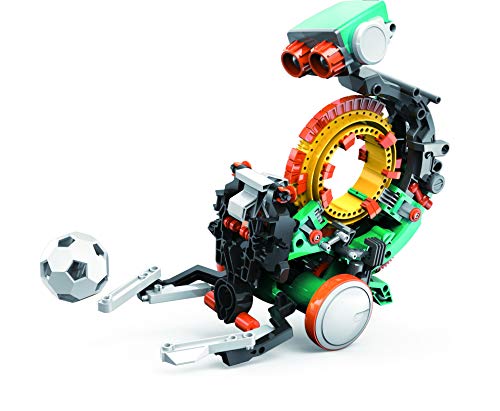
- Programs actions with snap-on coding buttons
- Introduces mechanical engineering and coding
- Designed as a multi-hour building project
Best For: Ages 10+ ready for a deeper hands-on STEM challenge
Hands-On Circuit Builder

- Combines wood assembly, motors, and circuits
- No soldering required
- Introduces mechanical movement and electronics
Best For: Older kids, teens, adults, and families wanting a deeper project
Best All-in-One Build – Kyanio 3-in-1 Robotics Kit
For families seeking beginner robotics sets with plenty of hands-on building, the Kyanio combines 560 building pieces, remote control, app control, and programming features. Clear instructions and color-coded blocks help make the multi-stage build approachable for children ages 8 to 14.
Best For: Kids who want a construction-focused robotics project with multiple robot designs and remote or app-based play.
Pros:
- Builds three different models, including a tracked vehicle and tanks.
- Includes 560 pieces, step-by-step instructions, and color-coded blocks.
- Supports remote control, app programming, and STEM-focused learning.
- Uses 2.4GHz control and includes a rechargeable battery with Type-C charging.
Cons:
- The larger piece count may require more time and organization during assembly.
- Its recommended age range makes it less suitable for very young beginners.
This is a strong choice when building and mechanical design matter as much as coding. It offers more variety than a single-model robot, though its feature-rich design may benefit from adult guidance during the first build.
Best Electronics Starter – ELEGOO UNO R3 Super Starter Kit
The ELEGOO UNO R3 is one of the more practical beginner robotics sets for learning circuits and Arduino programming. Its 22-plus guided lessons cover LEDs, sensors, displays, motors, a servo, and other components, while the solderless breadboard keeps early projects focused on wiring and code.
Best For: Beginners, homeschoolers, coding clubs, and classrooms that want a broad Arduino electronics curriculum rather than a prebuilt robot.
Pros:
- Includes 22-plus hands-on lessons and example code.
- Offers a wide mix of sensors, motors, displays, controls, and circuit components.
- Solderless breadboard and pre-soldered LCD help reduce setup difficulty.
- Supports creative projects such as alarms, monitors, reaction games, and motion experiments.
Cons:
- It does not center on assembling and driving a complete robot vehicle.
- The included power module should not be used above 9V.
- Younger learners may need experienced adult supervision.
Choose this kit if the goal is to understand the electronics behind robotics. It provides more component variety and structured experimentation than a single-purpose robot, but beginners should be comfortable following wiring and setup instructions.
Best Quick-Build Robot – Makeblock mBot
Makeblock mBot is a straightforward option among beginner robotics sets, with a build designed to be completed in about 15 minutes. It introduces electronics, mechanics, and programming through Scratch and Arduino, then adds hands-on driving modes such as line following and obstacle avoidance.
Best For: Children ages 8 and up who want a fast first robot with guided coding lessons, remote control, and room to expand.
Pros:
- Clear instructions support a quick, approximately 15-minute assembly.
- Teaches coding through Scratch and Arduino with cards, lessons, and software.
- Offers line following, obstacle avoidance, remote control, and programming games.
- Open-source design supports more than 100 electronic modules and 500 parts from the platform.
Cons:
- Four AA batteries and a CR2025 battery for the remote are not included.
- Additional configurations may require separately available add-on packs.
mBot is especially appealing when ease of assembly and an immediate sense of progress are priorities. Its expansion potential gives learners a path beyond the starter lessons without making the first build overly demanding.
Best Smart Robot Car – ELEGOO UNO R3 Robot Car V4
The ELEGOO UNO R3 Smart Robot Car V4 is a feature-rich pick for beginner robotics sets, pairing guided assembly with app and IR control. Once built, it can stream FPV video, track lines, avoid obstacles, and support Arduino coding experiments with its rechargeable battery and included sensors.
Best For: Learners ages 12 and up who want a programmable robot car with camera-based exploration and multiple autonomous driving modes.
Pros:
- Includes FPV video, app control, IR control, line tracking, and obstacle avoidance.
- Keyed connectors help reduce wiring errors during assembly.
- Guided tutorials and example programs support first-time builders.
- Includes a rechargeable 2000 mAh lithium-ion battery.
Cons:
- Its recommended age is 12 and up, so younger children may need substantial adult help.
- The larger mix of camera, Wi-Fi, sensors, and motors creates a more involved setup.
- The listed manufacturer warranty is six months.
This kit makes sense for older beginners who want more than basic remote driving. It offers engaging camera and autonomous features, while its greater complexity makes careful assembly and guided programming important.
Best All-in-One Starter – 40-in-1 STEM Robotics Kit
For families comparing beginner robotics sets, this 40-in-1 kit offers a broad introduction to sensors, motors, circuits, and simple automation projects. Its plug-and-play design requires no soldering, special tools, or prior coding knowledge, making it approachable for children ages 8 to 12.
Best For: Kids who want many guided robotics and home-automation projects in one kit.
Pros:
- Includes more than 100 components and projects such as a line-following car, drawing robot, and flame-extinguisher robot.
- Plug-and-play parts and detailed instructions support independent assembly.
- Reusable IR, flame, touch, LDR, and other sensors encourage custom experiments.
Cons:
- AA batteries are required, and the included holder is not compatible with Duracell batteries.
- The large number of projects and components may require organized storage and adult guidance.
This is a strong choice when variety matters most. It provides an extended, hands-on learning path rather than focusing on one remote-controlled model.
Best for Remote-Controlled Builds – 5-in-1 Programmable Robot Set
This Sillbird set stands out among beginner robotics sets for its combination of buildable models, remote control, app control, and basic programming. The 488-piece kit lets kids progress from simpler designs to more involved robot, dinosaur, car, and tank builds.
Best For: Kids who want to build different models and control them through an app or remote.
Pros:
- Five buildable formats provide progressive difficulty and replay value.
- Supports both Bluetooth app control and a dedicated remote.
- Colorful step-by-step instructions and 488 pieces support hands-on building.
- Rechargeable battery provides up to 40 minutes of play on one charge.
Cons:
- Assembly involves substantially more pieces than a very simple starter kit.
- App and remote-control features may require setup and supervision for younger builders.
Choose this option if interactive driving and model variety are higher priorities than electronics experiments. Its progressive designs can keep children engaged as their building confidence develops.
Best Budget Experiment Set – 6-in-1 Science Robotics Kit
For shoppers seeking beginner robotics sets with straightforward science activities, this six-in-one kit combines robot building with small electronic experiments. Projects include a reptile robot, balance car, bubble machine, fiber lamp, and buzzer wire game, with step-by-step manuals and a mini screwdriver included.
Best For: Families and elementary-age learners who want simple, varied circuit and motor projects.
Pros:
- Six activities introduce circuits, motors, balance, and basic robotics concepts.
- Detailed instructions and an included mini screwdriver make assembly more accessible.
- Suitable for family project time, science fairs, and hands-on STEM activities.
- Backed by a lifetime warranty against manufacturer defects.
Cons:
- AA batteries and bubble solution are not included.
- The projects are simpler and less programmable than more advanced robotics kits.
This kit is a practical pick for first experiments and shared parent-child building sessions. It favors accessible activities and variety over advanced programming or app-based control.
Sun-Powered Starter – 12-in-1 Solar Robot Kit
For families seeking beginner robotics sets with flexible difficulty levels, the Sillbird 12-in-1 kit offers 190 parts and instructions for building 12 solar-powered models. It supports screen-free STEM play and can run outdoors in sunlight or indoors under a strong flashlight.
Best For: Kids ages 8 and up who are new to robotics and enjoy building a variety of models while learning about solar power.
Pros:
- Includes 12 models with gradually increasing challenges.
- Large solar panel supports stronger power output.
- Clear step-by-step instructions encourage independent or family building.
- Requires no battery.
Cons:
- Solar operation depends on adequate sunlight or a strong artificial light source.
- The manufacturer recommends it for ages 10 and up, despite broader age-focused marketing.
This is a practical entry point for children who want variety rather than one complex robot. Its solar focus adds a renewable-energy lesson, while the staged builds let skills develop over time.
Mechanical Coding Challenge – Mech-5 Coding Robot
Among beginner robotics sets, the TEACH TECH Mech-5 stands out for combining a detailed mechanical build with hands-on coding. Users snap coding buttons onto a wheel to program actions such as throwing, lifting, kicking, and drawing.
Best For: Kids ages 10 and up who want a longer building project that introduces mechanical engineering and coding basics.
Pros:
- Mechanical coding wheel provides tangible programming practice.
- Robot can throw, lift, kick, draw, and perform other actions.
- Detailed instructions support a substantial, multi-hour build.
- Mission-based design encourages learning by doing.
Cons:
- Assembly requires time and careful attention to the instructions.
- Requires two AAA batteries, which are not included in the supplied details.
Mech-5 is better suited to learners ready for a focused project than to children seeking a quick-build toy. Its button-based coding wheel makes programming concepts approachable without relying on an advanced software platform.
Hands-On Circuit Builder – DIY Robot Arm Kit
This wooden robot arm is one of the more electronics-focused beginner robotics sets, combining mechanical assembly with motors, a PCB microcontroller board, and wires. The no-soldering design gives builders a practical introduction to circuits and controlled movement.
Best For: Kids ages 8 and up, teens, adults, or families looking for a challenging robotics and engineering project.
Pros:
- Combines a wooden mechanical build with circuits and motor control.
- No soldering is required.
- Supports logical thinking, problem solving, and motor skills.
- Includes an assembly tutorial and the robot arm components.
Cons:
- Requires six AA batteries, which are not included.
- The precise wooden assembly may be challenging for younger beginners.
- It is a single robot-arm project rather than a multi-model set.
This kit is a strong choice when the goal is to understand how electronics and mechanical movement work together. Expect a more involved build, but the completed arm can provide a satisfying introduction to robotics hardware.
How We Picked These Beginner Robotics Sets
We focused on kits that offer a practical entry point into robotics rather than novelty alone. The selection covers several learning paths: guided construction, block-based coding, Arduino programming, sensor-driven vehicles, solar-powered mechanisms, and robot-arm engineering. We also considered stated age ranges, project variety, included electronics, control methods, tutorial support, and how well each kit can grow with a learner’s skills.
Because “beginner” means different things to different users, this list includes both highly guided children’s kits and more technical boards suitable for teens, adults, or families learning together.
Quick Comparison
| Best For | Look For | Most Suitable Kit Type |
|---|---|---|
| Young first-time builders | Clear instructions and simple controls | Remote-control or guided building kit |
| Learning electronics | Arduino-compatible board, sensors, and tutorials | Starter electronics or smart-car kit |
| Exploring many projects | Multiple builds and reusable components | Multi-in-one robotics kit |
| Learning coding | App, block-based, or text-based programming | Programmable robot platform |
| Mechanical engineering | Gears, motors, linkages, and manipulators | Robot arm or mechanism-focused kit |
Key Buying Factors for Beginner Robotics Sets
Age, Patience, and Supervision
Check more than the suggested age. A younger child may need an adult to sort parts, interpret diagrams, or troubleshoot wiring. Older beginners may quickly outgrow a toy-like kit unless it supports coding or hardware expansion.
Build Complexity and Instructions
Detailed manuals and project tutorials reduce frustration during the first build. Kits with several projects can provide better long-term value, but they may also introduce more parts and less direct guidance. Choose simplicity for a first project and variety for a learner who enjoys rebuilding.
Control and Programming
Remote control is an engaging starting point, while app control can add convenience and simple programming. Arduino-compatible kits offer the greatest technical depth, but they require more patience with wiring, code, and troubleshooting. Confirm whether software, cables, batteries, or a computer are required separately.
Sensors, Components, and Expandability
Sensors allow a robot to respond to light, distance, lines, or obstacles instead of merely following commands. Reusable boards, standard connectors, and accessible replacement parts are valuable when a learner wants to create independent projects later.
Who Should Buy Which Beginner Robotics Sets?
Choose a guided remote- or app-controlled builder for a child who is new to robotics and wants quick results. A multi-project kit is a strong choice for curious learners who prefer variety and hands-on experimentation. Choose an Arduino starter set for teens, adults, or families specifically interested in electronics and coding fundamentals. Smart robot-car kits suit learners who want visible sensor behavior and programming challenges, while robot-arm kits are better for those drawn to gears, movement, and mechanical control. Solar kits are a good option when the goal is exploring energy and simple mechanisms with less emphasis on software.
Whichever option you choose, set aside a clear workspace and expect some trial and error. The most useful robotics set is one that is challenging enough to teach new skills while still providing a realistic path to a working first project.