Choosing among 16-channel logic analyzers can be difficult when specifications vary widely in sampling speed, memory depth, software support, and protocol decoding.
This roundup compares 10 options for electronics engineers, developers, makers, and students who need to capture and analyze multiple digital signals efficiently.
Best 10 16 Channel Logic Analyzers Picks for 2026
Portable Protocol Workhorse
LA2016 16-Channel Logic Analyzer

- 16 channels at 200MHz with 1Gbit memory
- Decodes 20+ protocols, including SPI, I2C, CAN, and UART
- Portable, USB-powered kit for Windows, macOS, and Linux
Best For: Protocol-heavy digital debugging on the go
High-Speed Mixed-Signal Choice

- 16 configurable digital and analog inputs
- Digital sampling up to 500MS/s and analog up to 50MS/s
- Stores billions of samples through PC memory and USB 3.0
Best For: Mixed-signal debugging and long recordings
Deep-Capture Specialist
DSLogic Plus 16-Channel Analyzer
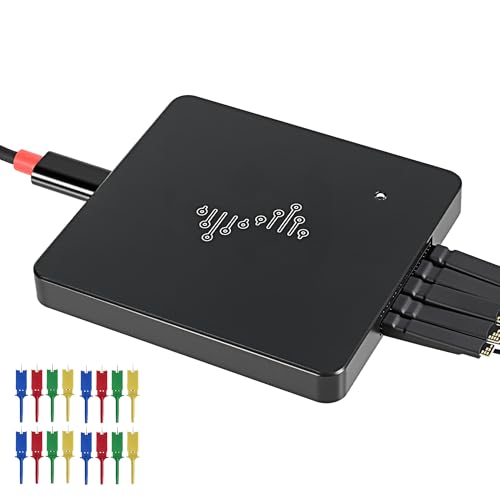
- 400MHz sampling with buffer and real-time stream modes
- Up to 16G sample depth in stream mode
- Nearly 100 protocol decoders across major operating systems
Best For: Long captures and flexible high-speed analysis
Easy Mixed-Signal Favorite

- 16 digital/analog inputs with up to 500MS/s digital sampling
- Decodes SPI, I2C, and 23+ additional protocols
- USB-powered and compatible with Windows, Mac, and Linux
Best For: Accessible mixed-signal and protocol debugging
Best High-Speed Pick

- 16 channels with up to 1GHz sampling
- Stream and buffer capture modes
- Windows, macOS, and Linux support
Best For: Fast digital debugging and extensive protocol analysis
Best Budget-Friendly Option

- 16 channels at 100MHz per channel
- Decodes 30+ common protocols
- Compatible with Windows, macOS, and Linux
Best For: Embedded debugging, learning, and everyday protocol checks
Best Portable Prototyping Tool

- 16 channels at 170MHz sampling
- 16G storage depth with compression
- 100+ protocol decoders
Best For: Portable debugging, prototyping, and extended recordings
High-Speed Debugging Pick
LA5016 16-Channel Logic Analyzer

- 500MS/s sampling with 10G deep memory
- Decodes UART, I2C, SPI, CAN, USB 1.1, and more
- Works with Windows, macOS, and Linux
Best For: High-speed MCU, ARM, and FPGA debugging
Protocol Analysis Pick
16-Channel Logic Analyzer with Logic2

- Supports 17 serial protocol analyses
- Customizes UART and RS-232 parameters
- Displays multiple protocols in several data formats
Best For: Logic2-based serial bus troubleshooting
Simple Developer Option
- 100M sampling for real-time capture
- Supports 17 protocols including SPI, UART, CAN, and JTAG
- Compatible with Logic2 software
Best For: Routine USB-connected development and debugging
Portable Protocol Workhorse – LA2016 16-Channel Logic Analyzer
For buyers comparing 16 channel logic analyzers, the LA2016 stands out with simultaneous 16-signal capture, a 200MHz sampling rate, and 1Gbit memory. Its software supports automated decoding for more than 20 protocols, making it a practical option for digital debugging across Windows, macOS, and Linux.
Best For: Engineers and makers who need broad protocol support, deep memory, and a portable USB-powered setup.
Pros:
- Captures 16 digital signals at up to 200MHz with 1Gbit memory.
- Decodes protocols including I2C, SPI, UART, CAN, I2S, USB 1.1, JTAG, and Modbus.
- Includes waveform compression, data export, saving tools, and a PWM generator.
- Comes with probes, hook clips, and a USB cable.
Cons:
- The listed operating-system support is centered on older Windows versions through Windows 10.
- It is a digital-focused analyzer rather than a listed digital/analog instrument.
The LA2016 is a well-equipped choice when protocol decoding and included accessories matter more than the highest stated sampling rate. Its cross-platform support and portable design also suit field troubleshooting.
High-Speed Mixed-Signal Choice – Saleae Logic Pro 16 Red
Among 16 channel logic analyzers, the Saleae Logic Pro 16 offers flexible digital and analog inputs for detailed signal work. It combines digital sampling up to 500MS/s, analog sampling up to 50MS/s, USB 3.0 connectivity, and PC-based storage for long captures.
Best For: Developers and engineers who need mixed-signal analysis, long recordings, and extensive protocol decoding.
Pros:
- Provides 16 configurable digital and analog inputs.
- Supports SPI, I2C, and more than 23 additional protocol decoders.
- Captures more than 10 billion digital samples and 500 million analog samples using PC memory.
- Works with Mac, Windows, and Linux.
Cons:
- Its capture capacity relies on the connected computer’s memory.
- The supplied notes do not specify included probes or hook clips.
With its combination of analog inputs, high sampling rates, and PC-backed capture depth, the red Logic Pro 16 is suited to demanding bench work. It is especially compelling for users who want one tool for timing, protocol, and mixed-signal investigations.
Deep-Capture Specialist – DSLogic Plus 16-Channel Analyzer
The DSLogic Plus is a strong candidate for shoppers evaluating 16 channel logic analyzers for either real-time streaming or high-speed buffered captures. Its 400MHz sampling rate, 256Mbit onboard SDRAM, adjustable threshold, and support for up to 16G samples in stream mode provide useful flexibility.
Best For: Users who need long-duration streaming, deep capture options, and wide protocol-decoder compatibility.
Pros:
- Offers 16 channels with stream and buffer capture modes.
- Reaches a 400MHz sampling rate and up to 16G sample depth in stream mode.
- Includes adjustable threshold settings and shielded wires for cleaner waveforms.
- Supports nearly 100 protocol decoders and works across Windows, macOS, and Linux.
Cons:
- Uses a USB 2.0 Type-C interface rather than the faster USB 3.0 connection found on some alternatives.
- The supplied notes do not list included accessories beyond the analyzer’s stated features.
The DSLogic Plus is differentiated by its two capture modes: stream mode for extended recordings and buffer mode for high-rate acquisition. That makes it a flexible choice for both long-duration monitoring and concentrated digital analysis.
Easy Mixed-Signal Favorite – Saleae Logic Pro 16 Black
For a straightforward 16 channel logic analyzers comparison, the black Saleae Logic Pro 16 combines 16 multi-use digital/analog inputs with fast sampling and broad operating-system compatibility. It supports digital rates up to 500MS/s, analog rates up to 50MS/s, and large PC-backed captures over USB 3.0.
Best For: Users seeking an easy-to-use, portable analyzer for digital, analog, and protocol debugging.
Pros:
- Combines 16 digital/analog inputs in a single instrument.
- Decodes SPI, I2C, and more than 23 other protocols.
- Supports more than 10 billion digital samples and 500 million analog samples through PC memory.
- Works with Windows, Mac, and Linux and is USB-powered.
Cons:
- Large capture capacity depends on the connected PC’s available memory.
- The supplied notes do not specify the included probe or cable set.
The black Logic Pro 16 offers the same core mixed-signal capability and cross-platform flexibility expected from this model line, with a portable USB-powered format. It is a sensible pick for users who value an approachable workflow alongside advanced capture features.
Best High-Speed Pick – DSLogic U3Pro16
For demanding 16 channel logic analyzers work, the DSLogic U3Pro16 combines high sampling rates, deep memory, and flexible capture modes. It reaches up to 1GHz sampling, with stream and buffer modes suited to either long recordings or high-speed captures.
Best For: Engineers debugging fast digital systems who need extensive protocol support and flexible memory options.
Pros:
- Supports 16 digital channels and up to 1GHz sampling.
- Offers stream depths up to 16G samples and includes 2Gbits of onboard DDR3 memory.
- Works with Windows, macOS, and Linux through DSView, with nearly 100 protocol decoders.
- Includes a USB 3.0 Type-C interface, shielded fly wires, and an aluminum case.
Cons:
- The highest 1GHz stream rate is limited to three channels.
- Its advanced feature set may be more than basic troubleshooting requires.
The U3Pro16 is the strongest choice here for speed and capture flexibility. Its channel-dependent sampling modes and dual operating modes make it particularly useful when testing complex or fast digital designs.
Best Budget-Friendly Option – LA1010 16-Channel Analyzer
The LA1010 is a practical entry point for 16 channel logic analyzers, pairing 100MHz sampling per channel with a portable USB design. Its KingstVIS software provides real-time waveform viewing and decodes more than 30 common protocols.
Best For: Students, embedded developers, and hobbyists working with common digital communication protocols.
Pros:
- Captures 16 digital signals simultaneously at up to 100MHz per channel.
- Decodes protocols including I2C, SPI, UART, CAN, and more.
- Supports Windows, macOS, and Linux.
- Portable design with low stated power consumption of 0.5 watts.
Cons:
- Its 100MHz sampling rate is lower than the other listed analyzers.
- KingstVIS supports over 30 protocols, fewer than some competing options in this roundup.
Choose the LA1010 when broad compatibility and straightforward digital troubleshooting matter more than extreme capture speed. It covers common embedded-system workflows without requiring a large bench instrument.
Best Portable Prototyping Tool – LiebeWH 16-Channel Analyzer
The LiebeWH 16 channel logic analyzer is designed for accessible electronics debugging and prototyping. It provides 170MHz sampling, 16G maximum storage depth, and USB 2.0 Type-C connectivity in a compact, lightweight package.
Best For: Portable lab work, student projects, and developers who need extended recordings with broad protocol coverage.
Pros:
- Provides 16 channels with a 170MHz sampling rate.
- Offers up to 16G storage depth with hardware compression.
- Supports more than 100 protocol decoders.
- Compact, lightweight design with plug-and-play USB 2.0 Type-C connectivity.
Cons:
- Its sampling rate is lower than the DSLogic U3Pro16.
- The supplied notes do not specify operating-system compatibility.
The LiebeWH balances storage capacity, protocol coverage, and portability. It is a sensible fit for extended captures and mobile troubleshooting, provided your computer setup is compatible with its software.
High-Speed Debugging Pick – LA5016 16-Channel Logic Analyzer
For demanding 16 channel logic analyzers work, the LA5016 combines a 500MS/s sampling rate with 10G deep memory. Its 16 simultaneous digital inputs, protocol decoding, and PWM generation make it suited to detailed MCU, ARM, and FPGA debugging.
Best For: Engineers and developers who need high-speed capture, deep memory, and broad protocol support across Windows, macOS, or Linux.
Pros:
- 500MS/s sampling and 10G memory support detailed captures.
- Captures all 16 digital signals simultaneously.
- Decodes UART/RS-232/485, I2C, SPI, CAN, USB 1.1, and HDMI CEC.
- Includes PWM generation and cross-platform software support.
Cons:
- The supplied specifications list a 20MHz frequency, which may require clarification alongside the 500MS/s sampling claim.
- Designed for indoor, PC-connected use rather than a standalone workflow.
The LA5016 is the strongest option here for users prioritizing capture depth and sampling speed. Its wide decoder selection adds flexibility when troubleshooting several digital interfaces.
Protocol Analysis Pick – 16-Channel Logic Analyzer with Logic2
This 16 channel logic analyzer offers a practical Logic2-based workflow with a 100M sampling mode and support for 17 serial protocol analyses. Customizable settings and simultaneous protocol views make it useful for detailed board-level troubleshooting.
Best For: Developers who want flexible serial-protocol configuration and multi-format analysis in Logic2 software.
Pros:
- Supports 17 protocols, including SPI, UART, CAN, JTAG, and 1-Wire.
- Lets users adjust baud rate, data length, stop bits, and related parameters.
- Can analyze multiple protocols simultaneously in ASCII, hexadecimal, decimal, octal, and binary.
- Supports Logic2 software on Windows and OS X, with future software upgrades noted.
Cons:
- Optimal operation requires USB 2.0 high-speed mode.
- The supplied notes specify 100M sampling with three channels, so buyers should confirm channel-specific performance.
This model stands out for protocol customization and software-based analysis. It is a good fit when decoding flexibility matters more than the higher sampling rate and deeper memory offered by the LA5016.
Simple Developer Option – USB 16-Channel Logic Analyzer
For straightforward 16 channel logic analyzers testing, this USB model combines 100M sampling with support for 17 serial protocols. Its Logic2 compatibility and adjustable UART or RS-232 settings provide a practical setup for everyday debugging.
Best For: Engineers and developers seeking a compact USB analyzer for SPI, UART, CAN, JTAG, and related protocol work.
Pros:
- Provides 16 channels for monitoring multiple digital signals.
- Offers up to 100M sampling for real-time data capture.
- Supports 17 protocols, including SPI, UART, CAN, and JTAG.
- Allows simultaneous multi-protocol visualization through Logic2 software.
Cons:
- The supplied details do not specify a macOS version, only OS X compatibility.
- No deep-memory capacity or PWM-generation feature is listed.
This is a sensible general-purpose choice for developers who need broad protocol coverage without the extra high-speed and deep-memory features of the LA5016. Its feature set closely matches routine USB-connected debugging tasks.
How We Picked the Best 16 Channel Logic Analyzers
We focused on the specifications that most affect real-world debugging: channel count, maximum sampling rate, capture memory, host connection, software compatibility, protocol support, portability, and overall usability. The selection includes compact entry-level tools, higher-speed USB analyzers, and premium options designed for demanding embedded development.
Because advertised performance can depend on the number of active channels, signal type, and software settings, treat headline sampling rates and memory figures as starting points. Confirm the manufacturer’s documentation for sustained capture performance, voltage limits, and supported operating systems before buying.
Quick Comparison
| What to Compare | Why It Matters |
|---|---|
| Sampling rate | Determines how accurately fast transitions and timing relationships are captured. |
| Memory depth | Controls how much activity can be recorded, especially during intermittent faults. |
| Software | Affects protocol decoding, trigger setup, export options, and ease of analysis. |
| Connectivity | USB 2.0 is adequate for many uses, while USB 3.0 can better support high-throughput captures. |
| Protocol support | Decoders for I2C, SPI, UART, CAN, JTAG, and 1-Wire can significantly reduce analysis time. |
Key Buying Factors for 16 Channel Logic Analyzers
Sampling Speed and Signal Timing
Choose a sampling rate based on the fastest edge or clock you need to inspect, not just the nominal bus frequency. Higher rates provide more timing detail, but they may increase file sizes and reduce the practical capture duration.
Memory Depth and Triggers
Deep memory is valuable when a fault occurs unpredictably or far from the trigger event. Also look for flexible triggers, pre-trigger capture, and the ability to isolate specific channels or protocol events.
Software and Operating-System Support
Software often matters more than raw specifications. Check whether the analyzer includes a stable application for your operating system, built-in protocol decoders, waveform export, scripting, and searchable data views. Compatibility with Windows, macOS, or Linux should be confirmed before purchase.
Electrical Compatibility
Verify input voltage ranges, threshold settings, ground requirements, and whether the device is suitable for 3.3V, 5V, or lower-voltage logic. A logic analyzer is not automatically safe for every circuit, and it should not be connected directly to signals beyond its rated limits.
Who Should Buy Which 16 Channel Logic Analyzers?
Choose an entry-level 16-channel model for Arduino, Raspberry Pi, UART, I2C, and basic SPI troubleshooting where moderate speeds and straightforward software are sufficient.
Choose a higher-speed or deeper-memory analyzer for FPGA, ARM, motor-control, high-speed serial, or intermittent embedded-system faults that require detailed timing and longer captures.
Choose a Saleae or similarly polished software experience if fast setup, dependable protocol decoding, cross-platform support, and efficient daily workflow matter more than minimizing purchase price.
Choose a USB 3.0 model when you regularly capture many channels at high rates and want better transfer performance. For occasional bench work, a USB 2.0 analyzer may offer better value.