The best vertical mice for Windows can make long workdays more comfortable by keeping your wrist and forearm in a more natural handshake position. This roundup compares 10 ergonomic models across wireless, Bluetooth, rechargeable, and wired designs.
Use the buying guide below to narrow your choice by hand size, connection type, tracking needs, button layout, and overall comfort.
Best 10 Vertical Mice for Windows Picks for 2026
Best Overall

- 57-degree handshake-style design
- 4000 DPI tracking with speed switch
- Windows 10/11 compatible
Best For: Right-handed office users wanting a refined ergonomic mouse
Best for Large Hands

- Designed for 19.0–21.5 cm hands
- Side scroll wheel for wide workspaces
- Three-device wireless connectivity
Best For: Large-handed Windows users with multitasking workflows
Best for Small to Medium Hands
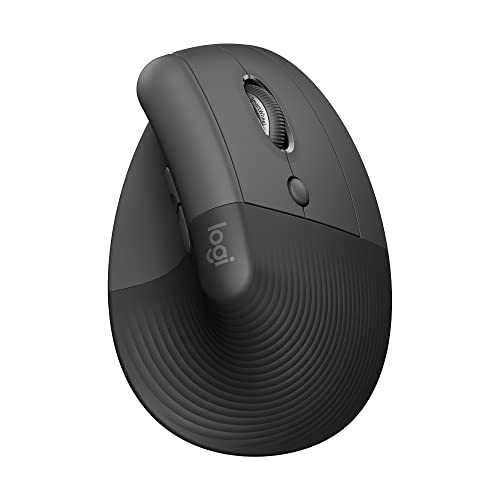
- Fits small to medium right hands
- Quiet clicks and SmartWheel scrolling
- Bluetooth and Logi Bolt connectivity
Best For: Compact Windows workstations and quiet office use
Best Quiet Budget Option
UGREEN Ergonomic Wireless Mouse

- Quiet clicks with five-button layout
- Bluetooth and 2.4 GHz wireless
- Four DPI levels up to 4000
Best For: Medium- to large-handed users needing quiet, flexible connectivity
Multi-Device Wireless Pick

- Connects with up to three devices
- Rechargeable battery and quiet clicks
- Sized for small to medium hands
Best For: Windows users who need rechargeable multi-device wireless connectivity
Simple Wireless Value

- 2.4G USB wireless connection
- Three DPI settings and browser buttons
- Uses replaceable AAA batteries
Best For: Right-handed Windows users seeking uncomplicated wireless comfort
Best Rechargeable Pick
Lekvey Vertical Wireless Mouse

- Rechargeable battery with USB-C charging
- Plug-and-play 2.4GHz Windows connection
- Three DPI levels and browser buttons
Best For: Right-handed users with medium or large hands
Best Multi-Device Option

- Switches among three devices
- USB receiver plus dual Bluetooth channels
- Quiet clicks and three DPI settings
Best For: Small to medium right hands using shared spaces
Best Feature-Rich Design

- Bluetooth and 2.4GHz connectivity
- Rechargeable battery with RGB lighting
- Four DPI settings up to 3200
Best For: Medium to large hands wanting flexible features
Best Overall – Logitech MX Vertical
The Logitech MX Vertical is a strong choice among vertical mice for Windows users who want a pronounced handshake-style grip, a 57-degree angle, and precise tracking. Its 4000 DPI sensor, cursor-speed switch, and wireless connectivity suit everyday office and multitasking work.
Best For: Right-handed Windows users seeking a polished, ergonomic mouse for extended desk work.
Pros:
- 57-degree vertical angle and textured grip support a natural hand position.
- 4000 DPI sensor and cursor-speed switch provide adjustable control.
- Works with Windows 10 and 11, with included receiver and USB-C cable.
Cons:
- Designed for right-handed use only.
- Has four buttons, which may be limiting for shortcut-heavy workflows.
Choose the MX Vertical if comfort-focused design and reliable precision matter more than extensive button customization. Its four-month battery rating and 10-meter range make it well suited to a typical Windows workstation.
Best for Large Hands – ProtoArc EM11 Pro
The ProtoArc EM11 Pro stands out among vertical mice for Windows users with larger hands. Its contoured body is designed for 19.0–21.5 cm hand lengths, while side scrolling, six-button customization, and three-device connectivity support demanding desk setups.
Best For: Large-handed users working across spreadsheets, wide documents, multiple computers, or large monitors.
Pros:
- Large-hand design provides fuller palm support.
- Side scroll wheel is useful for wide spreadsheets and timelines.
- Connects to up to three devices through Bluetooth and 2.4 GHz wireless.
- Adjustable sensitivity reaches 7200 DPI and the battery is rechargeable.
Cons:
- May be uncomfortable for users with small or medium hands.
- Browser-based customization requires access to the configuration tool.
The EM11 Pro is a practical fit when size, side scrolling, and multi-device flexibility are priorities. Measure your hand before buying, since its larger shell is central to the design.
Best for Small to Medium Hands – Logitech Lift
The Logitech Lift is one of the more approachable vertical mice for Windows users with small to medium right hands. Its 57-degree shape, soft grip, quiet clicks, SmartWheel, and customizable buttons are geared toward comfortable everyday productivity.
Best For: Right-handed users with small to medium hands who want quiet, low-maintenance wireless operation.
Pros:
- Designed specifically to fit small to medium right hands.
- Vertical shape and thumb rest encourage a more natural forearm posture.
- Quiet clicks and SmartWheel support focused office work.
- Bluetooth and Logi Bolt connectivity work with Windows 10 and 11.
Cons:
- Not intended for left-handed users.
- Uses a replaceable AA battery rather than a rechargeable battery.
Lift is a sensible pick for compact workstations and users who prefer a smaller vertical mouse. Its stated two-year battery life also reduces charging and battery-maintenance interruptions.
Best Quiet Budget Option – UGREEN Ergonomic Wireless Mouse
The UGREEN Ergonomic Wireless Mouse is a straightforward option among vertical mice for Windows users who want quiet clicks, dual wireless connectivity, and a five-button layout. Its 1000–4000 DPI settings and PTFE glide feet make it suitable for routine office and browsing tasks.
Best For: Medium- to large-handed Windows users seeking quiet, flexible wireless productivity features.
Pros:
- Vertical handshake design is intended to reduce wrist rotation.
- Quiet clicks and five buttons support shared workspaces and productivity.
- Bluetooth and 2.4 GHz wireless connections support up to three devices.
- Compatible with Windows, macOS, Linux, ChromeOS, and Android.
Cons:
- May not suit small hands.
- Maximum sensitivity is 4000 DPI, lower than some productivity-focused alternatives.
- Requires one AA battery.
Consider the UGREEN when quiet operation and broad compatibility are more important than premium extras. Check the hand-size guide first, because the medium-to-large fit is a key purchasing consideration.
Large-Hand Wired Pick – DELUX M618PLUS RGB
For shoppers comparing vertical mice for windows, the DELUX M618PLUS is a strong wired option for large right hands. Its vertical shape, removable wrist rest, silent primary clicks, and plug-and-play USB connection are aimed at comfortable, consistent desk use.
Best For: Right-handed Windows users with large hands who want a stable wired connection and extensive customization.
Pros:
- Designed for hands measuring approximately 6.7–7.5 inches long and 3.1–3.9 inches wide.
- Reliable 1.6-meter USB cable with plug-and-play setup and no driver required for basic use.
- Six DPI levels, six programmable buttons, removable wrist rest, and switchable RGB lighting.
- Silent left, right, and scroll-wheel clicks reduce operating noise.
Cons:
- Its large 210-gram body may not suit smaller hands or users seeking a lightweight mouse.
- Right-handed design limits flexibility for left-handed users.
- Users may need several days to adjust to the vertical shape; advanced customization requires the driver.
The DELUX is the most feature-rich choice here for large-handed Windows users who do not mind a cable. Choose it when wrist support, quiet clicking, RGB, and programmable controls matter more than portability.
Multi-Device Wireless Pick – ProtoArc EM11 NL
Among vertical mice for windows, the rechargeable ProtoArc EM11 NL stands out for flexible wireless connectivity. It can connect to up to three devices through dual Bluetooth and a 2.4G USB-A receiver, while its vertical grip is sized for small to medium hands.
Best For: Right-handed users with hands under 7.5 inches who switch between Windows computers and other compatible devices.
Pros:
- Supports simultaneous connections to up to three devices using Bluetooth and 2.4G USB-A.
- Built-in 500mAh rechargeable battery and included USB-C charging cable.
- Vertical design encourages a more neutral wrist and forearm position, with quiet left and right clicks.
- Offers 1000, 1600, and 2400 DPI settings plus forward and back buttons.
Cons:
- It is right-handed and may require one to two weeks of adjustment.
- Buttons are not programmable, and forward/back buttons do not work with Mac OS.
- The included USB-C cable is for charging only; the receiver is USB-A, not USB-C.
The EM11 NL is a practical choice for a wireless Windows setup that spans multiple devices. Measure your hand first, and expect an adjustment period before judging the vertical shape.
Simple Wireless Value – Anker Vertical Mouse
The Anker vertical mouse is a straightforward option for shoppers seeking vertical mice for windows without rechargeable features or Bluetooth. It uses a 2.4G USB receiver, offers three DPI settings, and includes navigation buttons for routine browsing and office work.
Best For: Right-handed Windows users who want a simple, battery-powered vertical mouse with basic wireless functionality.
Pros:
- Vertical “handshake” design aims to support a neutral wrist and arm position.
- Three DPI settings—800, 1200, and 1600—provide adjustable optical tracking.
- Next and previous buttons simplify webpage navigation.
- Power-saving mode activates after eight minutes of inactivity, and an 18-month warranty is included.
Cons:
- Uses a 2.4G USB receiver rather than Bluetooth.
- Requires two AAA batteries, which are not included.
- Clicks are not silent, and the design is intended for right-handed use.
The Anker keeps the feature set simple and familiar, making it suitable for everyday Windows work. Pick it if you prefer replaceable batteries and basic wireless operation over rechargeable power or multi-device pairing.
Best Rechargeable Pick – Lekvey Vertical Wireless Mouse
For shoppers comparing vertical mice for windows, the Lekvey is a practical right-handed option with a neutral handshake-style grip, wireless USB setup, and rechargeable power. Its three DPI settings and browser navigation buttons suit everyday office and home computing.
Best For: Windows users with medium or large hands who want a rechargeable vertical mouse for daily work and browsing.
Pros:
- Ergonomic vertical shape encourages a more neutral wrist and arm position.
- Rechargeable 600mAh battery can last about 3–4 weeks with regular use, according to the supplied notes.
- Plug-and-play 2.4GHz USB receiver works with Windows 2000 through Windows 11.
- Offers three DPI levels plus forward and back buttons.
Cons:
- Designed for right-handed use and recommended for medium or large hands.
- Buttons are not programmable.
- Uses a USB receiver rather than Bluetooth.
The Lekvey stands out if you prefer a simple wireless connection and do not want to replace disposable batteries. Allow a short adjustment period when moving from a conventional mouse to its vertical shape.
Best Multi-Device Option – seenda 52° Vertical Mouse
The seenda is one of the more flexible vertical mice for windows, combining a 52-degree grip with a USB receiver and two Bluetooth channels. It is aimed at small to medium right hands and adds quiet clicks, adjustable DPI, and a distinctive purple finish.
Best For: Windows users who switch among a desktop, laptop, and tablet and prefer quiet operation.
Pros:
- Connects with 2.4GHz USB or two Bluetooth channels and supports up to three devices.
- 52-degree vertical design, sculpted palm shape, and silicone thumb rest support a steadier grip.
- Quiet left and right clicks are tested under 40 dB.
- Provides 1000, 1600, and 2400 DPI settings with forward and back buttons.
Cons:
- Requires one AA battery, which is not included.
- Right-handed design is intended for small to medium hands.
- Forward and back buttons are not supported on macOS.
Choose the seenda when multi-device switching matters more than rechargeable convenience. Its quiet controls make it especially suitable for shared offices, libraries, dorms, and late-night workspaces.
Best Feature-Rich Design – MEETION BTM010 Vertical Mouse
For users seeking vertical mice for windows with broader connectivity and more tracking control, the rechargeable MEETION BTM010 offers Bluetooth and 2.4GHz wireless modes, four DPI settings, and RGB lighting. Its larger body is better suited to medium and large hands.
Best For: Medium- to large-handed Windows users who want rechargeable power, Bluetooth flexibility, and higher DPI adjustment.
Pros:
- Supports dual Bluetooth versions and 2.4GHz wireless connectivity.
- Rechargeable battery provides up to about two months with lighting off, based on the supplied notes.
- Offers four DPI levels from 1200 to 3200 for varied tracking needs.
- Includes RGB lighting, smooth scrolling, and forward/back buttons.
Cons:
- Its 4.3-by-3.1-by-2.8-inch body may not suit smaller hands.
- Forward and backward buttons are not available in Safari.
- The smooth surface may feel less grippy for users who frequently lift the mouse.
The BTM010 is a strong fit when you want more connection choices and DPI range than a basic vertical mouse provides. For the most stable wireless performance in busy environments, the supplied guidance recommends prioritizing Bluetooth.
How We Picked the Best Vertical Mice for Windows
We focused on practical features that matter during everyday Windows use: ergonomic shape, reliable tracking, connection options, button placement, hand-size compatibility, power design, and ease of setup. The selection includes compact and full-size models, quiet-click options, rechargeable mice, USB wireless designs, Bluetooth models, and a wired choice for users who prefer a constant connection.
Because comfort is highly personal, no single shape suits everyone. A good vertical mouse should let your hand rest naturally without forcing your fingers to stretch, your wrist to bend, or your thumb to reach awkwardly for side buttons.
Quick Comparison
| What Matters | Best Fit |
|---|---|
| Premium ergonomic design | Logitech MX Vertical |
| Smaller or medium hands | Logitech Lift or seenda 52° model |
| Larger hands | ProtoArc EM11 Pro or DELUX M618PLUS RGB |
| Bluetooth and 2.4G flexibility | UGREEN or compatible ProtoArc models |
| Simple budget wireless setup | Anker 2.4G Wireless Mouse |
| Wired reliability | DELUX M618PLUS RGB |
Key Buying Factors for Vertical Mice for Windows
Hand Size and Grip Angle
Full-size vertical mice generally provide more palm support, while compact designs can be easier to control with smaller hands. A steeper angle may feel more natural to some users, but a moderate angle can be easier to adapt to when switching from a conventional mouse.
Connection Options
USB receivers are usually simple and dependable for Windows desktops and laptops with an available USB port. Bluetooth is convenient for compatible laptops and tablets, while dual-mode models offer more flexibility. Check whether a receiver is included and whether your computer needs a USB-A adapter.
Power, Charging, and Click Noise
Rechargeable models reduce disposable battery use but require periodic charging. Battery-powered mice may be preferable for travel or uninterrupted use. If you work near others or attend meetings, quiet-click switches can be a useful advantage.
Buttons and Tracking
Consider whether you need forward and back buttons, a side scroll wheel, adjustable sensitivity, or programmable controls. For office work, reliable tracking on your usual desk surface matters more than extreme gaming-style specifications.
Who Should Buy Which Vertical Mice for Windows?
Choose the Logitech MX Vertical if you want a polished, premium ergonomic experience for extended office work. The Logitech Lift is a strong option for users who prefer a smaller, more compact shape. Larger-handed users should start with the ProtoArc EM11 Pro or DELUX M618PLUS RGB.
Pick UGREEN or ProtoArc wireless models if connection flexibility and rechargeable convenience are priorities. The Anker is suited to shoppers who want a straightforward 2.4G setup, while the Lekvey and MEETION models offer practical ergonomic features at approachable prices. Choose the seenda model if you want a compact, colorful Bluetooth design, and select the DELUX wired option when you prefer zero battery management.