The best compact smart home hubs make it easier to connect devices, automate routines, and reduce the number of separate apps you need. The right choice depends on your preferred ecosystem, wireless standards, and how much local control you want.
These 10 hubs range from beginner-friendly bridges to advanced automation platforms, with options for Zigbee, Z-Wave, Matter, Thread, infrared control, and popular voice assistants.
Best 10 Compact Smart Home Hubs Picks for 2026
Best Overall

- Home Assistant OS is preinstalled
- Silent, compact design with 4GB RAM
- Expandable via USB wireless adapters
Best For: Flexible local automation and privacy-focused smart homes
Best for Tapo Devices

- Connects up to 64 Tapo devices
- Low-power protocol helps extend battery life
- Built-in chime and up to 90 dB siren
Best For: Tapo sensors, switches, buttons, and home alerts
Best Multi-Protocol Option

- Supports Matter, Zigbee, and Z-Wave Plus
- Works with SmartThings, Alexa, and Google Home
- Offers Wi-Fi or Ethernet connectivity
Best For: North American mixed-protocol smart homes
Best Compact Matter Bridge
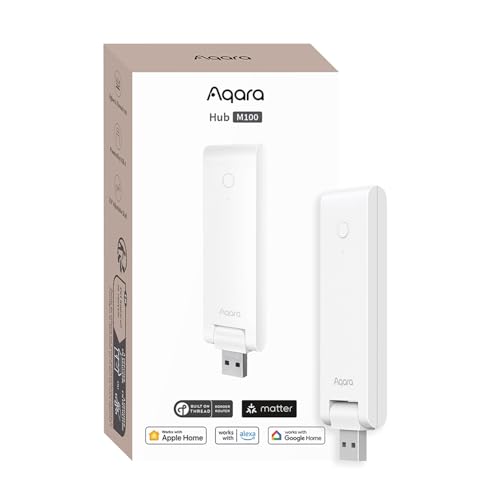
- Bridges Aqara Zigbee devices to Matter ecosystems
- Supports local Zigbee and Matter automation
- Adjustable design with USB-A power
Best For: Aqara setups expanding into Apple Home, Alexa, or Home Assistant
Best Sensor-Rich Hub

- Monitors temperature, humidity, and light
- Learns IR remotes for TVs and air conditioners
- Supports Matter, Alexa, Google Home, and Apple Home
Best For: SwitchBot users wanting sensors and IR control in one hub
Best for Local Automation

- Runs automations locally, even during internet outages
- Supports Zigbee, Matter, Thread, and Ethernet
- Works with 1,000+ brands without a subscription
Best For: Multi-brand homes prioritizing privacy and advanced automation
Best Tuya Budget Bridge
Tuya ZigBee and Bluetooth Gateway

- Connects Tuya Zigbee 3.0 and Bluetooth devices
- Works with Smart Life and Tuya Smart apps
- Adds Alexa and Google Assistant voice control
Best For: Tuya-only homes needing a simple wireless gateway
Best for Lutron Lighting

- Supports up to 75 Caseta devices
- Works with major voice and smart-home platforms
- Simple router and app setup
Best For: Lutron-focused lighting systems
Best for Aqara Automation

- Supports up to 128 Aqara Zigbee devices
- Includes 360-degree IR appliance control
- Offers Ethernet and broad platform integration
Best For: Aqara-centered homes with IR devices
Best for Matter and Thread

- Works across four major smart-home platforms
- Includes Thread Border Router functionality
- Supports up to 150 sub-devices and local automation
Best For: Growing YEELIGHT Matter and Thread setups
Best Overall – Home Assistant Green
Home Assistant Green | Smart Home hub with Advanced Automation | Official Home Assistant Hardware
Check Price On AmazonHome Assistant Green is an approachable choice among compact smart home hubs, especially if you want broad automation control without installing the platform yourself. It arrives with Home Assistant OS installed and uses Ethernet for setup and connectivity.
Best For: Homeowners who want centralized, privacy-focused automation and room to expand with USB-connected Zigbee, Z-Wave, or Thread devices.
Pros:
- Home Assistant is preinstalled for a simpler start.
- Compact, fanless, and silent design with 4GB RAM and 32GB storage.
- Home data stays on the hub, with options to view, share, and export it.
- USB ports support expansion with additional wireless protocols.
Cons:
- Ethernet is the listed network connection, so it is not a wireless-first hub.
- Zigbee, Z-Wave, and Thread connectivity requires separate USB devices.
Choose Home Assistant Green when flexible automation and local data control matter more than an all-in-one wireless radio package. Its simple setup and expandable hardware make it a strong foundation for a growing smart home.
Best for Tapo Devices – Tapo Smart Hub H100
The Tapo Smart Hub H100 is a compact smart home hub for building a focused Tapo ecosystem. It connects Tapo sensors, switches, and buttons over a low-power wireless protocol while connecting to your home network through 2.4GHz Wi-Fi.
Best For: Tapo users who want extended battery life, simple sensor-based actions, and a built-in security chime.
Pros:
- Supports up to 64 Tapo devices.
- Low-power connections can extend compatible device battery life by up to 10 times compared with Wi-Fi devices.
- Offers a built-in siren rated up to 90 dB for compatible security setups.
- Advertised connection distance reaches up to 30 meters, depending on conditions.
Cons:
- Requires a 2.4GHz Wi-Fi network.
- Designed for Tapo sensors, switches, and buttons rather than a broad multi-brand ecosystem.
- Cannot directly connect to Tapo smart plugs or lighting.
The H100 is most practical when your smart home already centers on Tapo products. Its device capacity, low-power protocol, and built-in chime make it useful for basic automation and monitoring, but its ecosystem limitations should be considered first.
Best Multi-Protocol Option – Aeotec Smart Home Hub
The Aeotec Smart Home Hub is a versatile pick among compact smart home hubs, combining SmartThings control with support for Matter, Zigbee, and Z-Wave Plus. It can connect through either Wi-Fi or Ethernet and is managed through the SmartThings app.
Best For: North American households combining devices from multiple supported protocols and using Alexa, Google Assistant, or SmartThings.
Pros:
- Supports Matter, Zigbee, and Z-Wave Plus alongside SmartThings and Wi-Fi.
- Works with Alexa and Google Home voice assistants.
- Supports wired Ethernet or Wi-Fi setup.
- SmartThings automations can run locally for improved speed and reliability.
Cons:
- Designed for use in North America.
- Requires the SmartThings app for setup and management.
- Compatibility still depends on whether individual devices are supported.
This Aeotec hub is a strong fit for shoppers who want protocol flexibility without managing several separate hubs. Its SmartThings foundation and wired-or-wireless networking provide a practical balance for mixed-device homes.
Best Compact Matter Bridge – Aqara Smart Hub M100
The Aqara Smart Hub M100 is a small, flexible option among compact smart home hubs, with Matter bridging plus Aqara Zigbee and Thread support. Its adjustable shaft and USB-A power connection make placement convenient, while local automation can keep compatible routines running without Wi-Fi or cloud access.
Best For: Aqara users who want to bridge supported Zigbee devices into Matter ecosystems such as Apple Home, Alexa, or Home Assistant.
Pros:
- Supports Aqara Zigbee and Thread devices, plus Matter bridging.
- Can run Zigbee and Matter automations locally.
- Flexible USB-A power and a shaft adjustable through 210 degrees.
- Uses 2.4GHz Wi-Fi 6 with WPA3 security.
Cons:
- USB power adapter is not included.
- Supports Aqara Zigbee devices rather than third-party Zigbee devices.
- Capacity is listed as up to 20 Aqara Zigbee and 20 Thread devices.
The M100 makes sense when compact placement and Matter integration are priorities. It is particularly appealing for Aqara households, but buyers should account for the adapter requirement and the limited compatibility with non-Aqara Zigbee products.
Best Sensor-Rich Hub – SwitchBot Hub 2
For shoppers comparing compact smart home hubs, the SwitchBot Hub 2 stands out by combining Wi-Fi connectivity with temperature, humidity, light sensing, infrared control, and Matter support. It is a practical choice for consolidating remotes and building environment-triggered automations.
Best For: SwitchBot households that want indoor climate monitoring, IR appliance control, and compatibility with Alexa, Google Home, or Apple Home.
Pros:
- Measures temperature, humidity, and light, with remote monitoring through Wi-Fi.
- Controls infrared devices such as TVs and air conditioners through the app or voice commands.
- Supports Matter for SwitchBot Lock, Curtains, and Blind Tilts, plus Apple Home integration.
- Includes two physical buttons for simple scene or appliance control.
Cons:
- Wi-Fi connectivity supports 2.4GHz networks.
- Its broadest Matter support is focused on listed SwitchBot products.
- Infrared control is limited by the appliance’s IR compatibility and range.
The Hub 2 is more than a basic bridge: its built-in sensors can trigger scenes, while IR learning helps replace several remotes. Choose it if monitoring room conditions and controlling compatible SwitchBot or IR devices are priorities.
Best for Local Automation – Homey Pro mini
The Homey Pro mini is a strong option among compact smart home hubs for users who want centralized automation and local processing. It supports Zigbee, Matter, Thread, and Ethernet out of the box, while Homey Flow provides tools for creating routines across many brands.
Best For: Multi-brand smart homes that need local control, advanced routines, energy monitoring, and no required subscription.
Pros:
- Processes smart-home data locally, including when the internet is unavailable.
- Supports Zigbee, Matter, Thread, and Ethernet without extra hardware.
- Works with more than 1,000 brands through official and community-developed apps.
- Includes Homey Flow automation and does not require a monthly subscription.
Cons:
- Z-Wave, Bluetooth, and infrared require the separately sold Homey Bridge.
- Advanced workflows may require using the Homey desktop app.
- Brand compatibility should be checked before purchase despite the broad ecosystem.
Homey Pro mini is suited to shoppers building a substantial, mixed-brand system rather than a single-protocol setup. Its local processing, backup options, and subscription-free feature access make it particularly appealing for reliability and privacy-conscious automation.
Best Tuya Budget Bridge – Tuya ZigBee and Bluetooth Gateway
For a Tuya-based setup, this compact smart home hub provides a straightforward way to connect compatible Zigbee and Bluetooth devices over 2.4GHz Wi-Fi. It works with the Smart Life and Tuya Smart apps and adds Alexa and Google Assistant voice control.
Best For: Homes already using Tuya-compatible Zigbee 3.0 or Bluetooth devices that want app and voice control without an Ethernet connection.
Pros:
- Combines Zigbee 3.0 and Bluetooth 5.0 connectivity in one gateway.
- Supports remote control through the Smart Life and Tuya Smart apps.
- Works with Amazon Alexa and Google Assistant voice control.
- Connects over 2.4GHz Wi-Fi and needs only power and app pairing for setup.
Cons:
- Compatible only with devices using Tuya protocols.
- Not compatible with listed blinds, Sengled bulbs, or door locks.
- Uses Micro-USB power and has no need or provision for a network cable.
This gateway makes sense when your devices already belong to the Tuya ecosystem. Its dual-mode radio support is useful for a focused setup, but shoppers with mixed-platform devices should verify compatibility carefully before buying.
Best for Lutron Lighting – Compact Lutron Caseta Hub
The Lutron Caseta Smart Hub is a practical choice among compact smart home hubs for households centered on Caseta lighting. It connects to your router and supports Alexa, Apple HomeKit, Google Assistant, Ring, Serena shades, and Sonos for broader control.
Best For: Homes using Lutron Caseta dimmers and switches that want dependable, app-based and voice-enabled lighting control.
Pros:
- Supports up to 75 Caseta devices.
- Works with Alexa, Apple HomeKit, Google Assistant, Ring, Serena shades, and Sonos.
- Clear Connect Technology operates separately from Wi-Fi-connected devices.
- Simple setup through an outlet connection, router, and Lutron app.
Cons:
- Designed for Lutron Caseta devices, which are sold separately.
- Requires connection to a Wi-Fi router.
This hub is especially appealing if lighting is the foundation of your smart home. Its broad ecosystem support and 75-device capacity make it easier to expand, though it is less suitable as a general-purpose hub for unrelated device brands.
Best for Aqara Automation – Compact Aqara M2 Smart Hub
The Aqara Smart Hub M2 is one of the more versatile compact smart home hubs for Aqara users, combining Zigbee device control, infrared automation, alarm features, and broad platform compatibility. It requires 2.4 GHz Wi-Fi and can also use Ethernet for a more stable connection.
Best For: Aqara-based homes that need alarm routines, IR control for existing appliances, and integration with Alexa, Google Assistant, Apple HomeKit, or IFTTT.
Pros:
- Connects up to 128 Aqara Zigbee devices when compatible repeaters are used.
- 360-degree infrared control works with devices such as TVs, fans, and air conditioners.
- Offers Ethernet connectivity for improved stability and response time.
- Built-in speaker supports alerts, doorbells, alarms, and configurable ringtones.
Cons:
- Requires 2.4 GHz Wi-Fi.
- Supports Aqara Zigbee child devices, not Aqara Thread devices or Zigbee devices from other brands.
- Compatible-platform support varies by sub-device.
The M2 is a strong option when you are committed to Aqara hardware and want more than basic device bridging. Its IR features and Ethernet port add flexibility, but the ecosystem limitations are important to consider before buying.
Best for Matter and Thread – Compact YEELIGHT E1 Hub
The YEELIGHT E1 is a forward-looking choice among compact smart home hubs, combining Matter control, a Thread Border Router, and Wi-Fi or Ethernet networking. It is designed for multi-platform homes using Apple Home, Alexa, Google Home, or SmartThings.
Best For: Expanding smart homes that want local automations, Thread support, and centralized control across multiple major platforms.
Pros:
- Supports Matter control across Apple Home, Alexa, Google Home, and SmartThings.
- Built-in Thread Border Router supports Thread-based Matter devices.
- Supports up to 150 sub-devices.
- Local automation can continue responding during an internet interruption.
Cons:
- The E1 currently supports Matter-enabled YEELIGHT devices.
- For other brands, support is currently limited to color-capable and adjustable color-temperature lights.
- Its single-band connectivity is listed as 802.11b-compatible Wi-Fi.
The E1 makes the most sense for users building around YEELIGHT Matter products or experimenting with local, multi-platform automation. Its 150-device capacity and Home Assistant compatibility offer room to grow, but third-party Matter support remains limited.
How We Picked the Best Compact Smart Home Hubs
We focused on hubs that offer a practical combination of size, connectivity, compatibility, and automation features. Each model was assessed for supported wireless protocols, ecosystem integration, setup requirements, expansion potential, and the types of devices it can control. We also considered whether a hub is best suited to a specific brand ecosystem or works as a broader smart-home controller.
Because “compact” does not mean the same thing for every buyer, we included small bridges for lights and sensors alongside more capable controllers designed to coordinate a larger home.
Quick Comparison
| Best For | What to Look For |
|---|---|
| Simple brand-specific setups | Easy pairing and reliable app support |
| Mixed-device homes | Matter, Zigbee, Thread, or Z-Wave compatibility |
| Advanced automation | Local processing, flexible rules, and broad integrations |
| Remote controls and appliances | Infrared support and scheduling features |
| Voice-controlled homes | Alexa, Google Home, Apple Home, or Siri compatibility |
Key Buying Factors for Compact Smart Home Hubs
Wireless Protocols
Check which standards your existing and planned devices use. Zigbee and Z-Wave remain useful for sensors, switches, and locks, while Matter improves cross-platform compatibility. Thread can help create a responsive, low-power mesh network, but it may require a compatible border router.
Ecosystem Compatibility
Choose a hub that fits your preferred control platform. Apple Home, Alexa, Google Home, SmartThings, and Home Assistant can differ in setup, device support, and automation depth. Compatibility claims should be checked against the specific devices you own.
Local Versus Cloud Control
Local processing can improve response times and keep core routines working during internet outages. Cloud-dependent hubs may be simpler to configure but can rely more heavily on account access and external services.
Network and Power Requirements
Some hubs need 2.4GHz Wi-Fi, while others use Ethernet or require a wired connection. Confirm your router supports the required band and that the hub can be placed centrally enough for dependable coverage.
Future Expansion
Think beyond your first few devices. A basic bridge may be ideal for one brand, but a broader hub can be more economical if you plan to add locks, thermostats, sensors, lighting, or security equipment later.
Who Should Buy Which Compact Smart Home Hubs?
Choose a brand-focused hub if you mainly use one manufacturer’s lights, sensors, or switches and want straightforward setup. Buyers building a mixed smart home should prioritize Matter and support for the protocols already in use. Home Assistant Green and Homey Pro mini are better suited to users who want deeper automation and customization.
For households centered on Lutron Caseta, the Lutron hub is the logical choice. Aqara, Tapo, SwitchBot, and Yeelight hubs make sense when their connected accessories are the main priority. Aeotec is worth considering for SmartThings users and homes that need Z-Wave or Zigbee support, while a Tuya-compatible gateway can suit budget-conscious users with compatible accessories. Before buying, confirm device compatibility, connection requirements, and whether the hub supports the automations you actually need.