The best network switches make it easier to connect computers, access points, cameras, consoles, printers, and other wired devices without relying on Wi-Fi for everything. The right model depends on port count, speed, PoE support, management features, and where you plan to install it.
We selected 10 options ranging from compact five-port plug-and-play switches to 24-port models and a 2.5Gbps multi-gig switch. Use the guide below to narrow the list by network size, device type, and upgrade plans.
Best 10 Network Switches Picks for 2026
Best Compact Pick
TP-Link TL-SG105 5-Port Gigabit Switch
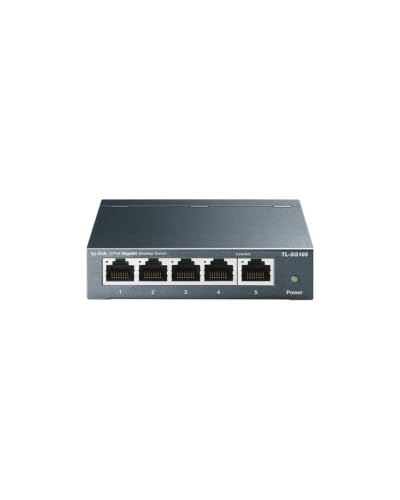
- Five gigabit RJ45 ports
- Fanless metal desktop or wall-mount design
- QoS and IGMP Snooping included
Best For: Small wired networks needing quiet, simple expansion
Best Simple Setup
NETGEAR GS305 5-Port Gigabit Switch

- Five 1Gbps Ethernet ports
- Plug-and-play with no configuration
- Fanless metal design with flexible mounting
Best For: Basic U.S. or Canadian home and office networks
Best PoE Value
TP-Link TL-SG1005P 5-Port PoE+ Switch

- Four PoE+ ports up to 30W each
- 65W total PoE power budget
- One additional non-PoE gigabit port
Best For: Small networks powering compatible PoE devices
Best for More Connections
NETGEAR GS308 8-Port Gigabit Switch
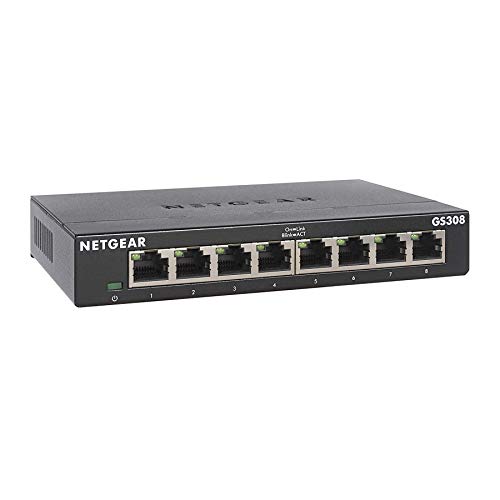
- Eight 1Gbps Ethernet ports
- Plug-and-play unmanaged operation
- Silent, energy-efficient metal design
Best For: Small networks needing extra wired gigabit ports
Best Managed Pick
TP-Link 8-Port Easy Smart Gigabit Switch
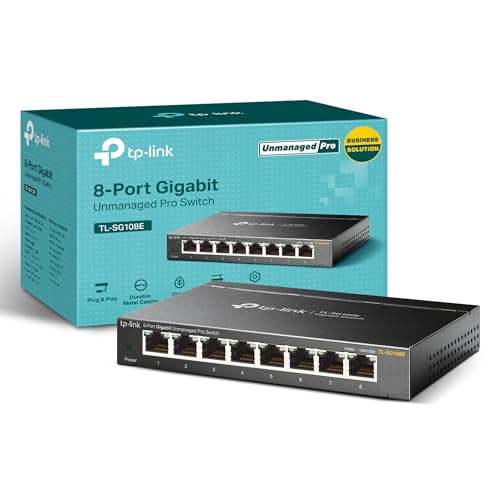
- Eight Gigabit Ethernet ports
- VLAN, QoS, and monitoring tools
- Metal desktop or wall-mount design
Best For: Manageable home and small-office networks
Best for Many Devices
NETGEAR 24-Port Gigabit Unmanaged Switch

- 24 Gigabit Ethernet ports
- No configuration or software required
- Fanless with desktop, wall, or rack mounting
Best For: Large wired home or office setups
Best Multi-Gig Upgrade
TP-Link 8-Port 2.5G Unmanaged Switch

- Eight 2.5Gbps ports
- Up to 40Gbps switching capacity
- Silent fanless operation
Best For: Multi-gig home networks, gaming, and NAS setups
Best with Extra Features
TP-Link TL-SG108 8-Port Gigabit Switch

- Eight Gigabit Ethernet ports
- Fanless, quiet operation
- Plug-and-play metal design
Best For: Small, quiet home-office networks
Best Mid-Size Expansion
TP-Link TL-SG116 16-Port Gigabit Switch
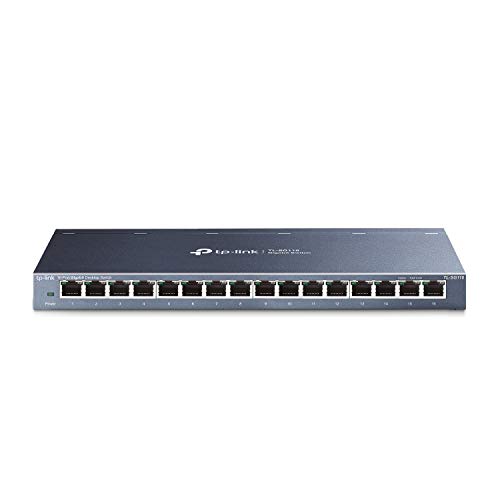
- Sixteen Gigabit ports
- Fanless metal enclosure
- QoS and IGMP Snooping support
Best For: Growing home and small-business networks
Best High-Capacity Pick
TP-Link TL-SG1024S 24-Port Switch
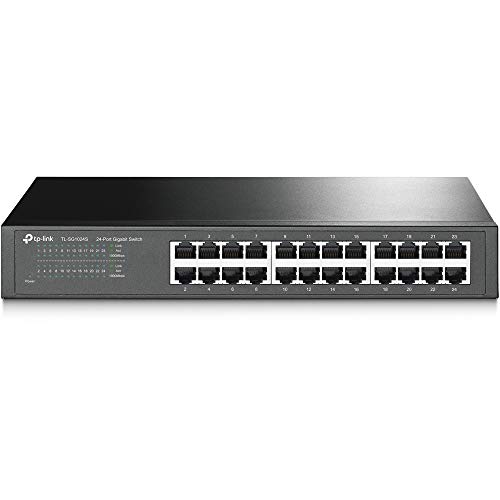
- Twenty-four Gigabit ports
- Desktop or 1U rackmount design
- Fanless metal construction
Best For: Larger offices and high-device-count networks
Best Compact Pick – TP-Link TL-SG105 5-Port Gigabit Switch
If you need a small, quiet way to expand a wired network, the TP-Link TL-SG105 is a practical choice among network switches. Its five gigabit ports, plug-and-play setup, fanless design, and metal housing suit home offices, entertainment setups, and other space-conscious installations.
Best For: Small wired networks that need simple gigabit expansion in a desktop or wall-mounted format.
Pros:
- Five 10/100/1000Mbps ports support auto-negotiation and Auto MDI/MDIX.
- Fanless operation and a durable metal case support quiet, flexible placement.
- QoS and IGMP Snooping can help prioritize voice, video, and other traffic.
- Energy-efficient technology helps reduce power consumption.
Cons:
- Only five ports are available, limiting expansion for larger networks.
- This is an unmanaged switch, so advanced configuration options are limited.
The TL-SG105 balances useful traffic features with easy installation and a compact footprint. It is a strong fit when you want dependable gigabit connectivity without software setup or active cooling.
Best Simple Setup – NETGEAR GS305 5-Port Gigabit Switch
The NETGEAR GS305 is one of the straightforward network switches for adding wired connections without configuration. It provides five 1Gbps ports, automatic speed negotiation, silent fanless operation, and desktop or wall-mount flexibility.
Best For: U.S. and Canadian home or office users who want a basic, quiet gigabit switch.
Pros:
- Five 1.0Gbps ports work with existing Cat5e or Cat6 Ethernet cables.
- Plug-and-play operation requires no software installation or configuration.
- Fanless, energy-efficient design supports silent operation.
- Compact metal housing can sit on a desk or mount on a wall.
Cons:
- It has no more than five Ethernet ports for connected devices.
- The supplied notes specify regional compatibility for U.S. and Canada only.
For a small installation where simplicity matters more than management features, the GS305 is an easy recommendation. Automatic negotiation and silent operation make it especially convenient for everyday home or office networking.
Best PoE Value – TP-Link TL-SG1005P 5-Port PoE+ Switch
The TP-Link TL-SG1005P stands out among network switches when connected devices need both data and power over Ethernet. Four PoE+ ports provide up to 30W per port within a 65W total budget, while a fifth gigabit port handles a non-PoE connection.
Best For: Small installations using compatible IEEE 802.3af/at devices such as powered network hardware.
Pros:
- Four 10/100/1000Mbps PoE+ ports provide up to 30W per port.
- A 65W total PoE budget supports multiple compatible powered devices.
- The fifth gigabit RJ45 port provides a non-PoE connection.
- Fanless cooling, a metal case, QoS, and IGMP Snooping add practical flexibility.
Cons:
- PoE works with compatible IEEE 802.3af/at powered devices only.
- The total 65W budget may limit simultaneous high-power device use.
This model is more specialized than a standard unmanaged switch, but its integrated PoE makes installation cleaner for compatible devices. Confirm the power requirements of your equipment before relying on the full port count.
Best for More Connections – NETGEAR GS308 8-Port Gigabit Switch
With eight gigabit Ethernet ports, the NETGEAR GS308 gives you more room to connect computers, servers, switches, and other wired hardware than a five-port model. Its plug-and-play setup, fanless operation, and desktop or wall-mount design make it a convenient expansion switch.
Best For: Home offices and small networks that need several additional gigabit connections.
Pros:
- Eight 1.0Gbps ports provide useful capacity for growing wired networks.
- Auto-negotiating ports work with Cat5e and Cat6 Ethernet cables.
- No software or configuration is required for setup.
- Fanless, energy-efficient operation and flexible mounting support quiet installation.
Cons:
- It is an unmanaged switch without advanced network configuration controls.
- The supplied notes specify regional compatibility for U.S. and Canada only.
The GS308 is a sensible step up when five ports are not enough but you still want a simple, low-maintenance setup. Its eight-port layout offers practical expansion without adding configuration complexity.
Best Managed Pick – TP-Link 8-Port Easy Smart Gigabit Switch
For network switches that offer more control than a basic plug-and-play model, the TP-Link TL-SG108E combines eight Gigabit ports with practical management tools. Its web interface or free software supports VLANs, QoS, monitoring, and other Layer 2 features for home or small-office networks.
Best For: Home users and small offices that need manageable traffic segmentation and monitoring in a compact switch.
Pros:
- Eight auto-negotiating 10/100/1000Mbps Ethernet ports
- Supports VLANs, QoS, port mirroring, loop prevention, and cable diagnostics
- Sturdy metal design with desktop or wall-mount installation
- Backed by a stated three-year warranty and free technical support
Cons:
- Management features require configuration through a web interface or software
- Offers Gigabit connectivity rather than multi-gigabit speeds
The TL-SG108E is a strong choice when basic connectivity is not enough. Its eight ports and useful management features provide room to organize and monitor a growing wired network without moving to a larger, more complex switch.
Best for Many Devices – NETGEAR 24-Port Gigabit Unmanaged Switch
Among network switches for expanding a wired setup, the NETGEAR GS324 stands out with 24 Gigabit Ethernet ports and a straightforward unmanaged design. It requires no software or configuration, making it a practical option for connecting numerous computers, entertainment devices, access points, and other Ethernet-equipped hardware.
Best For: Homes, offices, and workspaces that need many wired connections with minimal setup.
Pros:
- Provides 24 1.0Gbps Ethernet ports
- Plug-and-play operation with no software or configuration required
- Fanless design supports silent operation
- Supports desktop, wall-mount, or rack-mount placement
Cons:
- Unmanaged design does not provide VLAN, QoS, or monitoring controls
- Listed for use in the U.S. and Canada only
- Larger footprint than an eight-port desktop switch
If port count is the priority, the GS324 offers a simple way to bring up to 24 wired devices onto a Gigabit network. Its fanless metal enclosure and flexible mounting options also suit installations where quiet operation and tidy placement matter.
Best Multi-Gig Upgrade – TP-Link 8-Port 2.5G Unmanaged Switch
For network switches designed to move beyond standard Gigabit speeds, the TP-Link TL-SG108S-M2 provides eight 2.5Gbps ports and up to 40Gbps of switching capacity. Auto-negotiation supports 100Mbps, 1Gbps, and 2.5Gbps connections, making it suitable for compatible Wi-Fi 6 access points, NAS devices, workstations, and gaming systems.
Best For: Home networks, LAN parties, and small offices with multi-gigabit devices or fast local file-transfer needs.
Pros:
- Eight 2.5-Gigabit Ethernet ports provide up to 40Gbps switching capacity
- Auto-negotiates between 100Mbps, 1Gbps, and 2.5Gbps
- Can upgrade compatible networks without requiring Cat6 wiring
- Fanless design delivers silent operation
Cons:
- Unmanaged, so it lacks VLAN, QoS, and monitoring controls
- Benefits depend on having compatible multi-gigabit devices
- Plastic enclosure may feel less substantial than a metal switch
The TL-SG108S-M2 is a sensible upgrade for users who need faster local connections without adding network-management complexity. Its eight multi-gigabit ports and silent operation make it especially appealing for modern home entertainment, storage, gaming, and workstation setups.
Best with Extra Features – TP-Link TL-SG108 8-Port Gigabit Switch
The TP-Link TL-SG108 is a practical choice when you need to add wired connections without complicated setup. This unmanaged network switch provides eight Gigabit Ethernet ports, operates quietly without a fan, and fits well in home offices, bedrooms, or other noise-sensitive spaces.
Best For: Home offices and small setups that need a quiet, plug-and-play network switch.
Pros:
- Eight 10/100/1000 Mbps ports support computers, printers, gaming consoles, and other Ethernet devices.
- Fanless design provides silent operation.
- Sturdy metal housing and shielded ports support heat dissipation and EMI protection.
- Automatic power adjustment helps reduce energy use based on link status and cable length.
Cons:
- Eight ports may be limiting for larger networks.
- As an unmanaged switch, it does not provide advanced configuration controls.
With its compact form, simple installation, and quiet metal construction, the TL-SG108 is a straightforward way to expand a small wired network while retaining Gigabit speeds.
Best Mid-Size Expansion – TP-Link TL-SG116 16-Port Gigabit Switch
The TP-Link TL-SG116 is designed for users who need more wired connections than a compact switch provides. Its 16 Gigabit ports, fanless metal enclosure, and plug-and-play setup make it a convenient network switch for growing home or small-business networks.
Best For: Expanding networks with multiple wired devices while keeping operation quiet and installation simple.
Pros:
- Sixteen 10/100/1000 Mbps RJ45 ports provide room for network expansion.
- Fanless design supports quiet operation.
- Port-based 802.1p/DSCP QoS and IGMP Snooping help prioritize video or voice traffic.
- Metal housing supports durability, while desktop or wall mounting adds placement flexibility.
Cons:
- Its larger footprint is less convenient than an 8-port model for compact spaces.
- It is an unmanaged switch, so configuration options remain limited.
The TL-SG116 offers a useful balance of capacity and simplicity. It is a strong fit when 16 Gigabit connections and basic traffic-optimization features matter more than advanced network management.
Best High-Capacity Pick – TP-Link TL-SG1024S 24-Port Switch
The TP-Link TL-SG1024S is built for networks that need many wired connections in one unit. This 24-port Gigabit network switch supports desktop or rackmount placement, uses a fanless design for quiet operation, and provides a metal chassis for durability and heat dissipation.
Best For: Larger wired networks, offices, and setups that need desktop or standard 1U rackmount installation.
Pros:
- Twenty-four 10/100/1000 Mbps RJ45 ports provide substantial expansion capacity.
- Rackmount-compatible design fits standard 1U racks and includes mounting hardware.
- Fanless construction supports whisper-quiet operation.
- Metal casing offers durability, heat dissipation, and EMI protection.
Cons:
- Its larger size and 3.4-pound weight require more installation space.
- As an unmanaged switch, it does not offer advanced network configuration.
- May provide more ports than smaller home networks require.
For offices or equipment areas with many wired endpoints, the TL-SG1024S delivers high port density without adding fan noise. Its rackmount support makes it especially practical for organized network installations.
How We Picked These Network Switches
We focused on practical features that matter in real home, office, gaming, and small-business networks. The selection includes unmanaged switches for simple expansion, an easy-smart managed model for basic VLAN and QoS control, a PoE option for compatible powered devices, and a multi-gig switch for newer high-speed hardware.
We also considered port counts, Gigabit versus 2.5Gbps performance, fanless operation, metal construction, shielded ports, desktop or rack-friendly designs, and the convenience of plug-and-play installation. Because network requirements vary, no single switch is ideal for every setup.
Quick Comparison
- Best for a small setup: A five-port Gigabit switch is suitable for a few wired devices near a router or desktop.
- Best for growing networks: Eight- and 16-port switches provide room for printers, access points, consoles, cameras, and additional computers.
- Best for many devices: A 24-port model works well in offices, media rooms, labs, and structured wiring cabinets.
- Best for powered equipment: A PoE+ switch can deliver both data and power to compatible cameras, access points, and VoIP devices.
- Best for faster-than-Gigabit connections: A 2.5Gbps switch is the better fit for multi-gig internet, NAS transfers, or newer computers.
Key Buying Factors for Network Switches
Port Count and Layout
Count the devices you need to connect now, then leave several spare ports for future expansion. Five ports suit small installations, while 16- and 24-port models reduce the need to replace the switch as your network grows.
Speed and Compatibility
Gigabit Ethernet remains appropriate for most home and office devices. Choose a 2.5Gbps model if your router, NAS, computers, or internet service can use speeds above 1Gbps. Multi-gig switches generally negotiate down to slower Ethernet speeds, but confirm compatibility for your specific hardware.
PoE Requirements
PoE is useful for access points, security cameras, and VoIP phones because one Ethernet cable can carry power and data. Check the switch’s total power budget and the requirements of each connected device rather than looking only at the number of PoE ports.
Managed Versus Unmanaged Operation
Unmanaged switches are the simplest choice: connect the cables and start using the network. Easy-smart models add controls such as VLANs, QoS, and traffic monitoring, which can help prioritize calls, separate devices, or improve control in a more advanced network.
Installation and Noise
Fanless metal switches are often a good choice for bedrooms, offices, and entertainment centers because they operate quietly. For wiring closets or equipment racks, check dimensions, mounting options, cable access, and heat ventilation before buying.
Who Should Buy Which Network Switches?
Choose a compact five-port Gigabit switch for a desk, TV stand, home office, or small group of wired devices. Move to an eight-port model if you need additional room for gaming consoles, printers, streaming hardware, or an access point.
Buy a 16-port switch when several rooms or workstations need wired connections, and choose a 24-port model for a larger office, home lab, or centralized patch-panel setup. Select the PoE model if you need to power compatible network equipment through Ethernet. Finally, choose the 2.5Gbps option when your network hardware and file-transfer needs justify multi-gig performance.