The right memory card reader can make the difference between a smooth transfer workflow and a frustrating bottleneck after a shoot. Photographers need more than a reader that simply fits a card—they need dependable connections, useful format support, and speeds that match their camera and computer.
We compared 10 versatile options, from compact USB-C adapters to professional CFexpress readers and multi-slot hubs, to help you choose the best fit for your camera bag, editing setup, and mobile workflow.
Best 10 Memory Card Readers for Photographers Picks for 2026
Best All-in-One Hub
UGREEN 4-Slot USB 3.0 Card Reader
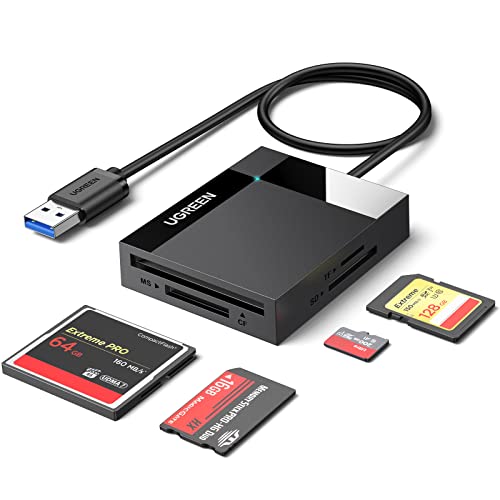
- Reads SD, microSD, CF, and Memory Stick cards
- Supports four cards simultaneously
- USB 3.0 speeds up to 5Gbps
Best For: Photographers using several card formats
Best High-Speed Pro Pick
ProGrade CFexpress Type B & SD Reader
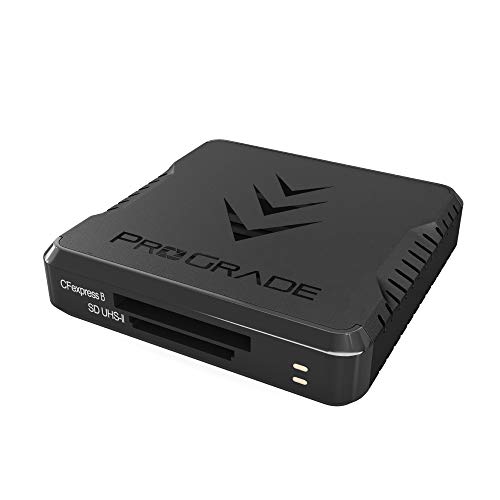
- Supports CFexpress Type B and SD cards
- Up to 1.25GB/s transfer speed
- Transfers both cards simultaneously
Best For: Professional CFexpress and SD workflows
Best Dual-Interface Value
BENFEI 4-in-1 USB-C Card Reader

- USB-C and USB 3.0 connectivity
- Four card formats with simultaneous access
- Up to 160MB/s in UHS-I mode
Best For: Mixed USB-C and USB-A photography setups
Best Compact Travel Pick

- Lightweight 37-gram travel design
- USB-C and USB-A interfaces
- Reads SD and microSD simultaneously
Best For: Mobile photographers using SD and microSD cards
Most Versatile
7-in-1 USB-C Memory Card Reader

- Supports SD, TF, CF, MS, and XD cards
- Reads up to five cards at once
- USB-C speeds rated up to 5Gbps
Best For: Photographers managing multiple card formats
Best for Travel
PGYTECH Card Reader and Storage Case

- Stores SD, TF, and Nano SIM cards
- Reads SD and TF cards simultaneously
- USB 3.1 speeds rated up to 312MB/s
Best For: Photographers who need organized, protected card storage on the go
Best Dual-Connector Value

- Works with USB-C and USB ports
- Supports SD, microSD, CF, and MS cards
- Plug-and-play file transfers
Best For: Photographers using both modern and legacy devices
Best Compact Dual-Slot Pick
Acer USB-C Dual-Slot Card Reader

- Simultaneous SD and microSD reading and writing
- USB-C and USB-A connectors with 5Gbps USB 3.0
- Compact, plug-and-play design for travel
Best For: Photographers using SD and microSD cards across USB-C and USB-A devices
Best Multi-Format Pick

- Supports CF, SD, microSD, XD, and MS cards
- Reads and writes up to five cards simultaneously
- USB-C and USB-A with 5Gbps USB 3.0 transfer
Best For: Photographers managing cameras and archives with varied card formats
Best USB-C Workflow Pick

- Supports SD and microSD card families
- USB-C connection plus a USB-A expansion port
- Plug-and-play compatibility with many phones and tablets
Best For: Photographers transferring files to USB-C phones, iPads, and laptops
Best All-in-One Hub – UGREEN 4-Slot USB 3.0 Card Reader
For photographers working with several card formats, this UGREEN model is a versatile choice among memory card readers for photographers. It combines SD, microSD, CompactFlash, and Memory Stick slots with USB 3.0 transfer speeds up to 5Gbps, making it useful for consolidating files at home or on the go.
Best For: Photographers who use multiple card formats and want to read or write up to four cards simultaneously.
Pros:
- Supports SD, microSD, CompactFlash, and Memory Stick formats.
- Can read and write four different memory cards at the same time.
- USB 3.0 offers transfer rates up to 5Gbps.
- Works with Windows, macOS, Linux, and ChromeOS.
Cons:
- Uses a USB connection rather than a built-in USB-C-only design.
- The 1.7-foot cable adds flexibility but takes up more space than a compact directly attached reader.
With broad format support and simultaneous four-card access, this is a practical workflow tool for photographers managing cards from multiple cameras or devices. Its compact body also makes it suitable for mobile workstations.
Best High-Speed Pro Pick – ProGrade CFexpress Type B & SD Reader
Photographers and videographers using modern high-performance cards may prefer this ProGrade Digital reader. It supports CFexpress Type B and SD cards, with USB 3.2 Gen 2 connectivity and transfer speeds up to 1.25GB/s from both cards simultaneously.
Best For: Professional imaging workflows that use CFexpress Type B and SD cards and prioritize fast downloads.
Pros:
- Supports CFexpress Type B and SD card formats.
- Transfers data at up to 1.25GB/s, according to the supplied specifications.
- Can transfer from both cards simultaneously.
- Includes a magnetic mounting system and a two-year warranty.
Cons:
- Supports only two card slots.
- Designed around USB 3.2 Gen 2 rather than a broad range of legacy card formats.
- Its performance depends on compatible cards and the connected USB hardware.
This is the most specialized option in the group, trading broad compatibility for CFexpress Type B and SD workflow speed. The magnetic mounting plate is especially useful when creating a compact editing setup on the road.
Best Dual-Interface Value – BENFEI 4-in-1 USB-C Card Reader
This BENFEI adapter is a flexible option for photographers moving between newer USB-C devices and conventional USB ports. It includes SD, microSD, Memory Stick, and CompactFlash slots, while its integrated USB-C and USB 3.0 design supports transfer rates up to 160MB/s in UHS-I mode.
Best For: Photographers who need four card formats and connectivity with both USB-C and USB-A computers, tablets, or phones.
Pros:
- Combines USB-C and USB 3.0 connectivity in one integrated design.
- Supports SD, microSD, Memory Stick, and CompactFlash cards.
- Can read and write four cards simultaneously.
- Includes an 18-month warranty.
Cons:
- Its listed 160MB/s speed is below the maximum advertised by the faster USB 3.2 reader.
- Does not support standard Memory Stick, Memory Stick Micro, or CF Type I, according to the supplied notes.
- SDXC exFAT compatibility may be limited on older operating systems.
For photographers with mixed devices, the dual-interface design is the main advantage. It offers extensive card-format coverage and simultaneous access without requiring a separate USB-C or USB-A reader.
Best Compact Travel Pick – UGREEN USB-C and USB-A Reader
For photographers who want a small reader for a camera bag or laptop sleeve, this UGREEN model offers dual USB-C and USB-A connectivity in a 37-gram design. It handles SD and microSD cards simultaneously and supports USB 3.0 transfer speeds up to 5Gbps.
Best For: Mobile photographers using SD and microSD cards with USB-C and USB-A laptops, tablets, phones, or cameras.
Pros:
- Compact, lightweight design for travel.
- Built-in USB-C and USB-A interfaces improve device flexibility.
- Reads SD and microSD cards at the same time.
- Supports Windows, macOS, Android, ChromeOS, and Linux.
Cons:
- Supports two card slots rather than four.
- Does not include CompactFlash or Memory Stick support.
- Transfer performance depends on the card and connected USB port.
This reader is a strong fit for photographers who mainly use SD and microSD media and value portability. Its dual-interface design avoids carrying separate adapters for USB-C and USB-A devices.
Most Versatile – 7-in-1 USB-C Memory Card Reader
For photographers working with several camera formats, this 7-in-1 reader is a flexible choice among memory card readers for photographers. Its USB-C connection, broad card support, and ability to read multiple cards at once make it useful for moving photos and videos between cameras, phones, tablets, and laptops.
Best For: Photographers who use SD, microSD, CompactFlash, Memory Stick, or XD cards and want one reader for multiple devices.
Pros:
- Seven slots support SD, TF/microSD, CF, MS, and XD cards.
- Can read up to five cards simultaneously.
- USB-C transfer speeds are rated up to 5Gbps, with no app required.
- Compact aluminum-alloy construction and independent slot indicator lights.
Cons:
- Designed primarily for USB-C devices, so older USB-A equipment may need an adapter.
- The many-slot design may be more than needed for photographers using only SD cards.
This is a strong all-purpose option when your workflow spans multiple card types. Its broad compatibility and simultaneous card access prioritize flexibility and convenience over a minimal single-slot design.
Best for Travel – PGYTECH Card Reader and Storage Case
This PGYTECH model combines a memory card reader with protective storage, making it a practical pick among memory card readers for photographers who travel. The case holds SD and TF cards while the USB-C reader supports simultaneous transfers from both card slots.
Best For: Traveling photographers who want card organization, protection, and a reader in one compact case.
Pros:
- Combines card storage and reader functions in one case.
- Holds four SD cards, four TF cards, two Nano SIM cards, and an eject pin.
- USB 3.1 transmission is rated up to 312MB/s with SD 4.0 cards.
- Aluminum shell, rubber protection, carabiner, and stated IP54 water resistance.
Cons:
- USB-C devices must support OTG for phone and tablet transfers.
- A USB-C-to-USB-A adapter is required for desktop computers with USB-A ports.
- It supports SD and TF cards rather than the broader range of formats offered by some multi-card readers.
The integrated case is the main advantage here: it reduces loose-card clutter while adding protection for travel. Consider it especially if your cameras use SD or microSD and you value organization as much as transfer speed.
Best Dual-Connector Value – 4-in-1 USB-C Card Reader
This 4-in-1 reader is a straightforward option among memory card readers for photographers who need compatibility with both newer USB-C devices and older USB computers. It includes SD, microSD, CompactFlash, and Memory Stick slots, plus a detachable USB-C-to-USB adapter.
Best For: Photographers transferring files across USB-C phones, tablets, Macs, and legacy USB computers.
Pros:
- Supports SD, microSD, CompactFlash, and Memory Stick cards.
- Dual-connector design works with USB-C and USB ports.
- Plug-and-play operation requires no additional driver, software, or network.
- Supports common JPEG, RAW, H.264, and MPEG-4 files.
Cons:
- The listed transfer rate is 480Mbps, lower than the faster-rated alternatives here.
- It has four card slots and does not support XD cards.
- Wi-Fi SD cards are not supported.
The detachable adapter gives this reader useful cross-platform flexibility, particularly for photographers using a mix of current and older computers. It is best viewed as a compatibility-focused choice rather than a maximum-speed reader.
Best Compact Dual-Slot Pick – Acer USB-C Dual-Slot Card Reader
For photographers who want a compact option among memory card readers for photographers, this Acer model combines SD and microSD support with both USB-C and USB-A connectivity. Its 5Gbps USB 3.0 transfer rate is suited to moving photos and videos between cards and compatible computers, phones, or tablets.
Best For: Photographers who use both SD and microSD cards and switch between USB-C and USB-A devices.
Pros:
- Reads and writes SD and microSD cards simultaneously.
- Offers USB-C and USB-A connectors with up to 5Gbps transfer speeds.
- Compact aluminum design includes protective port covers and an attached cord.
- Plug-and-play support works with Windows, macOS, Android, and other listed systems.
Cons:
- Does not support CF Express, CF, XQD, MS, or Memory Stick cards.
- Thick device cases may prevent full connector insertion.
- Not compatible with Lightning-port devices.
This is a practical travel reader for photographers whose workflow centers on SD and microSD cards. Choose a broader-format reader if your camera kit includes CF or other legacy card types.
Best Multi-Format Pick – Rocketek 7-in-1 Card Reader
The Rocketek 7-in-1 is a strong choice for photographers seeking memory card readers for photographers that cover a wide range of camera formats. It includes CF, SD, microSD, XD, and MS support, plus USB-C and USB-A connectors, making it useful for mixed-card collections.
Best For: Photographers and editors who work with multiple card formats, including CF, XD, and Memory Stick.
Pros:
- Supports CF, SD, microSD, XD, MS, and related card types.
- Can read and write up to five cards at the same time.
- USB-C and USB-A connectors provide broad device compatibility.
- USB 3.0 transfer speeds reach up to 5Gbps and include USB 2.0/1.1 compatibility.
Cons:
- The larger seven-slot design is less minimal than a basic SD reader.
- The supplied details do not specify support for CF Express cards.
Choose this reader when format flexibility matters more than having the smallest possible accessory. Its simultaneous multi-card capability can also streamline transfers when handling several cards from a shoot.
Best USB-C Workflow Pick – BnmxTek USB-C SD Card Reader
This BnmxTek adapter is designed for photographers moving files directly to USB-C equipment. It supports SD and microSD cards, includes a USB-A expansion port, and works with devices such as iPhone 15 and 16 models, iPads, MacBooks, Android devices, and compatible computers.
Best For: USB-C photographers who transfer photos and videos to newer phones, tablets, laptops, or desktops.
Pros:
- Compatible with SD, SDHC, SDXC, microSD, microSDHC, and microSDXC cards.
- Built-in USB-C cable connects directly to a wide range of USB-C devices.
- USB-A female port can connect flash drives, hard drives, keyboards, mice, and other peripherals.
- Plug-and-play operation requires no additional app or driver on listed systems.
Cons:
- Cannot read SD and microSD cards at the same time.
- Does not support Lightning-connector iPhones.
- Listed transfer rate is 54MBps, lower than the 5Gbps specification of the other readers here.
This reader fits a modern USB-C-centered workflow, especially when you also want a USB-A expansion port. Photographers needing simultaneous card access or legacy formats should consider a different design.
How We Picked the Best Memory Card Readers for Photographers
We focused on the features that matter most during real photo transfers: supported card formats, interface speed, simultaneous read/write capability, connector compatibility, portability, and overall workflow flexibility. The selection includes readers for common SD and microSD cards as well as CF, CFexpress Type B, Memory Stick, and xD formats.
We also considered whether each model suits a desktop editing station, a travel kit, or direct use with USB-C phones and tablets. A fast reader is only useful when its interface and card standard can keep up with the camera media being used.
Quick Comparison
| Best For | Look For | Recommended Type |
|---|---|---|
| Professional high-speed transfers | CFexpress Type B and USB 3.2 | Dedicated CFexpress reader |
| Multiple camera formats | SD, microSD, CF, and other slot support | Multi-card reader |
| USB-C laptops and tablets | Native USB-C connector | Compact USB-C reader |
| Phone-based transfers | USB-C compatibility and broad device support | USB-C card reader or hub |
| Travel and backup kits | Small size and protected slots | Portable single- or dual-slot reader |
Key Buying Factors for Memory Card Readers for Photographers
Card Format Compatibility
Start with the cards used by your cameras, drones, recorders, and accessories. SDXC and microSD are common, but professional cameras may use CFexpress Type B or CompactFlash. A reader with extra slots can be convenient, but unused formats add little value if you only shoot SD.
Transfer Speed
Check both the reader interface and the card’s rated speed. USB 3.0 supports faster transfers than USB 2.0, while USB 3.1 or USB 3.2 can be a better match for high-capacity cards and large RAW or video files. Real-world performance also depends on the computer, cable, operating system, and card.
Connector and Device Support
USB-C is increasingly useful for modern laptops, tablets, and phones, while USB-A remains common on older computers. Models with an adapter or dual connector provide more flexibility, but make sure the connection is stable and does not block nearby ports.
Build and Workflow Design
Photographers who travel should prioritize compact construction, a short cable or integrated plug, and slot covers where available. Desktop users may prefer a hub-style reader that stays connected and supports several cards at once.
Who Should Buy Which Memory Card Readers for Photographers?
Choose a dedicated CFexpress reader if you regularly work with high-resolution burst photography or demanding video files. Pick a multi-format reader if your kit includes several camera brands or card standards. A compact USB-C model is the practical choice for photographers who edit on a modern laptop, iPad, or compatible phone. If you mainly use SD or microSD, a simple single- or dual-slot reader can offer the best balance of speed, size, and price.