A dependable receipt printer keeps coffee-shop orders moving from payment to pickup without adding friction at the counter. The right model should print quickly, connect reliably to your POS system, and handle the pace of busy service.
This roundup compares 10 receipt printers for coffee shops, including compact 58mm options and faster 80mm models with USB, Ethernet, Bluetooth, auto-cutters, and cash-drawer support.
Best 10 Receipt Printers for Coffee Shops Picks for 2026
Best Wired Workhorse

- USB, serial, and Ethernet connectivity
- Up to 250mm/s with auto cutter
- Supports 80mm/58mm paper and cash drawers
Best For: Computer-based coffee shop POS systems
Best High-Speed Counter Printer
Rongta RP820 80mm Thermal POS Printer
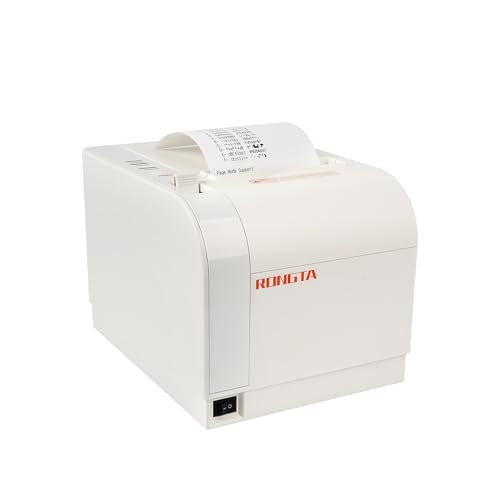
- Prints at up to 300mm/s
- USB, LAN, and serial interfaces
- Auto cutter and large paper compartment
Best For: High-volume café counters with wired POS systems
Best Compact Mobile Option
MR.BOSS E2000 58mm Bluetooth Printer

- Bluetooth and USB connectivity
- Compact 58mm design for small spaces
- 90mm/s printing with cash-drawer port
Best For: Mobile or app-based café setups supporting 58mm printers
Best Simple 80mm Setup
Rongta RP326-USE Thermal POS Printer

- 250mm/s printing with auto cutter
- USB, serial, and Ethernet ports
- Wall-mountable 80mm design
Best For: Standard wired café POS and cash-drawer stations
Best for Busy Kitchen Alerts

- 200 mm/s printing with auto cutter
- RGB and audible order alerts
- USB, Ethernet, and RJ11 connections
Best For: Wired coffee-shop and kitchen POS setups
Best Value Wall-Mount Option

- 250 mm/s printing with auto cutter
- USB, LAN, and serial ports
- Desktop or wall-mounted installation
Best For: Budget-conscious cafes with wired ESC/POS systems
Best for Cloud-Friendly Connectivity
Epson TM-T20IV Thermal Receipt Printer

- 310 mm/s printing for fast service
- USB, serial, and Ethernet interfaces
- Epson ePOS support for Windows, Android, and iOS
Best For: Modern cafes using mobile or web-based POS workflows
Fast USB Countertop Pick
NetumScan 80mm USB Receipt Printer

- 300mm/s printing with auto cutter
- Windows, Mac, and Linux support
- USB-only with wall-mount option
Best For: Computer-based coffee-shop POS stations
Flexible Connectivity Pick
NETUM NT-861 Bluetooth Receipt Printer

- Bluetooth, USB, and Ethernet interfaces
- 260mm/s 80mm thermal printing
- Includes paper roll and setup accessories
Best For: Counters needing multiple connection choices
Network-Ready Speed Pick
NetumScan NS8360L Receipt Printer

- 300mm/s printing with auto cutter
- USB and Ethernet interfaces
- Windows, Mac, and Linux ESC/POS support
Best For: Fixed counters using wired network or USB POS systems
Best Wired Workhorse – Rongta RP332 80mm POS Printer
For coffee shops using a Windows, Mac, or Linux computer, the Rongta RP332 is a practical wired option among receipt printers for coffee shops. It supports USB, serial, and Ethernet connections, prints at up to 250mm/s, and includes an auto cutter and cash-drawer support.
Best For: Coffee shops with a desktop or laptop-based POS setup that need flexible wired connectivity and wall-mounting capability.
Pros:
- USB, serial, and Ethernet interfaces support varied wired installations.
- Auto cutter and up to 250mm/s printing help streamline counter service.
- Supports 80mm and 58mm paper and can drive a cash drawer.
- Wall-hanging design can help save counter space.
Cons:
- No Wi-Fi or Bluetooth, and it does not support phones or tablets.
- Not compatible with several popular platforms, including Square, Clover, Shopify, and Lightspeed.
- Requires choosing the correct driver for the paper width.
The RP332 is a strong fit when reliability and connection flexibility matter more than mobile convenience. Confirm your POS software and computer setup before buying.
Best High-Speed Counter Printer – Rongta RP820 80mm Thermal POS Printer
The Rongta RP820 is a fast 80mm model for busy coffee shops that want straightforward wired receipt printing. Its auto cutter, 300mm/s maximum speed, large paper compartment, and USB, LAN, and serial ports make it suitable for high-volume counter or kitchen use.
Best For: Busy coffee shops, cafés, and food-service counters using a compatible Windows, Mac, or Linux POS computer.
Pros:
- 300mm/s maximum printing speed is suited to busy service periods.
- USB, Ethernet, and serial ports offer installation flexibility.
- Auto cutter, one-button cover opening, and large paper storage simplify operation.
- Supports cash-drawer driving and ESC/POS commands.
Cons:
- No Wi-Fi or Bluetooth for wireless or mobile printing.
- Not compatible with Grubhub, DoorDash, Square, or Chromebook systems.
- Limited to 80mm paper.
With its speed and practical maintenance features, the RP820 is appealing for a high-throughput café station. Verify application compatibility and available wired ports before purchasing.
Best Compact Mobile Option – MR.BOSS E2000 58mm Bluetooth Printer
The MR.BOSS E2000 offers a compact alternative for coffee shops that need receipt printing from a compatible phone, tablet, or computer. This 58mm thermal printer uses Bluetooth or USB, prints at 90mm/s, and includes a cash-drawer port.
Best For: Small cafés, food trucks, and shops using an app that specifically supports 58mm Bluetooth thermal printers.
Pros:
- Bluetooth connectivity supports compatible Android and iOS apps.
- Compact, lightweight design suits limited counter space or mobile service.
- USB connection also supports Windows and Mac installation.
- No ink or ribbon is required, and a 12-month warranty is included.
Cons:
- 58mm paper produces narrower receipts than standard 80mm models.
- 90mm/s speed is slower than the larger Rongta options here.
- Bluetooth compatibility depends on the POS app; unsupported devices cannot use it.
The E2000 is the most flexible choice for mobile-oriented setups, but its narrower paper and app-dependent Bluetooth support require careful compatibility checks.
Best Simple 80mm Setup – Rongta RP326-USE Thermal POS Printer
The Rongta RP326-USE is a straightforward 80mm thermal printer for coffee shops that prefer a wired POS station. It offers USB, serial, and Ethernet ports, a 250mm/s print speed, an auto cutter, and wall-mounting holes for flexible placement.
Best For: Coffee shops and restaurant counters seeking a simple 80mm printer for compatible POS and cash-drawer systems.
Pros:
- 250mm/s printing and an auto cutter support efficient checkout.
- USB, serial, and Ethernet connections fit different wired setups.
- Supports ESC/POS commands and cash drawers.
- Wall-mounting design helps conserve counter space.
Cons:
- No Wi-Fi or Bluetooth.
- Not compatible with DoorDash, Uber Eats, Square, or Grubhub.
- Designed for 80mm paper rather than narrower receipt rolls.
The RP326-USE keeps the setup focused on dependable wired printing and standard-width receipts. It is a sensible option when your POS software supports ESC/POS and your station has a USB, serial, or Ethernet connection.
Best for Busy Kitchen Alerts – P80E Thermal Receipt Printer
For coffee shops seeking receipt printers for coffee shops with visible order-status feedback, the P80E combines fast 80mm thermal printing with USB, Ethernet, and RJ11 connectivity. Its RGB lights, audible buzzer, and grease-resistant design suit busy counter or kitchen environments.
Best For: Cafes and coffee shops using a compatible wired ESC/POS setup that need kitchen order alerts and continuous receipt printing.
Pros:
- Prints at up to 200 mm/s with a built-in auto cutter.
- RGB lights and a loud buzzer provide visual and audible status alerts.
- Supports desktop or wall mounting and includes an RJ11 cash-drawer connection.
- Oil-resistant ABS housing and overheat protection support demanding work areas.
Cons:
- No Wi-Fi or Bluetooth connectivity.
- Not compatible with Square, Clover, Lightspeed, Toast, Shopify POS, or several delivery platforms.
- Requires a compatible wired ESC/POS system rather than Chromebooks or Linux.
The P80E is a practical choice when alert visibility and kitchen durability matter more than wireless convenience. Confirm your POS platform supports its wired connections before buying.
Best Value Wall-Mount Option – RONGTA RP326 80mm POS Printer
The RONGTA RP326 is a straightforward option for coffee shops comparing receipt printers for coffee shops on a budget. It uses ink-free 80mm thermal paper, prints at up to 250 mm/s, and offers USB, LAN, and serial connections for compatible POS systems.
Best For: Cafes, canteens, and retail counters that want a fast wired printer with flexible desktop or wall-mounted placement.
Pros:
- Up to 250 mm/s printing and an automatic cutter help speed service.
- USB, LAN, and serial ports support several wired installation options.
- Wall-hanging design can preserve valuable counter space.
- Ink-free thermal printing and overheating protection help reduce operating and maintenance demands.
Cons:
- Does not support Wi-Fi or Bluetooth.
- Not compatible with Uber Eats, Grubhub, DoorDash, Lightspeed, Postmates, Square, Chromebook, or Clover.
- Its compatibility depends on a suitable ESC/POS-compatible POS environment.
With fast output and a wall-mount option, the RP326 fits coffee shops that already use a compatible wired POS system. Its platform limitations should be checked carefully before purchase.
Best for Cloud-Friendly Connectivity – Epson TM-T20IV Thermal Receipt Printer
The Epson TM-T20IV is a strong choice for coffee shops evaluating receipt printers for coffee shops that need broad wired connectivity and mobile support. It prints 80mm receipts at up to 310 mm/s and supports USB, serial, Ethernet, and Epson ePOS printing from Windows, Android, and iOS devices.
Best For: Cafes using modern mPOS or web-based workflows that want fast printing, flexible installation, and a longer stated warranty.
Pros:
- Up to 310 mm/s printing supports quick customer transactions.
- USB, RS-232 serial, and Ethernet provide flexible POS integration.
- Epson ePOS support enables printing from Windows, Android, and iOS devices.
- Offers paper-saving controls, ENERGY STAR certification, and up to 2 million auto-cuts.
Cons:
- It is a wired printer without stated Wi-Fi or Bluetooth connectivity.
- Its broader feature set may be more than a small counter needs.
- Compatibility still depends on the specific POS software and Epson ePOS setup.
The TM-T20IV stands out for speed and platform flexibility, especially where Ethernet or mobile-device printing is important. Verify the exact POS integration and warranty terms for the listed model before ordering.
Fast USB Countertop Pick – NetumScan 80mm USB Receipt Printer
For coffee shops running a Windows, Mac, or Linux setup, this NetumScan is a straightforward option among receipt printers for coffee shops. Its USB-only connection, 300mm/s print speed, auto cutter, and wall-mount option suit a busy counter, provided your POS software supports the printer.
Best For: Coffee shops using a compatible computer-based ESC/POS system that need fast USB receipt printing.
Pros:
- Prints at speeds up to 300mm/s.
- Automatic cutter helps separate receipts cleanly.
- Supports Windows, Mac, and Linux through USB.
- Wall-mount holes can help save counter space.
Cons:
- USB-only; no LAN, Wi-Fi, or Bluetooth connectivity.
- Not compatible with Square POS, iOS, Android devices, Clover, Shopify, Lightspeed, and several delivery platforms listed by the manufacturer.
This is a practical, fast printer for a dedicated computer-based coffee-shop station. Confirm compatibility before buying, especially if your shop relies on tablet-based or cloud POS hardware.
Flexible Connectivity Pick – NETUM NT-861 Bluetooth Receipt Printer
The NETUM NT-861 offers more connection flexibility than a USB-only model, making it a useful candidate among receipt printers for coffee shops with varied equipment. It combines Bluetooth, USB, and Ethernet connectivity with an 80mm format and 260mm/s print speed.
Best For: Retail or coffee-shop counters that need Bluetooth, USB, and Ethernet connection options.
Pros:
- Supports Bluetooth, USB, and Ethernet connectivity.
- Prints 80mm thermal receipts at up to 260mm/s.
- Built-in auto cutter supports quick receipt handling.
- Includes a USB cable, power accessories, paper roll, driver CD, manual, and paper separator.
Cons:
- The supplied notes do not identify specific POS or operating-system compatibility.
- At 1 kg, it may be less convenient to move than lighter options.
Its three interface choices make the NT-861 the most connectivity-oriented option in this group. Before purchase, verify that its ESC/POS support and chosen connection method work with your coffee shop’s POS system.
Network-Ready Speed Pick – NetumScan NS8360L Receipt Printer
The NetumScan NS8360L is designed for coffee shops that want fast 80mm receipts and a wired network option. As receipt printers for coffee shops go, its 300mm/s speed, USB and Ethernet interfaces, auto cutter, and wall-mount holes make it well suited to a fixed counter or kitchen-printing setup.
Best For: Coffee shops using Windows, Mac, or Linux ESC/POS systems that benefit from USB or Ethernet connectivity.
Pros:
- Prints at up to 300mm/s.
- Offers both USB and Ethernet interfaces.
- Auto cutter and one-button cover opening simplify routine use.
- Supports Windows, Mac, and Linux systems based on ESC/POS commands.
Cons:
- Not compatible with Square POS, DoorDash, Grubhub, Uber Eats, and other platforms listed by the manufacturer.
- Does not list Wi-Fi or Bluetooth connectivity.
This model is a strong fit when a wired LAN connection is more useful than wireless pairing. Its platform limitations make compatibility checking essential before adding it to a tablet-focused coffee-shop workflow.
How We Picked the Best Receipt Printers for Coffee Shops
We focused on the features that matter most in a café environment: dependable thermal printing, practical print speed, easy POS integration, useful connectivity, paper capacity, auto-cutting, and compatibility with common operating systems. We also considered whether each printer suits a compact counter, a fixed checkout station, or a shop that needs flexible network or wireless placement.
Thermal printers are generally the best fit for coffee shops because they do not require ink or toner. However, paper quality and printer placement still affect day-to-day results, so buyers should match the printer to their order volume and counter setup.
Quick Comparison
| Best For | Recommended Type | Features to Prioritize |
|---|---|---|
| Busy cafés | 80mm high-speed printer | 250–300mm/s printing, auto-cutter, Ethernet |
| Small counters | Compact 58mm printer | Small footprint, USB or Bluetooth |
| Fixed POS stations | Wired thermal printer | USB, Ethernet, cash-drawer port |
| Flexible layouts | Bluetooth or LAN model | Wireless pairing, network support, stable drivers |
Key Buying Factors for Receipt Printers for Coffee Shops
Paper Width and Print Speed
Most full-size café POS printers use 80mm paper, which provides more room for itemized orders, modifiers, taxes, and promotional messages. A 58mm model can save counter space, but its narrower receipts may be less suitable for detailed tickets. For busy service, look for a rated speed of roughly 200mm/s or higher.
Connectivity and Compatibility
USB is simple and dependable for a nearby register. Ethernet is usually better when several terminals, kitchen displays, or networked POS devices need access to one printer. Bluetooth can help with tablets and mobile checkout, but confirm compatibility with your POS software, operating system, and device before buying.
Auto-Cutter and Cash-Drawer Support
An auto-cutter makes handoff faster and keeps receipts neat during rushes. A cash-drawer port is useful for traditional tills, although not every café needs one. Check the included cables, driver support, and whether the printer works with your specific cash drawer or POS terminal.
Reliability and Maintenance
Choose a printer from a model with clear setup instructions and accessible replacement paper. Keep the unit away from steam, spills, and loose coffee grounds. Regularly clean the print area and avoid overloading the paper roll, since simple maintenance can prevent many feed and print-quality problems.
Who Should Buy Which Receipt Printers for Coffee Shops?
Choose an 80mm Ethernet model if your coffee shop has a fixed counter, high order volume, or multiple networked POS devices. These printers are typically the strongest all-around choice for speed and dependable placement.
Choose a USB model if you need a straightforward printer for one register and want to minimize configuration. USB is especially practical when the printer will sit directly beside a Windows, Mac, or Linux POS computer.
Choose a Bluetooth or compact 58mm model if counter space is limited or staff use tablets for mobile ordering. Before purchasing, verify wireless range, supported platforms, receipt width, and whether your POS app can send print jobs to the device.