A gaming mouse with charging dock can keep your setup tidy while making low-latency wireless play more convenient. Instead of plugging in after every session, you can return the mouse to its dock between matches.
We compared 10 options across sensor performance, connectivity, weight, battery capacity, charging design, and practical desktop features to help you find the right fit for competitive play, everyday gaming, or a cleaner RGB setup.
Best 10 Gaming Mouse with Charging Dock Picks for 2026
Best Tri-Mode Pick
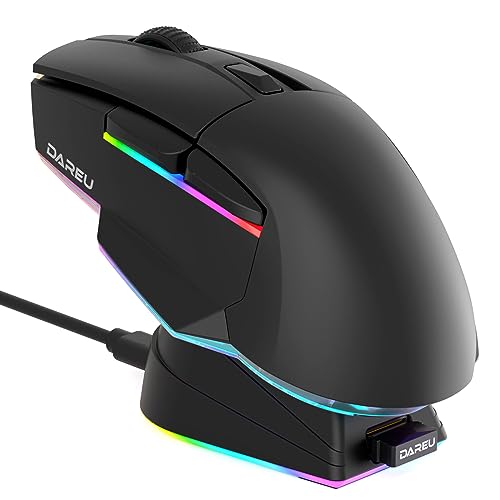
- Tri-mode USB, 2.4GHz, and Bluetooth connectivity
- Magnetic RGB charging dock
- Up to 120-hour battery life
Best For: Gamers seeking flexible connections and extensive customization
Best Razer Upgrade
Mouse Dock Pro Charging Station

- Magnetic wireless charging puck
- Integrated up-to-4K Hz transceiver
- Chroma RGB and anti-slip base
Best For: Owners of compatible Razer wireless mice
Best Stylish Option
DAREU Sakura Pink Wireless Mouse

- Strong magnetic docking connection
- 12,000 DPI sensor with 1 ms transmission
- Mouse and dock feature rainbow RGB lighting
Best For: Users wanting a distinctive pink setup for gaming and office work
Best Lightweight Value

- Lightweight 66 g design
- 12,000 DPI PAW3311 sensor
- Three modes with magnetic RGB charging base
Best For: FPS and MOBA players who prioritize low weight and flexibility
Display-Focused Pick
EPOMAKER NEX Lite With RGB Dock

- Dual OLED screens display key mouse and dock status information.
- Tri-mode connectivity supports 2.4GHz, Bluetooth 5.0, and USB-C.
- 65g design with 12,000 DPI PAW3311 sensor and five programmable buttons.
Best For: Gamers who want visible settings and a tidy charging setup
Durable Performance Pick

- PAW3311 sensor provides up to 12,000 DPI and 300 IPS tracking.
- Magnetic RGB charging base keeps the mouse stored and ready.
- 66g build, three connection modes, and switches rated to 80 million clicks.
Best For: FPS and MOBA players wanting a lightweight docked mouse
Blue Display Pick

- Blue finish pairs with dual OLED screens for visible performance details.
- Tri-mode connectivity and RGB charging dock support flexible desk setups.
- 65g body, 12,000 DPI sensor, five programmable buttons, and up to 55 hours of battery life.
Best For: Users wanting a colorful, display-equipped wireless mouse
Flexible Docked Performer
SOLAKAKA SM822 Wireless Gaming Mouse

- Tri-mode 2.4GHz, Bluetooth 5.0, and USB-C connectivity
- 62g design with PAW3311 sensor and up to 24,000 DPI
- Magnetic RGB dock stores the receiver while charging
Best For: Users who switch between PC, laptop, and mobile devices
Fast-Charging Lightweight Pick
ATTACK SHARK X11 Wireless Gaming Mouse

- 59g body designed for quick, comfortable movement
- RGB magnetic dock provides five hours after a 10-minute charge
- Tri-mode operation with PAW3311 sensor up to 22,000 DPI
Best For: Medium- to large-handed gamers who want rapid recharging
Durability-Focused Docked Mouse
AJAZZ AJ139 V2 MC Wireless Gaming Mouse

- 500mAh battery with magnetic RGB charging dock
- 66g ergonomic body and PAW3311 sensor
- HUANO switches rated for 80 million clicks
Best For: Long-session users who value battery capacity and switch durability
Best Tri-Mode Pick – DAREU A955 Wireless Mouse
If you want a gaming mouse with charging dock that also works across wired, 2.4GHz, and Bluetooth connections, the DAREU A955 is a versatile option. It combines a 12,000 DPI sensor, programmable controls, RGB lighting, and a lightweight 93 g design.
Best For: Gamers who want flexible connectivity, extensive customization, and long battery life.
Pros:
- Tri-mode connectivity supports USB, 2.4GHz, and Bluetooth use.
- Magnetic RGB charging dock keeps the rechargeable mouse ready.
- Programmable buttons, DPI settings, macros, and lighting are available through the driver.
- Rated for up to 120 hours of battery life.
Cons:
- Right-hand orientation may not suit left-handed users.
- Driver installation requires wired mode and unzip software.
The A955 stands out when a docked wireless setup and broad device compatibility matter as much as gaming performance. Its programmable controls and 12,000 DPI ceiling add flexibility without giving up Bluetooth or wired operation.
Best Razer Upgrade – Mouse Dock Pro Charging Station
The Razer Mouse Dock Pro is a charging-dock upgrade for owners of select compatible Razer mice. It adds magnetic wireless charging, Chroma RGB, battery-status lighting, and an integrated HyperPolling transceiver for supported setups.
Best For: Razer users with a Basilisk V3 Pro, Cobra Pro, or Naga V2 Pro who want a premium docked charging setup.
Pros:
- Magnetic charging puck makes docking simple and secure.
- Integrated HyperPolling transceiver supports up to 4K Hz with compatible mice.
- Eight Chroma RGB zones offer extensive lighting customization.
- Anti-slip base helps keep the dock stable.
Cons:
- It is a dock and puck, not a standalone gaming mouse.
- Compatibility is limited to select Razer mouse models.
- The supplied notes specify 4K Hz support, not 8K Hz operation.
This is a specialized choice rather than a universal gaming mouse with charging dock. For compatible Razer owners, however, it combines convenient charging, status feedback, lighting, and a high-polling wireless connection in one accessory.
Best Stylish Option – DAREU Sakura Pink Wireless Mouse
For shoppers who want a gaming mouse with charging dock that looks distinctive, the DAREU Sakura Pink pairs a symmetrical pink design with a magnetic dock and rainbow RGB lighting. It also offers 12,000 DPI sensitivity, 1 ms wireless transmission, and an 85 g body.
Best For: Gamers and office users who prioritize a coordinated aesthetic, comfortable claw grip, and simple dock charging.
Pros:
- Strong magnetic alignment helps the mouse connect quickly to the dock.
- 12,000 DPI sensor and 1 ms wireless transmission support responsive play.
- Rainbow RGB lighting is built into both the mouse and dock.
- Micro-switches are rated for up to 50 million clicks.
Cons:
- Its listed battery average is 24 hours, shorter than some alternatives.
- Right-hand orientation may limit fit for left-handed users.
- The pink limited-edition styling may not suit every setup.
The Sakura Pink is a practical blend of appearance and function. Its magnetic dock and rechargeable design simplify daily use, while the 12,000 DPI sensor and lightweight shell keep it suitable for gaming and general productivity.
Best Lightweight Value – AJAZZ AJ139 V2 MC Mouse
The AJAZZ AJ139 V2 MC is a gaming mouse with charging dock built for users who favor a lightweight shell and adaptable connectivity. Its 66 g design, PAW3311 sensor, 12,000 DPI adjustment, and magnetic RGB charging base suit fast-paced play.
Best For: FPS and MOBA players who want a light mouse with three connection modes and a docked charging routine.
Pros:
- Very light 66 g design can reduce wrist strain during long sessions.
- PAW3311 sensor supports up to 12,000 DPI, 300 IPS, and 35G acceleration.
- Bluetooth, 2.4GHz wireless, and USB-C wired modes provide flexibility.
- Magnetic RGB charging base keeps the rechargeable mouse ready.
Cons:
- Right-hand orientation may not work for left-handed users.
- The supplied details do not specify battery runtime.
- Its feature set may be more than needed for basic office use.
The AJ139 V2 MC is the strongest fit here for weight-conscious gamers. It balances a 66 g body with a capable sensor, durable switches rated to 80 million clicks, and convenient three-mode connectivity.
Display-Focused Pick – EPOMAKER NEX Lite With RGB Dock
If you want a gaming mouse with charging dock that keeps key settings visible, the EPOMAKER NEX Lite combines a compact RGB dock with OLED screens on both the mouse and dock. It supports 2.4GHz, Bluetooth 5.0, and USB-C wired connectivity, while the PAW3311 sensor offers adjustable sensitivity up to 12,000 DPI.
Best For: Gamers who want on-device status displays, tri-mode connectivity, and a lightweight right-handed design.
Pros:
- Dual OLED screens show DPI, battery percentage, connection mode, and polling rate.
- Lightweight 65g design with an ergonomic shape for medium-to-large hands.
- RGB charging dock provides storage, charging, and lighting controls.
- Five programmable buttons and onboard memory support customized settings.
Cons:
- The right-handed shape may not suit left-handed users.
- Online configuration software is browser-based, with Chrome recommended.
- Battery life is rated for up to 55 hours, which may require regular charging during heavy use.
The NEX Lite stands out if you value visible status information and a tidy desktop setup. Its sensor, lightweight build, and flexible connection options make it versatile for gaming and everyday computer use.
Durable Performance Pick – AJAZZ AJ139 V2 MC
The AJAZZ AJ139 V2 MC is a gaming mouse with charging dock designed for users who want a lightweight wireless setup with a magnetic base. Its PAW3311 sensor reaches 12,000 DPI, and its three connection modes let you switch between 2.4GHz wireless, Bluetooth, and USB-C wired use.
Best For: FPS and MOBA players seeking a lightweight mouse with a magnetic RGB charging base and durable switches.
Pros:
- PAW3311 sensor supports up to 12,000 DPI, 300 IPS, and 35G acceleration.
- Magnetic charging base keeps the mouse stored and ready to use.
- 66g ergonomic body helps reduce wrist strain during extended sessions.
- Micro-switches are rated for up to 80 million clicks.
Cons:
- The right-handed design limits suitability for left-handed users.
- The supplied notes do not specify a battery-life estimate.
- RGB lighting may not appeal to users seeking a more understated setup.
With its sensor performance, three-mode connectivity, and durable click rating, the AJ139 V2 MC is a practical choice for fast-paced games. The magnetic RGB base adds convenience while keeping the mouse visible and charged between sessions.
Blue Display Pick – EPOMAKER NEX Lite
For shoppers looking for a gaming mouse with charging dock in a blue finish, this EPOMAKER NEX Lite offers the same display-rich feature set in a distinct colorway. It pairs a 65g right-handed design with a PAW3311 sensor, tri-mode connectivity, RGB dock controls, and OLED screens for at-a-glance information.
Best For: Users who want a lightweight blue mouse with dual displays, customizable controls, and flexible device compatibility.
Pros:
- Blue finish gives the setup a distinct visual style.
- OLED displays show DPI, battery, connection mode, and polling rate.
- Supports 2.4GHz, Bluetooth 5.0, and USB-C wired modes.
- Offers five programmable buttons, onboard memory, and up to 55 hours of battery life.
Cons:
- The right-handed ergonomic shape is not designed for left-handed use.
- The online software may require Chrome for optimal compatibility.
- Its 65g shape is specified for medium-to-large hands, so smaller-hand users should check fit carefully.
This version is a strong fit when appearance and quick access to mouse information matter. The charging dock, adjustable sensor, and onboard profiles provide a balanced combination of convenience and customization for gaming or general use.
Flexible Docked Performer – SOLAKAKA SM822 Wireless Gaming Mouse
The SOLAKAKA SM822 is a practical gaming mouse with charging dock for users who want flexible connectivity and a lightweight design. It supports 2.4GHz wireless, Bluetooth 5.0, and USB-C wired operation, while its PAW3311 sensor offers adjustable sensitivity for gaming and everyday work.
Best For: PC and laptop users who want tri-mode connectivity, a magnetic RGB dock, and a lightweight right-handed mouse.
Pros:
- Tri-mode connectivity works with 2.4GHz, Bluetooth 5.0, and USB-C wired connections.
- Lightweight 62g design and contoured shape are suited to extended use.
- PAW3311 sensor supports up to 24,000 DPI through the software.
- Magnetic RGB charging dock can hold the receiver and reduce cable swapping.
Cons:
- Driver software supports Windows only and must be run in wired mode.
- Its five programmable buttons may be limiting for users who need many controls.
The SM822 balances portability, customization, and convenient dock charging. It is a strong option for users who switch between devices, though advanced button programming is more limited than on larger gaming mice.
Fast-Charging Lightweight Pick – ATTACK SHARK X11 Wireless Gaming Mouse
The ATTACK SHARK X11 is a gaming mouse with charging dock focused on low weight and quick top-ups. Its magnetic RGB dock reportedly provides up to five hours of use after a 10-minute charge, while tri-mode operation supports wired, 2.4GHz, and Bluetooth connections.
Best For: Medium- to large-handed gamers who prioritize a lightweight shell, fast dock charging, and adjustable wireless connectivity.
Pros:
- Ultra-lightweight 59±3g construction supports quick movement.
- Magnetic RGB dock includes a USB 2.0 port and supports rapid charging.
- PAW3311 sensor offers up to 22,000 DPI, 1,000Hz polling, and 300 IPS tracking.
- TTC encoder and HUANO switches are rated for precise scrolling and over 20 million clicks.
Cons:
- The ergonomic dimensions are specifically better suited to medium and large hands.
- Its five programmable-button layout may not satisfy MMO-style control needs.
The X11 is particularly appealing if fast charging and low weight matter more than extensive button customization. Its larger shape and straightforward control layout are worth considering before purchase.
Durability-Focused Docked Mouse – AJAZZ AJ139 V2 MC Wireless Gaming Mouse
The AJAZZ AJ139 V2 MC is a gaming mouse with charging dock that combines a 66g body with a 500mAh battery and RGB magnetic charging station. Its PAW3311 sensor supports up to 24,000 DPI, and tri-mode connectivity lets it operate over 2.4GHz wireless, Bluetooth, or USB-C.
Best For: Gamers and work-from-home users seeking a lightweight ergonomic mouse with a large battery and highly durable switches.
Pros:
- 500mAh battery and magnetic RGB dock are designed to reduce frequent recharging.
- PAW3311 sensor provides 300 IPS tracking, 35G acceleration, and adjustable DPI up to 24,000.
- 66g ergonomic design is intended to reduce fatigue during long sessions.
- HUANO switches are rated for an 80-million-click lifespan.
Cons:
- The supplied details list a maximum sensitivity of 12,000 DPI in the specifications, despite the feature description stating up to 24,000 DPI.
- It is listed as right-handed, limiting suitability for left-handed users.
- The product details identify Windows as the operating system, so cross-platform software support is less clearly specified.
The AJ139 V2 MC stands out for its battery capacity and switch durability, making it a sensible long-session choice. Buyers should verify the exact DPI specification and software compatibility for their setup.
How We Picked the Best Gaming Mouse with Charging Dock Options
We focused on the features that have the greatest effect on everyday use: wireless connection modes, sensor specifications, weight, battery capacity, charging reliability, and dock design. Models with 2.4GHz wireless were prioritized for gaming because that connection typically offers lower latency than Bluetooth. Tri-mode mice received extra consideration for users who also want USB or Bluetooth compatibility.
We also compared stated DPI ranges, sensor families, charging interfaces, RGB implementation, and whether a dock provides a practical home for the mouse when it is not in use. High maximum DPI is not automatically better, so tracking consistency, shape, and control remain important.
Quick Comparison
- Best for broad compatibility: Tri-mode models supporting 2.4GHz, USB, and Bluetooth.
- Best for lightweight play: Options weighing roughly 59–66 grams.
- Best for battery flexibility: Mice with larger batteries, such as 500mAh designs.
- Best for advanced wireless setups: Razer’s Dock Pro ecosystem, especially for compatible Razer mice and high-polling requirements.
- Best for customization: Models offering RGB docks, onboard screens, adjustable DPI, or multiple connection modes.
Key Buying Factors for a Gaming Mouse with Charging Dock
Sensor and Responsiveness
Look beyond the headline DPI number. A dependable optical sensor, stable tracking, and a polling rate suited to your system matter more than extreme sensitivity. For most players, a broad DPI range and easy adjustment are sufficient.
Wireless Connectivity
Choose 2.4GHz wireless for competitive gaming, Bluetooth for portable or secondary-device use, and USB mode when you want a wired fallback. Check whether the wireless receiver is included and whether the dock doubles as a receiver extender.
Weight, Shape, and Controls
Lightweight mice can feel quicker in shooters, while a fuller shell may provide better palm support. Confirm the shape, button layout, grip style, and dimensions before buying. Extra side buttons are useful for MMOs and productivity but can be unnecessary for minimalist FPS setups.
Dock and Battery Design
Magnetic alignment, stable feet, visible charging indicators, and a long enough cable make a dock more useful. Confirm how the mouse charges and whether the dock requires a specific puck, receiver, or software ecosystem.
Who Should Buy Which Gaming Mouse with Charging Dock?
Competitive FPS players should prioritize low weight, reliable 2.4GHz performance, a comfortable shape, and a sensor that tracks consistently. Multi-device users will benefit from tri-mode connectivity, especially if the mouse moves between a gaming PC, laptop, and tablet.
RGB-focused buyers should look for a dock with controllable lighting and software support, while traveling gamers may prefer a lightweight mouse with Bluetooth and USB-C backup. If you already own compatible Razer hardware and want a high-end charging and polling setup, the Dock Pro route makes the most sense. For everyone else, compare dock stability, battery capacity, comfort, and warranty support before paying extra for decorative features or unusually high DPI claims.