The best mechanical keyboard for typing should make long work sessions feel comfortable, predictable, and efficient. Switch feel, layout, keycap quality, and connectivity all matter more than flashy features alone.
We compared 10 standout keyboards across compact, full-size, wireless, gasket-mounted, hot-swappable, and budget categories to help you find the right fit for your desk and daily workflow.
Best 10 Mechanical Keyboard for Typing Picks for 2026
Compact Thocky Pick
Kisnt KN85 Wireless Mechanical Keyboard

- 75% layout saves desk space
- Tri-mode wireless and USB-C connectivity
- Hot-swappable switches with cushioned sound
Best For: Compact wireless typing setups
Long-Battery Workhorse
Redragon K768 PRO Wireless Keyboard
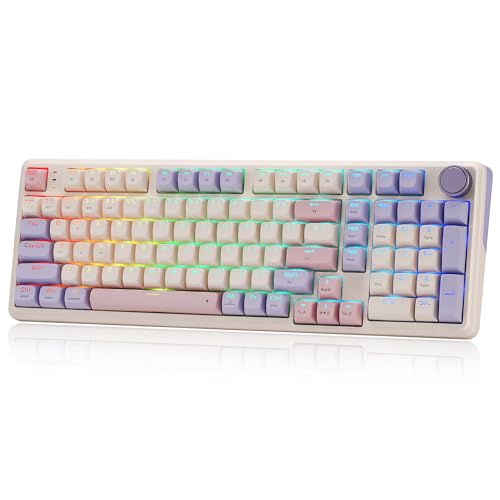
- Large 8000mAh battery
- 100-key layout with gasket typing feel
- Hot-swap support and multifunction knob
Best For: Extended wireless typing and mixed work/play
Full-Size Office Classic
Keychron C2 Wired Mechanical Keyboard
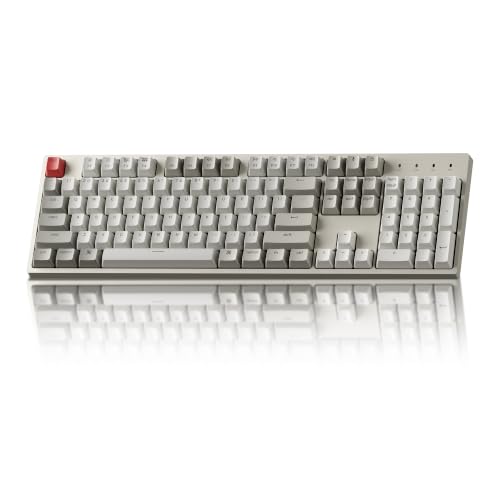
- 104-key layout with dedicated number pad
- Tactile brown switches for responsive typing
- Wired USB-C connection for consistent power
Best For: Office typing and frequent number-pad use
Customizable 75% Favorite
AULA F75 Pro Wireless Keyboard

- Compact 75% layout with control knob
- Tri-mode connectivity and 4000mAh battery
- Hot-swap switches with dampened typing feel
Best For: Custom wireless typing and gaming setups
Customizable Full-Size Value

- Hot-swappable 3-pin and 5-pin switch support
- Four programmable shortcut keys
- 108-key layout with customizable RGB lighting
Best For: Wired typing setups that prioritize customization and full-size functionality
Quiet Multi-Device Workhorse

- Low-profile linear switches for quiet typing
- Bluetooth and 2.4G support for up to three devices
- Rechargeable full-size aluminum design
Best For: Quiet office typing and multi-device productivity
Colorful Wired Workhorse
Redragon K671 Mechanical Keyboard

- 104-key layout with number pad and multimedia shortcuts
- Hot-swappable linear red switches with four spares
- 11 backlight modes and full-key anti-ghosting
Best For: Full-size wired typing, work, and gaming
Flexible Wireless Customizer
AULA F99 Wireless Mechanical Keyboard

- Tri-mode Bluetooth, 2.4GHz, and USB-C connectivity
- 96% layout retains arrow keys and number pad
- 8000mAh battery, hot-swap PCB, and pre-lubed switches
Best For: Multi-device typing and customizable desktop setups
Compact Number-Pad Specialist

- 98-key layout retains the number pad in less space
- Pre-lubed linear switches with gasket mount and foam layers
- Volume knob, PBT keycaps, and hot-swappable support
Best For: Space-conscious work and typing with frequent number entry
Compact Thocky Pick – Kisnt KN85 Wireless Mechanical Keyboard
If you want a mechanical keyboard for typing that saves desk space without giving up arrow keys or a function row, the Kisnt KN85 is a practical 75% option. Its gasket-mounted design, pre-lubed linear switches, and multi-device connectivity suit home offices, laptop setups, and shared workspaces.
Best For: Typists who want a compact wireless keyboard with a cushioned, mellow sound and hot-swap flexibility.
Pros:
- 75% layout retains F1–F12 keys, arrows, and shortcuts while reducing desk footprint.
- Tri-mode connectivity supports USB-C, 2.4GHz wireless, and Bluetooth 5.0.
- Gasket mount and pre-lubed linear switches are designed for a smooth, softer typing sound.
- Hot-swappable sockets accept compatible 3-pin and 5-pin switches without soldering.
Cons:
- No dedicated number pad, which may be limiting for frequent numeric entry.
- Companion software is Windows-only and works in wired or 2.4GHz mode.
- Animated RGB effects can reduce wireless battery life.
The KN85 is a strong fit when compact dimensions, wireless flexibility, and a quieter-feeling typing experience matter more than a full-size layout. Consider a wrist rest for extended sessions, as recommended by the manufacturer.
Long-Battery Workhorse – Redragon K768 PRO Wireless Keyboard
The Redragon K768 PRO is a practical mechanical keyboard for typing if you want a near-full layout, wireless convenience, and a soft gasket-mounted feel. Its 100-key design keeps more navigation and numeric functionality than a typical 75% board while remaining smaller than a full-size keyboard.
Best For: Typists who want long wireless runtime, a control knob, and a compact layout with expanded key coverage.
Pros:
- 8000mAh battery is designed to provide extended time between charges.
- Tri-mode connectivity supports USB-C, Bluetooth, and 2.4GHz wireless.
- Gasket construction and five-layer noise dampening aim for a creamy, cushioned typing feel.
- Hot-swappable sockets support compatible 3-pin and 5-pin switches.
Cons:
- It uses a custom linear switch, so it may not suit typists who prefer tactile feedback.
- The 100-key layout is not a conventional full-size 104-key design.
- Its software customization features may be more than needed for basic office typing.
Choose the K768 PRO when battery capacity and wireless flexibility are priorities. The control knob adds convenient access to lighting and media playback, while PBT keycaps are intended to retain their texture and color over time.
Full-Size Office Classic – Keychron C2 Wired Mechanical Keyboard
For shoppers who want a straightforward mechanical keyboard for typing with a familiar layout, the Keychron C2 provides 104 keys, a dedicated number pad, and a wired USB-C connection. Its pre-installed brown tactile switches are aimed at responsive everyday typing on Mac or Windows.
Best For: Office users, writers, and data-entry typists who need a full-size wired keyboard with tactile switches.
Pros:
- Full 104-key layout includes a dedicated number pad and familiar navigation keys.
- Brown tactile switches provide tactile responsiveness and are rated for up to 50 million keystrokes.
- USB-C wired connection supplies consistent power without charging or pairing.
- Adjustable feet and an inclined frame provide ergonomic positioning options.
Cons:
- Wired-only design does not offer Bluetooth or 2.4GHz flexibility.
- The listed version is non-backlit, which may be less suitable for dim environments.
- ABS keycaps may not offer the same wear resistance as PBT keycaps.
The C2 is a sensible choice for a stationary desk where dependable wired performance and a number pad matter. Its Mac and Windows keycaps, tactile switches, and adjustable feet make it especially suited to traditional office typing.
Customizable 75% Favorite – AULA F75 Pro Wireless Keyboard
The AULA F75 Pro is a versatile mechanical keyboard for typing that combines a compact 75% layout with tri-mode connectivity, hot-swap support, and a cushioned sound profile. Its knob, programmable keys, and pre-lubed switches make it useful for both everyday work and gaming-oriented setups.
Best For: Typists who want a compact custom keyboard with wireless connectivity, RGB controls, and room to modify the switches.
Pros:
- 75% layout saves desk space while retaining arrow keys and other essential controls.
- Bluetooth 5.0, 2.4GHz wireless, and USB wired modes support multiple devices.
- Pre-lubed stabilizers, Reaper switches, silicone padding, and five-layer filling target a softer, quieter feel.
- Hot-swap base accepts compatible 3-pin and 5-pin switches without soldering.
Cons:
- It does not include a dedicated number pad.
- RGB, macros, and driver features may be unnecessary for simple typing tasks.
- Its gaming-focused design may be less understated than a conventional office keyboard.
The F75 Pro stands out for users who want to tune their typing setup over time. It offers a compact footprint and flexible connections while preserving customization options such as switch replacement, programmable keys, and adjustable RGB.
Comfort-Focused Wireless Pick – Logitech Alto Keys K98M
If you want a mechanical keyboard for typing that combines a compact full-size layout with wireless convenience, the Logitech Alto Keys K98M is a practical choice. Its gasket mount is designed to absorb vibrations, while the concave hot-swappable Marble Switches provide a clicky, responsive feel for work or gaming.
Best For: Wireless productivity users who want a compact 98-key layout, numpad access, and a comfortable clicky typing experience.
Pros:
- Gasket mount helps absorb typing vibrations for a more comfortable feel.
- Hot-swappable Marble Switches offer a responsive, clicky typing experience.
- Bluetooth and Logi Bolt connectivity support multiple setup styles.
- Programmable Action Keys and up to 12 months of wireless use support productivity.
Cons:
- White backlighting is single-color rather than RGB.
- Clicky switches may be less suitable for quiet shared workspaces.
- Its 98-key format is compact, but not as space-saving as a tenkeyless keyboard.
The Alto Keys K98M stands out for pairing a numpad-equipped layout with wireless flexibility and gasket-mounted comfort. Choose it if you value a distinctive clicky feel and long battery life more than RGB lighting or a completely quiet typing setup.
Customizable Full-Size Value – Redragon K668
For shoppers seeking a mechanical keyboard for typing with extensive customization, the wired Redragon K668 offers a full-size 108-key layout, hot-swappable sockets, and programmable shortcut keys. Its stock linear red switches are intended to keep typing relatively quiet, making it more practical for shared spaces than clicky alternatives.
Best For: Desktop users who want a customizable, wired full-size keyboard for typing, shortcuts, and casual gaming.
Pros:
- Hot-swappable sockets accept many 3-pin and 5-pin switches without soldering.
- Dedicated hotkeys provide quick access to mute, calculator, screen lock, and desktop functions.
- RGB lighting includes up to 19 preset modes, brightness controls, and music synchronization.
- Included keycap sets, adjustable feet, and software add customization options.
Cons:
- It is wired, so it does not provide wireless flexibility.
- The full-size layout takes more desk space than compact keyboards.
- Customization software may require Windows 11 or Mac OS 14 Sonoma.
The K668 is a strong fit when switch swapping, RGB effects, and dedicated shortcuts matter more than portability. Its linear switches and cushioned sound profile make it a versatile choice for typing and gaming, provided a wired connection works for your desk.
Quiet Multi-Device Workhorse – ProtoArc K310 Pro
The ProtoArc K310 Pro is a useful mechanical keyboard for typing when quiet operation, wireless connectivity, and a traditional full-size layout are priorities. Its low-profile linear red switches are designed for smooth, quiet keystrokes, while Bluetooth and 2.4G connections let you move between up to three devices.
Best For: Office and home users who need quiet full-size typing across computers, tablets, and phones.
Pros:
- Low-profile linear switches provide smooth typing with reduced noise.
- Connects with up to three devices through Bluetooth or a USB receiver.
- Rechargeable battery offers up to 150 days of standby time after charging.
- Aluminum construction, adjustable tilt legs, backlighting, and macro support add versatility.
Cons:
- Backlighting supports a single color rather than RGB.
- Macro use is limited to 2.4G USB connections, and the device may not be detected through a multi-port hub.
- The full-size 108-key design occupies more desk space.
The K310 Pro is particularly well suited to quieter work environments and users who switch between operating systems or devices. Its full-size layout and rechargeable wireless design make it practical for everyday productivity, while the low-profile switches keep the mechanical feel more restrained.
Colorful Wired Workhorse – Redragon K671 Mechanical Keyboard
If you want a straightforward mechanical keyboard for typing with responsive linear switches and useful customization, the wired Redragon K671 is a practical option. Its full-size 104-key layout, red switches, and anti-ghosting support suit everyday work, programming, and gaming without requiring wireless charging or pairing.
Best For: Typists and gamers who want a full-size wired keyboard with backlighting, macro support, and hot-swappable switches.
Pros:
- Smooth, light-feeling linear red switches support comfortable repeated keystrokes.
- Full-size 104-key layout includes a number pad and 12 multimedia shortcuts.
- Hot-swappable design includes spare switches and keycaps for simple maintenance.
- Offers 11 backlight modes, adjustable brightness and speed, and full-key anti-ghosting.
Cons:
- Wired-only connectivity provides less flexibility than wireless models.
- Backlight color cannot be changed, despite software-adjustable effects.
- The full-size design takes more desk space than compact layouts.
The K671 focuses on dependable wired performance and broad functionality. It is a sensible pick if you value a number pad, light linear switches, and easy switch replacement over wireless convenience or advanced lighting color control.
Flexible Wireless Customizer – AULA F99 Wireless Mechanical Keyboard
The AULA F99 is a versatile mechanical keyboard for typing when you need one board to move between workstations, tablets, and gaming devices. It combines Bluetooth 5.0, 2.4GHz wireless, and USB-C connections with a compact 96% layout, while its pre-lubed linear switches and gasket structure aim for a smoother, softer typing feel.
Best For: Multi-device users who want wireless flexibility, a number pad, hot-swappable switches, and a quieter, cushioned typing experience.
Pros:
- Tri-mode connectivity supports Bluetooth, 2.4GHz wireless, and USB-C wired use.
- Can connect with up to five devices and switch between them using key combinations.
- Hot-swappable PCB accepts 3-pin and 5-pin switches without soldering.
- 8000mAh battery, double-shot PBT keycaps, and five-layer sound dampening add practical value.
Cons:
- The 96% layout may require adjustment compared with a traditional full-size keyboard.
- Its many customization features may be more than casual typists need.
- Wireless operation adds a battery that must be recharged.
With multiple connection options and a substantial battery, the F99 is built for flexible desk setups. Its compact number-pad layout preserves work-friendly keys while the gasket construction and pre-lubed switches emphasize a softer, smoother typing experience.
Compact Number-Pad Specialist – RK ROYAL KLUDGE R98 Pro
The RK ROYAL KLUDGE R98 Pro is a strong mechanical keyboard for typing if you want a space-saving layout without giving up a number pad. Its 98-key design, pre-lubed linear cream switches, MDA-profile PBT keycaps, and gasket mount are aimed at a smooth, cushioned feel for work, programming, and gaming.
Best For: Users who want a compact wired keyboard with a number pad, quieter-feeling construction, and convenient volume control.
Pros:
- 98-key layout keeps the number pad and arrow keys while saving desk space.
- Gasket mount and five layers of sound-absorbing foam target a softer, thockier typing experience.
- Hot-swappable PCB supports both 3-pin and 5-pin switches.
- Detachable aluminum volume knob and programmable driver add useful control options.
Cons:
- USB-C wired connectivity does not offer wireless flexibility.
- The compact 98-key arrangement may take time to learn.
- Customization through the online driver is listed for Windows and Mac, not every supported operating system.
The R98 Pro balances productivity and desk space particularly well. Its number pad, volume knob, durable PBT keycaps, and sound-dampening construction make it a practical choice for frequent typing when a traditional full-size board feels too large.
How We Picked the Best Mechanical Keyboard for Typing
We focused on the features that affect everyday typing rather than gaming specifications alone. Our criteria included switch feel, noise level, stabilizer consistency, keycap durability, layout efficiency, connectivity, comfort, and overall value. We also considered whether each keyboard offers useful extras such as hot-swappable switches, Bluetooth, 2.4GHz wireless, a volume knob, RGB lighting, or a gasket-style mounting system.
Because typing preferences vary, this list includes linear and tactile switch options, compact and full-size layouts, wired and wireless models, and keyboards with or without a number pad.
Quick Comparison
| Best For | Recommended Type | Features to Prioritize |
|---|---|---|
| Office and general work | Quiet wireless or wired keyboard | Comfortable switches, reliable connectivity, sensible layout |
| Writers and frequent typists | 75% or full-size mechanical keyboard | Consistent switches, good stabilizers, quality keycaps |
| Number-heavy tasks | Full-size or 96% layout | Dedicated number pad, navigation keys, wrist comfort |
| Customization | Hot-swappable keyboard | Replaceable switches, compatible keycaps, accessible software |
| Shared spaces | Quiet linear or tactile model | Lower-pitched acoustics, dampening, moderate actuation force |
Key Buying Factors for a Mechanical Keyboard for Typing
Switch Feel and Noise
Tactile switches provide a noticeable bump that can make keystrokes feel deliberate, while linear switches offer a smooth press from top to bottom. Quiet or pre-lubed switches are better for shared offices, but sound also depends on the case, plate, keycaps, and typing technique.
Layout and Desk Space
A 75% keyboard keeps function and arrow keys while reducing wasted space. Tenkeyless and compact layouts are convenient for smaller desks, whereas full-size and 96% boards are preferable if you regularly use a number pad. Check the position of navigation keys and the function row before buying.
Connectivity and Battery
Wired USB-C is simple and dependable. Bluetooth suits multi-device setups, while 2.4GHz wireless usually offers a faster desktop connection. For wireless models, check battery capacity, charging support, and whether the keyboard can be used while charging.
Build Quality and Customization
Hot-swappable sockets let you change switches without soldering and make it easier to tune the board over time. Look for double-shot or durable keycaps, stable larger keys, adjustable feet, and a case that does not flex excessively. A gasket mount can provide a softer feel, but it is not automatically better for every typist.
Who Should Buy Which Mechanical Keyboard for Typing?
Choose a compact 75% model if you want a comfortable typing layout with more mouse room. Pick a full-size or 96% keyboard if spreadsheets, accounting, or data entry are part of your routine. Wireless models are best for clean desks and switching between devices, while wired boards are ideal for maximum simplicity and consistent availability.
If you are new to mechanical keyboards, a tactile brown-style switch is a balanced starting point. If you prefer smooth, light keystrokes or want a softer sound profile, consider a linear model. Buyers who enjoy experimenting should prioritize hot-swappable designs, while shoppers focused on quiet office use should evaluate acoustics and switch noise before RGB or gaming features.