A mechanical keyboard with a volume knob makes everyday audio control faster without forcing you to leave a game, meeting, or creative app. The models in this roundup range from compact 60% and 75% layouts to larger keyboards with dedicated macro keys or a number pad.
We focused on practical differences including switch feel, connectivity, customization, layout, build quality, and media controls so you can choose the right fit for your desk and budget.
Best 10 Mechanical Keyboard with Volume Knob Picks for 2026
Compact Thocky Pick
Ajazz AK820 75% Mechanical Keyboard

- Compact 75% layout with volume knob
- Hot-swappable 3-pin and 5-pin PCB
- Gasket mount with pre-lubed linear switches
Best For: Compact wired gaming and office setups
Wireless Productivity Pick
Redragon K742 Mechanical Keyboard
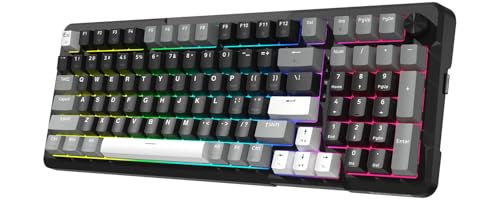
- Tri-mode Bluetooth, 2.4GHz, and USB-C connectivity
- 98% layout with multimedia volume knob
- QMK/VIA support and hot-swappable switches
Best For: Multi-device workstations and gaming setups
Full-Size Ergonomic Pick
TECKNET Metal-Panel RGB Keyboard
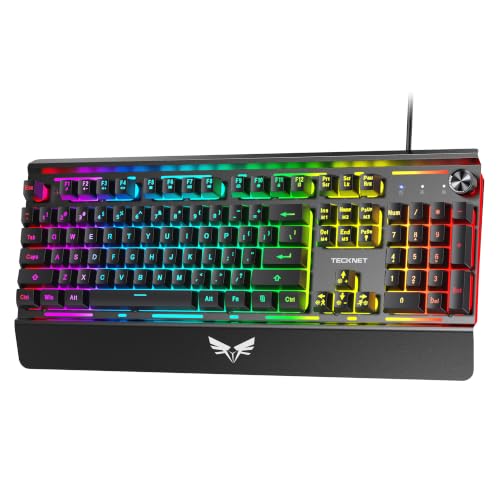
- Full-size 104-key layout with media controls
- Volume knob includes one-press mute
- Wrist rest, adjustable feet, and metal panel
Best For: Windows gaming and comfortable desktop use
Smart Display Pick

- 75% layout with TFT smart display and knob
- Tri-mode wireless and USB-C connectivity
- Gasket mount with hot-swappable switches
Best For: Feature-rich custom keyboard enthusiasts
Macro-Friendly Wired Pick
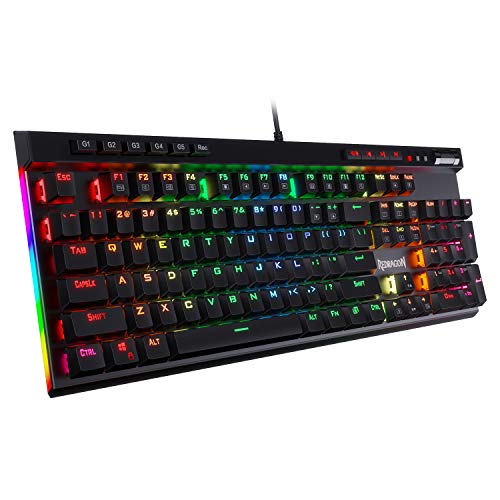
- Full-size 104-key layout with volume roller
- Five onboard macro keys
- Hot-swappable clicky Blue switches
Best For: Gamers wanting extensive wired controls and clicky feedback
Flexible Wireless Pick

- Tri-mode wireless and wired connectivity
- 75% layout with multi-function knob
- 4000mAh battery and hot-swap support
Best For: Multi-device users seeking a compact wireless keyboard
Sound-Focused Wired Pick

- Compact 75% layout with aluminum volume knob
- Gasket mount with layered sound absorption
- Hot-swappable Silver linear switches
Best For: Desk-based gaming and typing with fast, damped-feeling keys
Most Versatile Wireless Pick
Redragon K688 Tri-Mode Mechanical Keyboard

- Bluetooth, 2.4GHz, and USB-C connectivity
- Hot-swappable pre-lubed linear switches
- 98-key layout with multifunction control knob
Best For: Multi-device work, gaming, and flexible wireless setups
Best Compact Programmable Pick
RK ROYAL KLUDGE R65 60% Mechanical Keyboard

- Compact 66-key layout saves desk space
- Metal knob adjusts volume and mutes
- QMK/VIA support with hot-swappable switches
Best For: Compact wired gaming and programmable keyboard setups
Best With Numpad
RK ROYAL KLUDGE R98 Pro Mechanical Keyboard

- 98-key layout includes a numpad and arrow keys
- Detachable aluminum volume knob
- Hot-swappable switches and PBT keycaps
Best For: Work and gaming users who need numpad functionality
Compact Thocky Pick – Ajazz AK820 75% Mechanical Keyboard
The Ajazz AK820 is a practical mechanical keyboard with volume knob for shoppers who want a compact wired setup without giving up dedicated function keys. Its 75% layout, gasket construction, hot-swappable PCB, and pre-lubricated linear switches make it suited to both gaming and everyday typing.
Best For: Gamers and desk users who want a compact, customizable wired keyboard with a creamy typing sound.
Pros:
- 75% layout retains essential function keys while saving desk space.
- Volume knob provides quick audio adjustment or muting.
- Hot-swappable PCB supports 3-pin and 5-pin switches.
- South-facing RGB and double-shot PBT keycaps offer customizable lighting and durable legends.
Cons:
- Wired USB-C connectivity may be less flexible than a wireless design.
- Its compact layout omits some full-size keys.
The AK820 is a strong choice if you prioritize a smaller footprint, switch customization, and a tuned linear typing feel. Its wired connection is best for users who value stable, zero-latency performance over wireless convenience.
Wireless Productivity Pick – Redragon K742 Mechanical Keyboard
The Redragon K742 is a mechanical keyboard with volume knob designed for users who need flexible connectivity and a near-full layout. Its 98% arrangement keeps many useful keys, while tri-mode wireless support, hot-swappable switches, and QMK/VIA compatibility add versatility for work and gaming.
Best For: Hybrid workers and gamers who switch between multiple devices and want wireless flexibility with programmable controls.
Pros:
- Tri-mode connectivity supports Bluetooth, 2.4GHz wireless, and USB-C wired use.
- 98% layout preserves functionality while saving some desk space.
- Hot-swappable PCB accepts 3-pin and 5-pin switches.
- QMK/VIA support enables remapping, macros, and layered customization.
Cons:
- Backlit battery life is listed at about 16 hours.
- Software customization requires obtaining the VIA JSON file from the manufacturer.
Choose the K742 when wireless convenience and device switching matter as much as the volume knob. Its 4,000mAh battery, multi-device support, and programmable design make it more adaptable than a basic wired keyboard.
Full-Size Ergonomic Pick – TECKNET Metal-Panel RGB Keyboard
The TECKNET wired mechanical keyboard with volume knob is aimed at users who prefer a familiar 104-key layout and straightforward USB-A connectivity. It combines a metal panel, RGB lighting, an integrated wrist rest, multimedia keys, and a rotary knob for everyday gaming and computer use.
Best For: PC users who want a full-size wired gaming keyboard with ergonomic features and dedicated media controls.
Pros:
- Full-size 104-key layout includes 12 multimedia keys.
- Volume knob offers tactile adjustment plus one-press mute.
- Integrated wrist rest and two-stage kickstand support adjustable typing angles.
- Double-shot keycaps, metal panel, IP32 water resistance, and 25-key anti-ghosting support durability and gaming use.
Cons:
- Multimedia keys are not compatible with Mac.
- USB-A wired connectivity offers no wireless option.
- Its full-size design takes more desk space than compact layouts.
The TECKNET is a sensible fit when comfort, dedicated controls, and a complete key set are more important than portability. It is particularly practical for Windows-based gaming or workstations with room for a larger keyboard.
Smart Display Pick – EPOMAKER X Aula F75 MAX
The EPOMAKER X Aula F75 MAX is a mechanical keyboard with volume knob for users who want a compact wireless board with extra visual customization. Its 75% layout, TFT screen, gasket mount, hot-swappable PCB, and tri-mode connectivity give it a feature-rich profile for gaming, programming, and office work.
Best For: Enthusiasts who want a customizable 75% keyboard with a smart display, wireless operation, and a soft linear typing feel.
Pros:
- TFT screen displays customizable visuals along with connectivity and battery information.
- Bluetooth, 2.4GHz wireless, and USB-C modes support multiple devices and setups.
- Gasket mount, flex-cut plate, and layered dampening target a softer, quieter typing experience.
- Hot-swappable PCB, south-facing RGB, remapping, and macro support offer extensive customization.
Cons:
- Its 80-key layout is less complete than a full-size keyboard.
- Additional screen and software features may be unnecessary for users seeking a simple board.
- Plate-mount stabilizers are supplied, which may limit out-of-box stabilizer preferences.
The F75 MAX stands out for combining a volume knob with a configurable TFT display and broad connectivity. It is a compelling option for keyboard enthusiasts, though shoppers wanting only basic wired controls may prefer a simpler model.
Macro-Friendly Wired Pick – Redragon K580 VATA
The Redragon K580 is a full-size mechanical keyboard with volume knob functionality, dedicated media controls, and five onboard macro keys. Its clicky Blue switches, hot-swappable design, and 104-key layout make it a practical choice for gamers who want extensive controls without relying on software for everyday customization.
Best For: Gamers who want a full-size wired keyboard with clicky feedback, onboard macros, and dedicated media controls.
Pros:
- Dedicated media controls include a volume roller for quick audio adjustments.
- Five macro keys can record combos and shortcuts directly on the keyboard.
- Hot-swappable switch sockets support switch replacement without soldering.
- Full anti-ghosting, double-shot keycaps, and a rated 50-million-keystroke lifespan support heavy use.
Cons:
- The full-size 104-key layout takes up more desk space than a compact board.
- Stock Blue switches are noticeably clicky and audible.
- Connectivity is wired rather than wireless.
The K580 stands out when dedicated controls and onboard macros matter more than compactness or quiet operation. Choose it for a traditional full-size gaming layout and pronounced clicky typing feel.
Flexible Wireless Pick – AULA F75 Pro
The AULA F75 Pro is a 75% mechanical keyboard with volume knob control, tri-mode connectivity, and a rechargeable 4000mAh battery. It combines a compact layout with hot-swappable switches, pre-lubricated components, RGB lighting, and a knob that can handle volume, media, or lighting functions depending on the selected mode.
Best For: Users who want a compact mechanical keyboard with volume knob control and wired, Bluetooth, or 2.4GHz connectivity.
Pros:
- Tri-mode connectivity supports Bluetooth 5.0, 2.4GHz wireless, and USB-C wired use.
- 75% layout retains arrow keys while saving desk space.
- Hot-swappable base accepts 3-pin or 5-pin switches without soldering.
- Multi-function knob controls volume, media, lighting brightness, or effects depending on mode.
Cons:
- Some advanced lighting and macro customization requires the driver.
- The knob’s function changes between gaming and office modes, so it may require mode switching.
The F75 Pro is the most versatile option here for switching between devices and connection types. Its compact format and multi-purpose knob suit mixed work-and-gaming setups, while the damped construction is designed for a softer, quieter-feeling typing experience.
Sound-Focused Wired Pick – RK ROYAL KLUDGE R75
The RK ROYAL KLUDGE R75 is a wired 75% mechanical keyboard with a CNC aluminum volume knob, gasket mount, and hot-swappable Silver switches. Its layered foam construction, pre-lubricated stabilizers, and PBT keycaps make it a strong fit for shoppers who want a compact mechanical keyboard with volume knob control and a tuned typing feel.
Best For: Gamers and typists who prefer a compact wired board with fast linear switches and a damped, creamy sound profile.
Pros:
- 75% layout preserves arrow and function keys while reducing desk footprint.
- High-grade CNC aluminum volume knob provides convenient audio control.
- Gasket mount and triple absorption layers help reduce vibration and case noise.
- Hot-swappable PCB supports both 3-pin and 5-pin switches.
Cons:
- It is wired only and does not offer wireless connectivity.
- Silver linear switches prioritize quick response over tactile or clicky feedback.
- The keyboard is not water resistant according to the supplied specifications.
The R75 is a good match for buyers who value a compact layout, quick linear response, and a more controlled out-of-the-box sound. Its wired design keeps the feature set focused on desk-based gaming and typing.
Most Versatile Wireless Pick – Redragon K688 Tri-Mode Mechanical Keyboard
The Redragon K688 is a strong choice if you want a mechanical keyboard with volume knob that can move between a desktop, laptop, tablet, or compatible gaming console. Its tri-mode connectivity, 98-key layout, hot-swappable switches, and gasket construction make it suitable for both everyday work and gaming.
Best For: Users who want wireless flexibility, a number-friendly layout, and extensive customization.
Pros:
- Connects through Bluetooth 5.0, 2.4GHz wireless, or USB-C wired mode, with support for up to five devices.
- Includes hot-swappable, pre-lubed linear cream switches and supports both 3-pin and 5-pin replacements.
- Gasket construction, five layers of filling, and PCB slotting are designed to improve cushioning and reduce cavity noise.
- The multifunction knob adjusts volume by default and can also control backlight brightness and lighting modes.
Cons:
- Its 98-key design takes up more space than a compact 60% keyboard.
- Some customization features, including macros and lighting controls, require the driver.
- It is listed with Windows 10 as the minimum required operating system version.
The K688 stands out for buyers who do not want to choose between wireless convenience and mechanical-keyboard customization. Choose it when multi-device use and a fuller layout matter more than minimizing desk space.
Best Compact Programmable Pick – RK ROYAL KLUDGE R65 60% Mechanical Keyboard
The RK ROYAL KLUDGE R65 is a compact mechanical keyboard with volume knob for buyers who want to preserve desk space without giving up enthusiast-oriented features. Its 66-key layout combines a metal knob, gasket mount, hot-swappable switches, and QMK/VIA programmability in a wired design.
Best For: Compact gaming and desk setups where programmability and quick volume control are priorities.
Pros:
- The aluminum CNC volume knob adjusts volume and can be pressed to mute.
- Gasket construction and five layers of sound-absorbing material help buffer key vibration and noise.
- Pre-lubed linear cream switches are hot-swappable and compatible with 3-pin and 5-pin switches.
- Supports more than 20 RGB modes and QMK/VIA programming for remapping and customization.
Cons:
- The 60% layout has only 66 keys, so it omits the dedicated number pad and many full-size controls.
- It uses USB-C wired connectivity rather than Bluetooth or 2.4GHz wireless.
- Compatibility is listed for Windows and macOS, rather than a broader range of operating systems.
The R65 is a practical fit when compact dimensions matter more than having a numpad. Its knob, programmable firmware support, and hot-swap design give a small keyboard capabilities often associated with larger enthusiast models.
Best With Numpad – RK ROYAL KLUDGE R98 Pro Mechanical Keyboard
The RK ROYAL KLUDGE R98 Pro is a practical mechanical keyboard with volume knob for work and gaming users who still need a number pad. Its 98-key layout keeps the numpad, arrow keys, and most functions while using a more space-conscious design than a traditional full-size keyboard.
Best For: Buyers who need numpad access, a dedicated volume control, and a creamy gasket-mounted typing feel.
Pros:
- The 98-key layout retains the numpad, arrow keys, and most functions while saving desk space.
- Its detachable aluminum CNC knob provides quick volume adjustment, and indicator lights show key and mode status.
- Hot-swappable pre-lubed linear cream switches support both 3-pin and 5-pin replacements.
- MDA-profile double-shot PBT keycaps, gasket mounting, and five layers of sound-absorbing foam support a cushioned typing experience.
Cons:
- This is a wired USB-C keyboard, without the multi-mode wireless connectivity found on some alternatives.
- The 15.3-inch length may be relatively large for smaller desks.
- Key remapping, macros, and custom RGB settings use the RK online driver.
The R98 Pro is the better match when productivity features such as a numpad are non-negotiable. It offers a fuller layout, quick media control, and switch customization while keeping a compact 98-key footprint.
How We Picked the Best Mechanical Keyboard with Volume Knob
We compared the selected keyboards by looking at the features that matter most in daily use: layout efficiency, knob placement, switch and keycap options, construction, mounting style, lighting, connectivity, and customization. Hot-swappable sockets are useful if you want to change switches without soldering, while gasket-mounted designs may provide a softer, less rigid typing feel.
We also considered whether each model suits gaming, office work, streaming, or general desktop use. Wireless keyboards received attention for connection flexibility and battery convenience, while wired models can be preferable when you want consistent performance with no charging routine.
Quick Comparison
- Best for compact desks: 60% and 65% models save space but omit function-row and navigation keys.
- Best all-around layout: 75% keyboards retain useful navigation keys while staying relatively compact.
- Best for number-heavy work: A 96% or full-size-style keyboard keeps a dedicated number pad.
- Best for flexibility: Wireless, hot-swappable models support multiple connection methods and future switch changes.
- Best for simple reliability: Wired keyboards avoid battery management and wireless pairing concerns.
Key Buying Factors for a Mechanical Keyboard with Volume Knob
Layout and Desk Space
Choose the smallest layout that still includes the keys you use. A 75% board is often a strong compromise, while a 65% or 60% model works well for minimalist setups. If spreadsheets or accounting are part of your routine, prioritize a number pad.
Knob Design and Media Control
Check whether the knob adjusts volume only or also supports mute and other functions through a press or software remapping. Its position can affect access to the function row, display, or nearby keys.
Switches, Mounting, and Customization
Linear switches are smooth and commonly favored for gaming, while tactile switches provide a noticeable bump for typing feedback. Hot-swap support makes experimentation easier. Gasket mounting, foam, and pre-lubed switches can influence sound and feel, but preferences vary.
Connectivity and Software
Wired USB is straightforward and dependable. Bluetooth and 2.4GHz wireless add flexibility, especially for multi-device setups, but check battery life, charging, operating-system support, and whether all lighting or remapping features require software.
Who Should Buy Which Mechanical Keyboard with Volume Knob?
Gamers and streamers should look for quick media access, responsive switches, RGB controls, and a layout that leaves enough room for mouse movement. Office and hybrid users may prefer a quieter switch option, wireless connectivity, and dedicated navigation keys. Enthusiasts should prioritize hot-swappable sockets, programmable controls, PBT keycaps, and a mounting system suited to their preferred typing feel. Data-entry users should choose a larger layout with a number pad rather than sacrificing productivity for compactness.