Choosing a business laptop means balancing performance, portability, connectivity, and cost. The best laptops for small businesses handle everyday office software, video calls, multitasking, and secure web-based work without overspending.
This roundup compares 10 current options, from compact Apple hardware to full-size Windows laptops with numeric keypads, Ethernet ports, and business-focused features.
Best 10 Laptops for Small Businesses Picks for 2026
Power User Pick
Lenovo V15 Gen 4 Core i5 Business Laptop

- 13th Gen Core i5 processor with 8 cores and 12 threads
- 16GB RAM and 512GB NVMe SSD
- Windows 11 Pro, Ethernet, HDMI, and numeric keypad
Best For: Small-business multitasking and office productivity
Most Portable Mac
Apple MacBook Neo 13-inch with A18 Pro

- Lightweight 2.71-pound aluminum design
- Up to 16 hours of battery life
- Liquid Retina display and 1080p camera
Best For: Mobile professionals in the Apple ecosystem
Best Value Workhorse
Lenovo V15 Ryzen 5 Business Laptop

- 16GB DDR5 RAM and 512GB SSD
- Windows 11 Pro with business security features
- Ethernet, Wi-Fi 6, USB-C, HDMI, and numeric keypad
Best For: Budget-minded offices and routine business work
Best for Cloud Work
Lenovo V15 N150 Business Laptop

- 16GB DDR5 memory and 256GB NVMe SSD
- Windows 11 Pro with business tools
- USB-C, HDMI, Ethernet, webcam shutter, and Dolby Audio
Best For: Web-based office work and everyday collaboration
Best Value Business Laptop

- 16GB RAM and 512GB SSD
- 15.6-inch Full HD IPS display
- Windows 11 Pro and Wi-Fi 6
Best For: Everyday office work, video calls, and portable business use
Best for Portability and Security
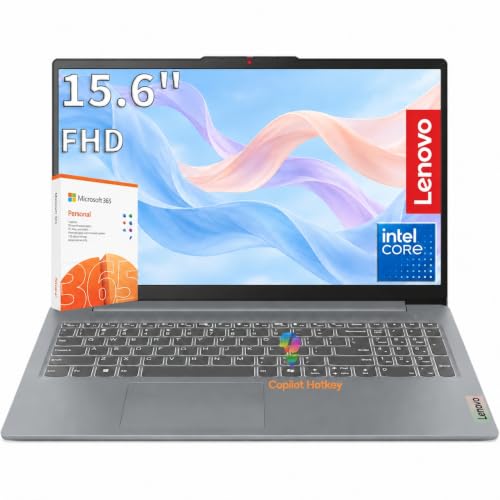
- Lightweight 3.33-pound design
- Wi-Fi 6, Gigabit Ethernet, and USB-C
- Privacy shutter and TPM 2.0
Best For: Remote work, office mobility, and everyday business applications
Best Performance Pick

- Ryzen 7 with 8 cores and 16 threads
- 16GB RAM and 512GB PCIe SSD
- Windows 11 Pro with numeric keypad
Best For: Multitasking, business applications, and productivity-heavy workloads
Reliable Refurbished Workhorse

- 16GB RAM and 256GB SSD
- 14-inch matte Full HD display
- Windows 11 Pro with business connectivity
Best For: Office multitasking and compact business setups
Big-Screen Office Value

- 17.3-inch anti-glare display
- 16GB RAM with Ryzen 5 CPU
- Numeric keypad and Office 365 for the web
Best For: Desk-based work, spreadsheets, and video calls
Secure Everyday Essential

- 16GB LPDDR5 RAM and Ryzen 3 CPU
- Windows 11 Pro with TPM 2.0
- Wi-Fi 6, Ethernet, and webcam shutter
Best For: Secure everyday office and mobile work
Power User Pick – Lenovo V15 Gen 4 Core i5 Business Laptop
For small businesses that need strong everyday performance and familiar Windows tools, this Lenovo V15 pairs a 13th Gen Intel Core i5-13420H processor with 16GB RAM and a 512GB SSD. Its 15.6-inch Full HD screen, numeric keypad, Ethernet, and Windows 11 Pro make it practical for office work, spreadsheets, multitasking, and hybrid setups.
Best For: Small-business users who prioritize processing power, storage, wired networking, and a full-size work-friendly layout.
Pros:
- Core i5-13420H processor offers 8 cores, 12 threads, and speeds up to 4.6 GHz.
- 16GB RAM and a 512GB PCIe NVMe SSD support multitasking and quick file access.
- Includes HDMI, RJ45 Ethernet, USB-C, three USB ports, and a dedicated numeric keypad.
- Windows 11 Pro provides business-oriented features and compatibility.
Cons:
- Integrated Intel UHD Graphics are intended for general productivity rather than graphics-intensive work.
- The 15.6-inch design is less portable than a compact business laptop.
This is a well-rounded choice among laptops for small businesses when application responsiveness, local storage, and office connectivity matter more than premium portability.
Most Portable Mac – Apple MacBook Neo 13-inch with A18 Pro
For small businesses that value portability and long unplugged work sessions, the Apple MacBook Neo combines an A18 Pro chip with a lightweight 13-inch aluminum design. It also includes a Liquid Retina display, 1080p camera, and macOS features that can be especially useful for teams already using iPhone.
Best For: Mobile business owners and professionals who want a compact Mac for communication, documents, presentations, and everyday apps.
Pros:
- Compact 2.71-pound design is easy to carry between meetings or work locations.
- Up to 16 hours of battery life supports extended mobile workdays.
- A18 Pro chip is designed for everyday performance and Apple Intelligence features.
- Liquid Retina display, 1080p camera, dual microphones, and speakers support calls and presentations.
Cons:
- 8GB unified memory and 256GB SSD provide less headroom than several Windows alternatives in this roundup.
- The 13-inch screen may feel limited for large spreadsheets or side-by-side documents.
The MacBook Neo is a compelling fit for small-business users already invested in Apple devices, particularly those who prioritize low weight, battery life, and a cohesive macOS-and-iPhone workflow.
Best Value Workhorse – Lenovo V15 Ryzen 5 Business Laptop
This Lenovo V15 is a practical option for small businesses seeking solid everyday performance without moving to a higher-end workstation. Its Ryzen 5 7520U processor, 16GB DDR5 RAM, 512GB SSD, Windows 11 Pro, and broad port selection suit documents, spreadsheets, video calls, browsing, and remote work.
Best For: Budget-conscious offices needing a durable, general-purpose Windows laptop with business features and flexible connectivity.
Pros:
- 16GB DDR5 RAM and 512GB PCIe NVMe SSD provide responsive multitasking and storage.
- 15.6-inch Full HD anti-glare display includes TÜV Low Blue Light features.
- Offers Wi-Fi 6, Bluetooth 5, Ethernet, USB-C with DisplayPort, HDMI, and two USB-A ports.
- Windows 11 Pro includes features such as BitLocker encryption and Remote Desktop.
Cons:
- AMD Radeon 610M integrated graphics are suited to productivity rather than demanding visual workloads.
- The listing notes that the computer has been resealed for a system upgrade, so buyers should review the included warranty terms.
With its business-focused operating system, MIL-SPEC-tested design claim, numeric keypad, and useful ports, this Lenovo offers a strong balance for routine small-business computing.
Best for Cloud Work – Lenovo V15 N150 Business Laptop
Small businesses centered on browser-based tools and office applications may find this Lenovo V15 a sensible, straightforward choice. It combines an Intel N150 processor with 16GB DDR5 memory, a 256GB NVMe SSD, Windows 11 Pro, and a 15.6-inch Full HD anti-glare display.
Best For: Office teams handling web-based work, email, documents, video calls, and everyday multitasking with a need for business connectivity.
Pros:
- 16GB DDR5 RAM helps keep everyday multitasking responsive.
- Windows 11 Pro includes enhanced security, Remote Desktop, and device-management features.
- USB-C with Power Delivery and DisplayPort, HDMI, USB-A, and Ethernet support flexible setups.
- HD webcam with privacy shutter and Dolby Audio speakers support collaboration.
Cons:
- The 256GB SSD offers less storage capacity than the 512GB Lenovo models.
- The Intel N150 is aimed at everyday productivity rather than demanding applications.
This model makes the most sense for small-business users whose workloads are primarily cloud-based and who value Windows 11 Pro, modern memory, and convenient office connectivity over high-end performance.
Best Value Business Laptop – HP 255 G10 Ryzen 3
For small businesses seeking practical laptops for small businesses, the HP 255 G10 combines Windows 11 Pro, 16GB of RAM, and a 512GB SSD in a lightweight 15.6-inch design. It is well suited to everyday office work, video calls, browsing, and general multitasking.
Best For: Small-business users who want a portable Windows 11 Pro laptop with strong everyday specifications and useful connectivity.
Pros:
- 16GB RAM and a 512GB SSD support responsive multitasking and quick storage access.
- 15.6-inch Full HD IPS anti-glare display offers 1920 x 1080 resolution and wide viewing angles.
- Includes Wi-Fi 6, Bluetooth 5.3, USB-C, two USB-A ports, HDMI, and a combined headphone/microphone jack.
- Integrated HD camera, dual-array microphones, and AI-based noise reduction support virtual meetings.
Cons:
- Ryzen 3 processing is aimed at everyday productivity rather than demanding professional workloads.
- Integrated AMD Radeon graphics are not intended for graphics-intensive applications.
- The product seal was opened for upgrades, so coverage is split between the upgraded components and the remaining hardware.
The HP 255 G10 is a balanced option for routine business productivity, particularly when Windows 11 Pro, generous memory, and a larger Full HD screen matter more than high-end processing power.
Best for Portability and Security – Lenovo V15 G6
The Lenovo V15 G6 is a practical choice among laptops for small businesses when portability, connectivity, and basic security features are priorities. Its compact 3.33-pound design, Full HD display, and Windows 11 Home setup fit office, home, and remote-work routines.
Best For: Remote workers and small-business users who need a lightweight laptop with wired networking, privacy features, and flexible ports.
Pros:
- Intel N100 quad-core processor, 8GB DDR5 RAM, and a 256GB PCIe 4.0 SSD cover everyday business applications and document work.
- Offers Wi-Fi 6, Bluetooth 5.2, and Gigabit Ethernet for flexible network connectivity.
- Camera privacy shutter, Firmware TPM 2.0, and Kensington Nano Security Slot add practical security features.
- Two USB-C ports support charging and DisplayPort, alongside two USB-A ports and HDMI.
Cons:
- Windows 11 Home lacks the business-oriented features included with Windows 11 Pro.
- 256GB of storage provides less room for large business files than the 512GB alternatives in this roundup.
- Integrated Intel UHD Graphics are intended for video playback and light multimedia tasks.
With MIL-STD-810H testing, a privacy shutter, and both wired and wireless networking, the Lenovo V15 G6 emphasizes dependable everyday work and mobility rather than demanding performance.
Best Performance Pick – HP 255 G10 Ryzen 7
For small businesses that regularly multitask, the HP 255 G10 offers a stronger performance profile than entry-level alternatives. Its Ryzen 7 processor, 16GB of RAM, 512GB PCIe SSD, and Windows 11 Pro make it a capable fit for productivity-heavy laptops for small businesses.
Best For: Business users who run multiple applications and browser tabs and want Windows 11 Pro with a higher-performance processor.
Pros:
- Eight-core, 16-thread Ryzen 7 7730U processor reaches up to 4.5GHz for demanding multitasking.
- 16GB RAM and a 512GB PCIe SSD provide useful capacity for applications, files, and quick boot times.
- 15.6-inch Full HD IPS anti-glare display includes a numeric keypad and 250-nit brightness.
- Includes Wi-Fi 6, Bluetooth, HDMI, USB-C, two USB-A ports, and a webcam.
Cons:
- Integrated Radeon graphics are not designed for graphics-intensive professional workloads.
- The display is rated at 250 nits and 45% NTSC, so it is geared toward standard office use rather than color-critical work.
- It is a traditional clamshell design without a listed touch-display feature.
The Ryzen 7 configuration is the strongest performance choice here for office multitasking, while its business-focused Windows 11 Pro features, numeric keypad, and broad port selection keep it practical for everyday company use.
Reliable Refurbished Workhorse – Dell Latitude 5420
For small businesses seeking practical laptops for small businesses, the renewed Dell Latitude 5420 combines a business-focused Windows 11 Pro setup with 16GB of RAM, a 256GB SSD, and an 11th Gen Intel Core i5 processor. Its 14-inch matte Full HD display and broad connectivity make it well suited to everyday office work.
Best For: Office multitasking, remote work, email, web applications, and users who need a compact business laptop with Windows 11 Pro.
Pros:
- 16GB RAM supports multitasking across common business applications.
- 256GB SSD provides responsive storage for documents and software.
- 14-inch 1920 x 1080 matte display helps reduce glare.
- Includes HDMI, Ethernet, four USB ports, Wi-Fi, and Bluetooth connectivity.
Cons:
- 256GB of storage may feel limited for large files or extensive media libraries.
- It is a renewed product with a listed 30-day warranty.
- Integrated graphics are intended for everyday use rather than demanding graphics work.
The Latitude 5420 is a sensible choice when a small business needs strong everyday multitasking and business-oriented connectivity without prioritizing the newest hardware. Its renewed condition and shorter listed warranty are the main factors to weigh.
Big-Screen Office Value – HP 17 Business Laptop
The HP 17 is a strong option for small businesses that value screen space and comfortable data entry. It pairs a 17.3-inch anti-glare display with 16GB of RAM, a Ryzen 5 processor, a numeric keypad, and Windows 11 with Office 365 for the web.
Best For: Desk-based business work, spreadsheets, document editing, video calls, and employees who benefit from a large display and numeric keypad.
Pros:
- Large 17.3-inch anti-glare display supports multitasking and detailed work.
- Full-size keyboard includes a 10-key numeric keypad.
- 16GB RAM and a Ryzen 5 processor suit everyday office multitasking.
- Features a 720p camera, digital microphones, HDMI, USB ports, and claimed 12-hour battery life.
Cons:
- The larger 17.3-inch chassis is less convenient for frequent travel.
- The listed native resolution is 1600 x 900, despite the product description referencing Full HD.
- The listing indicates Office 365 for the web rather than a full desktop Office installation.
This HP makes the most sense as a workplace or home-office computer where screen size, keypad access, and long battery life matter more than maximum portability. Verify the display specification and Office requirements before purchasing.
Secure Everyday Essential – Lenovo V15 Gen 4
For budget-conscious small businesses, the Lenovo V15 Gen 4 offers a practical mix of security, connectivity, and everyday performance. Its Ryzen 3 7320U processor, 16GB LPDDR5 RAM, Windows 11 Pro, Wi-Fi 6, and 15.6-inch Full HD display cover common office and mobile-work needs.
Best For: Everyday business applications, web work, studying, mobile employees, and organizations that value Windows 11 Pro security features.
Pros:
- 16GB LPDDR5 RAM supports everyday multitasking.
- Windows 11 Pro, TPM 2.0, and a webcam privacy shutter add business-focused protection.
- 15.6-inch anti-glare 1920 x 1080 display provides a practical work area.
- Includes Ethernet, HDMI, USB-C, USB-A, Wi-Fi 6, Bluetooth 5.3, and a numeric keypad.
Cons:
- 256GB storage may be restrictive for large business file collections.
- The Ryzen 3 processor is aimed at everyday tasks rather than demanding workloads.
- Integrated graphics are not designed for intensive creative or 3D applications.
The V15 Gen 4 is a well-rounded choice for routine productivity, especially when security controls and wired networking are useful. It is best matched with browser-based tools, office applications, and standard administrative workloads.
How We Picked These Laptops for Small Businesses
We focused on specifications that matter in real small-business workloads: processor capability, memory, storage, display size, operating system, connectivity, and included business features. Models with at least 16GB of RAM and a solid-state drive generally provide a smoother experience for multitasking, browser-heavy workflows, spreadsheets, accounting software, and video conferencing.
We also included different form factors and price tiers. A small office may value Ethernet and a numeric keypad, while a mobile professional may prefer lower weight, longer battery life, or Apple’s integrated hardware and software experience. Because specifications and configurations can vary by seller, confirm the exact model, warranty, operating system, and included accessories before buying.
Quick Comparison
| Best For | What to Prioritize | Recommended Type |
|---|---|---|
| General office work | 16GB RAM, 512GB SSD, comfortable display | 15.6-inch Windows laptop |
| Remote and mobile work | Low weight, battery life, webcam quality | Compact laptop or MacBook |
| Finance and spreadsheets | Numeric keypad, larger screen, strong multitasking | 15.6- or 17.3-inch business laptop |
| Wired office networks | Built-in RJ45 Ethernet or a reliable adapter | Business-oriented Windows model |
| Budget deployment | Upgradeable storage, adequate RAM, warranty | Entry-level Lenovo or HP laptop |
Key Buying Factors for Laptops for Small Businesses
Performance and Memory
For email, documents, browser tabs, point-of-sale tools, and video meetings, a modern midrange processor is usually sufficient. Choose 16GB of RAM when possible, especially if employees regularly multitask. Models with 8GB can work for lighter workloads but offer less headroom.
Storage and Security
An SSD makes startup and application loading much faster than a traditional hard drive. A 256GB SSD may be adequate for cloud-first users, while 512GB is a better general-purpose choice. Windows 11 Pro can be useful for business management features, while any business deployment should also use strong passwords, automatic updates, encryption, and dependable backups.
Screen, Keyboard, and Connectivity
A 15.6-inch Full HD display is a practical middle ground for office work. A 17.3-inch screen improves visibility but reduces portability. Numeric keypads benefit accounting and data-entry tasks. HDMI, USB ports, Wi-Fi, a good webcam, and Ethernet can reduce the need for dongles and simplify office setup.
Support and Total Cost
Compare warranty coverage, return policies, repair options, and included software—not just the sale price. For a team purchase, consistent configurations can simplify setup, maintenance, and employee support.
Who Should Buy Which Laptops for Small Businesses?
- Choose a Lenovo V15 or HP 255 G10 for a practical Windows office computer with a large screen, familiar software support, and useful connectivity.
- Choose the higher-memory, larger-storage configurations for employees who run many browser tabs, spreadsheets, communications tools, or business applications simultaneously.
- Choose a 17.3-inch HP model if screen size and numeric data entry matter more than portability.
- Choose the Dell Latitude if you prefer a traditionally business-oriented platform and a more compact 14-inch format.
- Choose the MacBook Neo if your team already uses Apple devices and values Apple Intelligence, macOS integration, and a compact premium design.
Before placing a bulk order, verify processor generation, RAM type, storage capacity, operating system edition, keyboard layout, warranty, and whether Microsoft 365 is a full license or web-only access.