Video editing demands fast storage, dependable drive management, and enough capacity for large source files, proxies, project libraries, and finished exports. The right RAID enclosure can expand your workstation without requiring a full NAS setup.
We selected 10 options ranging from portable dual-bay enclosures to high-capacity multi-drive arrays. Use the guide below to match drive support, interface speed, RAID flexibility, cooling, and capacity to your editing workflow.
Best 10 Raid Enclosure for Video Editing Picks for 2026
Premium Capacity Pick
SanDisk Professional G-RAID Shuttle 8
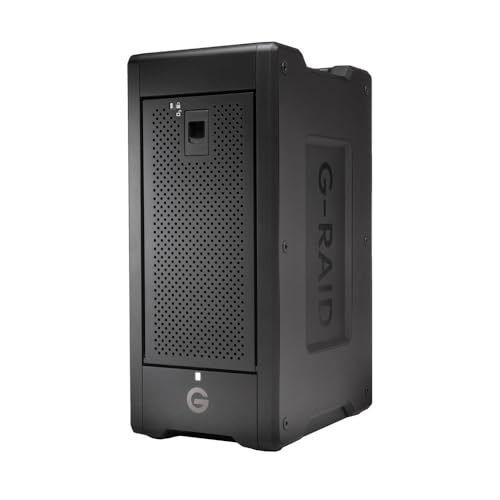
- Up to 160TB with eight removable Ultrastar drives
- Up to 2000MB/s write speeds over Thunderbolt 3
- Supports RAID 0, 1, 5, 6, 10, 50, 60, and JBOD
Best For: Professional editors managing very large 4K, 8K, or VR projects
Best 20Gbps Four-Bay Value

- Supports six RAID modes, including RAID 5 and RAID 10
- Up to 104TB across four SATA drives
- USB 3.2 Gen 2x2 with hot-swappable bays
Best For: Editors assembling a flexible four-drive desktop array
Flexible RAID Configuration

- Eight RAID and disk-management modes
- Up to 96TB with four 24TB SATA drives
- Dual switch-controlled cooling fans
Best For: Power users prioritizing RAID flexibility and large media storage
High-Capacity Five-Bay DAS

- Supports up to five drives and 110TB capacity
- Offers eight hardware RAID and disk modes
- Built-in 150W power supply and 80mm cooling fan
Best For: Editors building a large desktop media library or backup array
Best Dual-Bay HDD RAID Value

- Two-bay hardware RAID for SATA drives
- Up to 44TB with 22TB drives
- 10Gbps USB-C DAS connection
Best For: High-capacity desktop video editing and backups
Best Portable NVMe RAID

- 20Gbps dual-NVMe enclosure
- RAID 0/1, JBOD, and Clone modes
- Tool-free aluminum portable design
Best For: Portable NVMe editing storage and disk cloning
Compact RAID Pick
CENMATE 2-Bay USB RAID Enclosure

- Four modes: RAID 0, RAID 1, Normal, and JBOD
- Supports 2.5-inch and 3.5-inch SATA drives
- USB 3.0, up to 5Gbps, with active cooling
Best For: Two-drive editing and backup setups
High-Capacity Workflow Pick
Yottamaster 5-Bay RAID Enclosure

- Five bays and up to 110TB of stated capacity
- Supports RAID 0/1/3/5/10, JBOD, and CLONE
- 80mm temperature-controlled fan and removable trays
Best For: Large media libraries and expandable studio storage
Flexible Interface Pick
CENMATE 4-Bay USB/eSATA RAID Enclosure

- Four bays and up to 80TB stated capacity
- Eight RAID and storage modes, including RAID 5 and 10
- USB-A/C 3.0 plus eSATA connectivity
Best For: Four-drive editing setups needing flexible RAID options
Premium Capacity Pick – SanDisk Professional G-RAID Shuttle 8
For demanding video editing workflows, the SanDisk Professional G-RAID Shuttle 8 is a raid enclosure for video editing built around eight removable enterprise-class hard drives. Its Thunderbolt 3 connectivity, hardware RAID, and enormous capacity make it suited to large 4K, 8K, and VR projects in studios or on location.
Best For: Professional editors who need very high capacity, fast transfers, and flexible hardware RAID options.
Pros:
- Up to 160TB of storage with eight removable Ultrastar drives.
- Read speeds up to 1900MB/s and write speeds up to 2000MB/s.
- Supports RAID 0, 1, 5, 6, 10, 50, 60, and JBOD configurations.
- Thunderbolt 3 daisy-chaining and up to 85W USB-C Power Delivery.
Cons:
- Its 32-pound chassis is less convenient than smaller desktop enclosures.
- Designed primarily for Mac hardware, according to the supplied specifications.
- Its premium capacity and enterprise-class design may exceed the needs of casual editors.
This is the strongest option here for high-volume professional production. The removable drives and broad RAID support add flexibility, while Thunderbolt 3 provides the bandwidth needed for demanding media work.
Best 20Gbps Four-Bay Value – ORICO 4-Bay RAID Enclosure
The ORICO 4-Bay enclosure is a practical raid enclosure for video editing when you want flexible disk configurations and a high-speed USB connection. It accepts four SATA drives, supports up to 104TB, and includes cooling and a built-in power supply for sustained multi-drive use.
Best For: Video producers and desktop users who want a flexible four-drive enclosure with broad operating-system compatibility.
Pros:
- Supports RAID 0, 1, 5, 10, JBOD, and Normal modes.
- Holds up to four 3.5-inch SATA drives, with up to 104TB total capacity.
- USB 3.2 Gen 2×2 supports up to 20Gbps with compatible USB4 connectivity.
- Hot-swapping, aluminum construction, and a low-noise 45dB fan.
Cons:
- Thunderbolt connections are limited to around 10Gbps in practice, according to the notes.
- Changing RAID modes erases drive contents, so careful backups are required.
- Drives are not included.
With six RAID modes, hot-swap support, and a 150W power supply, this ORICO model offers a balanced feature set for editors building their own storage array. Its full 20Gbps potential depends on a compatible USB4 host.
Flexible RAID Configuration – MAIWO 4-Bay RAID Enclosure
The MAIWO 4-Bay enclosure is a raid enclosure for video editing aimed at users who want many configuration choices without moving to a larger multi-bay system. It supports up to four 3.5-inch SATA drives, offers eight RAID modes, and includes dual switch-controlled cooling fans.
Best For: Power users who want flexible RAID layouts and a large local media library at a moderate transfer speed.
Pros:
- Offers eight modes, including RAID 0, 1/10, 3, 5, Clone, Large/JBOD, and Normal.
- Supports up to 96TB using four 24TB drives.
- USB-A/C 3.1 connectivity provides transfer speeds up to 5Gbps.
- Dual cooling fans can be switched on or off.
Cons:
- Its 5Gbps interface is slower than the other high-speed options here.
- Changing RAID configurations may require data to be backed up first.
- It is limited to four 3.5-inch SATA drives.
The MAIWO is a sensible choice when RAID flexibility and cooling matter more than maximum interface bandwidth. It can provide substantial capacity for editing projects, backups, and media libraries while keeping the setup straightforward.
High-Capacity Five-Bay DAS – ORICO 5-Bay RAID Enclosure
The ORICO 5-Bay enclosure is a raid enclosure for video editing that emphasizes capacity, simple hardware control, and long-duration desktop operation. It supports five SATA HDDs or SSDs, includes a 150W internal power supply, and uses USB 3.0 for cross-platform file access.
Best For: Editors and media archivists who need five bays, broad RAID choices, and a large local storage pool.
Pros:
- Supports RAID 0, 1, 3, 5, 10, JBOD, Clone, and Clear modes.
- Accommodates up to five drives and up to 110TB of stated capacity.
- Built-in 150W power supply supports multiple high-consumption drives.
- Aluminum housing, honeycomb vents, and an 80mm cooling fan support extended use.
Cons:
- USB 3.0 is slower than the 20Gbps and Thunderbolt options.
- The enclosure does not include storage drives.
- Its stated 230MB/s transfer rate may not suit the most demanding multi-stream workflows.
This ORICO model makes the most sense as a spacious desktop DAS for editing libraries, backups, and shared media storage. Its five bays and extensive RAID modes provide useful expansion, but editors needing maximum real-time throughput should consider a faster interface.
Best Dual-Bay HDD RAID Value – TerraMaster D2-320
The TerraMaster D2-320 is a practical raid enclosure for video editing when you need substantial capacity from two SATA drives. Its USB 3.2 Gen 2 connection, hardware RAID modes, and support for up to 44TB make it suitable for desktop editing, backups, and media storage.
Best For: Video editors who want a high-capacity, two-drive DAS with RAID 0 performance or RAID 1 mirroring.
Pros:
- Supports RAID 0, RAID 1, JBOD, and Single configurations.
- Accepts two 3.5-inch or 2.5-inch SATA HDDs or SSDs, up to 22TB per drive.
- USB 3.2 Gen 2 delivers up to 10Gbps, with claimed RAID 0 speeds up to 521MB/s on HDDs and 1,075MB/s read on SSDs.
- Tool-free trays and temperature-controlled cooling simplify installation and operation.
Cons:
- It is a DAS rather than a network-attached storage system.
- It is diskless, so drives must be purchased separately.
- Its two-bay design offers less expansion than larger enclosures.
The D2-320 is a strong choice if capacity, straightforward hardware RAID, and broad SATA drive compatibility matter more than network access or extensive bay expansion.
Best Portable NVMe RAID – NEWQ Dual-Bay SSD Enclosure
This dual-bay NVMe enclosure is a compact raid enclosure for video editing built around M.2 2280 SSDs. It combines RAID 0 and RAID 1 with JBOD and offline clone modes, making it useful for fast project storage, duplication, and portable workflows.
Best For: Editors and mobile professionals using two M.2 NVMe SSDs who need fast transfers, cloning, and a lightweight enclosure.
Pros:
- Offers RAID 0, RAID 1, JBOD, and direct Clone mode.
- Supports data transfer speeds up to 20Gbps.
- Tool-free access makes SSD replacement and cloning more convenient.
- Aluminum construction supports heat dissipation while keeping the enclosure portable.
Cons:
- It is designed for M.2 2280 NVMe SSDs rather than SATA drives.
- The listed platform compatibility is PC.
- Two high-capacity SSDs may require the auxiliary USB-C input for stable operation.
The NEWQ enclosure is appealing for fast, portable editing storage, especially when NVMe performance and offline duplication are more important than accommodating large mechanical hard drives.
Best Multi-Bay Flash Workflow – ORICO 4-Bay All-Flash Enclosure
The ORICO 4-bay model is a versatile raid enclosure for video editing designed for 2.5-inch SSDs and HDDs. With seven RAID modes, card slots, USB expansion, and support for up to 40TB across the bays, it is suited to editors managing active projects and field media.
Best For: Video editors and photographers who need multiple 2.5-inch drives, flexible RAID choices, and convenient memory-card access.
Pros:
- Supports RAID 0, 1, 3, 5, 10, JBOD, and Clear modes.
- Holds up to four 2.5-inch SSDs or HDDs, with up to 40TB total capacity as specified.
- Includes two USB 3.2 10Gbps ports plus SD and TF 3.0 card slots.
- Compact all-flash design is more portable and shock-resistant than traditional 3.5-inch HDD enclosures.
Cons:
- It does not support 3.5-inch drives.
- SATA connections are listed at 5Gbps, below the enclosure’s 10Gbps PSSD connection capability.
- The supplied specifications list both 32TB and up to 40TB capacity figures.
The ORICO stands out for multi-drive flexibility and on-site media handling. It is a good fit when card access, several RAID options, and a compact 2.5-inch design are central to the editing setup.
Compact RAID Pick – CENMATE 2-Bay USB RAID Enclosure
If you need a compact raid enclosure for video editing, this two-bay CENMATE model provides selectable RAID 0, RAID 1, Normal, and JBOD modes in an aluminum enclosure. It supports 2.5-inch and 3.5-inch SATA HDDs or SSDs and connects over USB 3.0 at up to 5Gbps.
Best For: Editors and creators who need a straightforward two-drive external storage setup for desktop or laptop use.
Pros:
- Supports RAID 0, RAID 1, Normal, and JBOD configurations.
- Accepts both 2.5-inch and 3.5-inch SATA HDDs and SSDs, with up to 20TB per drive.
- Includes USB-A and USB-C 3.0 connectivity and works with Windows, Mac, and Linux.
- Aluminum construction and a built-in 2-inch cooling fan help manage drive heat.
Cons:
- USB 3.0 tops out at 5Gbps, which may limit performance with demanding editing workflows.
- The fan is rated at roughly 40–50 decibels and may be audible in quiet rooms.
- Changing RAID settings can result in data loss, and the notes specify no RAID software for Mac OS.
This is a practical entry-level choice when two drive bays are enough and USB connectivity fits your setup. Back up important footage before configuring or changing RAID modes.
High-Capacity Workflow Pick – Yottamaster 5-Bay RAID Enclosure
For larger media libraries, the Yottamaster PS500RU3 is a five-bay raid enclosure for video editing that supports up to 110TB using five 22TB drives. Its broad selection of RAID modes, removable trays, and temperature-controlled 80mm fan make it suited to expandable desktop or on-location storage.
Best For: Video editors who need substantial external capacity and flexible RAID options for studio or field workflows.
Pros:
- Five bays support 2.5-inch and 3.5-inch SATA HDDs and SSDs.
- Offers RAID 0, 1, 3, 5, 10, JBOD/SPAN, and CLONE modes.
- Supports up to 110TB total capacity with five 22TB drives.
- Aluminum construction and an intelligent 80mm fan provide active cooling with automatic speed adjustment.
Cons:
- USB 3.0 transfer is limited to up to 5Gbps rather than a faster modern interface.
- It is a larger five-drive solution that may be more than smaller editing projects require.
- New drives may need formatting and partitioning before the computer recognizes them.
The five bays give this enclosure the strongest capacity and expansion advantage of the group. It is a compelling fit for editors managing multiple projects, provided a 5Gbps USB connection meets the workflow’s speed requirements.
Flexible Interface Pick – CENMATE 4-Bay USB/eSATA RAID Enclosure
The CENMATE four-bay enclosure combines USB 3.0 and eSATA connectivity with eight selectable modes, making it a flexible raid enclosure for video editing. It supports up to 80TB across four 2.5-inch or 3.5-inch SATA drives and includes cooling fans plus a 12V power adapter.
Best For: Editors who want four-drive capacity, multiple RAID configurations, and an eSATA option on compatible systems.
Pros:
- Supports RAID 0, 1, 3, 5, 10, CLONE, LARGE, and NORMAL modes.
- Accepts 2.5-inch and 3.5-inch SATA HDDs or SSDs, with up to 20TB per drive.
- Provides USB-A/C 3.0 and eSATA connections and includes both cables.
- Aluminum housing, dual 2-inch fans, and a 12V power adapter support cooling and stable operation.
Cons:
- Fan noise is listed at approximately 40–50 decibels.
- eSATA access to multiple bays requires a computer eSATA port that supports RAID; otherwise, only one bay may be accessible.
- Hot-swapping is not supported, and changing RAID modes requires a specific power-off and reset procedure.
This model offers more RAID choices and bays than the two-bay CENMATE while retaining a compact desktop format. Its eSATA behavior requires careful compatibility checking, so USB 3.0 may be the simpler connection for many systems.
How We Picked the Best Raid Enclosure for Video Editing
We focused on the factors that matter most during real editing work: connection speed, drive-bay count, RAID modes, supported drive types, cooling, capacity, and ease of installation. The selection includes SATA HDD and SSD enclosures, NVMe options, compact two-bay models, and professional multi-bay arrays.
Because an enclosure’s performance depends on the drives installed, we considered each model’s expansion potential rather than treating advertised speeds as guaranteed editing throughput. We also looked for practical features such as tool-free installation, USB-C connectivity, removable drive trays, fan cooling, and compatibility with common operating systems.
Quick Comparison
| Best For | Recommended Type | What to Prioritize |
|---|---|---|
| High-resolution and multicamera editing | Four- to eight-bay array | Thunderbolt or high-speed USB, RAID 5/6 support, strong cooling |
| Large media libraries | Four- or five-bay HDD enclosure | High maximum capacity, redundancy, quiet operation |
| Portable project storage | Two-bay enclosure | Compact design, USB-C, RAID 1, easy drive access |
| Scratch disks and fast transfers | NVMe or all-flash enclosure | USB 3.2 Gen 2×2 or faster, heat management, SSD compatibility |
Key Buying Factors for a Raid Enclosure for Video Editing
Interface and Real-World Speed
Choose Thunderbolt 3 or faster when editing directly from the enclosure with high-bitrate 4K, 6K, or 8K footage. USB 3.2 can work well for HD editing, proxies, backups, and many 4K workflows, but actual speed depends on the computer, cable, RAID mode, and installed drives.
RAID Level and Data Protection
RAID 0 combines drives for speed and capacity but has no fault tolerance. RAID 1 mirrors data for protection at the cost of usable capacity. RAID 5 or RAID 6 can provide a better balance for multi-drive media libraries, though not every enclosure supports them. RAID is not a backup, so keep another copy of valuable projects.
Drive Type, Capacity, and Cooling
HDDs offer economical bulk storage, while SATA or NVMe SSDs provide faster access and lower noise. Confirm whether the enclosure supports 2.5-inch drives, 3.5-inch drives, M.2 NVMe modules, or a combination. Fans and aluminum chassis designs help control heat during long renders and transfers.
Workflow Compatibility
Check operating-system support, file-system compatibility, included cables, power requirements, and whether RAID configuration is hardware- or software-managed. A tool-free enclosure is convenient for frequent drive swaps, while removable trays are useful in production environments.
Who Should Buy Which Raid Enclosure for Video Editing?
Choose the SanDisk Professional G-RAID Shuttle for a professional, high-capacity workflow that benefits from a large ready-to-use array and Thunderbolt connectivity. Multi-bay ORICO, CENMATE, MAIWO, and Yottamaster models suit editors who want flexible SATA storage and room to expand.
The TERRAMASTER two-bay enclosure and other compact dual-bay options are better for smaller workstations, mirrored project storage, or portable editing setups. The dual-bay NVMe model and ORICO all-flash enclosure are strongest candidates for fast scratch storage, active projects, and users prioritizing low latency over maximum economical capacity.